Use the ASM warm-up feature when you scale out your application, deploy a new version, or anticipate a traffic spike. This feature gradually ramps up request traffic to new instances within a custom time window. This process ensures a smooth transition and reduces the risk of service interruptions, request timeouts, and data loss from sudden traffic surges. It helps maintain stable performance and high availability during application scaling and updates.
Prerequisites
-
You have created an ASM Enterprise Edition or ASM Ultimate Edition instance of version 1.14.3 or later. For more information, see Create an ASM instance.
-
You have connected to a Container Service for Kubernetes (ACK) cluster by using kubectl. For more information, see Obtain the kubeconfig file of a cluster and use kubectl to connect to the cluster.
-
You have created an ASM ingress gateway. For more information, see Create an ingress gateway service.
-
You have deployed the Bookinfo sample application. This topic uses the Reviews service as an example. For more information, see Deploy an application in a cluster associated with an ASM instance.
Background information
Without the warm-up feature, new pods immediately receive their full share of traffic, with no gradual ramp-up. This can be problematic for services that require a warm-up period to perform optimally, such as JVM-based applications that need to perform Just-In-Time (JIT) compilation or populate large caches. This sudden load can cause request timeouts, data loss, and a degraded user experience. The warm-up feature addresses this by gradually introducing traffic to new instances, allowing them to prepare to serve requests at full capacity.
Warm-up feature
The warm-up feature, also known as slow start or progressive traffic ramp-up, allows you to configure a time period for a service. When a service instance starts, the client sends a fraction of the request load to that instance and gradually increases the request rate over the configured duration. Once the warm-up period ends, the instance begins receiving its full traffic share.
In slow start mode, new pods are protected from being overwhelmed by a sudden burst of requests. This allows new instances to warm up during a ramp-up period before receiving their full traffic share.
The warm-up feature is useful for applications that rely on caching and require a warm-up period to respond to requests at optimal performance. In ASM, you only need to configure the trafficPolicy/loadBalancer section of the corresponding DestinationRule for the service. Note the following parameters:
-
loadBalancer: specifies the load balancer settings. This feature only supports the ROUND_ROBIN and LEAST_REQUEST load balancers.
-
warmupDurationSecs: specifies the warm-up duration for the service. If set, a newly created service endpoint remains in warm-up mode for this duration, starting from its creation time. During this window, Istio gradually increases the traffic to the endpoint instead of immediately sending a proportional share of traffic.
The warm-up feature requires that the number of application replicas in the current availability zone is not zero. For example:
-
If the data plane cluster has only one availability zone, Zone A, and there is currently one replica in that zone, the warm-up feature takes effect when a second replica is started.
-
If the data plane cluster has two availability zones, Zone A and Zone B, and the only existing replica is in Zone A, starting a second replica in Zone B will not trigger the warm-up feature. This can happen because some schedulers distribute replicas across availability zones by default. In this scenario, the warm-up feature will take effect when a third replica is started.
The following is a sample DestinationRule in YAML format:
apiVersion: networking.istio.io/v1alpha3
kind: DestinationRule
metadata:
  name: mocka
spec:
  host: mocka
  trafficPolicy:
    loadBalancer:
      simple: ROUND_ROBIN
      warmupDurationSecs: 100s
Step 1: Configure routing and access the gateway
To demonstrate, scale the replicas for the reviews-v3 Deployment to 0.
-
Define the ingress resources.
-
Create a file named bookinfo-gateway.yaml with the following content.
-
Run the following command to deploy the gateway and virtual service.
kubectl apply -f bookinfo-gateway.yaml
-
-
Create the DestinationRule for the Reviews service.
-
Create a file named reviews.yaml with the following content.
-
Run the following command to deploy the DestinationRule.
kubectl apply -f reviews.yaml
-
-
Enable mesh topology and continuously access the ingress gateway address.
This topic uses the
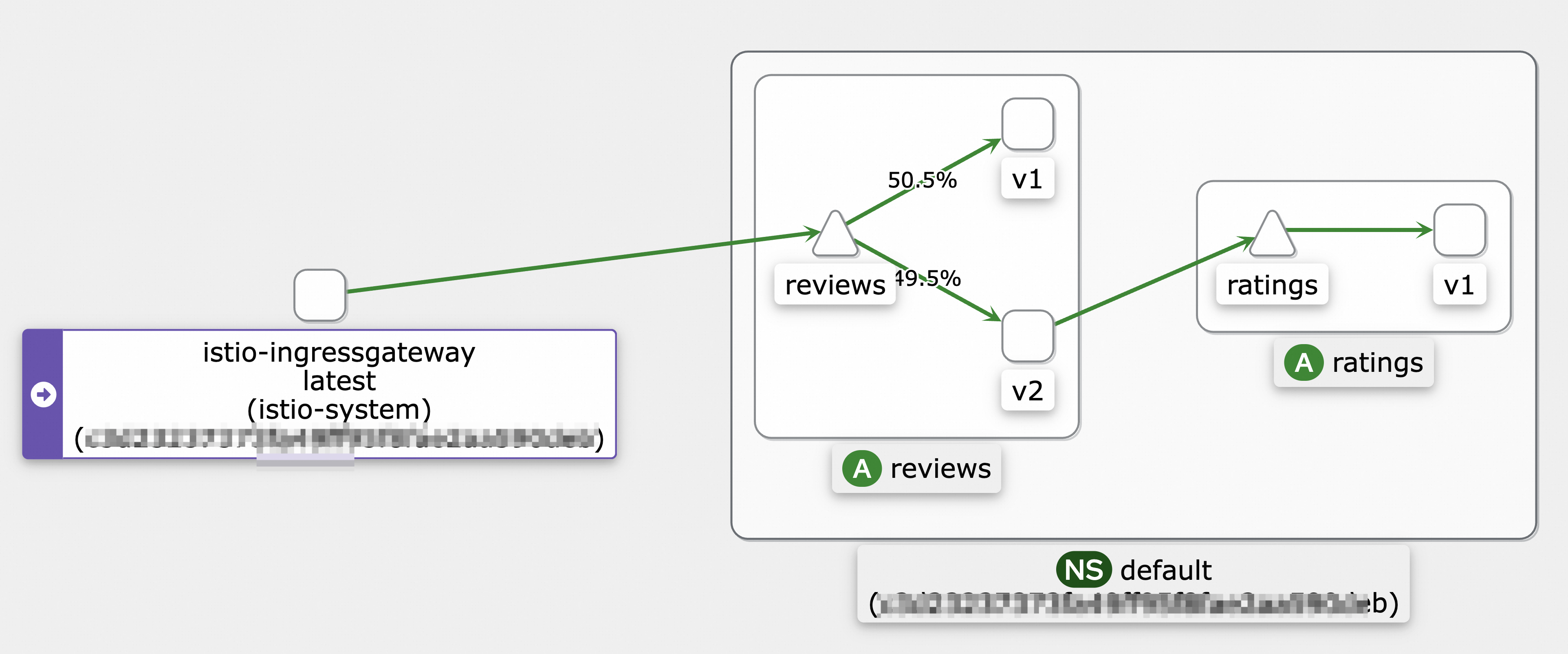
heycommand to send load testing requests for 10s. For information about how to download and installhey, see hey. For more information about how to enable and view the mesh topology, see View the mesh topology of an application.hey -z 10s -q 100 -c 4 http://${INGRESS_GATEWAY_ADDRESS}/reviews/0The following figure shows a sample call topology:
Step 2: Observe pod startup
-
Log on to the ASM console.
-
In the left-side navigation pane, choose .
-
On the Mesh Management page, find the ASM instance that you want to configure. Click the name of the ASM instance or click Manage in the Actions column.
-
In the left-side navigation pane, choose .
-
For ASM instances earlier than version 1.17.2.35: On the Monitoring metrics page, click the Monitoring instrument tab, then click the Cloud ASM Istio Service tab, and select the Reviews service.
-
For ASM instances of version 1.17.2.35 and later: On the Monitoring metrics page, click the Cloud ASM Istio Work load tab, select the
reviews-v3workload, and set Reporter tosource.
-
-
Send load testing requests and observe the monitoring data.
-
With the warm-up feature disabled, scale the replicas for the
reviews-v3Deployment from 0 to 1. -
Run the following command to send load testing requests to the ingress gateway.
This example sends load testing requests for 120s.
hey -z 120s -q 100 -c 4 http://${INGRESS_GATEWAY_ADDRESS}/reviews/0 -
Observe the data on the Prometheus monitoring dashboard.
It takes about 45 seconds for the
reviews-v3pod to receive a balanced share of requests. The actual time may vary depending on your load testing environment.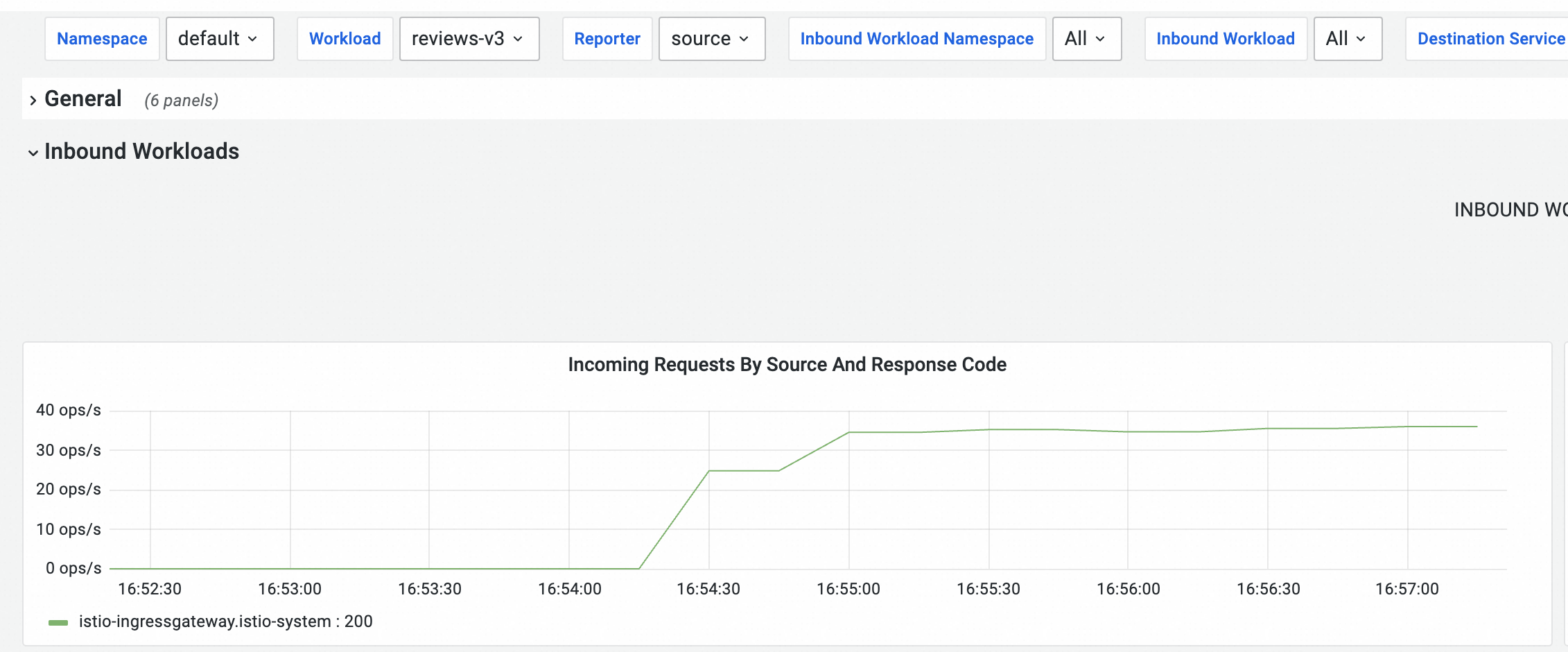
-
-
Scale the replicas for the
reviews-v3Deployment back to 0.
Step 3: Enable the warm-up feature
-
Update the reviews.yaml file with the following content.
Add the
warmupDurationSecsfield and set it to120s, which sets the warm-up duration to 120 seconds.apiVersion: networking.istio.io/v1beta1 kind: DestinationRule metadata: name: reviews spec: host: reviews trafficPolicy: loadBalancer: simple: ROUND_ROBIN warmupDurationSecs: 120s -
Run the following command to apply the update.
kubectl apply -f reviews.yaml
Step 4: Verify the warm-up effect
-
After enabling the warm-up feature, scale the replicas for the
reviews-v3Deployment from 0 to 1. -
Run the following command to send load testing requests to the ingress gateway.
This example sends load testing requests for 150s.
hey -z 150s -q 100 -c 4 http://${INGRESS_GATEWAY_ADDRESS}/reviews/0 -
On the Cloud ASM Istio Service tab, observe the data on the Prometheus monitoring dashboard.
It takes about 120 seconds for the
reviews-v3pod to receive a balanced share of requests. The actual time may vary depending on your load testing environment.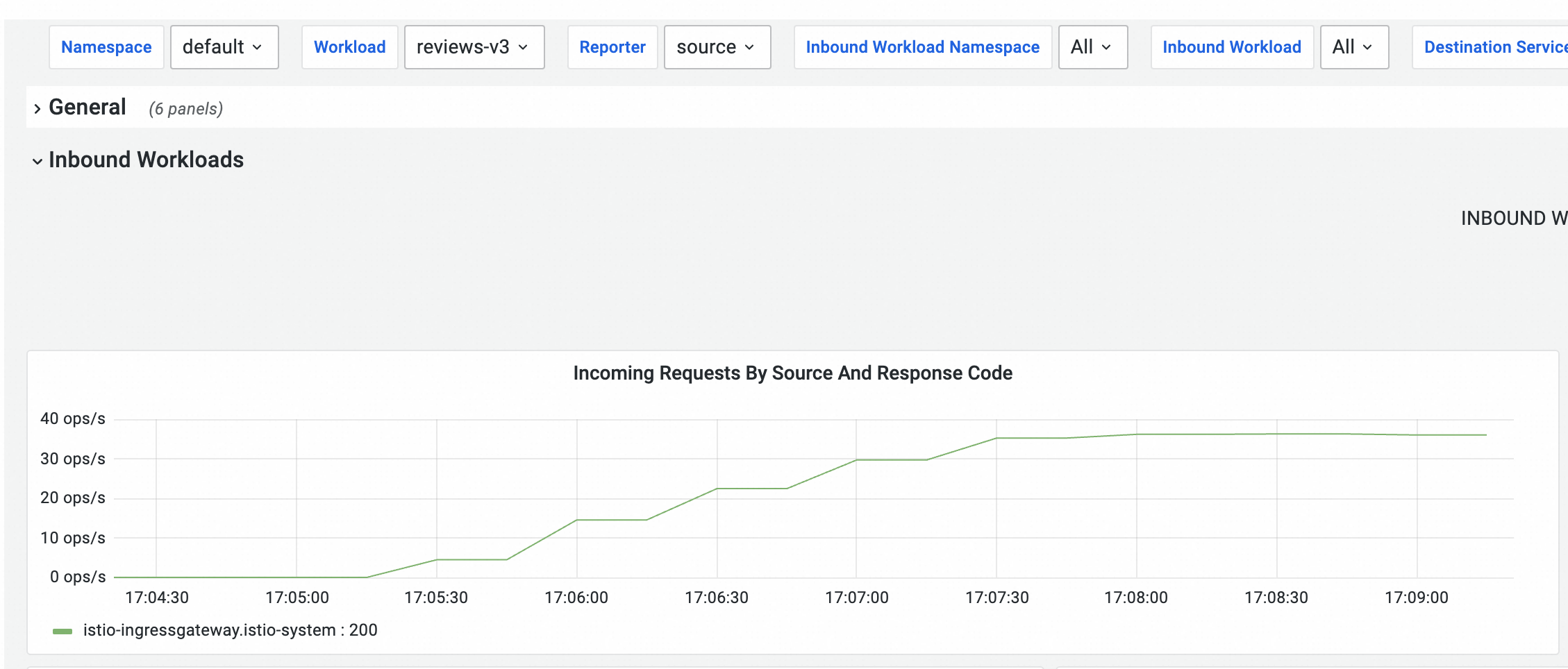 The curve may appear stepped because metrics are collected at intervals. In reality, the traffic to the
 reviews-v3pod increases smoothly. If you enable sidecar log collection, you can search for the logs of this sidecar in Simple Log Service (SLS) to view the log volume over the last 5 minutes. As expected with the warm-up feature, a new instance initially receives a fraction of the traffic, which then ramps up smoothly over the configured duration until it receives its full share.
After the warm-up feature is enabled, it takes about 2 minutes and 30 seconds for traffic to be evenly distributed among the v1, v2, and v3 versions. In the Kiali Service Graph view, the istio-ingressgateway distributes traffic almost evenly among the v1, v2, and v3 versions of the Reviews service, at 33.3%, 33.3%, and 33.4% respectively. The v2 and v3 versions then call the ratings v1 service, which indicates that traffic is balanced after the warm-up is complete.
Related documents
-
You can configure local throttling or global throttling to keep traffic within a manageable threshold, ensuring service availability and stable performance. For more information, see Configure local throttling in the traffic management center and Use ASMGlobalRateLimiter to configure global throttling for ingress traffic of an application.
-
ASMAdaptiveConcurrency provides adaptive concurrency control by dynamically adjusting the allowed number of concurrent requests based on sampled request data. When the number of concurrent requests exceeds the service capacity, requests are rejected to protect the service. For more information, see Use ASMAdaptiveConcurrency for adaptive concurrency control.
-
You can configure a connection pool to implement circuit breaking, which protects your system from further damage in the event of a failure or overload. For more information, see Configure a connection pool for circuit breaking.