To ensure business continuity and prevent security and stability risks from expired instances, Service Mesh (ASM) supports in-place upgrades and canary releases to upgrade the control plane and data plane.
Prerequisites
Key concepts
Why upgrade?
ASM updates supported Istio major versions approximately every three months, with patch versions (such as 1.19.x.y) released as needed for features and vulnerability fixes. Expired instances pose security and stability risks. Upgrade your ASM instances promptly. Supported versions are listed in Versioning mechanism.
Benefits of proactive upgrades:
-
Reduced security and stability risks: Each version fixes known vulnerabilities. Running expired instances may expose your business to security and stability risks.
-
Improved maintenance support: ASM no longer provides patches or technical support for expired versions. Upgrading ensures continued support.
-
Access to new features: ASM adapts to new open-source Istio versions, providing improved developer and O&M experiences.
Precautions and instructions for upgrades
Precautions
-
Upgrading requires manually restarting data plane pods to re-inject new-version sidecars. Perform upgrades during off-peak hours.
-
If you manually upgrade an ASM gateway, a rolling restart is triggered.
-
Sidecar injection may become briefly unavailable during the upgrade process. Avoid updating pods during this time.
-
During an upgrade, do not perform operations such as phased release or traffic rule configuration.
-
ASM performs a pre-upgrade check, but it may not detect all incompatible configurations or API operations. Review the upgrade precautions for your target version before upgrading.
-
For security reasons, ASM provides the following mechanisms:
-
ASM may forcibly upgrade expired instances to the earliest supported version. Upgrade proactively to avoid forced upgrades.
-
Patch upgrades (for example, v1.18.0.123 to v1.18.0.146) are applied automatically without notification. Data plane gateway and sidecar proxy versions remain unchanged during hot updates.
-
Instructions on in-place upgrades
In-place upgrades only support upgrades to an adjacent version. Cross-version upgrades and rollbacks are not supported.
Instructions on canary releases
A canary release lets you verify a new version before switching to it, providing a safer upgrade path. It supports upgrades across one minor version and rollbacks during the process.
|
Type |
Description |
|
Applicable versions |
Enterprise Edition or Ultimate Edition instances of version 1.16.4.91 or later. |
|
Scenarios |
Note
If only the asm-patch version changes, we recommend that you perform an in-place upgrade. |
|
Version format |
The version of an ASM instance is in the following format: <major>.<minor>.<patch>.<asm-patch>[-<sequence>-aliyun]. Example: v1.18.0.158-gc6cf0b9c-aliyun (Enterprise Edition). The following list describes the fields in the format:
|
Instructions on Sidecar injection labels
After you enable canary release, two control plane versions coexist. For example, upgrading from 1.17.2.42 to 1.18.0 makes both versions 1.17.2 and 1.18.0 available simultaneously.
During a canary release, add an injection label to a namespace to specify which sidecar version to inject. The default label istio-injection=enabled injects the current version.
Sidecar version and namespace label mapping when two versions coexist:
-
Current version
-
The sidecar injected by the
istio-injection=enabledlabel corresponds to the current version of ASM and connects to the control plane of the current version. -
Add the
istio.io/rev=$revisionlabel to the namespace to specify the sidecar version to inject. The format of therevisionvariable isx-y-z, such as1-17-2. -
Add the
istio.io/rev=stablelabel to the namespace to specify that the sidecar version to inject is the current version of ASM.
ImportantYou cannot add both the
istio-injectionandistio.io/revlabels to a namespace at the same time.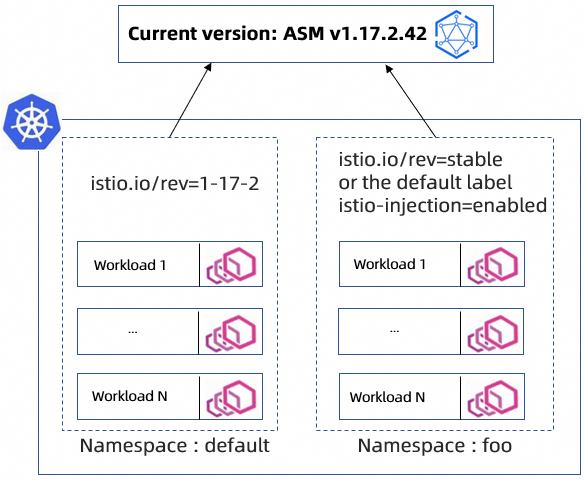
-
-
Canary version
If a business service needs to be injected with a sidecar that corresponds to the canary version, you can add the
istio.io/rev=$revisionoristio.io/rev=canarylabel to the namespace. The format of$revisionisx-y-z, such as1-18-0. We recommend that you use theistio.io/rev=$revisionlabel.To perform a canary release, see Use canary release to enhance upgrade stability.
Upgrade paths, methods, and processes
Upgrade paths
The following example uses an upgrade from v1.16 to v1.18. Select your upgrade path based on your environment.
|
Initial version |
Destination version |
Upgrade method |
|
1.16.4.93 |
1.17.2.42 |
In-place upgrade or canary release |
|
1.17.2.42 |
1.18.0.158 |
In-place upgrade or canary release |
|
1.16.4.93 |
1.18.0.158 |
Canary release |
Upgrade methods
-
ASM console: supports in-place upgrades and canary releases. See Procedure.
-
API: supports in-place upgrades. Related API operations: UpgradeMeshVersion, DescribeUpgradeVersion, and DescribeServiceMeshUpgradeStatus.
Upgrade process
Confirm the destination version and upgrade method, and review the precautions before you proceed.

Procedure
In-place upgrade
-
Log on to the ASM console. In the left-side navigation pane, choose .
-
On the Mesh Management page, click the name of the ASM instance. In the left-side navigation pane, choose .
-
On the Upgrade Management page, click the In-place Upgrades tab. Click Perform Upgrade Precheck. In the Note dialog box that appears, click OK.
-
After the precheck is passed, click Upgrade. In the Note dialog box, click OK.
-
In the Data Plane section, find the Upgrade column, select the target gateway, and then click Upgrade Gateway. In the Note dialog box, click OK.
-
Restart workloads as needed. Redeploy workloads.
Canary release
FAQ about upgrades
When a canary version is switched to the official version, the sidecar injected into the previously deployed service is of an earlier version. How do I upgrade the sidecar to the new version?
On the Upgrade Management page, click the Canary Upgrade tab, and then click the Data plane tab. In the Workload to be upgraded section, find the target workload and click Rolling Upgrade in the Actions column to trigger a rolling update for the service's deployment.
Does an in-place upgrade affect the traffic of existing services?
An in-place upgrade affects only the control plane, not the traffic on the data plane.
How many times does an ASM instance need to be upgraded to reach the destination version?
In-place upgrades support only adjacent major versions. Canary releases support upgrades across one minor version. Calculate the number of required upgrades based on your current and target versions.
Can I select any upgrade method for each version of an ASM instance?
Instances earlier than 1.16.4.91 support only in-place upgrades. Instances of version 1.16.4.91 or later support both in-place upgrades and canary releases.
After an ASM instance is upgraded, to which version does the corresponding ACK cluster need to be upgraded?
Check ASM and ACK version compatibility and upgrade the cluster as needed. Manually upgrade a cluster.
Related documents
-
Diagnose the mesh for issues such as component version mismatches, service port conflicts, and virtual service conflicts. Use ASM mesh diagnostics.
-
The AIOps for containers platform provides one-click fault diagnosis for nodes, pods, Services, Ingress, memory, and networking. Use cluster diagnostics.
-
Latest ASM feature updates: Release notes.