When multiple team members need access to Application Real-Time Monitoring Service (ARMS) Tracing Analysis, sharing your Alibaba Cloud account credentials creates security risks. Resource Access Management (RAM) lets you create separate user accounts with scoped permissions, so each team member gets only the access they need.
How permissions work
ARMS Tracing Analysis uses RAM policies to control access. A RAM user receives permissions through one or more policies attached to the user account. Two factors determine what a RAM user can do:
Policy scope: Whether the policy applies to all resources in the Alibaba Cloud account or to a specific resource group.
Policy type: Whether the policy is a system policy (predefined by Alibaba Cloud) or a custom policy (defined by you).
Available system policies
Tracing Analysis provides two system policies. Choose a policy based on the level of access required.
Policy | Description | When to use |
| Grants full read and write permissions on Tracing Analysis, including configuration changes. | Assign to administrators who manage tracing settings, alert rules, and data. |
| Grants read-only permissions on Tracing Analysis. Does not allow configuration changes. | Assign to team members who only need to view traces, topology maps, and dashboards. |
Note: Both policies are system policies maintained by Alibaba Cloud. You cannot modify them. To define more granular access controls, create a custom policy.
Step 1: Create a RAM user
If you already have a RAM user, skip to Step 2.
Log on to the RAM console with an Alibaba Cloud account or a RAM user that has administrative rights.
In the left-side navigation pane, choose Identities > Users.
On the Users page, click Create User.

In the User Account Information section, configure the following parameters:
Logon Name: Up to 64 characters. Supports letters, digits, periods (.), hyphens (-), and underscores (_).
Display Name: Up to 128 characters.
Tag (optional): Click the
 icon and enter a tag key and value. You can add one or more tags to organize RAM users by tags.
Note: Click Add User to create multiple RAM users at a time.
In the Access Mode section, select an access mode. Select only one access mode per RAM user to separate human access from programmatic access.
Console Access -- For team members who work in the Alibaba Cloud console. Configure the following settings:
Set Console Password: Select Automatically Regenerate Default Password or Reset Custom Password. A custom password must meet the requirements in Configure a password policy for RAM users.
Password Reset: Specify whether the RAM user must change the password on next logon.
Enable MFA: Specify whether to enable multi-factor authentication (MFA). After you enable MFA, bind an MFA device to the RAM user. For details, see Bind an MFA device to a RAM user.
Using permanent AccessKey to access -- For applications that call API operations programmatically. The system generates an AccessKey pair (AccessKey ID and AccessKey secret) automatically. For details, see Obtain an AccessKey pair.
Important: The AccessKey secret is displayed only at creation time and cannot be retrieved later. Save it immediately. To reduce credential exposure risk, use temporary Security Token Service (STS) tokens instead of permanent AccessKey pairs for production workloads. For details, see Best practices for using access credentials to call API operations.
Click OK.
Complete security verification as prompted.
Step 2: Grant permissions to the RAM user
Log on to the RAM console as a RAM administrator.
In the left-side navigation pane, choose Identities > Users.
On the Users page, find the RAM user and click Add Permissions in the Actions column.

Note: To grant permissions to multiple RAM users at once, select the RAM users and click Add Permissions at the bottom of the page.
In the Grant Permission panel, configure the following parameters:
Resource Scope: Select the scope of the authorization.
Account: The policy applies to all resources in the current Alibaba Cloud account.
ResourceGroup: The policy applies only to resources in a specific resource group. Make sure that Tracing Analysis supports resource groups before selecting this option. For details, see Services that work with Resource Group. For more information about how to grant permissions on a resource group, see Use a resource group to grant a RAM user the permissions to manage a specific ECS instance.
Principal: The RAM user to which you are granting permissions. The current RAM user is selected automatically.
Policy: Search for and select one or more policies. You can select multiple policies at a time. Policies can be classified into system policies and custom policies.
System policies: Predefined by Alibaba Cloud. You can use but cannot modify these policies. For more information, see Services that work with RAM. Two Tracing Analysis system policies are available:
AliyunTracingAnalysisFullAccess-- for full read and write accessAliyunTracingAnalysisReadOnlyAccess-- for read-only access
Custom policies: You can create, update, and delete custom policies based on your business requirements. For details, see Create a custom policy.
Note: The system flags high-risk policies such as
AdministratorAccessandAliyunRAMFullAccess. Avoid attaching these policies unless the RAM user specifically requires them.Click Grant permissions.
Click Close.
Verify the setup
After you grant permissions, share the RAM user credentials with the team member and verify that access works as expected.
Log on to the console as a RAM user
Open the RAM user logon page.
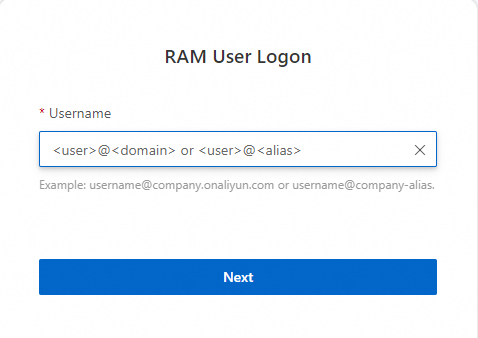
On the RAM User Logon page, enter the logon name in one of the following formats and click Next:
Format
Example
When to use
<UserName>@<AccountAlias>.onaliyun.comusername@company-alias.onaliyun.comDefault domain name. For details, see View and modify the default domain name.
<UserName>@<AccountAlias>username@company-aliasAccount alias. For details, see Terms.
<UserName>@<DomainAlias>username@example.comDomain alias (if configured). For details, see Create and verify a domain alias.
Enter the logon password and click Log On.
(Optional) If MFA is enabled, complete multi-factor authentication. For details, see Overview of security settings and Bind an MFA device to a RAM user.
Call API operations with an AccessKey pair
Specify the AccessKey ID and AccessKey secret of the RAM user in your application code. For the API reference, see Overview.
Security best practices
Follow least privilege: Assign
AliyunTracingAnalysisReadOnlyAccessto users who only need to view tracing data. ReserveAliyunTracingAnalysisFullAccessfor administrators.Use STS tokens for applications: Avoid permanent AccessKey pairs in production. Use STS tokens for temporary, scoped access.
Enable MFA: Require multi-factor authentication for RAM users with console access.
Audit permissions regularly: Review attached policies periodically and remove permissions that are no longer needed.