When a business-critical API starts returning errors or slowing down, you need metrics scoped to that specific transaction -- not just aggregated application data. Business traces in Application Real-Time Monitoring Service (ARMS) let you define characteristic rules that match requests to a specific transaction flow, then track request volume, error rate, and average response time for each trace independently.
How it works
When a request hits the entry interface of a monitored Java application, the ARMS agent extracts business parameters based on your predefined extraction rules. ARMS matches the extracted parameters against the characteristic rules you define in a business trace, then aggregates the matched requests into trace-level metrics: request count, error rate, and average response time.
Supported regions and editions
Business traces are available in the following regions:
| Scope | Regions |
|---|---|
| Chinese mainland | China (Hangzhou), China (Beijing), China (Zhangjiakou), China (Shanghai), China (Shenzhen) |
| Outside the Chinese mainland | China (Hong Kong), Singapore, Germany (Frankfurt) |
This feature is not available in Application Monitoring Basic Edition.
Create a business trace
Before you begin, make sure that:
Your Java application is monitored by ARMS Application Monitoring, with agent V4.3.0 or later installed
Business parameter extraction rules are configured for the target application
To create a business trace:
Exclude interfaces that read InputStream from business traces. When the ARMS agent extracts request parameters from interfaces with ContentType: application/x-www-form-urlencoded, it reads the InputStream early. Because InputStream supports only a single read, any subsequent access in your business code throws an exception.
Log on to the ARMS console.
In the left-side navigation pane, choose Application Monitoring > Business Trace Explorer.
Click Create. In the Create New Business Trace panel, configure the following parameters and click Confirm.
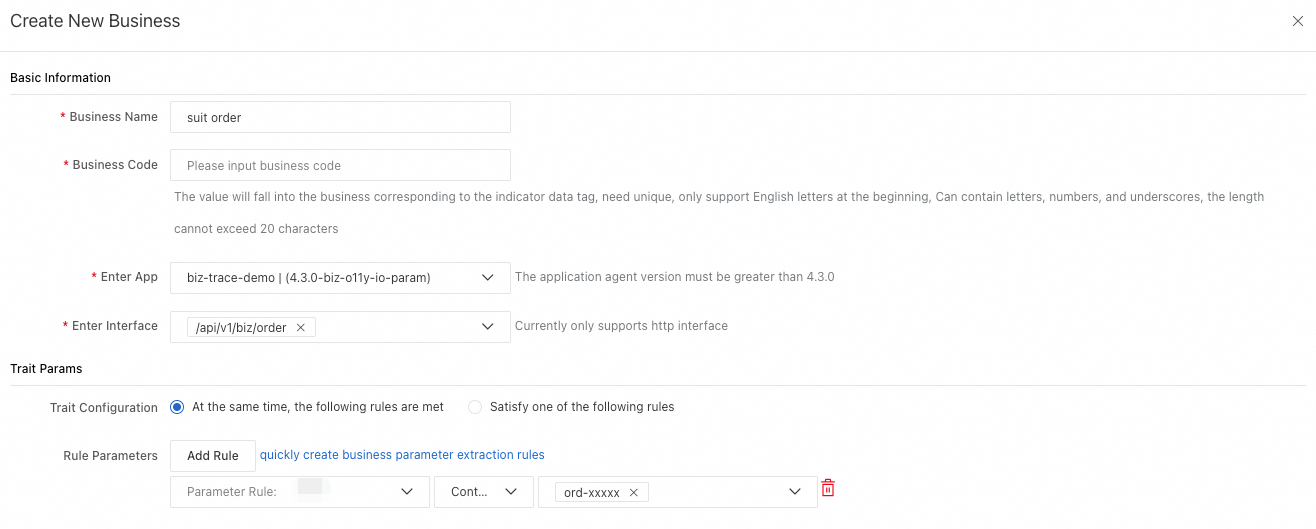
Parameter Description Business Trace Name A unique name for the business trace. Must be 2 to 60 characters. Business Trace Identifier A unique identifier used in metric data. Must start with a letter and can contain letters, digits, and underscores. Maximum 20 characters. Entry Application The application that receives the initial request. Requires agent V4.3.0 or later. Entry Interface The HTTP interface that serves as the trace entry point. Only HTTP interfaces are supported. See the InputStream caveat below. Characteristic Parameters (Optional) Refines matching logic based on the input and output parameters of the entry interface. Characteristic Trace Configurations Meet All Rules: matches when all rules are satisfied (AND logic). Meet One Rule: matches when any rule is satisfied (OR logic). Rule Parameters Parameter Rule: select from the extraction rules configured for the entry application. Matching Rule: the only available option is Contain. Rule value: select one or more reported values, or enter custom values.
Manage business traces
The Business Trace List page provides the following operations:

| Action | Description |
|---|---|
| Click a trace name | View trace details, including request volume, error rate, and average response time. |
| Edit | Modify trace settings such as entry interface and characteristic rules. |
| Delete | Remove a trace. After deletion, ARMS stops ingesting observability data for this trace. |
Billing
Business trace analysis uses one of the following billing models:
New billing model: billed by remote-write metric data volume, with no free quotas.
Region Price Chinese mainland USD 0.062 per GB Outside the Chinese mainland USD 0.087 per GB Legacy billing models (Application Monitoring Pro Edition, no discounts):