A message trace records the complete path of a message in ApsaraMQ for RocketMQ, covering message sending, message storage, and message consumption. Each stage captures timing, status, and client details. The message trace feature takes effect on all types of messages.
Use message traces to:
Confirm whether a message was sent and consumed successfully.
Identify where a message stalled or failed.
Find the specific consumer client and timestamp for a consumed message.
How message traces work
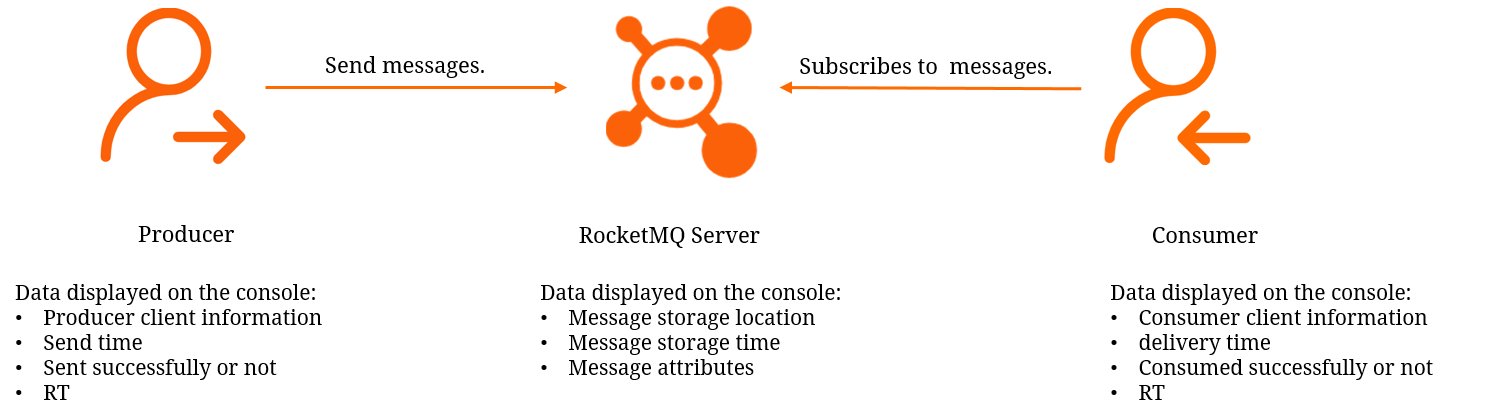
A complete message trace captures data at three stages:
| Producer | Broker | Consumer |
|---|---|---|
| Client IP address | Arrival time at server | Client IP address |
| Sending timestamp | Scheduled delivery time | Arrival time at consumer |
| Sending duration (RT) | Actual delivery time | Wait duration before processing |
| Sending status | Message type | Processing start/end time |
| AccessKey ID | Transaction commit/rollback time | Processing duration |
| Delivery result | ||
| AccessKey ID |
Before you begin
SDK version requirements
Message tracing requires a minimum SDK version.
| Protocol | Language | Minimum version | Release notes |
|---|---|---|---|
| TCP | Java | V1.2.7.Final | SDK for Java release notes |
| TCP | C/C++ | V1.1.2 | SDK for C and C++ release notes |
| TCP | .NET | V1.1.2 | SDK for .NET release notes |
| HTTP | Node.js | V1.0.2 | HTTP client SDK usage notes |
| HTTP | Others | V1.0.1 | HTTP client SDK usage notes |
Enhanced trace feature prerequisites
The enhanced trace feature exposes additional parameters in the console, allowing you to view trace data generated during message consumption as well as trace data of scheduled messages, delayed messages, and transactional messages:
Producer: AccessKey
MQ Server: Arrive at Server At, Scheduled to Be Delivered At, Delivered At, Committed/Rolled back At
Consumer: Arrive at Consumer At, Wait Duration before Processing
To use the enhanced trace feature:
TCP SDK for Java: Upgrade to V2.x.x.Final. The instance must be deployed in one of the following regions: China (Hangzhou), China (Qingdao), China (Beijing), China (Zhangjiakou), China (Hohhot), China (Shenzhen), China (Chengdu), Germany (Frankfurt), or Indonesia (Jakarta).
TCP SDK for C++: Upgrade to V3.x.x. Available in all regions.
Time range limit
Trace queries cover a rolling 24-hour window. Only traces for messages produced within the last 24 hours are available. For example, at 15:09:48 on November 30, 2023, the query range spans from 15:09:48 on November 29, 2023 to 15:09:48 on November 30, 2023.
How consumption status affects query results
| Message type | Behavior |
|---|---|
| Normal messages | Displays Not Consumed until the message is consumed. After consumption, both sending and consumption details appear. |
| Ordered messages | Same as normal messages. |
| Scheduled and delayed messages | Before the scheduled delivery time, the trace is queryable but the message cannot be queried. |
| Transactional messages | Before the local transaction is committed, the trace is queryable but the message cannot be queried. |
Query a message trace in the console
Log on to the ApsaraMQ for RocketMQ console. In the left-side navigation pane, click Instances.
In the top navigation bar, select a region, such as China (Hangzhou). Click the name of your instance.
In the left-side navigation pane, click Message Trace. In the upper-left corner of the page, click Create Query Task.
In the Create Message Trace Query Task panel, select a query method and configure the query conditions. Then click OK.
ImportantSet the time range as precisely as possible to narrow the scope and speed up the query.
Three query methods are available:
Method Matching type Best for Query by Message ID Exact match Fast, precise lookups. Recommended. Query by Message Key Fuzzy match (up to 1,000 results) When the message ID is unavailable but a unique key was set on the message. Query by Topic Range query Small-volume topics where neither the message ID nor message key is available. Not recommended for high-throughput topics -- the results are difficult to filter. The query task appears on the Message Trace page. If the Status column shows Querying, click the
 button in the upper-right corner of the task list to refresh until the status changes to Query Completed.
Click Query Results in the Actions column to view the trace details.
Troubleshoot a missing message
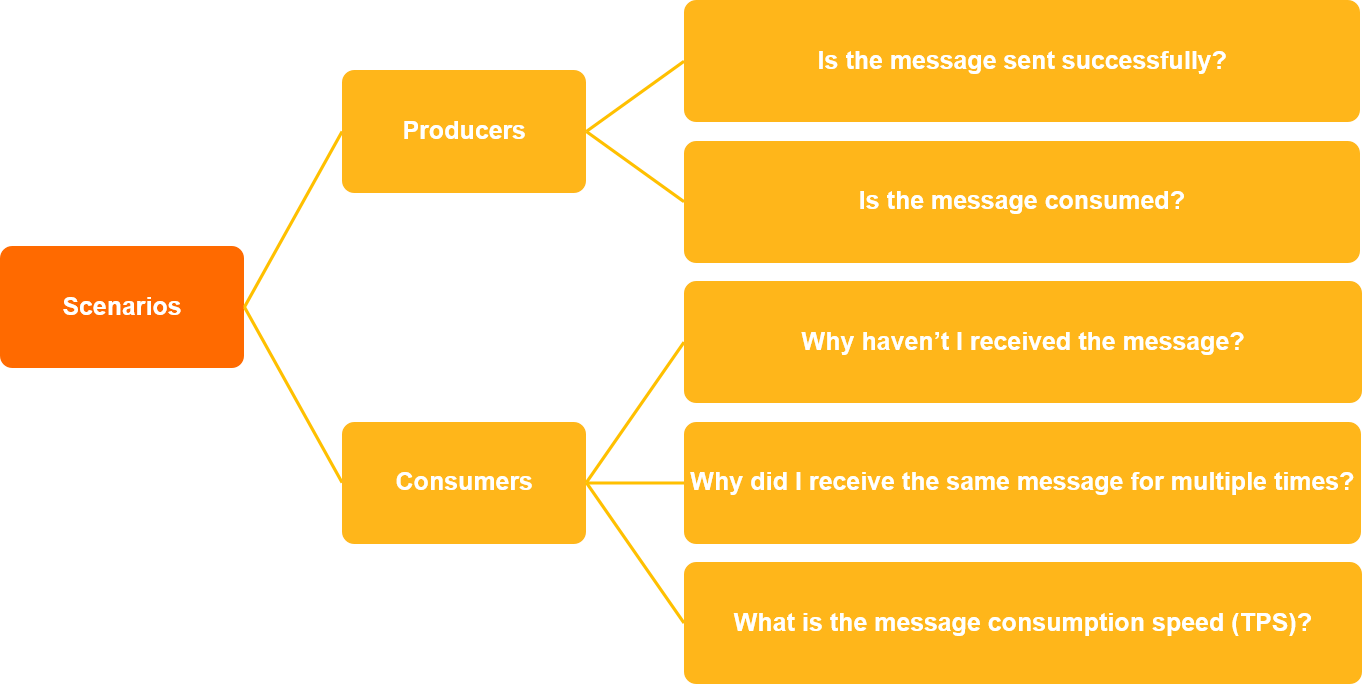
If a message was not received as expected, follow these steps:
Collect the message ID, message key, topic, and the approximate time the message was sent.
Log on to the ApsaraMQ for RocketMQ console and create a query task with the collected information.
Analyze the query results:
Not Consumed appears in the trace: Go to the Groups page to check whether message accumulation caused the issue. For more information, see View consumer details.
The message was consumed: Check the consumption details to identify the consumer client and consumption timestamp. Then review the logs on that client.
Trace parameter reference
On the trace results page, the Sending Status and Consumption Status columns provide a summary. Click a specific message to view the full trace, organized into Producer, MQ Server, and Consumer sections.
Basic information
| Parameter | Description |
|---|---|
| Message ID | Globally unique identifier, auto-generated by ApsaraMQ for RocketMQ. |
| Topic | The topic the message belongs to. |
| Message Key | Business identifier set by the producer. Uniquely identifies a business logic. |
| Message Tag | Tag used to classify messages within a topic. |
Producer
| Parameter | Description |
|---|---|
| AccessKey | AccessKey ID of the Alibaba Cloud account or Resource Access Management (RAM) user that sent the message. |
| Client IP Address | IP address of the producer client. |
| Message Produced At | Timestamp when the message was sent from the producer. |
| Sending RT | Time taken to send the message, in milliseconds. |
| Sending Status | Status of the sending operation. See Message status. |
MQ Server
| Parameter | Description |
|---|---|
| Message Type | Normal messages, scheduled and delayed messages, ordered messages, or transactional messages. Both scheduled and delayed messages display as Scheduled Message. |
| Arrive at Server At | Time the message arrived at the ApsaraMQ for RocketMQ broker. |
| Scheduled to Be Delivered At | Scheduled delivery time for scheduled messages. |
| Delivered At | Time the message became available for consumer delivery. |
| Committed/Rolled back At | Time a transaction was committed or rolled back. |
Consumer
| Parameter | Description |
|---|---|
| AccessKey | AccessKey ID of the Alibaba Cloud account or RAM user on the consumer side. |
| Arrive at Consumer At | Time the message arrived at the consumer client. |
| Wait Duration before Processing | Duration between message arrival at the consumer and the start of processing. |
| Delivery Result | Result of a single delivery attempt. A message may be delivered multiple times before successful consumption. See Message status. |
| Client IP Address | IP address of the consumer client. |
| Message Processing Started At | Timestamp when the consumer started processing the message. |
| Message Processing Complete At | Timestamp when the consumer finished processing. |
| Message Processing Duration | Time the consumer spent processing the message. |
Message status values
| Type | Possible values |
|---|---|
| Sending Status | Sent, Failed, Scheduling, Transactional Message Not Committed, Transactional Message Rolled Back |
| Consumption Status | All Successful, Partially Successful, All Failed, Not Consumed, No Consumption Result Returned, Consumed, Failed |
FAQ
Why can't I find the trace for a message?
Most likely, either your SDK is too old or the message is outside the query window. Check these in order:
SDK version: Confirm your SDK meets the minimum version requirements.
Time range: Traces are only available for messages produced within the last 24 hours.
Asynchronous collection gap: Trace data is collected asynchronously and may be incomplete. If the query returns no results despite valid conditions, check the client logs directly. For more information, see Logging settings.
Related API operations
Query message traces programmatically:
OnsTraceQueryByMsgId -- Query by message ID.
OnsTraceQueryByMsgKey -- Query by message key.
OnsTraceGetResult -- Get query results.