ApsaraMQ for RocketMQ delivers messages to consumers in one of two modes: clustering consumption (each message goes to one consumer in the group) or broadcasting consumption (each message goes to every consumer in the group). The default mode is clustering consumption.
Choose a consumption mode
Multiple consumers identified by the same group ID form a consumer group. Consumers in the same group must use the same consumption logic, subscribe to the same topics and tags, and use the same consumption mode. For more information, see Subscription consistency.
Pick the mode that matches how consumers in a group should receive messages:
| Goal | Mode | How it works |
|---|---|---|
| Distribute messages across consumers for parallel processing | Clustering consumption | Each message is delivered to exactly one consumer in the group. Consumers share the workload. |
| Deliver every message to every consumer | Broadcasting consumption | Each message is delivered to all consumers in the group. Every consumer processes the full message stream. |
If you do not explicitly set a consumption mode, clustering consumption is used.
Clustering consumption
In clustering consumption mode, ApsaraMQ for RocketMQ distributes messages from a topic across the consumers in a group. Each message is consumed by only one consumer.
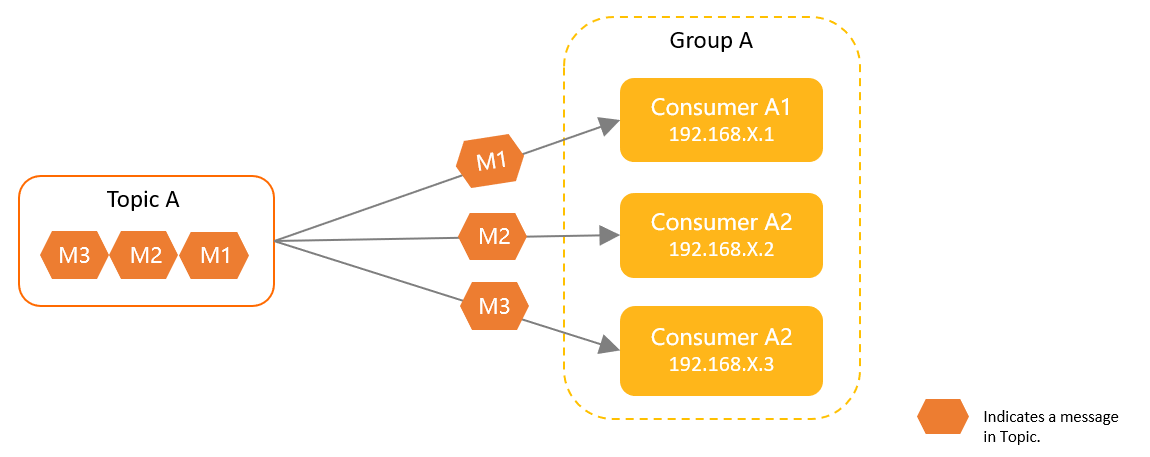
Use cases
Load balancing for high-throughput processing: Spread a large volume of messages across multiple consumers so each one handles a subset. Adding more consumers increases throughput.
Distributed data processing: Partition work across multiple nodes so each node processes a portion of the data independently.
Usage notes
A failed message is not necessarily redelivered to the same consumer. After a rebalance, the message may go to a different consumer in the group.
Consumer progress (offsets) is stored on ApsaraMQ for RocketMQ brokers. If a consumer restarts, it resumes from the last committed offset, so no messages are skipped.
Message retry is supported. If a consumer fails to process a message, the broker automatically redelivers it. For details, see Message retry.
Broadcasting consumption
In broadcasting consumption mode, ApsaraMQ for RocketMQ delivers each message to every consumer in the group. Each message is consumed by each consumer at least once. This mode is suitable for scenarios in which multiple consumers concurrently process the same group of messages, such as order processing.
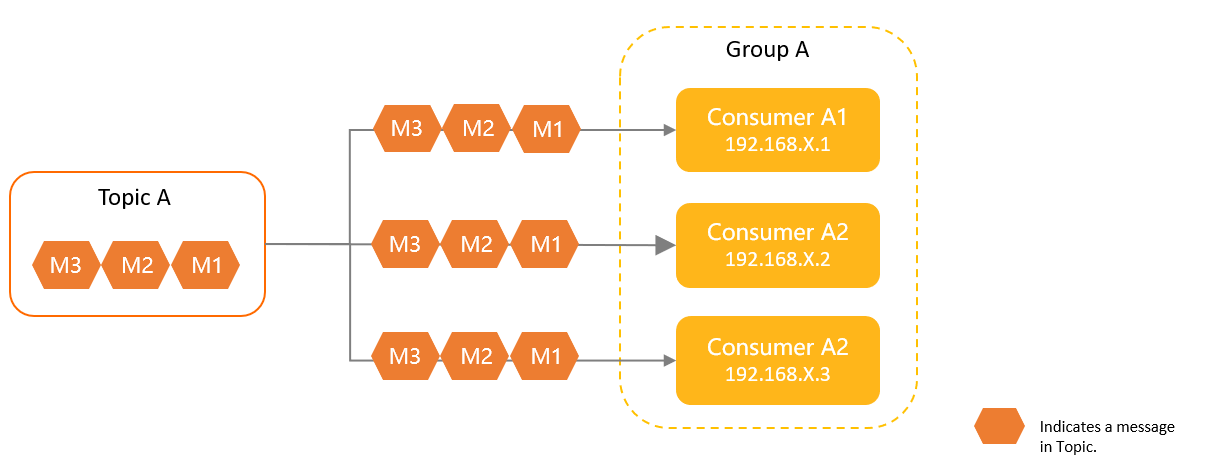
Use cases
Notifications and announcements: Push an update to all subscribers so every consumer acts on it.
Real-time data synchronization: Propagate data changes to all nodes in a distributed system to keep local caches or state consistent.
Usage notes
No automatic retry: The broker does not redeliver messages that a consumer fails to process. Handle consumption failures in your application logic.
Restart behavior: When a consumer restarts, it begins consuming from the latest message. Messages published while the consumer was offline are skipped.
Higher resource usage: Every consumer processes every message, which multiplies resource consumption. Use clustering consumption unless your use case specifically requires fan-out delivery.
Feature comparison
Broadcasting consumption trades feature richness for fan-out delivery. The following table lists what each mode supports.
| Feature | Clustering consumption | Broadcasting consumption |
|---|---|---|
| TCP client SDKs | Supported | Supported |
| HTTP client SDKs | Supported | Not supported |
| Ordered messages | Supported | Not supported |
| Consumer offset resetting | Supported | Not supported |
| Message retry | Supported | Not supported |
| Accumulated message query and alerting | Supported | Not supported |
| Subscription query | Supported | Not supported |
In broadcasting consumption mode, the broker does not retry failed messages, track consumption progress, or support offset resetting. Design your consumer to handle these concerns at the application level.
Consumer progress tracking
How consumer progress is tracked differs between the two modes:
| Aspect | Clustering consumption | Broadcasting consumption |
|---|---|---|
| Stored on | ApsaraMQ for RocketMQ broker | Client |
| After restart | Resumes from last committed offset | Starts from the latest message |
| Reliability | Higher -- broker-managed offsets survive client failures | Lower -- client-managed offsets are lost on restart; the probability of repeated consumption is higher |
| Message retry | Broker automatically redelivers failed messages | No automatic retry; handle failures in your code |
Configure the consumption mode
Set the MessageModel parameter in your consumer SDK code. If you do not set this parameter, clustering consumption is used by default.
TCP client SDKs
All TCP client SDK examples set the MessageModel property on the consumer configuration.
Java
Clustering consumption
  // Clustering consumption is the default. This explicit setting is optional.
  properties.put(PropertyKeyConst.MessageModel, PropertyValueConst.CLUSTERING);
Broadcasting consumption
properties.put(PropertyKeyConst.MessageModel, PropertyValueConst.BROADCASTING);
C/C++
Clustering consumption
  // Clustering consumption is the default. This explicit setting is optional.
  factoryInfo.setFactoryProperty(ONSFactoryProperty::MessageModel, ONSFactoryProperty::CLUSTERING);
Broadcasting consumption
factoryInfo.setFactoryProperty(ONSFactoryProperty::MessageModel, ONSFactoryProperty::BROADCASTING);
.NET
Clustering consumption
  // Clustering consumption is the default. This explicit setting is optional.
  factoryInfo.setFactoryProperty(ONSFactoryProperty.MessageModel, ONSFactoryProperty.CLUSTERING);
Broadcasting consumption
factoryInfo.setFactoryProperty(ONSFactoryProperty.MessageModel, ONSFactoryProperty.BROADCASTING);
HTTP client SDKs
HTTP client SDKs support only clustering consumption. No configuration is needed.
FAQ
Why does broadcasting consumption not take effect after I configure it?
This happens when the message type or SDK does not support broadcasting:
Ordered messages: Ordered messages support only clustering consumption. The
MessageModelsetting is ignored.HTTP client SDK: HTTP clients support only clustering consumption. To use broadcasting consumption, switch to a TCP client SDK.
Can I mix consumption modes within one group?
No. All consumers in a group must use the same consumption mode.
If consumers in the same group have different MessageModel settings, broadcasting consumption takes effect for all consumers in the group. For example, in a group of five consumers where two are set to CLUSTERING and three are set to BROADCASTING, all five use broadcasting consumption.
What's next
Subscription consistency: Rules for keeping subscription configurations consistent across consumers in a group.
Message retry: How the broker handles failed message delivery in clustering consumption mode.
Sample code: Complete messaging examples for ApsaraMQ for RocketMQ.