This topic describes how to use the data transmission service to migrate data from an ApsaraDB RDS for PostgreSQL instance to an OceanBase database in Oracle-compatible mode.
A data migration task remaining in an inactive state for a long time may fail to be resumed depending on the retention period of incremental logs. Inactive states are Failed, Stopped, and Completed. The data transmission service releases data migration tasks remaining in an inactive state for more than 3 days to reclaim related resources. We recommend that you configure alerts for data migration tasks and handle task exceptions in a timely manner.
Prerequisites
The data transmission service has the privilege to access cloud resources. For more information, see Grant privileges to roles for data transmission.
You have created a dedicated privileged account for data migration in the source ApsaraDB RDS for PostgreSQL instance. For more information, see PostgreSQL data source.
You have created a dedicated database user for data migration in the OceanBase database in Oracle-compatible mode and granted required privileges to the user. For more information, see Create a database user.
If you need to perform incremental synchronization, perform the following operations first:
The data transmission service does not support automatic synchronization of DDL statements during incremental synchronization. If a DDL statement needs to be executed on the table to be migrated, manually execute the DDL statement at the target and then execute it in the source ApsaraDB RDS for PostgreSQL instance.
To correctly parse incremental DML operations performed after the DDL statement is executed, you must create a corresponding trigger and a table for recording the DDL statement. For more information, see Create a trigger.
If you select Incremental Synchronization, you must set the wal_level parameter to logical.
For more information, see Change the log level for an ApsaraDB RDS for PostgreSQL instance.
Limitations
Limitations on the source database
Do not perform DDL operations that modify database or table schemas during schema migration or full migration. Otherwise, the data migration task may be interrupted.
Only instances of ApsaraDB RDS for PostgreSQL V11.x and V12.x are supported.
The data transmission service does not support the migration of partitioned tables, unlogged tables, or temporary tables from an ApsaraDB RDS for PostgreSQL instance.
The data transmission service does not support triggers at the target when it is a database. If triggers exist in the target database, the data migration may fail.
The data transmission service supports the migration of an object only when the following conditions are met: the database name, table name, and column name of the object are ASCII-encoded without special characters. The special characters are line breaks, spaces, and the following characters: . | " ' ` ( ) = ; / & \.
The data transmission service supports incremental synchronization only from the primary database.
Considerations
If you select Incremental Synchronization, the table-level
REPLICA IDENTITYoption must meet the following requirements:If you select Specify Objects to specify the migration objects, the specified tables must have a primary key or you need to set the table-level
REPLICA IDENTITYoption to FULL. Otherwise, the business data update and delete operations will fail.If you select Match Rules to specify the migration objects, the ApsaraDB RDS for PostgreSQL instance must subscribe to the changes to all tables (including selected tables, unselected tables, and new tables) of the selected databases, and all tables must have a primary key or you need to set the table-level
REPLICA IDENTITYoption to FULL. Otherwise, the business data update and delete operations will fail.If the primary keys or unique keys of the source and target tables are not fully aligned, the table level
REPLICA IDENTITYoption must be set to FULL for the tables.Complete before images are not returned for tables whose REPLICA IDENTITY option is set to DEFAULT in the ApsaraDB RDS for PostgreSQL instance. To ensure data quality, the data transmission service migrates corresponding tables in serial mode, compromising the incremental synchronization efficiency. Therefore, we recommend that you set the table-level
REPLICA IDENTITYoption to FULL for all tables.
You can execute the following statement to set the table-level
REPLICA IDENTITYoption to FULL:ImportantIf row filter conditions have been set for a table object to be migrated, the
REPLICA IDENTITYoption must be set to FULL for the table.ALTER TABLE table_name REPLICA IDENTITY FULL;When you migrate schemas or incremental DDL operations from an ApsaraDB RDS for PostgreSQL instance to an OceanBase database in Oracle-compatible mode, lowercase letters in table names and field names are converted into uppercase letters based on the default strategies of the data transmission service. For example, the source table name a is converted into A at the target by default. You can specify a table name or field name in the format of a, A, or "A", but not "a".
The Incr-Sync component of an ApsaraDB RDS for PostgreSQL instance automatically creates publications and slots, but you must monitor the disk usage of the instance logs. By default, the data transmission service notifies the instance, at an interval of 10 minutes, to update the
confirmed_flush_lsnvalue of a slot to the latest log sequence number (LSN) of 10 minutes ago. Therefore, each Incr-Sync component retains at least 10 minutes of logs of the ApsaraDB RDS for PostgreSQL instance.NoteIf you want to modify the notification interval, or the retention period of generated log files of the ApsaraDB RDS for PostgreSQL instance, contact OceanBase Technical Support.
If logs of the ApsaraDB RDS for PostgreSQL instance cannot be cleared during data migration due to the existence of slots, you must delete the data migration task and then clear the logs. The smallest
slot restart_lsnvalue among all slots determines whether the log files of the ApsaraDB RDS for PostgreSQL instance can be recycled. If the smallest value is within the log file range, the log files are not recycled.When you synchronize data to the target, duplicate data may exist if the target table does not have a primary key or non-null unique key.
During reverse increment of tables without a primary key, if data migration is performed in full-column matching mode for UPDATE and DELETE operations, the following issues may occur:
Performance issues
Due to the absence of a primary key index, each UPDATE or DELETE operation will be performed after a full-table scan.
Data inconsistency
The LIMIT clause is not supported for UPDATE and DELETE operations in the ApsaraDB RDS for PostgreSQL instance. In this case, if multiple records are matched in full-column matching mode, the number of data records affected by an UPDATE or DELETE operation may be larger than expected. Assume that the t1 table without a primary key has two columns, c1 and c2. Two data records where c1 = 1 and c2 = 2 exist at the source. When you delete only one data record from the source based on the where c1 = 1 and c2 = 2 condition, the two data records at the target will be deleted as they both match the condition. This causes data inconsistency between the source and the target.
The data transmission service supports reverse increment of tsvector fields from OceanBase Database to an ApsaraDB RDS for PostgreSQL instance. The tsvector fields must be written to OceanBase Database in the supported formats. Here are some examples:
Data written to OceanBase Database in the 'a b c' format will be converted into the "'a' 'b' 'c'" format in the ApsaraDB RDS for PostgreSQL instance.
Data written to OceanBase Database in the 'a:1 b:2 c:3' format will be converted into the "'a':1 'b':2 'c':3" format in the ApsaraDB RDS for PostgreSQL instance.
Data written to OceanBase Database in a non-tsvector format such as "'a':cccc" cannot be migrated to the ApsaraDB RDS for PostgreSQL instance. For more information about the supported formats, see 8.11. Text Search Types in PostgreSQL documentation.
If the UTF-8 character set is used in the source database, we recommend that you use a compatible character set, such as UTF-8 or UTF-16, in the target database to avoid garbled characters.
Check whether the migration precision of the data transmission service for columns of data types such as DECIMAL, FLOAT, and DOUBLE is as expected. If the precision of the target field type is lower than that of the source field type, the value with a higher precision may be truncated. This may result in data inconsistency between the source and target fields.
If you modify a unique index at the target, you must restart the data migration task to avoid data inconsistency.
If the clocks between nodes or between the client and the server are out of synchronization, the latency may be inaccurate during incremental synchronization or reverse increment.
For example, if the clock is earlier than the standard time, the latency can be negative. If the clock is later than the standard time, the latency can be positive.
Take note of the following considerations if you want to aggregate multiple tables:
We recommend that you configure the mappings between the source and target by specifying matching rules.
We recommend that you manually create schemas at the target. If you create a schema by using the data transmission service, skip the failed objects in the schema migration step.
If you select only Incremental Synchronization when you create the data migration task, the data transmission service requires that the local incremental logs of the source database be retained for at least 48 hours.
If you select Full Migration and Incremental Synchronization when you create the data migration task, the data transmission service requires that the local incremental logs of the source database be retained for at least 7 days. If the data transmission service cannot obtain incremental logs, the data migration task may fail or even the data between the source and target may be inconsistent after migration.
If the source or target contains table objects that differ only in letter cases, the data migration results may not be as expected due to case insensitivity at the source or target.
Data loss may occur if a column with a UNIQUE constraint allows NULL values. Specifically, if multiple NULL values of the column exist in the ApsaraDB RDS for PostgreSQL instance, only the first one is successfully synchronized and subsequent NULL values are discarded due to the UNIQUE constraint violation.
Supported source and target instance types
In the following table, OB_Oracle stands for an OceanBase database in Oracle-compatible mode.
Source | Target |
PostgreSQL (ApsaraDB RDS instance) | OB_Oracle (OceanBase cluster instance) |
PostgreSQL (ApsaraDB RDS instance) | OB_Oracle (self-managed database in a VPC) |
Data type mappings
Data type in an ApsaraDB RDS for PostgreSQL instance | Data type in an OceanBase database in Oracle-compatible mode |
int | NUMBER(10) |
smallint | NUMBER(5) |
bigint | NUMBER(20) |
decimal | NUMBER(p,s) |
numeric | NUMBER(p,s) |
real | BINARY_FLOAT |
double precision | BINARY_DOUBLE |
smallserial | NUMBER(5) |
serial | NUMBER(10) |
bigserial | NUMBER(20) |
char | CHAR(n) Note The default length and maximum length of a column of the |
varchar | VARCHAR2(n) |
text | CLOB |
timestamp | TIMESTAMP(p) |
timestamp with time zone | TIMESTAMP(p) WITH TIME ZONE |
time | DATE |
time with time zone | TIMESTAMP(p) WITH TIME ZONE |
boolean | NUMBER(1) |
bytea | BLOB |
citext | CLOB |
tsvector | CLOB |
Procedure
Log on to the
ApsaraDB for OceanBase console and purchase a data migration task.For more information, see Purchase a data migration task.
Choose Data Transmission > Data Migration. On the page that appears, click Configuration for the data migration task.

If you want to reference the configurations of an existing task, click Reference Configuration. For more information, see Reference the configuration of a data migration task.
On the Select Source and Target page, configure the related parameters.
Parameter
Description
Migration Task Name
We recommend that you set it to a combination of digits and letters. It must not contain any spaces and cannot exceed 64 characters in length.
Source
If you have created a PostgreSQL data source, select it from the drop-down list. Otherwise, click New Data Source in the drop-down list and create one in the dialog box that appears on the right. For more information, see Create a PostgreSQL data source.
Target
If you have created an OceanBase database in Oracle-compatible mode as a data source, select it from the drop-down list. Otherwise, click New Data Source in the drop-down list and create one in the dialog box that appears on the right. For more information about the parameters, see Create an OceanBase data source.
Tag (Optional)
Select a target tag from the drop-down list. You can also click Manage Tags to create, modify, and delete tags. For more information, see Use tags to manage data migration tasks.
Click Next. On the Select Migration Type page, specify migration types for the current data migration task.
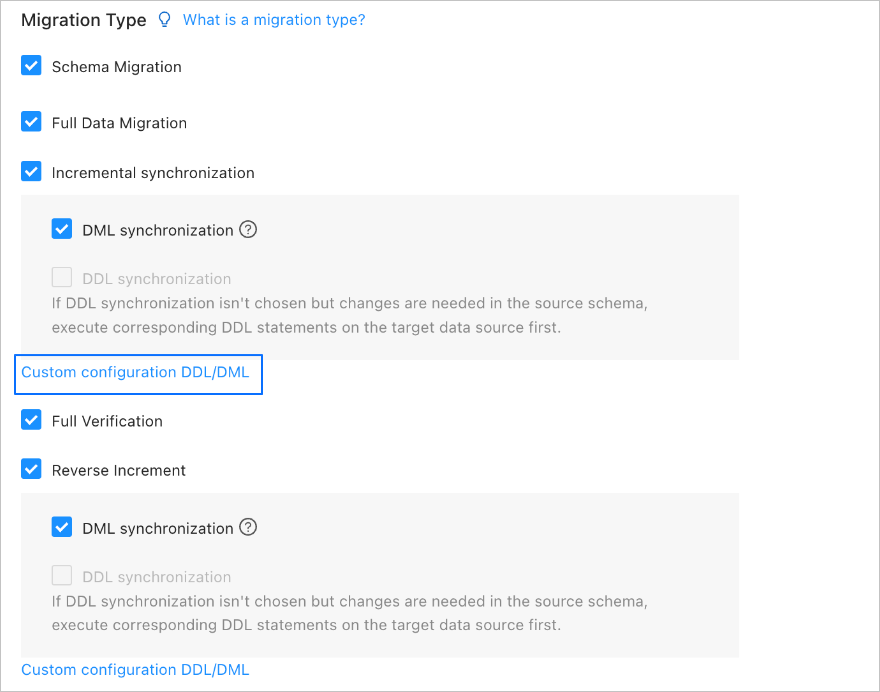
Options available for Migration Type are Schema Migration, Full Migration, Incremental Synchronization, Full Verification, and Reverse Increment.
Migration type
Description
Schema migration
After a schema migration task is started, the data transmission service migrates the definitions of database objects (such as tables, indexes, constraints, comments, and views) from the source database to the target database and automatically filters out temporary tables.
Full migration
After a full migration task is started, the data transmission service migrates existing data from tables in the source database to corresponding tables in the target database.
Incremental synchronization
After an incremental synchronization task is started, the data transmission service synchronizes changed data (data that is added, modified, or removed) from the source database to corresponding tables in the target database.
DML Synchronization is supported for Incremental Synchronization. You can select operations as needed. For more information, see Configure DDL/DML synchronization.
Full verification
After the full migration and incremental synchronization tasks are completed, the data transmission service automatically initiates a full verification task to verify the tables in the source and target databases.
NoteIf you have selected Incremental Synchronization but have not selected all DML operations in the DML synchronization section, the data transmission service does not support full verification.
The data transmission service supports full verification only for tables with primary keys or non-null unique keys.
Reverse increment
Data changes made in the target database after the business database switchover are synchronized to the source database in real time through reverse increment.
Generally, incremental synchronization configurations are reused for reverse increment. You can also customize the configurations for reverse increment as needed.
Click Next. On the Select Migration Objects page, specify migration objects for the data migration task.
You can select Specify Objects or Match Rules to specify the migration objects. This topic describes how to specify the migration objects by using Specify Objects. For information about matching rules, see Configure and modify matching rules.
ImportantThe names of tables to be migrated, as well as the names of columns in the tables, must not contain Chinese characters.
If a database or table name contains double dollar signs ($$), you cannot create the migration task.
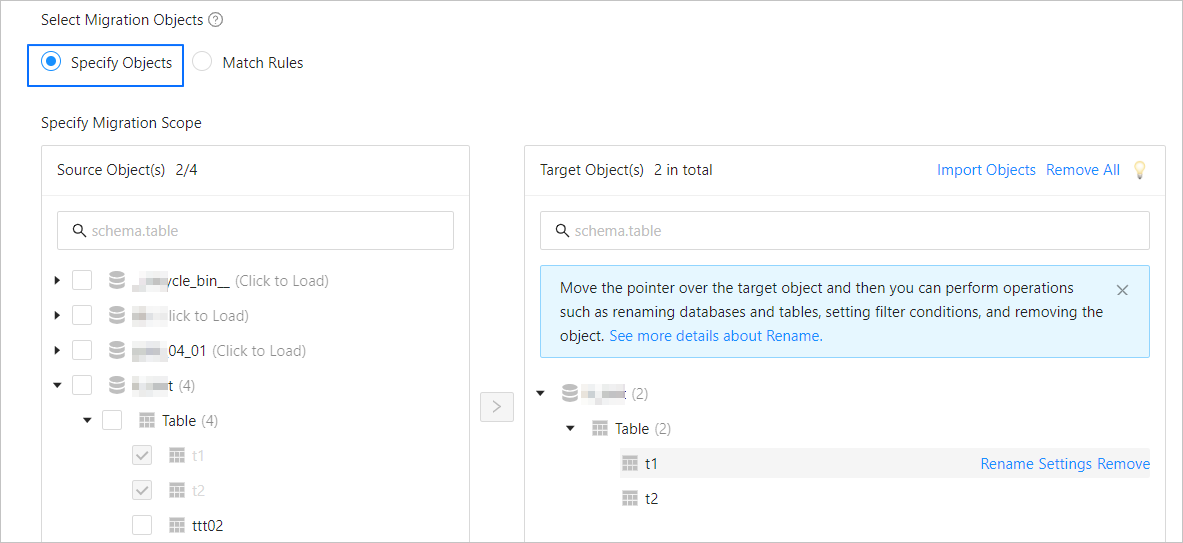
In the Select Migration Objects section, select Specify Objects.
In the Source Object(s) list of the Specify Migration Scope section, select the objects to migrate. You can select tables and views of one or more databases.
Click > to add them to the Target Object(s) list.
The data transmission service allows you to import objects from text files, rename target objects, set row filters, view column information, and remove a single or all migration objects.
NoteWhen you select Match Rules to specify migration objects, object renaming is implemented based on the syntax of the specified matching rules. In the operation area, you can only set filter conditions. For more information, see Configure and modify matching rules.
Operation
Description
Import objects
In the list on the right, click Import Objects in the upper-right corner.
In the dialog box that appears, click OK.
ImportantThis operation will overwrite previous selections. Proceed with caution.
In the Import Objects dialog box, import the objects to be migrated.
You can import CSV files to rename databases or tables and set row filter conditions. For more information, see Download and import the settings of migration objects.
Click Validate.
After you import the migration objects, check their validity. Column field mapping is not supported at present.
After the validation succeeds, click OK.
Rename objects
The data transmission service allows you to rename migration objects. For more information, see Rename a database table.
Configure settings
The data transmission service allows you to filter rows by using
WHEREconditions. For more information, see Use SQL conditions to filter data.You can also view column information of the migration objects in the View Columns section.
Remove one or all objects
The data transmission service allows you to remove a single or all synchronization objects that are added to the right-side list during data mapping.
Remove a single migration object
In the list on the right, move the pointer over the object that you want to remove, and click Remove to remove the migration object.
Remove all migration objects
In the list on the right, click Remove All in the upper-right corner. In the dialog box that appears, click OK to remove all migration objects.
Click Next. On the Migration Options page, configure the parameters.
Full migration
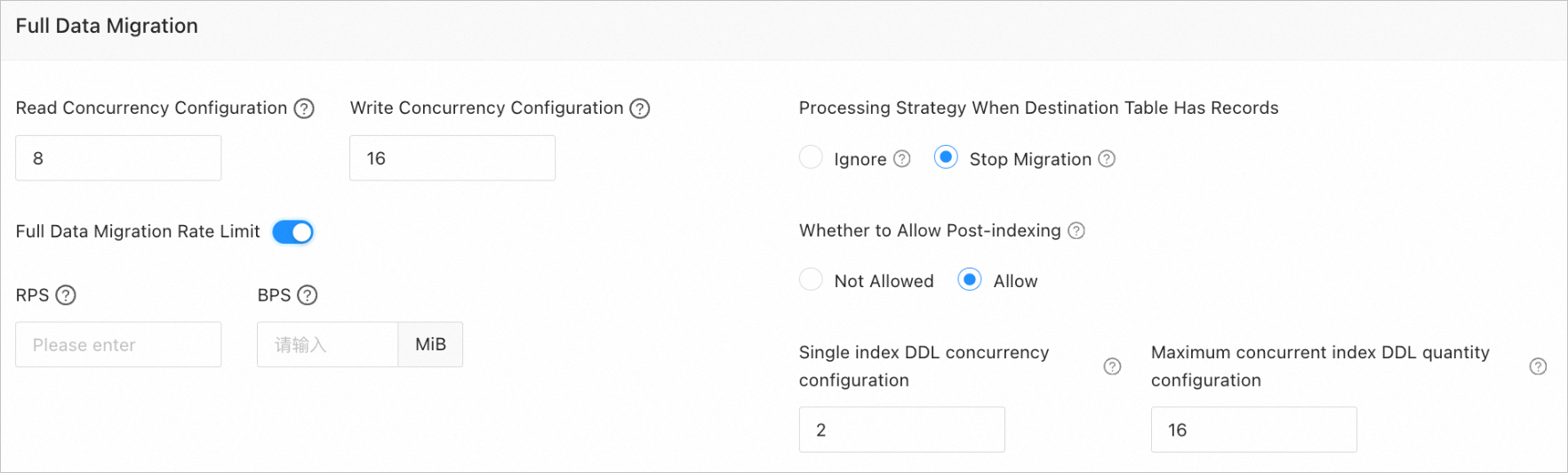
The following table describes the parameters for full migration, which are displayed only if you have selected Full Migration on the Select Migration Type page.
Parameter
Description
Read Concurrency
The concurrency for reading data from the source during full migration. The maximum value is 512. A high read concurrency may incur excessive stress on the source, affecting the business.
Write Concurrency
The concurrency for writing data to the target during full migration. The maximum value is 512. A high write concurrency may incur excessive stress on the target, affecting the business.
Full Migration Rate Limit
You can choose whether to limit the full migration rate as needed. If you choose to limit the full migration rate, you must specify the records per second (RPS) and bytes per second (BPS). The RPS specifies the maximum number of data rows migrated to the target per second during full migration, and the BPS specifies the maximum amount of data in bytes migrated to the target per second during full migration.
NoteThe RPS and BPS values specified here are only for throttling. The actual full migration performance is subject to factors such as the settings of the source and target and the instance specifications.
Handle Non-empty Tables in Target Database
Valid values are Ignore and Stop Migration.
If you select Ignore, when the data to be inserted conflicts with existing data of a target table, the data transmission service logs the conflicting data while retaining the existing data.
ImportantIf you select Ignore, data is pulled in IN mode during full verification. In this case, verification is inapplicable if the target contains data that does not exist in the source, and the verification performance is downgraded.
If you select Stop Migration and a target table contains records, an error prompting migration unsupported is reported during full migration. In this case, you must process the data in the target table before continuing with the migration.
ImportantIf you click Restore in the dialog box prompting the error, the data transmission service ignores this error and continues to migrate data. Proceed with caution.
Post-Indexing
Specifies whether to create indexes after the full migration is completed. Post-indexing can shorten the time required for full migration. For more information about the considerations on post-indexing, see the description below.
ImportantThis parameter is displayed only if you have selected both Schema Migration and Full Migration on the Select Migration Type page.
Only non-unique key indexes can be created after the migration is completed.
If the target OceanBase database returns the following error during index creation, the data transmission service ignores the error and determines that the index is successfully created, without creating it again.
Error message in an OceanBase database in MySQL-compatible mode:
Duplicate key name.Error message in an Oracle tenant of OceanBase Database:
name is already used by an existing object.
If the target is an OceanBase database and you select Allow for this parameter, the following parameters need to be set:
Single Index DDL Concurrency Configuration: the maximum number of concurrent DDL operations allowed for a single index. A larger value indicates higher resource consumption and faster data migration.
Maximum concurrent index DDL quantity configuration: the maximum number of post-indexing DDL operations that the system can call at a time.
If post-indexing is allowed, we recommend that you use a CLI client to modify the following parameters for business tenants based on the hardware conditions of OceanBase Database and your current business traffic:
// Specify the limit on the file memory buffer size.
alter system set _temporary_file_io_area_size = '10' tenant = 'xxx';
// Disable throttling in OceanBase Database V4.x.
alter system set sys_bkgd_net_percentage = 100;
Incremental synchronization
The following table describes the parameters for incremental synchronization, which are displayed only if you have selected Incremental Synchronization on the Select Migration Type page.

Parameter
Description
Write Concurrency
The concurrency for writing data to the target during incremental synchronization. The maximum value is 512. A high write concurrency may incur excessive stress on the target, affecting the business.
Incremental Synchronization Rate Limit
You can choose whether to limit the incremental synchronization rate as needed. If you choose to limit the incremental synchronization rate, you must specify the records per second (RPS) and bytes per second (BPS). The RPS specifies the maximum number of data rows synchronized to the target per second during incremental synchronization, and the BPS specifies the maximum amount of data in bytes synchronized to the target per second during incremental synchronization.
NoteThe RPS and BPS values specified here are only for throttling. The actual incremental synchronization performance is subject to factors such as the settings of the source and target and the instance specifications.
Incremental Synchronization Start Timestamp
This parameter is displayed only if you did not select Full Migration on the Select Migration Type page. This parameter is unavailable when the source is a PostgreSQL database. In this case, the incremental synchronization start time is used by default.
Reverse increment
The following table describes the parameters for reverse increment, which are displayed only if you have selected Reverse Increment on the Select Migration Type page. By default, incremental synchronization configurations are reused for reverse increment.
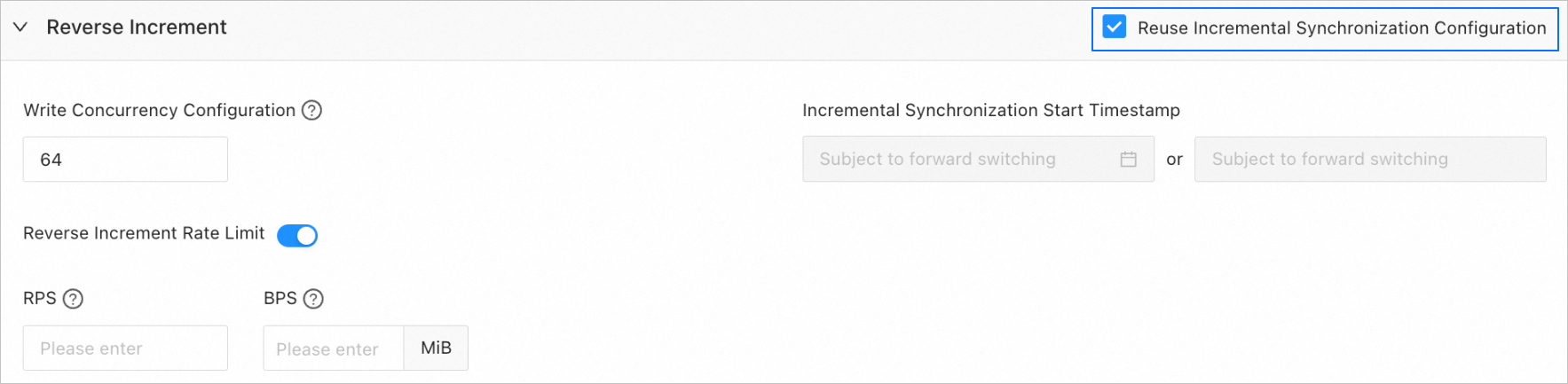
You can choose not to reuse the incremental synchronization configurations and configure reverse increment as needed.
Parameter
Description
Write Concurrency
The concurrency for writing data to the source during reverse increment. The maximum value is 512. A high concurrency may incur excessive stress on the source, affecting the business.
Reverse Increment Rate Limit
You can choose whether to limit the reverse increment rate as needed. If you choose to limit the reverse increment rate, you must specify the requests per second (RPS) and bytes per second (BPS). The RPS specifies the maximum number of data rows synchronized to the source per second during reverse increment, and the BPS specifies the maximum amount of data in bytes synchronized to the source per second during reverse increment.
NoteThe RPS and BPS values specified here are only for throttling. The actual reverse increment performance is subject to factors such as the settings of the source and target and the instance specifications.
Incremental Synchronization Start Timestamp
This parameter is not displayed if you have selected Full Migration on the Select Migration Type page.
If you have selected Incremental Synchronization but not Full Migration, the forward switchover start timestamp (if any) is used by default. This parameter cannot be modified.
Advanced parameters
This section is displayed only if the target is an OceanBase database V4.3.0 or later in Oracle-compatible mode and you have selected Schema Migration on the Select Migration Type page.
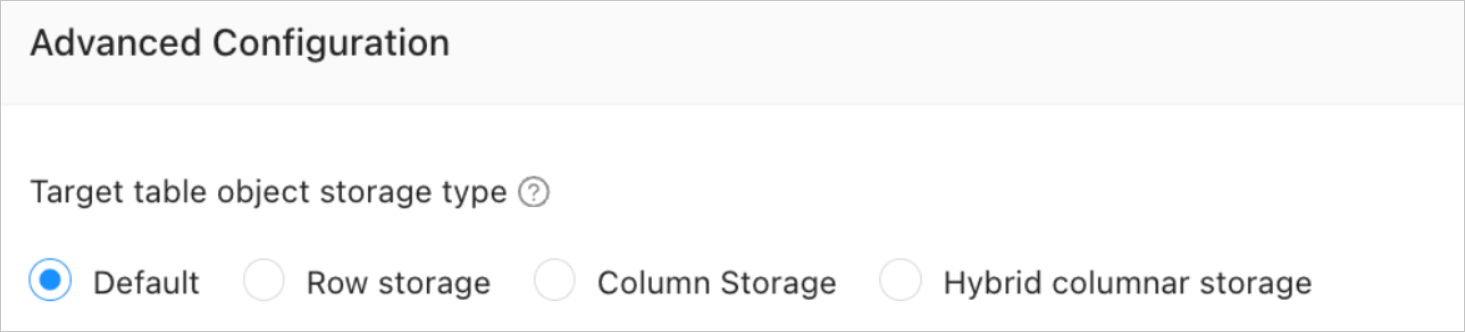
The storage types supported for target table objects are Default, Row storage, Column storage, and Hybrid columnar storage. For more information, see default_table_store_format.
NoteThe value Default means that other parameters are automatically set based on the parameter configurations of the target. Table objects in schema migration are written to the corresponding schemas based on the specified storage type.
Click Precheck to start a precheck on the data migration task.
During the precheck, the data transmission service checks the read and write privileges of the database users and the network connections of the databases. A data synchronization task can be started only after it passes all check items. If an error is returned during the precheck, you can perform the following operations:
Identify and troubleshoot the problem and then perform the precheck again.
Click Skip in the Actions column of the failed precheck item. In the dialog box that prompts the consequences of the operation, click OK.
After the precheck is passed, click Start Task.
If you do not need to start the task now, click Save. You can start the task later on the Migration Tasks page or by performing batch operations. For more information about batch operations, see Perform batch operations on data migration tasks.
The data transmission service allows you to modify the migration objects and their row filtering conditions when a migration task is running. For more information, see View and modify migration objects and their filter conditions. After the data migration task is started, it is executed based on the selected migration types. For more information, see View migration details.