Before you connect to a host in a dedicated cluster that uses the ApsaraDB MyBase for MySQL engine, you must create a host account. This topic describes how to create an account for a host in a dedicated cluster that uses the ApsaraDB MyBase for MySQL engine.
Prerequisites
The Grant OS Permissions parameter is set to Enabled when you create the ApsaraDB for MyBase dedicated cluster. For more information, see Create an ApsaraDB MyBase for MySQL dedicated cluster.
A bastion host is created. For more information, see Create a bastion host.
Procedure
Log on to the Bastionhost console. Find the bastion host that you want to manage and click Run on the right side to enable the bastion host. For more information, see Enable a bastion host.

Associate an ApsaraDB for MyBase host with the bastion host.
Log on to the ApsaraDB for MyBase console.
In the upper-left corner of the page, select a region.
Find the dedicated cluster that you want to manage and click Details in the Actions column.
In the left-side navigation pane, click Bastion Hosts. On the page that appears, find the bastion host that you want to manage and click Associate with Bastion Host in the Actions column.

Click Import Host. In the dialog box that appears, select the host that you want to import and click Import.
Create a host account.
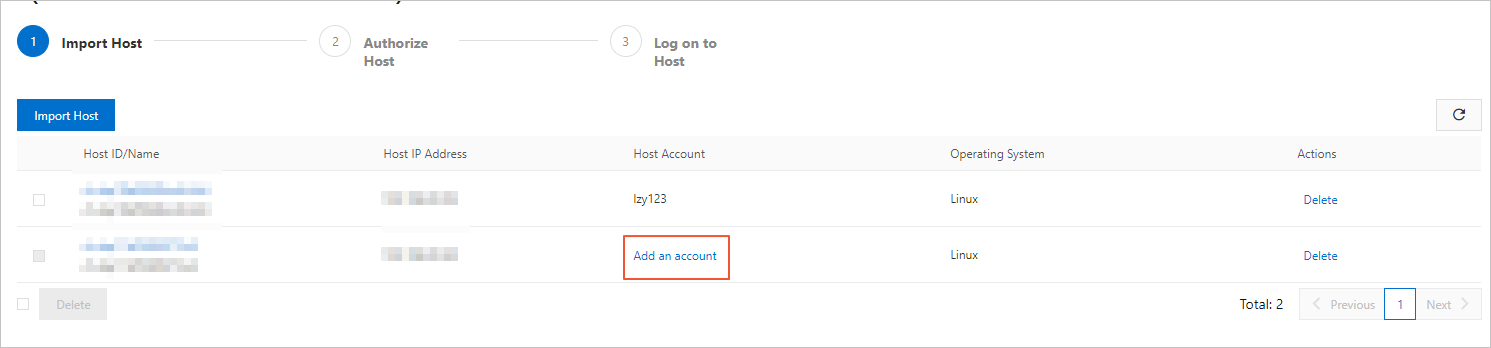
Find the host that you want to manage, and click Add an account in the Host Account column.
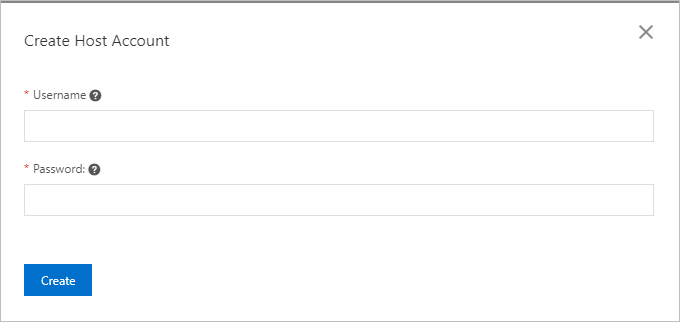
In the Create Host Account dialog box, configure the following parameters.
Parameter
Description
Username
The username must start with a lowercase letter and end with a letter or a digit.
The username can contain lowercase letters, digits, and underscores (_).
The username must be 2 to 16 characters in length.
The username cannot be root, admin, or another username that is reserved by the system.
Password
The password of the account. The password must meet the following requirements:
The password must contain at least three of the following character types: uppercase letters, lowercase letters, digits, and special characters.
The password must be 6 to 32 characters in length.
The password can contain the following special characters:
! @ # $ % ^ & * ( ) _ + - =
Click Create.
NoteAfter you create a host account, you can modify or delete the host account in the Bastionhost console. For more information about how to modify and delete a host account, see Configure account information for a host.
What to do next
After the host account is created, connect to the host. For information about how to connect to a host, see Log on to a host by using a bastion host in Linux.