The Google Remote Procedure Call (gRPC) framework uses the HTTP/2 protocol and supports features such as bidirectional streaming, header compression, and multiplexing, which can improve the efficiency of network transmission. This topic describes how to deploy a gRPC application in a Container Service for Kubernetes cluster and use a Cloud-native API Gateway instance to route requests of the gRPC application.
Prerequisites
An ACK cluster is created. For more information, see Create an ACK managed cluster.
A Cloud-native API Gateway instance is created. For more information, see Create a gateway instance.
Step 1: Deploy a gRPC application in the ACK cluster
For more information about how to deploy an application, see Create a stateless application by using a Deployment.
In this example, the ACK cluster is used for service discovery. The backend service is registered with CoreDNS by using declarative service APIs. This example uses an application named grpcbin as a backend service to implement multiple gRPC services. For more information, visit GitHub. The following code shows the configuration of the resource that is used by the grpcbin application in the ACK cluster.
The name of the gRPC service in the port field of the Kubernetes service must contain grpc.
apiVersion: apps/v1
kind: Deployment
metadata:
  name: grpcbin
spec:
  replicas: 1
  selector:
    matchLabels:
      app: grpcbin
  template:
    metadata:
      labels:
        app: grpcbin
    spec:
      serviceAccountName: grpcbin
      containers:
      - image: docker.io/moul/grpcbin
        imagePullPolicy: IfNotPresent
        name: grpcbin
        ports:
        - containerPort: 9000
        - containerPort: 9001
        resources:
            requests:
              cpu: '1'
              memory: 2Gi
            limit:
              cpu: '1'
              memory: 2Gi
---
apiVersion: v1
kind: ServiceAccount
metadata:
  name: grpcbin
---
apiVersion: v1
kind: Service
metadata:
  name: grpcbin-grpc
  labels:
    app: grpcbin
spec:
  ports:
  - name: grpc
    port: 9000
    targetPort: 9000
  selector:
    app: grpcbin
The following code shows the proto definition for the gRPC service.
syntax = "proto3";

package grpcbin;

service GRPCBin {
  rpc Index(EmptyMessage) returns (IndexReply) {}
  // The method that is called without parameters specified. An empty response is returned after the call.
  rpc Empty(EmptyMessage) returns (EmptyMessage) {}
  // The request parameters are returned.
  rpc DummyUnary(DummyMessage) returns (DummyMessage) {}
  // A streaming call is initiated for the response, and 10 responses are returned.
  rpc DummyServerStream(DummyMessage) returns (stream DummyMessage) {}
  // A streaming call is initiated for the request, 10 requests are received, and the last request body is returned.
  rpc DummyClientStream(stream DummyMessage) returns (DummyMessage) {}
  // The streaming method that is used for both requests and responses.
  rpc DummyBidirectionalStreamStream(stream DummyMessage) returns (stream DummyMessage) {}
  // After this method is called, a specified gRPC error is returned.
  rpc SpecificError(SpecificErrorRequest) returns (EmptyMessage) {}
  // After this method is called, a random error is returned.
  rpc RandomError(EmptyMessage) returns (EmptyMessage) {}
  // After this method is called, a header is returned.
  rpc HeadersUnary(EmptyMessage) returns (HeadersMessage) {}
  // After this method is called, no response is returned.
  rpc NoResponseUnary(EmptyMessage) returns (EmptyMessage) {}
}

message HeadersMessage {
  message Values {
    repeated string values = 1;
  }
  map<string, Values> Metadata = 1;
}

message SpecificErrorRequest {
  uint32 code = 1;
  string reason = 2;
}

message EmptyMessage {}

message DummyMessage {
  message Sub {
    string f_string = 1;
  }
  enum Enum {
    ENUM_0 = 0;
    ENUM_1 = 1;
    ENUM_2 = 2;
  }
  string f_string = 1;
  repeated string f_strings = 2;
  int32 f_int32 = 3;
  repeated int32 f_int32s = 4;
  Enum f_enum = 5;
  repeated Enum f_enums = 6;
  Sub f_sub = 7;
  repeated Sub f_subs = 8;
  bool f_bool = 9;
  repeated bool f_bools = 10;
  int64 f_int64 = 11;
  repeated int64 f_int64s= 12;
  bytes f_bytes = 13;
  repeated bytes f_bytess = 14;
  float f_float = 15;
  repeated float f_floats = 16;
}

message IndexReply {
  message Endpoint {
    string path = 1;
    string description = 2;
  }
  string description = 1;
  repeated Endpoint endpoints = 2;
}
The underlying layer of the gRPC service is based on the HTTP/2 protocol, and the Path field is in the {Package name}.{Service name}/{Method name} format. Cloud-native API Gateway instances can use the Path field to implement gRPC routing. For example, if you use gRPC to call the Index method of grpcbin, the value of the Path field for the HTTP/2 protocol is grpcbin.GRPCBin/Index.
Step 2: Use the Cloud-native API Gateway instance to route gRPC requests
Add the ACK cluster as a service source of the Cloud-native API Gateway instance and add the grpcbin service.
Add a service source
Log on to the Cloud-native API Gateway console.
In the left-side navigation pane, click Instance. In the top navigation bar, select a region.
On the Instance page, click the name of the gateway instance that you want to manage.
In the left-side navigation tree, click Service. Then, click the Source tab.
Click Create Source. In the Create Source panel, set the Service Source parameter to ACK, configure the parameters, and then click OK.
Parameter
Description
ACK/ACK Serverless Cluster
Select the cluster in which your backend service is deployed.
NoteWhen you create a gateway instance, you need to select the VPC in which the cluster is deployed. This way, when you add a service source, the cluster in the VPC is automatically obtained.
Listen to Kubernetes Ingress
If you turn on Listen to Kubernetes Ingress, the Cloud-native API Gateway instance automatically listens for changes in Ingress resources and applies the domain name and route configuration of the Ingress resources.
If you turn off Listen to Kubernetes Ingress, the Cloud-native API Gateway instance no longer listens for changes in Ingress resources, and the previous domain name and route configuration of the Ingress resources becomes invalid. Exercise caution when you perform this operation.
ImportantThe priorities of the domain names and routes that are manually configured in the console are higher than the priorities of the domain names and routes of the Ingress resources applied by the Cloud-native API Gateway instance.
IngressClass
The Ingress class with which Ingress resources are associated.
If you do not specify this parameter, the Cloud-native API Gateway instance monitors all Ingress resources in the cluster.
If you specify an Ingress class, the Cloud-native API Gateway instance monitors the Ingress resources that have the
classannotation or whoseSpec.IngressClassNameis set to the configured value. You cannot specify multiple Ingress classes. For example, if you set this parameter tonginx, the Cloud-native API Gateway instance monitors the Ingress resources whose IngressClass isnginxor the Ingress resources that are not associated with Ingress classes.
Namespace
The namespace to which Ingress resources belong.
If you do not specify this parameter, the Cloud-native API Gateway instance monitors all Ingress resources in all namespaces of the cluster.
If you specify a namespace, the Cloud-native API Gateway instance monitors the Ingress resources in the specified namespace. You can specify only one namespace in this parameter each time.
Update Ingress Status
If you set this parameter to Open, the IP address of the monitored Ingress is changed to the IP address of the Server Load Balancer (SLB) instance associated with the Cloud-native API Gateway instance.
NoteYou can use this feature only if the version of the gateway instance is 1.2.9 or later.
Security Group Rules
Security groups are configured for the node pool of the ACK cluster. In most cases, if an external component needs to access a service in the cluster, you must configure the security groups to expose all ports required by the service.
You can modify security groups. For more information, see Configure security group rules.
Add a service
Log on to the Cloud-native API Gateway console.
In the left-side navigation pane, click Instance. In the top navigation bar, select a region.
On the Instance page, click the name of the gateway instance that you want to manage.
In the left-side navigation tree, click Service. Then, click the Services tab.
On the Services tab, click Create Service. In the Create Service panel, configure the parameters and click OK.
Parameter
Description
Service Source
Select ACK.
Namespace
Select the namespace of the cluster.
Services
Select one or more services in the Services section.
Add a route to route traffic from the Cloud-native API Gateway instance to the grpcbin service
Create an HTTP API. For more information, see Create an HTTP API.
Click the target API and click Create Route in the upper-left corner.
In the Create Route panel, configure the parameters and click Save and Publish. For more information, see Create a route.
Parameter
Description
Route Name
Enter grpc in this field.
Domain Name
Select the default domain name * from the drop-down list.
Path
Select Prefix from the drop-down list and enter a path that starts with /grpcbin.GRPCBin.
NoteThe path of the gRPC service is in the {Package name}.{Service name}/{Method name} format. You can configure the required route prefix.
Scenarios
Select Single Service for the route.
Backend Services
Specify the service and configure the Service Port parameter.
Verify the result
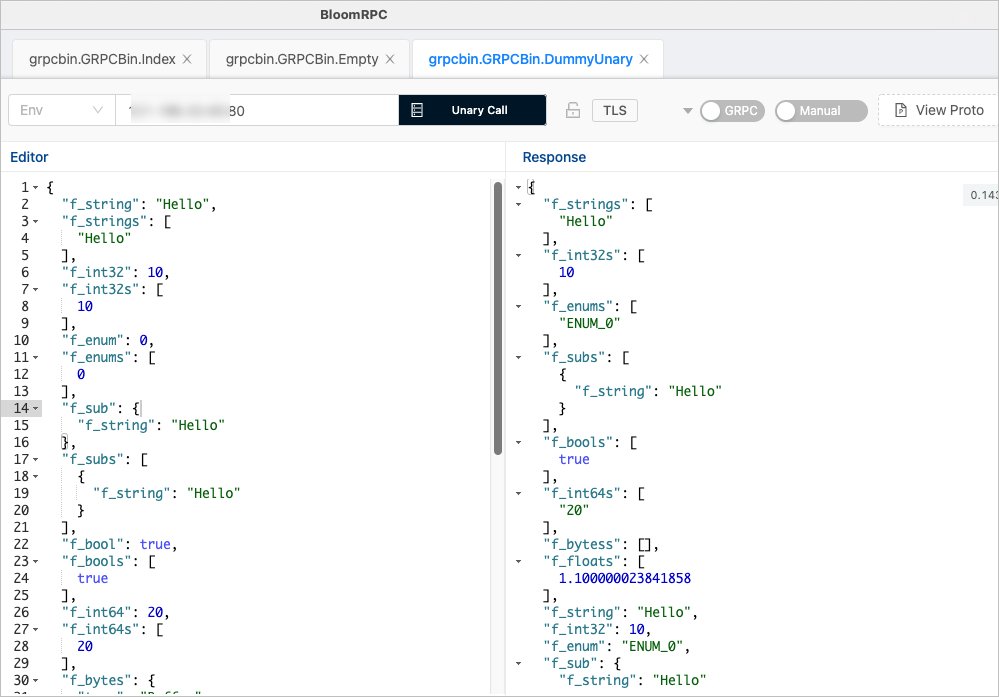
Use bloomrpc to test the availability of the gRPC service. If a response is returned, the gRPC service is available.
You can also use other gRPC clients for testing.