Build an image search application using AnalyticDB for PostgreSQL's vector database API. This guide covers uploading images from local files, remote URLs, or compressed archives; polling async upload status; and querying the database by text or image — all via the Python SDK.
How it works
Vector-based image search converts images into multi-dimensional feature vectors that capture visual characteristics such as color, shape, and texture. AnalyticDB for PostgreSQL stores these vectors and retrieves the most similar ones at query time using similarity metrics such as Euclidean distance and cosine similarity.
The end-to-end flow:
-
Feature extraction — The system extracts visual features from each image and encodes them as a feature vector.
-
Vector storage — Vectors are stored in the database and indexed for fast retrieval.
-
Query — A text string or query image is converted into a vector, and the database returns the top-K most similar vectors.
-
Ranking — Results are ranked by similarity score and returned to your application.
Prerequisites
Before you begin, make sure you have:
-
An AnalyticDB for PostgreSQL instance with:
-
The client IP address added to the instance whitelist
-
Python 3.7 or later
-
The following Python packages installed:
pip install alibabacloud-gpdb20160503 # AnalyticDB for PostgreSQL SDK (version 3.5.1 or later required) pip install alibabacloud-tea-OpenAPI # OpenAPI core library pip install alibabacloud-tea-util # SDK utilities pip install alibabacloud-OpenAPI-util # OpenAPI helper utilitiesImportantalibabacloud-gpdb20160503must be version 3.5.1 or later. -
AccessKey ID and AccessKey secret for a Resource Access Management (RAM) user, configured as environment variables:
export ALIBABA_CLOUD_ACCESS_KEY_ID="<your-access-key-id>"
export ALIBABA_CLOUD_ACCESS_KEY_SECRET="<your-access-key-secret>"
For instructions, see Create an AccessKey pair.
Preparations
Complete these steps before uploading images:
-
Initialize the vector database — initializes both the vector database and full-text index features.
-
Create a namespace — create a new namespace or use an existing one.
-
Create a collection — create a collection in the namespace. Select an embedding model in this step.
Upload images
All upload operations are asynchronous. A successful call returns a job_id that you use to poll upload progress.
All examples use the UploadDocumentAsync API operation. The client is initialized with credentials from environment variables and connects to the gpdb.aliyuncs.com endpoint.
Replace the following placeholders in each example:
| Placeholder | Description |
|---|---|
<your-instance-region-id> |
The region ID of the AnalyticDB for PostgreSQL instance |
<your-instance-name> |
The ID of the AnalyticDB for PostgreSQL instance |
<your-namespace-name> |
The namespace name from the Preparations section |
<your-namespace-password> |
The namespace password from the Preparations section |
<your-collection-name> |
The collection name from the Preparations section |
Upload a single image from a local file
Open the local image file in binary mode and pass the file object as file_url_object. Supported image formats: bmp, jpg, jpeg, png, tiff.
# -*- coding: utf-8 -*-
import os

from alibabacloud_gpdb20160503.client import Client as gpdb20160503Client
from alibabacloud_tea_OpenAPI import models as open_api_models
from alibabacloud_gpdb20160503 import models as gpdb_20160503_models
from alibabacloud_tea_util import models as util_models

class Sample:
    def __init__(self):
        pass

    @staticmethod
    def create_client(
        access_key_id: str,
        access_key_secret: str,
    ) -> gpdb20160503Client:
        config = open_api_models.Config(
            access_key_id=access_key_id,
            access_key_secret=access_key_secret
        )
        # For endpoint details, see https://api.aliyun.com/product/gpdb
        config.endpoint = 'gpdb.aliyuncs.com'
        return gpdb20160503Client(config)

    @staticmethod
    def main() -> None:
        meta_data = {metadata}
        f = open("<image_file_path>", "rb")  # Absolute path to the local image file

        client = Sample.create_client(
            os.environ["ALIBABA_CLOUD_ACCESS_KEY_ID"],
            os.environ["ALIBABA_CLOUD_ACCESS_KEY_SECRET"]
        )
        upload_document_async_request = gpdb_20160503_models.UploadDocumentAsyncAdvanceRequest(
            region_id="<your-instance-region-id>",
            dbinstance_id="<your-instance-name>",
            namespace="<your-namespace-name>",
            namespace_password="<your-namespace-password>",
            collection="<your-collection-name>",
            file_name="<your-file-name>",   # Must include extension, e.g., photo.jpg
            file_url_object=f,
            dry_run=False,
            metadata=meta_data,             # Collection metadata, dict structure
        )
        runtime = util_models.RuntimeOptions()
        try:
            response = client.upload_document_async_advance(upload_document_async_request, runtime)
            print("response code: %s, response body: %s\n" % (response.status_code, response.body))
        except Exception as error:
            print(error)

if __name__ == '__main__':
    Sample.main()
For the full API reference, see UploadDocumentAsync.
Upload a single image from a remote URL
Pass the remote image URL as file_url. Supported image formats: bmp, jpg, jpeg, png, tiff.
# -*- coding: utf-8 -*-
import os

from alibabacloud_gpdb20160503.client import Client as gpdb20160503Client
from alibabacloud_tea_OpenAPI import models as open_api_models
from alibabacloud_gpdb20160503 import models as gpdb_20160503_models
from alibabacloud_tea_util import models as util_models

class Sample:
    def __init__(self):
        pass

    @staticmethod
    def create_client(
        access_key_id: str,
        access_key_secret: str,
    ) -> gpdb20160503Client:
        config = open_api_models.Config(
            access_key_id=access_key_id,
            access_key_secret=access_key_secret
        )
        config.endpoint = 'gpdb.aliyuncs.com'
        return gpdb20160503Client(config)

    @staticmethod
    def main() -> None:
        file_url = "<image_file_url>"       # URL of the remote image
        meta_data = {metadata}

        client = Sample.create_client(
            os.environ["ALIBABA_CLOUD_ACCESS_KEY_ID"],
            os.environ["ALIBABA_CLOUD_ACCESS_KEY_SECRET"]
        )
        upload_document_async_request = gpdb_20160503_models.UploadDocumentAsyncRequest(
            region_id="<your-instance-region-id>",
            dbinstance_id="<your-instance-name>",
            namespace="<your-namespace-name>",
            namespace_password="<your-namespace-password>",
            collection="<your-collection-name>",
            file_name="<your-file-name>",   # Must include extension, e.g., photo.png
            file_url=file_url,
            dry_run=False,
            metadata=meta_data,
        )
        runtime = util_models.RuntimeOptions()
        try:
            response = client.upload_document_async_with_options(upload_document_async_request, runtime)
            print("response code: %s, response body: %s\n" % (response.status_code, response.body))
        except Exception as error:
            print(error)

if __name__ == '__main__':
    Sample.main()
For the full API reference, see UploadDocumentAsync.
Upload images in batch
Pack images into a compressed archive and upload them in a single call. All images in the archive are imported into the collection.
-
A compressed package can contain a maximum of 100 images.
-
Supported compression formats: tar, gz, zip.
# -*- coding: utf-8 -*-
import os

from alibabacloud_gpdb20160503.client import Client as gpdb20160503Client
from alibabacloud_tea_OpenAPI import models as open_api_models
from alibabacloud_gpdb20160503 import models as gpdb_20160503_models
from alibabacloud_tea_util import models as util_models

class Sample:
    def __init__(self):
        pass

    @staticmethod
    def create_client(
        access_key_id: str,
        access_key_secret: str,
    ) -> gpdb20160503Client:
        config = open_api_models.Config(
            access_key_id=access_key_id,
            access_key_secret=access_key_secret
        )
        config.endpoint = 'gpdb.aliyuncs.com'
        return gpdb20160503Client(config)

    @staticmethod
    def main() -> None:
        meta_data = {metadata}
        f = open("<compress_file_path>", "rb")  # Absolute path to the local archive

        client = Sample.create_client(
            os.environ["ALIBABA_CLOUD_ACCESS_KEY_ID"],
            os.environ["ALIBABA_CLOUD_ACCESS_KEY_SECRET"]
        )
        upload_document_async_request = gpdb_20160503_models.UploadDocumentAsyncAdvanceRequest(
            region_id="<your-instance-region-id>",
            dbinstance_id="<your-instance-name>",
            namespace="<your-namespace-name>",
            namespace_password="<your-namespace-password>",
            collection="<your-collection-name>",
            file_name="<your-file-name>",   # Must include extension, e.g., images.zip
            file_url_object=f,
            dry_run=False,
            metadata=meta_data,
        )
        runtime = util_models.RuntimeOptions()
        try:
            response = client.upload_document_async_advance(upload_document_async_request, runtime)
            print("response code: %s, response body: %s\n" % (response.status_code, response.body))
        except Exception as error:
            print(error)

if __name__ == '__main__':
    Sample.main()
For the full API reference, see UploadDocumentAsync.
Check upload progress
Because uploads are asynchronous, poll GetUploadDocumentJob with the job_id returned from the upload call. The upload is complete when job.status equals Success.
# -*- coding: utf-8 -*-
import os

from alibabacloud_gpdb20160503.client import Client as gpdb20160503Client
from alibabacloud_tea_OpenAPI import models as open_api_models
from alibabacloud_gpdb20160503 import models as gpdb_20160503_models
from alibabacloud_tea_util import models as util_models

class Sample:
    def __init__(self):
        pass

    @staticmethod
    def create_client(
        access_key_id: str,
        access_key_secret: str,
    ) -> gpdb20160503Client:
        config = open_api_models.Config(
            access_key_id=access_key_id,
            access_key_secret=access_key_secret
        )
        config.endpoint = 'gpdb.aliyuncs.com'
        return gpdb20160503Client(config)

    @staticmethod
    def main() -> None:
        client = Sample.create_client(
            os.environ["ALIBABA_CLOUD_ACCESS_KEY_ID"],
            os.environ["ALIBABA_CLOUD_ACCESS_KEY_SECRET"]
        )
        get_upload_document_request = gpdb_20160503_models.GetUploadDocumentJobRequest(
            region_id="<your-instance-region-id>",
            dbinstance_id="<your-instance-name>",
            namespace="<your-namespace-name>",
            namespace_password="<your-namespace-password>",
            collection="<your-collection-name>",
            job_id="<job_id>",              # job_id returned by the upload call
        )
        runtime = util_models.RuntimeOptions()
        try:
            response = client.get_upload_document_job_with_options(get_upload_document_request, runtime)
            print("response code: %s, response body: %s\n" % (response.status_code, response.body))
        except Exception as error:
            print(error)

if __name__ == '__main__':
    Sample.main()
For the full API reference, see GetUploadDocumentJob.
Retrieve images
Search by text
QueryContent accepts a text string, converts it to a vector internally, and returns the top-K most similar images from the collection.
# -*- coding: utf-8 -*-
import os

from urllib.request import urlopen
from PIL import Image

from alibabacloud_gpdb20160503.client import Client as gpdb20160503Client
from alibabacloud_tea_OpenAPI import models as open_api_models
from alibabacloud_gpdb20160503 import models as gpdb_20160503_models
from alibabacloud_tea_util import models as util_models

def show_image_text(image_text_list):
    for img, cap in image_text_list:
        # Note: show() may require an image viewer installed on the server.
        img.show()
        print(cap)

class Sample:
    def __init__(self):
        pass

    @staticmethod
    def create_client(
        access_key_id: str,
        access_key_secret: str,
    ) -> gpdb20160503Client:
        config = open_api_models.Config(
            access_key_id=access_key_id,
            access_key_secret=access_key_secret
        )
        config.endpoint = 'gpdb.aliyuncs.com'
        return gpdb20160503Client(config)

    @staticmethod
    def query(content: str) -> []:
        client = Sample.create_client(
            os.environ["ALIBABA_CLOUD_ACCESS_KEY_ID"],
            os.environ["ALIBABA_CLOUD_ACCESS_KEY_SECRET"]
        )
        query_content_request = gpdb_20160503_models.QueryContentRequest(
            region_id="<your-instance-region-id>",
            dbinstance_id="<your-instance-name>",
            namespace="<your-namespace-name>",
            namespace_password="<your-namespace-password>",
            collection="<your-collection-name>",
            content=content,
            top_k=3,                        # Number of results to return
        )
        runtime = util_models.RuntimeOptions()
        try:
            response = client.query_content_with_options(query_content_request, runtime)
            print("response code: %s, response body: %s\n" % (response.status_code, response.body))

            if response.status_code != 200:
                raise Exception(f"query_content failed, result: {response.body}")

            image_list = []
            for match_item in response.body.matches.match_list:
                url = match_item.file_url
                caption = match_item.metadata.get("caption")
                print("url: %s, caption: %s" % (url, caption))

                img = Image.open(urlopen(url))
                image_list.append((img, caption))
            return image_list
        except Exception as error:
            print(error)

if __name__ == '__main__':
    query_content = "Dog"
    show_image_text(Sample.query(query_content))
When query_content is set to "Dog", the results look like this (actual results depend on your uploaded image set):



Search by image
QueryContentAdvance accepts a local image file, converts it to a vector, and returns the top-K most similar images from the collection.
# -*- coding: utf-8 -*-
import os

from urllib.request import urlopen
from PIL import Image

from alibabacloud_gpdb20160503.client import Client as gpdb20160503Client
from alibabacloud_tea_OpenAPI import models as open_api_models
from alibabacloud_gpdb20160503 import models as gpdb_20160503_models
from alibabacloud_tea_util import models as util_models

def show_image_text(image_text_list):
    for img, cap in image_text_list:
        # Note: show() may require an image viewer installed on the server.
        img.show()
        print(cap)

class Sample:
    def __init__(self):
        pass

    @staticmethod
    def create_client(
        access_key_id: str,
        access_key_secret: str,
    ) -> gpdb20160503Client:
        config = open_api_models.Config(
            access_key_id=access_key_id,
            access_key_secret=access_key_secret
        )
        config.endpoint = 'gpdb.aliyuncs.com'
        return gpdb20160503Client(config)

    @staticmethod
    def query(file_path: str) -> []:
        client = Sample.create_client(
            os.environ["ALIBABA_CLOUD_ACCESS_KEY_ID"],
            os.environ["ALIBABA_CLOUD_ACCESS_KEY_SECRET"]
        )
        f = open(file_path, 'rb')
        filename = os.path.basename(file_path)
        query_content_request = gpdb_20160503_models.QueryContentAdvanceRequest(
            region_id="<your-instance-region-id>",
            dbinstance_id="<your-instance-name>",
            namespace="<your-namespace-name>",
            namespace_password="<your-namespace-password>",
            collection="<your-collection-name>",
            file_url_object=f,
            file_name=filename,
            top_k=3,                        # Number of results to return
        )
        runtime = util_models.RuntimeOptions()
        try:
            response = client.query_content_advance(query_content_request, runtime)
            print("response code: %s, response body: %s\n" % (response.status_code, response.body))

            if response.status_code != 200:
                raise Exception(f"query_content failed, result: {response.body}")

            image_list = []
            for match_item in response.body.matches.match_list:
                url = match_item.file_url
                caption = match_item.metadata.get("caption")
                print("url: %s, caption: %s" % (url, caption))

                img = Image.open(urlopen(url))
                image_list.append((img, caption))
            return image_list
        except Exception as error:
            print(error)

if __name__ == '__main__':
    query_file_path = "<image_file_path>"   # Absolute path to the query image
    show_image_text(Sample.query(query_file_path))
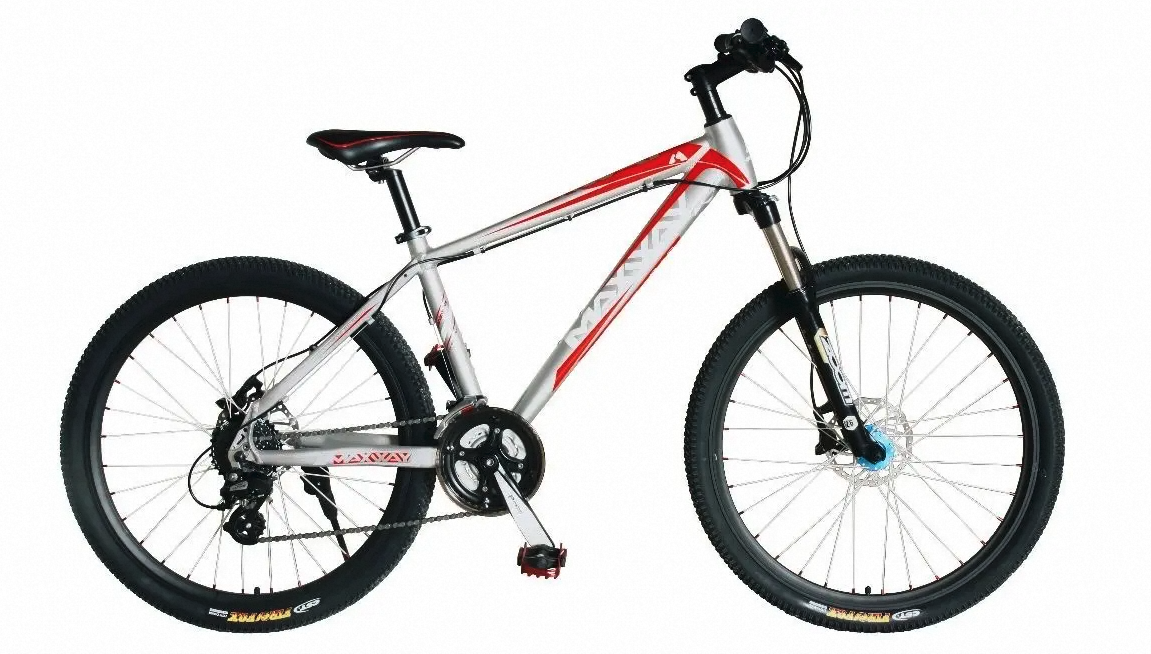
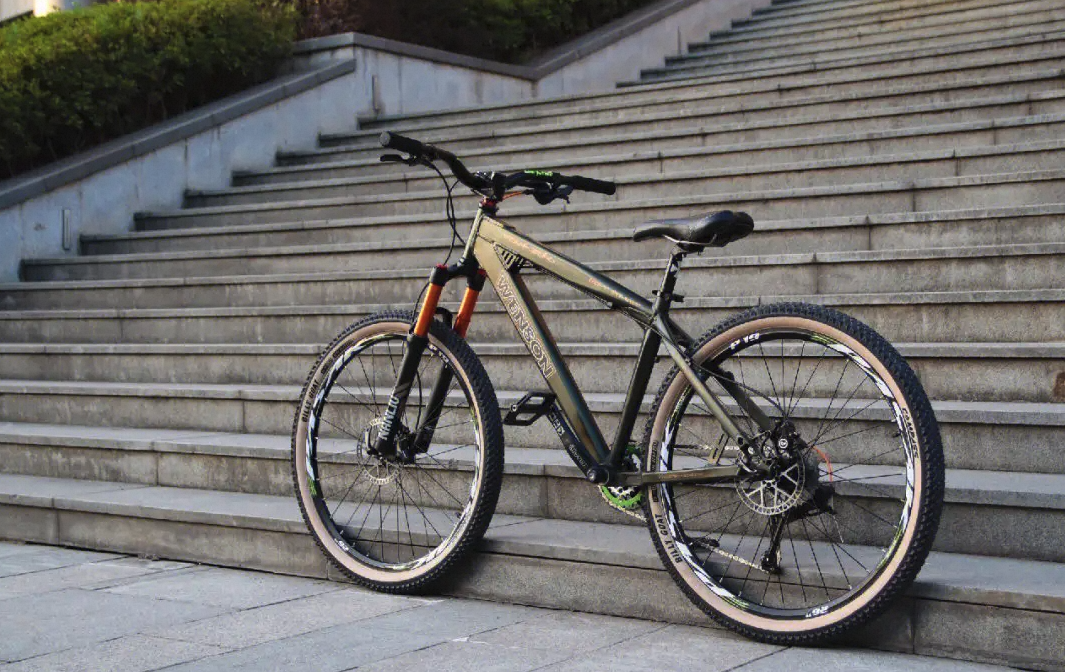
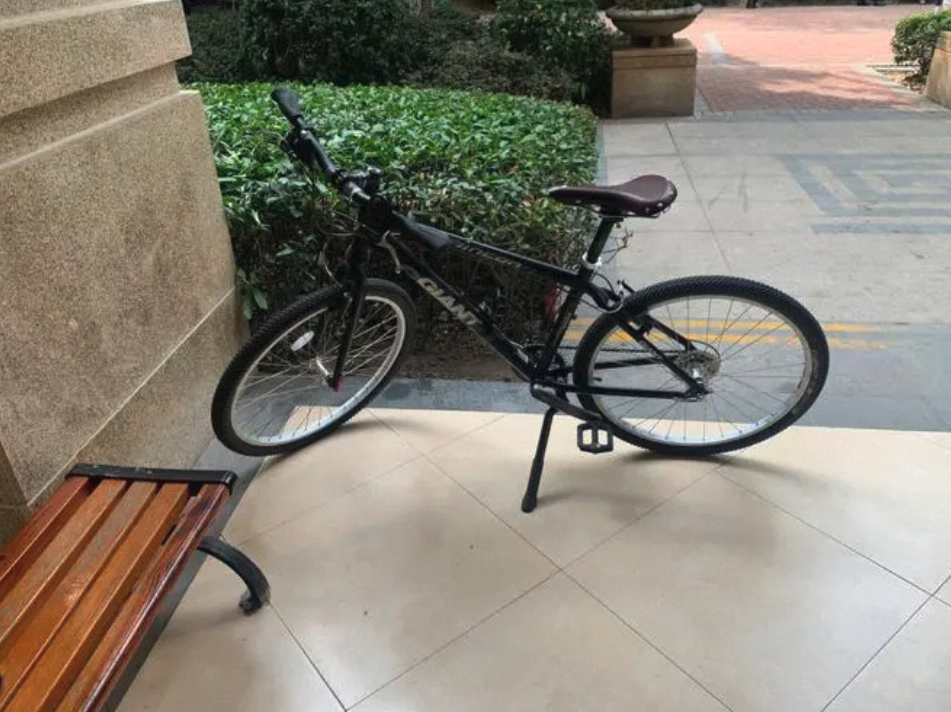
When querying with a bicycle image, the results look like this (actual results depend on your uploaded image set):
Build a web UI with Streamlit
Streamlit is a Python framework that turns data scripts into interactive web applications with minimal code — no frontend experience required. Use it to build a text-to-image search demo on top of the query API.
Install Streamlit:
pip install streamlitFor more information, see the Streamlit documentation and st.audio reference.
Text-to-image search demo
The following example adds a chat input field and displays retrieved images with their captions.
# -*- coding: utf-8 -*-
import os
import streamlit as st

from alibabacloud_gpdb20160503.client import Client as gpdb20160503Client
from alibabacloud_tea_OpenAPI import models as open_api_models
from alibabacloud_gpdb20160503 import models as gpdb_20160503_models
from alibabacloud_tea_util import models as util_models

class Sample:
    def __init__(self):
        pass

    @staticmethod
    def create_client(
        access_key_id: str,
        access_key_secret: str,
    ) -> gpdb20160503Client:
        config = open_api_models.Config(
            access_key_id=access_key_id,
            access_key_secret=access_key_secret
        )
        config.endpoint = 'gpdb.aliyuncs.com'
        return gpdb20160503Client(config)

    @staticmethod
    def query(content: str) -> []:
        client = Sample.create_client(
            os.environ['ALIBABA_CLOUD_ACCESS_KEY_ID'],
            os.environ['ALIBABA_CLOUD_ACCESS_KEY_SECRET']
        )
        query_content_request = gpdb_20160503_models.QueryContentRequest(
            region_id="<your-instance-region-id>",
            dbinstance_id="<your-instance-name>",
            namespace="<your-namespace-name>",
            namespace_password="<your-namespace-password>",
            collection="<your-collection-name>",
            content=content,
            top_k=3,
        )
        runtime = util_models.RuntimeOptions()
        try:
            response = client.query_content_with_options(query_content_request, runtime)
            print("response code: %s, response body: %s\n" % (response.status_code, response.body))

            if response.status_code != 200:
                raise Exception(f"query_content failed, result: {response.body}")

            image_list = []
            for match_item in response.body.matches.match_list:
                url = match_item.file_url
                caption = match_item.metadata.get("caption")
                print("url: %s, caption: %s" % (url, caption))
                image_list.append((url, caption))
            return image_list
        except Exception as error:
            print(error)

# Streamlit UI
st.header('Text-to-Image Search Demo')
text_query = st.chat_input("Enter a search term")
if text_query is None:
    st.text("Search term: ")
else:
    st.text("Search term: %s" % text_query)

if text_query:
    image_text_list = Sample.query(text_query)
    for url, cap in image_text_list:
        st.image(url)
        st.text("Description: " + cap)
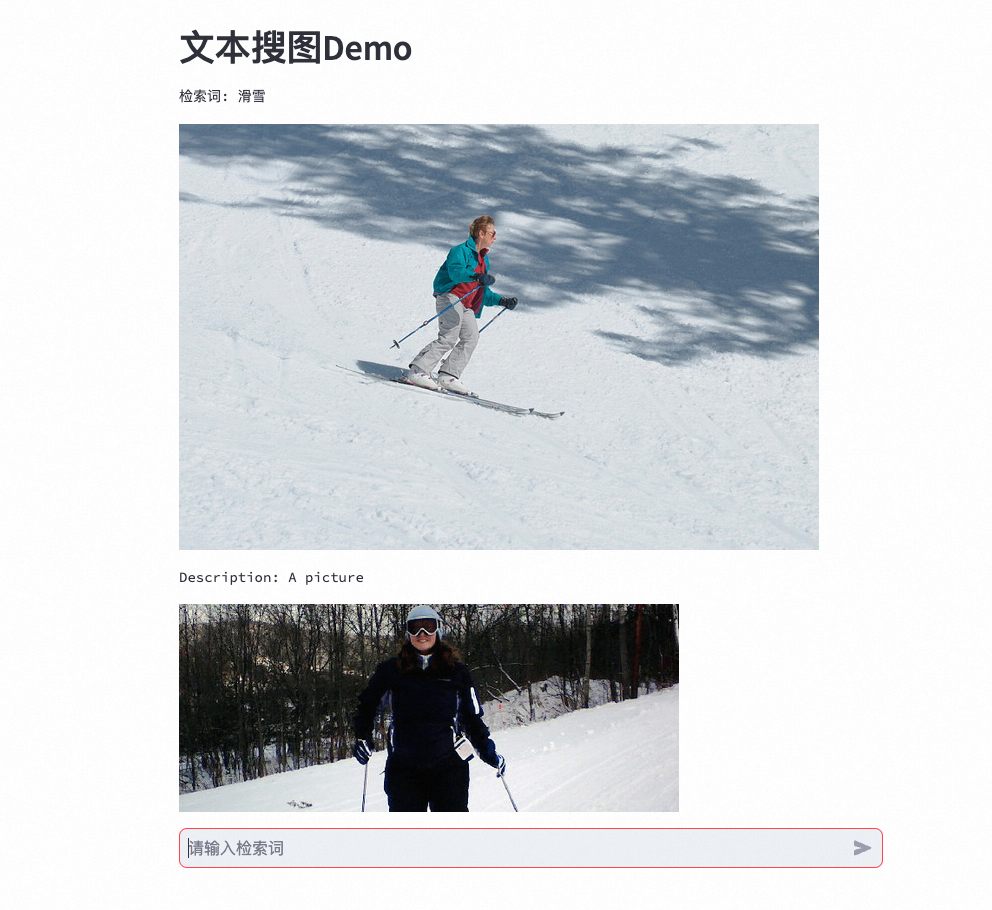
The results depend on what you type. Here is an example: