AnalyticDB for MySQL SQL diagnostics collects execution statistics at the query, stage, and operator levels, then surfaces optimization suggestions. This topic explains the three stage-level diagnostic results and how to act on them.
Diagnostic result types
Large data broadcast
What it means
Broadcast transmits data from an upstream stage to a downstream stage. When a stage broadcasts a large volume of data, the query can consume excessive memory. For more information about broadcast and other data output types, see Data output types.
Why it affects performance
Broadcast data becomes the right table in a join and is loaded into a hash table in memory. The larger the broadcast volume, the more memory is consumed.
What to do
First, determine whether the broadcast is appropriate for your query:
Broadcasting is often the right choice when the right table is small. It eliminates data redistribution for the larger left table and reduces network connections between nodes. The following example illustrates why. Suppose severe data skew exists in the
bcolumn ofTsmall, whileTbigis evenly distributed across storage nodes based on theacolumn. Without broadcast, redistribution ofTbigcauses long-tail processing, which also delays the downstream join stage. BroadcastingTsmallinstead eliminates the redistribution step entirely, resolving the long-tail issue.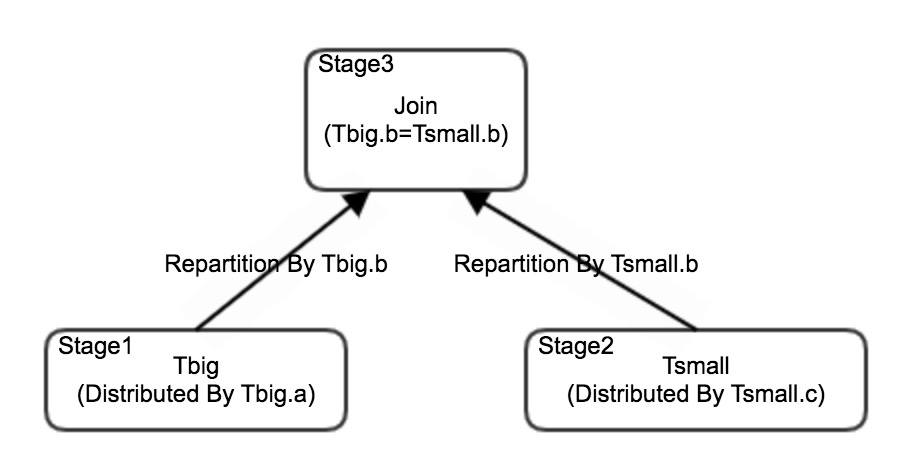
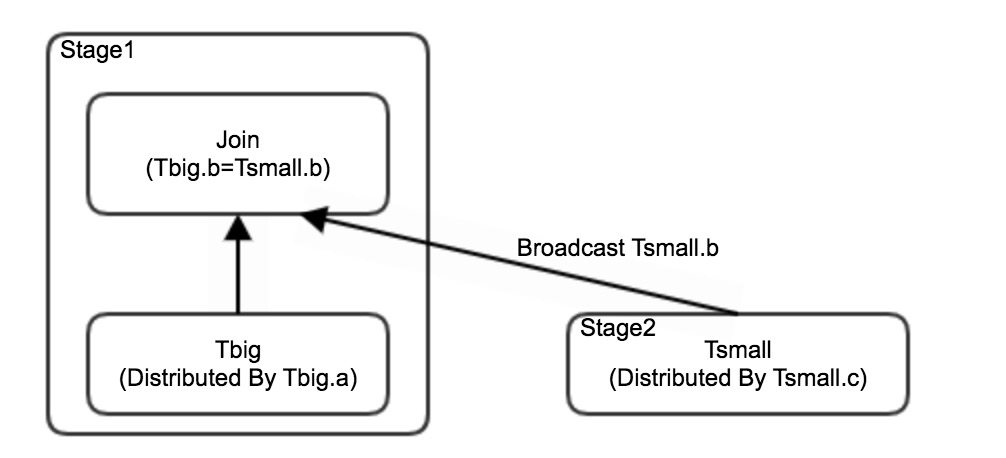
Broadcast may be inappropriate when statistics are stale. Outdated table statistics cause the optimizer to produce an inaccurate estimate of table size, leading to a large table being broadcast unintentionally. If this is the case, add the
JOIN_DISTRIBUTION_TYPE=repartitionedhint to disable broadcast and switch to data redistribution.
Data skew in stage input
What it means
The input data for this stage is unevenly distributed across nodes. One or a few nodes receive significantly more data than others.
Why it affects performance
Skewed input creates a bottleneck: the overloaded node takes longer to finish, while other nodes sit idle. The stage's total execution time is determined by the slowest node.
What to do
Identify the cause of the skew:
Skew from a table scan — The distribution column chosen when the table was created produces uneven data distribution. Review and change the distribution column. For guidance, see Distribution field skew diagnosis.
Skew from network transfer — The upstream stage outputs skewed data, which is then redistributed to this stage unevenly. Check whether the upstream stage has a data skew in stage output diagnostic result and address it there first.
Data skew in stage output
What it means
The output data from this stage is unevenly distributed across nodes before being passed to the downstream stage.
Why it affects performance
Skewed output causes uneven processing time across nodes — a long-tail effect. If the downstream stage performs complex operations, the slowest node extends the overall query execution time.
What to do
Inspect the columns shown in the diagnostic results for skew patterns. A common cause is a large proportion of null values in a distribution column.