Overview
How to synchronize emails from one email account (account A) to another account (account B) when using Alibaba Mail.
Detailed Information
1. If you only need to synchronize the email in the inbox, you can add account A to collect mail by using the Other Mailboxes function in account B. For more information, please check How to Add Other Mailboxes on The Webmail.
2. If you need to synchronize all emails in all directories (inbox, sent, deleted emails, spam emails, etc.) of account A to account B, this requirement cannot be directly implemented from the mailbox server system. You need to use third-party client software, such as Outlook 2016.
The operation of setting mailbox and transferring mail in Outlook 2016 is an operation in the computer client. If data abnormality caused by improper operation occurs, it can only be solved in the desktop client, but cannot be solved from the mailbox system side. Please consider and operate carefully.
3. Log on to Outlook 2016 and add accounts A and B. For more information about how to add accounts, please check Alibaba Mail Account Configuration in Outlook.
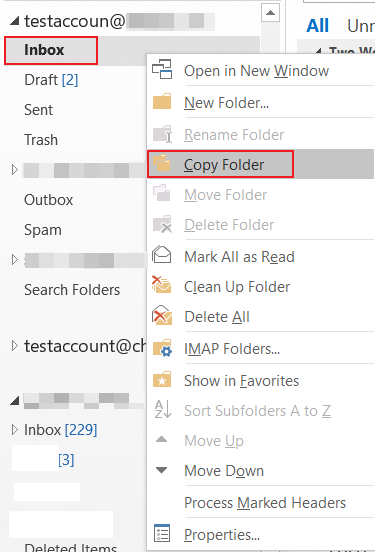
4. Right-click the email directory of account A, such as Inbox, Sent, Deleted, or Spam, and select Copy Folder.
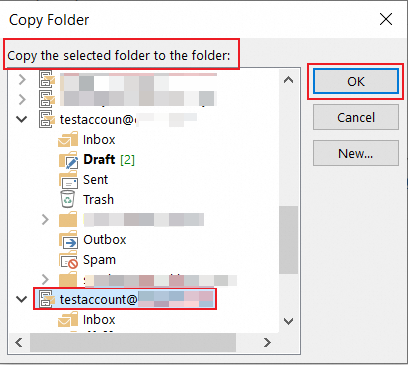
5. Find and select the target folder of account B and click OK.
Application Scope
Alibaba Mail