The cloud-native AI suite is a Container Service for Kubernetes (ACK) solution that provides full-stack infrastructure for building and operating AI and machine learning workloads on Kubernetes. It handles resource management, job scheduling, data acceleration, and lifecycle tooling so your team can focus on model development and training rather than cluster management.
The suite exposes all capabilities through CLI, multi-language SDKs, and the ACK console, and integrates with Alibaba Cloud AI services, open-source frameworks, and third-party AI tools through the same interfaces.
Architecture
Built on ACK, the cloud-native AI suite manages heterogeneous compute, storage, and network resources downward and exposes standard Kubernetes clusters and APIs upward. On top of this base, it provides the scheduling, data orchestration, workflow, and lifecycle components your AI workloads need.

PAI integration
The suite integrates with Platform for AI (PAI) to form a high-performance, elastic AI platform. ACK improves the elasticity and efficiency of the PAI services Data Science Workshop (DSW), Deep Learning Containers (DLC), and Elastic Algorithm Service (EAS). Deploy Lightweight Platform for AI in your ACK cluster with a few clicks to bring PAI's deeply optimized algorithms and engines into containerized workloads and accelerate both training and inference. For more information, see What is PAI?
Key features
The cloud-native AI suite uses Kubernetes as the base, and provides full-stack support and optimization for AI and machine learning applications and systems. The following table describes the key features provided by the cloud-native AI suite.
|
Feature |
Description |
References |
|
Heterogeneous resource management |
|
|
|
AI job scheduling |
|
|
|
Elastic scheduling |
Elastic scheduling for distributed deep learning jobs: The cloud-native AI suite dynamically scales the number of workers and the number of nodes without affecting the model training and model precision. The cloud-native AI suite adds workers to accelerate training when the cluster has idle resources and releases workers when the cluster cannot provide sufficient resources. This ensures that model training is not affected by resource shortages. This mode greatly improves the overall resource utilization of the cluster and helps avoid node failures. This mode also reduces the waiting time for launching jobs. |
|
|
AI data orchestration and acceleration |
Fluid: introduces the dataset concept. It provides training jobs with a data abstraction and provides a data orchestration and acceleration platform to help you manage datasets, enforce access control, and accelerate data access. ack-fluid can ingest data from different storage services and aggregate the data into the same dataset. You can also connect ack-fluid to on-cloud or on-premises storage services in a hybrid cloud environment to manage data and accelerate data access. In addition, ack-fluid can be extended to support a variety of distributed cache services. You can configure a cache service for each dataset and use features such as dataset warmup, cache capacity monitoring, and elastic scaling to greatly reduce the overheads of remotely ingesting data for training jobs and improve the efficiency of GPU computing. |
|
|
AI job lifecycle management |
|
Use cases
The cloud-native AI suite is suitable for continuously improving the utilization of heterogeneous resources and efficiently handling heterogeneous workloads such as AI jobs.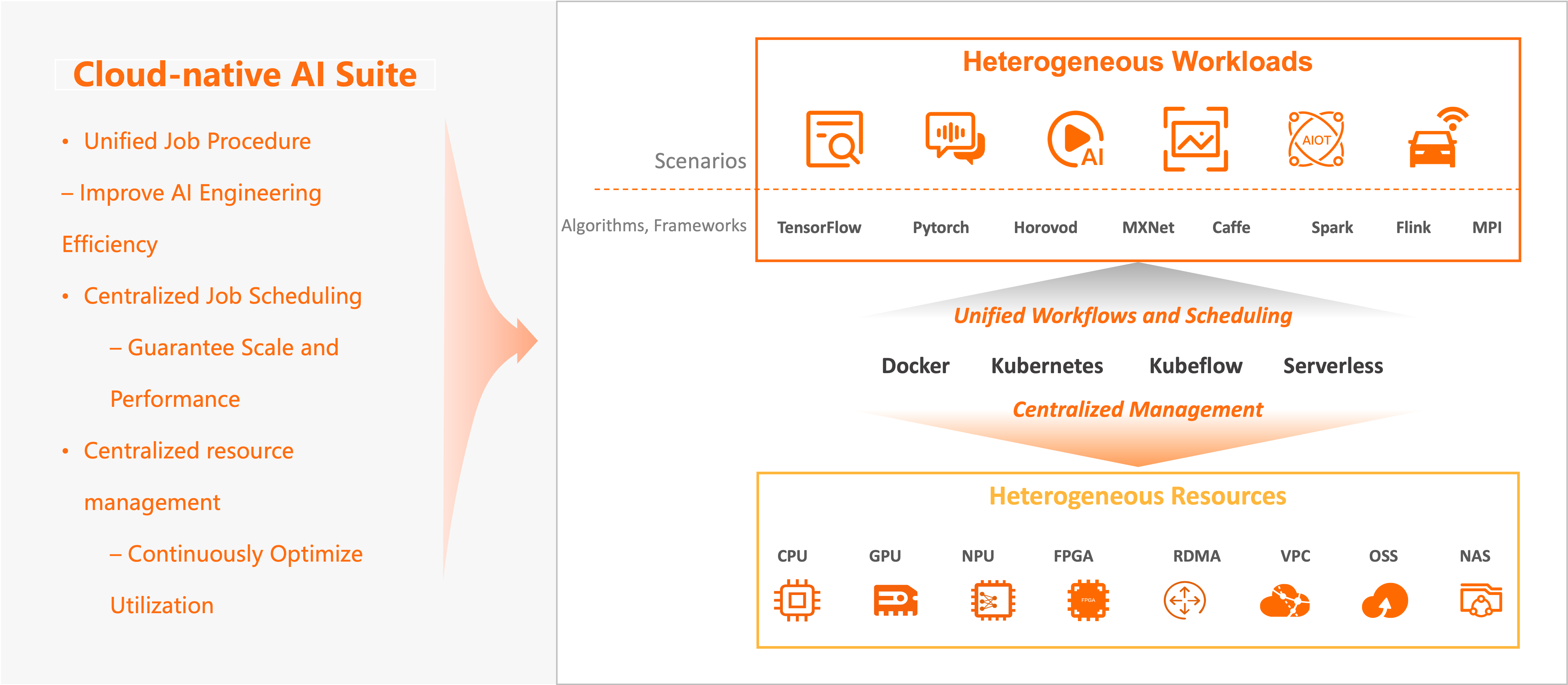
Use case 1: Continuously improve the utilization of heterogeneous resources
The cloud-native AI suite provides an abstraction of heterogeneous resources in the cloud, including computing resources (such as CPUs, GPUs, NPUs, VPUs, and FPGAs), storage resources (OSS, NAS, CPFS, and HDFS), and network resources (TCP and RDMA). You can use the cloud-native AI suite to centrally manage, maintain, and allocate these resources, and continuously improve the resource utilization based on resource scaling and software/hardware optimization.
Use case 2: Efficiently handle heterogeneous workloads such as AI jobs
The cloud-native AI suite is compatible with mainstream open source engines such as TensorFlow, PyTorch, DeepSpeed, Ray, Horovod, Spark, Flink, Kubeflow, Kserve, vLLM, and Triton Inference Server, and also supports self-managed engines and runtimes. The cloud-native AI suite also continuously optimizes training jobs in terms of performance, efficiency, and costs, optimizes the user experience of development and maintenance, and improves the engineering efficiency.
User roles
The cloud-native AI suite defines the following user roles.
|
Role |
Description |
|
O&M administrator |
Responsible for building AI infrastructure and daily administration. For more information, see Deploy the suite, Manage users, Manage elastic quota groups, and Manage datasets. |
|
Algorithm engineer and data scientist |
Uses the cloud-native AI suite to manage jobs. For more information, see Model trainingModel training in Kubernetes clusters, Manage models in MLflow Model Registry through Arena, and Analyze and optimize models. |
Work with the cloud-native AI suite
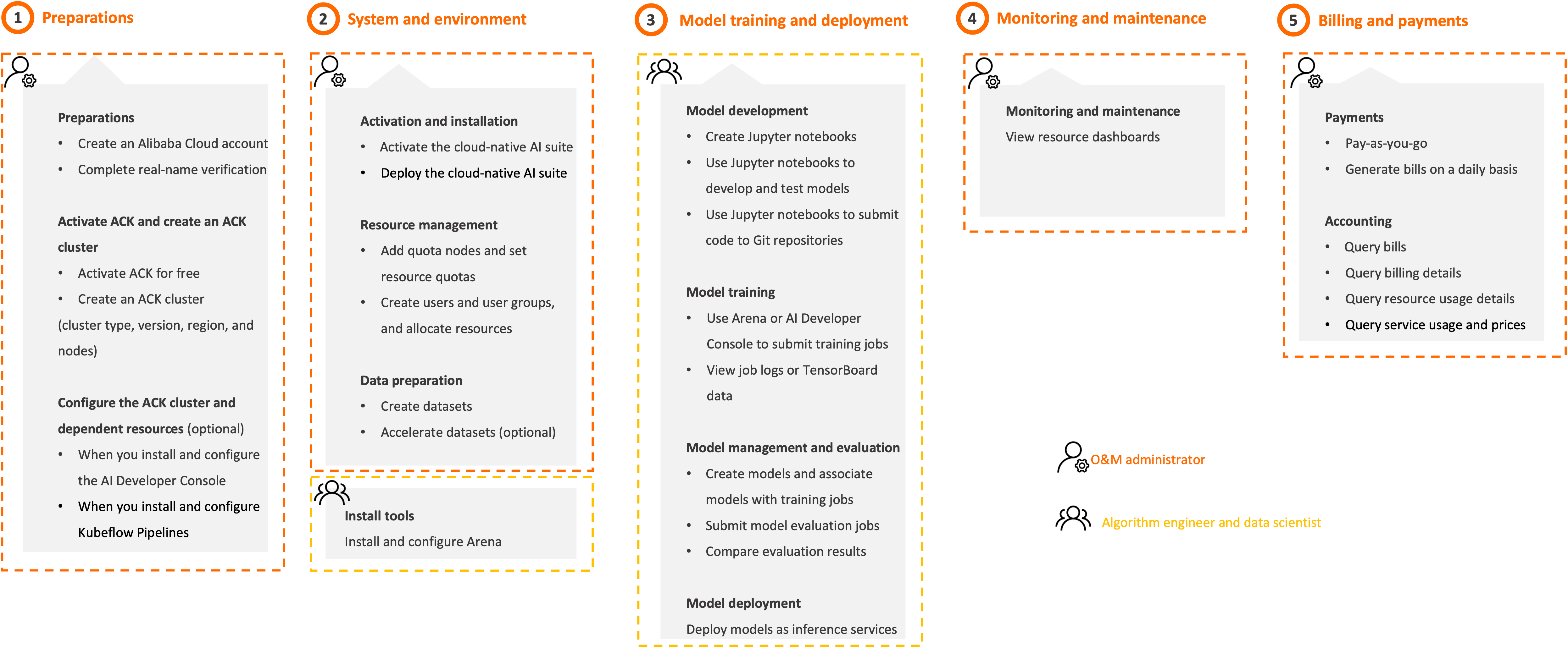
Follow the steps in the following figure to use the cloud-native AI suite based on the user role that you assume.
|
Step |
Description |
Console |
|
1. Preparations (O&M administrator) |
Create an Alibaba Cloud account Create an Alibaba Cloud account and complete real-name verification. For more information, see Register an Alibaba Cloud account. |
|
|
Create an ACK cluster Activate ACK and create an ACK cluster. We recommend that you use the following cluster configurations. For more information, see Create an ACK managed cluster.
|
||
|
(Optional) Configure cluster dependencies and create dependent cloud resources
|
||
|
2. System and environment (O&M administrator) |
Activate and install the cloud-native AI suite
|
|
|
Manage users and quotas
|
AI Dashboard and kubectl Note
The AI consoles provided by Alibaba Cloud (including the developer console and O&M console) are available as a allowlist feature starting January 22, 2025. If you deployed these consoles before the allowlist went into effect, your existing deployment will not be affected. Users who are not on the allowlist can install and configure the AI suite console from the open-source community. For more information about the open-source configuration, see Open-source AI console. |
|
|
Prepare data
|
||
|
(Algorithm engineer and data scientist) |
The cloud-native AI suite allows algorithm engineers and data scientists to use Arena, the web console, and AI Developer Console to develop models, train models, deploy inference services, and manage jobs.
|
|
|
3. Model training and deployment (Algorithm engineer and data scientist) |
When you use Arena or AI Developer Console, you can perform the following steps to train and deploy models: Develop models
Train models
Manage models
Deploy models Deploy a model as an inference service. For more information, see AI service deploymentDeploy AI services. |
AI Developer Console and Arena |
|
Use Lightweight Platform for AI to develop, train, and deploy models. |
N/A |
|
|
4. Monitoring and maintenance (O&M administrator) |
Monitor and maintain resources View the dashboards of various resources, including clusters, nodes, training jobs, and resource quotas. For more information, see Cloud-native AI monitoring dashboards. |
|
|
Manage quotas
|
||
|
Manage users Create, query, update, and delete users or user groups. For more information, see Manage users and Manage user groups. |
||
|
Manage datasets
|
||
|
Manage elastic jobs View elastic jobs and job details. For more information, see View elastic tasks. |
||
|
5. Billing and payments (O&M administrator) |
Starting 00:00:00 (UTC+8) on June 6, 2024, the cloud-native AI suite is free of charge. For more information, see Billing of cloud-native AI suite. |
|
|
Generate bills on a daily basis
|
Billing rules
For more information, see Billing of cloud-native AI suite.
References
|
Reference |
Description |
|
Helps you quickly apply the cloud-native AI suite to your development and O&M work through a few practices. |
|
|
Describes the release notes for the cloud-native AI suite. |