Use Gateway with Inference Extension to configure inference routing for SGLang Prefill/Decode disaggregation services
Prefill/Decode (PD) disaggregation decouples the prefill and decode stages of large language model (LLM) inference onto separate GPUs, eliminating resource contention between the two stages. This reduces Time Per Output Token (TPOT) and increases overall system throughput. This topic uses the Qwen3-32B model to show how to deploy a PD-disaggregated SGLang inference service in an ACK cluster and route traffic to it through Gateway with Inference Extension.
By the end, you will have a working inference endpoint that routes requests to the correct prefill and decode pods automatically, verified by a live chat completion response.
-
Make sure you understand the concepts of InferencePool and InferenceModel before you begin.
-
For background on PD disaggregation, see Deploy an SGLang PD-disaggregated inference service.
-
This topic requires version 1.4.0 or later of Gateway with Inference Extension. When installing the component, select Enable Gateway API Inference Extension.
Prerequisites
Before you begin, ensure that you have:
-
An ACK cluster running version 1.22 or later with GPU nodes added. For more information, see Create an ACK managed cluster and Add GPU nodes to a cluster. This topic requires a cluster with six or more GPUs, each with at least 32 GB of GPU memory. The Qwen3-32B model weights require approximately 64 GB total, split across two GPUs per role (tensor parallelism
--tp 2), so each GPU must hold ~32 GB of model weights. The SGLang PD disaggregation framework uses GPU Direct RDMA (GDR) for KV cache transfer between prefill and decode nodes, so your nodes must support elastic Remote Direct Memory Access (eRDMA). The ecs.ebmgn8is.32xlarge specification satisfies these requirements. For a full list of specifications, see ECS Bare Metal Instance specifications. When creating the node pool, select the Alibaba Cloud Linux 3 64-bit (pre-installed with eRDMA software stack) image from the Alibaba Cloud Marketplace images. For details, see Add eRDMA nodes in an ACK cluster. -
The ack-eRDMA-controller component installed. For more information, see Use eRDMA to accelerate container networks and Install and configure the ACK eRDMA Controller component.
-
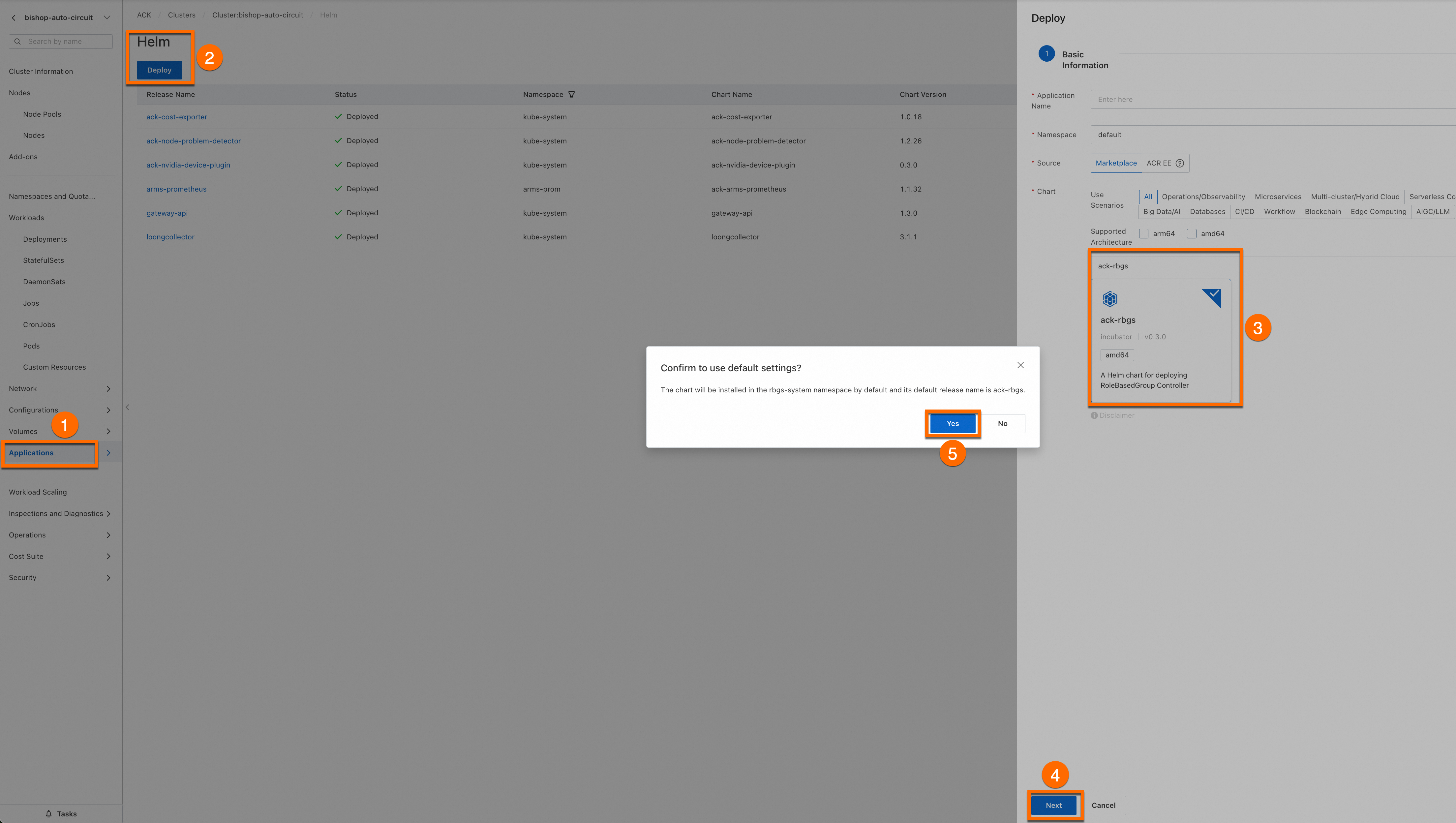
The ack-rbgs component installed: Log on to the Container Service Management Console. In the left navigation pane, click Cluster List and then click the name of your cluster. On the cluster details page, install the ack-rbgs component using Helm. You do not need to configure the Application Name or Namespace fields. Click Next. In the Confirm dialog box that appears, click Yes to use the default application name (ack-rbgs) and namespace (rbgs-system). Then, select the latest chart version and click OK to complete the installation.
Deploy the model
Step 1: Prepare the Qwen3-32B model files
-
Download the Qwen3-32B model from ModelScope.
Make sure the git-lfs plugin is installed. If not, run
yum install git-lfsorapt-get install git-lfs. For other installation methods, see Installing Git Large File Storage.git lfs install GIT_LFS_SKIP_SMUDGE=1 git clone https://www.modelscope.cn/Qwen/Qwen3-32B.git cd Qwen3-32B/ git lfs pull -
Upload the model files to an OSS bucket.
For ossutil installation instructions, see Install ossutil.
ossutil mkdir oss://<YOUR-BUCKET-NAME>/Qwen3-32B ossutil cp -r ./Qwen3-32B oss://<YOUR-BUCKET-NAME>/Qwen3-32B -
Create a persistent volume (PV) named
llm-modeland a persistent volume claim (PVC) for your cluster. For background, see Use ossfs 1.0 to create a statically provisioned volume.-
Create
llm-model.yaml. This file defines a Secret, a statically provisioned PV, and a PVC.apiVersion: v1 kind: Secret metadata: name: oss-secret stringData: akId: <YOUR-OSS-AK> # The AccessKey ID used to access OSS akSecret: <YOUR-OSS-SK> # The AccessKey secret used to access OSS --- apiVersion: v1 kind: PersistentVolume metadata: name: llm-model labels: alicloud-pvname: llm-model spec: capacity: storage: 30 Gi accessModes: - ReadOnlyMany persistentVolumeReclaimPolicy: Retain csi: driver: ossplugin.csi.alibabacloud.com volumeHandle: llm-model nodePublishSecretRef: name: oss-secret namespace: default volumeAttributes: bucket: <YOUR-BUCKET-NAME> # The name of the bucket. url: <YOUR-BUCKET-ENDPOINT> # The Endpoint information, such as oss-cn-hangzhou-internal.aliyuncs.com. otherOpts: "-o umask=022 -o max_stat_cache_size=0 -o allow_other" path: <YOUR-MODEL-PATH> # In this example, the path is /Qwen3-32B/. --- apiVersion: v1 kind: PersistentVolumeClaim metadata: name: llm-model spec: accessModes: - ReadOnlyMany resources: requests: storage: 30 Gi selector: matchLabels: alicloud-pvname: llm-model -
Apply the manifest. ``
bash kubectl create -f llm-model.yaml``
-
Step 2: Deploy the SGLang PD-disaggregated inference service
The SGLang PD-disaggregated service runs as a RoleBasedGroup with two roles: prefill (2 replicas) and decode (1 replica). Both roles use the same container image and share the model volume, but launch with different --disaggregation-mode flags.
-
Create
sglang_pd.yaml. -
Deploy the service.
kubectl create -f sglang_pd.yaml
Configure inference routing
Step 1: Deploy the inference routing policy
The InferencePool selects both prefill and decode pods by the shared alibabacloud.com/inference_backend: sglang label. The InferenceTrafficPolicy tells Gateway with Inference Extension that the backend runs in PD-disaggregated mode and specifies how to distinguish the two roles.
-
Create
inference-policy.yaml.# InferencePool declares that inference routing is enabled for the workload. apiVersion: inference.networking.x-k8s.io/v1alpha2 kind: InferencePool metadata: name: qwen-inference-pool spec: targetPortNumber: 8000 selector: alibabacloud.com/inference_backend: sglang # Selects both the prefill and decode workloads. --- # InferenceTrafficPolicy specifies the traffic policy applied to the InferencePool. apiVersion: inferenceextension.alibabacloud.com/v1alpha1 kind: InferenceTrafficPolicy metadata: name: inference-policy spec: poolRef: name: qwen-inference-pool modelServerRuntime: sglang # Specifies that the backend service runtime framework is SGLang. profile: pd: # Specifies that the backend service is deployed in PD-disaggregated mode. pdRoleLabelName: rolebasedgroup.workloads.x-k8s.io/role # Differentiates between the prefill and decode roles in the InferencePool by specifying pod labels. kvTransfer: bootstrapPort: 34000 # The bootstrap port used for KVCache transmission by the SGLang PD-disaggregated service. This must be consistent with the disaggregation-bootstrap-port parameter specified in the RoleBasedGroup deployment. -
Apply the routing policy.
kubectl apply -f inference-policy.yaml
Step 2: Deploy the gateway and routing rules
-
Create
inference-gateway.yaml. This file defines the gateway, the HTTPRoute that directs/v1traffic to the InferencePool, and a BackendTrafficPolicy that sets the request timeout to 24 hours.apiVersion: gateway.networking.k8s.io/v1 kind: Gateway metadata: name: inference-gateway spec: gatewayClassName: ack-gateway listeners: - name: http-llm protocol: HTTP port: 8080 --- apiVersion: gateway.networking.k8s.io/v1 kind: HTTPRoute metadata: name: inference-route spec: parentRefs: - name: inference-gateway rules: - matches: - path: type: PathPrefix value: /v1 backendRefs: - name: qwen-inference-pool kind: InferencePool group: inference.networking.x-k8s.io --- apiVersion: gateway.envoyproxy.io/v1alpha1 kind: BackendTrafficPolicy metadata: name: backend-timeout spec: timeout: http: requestTimeout: 24h targetRef: group: gateway.networking.k8s.io kind: Gateway name: inference-gateway -
Apply the gateway and routing rules.
kubectl apply -f inference-gateway.yaml
Step 3: Verify inference routing for the SGLang PD-disaggregated service
-
Get the gateway IP address.
export GATEWAY_IP=$(kubectl get gateway/inference-gateway -o jsonpath='{.status.addresses[0].value}') -
Send a test request to confirm the gateway routes traffic to the inference service.
curl http://$GATEWAY_IP:8080/v1/chat/completions \
  -H "Content-Type: application/json" \
  -d '{
    "model": "/models/Qwen3-32B",
    "messages": [
      {"role": "user", "content": "Hello, this is a test"}
    ],
    "max_tokens": 50
  }'
Expected output:
{"id":"02ceade4e6f34aeb98c2819b8a2545d6","object":"chat.completion","created":1755589644,"model":"/models/Qwen3-32B","choices":[{"index":0,"message":{"role":"assistant","content":"<think>\nOkay, the user sent \"Hello, this is a test\". It seems they are testing my response. First, I need to confirm what the user's request is. It's possible they want to see if my reply meets their expectations or to check for errors. I should remain friendly and","reasoning_content":null,"tool_calls":null},"logprobs":null,"finish_reason":"length","matched_stop":null}],"usage":{"prompt_tokens":12,"total_tokens":62,"completion_tokens":50,"prompt_tokens_details":null}}A response with
"model":"/models/Qwen3-32B"and achoicesarray confirms that Gateway with Inference Extension correctly scheduled the request to the SGLang PD-disaggregated inference service.