Traditional load balancing is often insufficient for LLM inference services in Kubernetes clusters, as it relies on simple traffic allocation that cannot handle the complex requests and dynamic traffic load of LLM inference. This topic explains how to use the Gateway with Inference Extension add-on to configure an inference service extension for intelligent routing and efficient traffic management.
Background information
Large language models (LLMs)
Large language models (LLMs) are neural network-based language models with billions of parameters, exemplified by GPT, Qwen, and Llama. These models are trained on diverse and extensive datasets -- including web text, professional literature, and code -- and are primarily used for text generation tasks such as completion and dialogue.
To leverage LLMs for building applications, you can:
Use external LLM API services from platforms like OpenAI, Alibaba Cloud Model Studio, or Moonshot.
Build your own LLM inference services using open-source or proprietary models and frameworks such as vLLM, and deploy them in a Kubernetes cluster. This approach suits scenarios that require control over the inference service or high customization of LLM inference capabilities.
vLLM
vLLM is a framework designed for efficient and user-friendly construction of LLM inference services. It supports various large language models, including Qwen, and optimizes inference efficiency through techniques like PagedAttention, dynamic batch inference (Continuous Batching), and model quantization.
KV cache
Workflow
The following diagram illustrates the workflow.

In the
inference-gateway, port 8080 uses a standard http route to forward requests to the backend inference service. Port 8081, however, routes requests to the inference service extension (LLM Route), which then forwards them to the backend inference service.In an http route, you configure an
InferencePoolresource to declare a group of LLM inference service workloads running in the cluster, and anInferenceModelresource to specify the traffic distribution policy for a specific model within theInferencePool. This setup routes requests from port 8081 of theinference-gatewayto the specified workloads using a load balancing algorithm enhanced for inference services.
Prerequisites
You must have an ACK managed cluster with a GPU node pool. Alternatively, install the ACK Virtual Node add-on in your ACK managed cluster to use ACS GPU computing power.
Procedure
Step 1: Deploy a sample inference service
Create a file named vllm-service.yaml with the following content.
NoteFor the image in this article, use A10 cards on Container Service for Kubernetes (ACK) clusters and the L20(GN8IS) card type on Alibaba Cloud Container Compute Service (ACS).
Because the LLM image is large, transfer it to Container Registry (ACR) and pull it using an internal network address. Pulling from the public network can be slow, as the speed is limited by the bandwidth of the cluster's elastic IP address (EIP).
Deploy the sample inference service.
kubectl apply -f vllm-service.yaml
Step 2: Install Gateway with Inference Extension
Install the ACK Gateway with Inference Extension add-on, and make sure that Enable Gateway API Inference Extension (Requires a deployed inference service) is selected.
In the parameter configuration, set the deployment replicas (control plane replica count) to replicas of the deployment to 2. Under envoyGateway > resources > limits, set CPU to 500m and memory to 1Gi. Under requests, set CPU to 100m and memory to 256Mi.
Step 3: Deploy inference routing
This step creates InferencePool and InferenceModel resources.
Create the
inference-pool.yamlfile.apiVersion: inference.networking.x-k8s.io/v1alpha2 kind: InferencePool metadata: name: vllm-qwen-pool spec: targetPortNumber: 8000 selector: app: qwen extensionRef: name: inference-gateway-ext-proc --- apiVersion: inference.networking.x-k8s.io/v1alpha2 kind: InferenceModel metadata: name: inferencemodel-qwen spec: modelName: /model/qwen criticality: Critical poolRef: group: inference.networking.x-k8s.io kind: InferencePool name: vllm-qwen-pool targetModels: - name: /model/qwen weight: 100Apply the configuration.
kubectl apply -f inference-pool.yaml
Step 4: Deploy and verify gateway
This step creates a gateway that listens on ports 8080 and 8081.
Create the
inference-gateway.yamlfile.apiVersion: gateway.networking.k8s.io/v1 kind: GatewayClass metadata: name: qwen-inference-gateway-class spec: controllerName: gateway.envoyproxy.io/gatewayclass-controller --- apiVersion: gateway.networking.k8s.io/v1 kind: Gateway metadata: name: qwen-inference-gateway spec: gatewayClassName: qwen-inference-gateway-class listeners: - name: http protocol: HTTP port: 8080 - name: llm-gw protocol: HTTP port: 8081 --- apiVersion: gateway.networking.k8s.io/v1 kind: HTTPRoute metadata: name: qwen-backend spec: parentRefs: - name: qwen-inference-gateway sectionName: llm-gw rules: - backendRefs: - group: inference.networking.x-k8s.io kind: InferencePool name: vllm-qwen-pool matches: - path: type: PathPrefix value: / --- apiVersion: gateway.networking.k8s.io/v1 kind: HTTPRoute metadata: name: qwen-backend-no-inference spec: parentRefs: - group: gateway.networking.k8s.io kind: Gateway name: qwen-inference-gateway sectionName: http rules: - backendRefs: - group: "" kind: Service name: qwen port: 8000 weight: 1 matches: - path: type: PathPrefix value: / --- apiVersion: gateway.envoyproxy.io/v1alpha1 kind: BackendTrafficPolicy metadata: name: backend-timeout spec: timeout: http: requestTimeout: 1h targetRef: group: gateway.networking.k8s.io kind: Gateway name: qwen-inference-gatewayDeploy the gateway.
kubectl apply -f inference-gateway.yamlThis configuration creates a namespace named
envoy-gateway-systemand a service namedenvoy-default-inference-gateway-645xxxxxin the cluster.Get the public IP address of the gateway.
export GATEWAY_HOST=$(kubectl get gateway/qwen-inference-gateway -o jsonpath='{.status.addresses[0].value}')Verify that the gateway routes to the inference service via standard HTTP routing on port 8080.
curl -X POST ${GATEWAY_HOST}:8080/v1/chat/completions -H 'Content-Type: application/json' -d '{
    "model": "/model/qwen",
    "max_completion_tokens": 100,
    "temperature": 0,
    "messages": [
      {
        "role": "user",
        "content": "Write as if you were a critic: San Francisco"
      }
    ]
}'
Expected output:
{"id":"chatcmpl-aa6438e2-d65b-4211-afb8-ae8e76e7a692","object":"chat.completion","created":1747191180,"model":"/model/qwen","choices":[{"index":0,"message":{"role":"assistant","reasoning_content":null,"content":"San Francisco, a city that has long been a beacon of innovation, culture, and diversity, continues to captivate the world with its unique charm and character. As a critic, I find myself both enamored and occasionally perplexed by the city's multifaceted personality.\n\nSan Francisco's architecture is a testament to its rich history and progressive spirit. The iconic cable cars, Victorian houses, and the Golden Gate Bridge are not just tourist attractions but symbols of the city's enduring appeal. However, the","tool_calls":[]},"logprobs":null,"finish_reason":"length","stop_reason":null}],"usage":{"prompt_tokens":39,"total_tokens":139,"completion_tokens":100,"prompt_tokens_details":null},"prompt_logprobs":null}Verify that the gateway routes to the inference service via the inference service extension on port 8081.
curl -X POST ${GATEWAY_HOST}:8081/v1/chat/completions -H 'Content-Type: application/json' -d '{
    "model": "/model/qwen",
    "max_completion_tokens": 100,
    "temperature": 0,
    "messages": [
      {
        "role": "user",
        "content": "Write as if you were a critic: Los Angeles"
      }
    ]
}'
Expected output:
{"id":"chatcmpl-cc4fcd0a-6a66-4684-8dc9-284d4eb77bb7","object":"chat.completion","created":1747191969,"model":"/model/qwen","choices":[{"index":0,"message":{"role":"assistant","reasoning_content":null,"content":"Los Angeles, the sprawling metropolis often referred to as \"L.A.,\" is a city that defies easy description. It is a place where dreams are made and broken, where the sun never sets, and where the line between reality and fantasy is as blurred as the smog that often hangs over its valleys. As a critic, I find myself both captivated and perplexed by this city that is as much a state of mind as it is a physical place.\n\nOn one hand, Los","tool_calls":[]},"logprobs":null,"finish_reason":"length","stop_reason":null}],"usage":{"prompt_tokens":39,"total_tokens":139,"completion_tokens":100,"prompt_tokens_details":null},"prompt_logprobs":null}
(Optional) Step 5: Configure observability metrics and dashboard
You must enable and integrate Managed Service for Prometheus with the cluster, which may incur additional fees.
Add
annotationsto the vLLM servicepod, allowing Prometheus to use its default service discovery to scrapemetricsand monitor the service's internal state.... annotations: prometheus.io/path: /metrics # The HTTP path for the metrics endpoint. prometheus.io/port: "8000" # The port for the metrics endpoint, which is the vLLM server's listening port. prometheus.io/scrape: "true" # Specifies whether Prometheus scrapes metrics from this pod. ...The following table lists key monitoring
metricsfor the vLLM service.Metric
Description
vllm:gpu_cache_usage_perc
The percentage of GPU cache used by vLLM. When vLLM starts, it pre-allocates as much
GPU video memoryas possible for the KV cache. On vLLM servers, a lower utilization percentage means the GPU has enough space for new requests.vllm:request_queue_time_seconds_sum
The total time that requests spend waiting in the queue. Incoming LLM inference requests may not be processed immediately. They must wait for the
vLLM schedulerto schedule them forprefillanddecode.vllm:num_requests_running
vllm:num_requests_waiting
vllm:num_requests_swapped
The number of requests currently processing, waiting, or swapped to memory. Use these values to assess the vLLM service's current request load.
vllm:avg_generation_throughput_toks_per_s
vllm:avg_prompt_throughput_toks_per_s
The number of
tokensper second consumed during theprefillstage and generated during thedecodestage.vllm:time_to_first_token_seconds_bucket
The
latencybetween sending a request to the vLLM service and receiving the firsttoken. Thismetric, also known as Time to First Token (TTFT), is critical to the user experience as it measures the client's wait time for the initial response.Use these monitoring
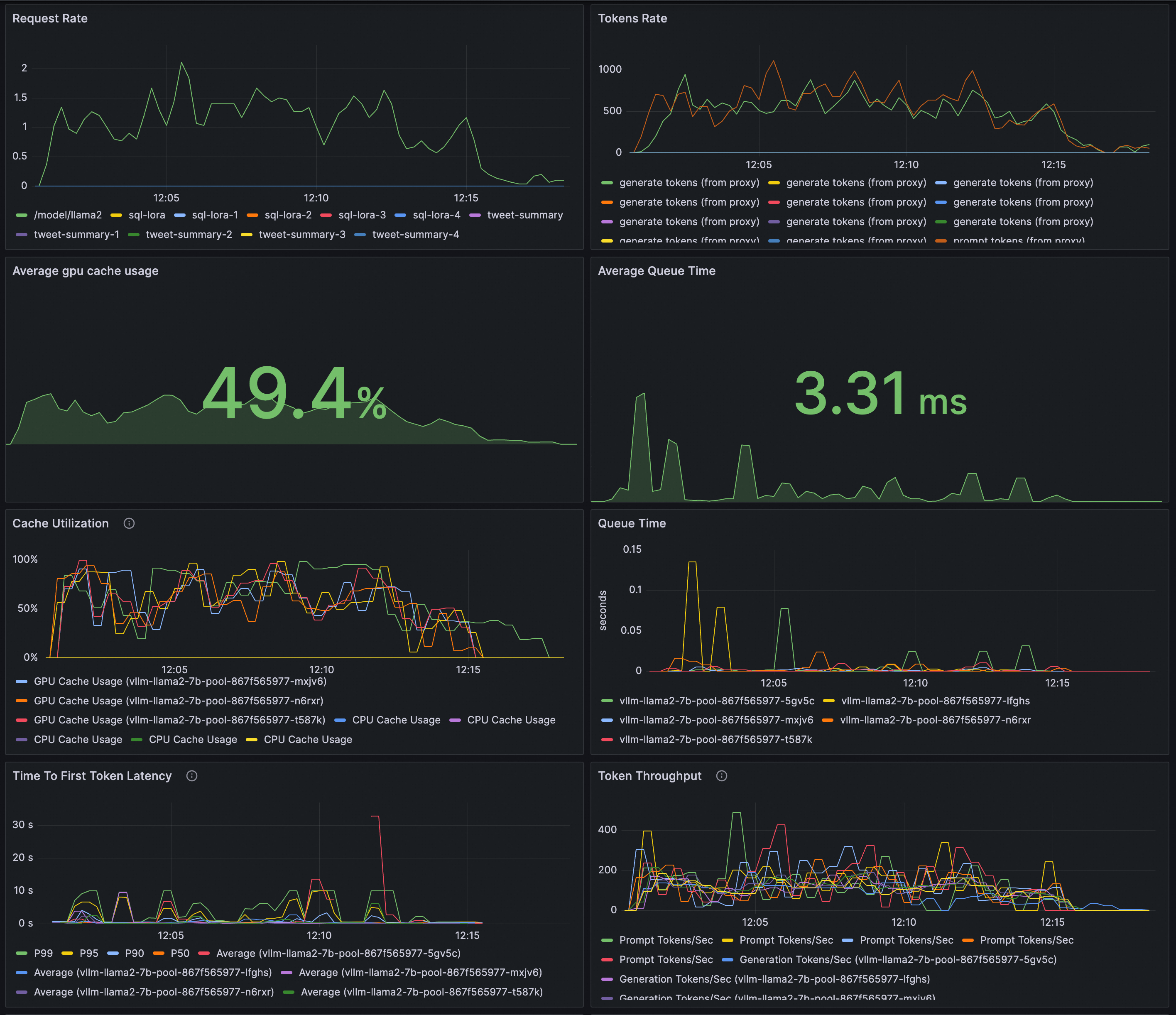
metricsto configurealert rulesfor real-time monitoring andanomaly detectionof your LLM service.Configure a Grafana dashboard to monitor an LLM inference service deployed with vLLM in real time. This dashboard allows you to:
Observe the request rate and total token throughput for the LLM service.
Observe the internal state of the inference workload.
Ensure your Prometheus instance, which serves as the data source for Grafana, has collected the vLLM monitoring metrics. To create the dashboard, import the following JSON content into Grafana.
Preview:
Use an ACK cluster and the vllm benchmark to stress-test an inference service and compare the load balancing of standard HTTP routing and inference service routing.
Deploy the stress test workload.
kubectl apply -f- <<EOF
apiVersion: apps/v1
kind: Deployment
metadata:
  labels:
    app: vllm-benchmark
  name: vllm-benchmark
  namespace: default
spec:
  progressDeadlineSeconds: 600
  replicas: 1
  revisionHistoryLimit: 10
  selector:
    matchLabels:
      app: vllm-benchmark
  strategy:
    rollingUpdate:
      maxSurge: 25%
      maxUnavailable: 25%
    type: RollingUpdate
  template:
    metadata:
      creationTimestamp: null
      labels:
        app: vllm-benchmark
    spec:
      containers:
      - command:
        - sh
        - -c
        - sleep inf
        image: registry-cn-hangzhou.ack.aliyuncs.com/dev/llm-benchmark:random-and-qa
        imagePullPolicy: IfNotPresent
        name: vllm-benchmark
        resources: {}
        terminationMessagePath: /dev/termination-log
        terminationMessagePolicy: File
      dnsPolicy: ClusterFirst
      restartPolicy: Always
      schedulerName: default-scheduler
      securityContext: {}
      terminationGracePeriodSeconds: 30
EOF
Start the stress test.
Get the internal IP address of the gateway.
export GW_IP=$(kubectl get svc -n envoy-gateway-system -l gateway.envoyproxy.io/owning-gateway-namespace=default,gateway.envoyproxy.io/owning-gateway-name=qwen-inference-gateway -o jsonpath='{.items[0].spec.clusterIP}')Run the stress test.
Standard HTTP routing
kubectl exec -it deploy/vllm-benchmark -- env GW_IP=${GW_IP} python3 /root/vllm/benchmarks/benchmark_serving.py \
--backend vllm \
--model /models/DeepSeek-R1-Distill-Qwen-7B \
--served-model-name /model/qwen \
--trust-remote-code \
--dataset-name random \
--random-prefix-len 10 \
--random-input-len 1550 \
--random-output-len 1800 \
--random-range-ratio 0.2 \
--num-prompts 3000 \
--max-concurrency 200 \
--host $GW_IP \
--port 8080 \
--endpoint /v1/completions \
--save-result \
2>&1 | tee benchmark_serving.txt
Inference service routing
kubectl exec -it deploy/vllm-benchmark -- env GW_IP=${GW_IP} python3 /root/vllm/benchmarks/benchmark_serving.py \
--backend vllm \
--model /models/DeepSeek-R1-Distill-Qwen-7B \
--served-model-name /model/qwen \
--trust-remote-code \
--dataset-name random \
--random-prefix-len 10 \
--random-input-len 1550 \
--random-output-len 1800 \
--random-range-ratio 0.2 \
--num-prompts 3000 \
--max-concurrency 200 \
--host $GW_IP \
--port 8081 \
--endpoint /v1/completions \
--save-result \
2>&1 | tee benchmark_serving.txt
After the tests complete, the dashboard shows a comparison of the load balancing between standard HTTP routing and inference service routing.
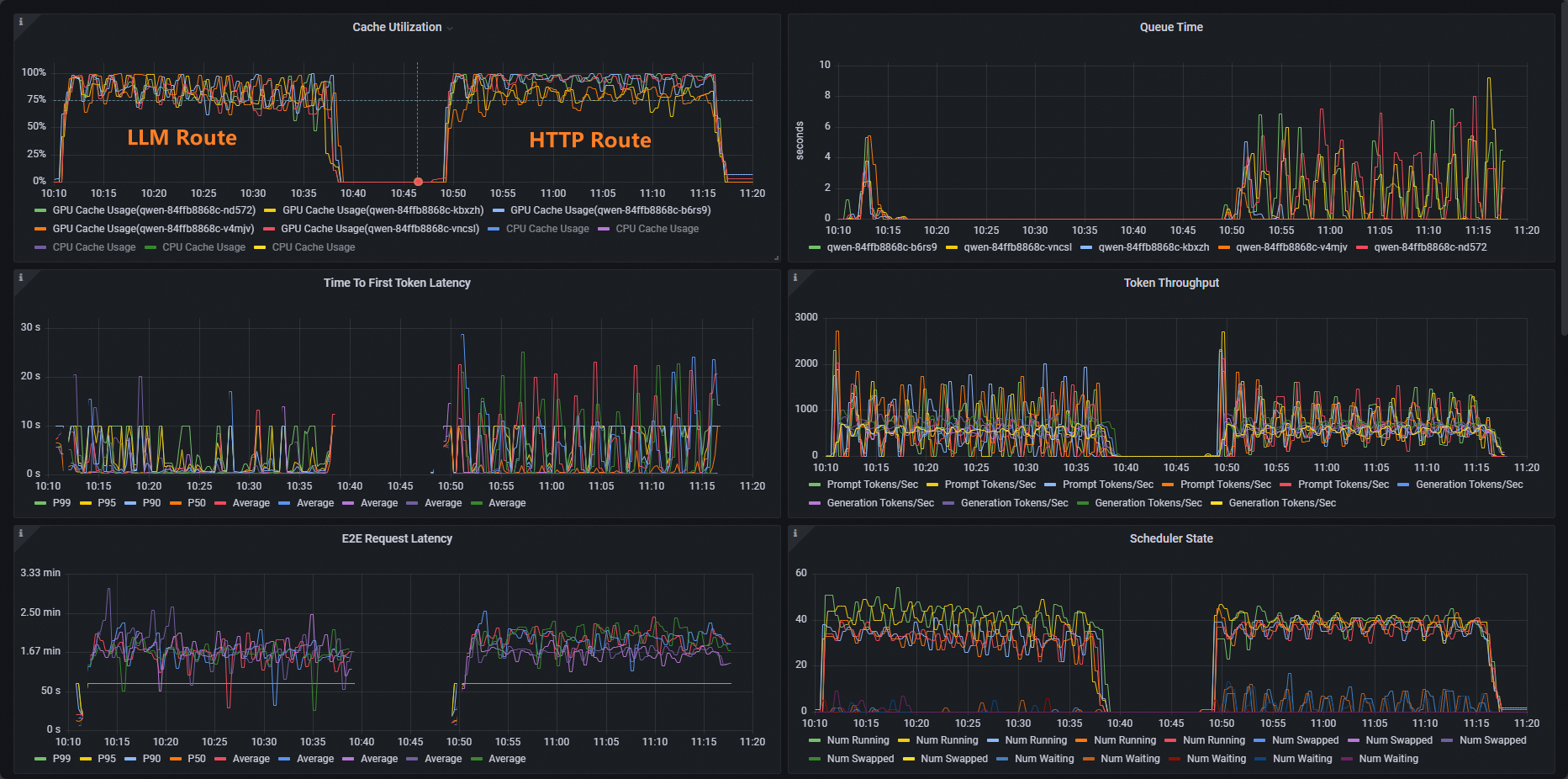
Workloads that use standard HTTP routing show an uneven Cache Utilization distribution, while those that use inference service routing have a balanced distribution.
Next steps
Gateway with Inference Extension supports various load balancing policies for different inference service use cases. You can apply a load balancing policy to inference requests routed to pods in an InferencePool by adding the inference.networking.x-k8s.io/routing-strategy annotation to the InferencePool resource.
The following example selects inference service pods using the app: vllm-app selector and applies the default load balancing policy, which is based on inference server metrics.
apiVersion: inference.networking.x-k8s.io/v1alpha2
kind: InferencePool
metadata:
  name: vllm-app-pool
  annotations:
    inference.networking.x-k8s.io/routing-strategy: "DEFAULT"
spec:
  targetPortNumber: 8000
  selector:
    app: vllm-app
  extensionRef:
    name: inference-gateway-ext-proc
The following load balancing policies are supported:
Policy | Description |
DEFAULT | The default load balancing policy based on inference server metrics. This policy evaluates the internal state of each inference server using multiple metrics, including request queue length and GPU cache utilization, and distributes traffic accordingly. |
PREFIX_CACHE | The request prefix-matching load balancing policy. This policy routes requests that share a common prefix to the same inference server pod. It is ideal for scenarios with a high volume of such requests, especially when the inference server has automatic prefix caching enabled. Typical use cases include:
|