When you no longer need an ApsaraDB RDS for MySQL instance, you can release or unsubscribe from it to stop billing. The action depends on your billing model: release a pay-as-you-go or serverless instance, or unsubscribe from a subscription instance.
Prerequisites
Before you begin, confirm the following:
-
Billing model: Identify whether your instance uses pay-as-you-go, serverless, or subscription billing. The action you take differs by billing model.
-
Suspension state: A pay-as-you-go instance in the Suspended state cannot be released directly. Restart the instance first, or call the DeleteDBInstance API operation.
-
Last read-only instance: To release or unsubscribe from the last read-only instance attached to a primary instance, first disable read/write splitting on the primary instance.
-
After you unsubscribe from a subscription instance, it enters a locked state. It remains visible in the console but billing stops. You must destroy the instance in the recycle bin to permanently remove it from the console.
-
Data backup: Releasing or unsubscribing from an instance permanently deletes its data in most cases. Back up the instance before proceeding, then download the backup files to local storage.
What happens after you release or unsubscribe
Recycle bin
The following instances are moved to the recycle bin after release or unsubscription. You can unlock and rebuild them from the recycle bin:
-
Subscription instances that expire or are manually unsubscribed from
-
Pay-as-you-go instances that are manually released
-
Serverless instances that are manually released
Not all instances meet the requirements for the recycle bin. For details, see Manage ApsaraDB RDS for MySQL instances in the recycle bin.
Data retention
Your data outcome depends on whether you configured backup retention before releasing or unsubscribing:
| Scenario | What happens |
|---|---|
| Backup Retention Policy After Release is configured | Backup files are retained after the instance is released. Download them from the console. If the parameter is set to Latest or All, backup storage fees continue to apply. To stop charges, delete the backup files. |
| Cross-region backup is enabled and the instance is within the retention period | Cross-region backup files are retained. |
| Neither of the above | Instance data is immediately and permanently deleted. This cannot be undone. |
Read-only instances
When you release or unsubscribe from a primary instance, all associated read-only instances — both pay-as-you-go and subscription — are automatically deleted. Payments for subscription read-only instances are refunded.
Subscription instances in the console
After you unsubscribe from a subscription instance, it is locked and no further fees are charged. The instance remains visible in the ApsaraDB RDS console until you destroy it in the recycle bin.
Pre-release check
Before you release an instance, we recommend that you check the number of active connections to avoid service interruptions caused by business connections that were not properly closed.
-
In the left-side navigation pane of the ApsaraDB RDS console, choose O&M and Monitoring > Performance Monitoring to view session connection metrics.
-
Alternatively, click Log On to Database on the instance list page to go to DMS and run the
SHOW PROCESSLISTcommand to check real-time connections. -
After you confirm that no active business connections exist, proceed to release the instance.
In cross-account data migration scenarios, the source instance may still have residual DTS connections after migration is complete. Make sure that you verify the connection count before releasing the instance.
Release or unsubscribe from a primary instance
Release a pay-as-you-go or serverless primary instance
-
Log on to the ApsaraDB RDS console. In the left-side navigation pane, click Instances. In the top navigation bar, select the region where your instance resides.
-
Use either of the following methods to release the instance:
-
In the dialog box, click Yes.
Unsubscribe from a subscription primary instance
Use any of the following methods to unsubscribe from a subscription instance.
From the Unsubscriptions page
Go to the Resource Unsubscription page and submit a ticketticketticketticketticketticketticket to apply for unsubscription.
Log on to the Unsubscription Management page and submit a ticket to request unsubscription from the subscription instance.
Log on to the Unsubscription Management page and submit a ticket to request unsubscription from the subscription instance.
From the Basic Information page
-
Log on to the ApsaraDB RDS console. In the left-side navigation pane, click Instances. In the top navigation bar, select the region where your instance resides.
-
Find the instance and click its ID. On the Basic Information page, go to the Status section and click Cancellation of Instance Subscription to open the Resource Unsubscription page. Submit a ticketticketticketticketticketticketticket to apply for unsubscription.
From the instance list
-
Log on to the ApsaraDB RDS console. In the left-side navigation pane, click Instances. In the top navigation bar, select the region where your instance resides.
-
Find the instance. In the Actions column, choose More > Cancellation of Instance Subscription. In the dialog box, click OK to open the Resource Unsubscription page. Submit a ticketticketticketticketticketticketticket to apply for unsubscription.
Release or unsubscribe from a read-only instance
Release a pay-as-you-go read-only instance
-
Log on to the ApsaraDB RDS console. In the left-side navigation pane, click Instances. In the top navigation bar, select the region where your instance resides.
-
Use either of the following methods to release the instance:
-
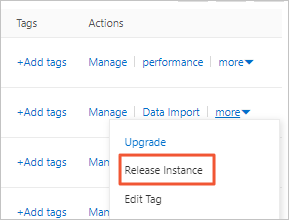
Method 1: Find the read-only instance. In the Actions column, choose More > Release Instance.
-
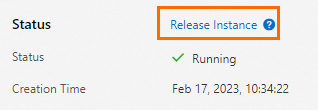
Method 2: Find the read-only instance and click its ID. On the Basic Information page, click Release Instance.
-
-
In the dialog box, click OK.
Unsubscribe from a subscription read-only instance
Use any of the following methods to unsubscribe from a subscription read-only instance.
From the Unsubscriptions page
Go to the Resource Unsubscription page and submit a ticketticketticketticketticketticketticket to apply for unsubscription.
From the Basic Information page
-
Log on to the ApsaraDB RDS console. In the left-side navigation pane, click Instances. In the top navigation bar, select the region where your instance resides.
-
Find the read-only instance and click its ID. On the Basic Information page, go to the Status section and click Cancellation of Instance Subscription to open the Resource Unsubscription page. Submit a ticketticketticketticketticketticketticket to apply for unsubscription.
From the instance list
-
Log on to the ApsaraDB RDS console. In the left-side navigation pane, click Instances. In the top navigation bar, select the region where your instance resides.
-
Find the read-only instance. In the Actions column, choose More > Cancellation of Instance Subscription. In the dialog box, click OK to open the Resource Unsubscription page. Submit a ticketticketticketticketticketticketticket to apply for unsubscription.
Automatic deletion
When you release or unsubscribe from a primary instance, all its read-only instances are automatically deleted and subscription payments are refunded. No separate action is required.
FAQ
API reference
| Operation | Description |
|---|---|
| DeleteDBInstance | Releases a pay-as-you-go or serverless instance. Not applicable to subscription instances. |