In autonomous driving systems, image analysis is a critical part of the perception module. It parses visual information from internal and external cameras in real time to understand and react to the vehicle's surroundings. This guide uses the BDD100K autonomous driving dataset as an example to simulate real-world driving scenarios. With 100,000 images covering diverse driving regions, geographies, environments, and weather conditions, this solution provides a full-stack technical validation for analyzing driving trajectories, optimizing environmental perception, and improving pedestrian and vehicle recognition accuracy. This enhances the system's adaptability to complex traffic scenarios, as well as its overall safety and user experience.
Core capabilities
This solution focuses on image processing and multi-modal search and analysis, using the following core capabilities:
Object Table: Reads unstructured data, such as PDF, IMAGE, and PPT files, from Object Storage Service (OSS) as a table.
AI Function: Lets you use standard SQL to call functions in Hologres. These functions automatically invoke built-in large models to help you build AI services.
Data processing: Provides
EmbedandChunkfunctions to process unstructured data into a structured format for storage. You can automatically generate embeddings without using external algorithms.Data retrieval and analysis: Provides functions such as
ai_genandai_summarize, allowing you to use SQL to perform inference, question summarization, and translation on data.
Dynamic Table: Supports incremental refresh mode to automatically process unstructured data. This mode processes only the data delta, which reduces redundant computation and lowers resource usage.
Vector search: Supports vector search queries using standard SQL for use cases such as similarity search and scene recognition on unstructured data. You can freely combine vector predicates and scalar filters in the same query.
Full-text search: Implements efficient search on unstructured data through mechanisms like inverted index and tokenization. It supports various query methods, such as keyword matching and phrase search, for more flexible retrieval.
Solution advantages
Hologres provides the following key advantages for image search:
End-to-end AI data pipeline: Covers the entire workflow, from data embedding and chunking to incremental processing and search or analysis. Build AI applications as easily as you would a big data system.
Process image data with standard SQL: Extract and process image data using pure SQL, without requiring specialized programming languages.
Unified platform for cross-modal search: Supports text-to-image search and image-to-image search. Semantic understanding goes beyond keyword limitations, allowing you to implement cross-modal search directly in Hologres.
More accurate, flexible, and intelligent search: Easily build hybrid search pipelines that combine keyword, semantic, and multi-modal search to cover all needs, from precise matching to intent understanding. You can also use AI Function to gain deep insights into user intent, correlate semantics, and perform contextual inference for more intelligent search.
Enhanced security with in-database processing: Processing data within Hologres eliminates the need for export. This approach integrates seamlessly with Hologres security features and provides robust data protection.
How it works
The workflow for this solution is as follows:
Prepare the dataset.
Upload the image data to an OSS bucket.
Process the images.
Use an Object Table to read image metadata. Then, create a Dynamic Table with incremental refresh to generate embeddings for the data. Build a vector index on the Dynamic Table to accelerate subsequent queries.
Use the
ai_embedfunction to create embeddings from natural language questions, and then use vector search to output the top N results.
Prerequisites
Data preparation
This topic uses the BDD100K Autonomous Driving Image Dataset from ModelScope and its
val.zipfile to simulate real driving data from multiple vehicles.Environment preparation
Purchase a Hologres instance of V4.0 or later and create a database.
This topic uses one
large-96core-512GB-384GBnode as an example.AI models and deployment. The following models and resources are used in this solution:
Parameter
Value
Model name
image_embed
Model category
clip-ViT-B-32
Model purpose
image embedding
vCPUs per replica
7
Memory per replica
30 GB
GPU per replica
1 card (96 GB)
Number of replicas
1
NoteThe preceding resource configurations for the model are default allocations.
Procedure
Download the image data and upload it to OSS.
Download the
val.zipfile from the BDD100K Autonomous Driving Image Dataset.Log on to the OSS Management Console, create a bucket, and upload the downloaded
val.zipfile to the bucket. For more information about the upload operation, see Simple upload.NoteUse lowercase for folder names.
Set up permissions.
-
Log on to the Resource Access Management (RAM) console and create an Alibaba Cloud RAM role with OSS read permissions.
We recommend granting the AliyunOSSReadOnlyAccess permission.
-
Add logon and Hologres access permissions to the RAM role.
-
Alibaba Cloud account (primary account)
Update the RAM role trust policy. Update the following parameters:
-
Action: Set to
sts:AssumeRole. -
Service: Set to
hologres.aliyuncs.com.
{ "Statement": [ { "Action": "sts:AssumeRole", "Effect": "Allow", "Principal": { "RAM": [ "acs:ram::1866xxxx:root" ], "Service": [ "hologres.aliyuncs.com" ] } } ], "Version": "1" } -
-
RAM user (sub-account)
-
Grant permissions to the RAM user.
-
On the page, click Create permission policy and select Script editor mode to create a policy. For details, see Create a custom policy.
Hologres uses this policy to determine whether the RAM user has permission to create the corresponding RAM role. Use the following policy document:
{ "Version": "1", "Statement": [ { "Effect": "Allow", "Action": "hologram:GrantAssumeRole", "Resource": "<RoleARN>" } ] } -
On the page, click Add permissions in the Actions column for the target RAM user to assign the policy created above. For details, see Manage RAM user permissions.
-
-
Grant permissions to the created RAM role.
Update the RAM role trust policy. Update the following parameters:
-
Action: Set to
sts:AssumeRole. -
Service: Set to
hologres.aliyuncs.com.
{ "Statement": [ { "Action": "sts:AssumeRole", "Effect": "Allow", "Principal": { "RAM": [ "acs:ram::1866xxxx:root" ], "Service": [ "hologres.aliyuncs.com" ] } } ], "Version": "1" } -
-
-
-
Generate embeddings for the images.
Create an Object Table and a Dynamic Table to read image metadata and generate embeddings. To simplify this process, Hologres encapsulates it in a stored procedure. This stored procedure provides the following capabilities:
Creates an Object Table to read image metadata.
Creates a sink Dynamic Table with incremental refresh to store the processed data and sets a vector index. The auto-refresh feature is disabled for this Dynamic Table, so it must be refreshed manually.
During the refresh process of a Dynamic Table,
ai_embedis used to generate embeddings for images.
To use this stored procedure, run the following code:
-- Stored procedure to create an Object Table and a Dynamic Table, and embed images by using the Dynamic Table.
CALL create_image_table_from_oss(
    oss_path => 'oss://xxxx/bdd100k/val/images',
    oss_endpoint => 'oss-cn-hangzhou-internal.aliyuncs.com',
    oss_role_arn => 'acs:ram::1xxxx:role/xxxx',
    image_table => 'public.dt_image_bdd100k',
    embedding_model =>'image_embed'
);
Refresh the result table.
The Object Table and Dynamic Table from the previous step must be manually refreshed to complete data processing. This step is also encapsulated in a stored procedure, which provides the following capabilities:
Refreshes the Object Table once to obtain image metadata.
Refreshes the Dynamic Table once to process the image embeddings.
To use this stored procedure, run the following code:
-- Refresh the Dynamic Table to embed the images.
CALL refresh_image_table(
    image_table => 'public.dt_image_bdd100k'
);
Search the images.
After the image data is processed, you can use vector search and AI Function to perform searches.
Text-to-image search
If you use the
clip-ViT-B-32model for text-to-image search, use English for your queries. For Chinese queries, switch to an LLM model. The sample SQL for text-to-image search is as follows:-- Text-to-image search SELECT object_uri, approx_cosine_distance (embedding_vector, ai_embed ('image_embed', 'a red car in the rain')) AS score FROM public.dt_image_bdd100k ORDER BY score DESC LIMIT 1; object_uri | score ---------------------------------------------------------------+------- oss://****/bd****k/val/images/b836b14a-fb13****.jpg| 0.322337151 (5 rows)The image for the first result retrieved from OSS is as follows:
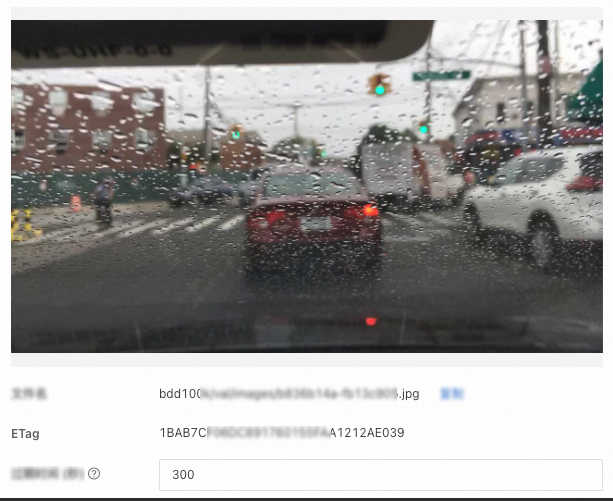
Image-to-image search
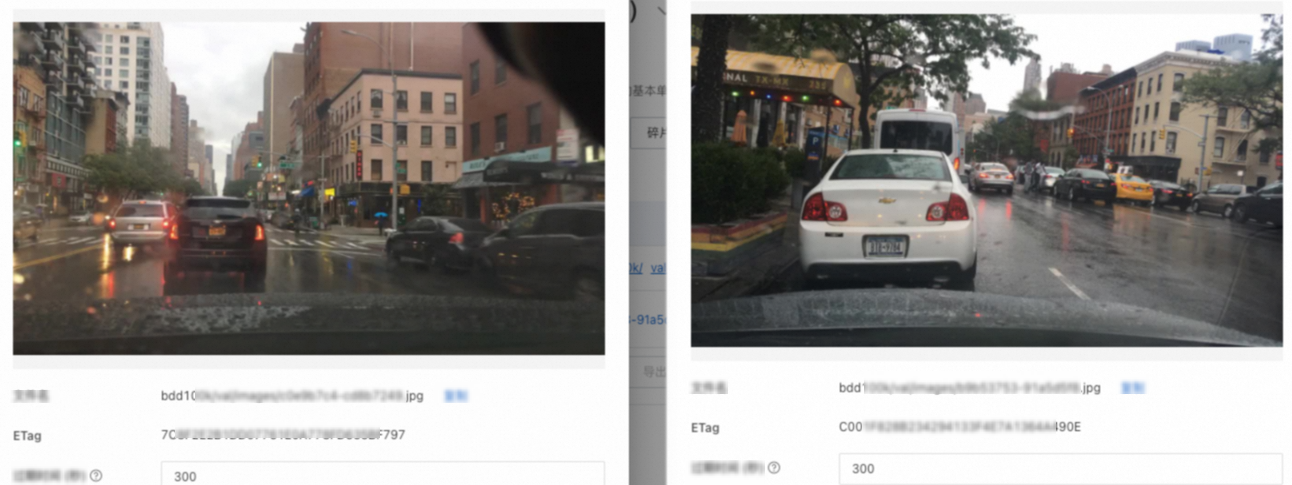
The following SQL statement provides an example of image-to-image search:
-- Image-to-image search
SELECT
    object_uri,
    approx_cosine_distance (embedding_vector, ai_embed ('image_embed', to_file ('oss://xxxx/val/images/b9b53753-91a5d5f8.jpg', 'oss-cn-hangzhou-internal.aliyuncs.com', 'acs:ram::18xxx:role/xxx'))) AS score
FROM
    public.dt_image_bdd100k
WHERE
    object_uri <> 'oss://hm-**-hangzhou/bd****k/val/images/b9b53753-91a5****.jpg' -- Exclude the query image itself.
ORDER BY
    score DESC
LIMIT 1;

                          object_uri                           |  score
---------------------------------------------------------------+------
 oss://****/bd****k/val/images/c0e9b7c4-cd8b****.jpg | 0.918008327
The retrieved image is compared with the original image in OSS. The result is as follows:
Appendix: Stored procedures
Create an Object Table and a Dynamic Table
-- By default, a query returns a maximum of 200 rows. To return more data, modify the LIMIT clause. Maximum: 10,000 rows or 20 MB.
-- Stored procedure to create an Object Table and a Dynamic Table, and embed images using the Dynamic Table.
CREATE OR REPLACE PROCEDURE create_image_table_from_oss(
    oss_path TEXT,
    oss_endpoint TEXT,
    oss_role_arn TEXT,
    image_table TEXT,
    embedding_model TEXT DEFAULT NULL,
    overwrite BOOLEAN DEFAULT FALSE
)
AS $$
DECLARE
    image_schema_name TEXT;
    image_table_name TEXT;
    obj_table_name TEXT;
    full_image_table_ident TEXT;
    full_obj_ident TEXT;
    embed_expr TEXT;
    create_sql TEXT;
    embedding_dims INT;
BEGIN
    -- 1. Split the schema name and table name.
    IF position('.' in image_table) > 0 THEN
        image_schema_name := split_part(image_table, '.', 1);
        image_table_name  := split_part(image_table, '.', 2);
    ELSE
        image_schema_name := 'public';
        image_table_name  := image_table;
    END IF;

    obj_table_name := image_table_name || '_obj_table';

    full_image_table_ident := format('%I.%I', image_schema_name, image_table_name);
    full_obj_ident    := format('%I.%I', image_schema_name, obj_table_name);

    -- 2. If overwrite is true, drop the table and index first.
    IF overwrite THEN
        DECLARE
            dyn_table_exists BOOLEAN;
            rec RECORD;
        BEGIN
            -- Check whether the dynamic table exists.
            SELECT EXISTS (
                SELECT 1
                FROM pg_class c
                JOIN pg_namespace n ON n.oid = c.relnamespace
                WHERE c.relname = image_table_name
                AND n.nspname = image_schema_name
            )
            INTO dyn_table_exists;

            IF dyn_table_exists THEN
                -- 2.1 Disable auto-refresh for the dynamic table.
                -- RAISE NOTICE 'Disabling auto refresh for %', full_image_table_ident;
                -- EXECUTE format('ALTER TABLE IF EXISTS %s SET (auto_refresh_enable=false)', full_image_table_ident);

                -- 2.2 Find and cancel the running refresh task.
                FOR rec IN
                    EXECUTE format(
                        $f$
                        SELECT query_job_id
                            FROM hologres.hg_dynamic_table_refresh_log(%L)
                            WHERE status = 'RUNNING';
                        $f$,
                        image_table
                    )
                LOOP
                    RAISE NOTICE 'Found running refresh job: %', rec.query_job_id;
                    IF hologres.hg_internal_cancel_query_job(rec.query_job_id::bigint) THEN
                        RAISE NOTICE 'Cancel job % succeeded.', rec.query_job_id;
                    ELSE
                        RAISE WARNING 'Cancel job % failed.', rec.query_job_id;
                    END IF;
                END LOOP;

                -- 2.3 Drop the Dynamic Table.
                EXECUTE format('DROP TABLE IF EXISTS %s;', full_image_table_ident);
            ELSE
                RAISE NOTICE 'Dynamic table % does not exist, skip cancel job and drop.', full_image_table_ident;
            END IF;

            -- 2.4 In any case, the Object Table must be dropped.
            EXECUTE format('DROP OBJECT TABLE IF EXISTS %s;', full_obj_ident);
        END;
    END IF;

    -- 3. Create the Object Table.
    RAISE NOTICE 'Create object table: %', obj_table_name;
    EXECUTE format(
        $f$
        CREATE OBJECT TABLE %s
        WITH (
            path = %L,
            oss_endpoint = %L,
            role_arn = %L
        );
        $f$,
        full_obj_ident,
        oss_path,
        oss_endpoint,
        oss_role_arn
    );

    COMMIT;

    -- 4. Refresh the Object Table.
    RAISE NOTICE 'Refresh object table: %', obj_table_name;
    EXECUTE format('REFRESH OBJECT TABLE %s;', full_obj_ident);

    COMMIT;

    -- 5. Select an embedding model.
    IF embedding_model IS NULL OR length(trim(embedding_model)) = 0 THEN
        embed_expr := 'ai_embed(file)';

        EXECUTE 'SELECT array_length(ai_embed(''dummy''), 1)'
        INTO embedding_dims;
    ELSE
        embed_expr := format('ai_embed(%L, file)', embedding_model);

        EXECUTE format(
            'SELECT array_length(ai_embed(%L, ''dummy''), 1)',
            embedding_model
        )
        INTO embedding_dims;
    END IF;

    RAISE NOTICE 'embedding dimension is: %', embedding_dims;

    -- 6. Create a sink dynamic table for RAG.
    RAISE NOTICE 'create dynamic table: %', image_table_name;
    EXECUTE format(
        $f$
        CREATE DYNAMIC TABLE %s(
            CHECK(array_ndims(embedding_vector) = 1 AND array_length(embedding_vector, 1) = %s)
        )
        WITH (
            vectors = '{
                "embedding_vector": {
                    "algorithm": "HGraph",
                    "distance_method": "Cosine",
                    "builder_params": {
                    "base_quantization_type": "sq8_uniform",
                    "max_degree": 64,
                    "ef_construction": 400,
                    "precise_quantization_type": "fp32",
                    "use_reorder": true
                    }
                }
            }',
            auto_refresh_mode = 'incremental',
            freshness = '5 minutes',
            auto_refresh_enable = 'false'
        ) AS
        SELECT
            object_uri,
            etag,
            %s AS embedding_vector
        FROM %s;
        $f$,
        full_image_table_ident,
        embedding_dims,
        embed_expr,
        obj_table_name
    );

    COMMIT;

    RAISE NOTICE '';
    RAISE NOTICE 'Create image table success: %', image_table;
    RAISE NOTICE '    Vector index is: %.embedding_vector', image_table;
END;
$$ LANGUAGE plpgsql;
Refresh an Object Table and a Dynamic Table
CREATE OR REPLACE PROCEDURE refresh_image_table(
    image_table TEXT
)
AS $$
DECLARE
    image_schema_name TEXT;
    image_table_name   TEXT;
    obj_table_name TEXT;
    full_image_table_ident TEXT;
    full_obj_ident    TEXT;
BEGIN
    -- 1. Parse the schema and table names.
    IF position('.' in image_table) > 0 THEN
        image_schema_name := split_part(image_table, '.', 1);
        image_table_name  := split_part(image_table, '.', 2);
    ELSE
        image_schema_name := 'public';
        image_table_name  := image_table;
    END IF;

    obj_table_name := image_table_name || '_obj_table';

    full_image_table_ident := format('%I.%I', image_schema_name, image_table_name);
    full_obj_ident    := format('%I.%I', image_schema_name, obj_table_name);

    -- 2. Refresh the Object Table.
    RAISE NOTICE 'Refreshing Object Table: %', obj_table_name;
    EXECUTE format('REFRESH OBJECT TABLE %s;', full_obj_ident);

    -- 3. Refresh the Dynamic Table.
    RAISE NOTICE 'Refreshing Dynamic Table: %', image_table_name;
    EXECUTE format('REFRESH TABLE %s;', full_image_table_ident);

    RAISE NOTICE 'Refresh image table complete: %', image_table;
END;
$$ LANGUAGE plpgsql;
Drop the related tables
CREATE OR REPLACE PROCEDURE drop_image_table(
    image_table TEXT
)
AS $$
DECLARE
    image_schema_name TEXT;
    image_table_name   TEXT;
    obj_table_name TEXT;
    full_image_table_ident TEXT;
    full_obj_ident    TEXT;
    rec RECORD;
BEGIN
    -- 1. Parse the schema and table names.
    IF position('.' in image_table) > 0 THEN
        image_schema_name := split_part(image_table, '.', 1);
        image_table_name   := split_part(image_table, '.', 2);
    ELSE
        image_schema_name := 'public';
        image_table_name   := image_table;
    END IF;

    obj_table_name := image_table_name || '_obj_table';

    full_image_table_ident := format('%I.%I', image_schema_name, image_table_name);
    full_obj_ident    := format('%I.%I', image_schema_name, obj_table_name);

    -- 2. Drop the tables.
    -- 2.1 Disable auto-refresh for the dynamic table.
    -- RAISE NOTICE 'Disabling auto refresh for %', full_image_table_ident;
    -- EXECUTE format('ALTER TABLE IF EXISTS %s SET (auto_refresh_enable=false)', full_image_table_ident);

    -- 2.2 Find and cancel the running refresh task.
    FOR rec IN
        EXECUTE format(
            $f$
            SELECT query_job_id
                FROM hologres.hg_dynamic_table_refresh_log(%L)
                WHERE status = 'RUNNING';
            $f$,
            image_table
        )
    LOOP
        RAISE NOTICE 'Found running refresh job: %', rec.query_job_id;
        IF hologres.hg_internal_cancel_query_job(rec.query_job_id::bigint) THEN
            RAISE NOTICE 'Cancel job % succeeded.', rec.query_job_id;
        ELSE
            RAISE WARNING 'Cancel job % failed.', rec.query_job_id;
        END IF;
    END LOOP;

    -- 2.3 Drop the Dynamic Table.
    RAISE NOTICE 'Dropping Dynamic Table: %', image_table_name;
    EXECUTE format('DROP TABLE IF EXISTS %s;', full_image_table_ident);

    -- 2.4 Drop the Object Table.
    RAISE NOTICE 'Dropping Object Table: %', obj_table_name;
    EXECUTE format('DROP OBJECT TABLE IF EXISTS %s;', full_obj_ident);

    RAISE NOTICE 'Drop image table complete: %', image_table;
END;
$$ LANGUAGE plpgsql;