Hologres Dynamic Table is a declarative data processing architecture that automatically processes and stores aggregated results from one or more base tables. It includes configurable, built-in data refresh policies that enable automatic data forwarding from base tables to Dynamic Tables, addressing the need for unified development, automatic data forwarding, and timely data processing.
When to use Dynamic Table
Dynamic Table is a good fit when:
-
You want to automate data transformation without writing custom scheduling code.
-
You want to avoid manually tracking data dependencies and managing refresh schedules.
-
You need to chain multiple tables for data transformation in a pipeline — for example, building data warehouse detail (DWD) → data warehouse service (DWS) → application data service (ADS) layers automatically.
-
Your workload does not require strict real-time freshness, and minute- or hour-level timeliness is sufficient.
-
You want to consolidate a Lambda architecture into a single engine with a unified SQL interface.
Advantages
-
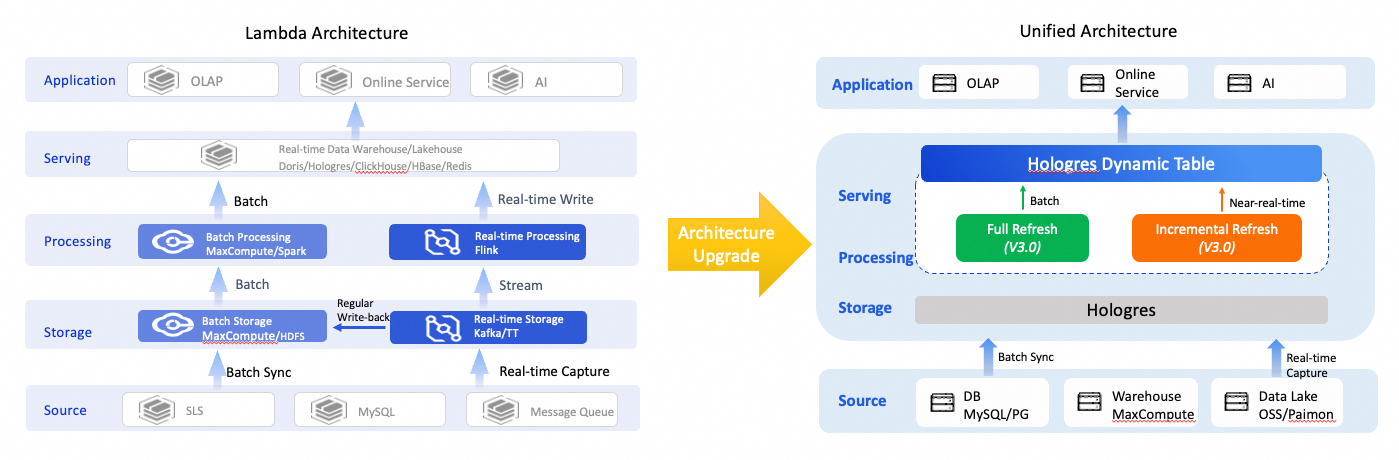
Simplified data warehouse architecture: Full and incremental refresh modes support both offline data transformation and near-real-time data transformation. Based on Hologres unified storage, Dynamic Table directly serves multiple application scenarios — online analytical processing (OLAP) queries, online services, and AI workloads — using a single engine, a single computation, and a single SQL statement. This replaces the Lambda architecture and reduces development and operations and maintenance (O&M) costs.
-
Automatic data warehouse layering: A Dynamic Table automatically triggers a refresh based on the freshness of the base table data, enabling automatic data forwarding from the operation data store (ODS) → DWD → DWS → ADS layers.
-
Improved ETL efficiency: Incremental refresh processes only new data from the base table in each run, reducing the amount of data computed per extract, transform, and load (ETL) cycle. Resources do not need to be constantly active as in stream computing. Automatic refreshes triggered by data freshness reduce compute costs.
-
Lower development and O&M costs: All refresh modes use a unified SQL interface. Dynamic Tables automatically manage refresh tasks and the hierarchical dependencies between layers, simplifying complex development and O&M workflows.
Key concepts
-
Base table: The data source for a Dynamic Table. It can be a single internal or foreign table, or a join of multiple tables. Supported base table types vary by refresh mode. For more information, see Supported features and limits of Dynamic Table.
-
Query: The query specified when creating a Dynamic Table. It defines how base table data is processed, similar to an ETL process. Supported query types vary by refresh mode. For more information, see Supported features and limits of Dynamic Table.
-
Refresh: When data in a base table changes, the Dynamic Table must be refreshed to reflect those changes. Dynamic Tables automatically run refresh tasks in the background based on the configured refresh start time and interval. For more information about monitoring and managing refresh tasks, see Manage Dynamic Table refresh tasks.
How it works
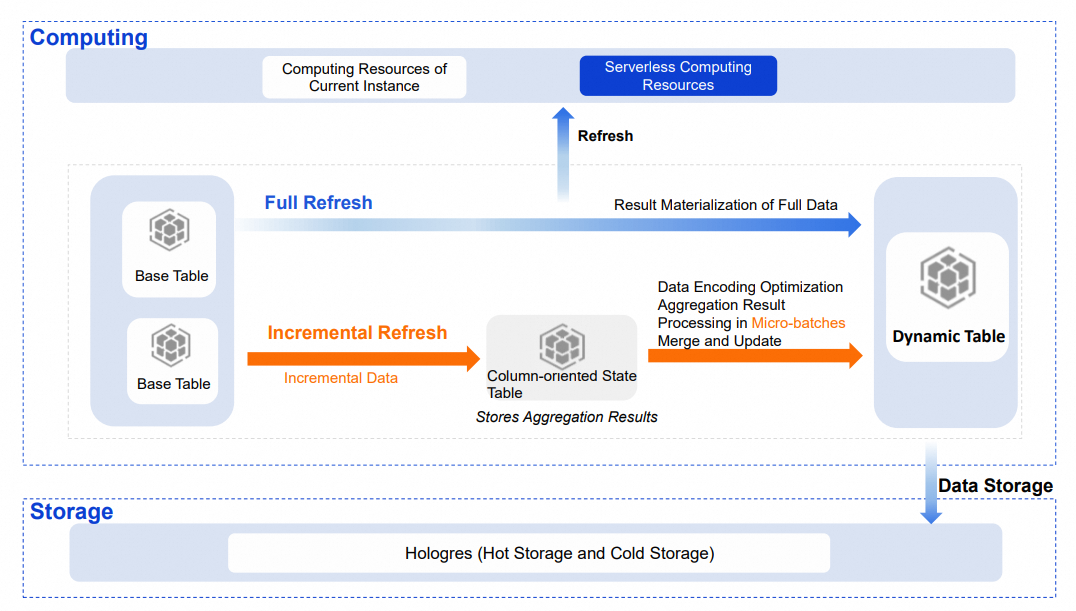
Data from a base table is written to a Dynamic Table through a refresh process, following the data processing flow defined by the Dynamic Table query. The following sections describe the technical principles behind Dynamic Table, covering refresh modes, compute resources, data storage, and table indexes.
Refresh modes
Dynamic Table supports two refresh modes: full and incremental. The underlying technical principles differ depending on the configured refresh mode.
Full refresh
A full refresh processes all data during each run. It materializes the aggregated results of the base table and writes them to the Dynamic Table. The technical principle is similar to an INSERT OVERWRITE operation.
Incremental refresh
Incremental refresh reads only new data from the base table in each run. It calculates the final result based on the intermediate aggregation state and the incremental data, then updates the Dynamic Table. Compared to a full refresh, incremental refresh processes less data per run, which improves timeliness while reducing compute resource usage.
Technical principle
When you create a Dynamic Table with incremental refresh, the system reads incremental data from the base table using the Stream or Binlog method. It then creates a column-oriented state table in the background, which stores the intermediate aggregation state of the query. The DPI engine optimizes the encoding and storage of this intermediate state to accelerate reading and updating. Incremental data is aggregated in micro-batches in memory and merged with the state table. The latest aggregated results are then written to the Dynamic Table using the BulkLoad method.
Choosing between Stream and Binlog
| Method | Principle | Read performance | Notes |
|---|---|---|---|
| Stream (recommended) | Detects data changes at the file level to compute the incremental data of the base table. | More than 10x higher than Binlog. | Simpler to use. Does not record incremental changes separately — no extra storage overhead and no binary log lifecycle management required. Does not support row-oriented tables as base tables. |
| Binlog | Binary logging records Data Manipulation Language (DML) changes to the base table and stores them as a binary log in the background. The system reads the binary log to detect data changes. | Lower. | Incurs extra storage overhead. Requires management of the binary log's storage lifecycle (TTL); otherwise, storage usage grows continuously as data changes. |
Usage notes
-
There are certain limits on base tables supported by incremental refresh. For more information, see Supported features and limits of Dynamic Table.
-
The built-in state table for incremental refresh occupies some storage space. The system sets a TTL to periodically clean up data. Use the provided function to view the storage size of the state table. For more information, see Manage state tables.
Choose a refresh mode
Use the following criteria to select a refresh mode:
| Condition | Recommended mode |
|---|---|
| Query uses supported operators and base tables are not row-oriented | Incremental |
| A large percentage of data changes per refresh, or the query includes unsupported operators | Full |
| Initial load or ensuring cross-layer data consistency | Full (one-time) |
Compute resources
Refresh tasks can use resources from the current instance or Serverless resources:
-
Serverless resources (default): In Hologres V3.1 and later, new Dynamic Tables use Serverless resources by default. For complex queries or large data volumes, Serverless resources improve refresh stability and avoid resource contention among tasks within the instance. The compute resources for a single refresh task can be adjusted independently.
-
Current instance resources: The refresh task shares resources with other tasks in the instance, which may cause resource contention during peak hours.
Data storage
The data storage of a Dynamic Table is the same as that of a standard table, using hot storage mode by default. To reduce storage costs, move infrequently queried data to cold storage.
Table indexes
Querying a Dynamic Table directly is equivalent to querying the aggregated results, which significantly improves query performance. Like standard tables, Dynamic Tables support table indexes such as row store or column store, Distribution Key, and Clustering Key. The DPI engine infers suitable indexes based on the Dynamic Table query. Set additional indexes to further improve query performance.
Comparison with materialized views
Dynamic Table vs. Hologres real-time materialized view
Hologres introduced SQL-managed materialized views in V1.3. Dynamic Table extends these capabilities significantly.
| Feature | Hologres Dynamic Table | Hologres real-time materialized view |
|---|---|---|
| Base table type | Internal table; Foreign table (MaxCompute, Paimon, OSS); Dynamic Table; View | Single internal table |
| Base table operations | Write, Update, Delete | Append-only writes |
| Refresh principle | Asynchronous refresh (full or incremental) | Synchronous |
| Refresh timeliness | Minute-level or hour-level | Real-time |
| Query types | Single-table aggregation; Multi-table join; Dimension table JOIN; Complex OLAP (window functions, CTEs, RB, etc.) Note
Supported query types vary by refresh mode. For more information, see Supported features and limits of Dynamic Table. |
Limited operator support (AGG, RB functions, etc.) |
| Query mode | Query the Dynamic Table directly | Query the materialized view directly; Query rewrite |
Dynamic Table vs. asynchronous materialized view
Other platforms offer features similar to Dynamic Table, such as asynchronous materialized views in OLAP products and Snowflake Dynamic Table.
| Feature | Hologres Dynamic Table | OLAP product async materialized view | Snowflake Dynamic Table |
|---|---|---|---|
| Base table type | Internal table; Foreign table (MaxCompute, Paimon, OSS); Dynamic Table; View Note
Supported query types vary by refresh mode. For more information, see Supported features and limits of Dynamic Table. |
Internal table; Foreign table (Hive, Hudi, Iceberg, etc.); Materialized view; View | Internal table; Dynamic Table; View |
| Refresh mode | Full; Incremental | Full; Refresh by specified partition or timestamp range | Full; Incremental |
| Refresh timeliness | Minute-level or hour-level | Hour-level | Hour-level or minute-level |
| Query types | Single-table aggregation; Multi-table join; Dimension table JOIN; Complex OLAP (window functions, CTEs, RB, etc.) | Single-table aggregation; Multi-table join; Dimension table JOIN; Complex OLAP (window functions, CTEs, etc.) | Single-table aggregation; Multi-table join; Dimension table JOIN; Complex OLAP (window functions, CTEs, etc.) |
| Query mode | Query the Dynamic Table directly | Query the materialized view directly; Query rewrite | Query the Dynamic Table directly |
| Monitoring/O&M | DataWorks and HoloWeb visualization interfaces; Rich monitoring metrics | Rich monitoring metrics | Visualization interface |
Use cases
Dynamic Table automatically completes data transformation and storage, supporting both data acceleration and improved business timeliness.
Lambda architecture upgrade
The Lambda architecture uses multiple product components to meet different timeliness requirements, resulting in a redundant architecture, inconsistent data definitions, difficult maintenance, and storage redundancy. Dynamic Table supports batch data transformation and near-real-time processing. Combined with Hologres unified storage — which supports OLAP queries and key-value (KV) point queries — it covers multiple application scenarios within a single product, simplifying the architecture and reducing development complexity and storage costs.
Near-real-time data processing
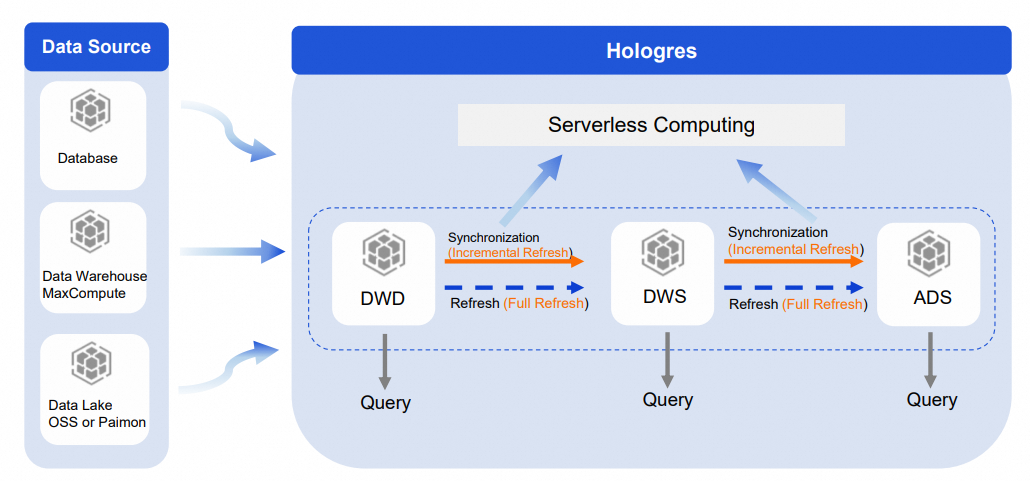
For large base tables requiring complex ETL processing, data warehouse layering is the standard approach. Dynamic Table has built-in automatic data processing, making it straightforward to implement layering in Hologres.
Build the DWD → DWS → ADS layers in Hologres using Dynamic Tables:
-
Use incremental refresh between layers. This ensures less data is processed at each layer, reduces repeated calculations, and improves synchronization speed. Submit refresh tasks to Serverless Computing to further improve timeliness and stability.
-
Perform a one-time full refresh to ensure data consistency across layers. Submit the full refresh task to Serverless Computing as well.
-
Each layer is queryable directly in Hologres, providing clear data warehouse layering with visibility and reusability at every level.
Lakehouse acceleration
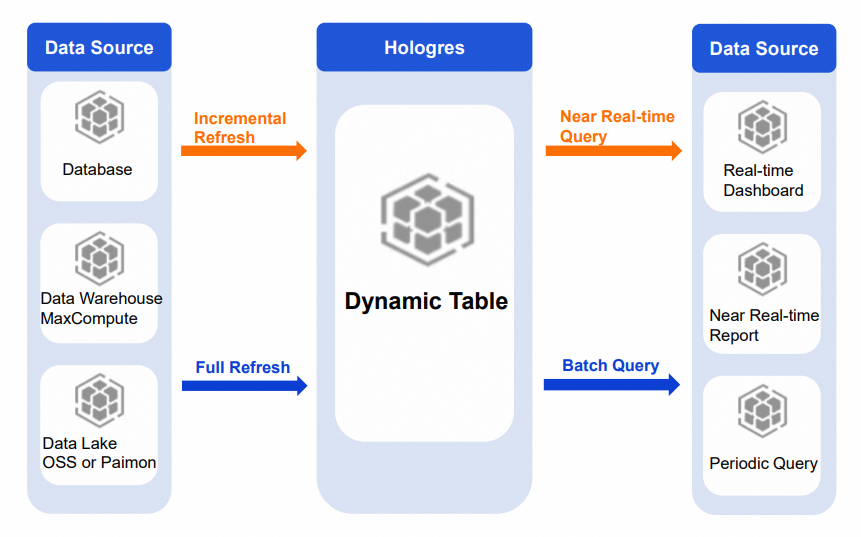
Dynamic Table base tables can come from Hologres tables, data warehouses such as MaxCompute, or data lakes such as OSS and Paimon. Full or incremental refreshes on this data support various query and exploration needs with different timeliness requirements.
-
Periodic report queries: For periodic observation scenarios with small data volumes or simple queries, use full or incremental refresh. Periodically refresh aggregation and analysis results from lakehouse data to a Dynamic Table. The application layer queries the Dynamic Table directly to retrieve pre-computed results, accelerating report queries.
-
Real-time dashboards and reports: For scenarios with higher timeliness requirements, use incremental refresh. Refresh aggregation and analysis results from Paimon or real-time data to a Dynamic Table, enabling near-real-time analysis.
Replacing offline periodic scheduling
In typical offline processing scenarios, the data volume is large and the computation cycle is long. A common approach runs T+H processing (for example, every 30 minutes) from DWD to DWS to ADS, plus a separate T+1 offline pipeline to process the last few days of data for accuracy. This results in redundant computation, wasted resources, and data duplication. Scheduled tasks can also block downstream jobs when they fail to complete on time.
With Dynamic Table, use T+H incremental refresh for each layer from DWD to DWS to ADS. Multiple jobs merge into a single incremental computing job. Dynamic Tables handle scheduling automatically, removing the need to maintain external scheduling jobs. Only incremental data is computed each time, which eliminates redundant computation, speeds up calculations, prevents task backlogs, and significantly reduces compute resource usage.
