Scenarios
If you require high service security and availability, you can deploy your business on the Alibaba Cloud network infrastructure to reduce network latency and packet loss and improve transmission efficiency. If a service has multiple origin servers, Global Traffic Manager (GTM) can monitor the IP addresses of these origin servers. This helps isolate abnormal IP addresses at the earliest opportunity and ensures service continuity.
Why use these three together?
Layered defense:
WAF: Ensures application layer security and defends against threats such as SQL injection, XSS, and CC attacks.
GA: Enhances network layer performance by reducing latency through nearest access and protocol optimization, including TCP/UDP acceleration.
GTM: Manages traffic on the DNS layer, directing requests to the optimal node based on health checks and geographic location.
Complementary capabilities:
WAF may not address cross-border network latency issues.
GA/GTM may not provide sufficient security protection.
Together, they offer an integrated solution of security protection + performance optimization + traffic scheduling.
Business continuity:
GTM monitors node health in real-time and automatically reroutes traffic to healthy nodes.
GA optimizes link quality, reducing packet loss.
WAF intercepts malicious traffic, preventing service interruptions from attacks.
Architecture

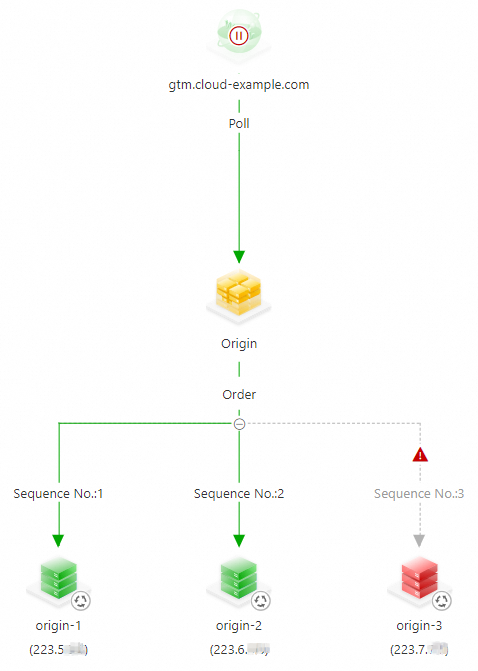
Once set up, the system operates as follows: If all origin servers work as expected, GTM sends requests to Origin Server 1. If Origin Server 1 encounters exceptions, GTM sends requests to Origin Server 2. If both Origin Server 1 and Origin Server 2 encounter exceptions, GTM sends requests to Origin Server 3. After Origin Server 1 recovers, GTM continues to send requests to Origin Server 1.
Prerequisites
The domain name is hosted by Alibaba Cloud DNS.
NoteYou can also use GTM even if your business domain name is not hosted by Alibaba Cloud DNS. You need to add a canonical name (CNAME) record to point your business domain name to the access domain name of your GTM instance at the Domain Name System (DNS) service provider.
A GTM instance is purchased. If no instances are purchased, purchase an instance first.
A Web Application Firewall (WAF) 3.0 instance is purchased. For more information, see Purchase a subscription WAF 3.0 instance.
A Global Accelerator (GA) instance is purchased. For more information, see Create and manage standard GA instances.
Procedure
This example demonstrates how to implement secure access and high service availability for the domain name www.cloud-example.com.
This example demonstrates the configuration procedure. If red or orange alert items appear in the actual configuration, check the address health status at the earliest opportunity.
1. Configure GTM
Log on to the Alibaba Cloud DNS console. In the navigation pane on the left, click Global Traffic Manager, and then click the Global Traffic Manager 3.0 tab. On the Access Domain Name tab, click Create Access Domain Name. In the Select Scenario dialog box that appears, click Custom Scenario.
On the Create Access Domain Name page, click the access domain name icon and complete the basic configuration. In this example, the access domain name is set to
gtm.cloud-example.com. For more information, see Configure an access domain name.On the Access Domain Name page, click the address pool icon. Complete the address pool configuration and add addresses to the address pool. For more information, see Configure an address pool.
ImportantAvoid setting the GTM access domain name as an A record while also setting the address pool type as a domain name, as this may cause WAF to return a 502 error.
On the Access Domain Name page, configure a policy for load balancing between addresses and a policy for load balancing between address pools. In this example, Order (Preemptive Mode) is specified as the load balancing policy for addresses and Poll is specified as the load balancing policy for address pools.
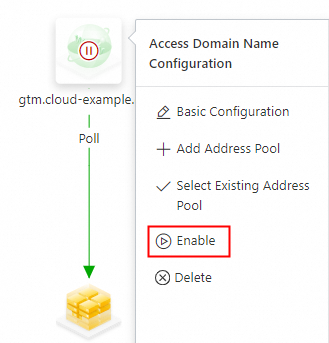
Configure alert rules for the instance. For more information, see the Procedure section of the Configure alert settings topic. On the Access Domain Name page, click the access domain name icon and select Enable. In the Confirm Access Domain Name Enabling message, confirm the access domain name and click OK.
ImportantIf a domain name record with the same name and the same type exists in the Authoritative DNS Resolution module of Alibaba Cloud DNS, the system first intelligently schedules and resolves DNS requests for this domain name based on the policy configured in GTM to implement advanced features such as traffic load balancing and failovers.
If you disable or delete this access domain name in GTM, requests for this domain name will be resolved by the Authoritative DNS Resolution module of Alibaba Cloud DNS.
2. Configure the WAF instance
Log on to the WAF 3.0 console. In the top navigation bar, select the resource group and the region in which your WAF instance is deployed. The region can be Chinese Mainland or Outside Chinese Mainland. For more information about how to configure an access domain name, see Add a domain name to WAF. In this example, the Domain Name that you want to protect is www.cloud-example.com, and the access domain name of the GTM instance for the origin servers is gtm.cloud-example.com.
3. Configure the GA instance
Log on to the GA console. In the navigation pane on the left, choose Instances, and then click Create GA Instance. For more information about how to configure the Basic Information, Acceleration Area, Listener, Endpoint Group, and Configuration Review, see Create and manage standard GA instances. The endpoint is configured as the access domain name www.cloud-example.com.**.aliyunwaf.com of your WAF instance.
4. Connect the business domain name to GA
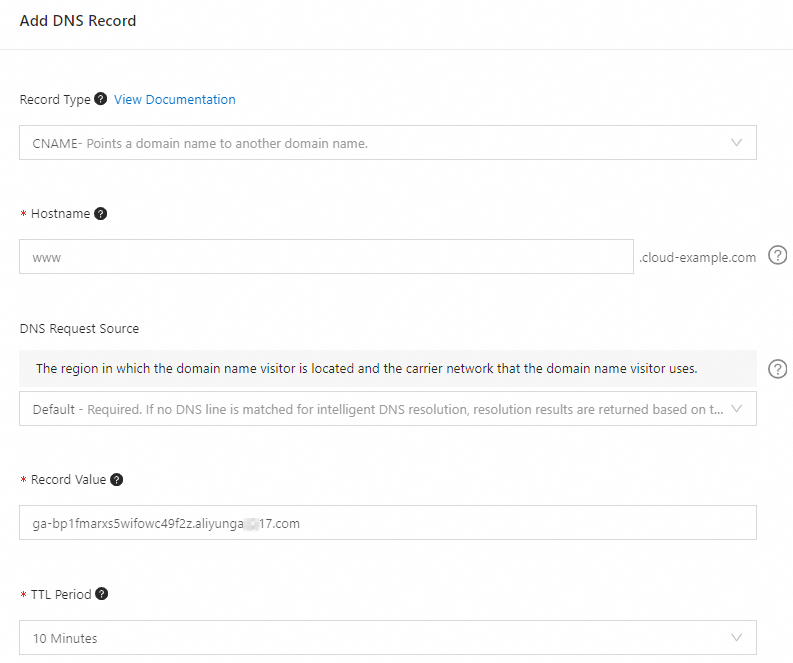
In the Alibaba Cloud DNS console, add a CNAME record to point the business domain name www.cloud-example.com to the access domain name ga-bp1fmarxs5wifowc49f2z.aliyunga**17.com of your GA instance.