Subscription instances
Purchase subscription Global Traffic Manager (GTM) instances to reduce costs, simplify budgets, and ensure long-term stability.
Editions
Subscription GTM instances are available in two editions: Standard and Ultimate Edition.
|
Features |
Standard Edition |
Ultimate Edition |
Recommendations |
|
Health check frequency |
Minimum 1 minute |
Minimum 15 seconds |
Choose Ultimate Edition if your failover target is under 1 minute. |
|
Address pools / IP addresses per pool |
30 / 30 |
50 / 50 |
Choose Ultimate Edition if you need more than 30 address pools or fine-grained routing. |
|
DNS query volume |
Unlimited |
Unlimited |
- |
|
Price |
USD 20/month |
USD 140/month |
- |
Purchase a subscription instance
-
Go to the Alibaba Cloud DNS - Global Traffic Manager console.
-
On the Access Domain tab, click Purchase Instance.
-
Set Commodity Type to Global Traffic Manager 3.0 subscription, select an edition, then click Buy Now and complete payment.
Parameter
Description
Commodity Type
Select Global Traffic Manager 3.0 subscription.
Plan Edition
Select Standard or Ultimate Edition.
Detection Task
Each instance includes 100 detection tasks by default. Detection tasks = monitoring nodes × target addresses. Purchase more only if needed.
Duration
Minimum duration: one month.
-
After purchase, go to the Alibaba Cloud DNS - Instance console. On the Global Traffic Manager tab, the system automatically creates an instance under Global Traffic Manager 3.0.
-
In the Actions column of the target instance, click Configure to configure failover. Get started.
NoteFor disaster recovery and failover scenarios, see Best practices.
Renewal
Renew your GTM instance before it expires to avoid service disruptions. Two options are available: Auto and Manual.
Auto-renewal
-
Enable auto-renewal to avoid missing the renewal window.
-
Auto-renewal takes effect the next day, not immediately. The system attempts payment at 08:00 (UTC+8) nine days before expiration. If payment fails, the system retries daily until 08:00 (UTC+8) on the day before expiration. If all attempts fail, renew manually.
Method 1
Go to the Alibaba Cloud DNS - Instance console. Select the Auto-renewal option when purchasing.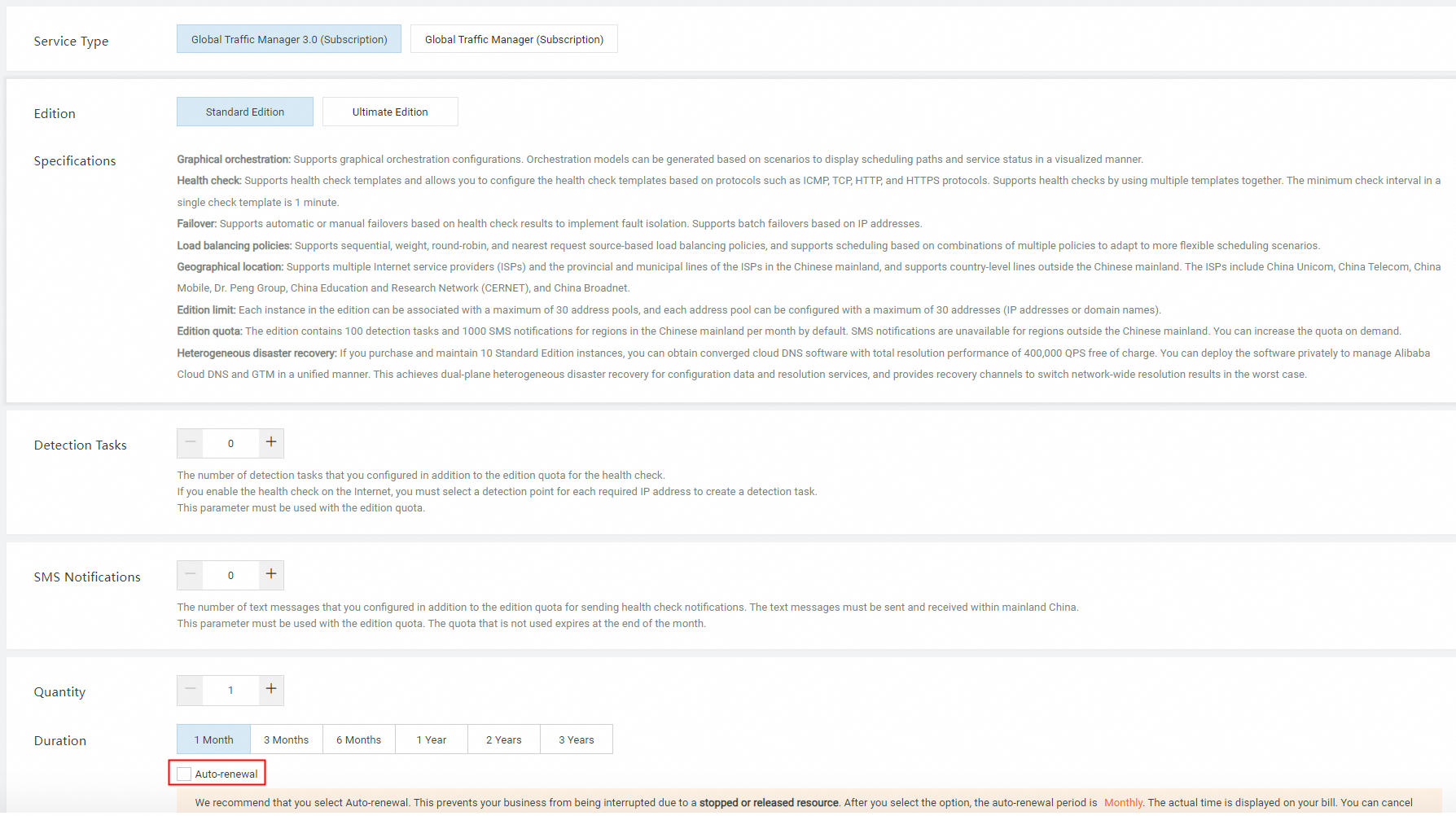
Method 2
-
Go to the Alibaba Cloud DNS - Instance console and select the Global Traffic Manager tab, then click Global Traffic Manager 3.0.
-
Find the target instance and set its Auto-renewal Status to Enabled.
NoteIn the Edit Auto Renewal dialog box, you can select a renewal period of 1 month, 3 months, 6 months, 1 year, 2 years, or 3 years.
Manual renewal
-
Go to the Alibaba Cloud DNS - Instance console. On the Global Traffic Manager tab, select Global Traffic Manager 3.0.
-
In the Actions column of the target instance, click Renew.
-
On the renewal page, select a Duration based on your business requirements. Select the Terms of Service checkbox and then click Buy Now.
NoteEnable auto-renewal to prevent the instance from being released after expiration.
Upgrade
Upgrade your GTM instance when you need more address pools or a higher health check frequency. Upgrades do not affect existing DNS resolution or traffic routing and cause no service interruption.
-
Go to the Alibaba Cloud DNS - Instance console. On the Global Traffic Manager tab, select Global Traffic Manager 3.0.
-
In the Actions column of the target instance, click Upgrade.
-
On the upgrade page, select items to upgrade based on your needs, such as Plan Edition or Detection Task.
NoteSMS notification packages are available only for accounts on the Alibaba Cloud China site (aliyun.com) and are not supported for accounts on the international site (alibabacloud.com).
Downgrade
GTM does not support direct downgrades. You must replace the current instance with a new, lower-tier one. This is a high-risk operation that requires careful migration:
-
Provision a new instance: Purchase a lower-tier instance and configure your traffic routing policies.
-
Switch DNS traffic: Update your service domain's DNS to point to the new GTM instance's access domain name.
-
Verify and monitor: Confirm all traffic routes to the new instance before removing the old configuration.
-
Unsubscribe from the old instance: Once the new instance runs stably, unsubscribe from the original to reduce costs.
Unsubscription
Unsubscription and refund scenarios for Alibaba Cloud products include terminating active resources, canceling pending renewals, automatic unsubscription after a creation or change failure, refunds for downgrades, refunds for switching from subscription to pay-as-you-go, and refunds for physical goods.