Restrict Alibaba Cloud Management Console access to office devices only. By routing console traffic through fixed Secure Access Service Edge (SASE) egress IP addresses and binding those addresses to a RAM access policy, only employees logged on to the SASE client from an office device can reach the console.
Prerequisites
Before you begin, make sure you have:
An Alibaba Cloud account with RAM administrator permissions
(Optional) A SASE instance — if you don't have one, activate a free trial in Step 1
How it works
SASE is Alibaba Cloud's one-stop office security platform. It provides zero-trust private network access, data leak prevention, internet activity auditing, and office access acceleration — without requiring complex on-premises hardware.
The protection mechanism works as follows:
Every device running the SASE client connects through a fixed egress IP address assigned to your SASE instance.
A RAM access policy restricts console access to requests originating from that egress IP address.
When a RAM user tries to log on to the console from a device that isn't running the SASE client, the request is blocked.
Step 1: Configure a SASE access policy
Complete the following four sub-steps to set up your SASE environment. Each step depends on the previous one.
1.1 Activate a SASE instance
SASE offers a 7-day free trial. Log on with your Alibaba Cloud account, go to the Activate SASE page, and click Free Trial. For billing details, see Billing overview of Secure Access Service Edge.
1.2 Configure an identity source
An identity source determines how employees authenticate to SASE. In the SASE console, configure the identity source for your enterprise. Supported identity sources include DingTalk, WeChat, Lark, Lightweight Directory Access Protocol (LDAP), and Identity as a Service (IDaaS). For configuration steps, see Identity access.
1.3 Configure a zero-trust policy
A zero-trust policy controls which user groups can access which applications and resources. Assign resource permissions to the relevant user groups for your office applications. For configuration steps, see Configure a zero-trust policy.
1.4 Download and log on to the SASE app
On each device you want to manage, download and log on to the SASE app using an account from the identity source you configured. After logging on, the device routes traffic through the fixed SASE egress IP address. For installation steps, see Install and log on to the SASE app.
Step 2: Grant RAM permissions based on SASE egress IP
With SASE running on managed devices, create a RAM access policy that allows console access only from the SASE egress IP address, then attach it to the target RAM users. After this step, a RAM user who isn't logged on to the SASE client will be blocked from accessing the console.
For background on IP-based access control in RAM, see Use RAM to restrict access based on IP addresses.
Create a custom policy
Configure an access policy that allows console access from the SASE egress IP address only.
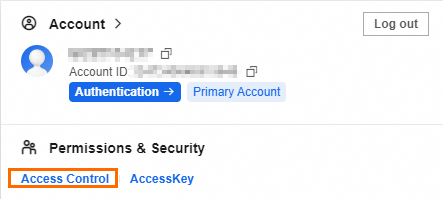
Log on to your Alibaba Cloud account. In the upper-right corner, click your profile picture and select Resource Access Management.
In the navigation pane, choose Permission Management > Policies.
On the Policies page, click Create Policy.
On the Create Policy page, click the Visual Editor tab and configure the following fields: For detailed steps, see Create a custom policy.
Field Value Description Effect Allow or Deny Determines whether the policy grants or denies access Service Secure Access Service Edge The Alibaba Cloud service this policy applies to Action Select based on required permissions The console actions the RAM user can perform Condition SASE egress IP address Restricts access to requests from the SASE egress IP — this is the key field that enforces device-based access control 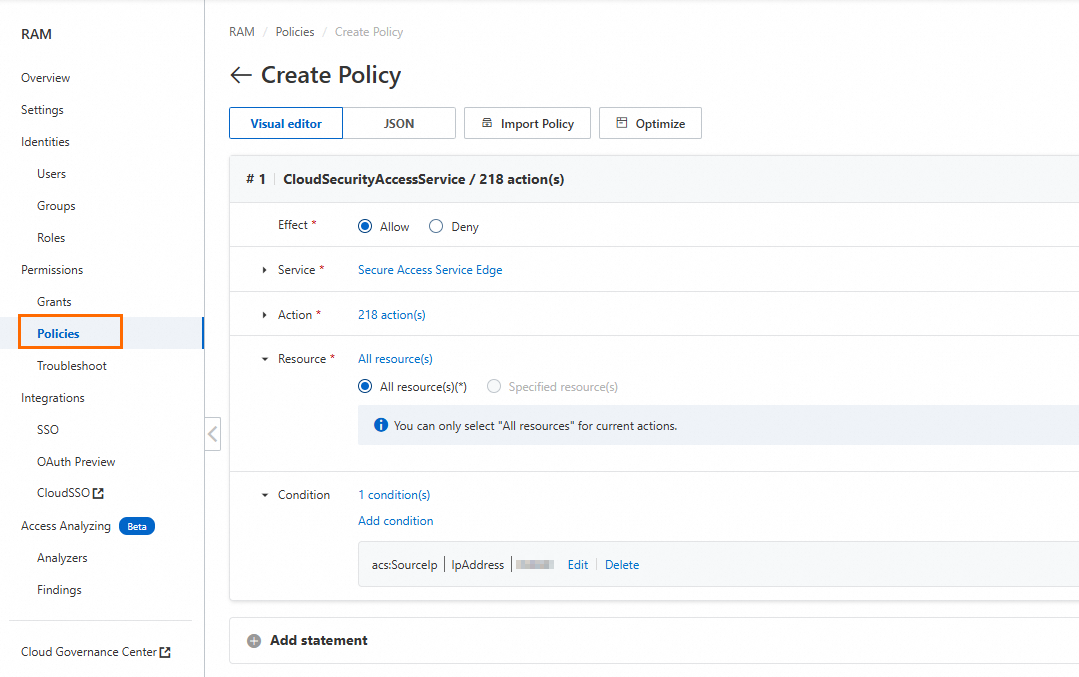
Attach the policy to a RAM user
In the navigation pane, choose Identity Management > Users.
In the Actions column for the target user, click Add Permissions.
In the Add Permissions panel, select the custom policy and click OK.

What's next
After completing this setup, RAM users can only access the Alibaba Cloud Management Console from devices running the SASE client. To extend this protection or explore other SASE capabilities, see: