Use Data Transmission Service (DTS) to continuously sync data from an ApsaraDB for MongoDB replica set to an ApsaraDB RDS for MySQL instance. DTS flattens MongoDB's document structure into relational tables using bson_value() expressions, so each MongoDB field maps to a MySQL column.
Before you begin
MongoDB and MySQL use fundamentally different data models. Before you start, understand how DTS bridges the gap:
A MongoDB document is equivalent to a MySQL row.
A MongoDB collection is equivalent to a MySQL table.
MongoDB fields are nested (hierarchical), while MySQL columns are flat. DTS uses
bson_value()expressions to map nested fields to individual columns.
Prerequisites
Before you begin, make sure that:
The destination ApsaraDB RDS for MySQL instance is created and has enough available storage — larger than the total data size in the source database. For details, see Create an ApsaraDB RDS for MySQL instance. It is recommended that the available storage space is at least 10% larger than the total data size in the source database.
A database and a table with a unique, non-composite primary key column exist in the destination instance. See Manage databases.
The destination table's column types are compatible with the MongoDB data types you plan to sync. For example, if the MongoDB
_idfield is of theObjectIdtype, the corresponding MySQL column must bevarchar.The destination table has no columns named `_id` or `_value`.
If the source is a sharded cluster, endpoints for all shard nodes are applied for, and all shard nodes share the same account password and endpoint. See Apply for an endpoint for a shard.
Required permissions
Grant the following permissions to the database accounts DTS uses to connect to each database.
| Database | Required permissions | Reference |
|---|---|---|
| Source ApsaraDB for MongoDB | Read permissions on the source database, the admin database, and the local database | Account management |
| Destination ApsaraDB RDS for MySQL | Read and write permissions on the destination database | Create an account and Modify account permissions |
Limitations
Review the following constraints before configuring the task.
Source database constraints
The source server must have sufficient outbound bandwidth. Low bandwidth reduces sync speed.
Only collections can be selected as sync objects. You cannot sync at the database level.
If you rename collections in the destination, a single task can sync at most 1,000 collections. For more collections, create multiple tasks.
DTS cannot connect to MongoDB over an SRV endpoint.
The following source types are not supported: standalone ApsaraDB for MongoDB instance, Azure Cosmos DB for MongoDB cluster, and Amazon DocumentDB elastic cluster.
The source database must have oplog enabled with logs retained for at least 7 days, or change streams enabled and available for the past 7 days. Use oplog (recommended) for lower latency. Change streams require MongoDB V4.0 or later.
Sharded cluster constraints
The
_idfield in each collection to be synced must be unique.The number of Mongos nodes cannot exceed 10.
The source must not contain orphaned documents. See the MongoDB documentation and the FAQ on deleting orphaned documents.
Do not run the following commands during sync:
shardCollection,reshardCollection,unshardCollection,moveCollection, ormovePrimary.If the balancer is active, latency may occur.
Sync behavior constraints
During full data synchronization, do not change database or collection schemas, or modify data of the
ARRAYtype.If you run full data synchronization only, do not write to the source database while the task is running.
Incremental sync supports only insert, update (via
$set), and delete operations. Transactions are not retained — they are converted to individual records.If the data contains 4-byte characters (such as emojis), the destination tables must use the
utf8mb4character set. If DTS handles schema sync, set thecharacter_set_serverparameter in the destination instance toutf8mb4.DTS cannot sync data from the
admin,config, orlocaldatabases.FLOATprecision defaults to 38 digits;DOUBLEprecision defaults to 308 digits. DTS appliesROUND(COLUMN,PRECISION)to retrieve values. Verify that the default precision meets your requirements.During full data synchronization, concurrent
INSERToperations may cause fragmentation in destination tables, resulting in higher storage usage than in the source.DTS attempts to resume tasks that failed within the last 7 days. Stop or release failed tasks before switching workloads to the destination database. Alternatively, revoke DTS's write permissions on the destination using the
REVOKEstatement to prevent source data from overwriting destination data on resume.Incremental sync latency is calculated based on the latest synced data timestamp in the destination versus the current timestamp in the source. Perform an update on the source to refresh the latency reading if no updates have occurred for an extended period.
Billing
| Synchronization type | Fee |
|---|---|
| Full data synchronization | Free of charge |
| Incremental data synchronization | Charged. See Billing overview |
Create a data synchronization task
Step 1: Open the data synchronization page
Go to the DTS task list using either the DTS console or the Data Management Service (DMS) console.
DTS console
Log on to the DTS console.
In the left-side navigation pane, click Data Synchronization.
In the upper-left corner, select the region where the sync task will run.
DMS console
The exact navigation path varies by the DMS console mode and layout. See Simple mode and Customize the layout and style of the DMS console for details.
Log on to the DMS console.
In the top navigation bar, move the pointer over Data + AI and choose DTS (DTS) > Data Synchronization.
From the drop-down list to the right of Data Synchronization Tasks, select the target region.
Step 2: Configure the source and destination databases
Click Create Task.
(Optional) Click New Configuration Page in the upper-right corner if prompted. Skip this step if Back to Previous Version is already shown.
Configure the following parameters.
| Category | Parameter | Description |
|---|---|---|
| N/A | Task Name | DTS auto-generates a name. Specify a descriptive name for easy identification. Task names do not need to be unique. |
| Source Database | Select Existing Connection | Select a registered instance from the drop-down list, or configure the connection parameters manually. |
| Database Type | Select MongoDB. | |
| Access Method | Select Alibaba Cloud Instance. | |
| Instance Region | The region of the source ApsaraDB for MongoDB instance. | |
| Replicate Data Across Alibaba Cloud Accounts | Select No to use an instance in the current account. | |
| Architecture | Select Replica Set. If the source is a Sharded Cluster, also specify Shard account and Shard password. | |
| Migration Method | Select Oplog (recommended) for lower latency. Select ChangeStream if oplog is unavailable. See the note below for constraints. | |
| Instance ID | The ID of the source ApsaraDB for MongoDB instance. | |
| Authentication Database | The authentication database that stores the account credentials. The default is admin. | |
| Database Account | The account with the required read permissions. | |
| Database Password | The password for the database account. | |
| Encryption | Select Non-encrypted, SSL-encrypted, or Mongo Atlas SSL. Available options depend on the values of Access Method and Architecture. The DTS console displays the applicable options. If the source database is a self-managed MongoDB database that uses the Replica Set architecture, the Access Method is not Alibaba Cloud Instance, and Encryption is SSL-encrypted, you can upload a certification authority (CA) certificate to verify the connection to the source database. | |
| Destination Database | Select Existing Connection | Select a registered instance or configure the connection parameters manually. |
| Database Type | Select MySQL. | |
| Access Method | Select Alibaba Cloud Instance. | |
| Instance Region | The region of the destination ApsaraDB RDS for MySQL instance. | |
| Replicate Data Across Alibaba Cloud Accounts | Select No to use an instance in the current account. | |
| RDS Instance ID | The ID of the destination ApsaraDB RDS for MySQL instance. | |
| Database Account | The account with the required read and write permissions. | |
| Database Password | The password for the database account. | |
| Encryption | Select Non-encrypted or SSL-encrypted. To use SSL encryption, enable SSL on the destination RDS instance first. See Use a cloud certificate to enable SSL encryption. |
Migration Method constraints:
Oplog is the default and recommended option for all ApsaraDB for MongoDB instances where oplog is enabled. It provides lower sync latency due to faster log pulling.
ChangeStream requires MongoDB V4.0 or later.
If the source is an inelastic Amazon DocumentDB cluster, you must enable change streams for the database, and set Migration Method to ChangeStream and Architecture to Sharded Cluster.
If you select Sharded Cluster for the Architecture parameter and set Migration Method to ChangeStream, you do not need to configure the Shard account and Shard password parameters.
If Architecture is Sharded Cluster and Migration Method is Oplog, the SSL-encrypted option for Encryption is unavailable.
Click Test Connectivity and Proceed.
DTS must be able to reach the source and destination databases. Add the DTS server CIDR blocks to the security settings of each database. See Add the CIDR blocks of DTS servers. For self-managed databases, click Test Connectivity in the CIDR Blocks of DTS Servers dialog box.
Step 3: Select objects and configure field mappings
In the Configure Objects step, set the following options.
| Configuration | Description |
|---|---|
| Synchronization Types | Incremental Data Synchronization is selected by default. Select Full Data Synchronization to sync historical data before starting incremental sync. Schema Synchronization is not available. |
| Processing Mode of Conflicting Tables | Precheck and Report Errors: the precheck fails if the destination has tables with the same names as the source. Use object name mapping to rename tables if needed. See Map object names. Ignore Errors and Proceed: skips the name conflict check. During full sync, conflicting records in the destination are kept; during incremental sync, they are overwritten. Use with caution. |
| Capitalization of Object Names in Destination Instance | Controls the capitalization of database, table, and column names in the destination. Default is DTS default policy. See Specify the capitalization of object names in the destination instance. |
| Source Objects | Select one or more collections from Source Objects and click  to add them to Selected Objects. Objects are selected at the collection level. to add them to Selected Objects. Objects are selected at the collection level. |
In Selected Objects, map MongoDB collections to MySQL tables. a. Rename the destination database: b. Rename destination tables: c. Configure field mappings: DTS auto-generates
bson_value()expressions for each field in the collection. Verify that the mapping is correct, then set Column Name, Type, Length, and Precision for each column.To view the MongoDB field name in an expression: the string in
""is the field name. For example,bson_value("age")maps theagefield.To delete a field you don't need to sync: click
 at the end of that row.
To add a field that requires a custom expression:
Click
at the end of any row, then click + Add Column. 
Set Column Name, Type, Length, and Precision.
Enter the
bson_value()expression in Assign Value. See the Field mapping example section for reference.Repeat for each additional column.
Right-click a collection in Selected Objects.

Change Table Name to the name of the target table in the destination MySQL instance.
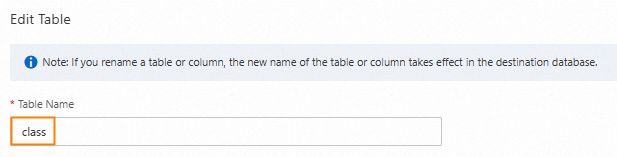
(Optional) Specify filter conditions to sync only a subset of data. See Specify filter conditions.

(Optional) In Select DDL and DML Operations to Be Synchronized, select the operations to sync during incremental data synchronization.

ImportantAssign
bson_value("_id")to the primary key column. For nested fields, specify the full path using comma-separated arguments inbson_value(). For example, usebson_value("person","name")— notbson_value("person")— to map thenamesubfield. Using only the parent field causes incremental data loss for all subfields.Click OK, then click Next: Advanced Settings.
Step 4: Configure advanced settings
| Configuration | Description |
|---|---|
| Dedicated Cluster for Task Scheduling | DTS uses the shared cluster by default. Purchase a dedicated cluster for higher stability. See What is a DTS dedicated cluster. |
| Retry Time for Failed Connections | How long DTS retries after a connection failure. Valid range: 10–1440 minutes. Default: 720. We recommend setting this to a value greater than 30. If multiple tasks share the same source or destination, the shortest retry time applies. |
| Retry Time for Other Issues | How long DTS retries after DDL or DML failures. Valid range: 1–1440 minutes. Default: 10. We recommend setting this to a value greater than 10. This value must be less than Retry Time for Failed Connections. |
| Enable Throttling for Full Data Synchronization | Limit DTS read/write speed during full sync to reduce the load on source and destination servers. Configure Queries per second (QPS) to the source database, RPS of Full Data Migration, and Data migration speed for full migration (MB/s). Available only when Full Data Synchronization is selected. |
| Only one data type for primary key _id in a table of the data to be synchronized | Available only when Full Data Synchronization is selected. Select Yes if all _id values in a collection share the same data type (skips type scanning). Select No to scan for mixed types. |
| Enable Throttling for Incremental Data Synchronization | Limit DTS speed during incremental sync. Configure RPS of Incremental Data Synchronization and Data synchronization speed for incremental synchronization (MB/s). |
| Environment Tag | Tag to identify this DTS instance. Optional. |
| Configure ETL | Select Yes to apply extract, transform, and load (ETL) transformations. Enter processing statements in the code editor. See Configure ETL in a data migration or data synchronization task. |
| Monitoring and Alerting | Select Yes to send alerts when the task fails or latency exceeds a threshold. Configure the alert threshold and notification contacts. See Configure monitoring and alerting when you create a DTS task. |
Step 5: Run the precheck
Click Next: Save Task Settings and Precheck.
To preview the API parameters for this task configuration, hover over Next: Save Task Settings and Precheck and click Preview OpenAPI parameters.
DTS runs a precheck before starting the sync. If any item fails:
Click View Details next to the failed item.
Resolve the issue based on the check result.
Click Precheck Again.
If an item triggers an alert that you can ignore:
Click Confirm Alert Details, then click Ignore in the View Details dialog box.
Click OK, then click Precheck Again.
Ignoring alert items may cause data inconsistency. Proceed with caution.
Step 6: Purchase and start the instance
Wait until Success Rate reaches 100%, then click Next: Purchase Instance.
On the purchase page, configure the following parameters.
| Parameter | Description |
|---|---|
| Billing Method | Subscription: pay upfront for a fixed term (1–9 months, or 1, 2, 3, or 5 years). More cost-effective for long-term use. Pay-as-you-go: billed hourly. Suitable for short-term use. |
| Resource Group Settings | The resource group for this instance. Default: default resource group. See What is Resource Management? |
| Instance Class | The sync throughput class. See Instance classes of data synchronization instances. |
Read and select Data Transmission Service (Pay-as-you-go) Service Terms.
Click Buy and Start, then click OK in the confirmation dialog box.
The task appears in the task list. Track its progress there.
Data type mapping
DTS maps MongoDB BSON types to MySQL types as follows.
| MongoDB data type | MySQL data type |
|---|---|
| ObjectId | VARCHAR |
| String | VARCHAR |
| Document | VARCHAR |
| DbPointer | VARCHAR |
| Array | VARCHAR |
| Date | DATETIME |
| TimeStamp | DATETIME |
| Double | DOUBLE |
| 32-bit integer (BsonInt32) | INTEGER |
| 64-bit integer (BsonInt64) | BIGINT |
| Decimal128 | DECIMAL |
| Boolean | BOOLEAN |
| Null | VARCHAR |
Field mapping example
This example shows how to map a nested MongoDB document to a flat MySQL table.
Source MongoDB document structure
{
  "_id": "62cd344c85c1ea6a2a9f****",
  "person": {
    "name": "neo",
    "age": 26,
    "sex": "male"
  }
}
Destination MySQL table schema
| Column name | Type | Note |
|---|---|---|
| mongo_id | varchar | Primary key column |
| person_name | varchar | |
| person_age | decimal |
Field assignment configuration
All examples use bson_value() to extract individual fields from the nested person object.
| Column name | Type | Assign Value |
|---|---|---|
| mongo_id | STRING | bson_value("_id") |
| person_name | STRING | bson_value("person","name") |
| person_age | DECIMAL | bson_value("person","age") |
Specify the full field path using comma-separated arguments. bson_value("person","name") extracts the name subfield. Using only bson_value("person") causes DTS to fail writing incremental updates for name, age, and any other subfields of person.
What's next
Monitor the sync task in the DTS console task list.
Before switching workloads to the destination database, verify data consistency and stop or release any failed tasks within the last 7 days.
To stop DTS from overwriting destination data if a failed task resumes, use
REVOKEto remove DTS's write access on the destination database.If a DTS task fails, DTS technical support attempts to restore it within 8 hours. The task may be restarted and task parameters (not database parameters) may be modified during restoration. Parameters that may change are described in Modify the parameters of a DTS instance.