Large language models enable Agents to understand tasks, generate content, and call tools. As task workflows grow longer, another class of needs becomes increasingly prominent: at every execution node, the system has to make a concrete decision. Which tools should be exposed right now? Does the retrieved material support this statement? Does this operation satisfy the conditions for execution? The outcomes of these questions ultimately feed into the program and determine what runs next.
JEV, released by TypeSafe, is a model built for exactly this class of needs. TypeSafe calls this model category System One: it receives context and typed questions, and directly returns options, scores, and probabilities that software can use for branching, ranking, and routing. The name borrows the concept of "System 1" from Thinking, Fast and Slow, emphasizing fast, focused judgment. It is well suited to decomposing a large problem into a number of concrete decisions, with code then composing the results. For the concept definition, see the official TypeSafe System One introduction.
Ordinary generative models are primarily built around text generation: they can write answers, code, and explanations, and can also return JSON via structured output. JEV, by contrast, is trained around typed decisions and probability calibration: the developer defines the question and the answer space in advance, the model judges the given material, and returns results that a program can consume directly. For example, choosing a handling team for a support ticket, checking an answer for factual grounding, or rating a risk level can all be expressed this way. It and generative models take on different responsibilities within an Agent workflow; complex analysis and content generation remain the job of generative models.
Probability gives applications the opportunity to bring "uncertainty" into the workflow. When evidence is insufficient, the system can keep the original route, gather additional material, or request human review. The probability calibration TypeSafe refers to concerns whether the probabilities of a set of predictions match the observed frequency of outcomes — it does not guarantee that any single judgment is correct; applications still need to validate thresholds and adoption strategies against their own business samples.
AgentScope now officially supports JEV, bringing System One's structured judgment into the full task workflow of an Agent. Specifically, via agentscope-extensions-jev in AgentScope Java, developers can call the JevClient and review components directly, and can also use tool selection, model routing, execution guardrails, context governance, retrieval evidence processing, answer revision, task supervision, and trajectory evaluation in the Harness.
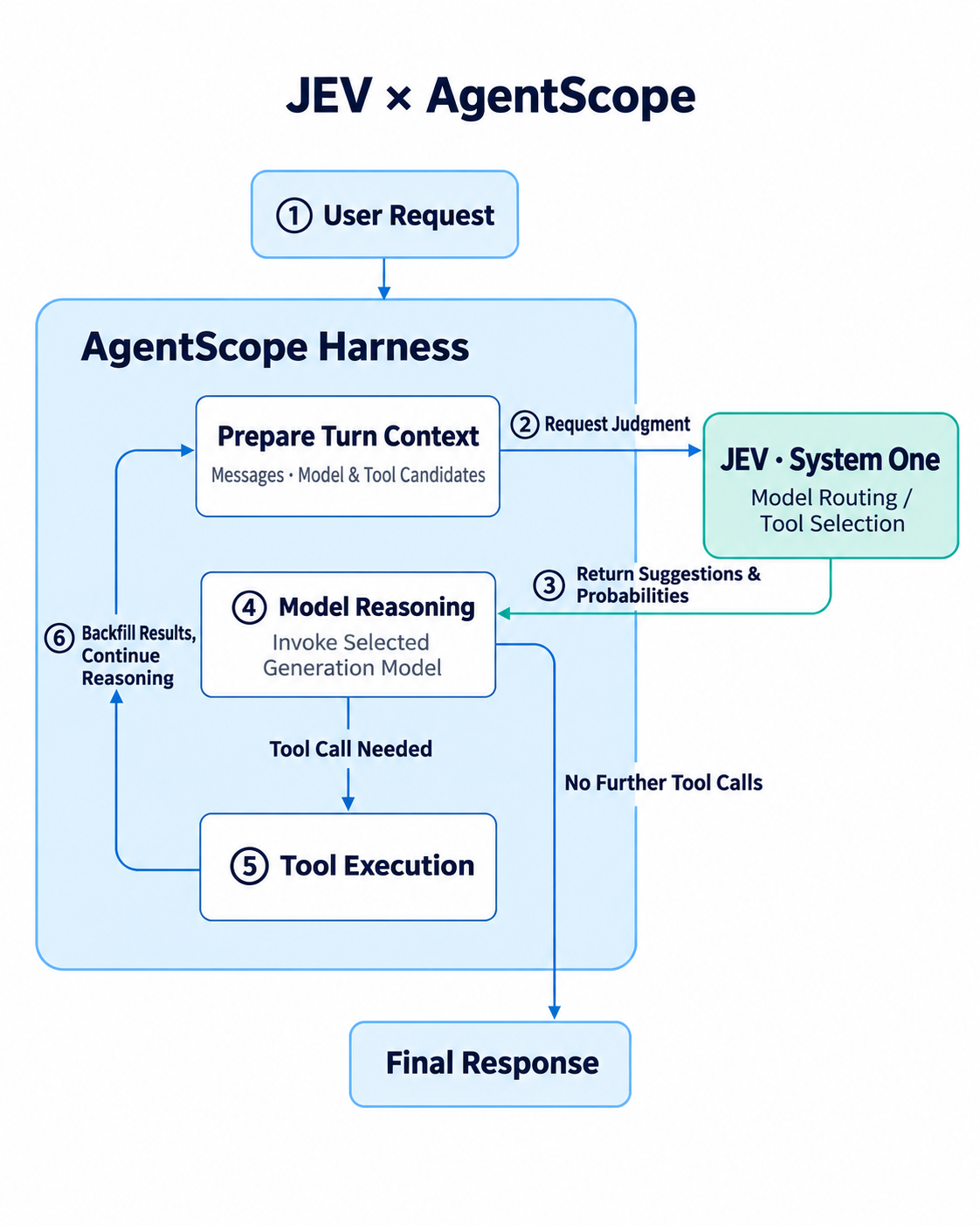
This support lets developers organize the relationship between judgment and execution explicitly: the application provides candidates, facts, and constraints; JEV returns typed results; the Harness applies those results at the corresponding stages and leaves behind run records that can be evaluated. Below, from three angles — basic concepts, typical scenarios, and hands-on integration — we introduce how to use JEV in AgentScope Java. For the full capability entry point, see the JEV module documentation.
JEV receives context and structured questions, and returns probabilities, options, or scores. AgentScope does not register it as a chat Model provider; instead, it is integrated through JevClient and higher-level components. User-facing answers, code patches, and complex analysis remain the work of generative models.
You can think of JEV as a model that provides structured judgment via the TypeSafe System One interface. The caller first defines "what needs to be judged," then supplies the business material; the result follows a predefined question type and is well suited to entering program branches. For example, when an application already has an order record and a draft answer, what is needed at that point is the judgment "does the record support this answer," not another user-facing reply to generate.
Generative models are responsible for analysis, generating answers, and proposing tool calls; JEV is responsible for structured judgment on specified questions; and the Harness is responsible for placing those judgments at the right execution points, managing tools, context, budget, and state. The three can be used together or adopted separately: for an ordinary Java service that only does draft review, calling the client or a Judge directly is enough.
Deterministic rules still have their place. Whether a user has refund permission, or whether an order has already been refunded, can be checked directly against the identity system and the business database; whether an answer omits a refund condition, or whether retrieved material contains injected instructions, requires semantic understanding. When integrating, first make clear which facts are verified by code, and then hand the questions that need semantic judgment to JEV.
state, Define the Standard with question
A single SystemOneRequest consists of a shared state and questions named by ID. The state can hold the user request, tool results, policies, or drafts; a question describes the condition these materials are expected to satisfy. Question IDs are used to locate the corresponding answers in the result, and a single request can contain multiple questions with different IDs.
For example, if the state contains "Business record: the refund has not yet been executed" and "Draft: the refund has been completed," the question should be "does the business record support the refund status in the draft." The probability obtained this way targets a definite proposition. Merely asking "is this answer good," without providing policy, facts, or evaluation criteria, makes it hard to form a reusable judgment.
| Question Type | Return Content | Suitable Questions to Answer |
|---|---|---|
NoulQuestion |
Probability that a statement is true | Is this tool applicable? Is there evidence for this statement? |
ChoiceQuestion |
Options, probability distribution, and confidence level | Which route to choose among the configured options? |
ScoreQuestion |
Grade distribution, weighted score, and confidence level | How severe is the risk? How many requirements does the answer cover? |
Suppose some NoulAnswer.noul() call returns 0.92. It represents the model's probability judgment that the given statement is true — not that the operation has succeeded, and not that 92% accuracy has been measured on your business. Choice returns a selection and distribution over a given candidate set; a Score's value must be interpreted against the defined grade levels. Probability and confidence are decision inputs; whether they suffice for adoption still depends on business thresholds and independent evaluation.
Typed results are easy for programs to process directly, but a correct format does not mean a correct judgment. For example, both "query order" and "conditional refund" may apply at the same time, which calls for independent judgment per tool; choosing a model route is the case where single selection fits. Probability thresholds need to be calibrated with your own business samples — do not treat the 0.8 in the examples as a universal standard.
On top of the basic types, JevJudge supports reusing review criteria and distinguishing PASS, FAIL, INCONCLUSIVE, and ERROR. Applications can handle pass, definite failure, insufficient evidence, and invocation failure separately. See Question Types and the Status Contract, and Review (Judge) Definitions.
Suppose the user asks: "Look up the order; if it hasn't shipped yet, refund it, and tell me the result." Handling this fully requires placing decisions at different points.
Before reasoning, tool selection keeps the query and refund tools; before executing the refund, a guardrail checks whether the current evidence supports the call. Knowledge retrieval provides the refund policy; evidence processing filters out suspicious instructions while retaining policies that conflict with the user's expectation but are useful. After the answer is generated, a reviewer checks whether conditions were omitted and whether "application submitted" was phrased as "refund received"; if necessary, only the draft is revised. After the calls finish, trajectory evaluation checks tool usage, answer grounding, and requirement coverage.
These stages can be enabled individually. That the refund tool is applicable does not mean the refund conditions are already met; that one call is allowed to execute does not mean the business operation has succeeded; and a passed answer review cannot replace the execution receipt from the order system.
JevToolSelectionMiddleware evaluates every candidate tool for applicability before each round of reasoning, then filters them by a count limit. It can keep both "query" and "refund" at the same time, and can explicitly withhold business tools for a plain greeting. Essential tools are retained separately and do not count against the selectable limit.
The current default context strategy is RECENT_WINDOW: the most recent 8 non-empty text messages, with a total text budget of 8,000 characters. Applications can adjust the budget, switch to sending only the latest user text, or use the full conversation. A smaller window limits the judgment input, but may also lose early clues — evaluate this against your task length.
Explicitly judging that none of the business tools apply is handled differently from a failed judgment: the former can keep only the essential tools; uncertain, timed-out, or invalid responses fall back to the original tool catalog. Filtering changes which candidates the main model can see, not tool permissions. For configuration and branch examples, see the Tool Selection Guide.
Beyond call-level model selection, JevPhaseRouting supports setting ordered candidate pools for routes such as planning and execution. The host provides model capability, context capacity, output reservation, and quota; candidates that do not qualify are excluded first, then a selection is made. Developers can start a phase explicitly, or let JEV decide among qualified routes and suggest a reasoning effort level within what the candidates support.
Within a single Agent invocation the selection is reused, and candidate conditions are re-checked right before actual dispatch; if a candidate expires, fall back to the original model. Phases are switched explicitly by the application and do not change on their own due to intermediate tool output. JevTeamPlanner can additionally recommend authorized, available team members for a declared phase; the actual assignment remains the scheduler's responsibility. See Phase Routing and Team Recommendations.
JevAutoModeMiddleware performs pre-execution checks on specific tool calls. For example, even though the refund tool has entered the candidate catalog, if the order status has not yet been determined, the actual refund call still needs to be checked.
In ENFORCE mode, rejected calls are not dispatched; when the judgment fails, protected calls are also rejected. Business permissions, parameter validation, and idempotency handling remain the responsibility of the original execution chain. A passed judgment only means execution may proceed — it is not proof of authorization or business success. See the Execution Guardrails Guide.
Long tasks accumulate a large volume of file reads, search results, and tool history. JevContextCompactor plugs into the Harness's existing compaction entry point and, within the range of tools the host marks as processable, judges whether each historical call and result should be kept, truncated, or removed from the current context in pairs.
Recent messages, system messages, fixed constraints, and incomplete tool results have explicit protection rules; uncertain material is retained. With ENFORCE, archiving must succeed before compaction happens; if archiving fails or the reduction is insufficient, the current history is kept. Later restoration reads the saved messages and does not re-execute historical tools.
Truncation keeps a prefix of the result — it is not a generated summary. The final request still goes through the Harness's budget checks. Applications can choose a file-based or BaseStore archiving implementation and isolate material by user, session, and Agent. See Context Compaction, Archive Restoration, and Explicit Exchanges for Planning.
Long-term memory has a separate entry point: JevMemoryGate reviews candidate facts both for lasting value and for conflicts with existing facts. It provides an admission recommendation; the actual write is the application's responsibility, and material is not automatically turned into long-term memory because of context compaction. See Memory Admission.
RAG scenarios need more than relevance ranking. When the user asks "will the refund definitely succeed," the policy line "refunds must satisfy conditions and pass review" refutes the question's premise — and is precisely the key evidence.
JevEvidenceProcessor supports classifying, filtering, and re-ranking authorized material, distinguishing prompt injection, answer evidence, and premise conflicts. The host performs ACL first; JEV then processes the visible material. Developers can process passages directly, expose them to the Agent via the search_evidence tool, or use the Knowledge adapter to plug into a retrieval pipeline.
Once evidence is retained, you still need to check whether the generated answer is actually supported by it. These two steps address "what material to give the model" and "whether the model uses the material faithfully," respectively. See Evidence Processing, Relevance and Grounding Checks, and the Knowledge Adapter.
When the policy is "unused items can be refunded within seven days" but the Agent writes "unconditional refunds are available," it is the answer that needs fixing. Re-running the whole Agent may repeat business operations that have already completed.
JevResponseMiddleware runs a quality review on the final text that carries no tool calls. Under ENFORCE, when the original draft clearly fails, it can enter a limited number of text-only revision rounds — revision calls carry no tools and do not re-run the Agent's tool loop. The revised draft is published only after passing the review again; on insufficient evidence, a review error, or exhausted revisions, the unapproved original is not published.
This also affects the streaming experience: the revision process is not streamed to the user word by word; text is emitted only after passing the review. Applications need to set review and revision budgets and handle rejection or human-handoff outcomes. SHADOW only reviews the original draft — it neither revises nor blocks publication.
Content guardrails can be combined with answer-quality review; applications that already have drafts can also plug directly into the standalone draft pipeline. See Answer Revision, Content Guardrails, and the Draft Pipeline.
JevSupervisionMiddleware observes, while a task is running, whether there is substantive progress, whether it has stalled or drifted, and whether additional verification is needed — and issues recommendations such as continue working, re-check direction, request verification, or complete the review.
The supervisor supports only OFF/SHADOW; it does not stop a task on its own or mark it as complete. A completion review requires the host to provide verification evidence matching the current version and scope; an Agent merely claiming "done" does not constitute a credible delivery conclusion. Applications can also initiate a one-off task review independently and consume the recommendations on their own schedule. See Continuous Supervision, Verification Evidence Integration, and One-off Task Review.
JevTraceEvaluator can evaluate historical trajectories and can also collect the current run's real calls via middleware. Built-in metrics cover tool selection, tool-result utilization, answer grounding, scope adherence, relevance, completeness, and indirect prompt injection; a deterministic tool-trajectory comparison that invokes no model can also be added.
The same set of definitions can be used both for online observation and offline batch evaluation, while custom metrics support your own business criteria. Results keep the classification, scores, pass/fail, and status, avoiding mixing skips, abstentions, and errors into one low score.
Post-hoc evaluation does not undo tool executions, nor does it re-run business flows to raise the score; the online middleware supports only OFF/SHADOW. Its value is in helping to discover problems, compare versions, and build regression samples. See Trajectory Evaluation, Metric Definitions, and Batch Evaluation.
Structured judgment can also be applied to specialized tasks with clear candidates and evidence boundaries.
JevCodeReviewer screens risks in a diff or source snapshot in phases, then locates evidence from the parsed real regions, and outputs mechanism, severity, and items pending review. It supports only OFF/SHADOW and does not automatically publish reviews or approve merges; a finding of "nothing found" also cannot be taken as proof of code safety. This capability is for organizing review leads; complex causal analysis and test verification still require follow-up checks. See the Code Review Guide.
JevBrowserNavigator chooses read-only navigation, scrolling, or waiting among the visible candidates on authorized pages, and plugs into the Agent via the read_browser tool. The host provides an exclusive browser session and an independent completion verifier; after a page changes, old recommendations must be re-observed. Only when the independent verification passes is VERIFIED returned — the model choosing DONE does not by itself constitute completion. It suits controlled tasks such as help centers and policy lookup. See Browser Execution and Action Recommendations.
For multi-tab routing at business entry points, conditional requests, and customer-service reply commitment checks, you can also directly combine candidate classification with customer-service review, without first building a full Agent.
We first complete a standalone judgment, then attach it to an existing Agent. Use Java 17 or later; replace ${agentscope.version} with the AgentScope version your project adopts that includes these APIs, and keep module versions consistent. For business code that uses the client, Judge, or evaluators directly, bring in the extension module:
<dependency>
    <groupId>io.agentscope</groupId>
    <artifactId>agentscope-extensions-jev</artifactId>
    <version>${agentscope.version}</version>
</dependency>
After obtaining API credentials from TypeSafe, set TYPESAFE_API_KEY in the environment that launches the Java process. These credentials are for the JEV judgment API; the Agent's existing generative model keeps its own configuration. When the key is not set explicitly, the client reads TYPESAFE_API_KEY and then JEV_API_KEY in order; if neither has a valid value, the client cannot be built.
Below is a standalone Java entry point; drop it into a project with the dependency above and run it from the IDE. It calls the real API — credentials must be configured, and it will incur API usage.
import io.agentscope.extensions.judge.jev.JevClient;
import io.agentscope.extensions.judge.jev.JevRetryPolicy;
import io.agentscope.extensions.judge.jev.NoulAnswer;
import io.agentscope.extensions.judge.jev.NoulQuestion;
import io.agentscope.extensions.judge.jev.SystemOneRequest;
import java.time.Duration;
import java.util.Map;

public class JevQuickStart {
    public static void main(String[] args) {
        var client = JevClient.builder()
            .baseUrl("https://api.typesafe.ai")
            .model("jev-latest")
            .timeout(Duration.ofSeconds(5))
            .retryPolicy(new JevRetryPolicy(2, Duration.ofMillis(500)))
            .build();

        var request = SystemOneRequest.builder()
            .state(Map.of(
                "business_record", "The refund has not yet been executed",
                "assistant_answer", "The refund has been completed"))
            .question("supported", new NoulQuestion(
                "Does business_record support the refund status claimed in assistant_answer?",
                null))
            .build();

        var result = client.systemOneBlocking(request);
        var answer = (NoulAnswer) result.answers().get("supported");
        System.out.println("Probability that the record supports the draft: " + answer.noul());
    }
}
A successful call prints the probability for supported. The input deliberately contains a factual conflict, so a low support probability is expected — but the exact value comes from the real model and must not be hard-coded as an acceptance result. You can change the draft to "the refund has not yet been executed," compare the two outputs under the same question, and then add real business samples for evaluation.
systemOneBlocking suits this standalone entry point; a reactive service should compose the Mono returned by client.systemOne(request) and avoid blocking the event loop. The client validates the answer types, the question set, and fields such as probabilities; when the request or response fails it throws a JevException — an API error must not be interpreted as a probability of zero.
The 5 seconds here is the per-request timeout; retries may increase the total latency. A higher-level Judge or JevExecution can set a budget over the entire decision logic including retries and backoff. For more options, see the Client Guide.
If the application needs to decide whether a draft proceeds to the next step, it can reuse the client above and define a JevJudge criterion:
import io.agentscope.extensions.judge.jev.JevJudge;
import io.agentscope.extensions.judge.jev.NoulQuestion;
import java.time.Duration;
import java.util.List;
import java.util.Map;

var definition = new JevJudge.Definition("refund-answer-v1", List.of(
    new JevJudge.Criterion(
        "supported",
        new NoulQuestion(
            "Does business_record support the refund status claimed in assistant_answer?",
            null),
        true, 0.2, 0.8)));

var judge = new JevJudge(client, Duration.ofSeconds(2));

var review = judge.judge(
    Map.of("business_record", "The refund has not yet been executed",
           "assistant_answer", "The refund has been completed"),
    definition);

var observed = review.doOnNext(result -> {
    System.out.println("Review status: " + result.status());
    System.out.println("Criterion details: " + result.findings());
});
// A reactive service can return or compose observed; a standalone CLI can call observed.block().
true means the criterion is expected to hold; in the example, at or below 0.2 is FAIL, at or above 0.8 is PASS, and the interval in between is INCONCLUSIVE. A request failure returns ERROR. These two thresholds only demonstrate the status branching and must be calibrated with business samples.
The Judge returns a result — it does not automatically publish or revise the answer. The application should continue with subsequent publication checks on PASS, revise or re-check on FAIL, gather more evidence on INCONCLUSIVE, and apply failure handling on ERROR. When changing criteria or thresholds, update the definition version to make offline regression comparison easy. Do not subscribe to a Mono a second time just for logging — that would repeat the review.
Use middleware only when the judgment needs to happen automatically before each round of reasoning. Harness integration requires an additional same-version dependency:
<dependency>
    <groupId>io.agentscope</groupId>
    <artifactId>agentscope-harness</artifactId>
    <version>${agentscope.version}</version>
</dependency>
Below, the client created earlier is used, while model and toolkit are the application's existing generative model and tool registry. Tool names and schemas must already be registered; the middleware filters — it does not create tools.
import io.agentscope.extensions.judge.jev.JevExecution;
import io.agentscope.extensions.judge.jev.example.JevToolSelectionMiddleware;
import io.agentscope.harness.agent.HarnessAgent;
import java.time.Duration;

var options = new JevExecution.Options(
    JevExecution.Mode.SHADOW,
    Duration.ofSeconds(2),
    "order-tools-v1",
    (ctx, record) -> System.out.println(record));

var selector = JevToolSelectionMiddleware.builder(client)
    .execution(options)
    .maxTools(2)
    .confidenceThreshold(0.8)
    .rejectionThreshold(0.2)
    .build();

var agent = HarnessAgent.builder()
    .name("order-support")
    .model(model)
    .toolkit(toolkit)
    .middleware(selector)
    .build();
The thresholds here are for demonstration only; under SHADOW the main model still receives the original tool catalog. A production observer should return quickly and associate the judgment version, latency, and recommendations with the current run. Ordinary middleware defaults to OFF; SHADOW records recommendations, and only ENFORCE applies them per the specific use case. Calling application APIs such as the Judge directly does initiate a review and is not implicitly governed by a global mode. See Run Modes.
To verify the wiring, run the existing Agent with "look up the order," "refund if not shipped," and a plain greeting, and check whether the corresponding tool recommendations appear in the records. Under SHADOW the actual tool catalog should remain unchanged; after calibration, switch the mode to ENFORCE, rebuild the middleware and the Agent, and re-check what tools are actually passed to the model. The original Agent invocation stays the same — registering the middleware itself does not execute a task.
Spring Boot projects can bring in the client integration with this Starter:
<dependency>
    <groupId>io.agentscope</groupId>
    <artifactId>agentscope-jev-spring-boot-starter</artifactId>
    <version>${agentscope.version}</version>
</dependency>
Configure it in application.yml:
agentscope:
  jev:
    api-key: ${TYPESAFE_API_KEY:}
    base-url: https://api.typesafe.ai
    model: jev-latest
    timeout: 5s
    retry:
      max-retries: 2
      initial-backoff: 500ms
The Starter creates a client by default when no custom JevClient Bean is present. You can inject it via the constructor and reuse the request and Judge definitions from earlier:
import io.agentscope.extensions.judge.jev.JevClient;
import io.agentscope.extensions.judge.jev.SystemOneRequest;
import io.agentscope.extensions.judge.jev.SystemOneResult;
import org.springframework.stereotype.Service;
import reactor.core.publisher.Mono;

@Service
public class DecisionService {
    private final JevClient client;

    public DecisionService(JevClient client) {
        this.client = client;
    }

    public Mono<SystemOneResult> decide(SystemOneRequest request) {
        return client.systemOne(request);
    }
}
What the Starter configures is the client — it does not automatically register tool filtering for all Agents or turn on ENFORCE. Middleware still has to be wired explicitly; to customize the client, provide a JevClientBuilderCustomizer Bean. Setting agentscope.jev.enabled=false disables the Starter's automatic client creation, and business components that depend on that Bean should be adjusted accordingly.
AgentScope Service users can configure, via a Session's agentOverrides.jev, tool selection, guardrails, routing, content and quality review, evaluation, compaction, supervision, code review, retrieval, and browser usage separately. Credentials are provided by the deployment environment; retrieval sources, model catalogs, browser sessions, and verification evidence still need to be integrated by the host. See Service Configuration.
If you want to see the flow running first, agentscope-examples/jev provides key-free offline examples covering retrieval with answer revision, compaction and archiving, phase routing, supervision, and trajectory evaluation. Build and run them following the example guides. The scripted models and synthetic judgments in the examples are for verifying the flow and do not represent real model quality.
Adding judgments also adds requests and waiting time. Fewer tool descriptions does not necessarily mean a faster end-to-end run, and more review does not necessarily improve task success rates. Compare the original flow and the augmented flow on the same inputs, measuring judgment quality, actual dispatch behavior, and final business outcomes separately.
For example, refund guardrails should count both wrong approvals and the share of legitimate refunds that were blocked; answer revision should track the final accuracy rate plus the added waiting; compaction should check retention of key facts and the quality of subsequent answers. During evaluation, keep errors, abstentions, and skips, distinguish judgment latency from overall latency, and never record missing usage as zero cost.
You can start with SHADOW to accumulate samples, then decide per use case whether to switch to ENFORCE, and verify that the fallbacks meet business requirements: on tool-selection or routing failure the original flow is kept; a failed check on a protected tool rejects dispatch; a failed pre-publication review blocks the text from being published.
The official documentation offers a complete evaluation guide plus budgeting and observability. We welcome you to share your use cases, missing capabilities, and real evaluation results at Issue #3251. Whether it's a custom middleware, a complete example, or an attempt that didn't pay off — all of it helps us keep improving the judgment flow in AgentScope Java.
You're also welcome to join the Agent x JEV DingTalk group to talk with us: group number 200975007516.
Friday, 21:47, Checkout Is Slow Again: Twenty Minutes of Troubleshooting with CMS MCP

798 posts | 60 followers
FollowAlibaba Cloud Native Community - October 22, 2026
Alibaba Cloud Native Community - October 28, 2026
Alibaba Cloud Community - May 21, 2026
Alibaba Cloud Native Community - October 26, 2026
Alibaba Cloud Community - August 6, 2026
Alibaba Cloud Community - October 14, 2026
798 posts | 60 followers
Follow Token Plan
Build more, spend less. One plan, every modality.
Learn More Qwen
Full-range, open-source, multimodal, and multi-functional
Learn More
Alibaba Cloud Model Studio
A one-stop generative AI platform to build intelligent applications that understand your business, based on Qwen model series such as Qwen-Max and other popular models
Learn More QwenWork
 is dedicated to helping employees strengthen their professional competitiveness in the AI era and to enabling enterprises to improve organizational effectiveness.
Learn MoreMore Posts by Alibaba Cloud Native Community

