This article uses an intelligent ticket-triage assistant to connect the full development, packaging, and deployment workflow: AgentScope Java and the Alibaba Cloud Model Studio decision model (Jev is unavailable on networks in mainland China) implement triage; the application is then deployed as a code package to Alibaba Cloud AgentCore; both standard and streaming calls are verified. Finally, we show how the assistant joins a Team to participate in task assignment and report review.
Even after an Agent works locally, preparing its runtime, releasing updates, and troubleshooting production issues still require effort. AgentCore supports both code-package and container-image deployment and provides ongoing runtime management. With code-package deployment, developers bundle the application with its runtime dependencies, while the platform supplies the base runtime, eliminating the need to build and maintain a dedicated image for each Agent.
This article is included in the open-source Alibaba Cloud AI Agent Handbook. For an enhanced reading experience, visit: https://aliyun.github.io/ai-agent-handbook/cases/jev/
In a typical enterprise workflow, a single ticket queue may contain both login failures and invoice requests. Operators must first determine the issue category, scope of impact, and urgency before routing the ticket to the appropriate team. Consider the following two tickets:
All production login API requests return HTTP 502, preventing every user from signing in. The issue began ten minutes ago, and the root cause has not yet been confirmed.
Request a replacement invoice for last month; there is no service interruption.
The login failure requires immediate investigation, whereas the invoice request requires verification of the billing period, ordering entity, and invoice status. After prioritization, operators must still retrieve ticket records and locate the relevant runbook before providing actionable recommendations.
The ticket assistant can prepare this information in advance. A dedicated Model Studio decision model determines the category and priority; the assistant then combines ticket records and runbooks into recommendations for operator review. Because classification criteria, result validation, and query tools must be adapted to enterprise rules and integrated with an existing ticketing system, this solution uses a high-code approach that keeps the logic in the business project.
The application divides responsibilities as follows: AgentScope Java orchestrates model and tool calls, Model Studio provides decision-making and generation capabilities, AgentCore handles deployment and runtime operations, the code package connects the local project to cloud services, and Team is an optional collaboration extension that can be added later.
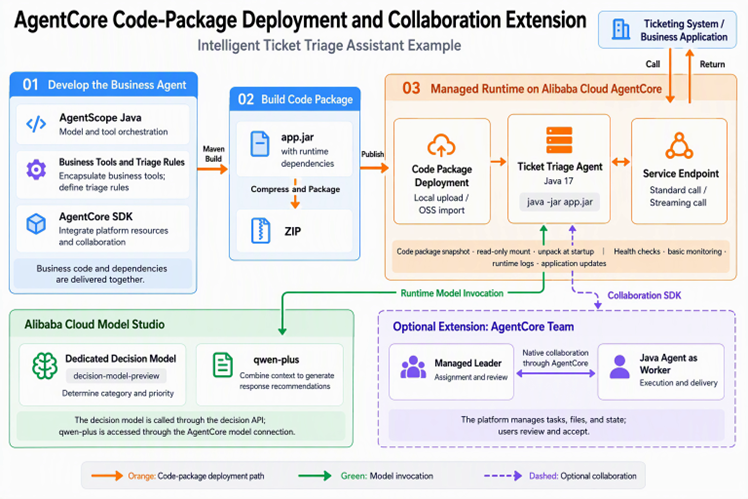
Figure 1: Code-package deployment spans development and release; Model Studio provides runtime model capabilities, while Team is an optional collaboration extension added according to business needs.
When developing the ticket assistant, AgentScope Java defines the Agent and orchestrates calls to models and business tools. When models, MCP tools, or Skills managed by AgentCore are required, use the AgentCore SDK to access platform resources and adapt them to the framework.
AgentCore SDKs are available for Python, JavaScript / TypeScript, and Java, with adapters for popular Agent frameworks. Existing projects can retain their technology stacks and connect to platform-managed models, MCP tools, Skills, memory, and credentials as needed. The following table lists framework support by language:
| Development Language | Supported Framework Adapters |
|---|---|
| Java | AgentScope Java, Spring AI, LangChain4j |
| Python | AgentScope, LangChain / LangGraph, Google ADK, Pydantic AI, CrewAI |
| JavaScript / TypeScript | LangChain / LangGraph, Google ADK, Mastra, AI SDK |
All of these SDKs are open source: Java, Python, and JavaScript / TypeScript. The ticket assistant uses the core SDK and the AgentScope adapter module. Example dependencies are shown below:
<properties>
    <agentcore.version>0.1.3</agentcore.version>
</properties>

<dependencies>
    <dependency>
        <groupId>io.github.ai-agentcore</groupId>
        <artifactId>agentcore-sdk</artifactId>
        <version>${agentcore.version}</version>
    </dependency>
    <dependency>
        <groupId>io.github.ai-agentcore</groupId>
        <artifactId>agentcore-sdk-agentscope</artifactId>
        <version>${agentcore.version}</version>
    </dependency>
</dependencies>
After integrating the SDK, existing ticket-query tools can continue to be used and combined with platform-managed models, MCP tools, or Skills. The dependencies above are for the SDK; model providers and other components should still be added as required by the business. The collaboration module is introduced later.
Classifying a ticket as "technical" is not enough. "No users can log in" and "some users experience slow login" are both technical issues, but they require different priorities. In addition to category options, the model therefore needs classification criteria corresponding to the scope of impact.
Decision models are well suited to tasks with explicit options and decision criteria. They support classification, scoring, and binary judgments, returning structured results and probability information. Once the application receives the category and priority, it can schedule subsequent queries and handling steps.
AgentScope Java already provides a Jev decision-model extension that encapsulates typed requests, result parsing, and validation in JevClient. Developers may also use TypeSafe's Jev, configure service credentials and the model according to the extension documentation, and integrate its decision capability into an existing Agent workflow.
This example uses the Model Studio decision model decision-model-preview. The project wraps its System One API in DecisionClient, submitting the ticket description together with classification criteria to obtain structured category and priority results.
In this example, an outage affecting all users or a core business function is classified as P1, while a general inquiry or request with no service interruption is classified as P3. After receiving the decision result, the assistant verifies that the category and priority belong to the predefined options before proceeding.
After determining priority, the next step is to find the supporting information. Ticket lookup and runbook retrieval are wrapped as two AgentScope tools: lookup_ticket provides the scope of impact, log clues, and recent release records, while lookup_runbook provides the corresponding handling procedure. qwen-plus then combines these materials with the decision result to generate recommendations and list items requiring human confirmation.
The following code connects the two stages: decisionClient first obtains the triage result, and the Agent then invokes query tools in the toolkit to generate a report. The materials to cite and the items to retain for confirmation are constrained by the prompt:
var decision = decisionClient.classify(input);
String content = input
    + "\nModel Studio decision-model triage result (the classification is not a root-cause conclusion):" + Main.json(decision);
var agent = ReActAgent.builder().name("triage")
    .model(model).toolkit(toolkit)
    .sysPrompt(prompt).maxIters(6).build();
String text = agent.call(List.of(new UserMessage(content)), context)
    .block(Duration.ofSeconds(150)).getTextContent();
Here, model uses the native AgentScope client to access a model connection in the AgentCore workspace and invoke qwen-plus. The generated recommendations are submitted to an operator for review.
The ticket assistant exposes an HTTP API compatible with OpenAI Chat Completions. After local verification, it can be deployed to AgentCore for invocation by the ticketing system.
Publishing this assistant does not require first building a dedicated image pipeline. AgentCore code-package deployment provides Python, Node.js, and Java runtimes whose base images are maintained by the platform. Developers can keep their existing build process, package the application with its runtime dependencies, and submit the resulting code package to the platform for deployment.
If a mature image pipeline already exists or custom system components are required, container-image deployment is also available. Because this ticket assistant can run in the Java environment supplied by the platform, code-package deployment is used here.
Packaging still uses Maven: business code, AgentScope, the SDK, and other runtime dependencies are bundled into app.jar, and the JAR is placed at the root of a ZIP archive. This ZIP file is the code package to publish.
In this practice, the local ZIP file is uploaded directly. If the code is already built by a pipeline, the artifact can instead be stored in OSS and imported from there. Either way, the delivered item is the application's own build artifact.
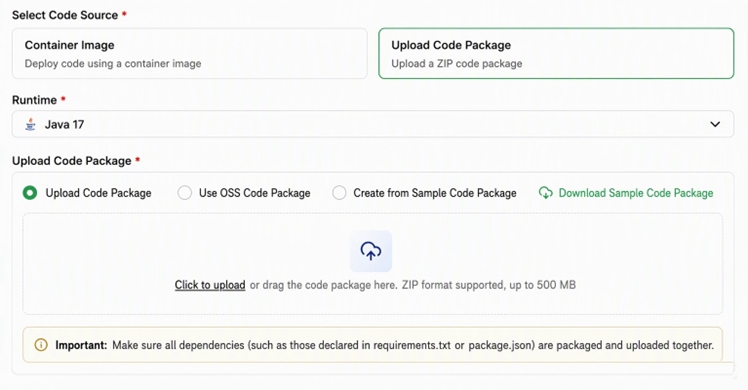
Figure 2: The code-package creation entry point supports runtime selection, local upload, and OSS sources.
After upload, the application still starts with its original command. This assistant uses Java 17 and the startup command java -jar app.jar, with service port 8080. AgentCore extracts the code package, starts the application, and verifies service status through health checks.
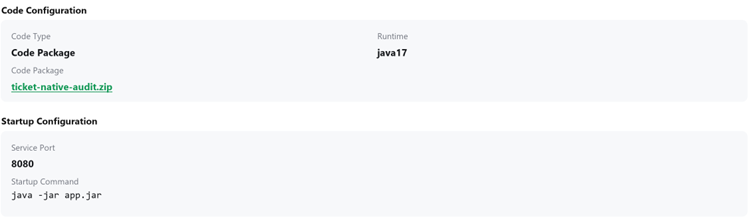
Figure 3: Deployment configuration for the ticket assistant, showing the code package, runtime, and application startup parameters in one place.
Once the application is ready, configure the service endpoint in AgentCore. The ticketing system can then send requests using the corresponding access URL and authentication information. The triage logic previously verified locally now has a service endpoint for business integration.
After deployment, submit the login failure and invoice request introduced earlier to the assistant and inspect the actual output. Verification covers two invocation modes: a standard call returns the complete report in one response for subsequent backend processing, while a streaming call returns content incrementally so users can view recommendations as they are generated on the ticket page.
The following results come from actual calls; the tickets and runbooks use demonstration data.
For the ticket stating that no users can log in, the assistant classifies it as “technical, P1” and cites the ticket record and incident runbook. The following is excerpted from the generated report:
Ticket category and priority: technical incident, P1. Known facts: the login API returns HTTP 502 and affects all users; the log clue is
upstream_connect_error, and there was a recent application release. Investigation recommendations: check upstream health, the connection pool, timeout settings, and the recent release; retain request IDs and relevant logs. Items for human confirmation: whether the upstream service is currently reachable, whether recent changes are related, and whether remediation or rollback requires authorization from the on-call owner.
For “request a replacement invoice for last month; no service interruption,” the assistant classifies the ticket as “billing, P3” and cites the invoice-handling runbook. Its recommendations focus on the billing period, ordering entity, and invoice status. Operators therefore receive not only a priority but also handling guidance appropriate to the issue category.
When the login service fails, related tickets may surge within a short period and then decline after recovery. AgentCore supports on-demand autoscaling: policies can be configured according to business concurrency requirements to add resources during peaks and reclaim idle resources as load falls, reducing the need to reserve peak capacity continuously. Learn about AgentCore elastic runtime capabilities
When a triage request does not return for an extended period, operators also need a place to investigate. AgentCore groups instances, Sessions, basic monitoring, and runtime logs under the same Agent, making it easy to check runtime status first and then trace a specific request through application logs. High-code Agent runtime and troubleshooting guide

Figure 4: Runtime instances and Session count for the ticket assistant, useful for understanding current runtime status and session occupancy.
After log collection is enabled for the ticket assistant and an SLS log store (Logstore) is configured, the team can view runtime logs in the AgentCore console and trace anomalous requests.
The ticket assistant records request IDs, execution duration, decision results, and tool calls. For a login failure, the logs show which ticket was queried, which runbook was used, and which category and priority were ultimately selected. If a recommendation is unexpected, these records provide a path back to the business code for troubleshooting.
To integrate a production ticket API or adjust the classification criteria for login failures, modify and test the existing project as usual. After verification, rebuild the code package and update the Agent through AgentCore; the new logic can then be released.
When an OSS source is used, uploading a new package and updating the Agent are separate actions. AgentCore saves a snapshot of the code package when an Agent is created or updated, so overwriting the OSS source file does not change the running code. The new package is read and deployed only when an Agent update is initiated, leaving the release timing under the team's control.
At this point, the ticket assistant can provide triage as a standalone service. However, a high-priority incident ticket often still requires someone to assign work, gather additional information, and review the report. The assignee, analysis progress, and acceptance status must also be recorded. By integrating AgentCore Team, the existing assistant can participate in subsequent collaboration.
Note: High-code Agent collaboration is currently available through an allowlist. Customers interested in trying it can submit a support ticket to request access.
Within a Team, the Leader assigns work, Workers perform specific analyses, and users can view progress, add requirements, and accept results. Subtasks, execution records, and report files are associated with the same task, enabling the next participant to review prior work and comment directly on the report instead of repeatedly relaying context or asking for status updates. Learn about Team tasks
The login-incident task uses the following division of responsibilities, reusing the Agent deployed earlier as the ticket assistant:
| Participant | Responsibility |
|---|---|
| Managed Agent serving as Leader | Assign the login-incident analysis task and review the report submitted by the Worker |
| Ticket assistant (high-code Agent) serving as Worker | Query the incident ticket and runbook, complete triage, and submit the report |
| User | Add task requirements, participate in review, and accept the final report |
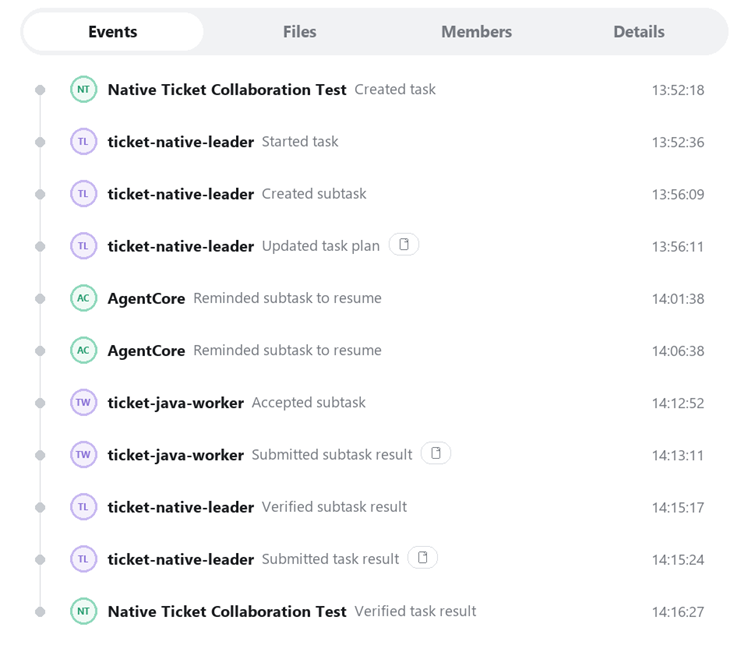
Figure 5: Task history for the login-incident ticket, showing subtask assignment, Worker submission, Leader review, and user acceptance.
The assistant retains its existing triage logic, uses the collaboration SDK to add tools for claiming tasks and delivering files, and joins a Team in a collaboration-enabled Workspace. The project adds the following dependency; the core SDK and AgentScope adapter module continue to use version 0.1.3:
<dependency>
    <groupId>io.github.ai-agentcore</groupId>
    <artifactId>agentcore-collaboration</artifactId>
    <version>0.1.0</version>
</dependency>
The SDK integrates task-claiming, file-delivery, and related capabilities into the existing Agent as tools and adds Worker collaboration rules. The toolkit below retains business query tools, businessPrompt retains the triage and report requirements, and collaboration is reused for the lifetime of the application and released on shutdown:
var workspace = Path.of(".");
var collaboration = Collaboration.auto(workspace);
var workerTools = new ArrayList<>(collaboration.tools().block());
Skill.tools(collaboration.skills().block(), workspace).stream()
    .filter(tool -> !"execute_command".equals(tool.name()))
    .forEach(workerTools::add);

workerTools.forEach(tool ->
    toolkit.registerAgentTool(AgentCoreAgentScope.tool(tool)));
var worker = ReActAgent.builder().name("ticket-worker")
    .model(model).toolkit(toolkit)
    .sysPrompt(collaboration.composePrompt(businessPrompt))
    .maxIters(18).build();
The task context is supplied with each call so that the analysis and report are associated with the correct task. The trustedHeaders below come from trusted platform requests; standard and streaming calls pass them in the same way:
var taskContext = CollaborationContext.fromHeaders(trustedHeaders);
var contextBuilder = RuntimeContext.builder().sessionId(sessionId);
if (taskContext != null) {
    contextBuilder.put(CollaborationContext.KEY, taskContext);
}
var context = contextBuilder.build();
var response = worker.call(List.of(new UserMessage(input)), context)
    .block(Duration.ofSeconds(150));
// For streaming calls, use worker.streamEvents(new UserMessage(input), context)
After integration, release still consists of rebuilding the code package and updating the Agent. See the Java collaboration SDK for the complete API.
The final report delivered for the task is shown below. It lists the basis for the P1 classification, known ticket facts, recommended investigation steps, and items requiring human confirmation. The Leader and user can review the report directly instead of reconstructing the conclusion from multiple conversation turns.
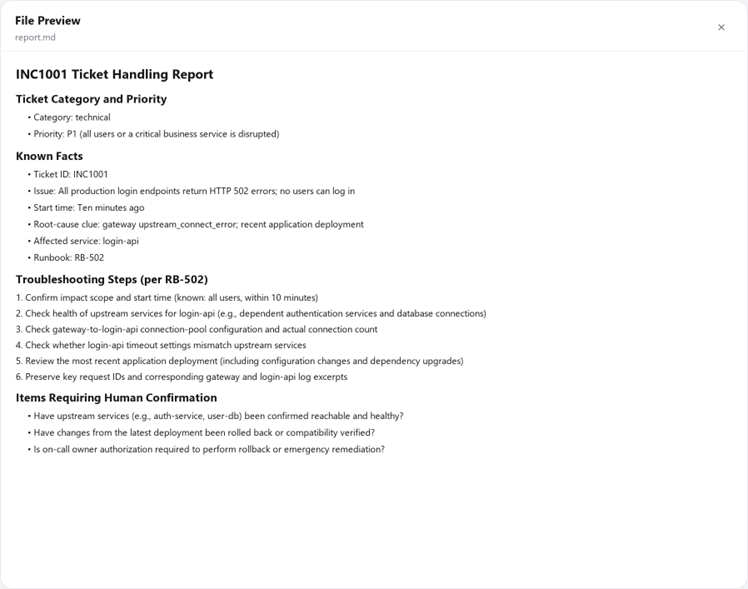
Figure 6: The report.md delivered with the task can be previewed directly by reviewers to verify the triage rationale and handling recommendations.
Returning to the two tickets introduced at the beginning, the assistant must help operators quickly recognize the urgency of the login failure and locate appropriate handling guidance for the invoice request. Classification rules and business tools will continue to evolve through real-world use, and releasing these improvements should become part of routine development.
AgentCore code-package deployment lets teams retain their existing projects and deliver verified applications and dependencies to the platform, avoiding the overhead of maintaining a separate image for every Agent. AgentCore manages the runtime and service operations, allowing developers to focus on triage rules, query tools, and actual handling outcomes; when complex tickets require cross-role follow-up, Team can extend the workflow with collaboration.
Visit the Alibaba Cloud AgentCore console to deploy and run your own business Agent as a code package.
The AI Agent Era Doesn't Need More Data — It Needs a Semantic Layer

789 posts | 60 followers
FollowAlibaba Cloud Native Community - October 22, 2026
Alibaba Cloud Native Community - November 6, 2025
CloudSecurity - April 9, 2026
Alibaba Cloud Native Community - July 14, 2026
ApsaraDB - May 22, 2026
Alibaba Cloud Native Community - May 26, 2026
789 posts | 60 followers
Follow Qwen
Qwen
Full-range, open-source, multimodal, and multi-functional
Learn More Token Plan
Build more, spend less. One plan, every modality.
Learn More
Alibaba Cloud Model Studio
A one-stop generative AI platform to build intelligent applications that understand your business, based on Qwen model series such as Qwen-Max and other popular models
Learn More Managed Service for Prometheus
Multi-source metrics are aggregated to monitor the status of your business and services in real time.
Learn MoreMore Posts by Alibaba Cloud Native Community

