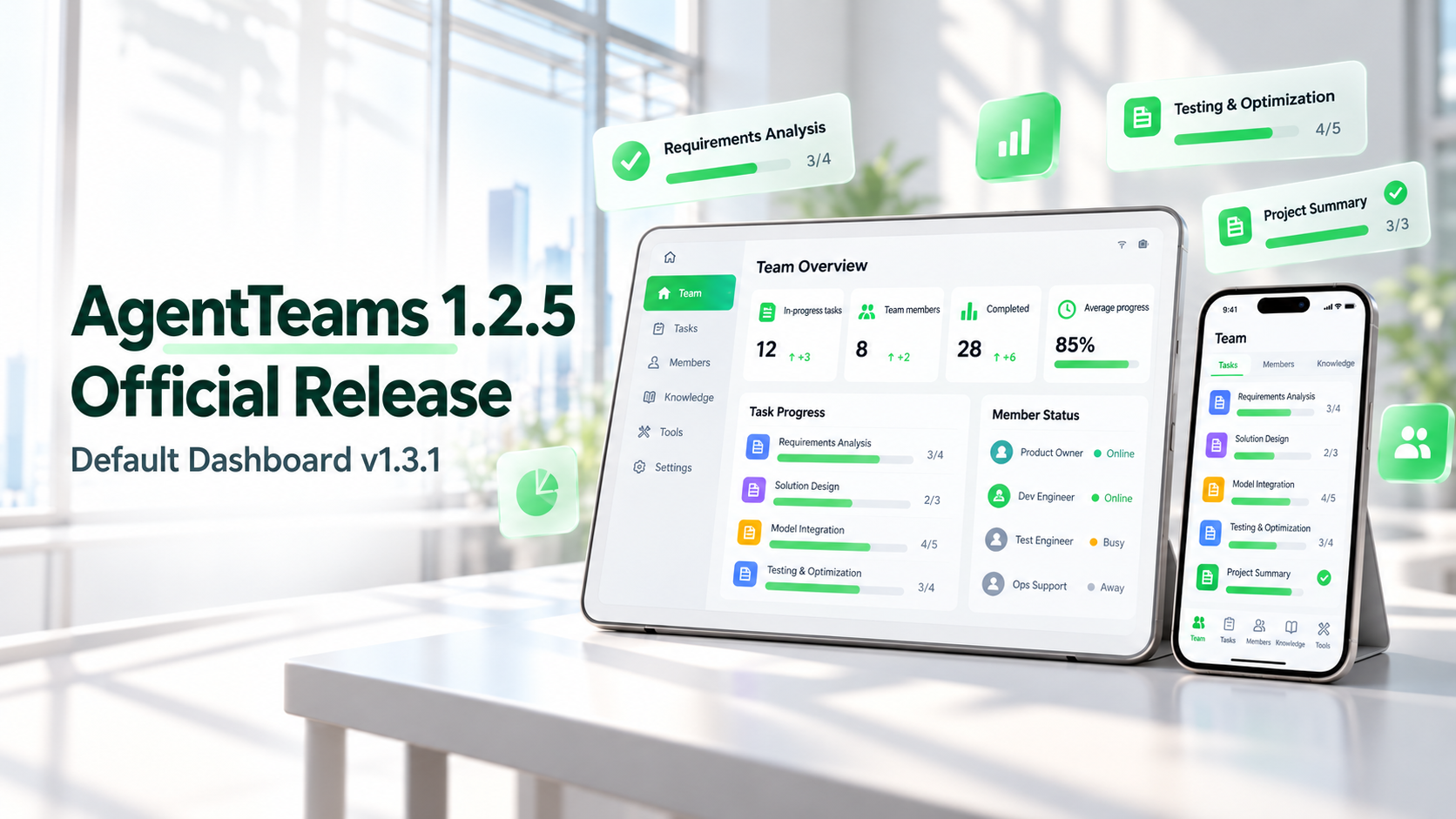
AgentTeams is an open-source project for multi-agent collaboration and operational management. It supports organizing multiple Agents into teams that execute tasks through a division of responsibilities. Users can participate in team communication, review execution results, and intervene to make adjustments when needed.
AgentTeams Dashboard provides a unified management interface for teams: managing members and permissions, configuring models, skills, and tools, and tracking collaboration progress through two levels of boards for projects and tasks.
From 1.2.0 to 1.2.5, AgentTeams completed its official upgrade from HiClaw and introduced Dashboard as the overall control plane. The main updates in recent releases have centered on this unified entry point: improving team resource management, providing two levels of boards for projects and tasks, unifying Skill management, and extending runtime management capabilities.
AgentTeams 1.2.5 has been officially released and comes with the independently released Dashboard v1.3.1 by default, adding features such as coding CLI management, execution record viewing, and LLM parameter tuning.
Dashboard centralizes the management of users and permissions, Agent instances, team relationships, and skill, tool, and model resources. The main categories are as follows:
· User and Permission Management: Manage Human users and the teams and Workers they can access. Administrators are responsible for sensitive configurations. Within their authorized scope, team members can view projects, manage skills, and process approvals. Read-only access to specific Workers can also be granted. Audit records are retained for relevant permission changes.
· Worker and Manager Management: View and manage Agent instances centrally, check their operational status and sessions, and maintain runtime, channel, model, tool, and skill configurations. Users can open a specific instance from the resource list to view its configuration and operational status.
· Team Management: Maintain Team membership and leadership relationships, and organize the division of responsibilities between Team Leaders and Workers. Team Leaders coordinate projects, while Workers execute tasks; team relationships and each Worker's own operational configuration are managed separately.
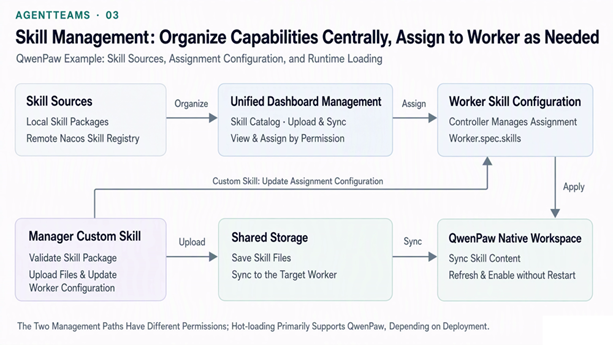
· Skill Management: Centrally view built-in, shared, and team skills, upload custom skills, and assign them to Workers according to members' responsibilities. Interfaces for connecting to and synchronizing remote skill repositories are also provided, making it easier to maintain and reuse team capabilities.
· MCP Management: Manage MCP services and their connection configurations, and configure the tools that Workers can invoke. Tool services and Agents' tool usage configurations each have corresponding management interfaces, making it easier to maintain tool connections.
· Model and Routing Management: Maintain configurations for models and related gateway resources, manage model access routes, and configure the models used by Agents, making it easier to adjust the team's model access setup centrally.
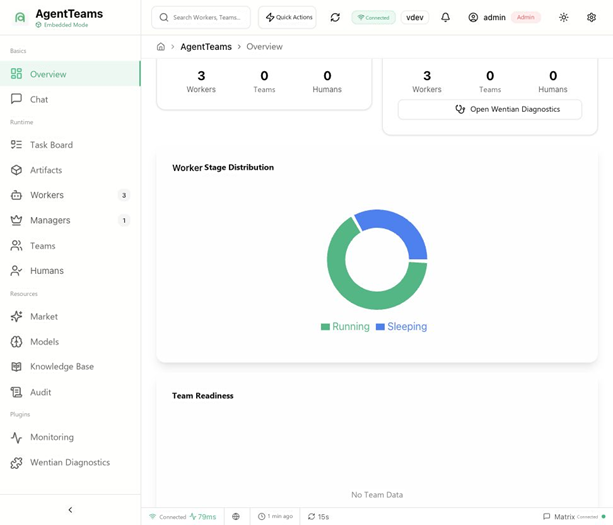
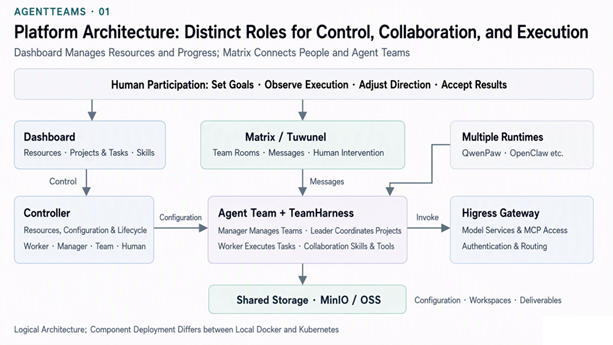
Dashboard and Matrix serve different roles: Matrix rooms host collaborative conversations between Humans and Agents, while Dashboard provides structured views of resources, configurations, and execution status. Together, they support team collaboration and human intervention.
The two levels of boards for projects and tasks are a key feature added recently, providing project overviews and views of task dependencies, execution status, and results. The project list brings together each project's status, update time, and task distribution. Opening the details reveals the workflow topology, blocking points, and tasks that are ready to move forward next.
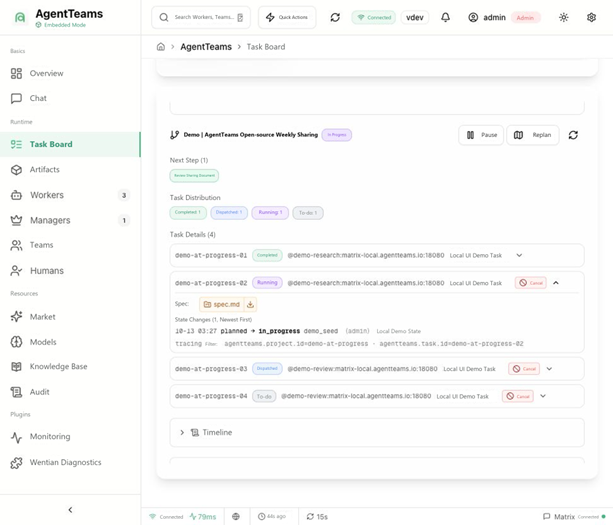
Projects organize the overall objective and task relationships, while tasks record execution information for specific work. The project view shows overall progress, task distribution, and dependencies; task details retain the person responsible, execution requirements, status changes, submitted results, and artifacts.
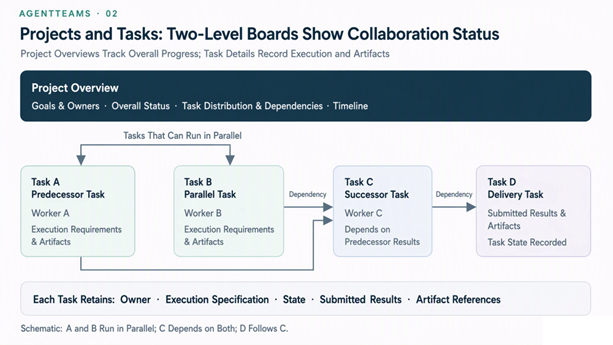
Through these two levels of views, users can drill down from overall project progress to specific tasks, view unfinished work and its prerequisite dependencies, and trace results that have already been submitted. Task details also record the history of status transitions, events, and progress information, allowing users to see when a task was dispatched, which status changes it has undergone, and what has been submitted so far.
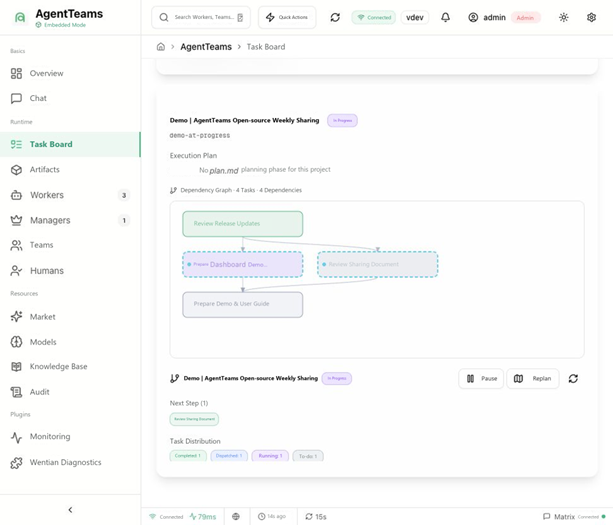
Projects can be paused and resumed, with related actions and status changes retained in the timeline to facilitate human intervention and subsequent tracing.
1.2.5 further improves project completion checks: projects cannot be marked complete prematurely while any tasks have yet to reach a terminal state. New notifications are sent when tasks are reassigned, reducing instances in which reassigned tasks are not received promptly.
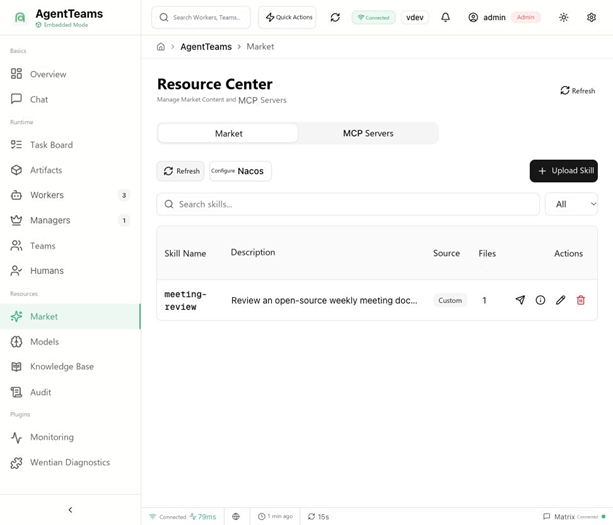
The Skill management interface provides unified capabilities for viewing, uploading, distributing, and reusing skills. Teams can maintain skill resources centrally and then assign them according to each Worker's responsibilities, reducing duplicate configuration.
The skill catalog covers built-in skills, shared skills, team skills, and skills bundled with plugins. Users can view the available skills and their sources in one place and, together with Workers' skill configurations and operational status, determine which work capabilities members have. Skill uploads and assignments are subject to the corresponding team permissions.
In addition to local skill management, Dashboard provides interfaces for configuring and synchronizing a remote Nacos Skill Registry, allowing teams to connect to existing skill repositories.
QwenPaw Managers and Workers now support skill hot-loading, so skill updates do not require a runtime restart. Combined with the unified management interface, this makes the process of maintaining, assigning, and loading skills more convenient.
1.2.5 also adds Skill ZIP downloads, making it easier to obtain complete skill packages for export and reuse.
Workers in a team can use different runtimes. Dashboard provides interfaces for viewing and managing operational status, sessions, and configurations, making it easier for users to understand how members are actually running. Operational management also covers session viewing, execution loop settings, and the status of channels, tools, and skills; the specific scope of support depends on the Worker's runtime.
This round of updates completed the upgrade of the primary runtime path from CoPaw to QwenPaw, with 1.2.4 using QwenPaw 2.2.1. DeepSeek Harness (DSH) was also introduced as an experimental Worker, while existing Worker paths such as OpenClaw and Hermes remain available. DSH is currently used only for Workers and is still experimental.
Model configurations support declaring capabilities such as vision and reasoning. Sub-Agents can use separate models or inherit team defaults, and hot updates at runtime are supported. Models and gateway routes also have a unified configuration interface, making it easier to centrally maintain the model and tool access configurations used by the team.
1.2.5 extends the LLM configuration capabilities of QwenPaw Workers, supporting retry counts, concurrency limits, and tuning of timeouts for waiting for the first content segment and for intervals between outputs in streaming responses. Dashboard v1.3.1 provides the corresponding configuration interface, making it easier to adjust model invocation parameters to suit task requirements.
QwenPaw Workers also gain pre-upgrade compatibility checks, in-place runtime upgrades, upgrade status queries, and rollback on failure. In-place upgrades restart the target runtime; container image versions continue to be managed through the deployment upgrade process.
The operational processes supporting these management features are also being continuously improved: reducing duplicate file synchronization and unnecessary configuration reloads, improving configuration and data retention during upgrades, and enhancing retries after file upload failures. When team membership changes, only the necessary team information and permissions are updated, avoiding repeated loading of unchanged model, channel, and tool configurations. These improvements have been delivered alongside recent releases.
1.2.5 also fixes issues with Worker recovery and settings retention after a Manager restart, improves MCP registration and standalone Higress Console integration, and prevents idle Matrix turns from being displayed as "Completed". Installation validation adds model channel checks, and Dashboard session keys are also retained during upgrades.
1.2.5 has delivered the Coding CLI extension, supporting coding tools such as Qwen Code, OpenCode, and Qoder. Workers can delegate coding tasks to these tools, and Dashboard v1.3.1 provides a management interface for tool installation, status checks, authorization configuration, and execution parameters.
In addition to tool configuration, Dashboard adds coding execution records and read-only detail pages. Users can view associated tasks, execution results, and logs, as well as records of blocked executions, helping them understand what coding tools actually executed and how those executions turned out.
The platform also provides Worker environment variable editing and gateway identity probing, making it easier to configure tool authorization and troubleshoot access issues with models and MCP tools. Before using a coding CLI, the corresponding tool must be installed and valid authorization must be completed.
The AgentTeams open-source repository provides installation guides and release notes. After installation, users can use Dashboard to manage team resources, view project tasks, and configure skills, while using Matrix rooms for multi-Agent collaboration.
You are welcome to share feedback through an Issue or contribute to the project through a Pull Request.
Special thanks to the main contributors @LUOSENGWA (Luo Chenghua) and @nillikechatchat (Sun Wei) for their continued contributions to AgentTeams, and to the community developers who have contributed code, documentation, testing, and issue feedback.
[1] AgentTeams
https://github.com/agentscope-ai/AgentTeams
[2] AgentCore
https://click.alibabacloud.com/m/20000003780/
[3] @LUOSENGWA
[4] @nillikechatchat
https://github.com/nillikechatchat
[5] AgentTeams Open-Source Repository
https://github.com/agentscope-ai/AgentTeams
[6] Installation and Usage Guide
https://github.com/agentscope-ai/AgentTeams/blob/v1.2.5/install/README.md
[7] AgentTeams 1.2.5 Release Notes
https://github.com/agentscope-ai/AgentTeams/releases/tag/v1.2.5
[8] Dashboard v1.3.1 Release Notes
https://github.com/agentteams-group/agentteams-dashboard/releases/tag/v1.3.1
[9] AgentTeams Dashboard
Personal Agent in Focus: Dissecting the Technical Challenges of 24/7 Operation

791 posts | 60 followers
FollowAlibaba Cloud Native Community - May 26, 2026
Alibaba Cloud Native Community - June 25, 2026
Alibaba Cloud Native Community - July 14, 2026
Della L. Wardhani - September 17, 2026
Alibaba Cloud Community - July 20, 2026
AliCloud-Data Middle Office - August 25, 2021
791 posts | 60 followers
Follow AgentBay
Multimodal cloud-based operating environment and expert agent platform, supporting automation and remote control across browsers, desktops, mobile devices, and code.
Learn More AgentCore
AgentCore unifies agent construction, governance, and execution capabilities so enterprises can deploy diverse agents with confidence.
Learn More QwenWork
QwenWork is dedicated to helping employees strengthen their professional competitiveness in the AI era and to enabling enterprises to improve organizational effectiveness.
Learn More Qoder
Qoder
From Assisted to Autonomous — Adapting to Every Programming Need
Learn MoreMore Posts by Alibaba Cloud Native Community

