To meet the needs of both Personal Agents and enterprise agents, we need an Agent as a Service architecture that allows tasks to continue progressing across different entry points, execution nodes, and working environments:
• A Personal Agent needs to continue organizing material after the user leaves their computer, and allow a local Harness to resume the same work when the user returns, retaining the context and memory accumulated earlier.
• Enterprise agents need to coordinate investigations remotely, delegate tool calls to cloud sandboxes or execution endpoints on the enterprise's internal network according to data and permission requirements, and continue processing after waiting for tools, obtaining human confirmation, or switching execution nodes.
The common requirement in both scenarios is to make an Agent's identity, task state, and long-term accumulated information independent of any single client, Harness instance, or execution environment. This requires organizing Harness operation, cloud-based management of Context and Memory, and actual tool execution separately, then connecting them through stable task identifiers and execution protocols.
Building on AgentScope, this article develops an implementation path centered on Sandbox as Tool: hosting the Harness as a remote service; connecting Context, Memory, and recovery state to cloud-based state services; supporting continuation of work locally and remotely through handoffs of execution ownership; and connecting tool execution endpoints in different locations by separating Brain and Hands. Along these boundaries, persistent task state, on-demand compute, and switchable execution environments are organized into a complete task delivery pipeline.
Whether serving individuals or enterprises, callers need to be able to submit work, check progress, provide additional requirements, handle confirmations, and retrieve results later. The service needs to support these interactions while retaining what the task has already completed, what it is waiting for, and how it should proceed next.
Agent as a Service, as used in this article, refers to this task-delivery-oriented service model. Managed Agent further clarifies operational responsibility: the platform hosts the Harness, execution scheduling, and state management within an agreed scope, while application teams provide business tools, authorization, and acceptance criteria. The platform can be deployed on the enterprise's own infrastructure.
This means that an Agent involves at least several distinct lifecycles: an Agent definition can be reused over the long term; a user session can span multiple tasks; a particular inference instance may run only for a limited period; and a sandbox is retained or reclaimed according to the needs of its files and processes. Separating these lifecycles is an important design responsibility for a Managed Agent platform.
Having clarified the responsibilities the service needs to assume, we can return to Agent construction and deployment. The engineering system that organizes the task loop, context, tools, state, and control around a model is commonly called a Harness. When building an Agent, teams can choose different starting points based on their customization requirements and the operational responsibilities they are willing to assume.
First, build a custom Harness using a code-first framework. The framework provides code abstractions for models, messages, tools, state, and other elements, on top of which the development team assembles the task loop, context strategies, and business capabilities. This approach enables extensive customization of how the Agent works, but also requires the team to implement or integrate the corresponding storage, runtime, and recovery mechanisms. AgentScope provides precisely this kind of foundation.
Second, reuse a productized Harness. A mature Coding Agent or workspace assistant already brings together planning, file operations, command execution, context management, and permission-related interactions. Teams can use the CLI directly or embed these capabilities in an application through an SDK, then integrate business tools, identities, and acceptance rules, reducing duplication in the development of general-purpose execution mechanisms.
Third, define an Agent around a model and have the platform host the Harness and its execution. Developers configure the model, instructions, tools, Skill, and execution environment, submit tasks through an API, and consume events and results. The platform assumes operational responsibility within an agreed scope, while the application side focuses on data and tool integration, authorization, result delivery, and business acceptance.
Fourth, rapidly build an Agent using a cloud product's built-in capabilities. Through the product interface or open APIs, teams assemble resources such as models, knowledge, memory, tools, and credentials into an Agent, then use the platform's versioning, release, and management processes. This approach places greater emphasis on integrating the interfaces for construction and governance; the same platform can provide both this approach and managed execution.
These four approaches can be combined. An enterprise can customize its core Agent with a framework, reuse a mature Harness for workspace tasks, and integrate and manage them through a unified platform. For the applicability boundaries of these approaches and the division of responsibilities among Harness, Runtime, Sandbox, and the enterprise, see "Mainstream Approaches to Building a Harness and Their Responsibility Boundaries" in the AI Agent Handbook.
After choosing a starting point for construction, the deployment of reasoning and execution still needs to be determined: does the Harness responsible for the reasoning loop reside within the same sandbox boundary as the environment that executes model-generated code?
We describe these two relationships as Agent IN Sandbox and Sandbox as Tool: the former places the Agent's runtime components inside the sandbox, while the latter allows an Agent outside the sandbox to invoke its execution capabilities. This provides a clear starting point for comparing deployment approaches.
Here, the Agent's runtime components primarily refer to the Harness, model invocation code, and tool orchestration code; the model itself can provide inference through a remote API. A container used to deploy a service is not necessarily the Sandbox that executes untrusted code; what matters is their respective permission and isolation boundaries.
Once the construction approaches above are mapped to specific deployment arrangements, they can be classified unambiguously. Each row in the following table fixes the location where the Harness runs, and therefore corresponds to only one pattern.
| Specific Construction Approach | Harness Runtime Location | Deployment Pattern |
|---|---|---|
| Use a code-first framework and deploy the custom Harness together with the task environment inside a sandbox | Inside the sandbox | Agent IN Sandbox |
| Reuse a productized Harness and launch the Agent runtime components associated with its CLI or SDK inside a sandbox | Inside the sandbox | Agent IN Sandbox |
| Use a Managed Agent or cloud product, with the platform running the complete set of Agent components inside the task sandbox | Inside the sandbox | Agent IN Sandbox |
| Use a code-first framework, run the Harness on the server side, and access the sandbox through tools; the service architecture built on AgentScope below adopts this approach | On the server side, outside the sandbox | Sandbox as Tool |
| Reuse a productized Harness that supports remote execution and delegate file and command operations to a separate sandbox | In a host process or on the server side, outside the sandbox | Sandbox as Tool |
| Use a Managed Agent or cloud product, with the platform running the Harness on the server side and the sandbox handling only tool execution | On the platform's server side, outside the sandbox | Sandbox as Tool |
Classification depends on where the Agent Loop actually runs. An SDK can initiate calls from outside the sandbox, but if the complete Harness it launches runs inside the sandbox, the deployment still falls under Agent IN Sandbox. In the AgentScope-based service developed below, the Harness runs on the server side and uses sandboxes through an independent tool execution layer, adopting the Sandbox as Tool pattern. "Framework," "SDK," "managed," and "cloud product" describe starting points for construction or divisions of responsibility; the specific deployment arrangement determines the final classification.
In this pattern, the Agent runtime components are installed in the task environment, where they read the workspace, invoke the model, execute commands, and maintain the task's execution process. External applications deliver input to this environment over the network and receive events and results in return.
This approach is similar to development in a local workspace. The Agent can directly use the files, dependencies, and tools in the environment. If it relies heavily on an existing CLI, a complex toolchain, or extensive local operations, placing the runtime components together with the environment usually makes it easier to get started. Correspondingly, upgrades, environment recovery, and process management need to be considered together.
In this pattern, the Harness runs on the server side. It organizes context, invokes the model, and determines the next action; when file operations or code execution are required, it calls a remote Sandbox. Once execution results are returned, the Harness continues advancing the task.
This separation establishes independent boundaries for Agent state and the execution environment, and allows credentials for model access to remain outside the sandbox. The trade-off is that tool calls introduce additional network interactions, and the system must handle remote execution and failures. Remote sandbox integration examples for some Agents also demonstrate the practice of using this approach for file operations and command execution.
The following simplified diagram illustrates the difference between the two patterns.
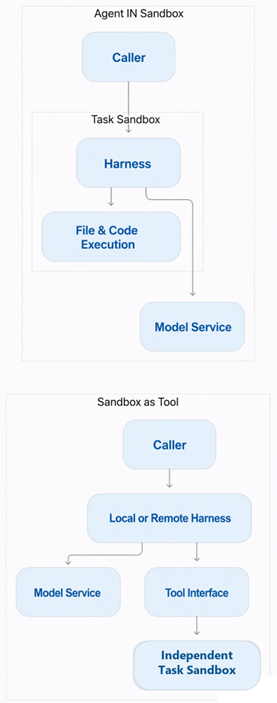
From a platform engineering perspective, this distinction also leads to the following considerations:
| Aspect | Agent IN Sandbox | Sandbox as Tool |
|---|---|---|
| Unit of Task Hosting | Tends to use a complete Agent environment as the unit | Can manage inference instances and execution environments separately |
| Long-Term State | Needs to be extracted from the environment and stored externally | Can be organized around independent task records |
| Resource Scheduling | Inference and environment lifecycles are relatively tightly coupled | Can schedule resources separately according to their different workloads |
| Permission Design | Needs to separate the permissions of runtime components from those of generated code | Can centralize checks at the remote tool boundary |
| Failure Handling | Needs to assess both process state and environment state | Needs to establish whether a tool has executed and how its results are handed off |
These differences represent opportunities and responsibilities arising from architectural choices. The first pattern can also support service delivery through externalized state, credential proxies, and permission separation; the second also requires investment in reliable execution protocols. The choice should be based on how tightly tasks are coupled to their environments and which engineering responsibilities the platform is willing to assume.
To build an Agent service with AgentScope, first use the Harness to organize models, tools, workspaces, memory, and task execution, then build an integration, scheduling, persistence, and tool execution pipeline around it. When adopting Sandbox as Tool, place the Harness on the server side and delegate file operations, commands, and similar actions to an independent execution layer; integrate enterprise APIs and MCP tools according to their respective authorization boundaries. The following table clarifies the implementation responsibilities of each part along this pipeline.
| Service Responsibility | Implementation Approach with AgentScope |
|---|---|
| Definition and Resource Management | Manage the Agent's model, instructions, tools, Skill, and configuration versions, and define workspace and resource authorization |
| Request and Event Intake | Verify identity, accept sessions and tasks, and provide progress queries, event subscriptions, additional input, and human confirmation |
| Task Scheduling and Execution Control | Durably accept work, control ordering within sessions, concurrency, and budgets, and manage execution ownership and recovery scheduling |
| Agent Operation | Use the Harness to construct context, invoke the model, orchestrate tool calls, and save execution progress |
| Tool Execution | Invoke sandboxes, MCP, or business systems; record stable execution identifiers, progress, and results; and handle queries and cancellation |
| State and Workspace Storage | Save session logs, checkpoints, pending items, tool records, and artifacts, and configure workspace persistence and isolation |
In implementation, first configure a reusable starting point for Harness construction and select the model, tools, and workspace backend. For each execution, pass authorized user and session identities through RuntimeContext, and connect Session Log and the required state to persistent storage. After the model generates a tool call, check permissions and record the execution intent before the execution layer invokes the sandbox or business tool. Once the result is confirmed to have been written back, the Harness proceeds to the next step.
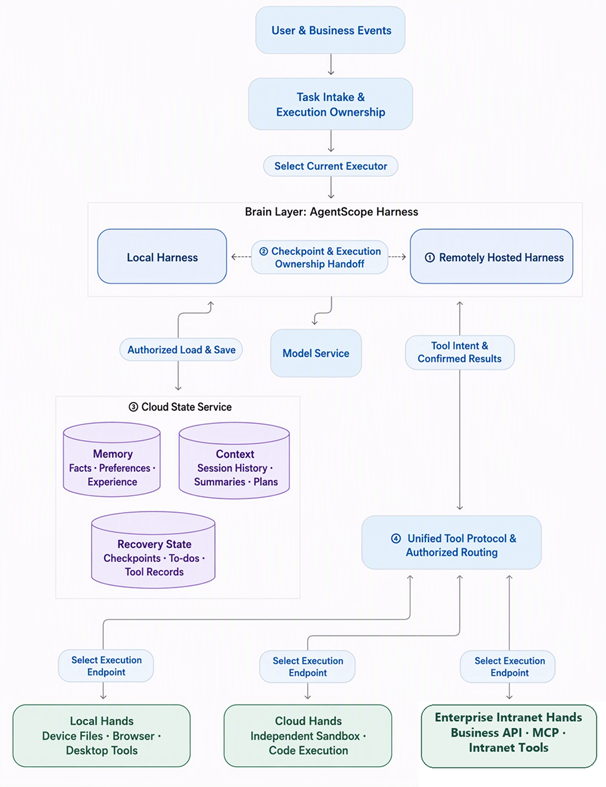
In the overview diagram, ① represents remote hosting of the Harness; ② represents execution handoff between local and remote Harness instances; ③ represents cloud-based management of Context, Memory, and recovery state; and ④ represents Brain invoking different Hands through a unified protocol. Solid lines indicate interactions involving tasks, state, and tool results; dashed lines indicate execution handoffs between Harness instances.
At any given time, the same logical task is advanced by the Harness that holds execution ownership; both the local and remote sides can access cloud-based state as authorized. When switching Hands, subsequent calls select an execution endpoint according to routing, while tools already dispatched still have their results confirmed using the original execution identifiers. Workspace files are shared as authorized or explicitly synchronized, and active processes are managed separately for each execution endpoint.
First, establish stable identifiers for every session and task, and separately save inputs, configuration versions, execution progress, and results. Include model context, pending items, and tool state in the log- and checkpoint-based recovery process. After an execution node exits, the scheduling layer first obtains a new grant of execution ownership, then reads committed state and resumes the task, avoiding reliance on context held within the original process.
Second, manage inference resources and tool resources separately. Model calls and Harness execution consume inference-side capacity, long-running tests occupy execution environments, and requests for human confirmation are saved as persistent pending items. During waiting periods, release whatever inference resources can be released; before reclaiming a sandbox, separately check active processes, unfinished tools, and whether the workspace has been saved. In this way, waiting for tools or users does not require the entire task to continuously occupy the same set of compute resources.
Third, enforce authorization at the entry points for different capabilities. Model access, controlled business tools, and arbitrary code execution each use the identities, credentials, and network policies they require. For example, ticket queries are performed through an approved business tool, while a test sandbox receives only the scope of access needed to run tests. Permission decisions in the Harness and actual restrictions in the execution layer jointly enforce this boundary.
Fourth, manage versions of Agent behavior and execution environments separately. For each task, record the model, instructions, tool definitions, Harness configuration, and environment version used, and specify how changes apply to new tasks and tasks already in progress. When updating context strategies, retain compatible execution environments; when upgrading runtime dependencies, verify recovery compatibility, so that configuration updates do not alter the execution semantics of existing tasks.
With these arrangements, the platform schedules instances that run on demand around persistent task records. Sessions and tasks can continue, while inference and tool execution can scale independently according to their respective workloads. This is the value of Sandbox as Tool in Managed Agent scenarios.
Taking issue investigation and time-consuming tests as an example, organize task processing into the following execution flow. AgentScope Harness organizes the model and context, while the service layer connects persistent state, tool execution, and resumption scheduling.
When implementing this flow in the service layer, maintain separate records for task state, tool execution state, and resumption conditions. Use durable delivery records or a transactional Outbox for asynchronous dispatch, and deduplicate at the receiving end using stable identifiers. When task suspension races with result arrival, recheck the readiness conditions to prevent a task from remaining dormant after its tool has already completed.
When implementing suspension and resumption, focus on the following two categories of state.
The first category is the state required to continue execution. A checkpoint should include the model context, unfinished tools and interactions, and the resumption phase. Chat history alone cannot fully distinguish whether a tool has not yet been dispatched, is running, or has returned but has not yet been incorporated into the next model input. Workspace files and active processes also have their own recovery mechanisms, which need to be designed together with the Harness's state recovery.
The second category is the confirmation state of external actions. After a network timeout, actions such as creating a ticket or sending a notification may already have taken effect. Retain such cases as unknown, query the original operation using its stable execution identifier, and verify persisted results or escalate to manual handling, rather than re-executing without confirmation. For business systems that support idempotency keys, use the same key throughout calls and retries; platform-side deduplication must still work in conjunction with the external system's actual execution semantics.
Tool dispatch, result confirmation, and resumption together form the service layer's execution protocol. Define identities, persistence ordering, deduplication rules, cancellation methods, and timeout handling for these operations, then connect these protocols to the Harness's tool and state interfaces. Only then can the same work continue after the inference instance has been released.
AgentScope Harness organizes Workspace, Memory, Skill, Subagent, context management, the file system, and interaction control around the inference loop. When building a service, connect the platform's storage, tools, and scheduling mechanisms through these capability interfaces, preserving consistent task semantics throughout execution.
For the actual integration, focus on connecting three sets of boundaries.
First, identity and session state. Pass stable user and session identifiers into execution through RuntimeContext, and connect session logs and checkpoints to the required persistent backends. Use a consistent identity mapping for entry-point authentication, resource access, and state reads, and establish execution ownership controls for each task so that continued work across requests and instances has clearly defined ownership.
Second, the workspace and execution environment. Read and write files through workspace and file-system abstractions, routing user task files, long-term memory, and temporary execution data to their respective backends; connect sandbox commands to the tool execution layer. Configure workspace rules for saving, recovery, isolation, and artifact export so that the files required by a task remain accessible after service instances change.
Third, long-horizon tasks and interaction. Configure memory, context compression, skills, and subtasks according to task requirements, and integrate human confirmation, supplementary input, cancellation, and resumption into the same execution process. Record parent-child relationships and result destinations for subtasks, and save the actual parameters and decisions for operations awaiting confirmation, so that user intervention applies precisely to the task in progress.
Application teams use this foundation to integrate business tools, data authorization, and result acceptance, while platform teams focus on building task intake, persistent state, execution scheduling, and resource management. AgentScope provides the mechanisms for how an Agent works; the service layer organizes those mechanisms into a continuously available task delivery capability.
During implementation, first use a single Agent to establish the complete path from submission through execution, waiting, resumption, and result retrieval, then validate paths such as disconnection, node exit, duplicate delivery, and human confirmation. Next, scale concurrency and runtime resources around the same identity, state, and tool protocols, making this foundation applicable to both Personal Agent and enterprise event-driven Agent scenarios.
Personal assistants and enterprise agents can reuse the same Agent Service, handing inputs from different scenarios to an authorized Harness and returning progress, pending items, and artifacts to the corresponding entry points. The following four parts—scenario entry points, shared services, execution resources, and result delivery—show how this architecture works.
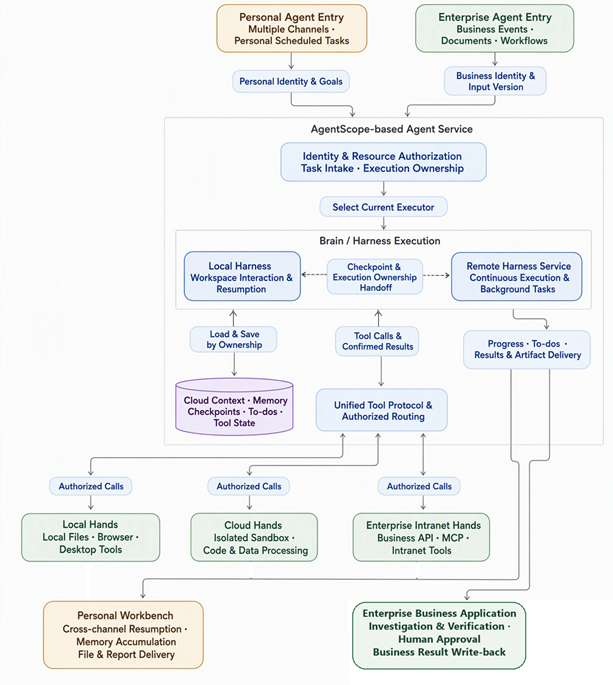
Personal scenarios use stable identities to preserve sessions and memory, hand work between local and remote Harness instances, and call local or cloud Hands as needed. Enterprise scenarios convert events into tasks with input versions and acceptance requirements, obtain evidence through intranet or cloud Hands, and then rely on business applications to complete review, approval, and write-back.
Runtime mechanisms and interfaces can be reused, while Context, Memory, workspaces, and tool permissions are organized separately for individuals, teams, or business processes. Tool routing in the diagram selects execution endpoints according to the task; dispatched calls still have their results confirmed using their original execution identifiers. The following four layers further explain how these boundaries fit together.
When applying the architecture to a specific scenario, determine separately where the Harness runs, who stores context and memory, and where tools execute. These choices can be combined to form the following four layers.
Layer 1: Remotely host the Harness. Move model calls, context organization, and the task loop to a remote service, with web, mobile, or desktop clients submitting tasks, consuming events, and participating in confirmation. When building on AgentScope, connect the Harness to the service execution flow described earlier, so that the service continues scheduling tasks after the client disconnects. This layer primarily addresses the continuous hosting of the Agent's execution process.
Layer 2: Hand execution between local and remote Harness instances. Configure compatible task state, tool definitions, and workspace access methods at both ends, and retain stable Agent, user, session, and task identifiers. When handing over at a turn boundary or a recoverable checkpoint, first confirm that the original executor has exited or had its execution ownership revoked; the other end then acquires execution ownership, loads state, and continues. Using a local Harness while at the computer, handing work to a remote Harness after leaving, and returning to continue locally all rely on this handover protocol. This switches the Harness's execution location.
Layer 3: Manage Context and Memory as cloud state services. Context includes the session history, compressed summaries, plans, and reference materials required for the current task; Memory stores facts, preferences, and experience used across sessions. Configure stable ownership, versions, and access interfaces for both, allowing local and remote Harness instances to load and update them according to authorization. Resuming execution also requires saving the corresponding checkpoints, pending items, and tool state, while workspace files must be made available through shared access or explicit synchronization. In this way, task state and long-term accumulated knowledge can outlive a single Harness instance.
Layer 4: Separate Brain from Hands and switch tool execution endpoints. Treat the Harness's inference and task control as Brain, and the execution layer for files, commands, browsers, and business tools as Hands. Through a unified tool protocol, route authorized calls to local devices, cloud sandboxes, or enterprise intranet execution services, while Brain can remain in its original location. When switching Hands, check the target endpoint's capabilities, dependencies, workspace, and authorization. Continue querying and finalizing dispatched tools using their original execution identifiers, and switch routing only for subsequent calls. If active execution must be migrated, separately confirm that it has stopped, save its state, and resume it, avoiding duplicate external actions.
A local Harness can therefore use cloud Context and Memory, while a remote Harness can call local Hands or enterprise intranet Hands. The first two layers organize who handles inference, the third maintains state and memory, and the fourth determines where actual actions take place. Based on these boundaries, build separate integration paths for personal assistants and enterprise tasks.
When building a Personal Agent, first establish stable identities for the user and the Agent, then connect web, mobile, desktop, and messaging channels to the same service entry point. The access layer maps identities from each channel to an authorized user identity and uses unified task and session records to continue the work, allowing users to view progress, add requirements, and retrieve results after switching entry points.
For state organization, model the long-lived Agent, each specific session, an individual task, and the execution environment separately. Pass user and session identifiers through RuntimeContext, and connect session Context and long-term Memory to state services with clearly defined ownership. Use consistent identity and access rules for local and remote Harness instances. Different sessions retain their own execution contexts and share memory and files only within authorized scopes.
When a user asks on their phone, “Continue organizing last week's research and generate a comparison report,” the remote Harness reads the original task's progress, context, and workspace from the state service and continues orchestrating the work. Public-data organization is delegated to cloud Hands; when files on the user's computer are involved, authorized tool calls are routed to online local Hands. After generating the report, save artifact references for the user to review on the web. When the user returns to the computer, if a local Harness needs to continue, reconnect it to the same work through a checkpoint and an execution ownership handover.
Offer users separate choices for the Harness's execution location and the tool execution environment. When switching between local and remote Harness instances, hand over context, checkpoints, and task execution ownership. When switching Hands, verify tool capabilities, files, dependencies, and credentials, and confirm the existing tool state. The cloud state service continuously stores identity, tasks, and memory, allowing both types of switching to retain the same work record.
Background work joins the same task flow through a persistent scheduler. After a user configures information organization, project monitoring, or conditional reminders, save the trigger rules, authorization scope, and result delivery destination. When triggered, submit a task with a stable identifier, and decide whether to notify the user based on the execution results.
With Sandbox as Tool, store Agent identity, memory, tasks, and pending items on the service side, and start inference and execution only when actually needed. While waiting for tools or human confirmation, release inference resources according to the suspension protocol described earlier; when the task is awakened, reload state and continue processing. Decide separately whether to retain or reclaim a sandbox based on active tools, workspace persistence, and the needs of subsequent tasks.
Place model and Harness configurations under version management, and use stable ownership and storage boundaries for long-term memory and skill assets. Before an upgrade, check state compatibility, then use task regression testing to validate context, tool calls, and result quality. Define how the new configuration applies to existing sessions, so that users' accumulated work assets continue to evolve with the service.
Establish a clear management process for accumulated memory and skills as well: distinguish facts, preferences, and temporary task information, distill valuable experience according to policy, and provide entry points for viewing, revising, and deleting it. Load long-term information as the reference context required by a task, allowing personalization capabilities to grow within manageable data boundaries.
When building enterprise agents, configure ingestion adapters for events such as alerts, document uploads, customer requirement updates, and overdue tickets. First deduplicate events and establish business associations, determine the execution identity, available tools, and data scope, and then create the task. Save the mappings between the business object, input version, Session, and task identifier.
For incident investigation, for example, connect monitoring alerts to the investigation Agent's service entry point, and fix the event, repository or log scope, and acceptance requirements for the investigation.
After the service accepts the task, the remote Harness acts as Brain, loading the task context, reading authorized logs and change records, and forming investigation hypotheses. Route tools to enterprise intranet Hands or an isolated sandbox according to data location and execution permissions to reproduce the issue and run tests. Save patches, test results, and investigation evidence as task artifacts for developers to review. If a release is involved, continue through the enterprise's existing permission and approval processes.
Use the same suspension and resumption protocol to save state when running time-consuming tests or waiting for supplementary information and human confirmation. The original execution endpoint continues tracking dispatched tools. Once results are ready or pending items have been answered, the Harness that acquires execution ownership resumes the task. When subsequent tools are switched to other Hands according to authorization, retain the execution records of the original calls. After users return to the business page, restore the display through queries and retrieval of missed events, without requiring the investigation to be submitted again.
Document verification follows the same integration flow: the upload event carries the document version and verification requirements; the Agent checks fields against the original text and saves issues, evidence locations, and structured results. Business rules then determine whether the task proceeds to manual review or the next processing step. After the materials change, create a verification task associated with the new version, and check the version again during write-back to prevent old results from overwriting new facts.
Customer management scenarios connect both requirement-change events and recurring tasks to the service. The Agent uses authorized product and customer information to generate an initial proposal, returning references, items awaiting confirmation, and artifacts to the original business interface. For actions such as contacting customers, sending content, and writing back to CRM, check authorization and confirmation conditions through the corresponding business tools, and verify execution results using stable request identifiers.
These business adapters reuse the same task execution flow. The current Harness reads cloud state according to its execution ownership and calls the selected Hands through authorized routing; tool results and human responses resume the original task:
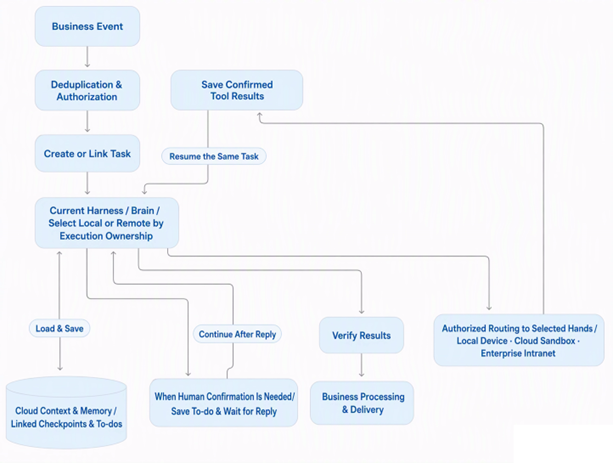
Enforce business rules in the adapter and result write-back stages: duplicate events reuse the original task identifier, while changes in business inputs produce a new version. After the task ends, verify the results, artifacts, and current business state before updating business records. Retain execution identifiers and confirmation results for external actions so that retries, cancellation, and human takeover can be traced back to the original operation.
Delegate deterministic steps, approvals, and transaction boundaries to workflows or business code, and use the Agent for understanding materials, investigation and analysis, and adjusting actions based on feedback. The workflow advances on the basis of verifiable results, giving model judgments and business state updates their own clearly defined entry points.
Personal assistants and enterprise agents reuse identity, task, state, tool execution, and resumption mechanisms, while separately configuring whom they serve, their triggers, memory scopes, and rules for human participation.
| Dimension | Personal Agent | Enterprise Event-Driven Agent |
|---|---|---|
| Primary users served | Individuals and their ongoing goals | Teams, roles, or business processes |
| Common triggers | Conversations, scheduled tasks, and user-authorized events | Alerts, messages, business documents, and business state changes |
| Long-term information | Personal preferences, projects, and work-related memory | Business knowledge, rules, and experience from past processing |
| Human participation | Users provide additional requirements and confirm actions | Review and approval according to roles and processes |
| Result delivery | Files and task results that users can continue using | Verifiable business artifacts and state changes |
In implementation, reuse AgentScope Harness's workspace, memory, context, and interaction mechanisms, along with the service layer's task intake, execution scheduling, persistent state, and resource management. Configure the Harness runtime location, Context and Memory services, and Hands execution endpoints separately, then determine data and authorization scopes for each individual, project, team, or business process. Define tool sets, state handover, and acceptance rules for each type of Agent, enabling the same foundation to support different runtime combinations.
After completing business integration, validate task submission, continued viewing after disconnection, tool waiting, resumption, human confirmation, and result write-back. Further verify behavior during handovers between local and remote Harness instances, cloud state reads, and Hands routing switches, checking execution ownership, input versions, and original tool results. Then connect the Agent application and the required storage and execution resources to the cloud hosting environment, using these protocols to provide a continuous service.
After building the service on AgentScope, use Alibaba Cloud AgentCore to host the Agent application's runtime and access. For solutions that need to retain a custom Harness and business logic, package the application and its dependencies as a container image and deploy it through AgentCore's code-first Agent entry point, continuing to use the original framework and service interfaces.
During deployment, connect the following components according to service responsibilities:
During deployment, define platform and application responsibilities separately. AgentCore hosts application instances and external access, while task state, resumption, tool idempotency, and business acceptance follow the service protocols already established. Databases, scheduling, workspaces, and execution endpoints are deployed separately according to the solution and connected with authorization. Placing the complete Agent environment inside an execution sandbox uses Agent IN Sandbox; deploying the Harness separately from the code execution sandbox uses Sandbox as Tool. The mode is still determined by the actual execution boundaries.
If you choose to reuse the platform's existing execution mechanisms, you can also use AgentCore's managed Harness entry point, configuring models, roles, tools, and Skill around the QwenPaw or Qoder it provides. For the service architecture built independently on AgentScope in this article, use a custom image to retain the Harness and service-layer design, then leverage the platform's resource, access, and management capabilities.
Based on the requirements discussed in this article, a direction worth pursuing in the future development of AgentCore as an Agent as a Service platform is to extend application hosting into continuous Agent service management. This would allow Harness implementations built independently on AgentScope and platform-managed Harness implementations to connect through compatible identity, task, and event protocols, providing version releases, task scheduling, human intervention, execution resumption, and result delivery across the Agent's full lifecycle. Code-first deployment would thereby become one entry point for developers to access the platform, while business definitions and Harness implementations would remain independently selectable.
Along this direction, Context and Memory could further evolve into independent cloud services, enabling local and remote Harness instances to continue tasks provided that permissions, state, and tool protocols are compatible. With Brain separated from Hands, the platform could also coordinate local devices, cloud sandboxes, and enterprise intranet execution endpoints according to capabilities, permissions, and data location. Combined with unified identity authorization, resource budgets, runtime observability, and effectiveness evaluation, such a platform could provide Personal Agent with a foundation for cross-device, long-running services, and enterprise agents with a foundation for event-driven, resumable, and governable task delivery.
From Personal Agent to enterprise agents, first use AgentScope to organize workspaces, memory, context, and actions; then use the service layer to enable continuous task delivery; and finally use AgentCore to host application execution and connect cloud resources. Maintain consistent identity, state, and execution protocols across these three layers so that personal assistants' long-term experience and enterprise task delivery processes can continue operating and evolving.
Digital Employees or Digital Twins? Improving End-to-End Software Delivery in Practice

793 posts | 60 followers
FollowAlibaba Cloud Native Community - October 27, 2026
Alibaba Cloud Native Community - April 3, 2026
Alibaba Cloud Native Community - October 12, 2026
Justin See - March 20, 2026
Alibaba Cloud Native Community - May 18, 2026
Alibaba Cloud Community - September 22, 2026
793 posts | 60 followers
Follow Qoder
Qoder
From Assisted to Autonomous — Adapting to Every Programming Need
Learn More AgentCore
AgentCore unifies agent construction, governance, and execution capabilities so enterprises can deploy diverse agents with confidence.
Learn More QwenWork
QwenWork is dedicated to helping employees strengthen their professional competitiveness in the AI era and to enabling enterprises to improve organizational effectiveness.
Learn More Wan3.0
Unleash Your Creativity Try Wan 3.0 now — longer narratives, greater control, endless creativity.
Learn MoreMore Posts by Alibaba Cloud Native Community

