10,000 images on the Qwen-Image-2.1 Turbo API cost $160 at Singapore list price. That buys generation, editing and native transparency from one 7B model, live on Model Studio since Oct 9.
Creative and product teams rarely need one beautiful picture. They need the same product on many backgrounds, a clean cutout for every listing, a banner whose headline actually reads, and a variant for every market.
Each of those jobs has usually lived in a different tool. Generate in one place, cut out in another, fix the text in a third. Every hand-off costs time and consistency.
Qwen-Image-2.1 collapses that stack. One model generates from text, edits from up to 10 reference images, outputs real alpha channels and renders at native 2K. The open weights let you test it for research and evaluation. The new Pro and Turbo APIs let you put it in production.
The release came in two steps. On Sep 20, Qwen published the Qwen-Image-2.1 open weights on Hugging Face, ModelScope and GitHub, with Day-0 support across the main open tooling. The announcement post on X passed 2.4M views.
On Oct 9, two things landed together. First, the Qwen-Image-2.1-Turbo checkpoint: the same 7B architecture, running 8 denoising steps instead of 40. Second, the Qwen-Image-2.1 Pro and Turbo APIs went live on Alibaba Cloud Model Studio.
That sequence matters for planning. The weights let your team test quality on your own prompts and assets. The APIs give you a commercial path with per-image billing, published rate limits and no GPU fleet to run.
Read the license before you plan. The open weights ship under the Qwen Research License Agreement, for research and evaluation only. Production use runs through Model Studio, or through a separate commercial license from Qwen.
Rule of Thumb: evaluate on the weights, ship on the API, and keep the two decisions separate.
Under the hood, Qwen-Image-2.1 is a 32-layer single-stream DiT with 7B parameters in the visual generation component, a Qwen3-VL 8B text encoder and a 64-channel RGBA VAE. Input images and text are computed once at the first denoising step and cached for every later step, which Qwen describes as "drastically accelerated inference for multi-image inputs."
Here is what that design means for a builder.
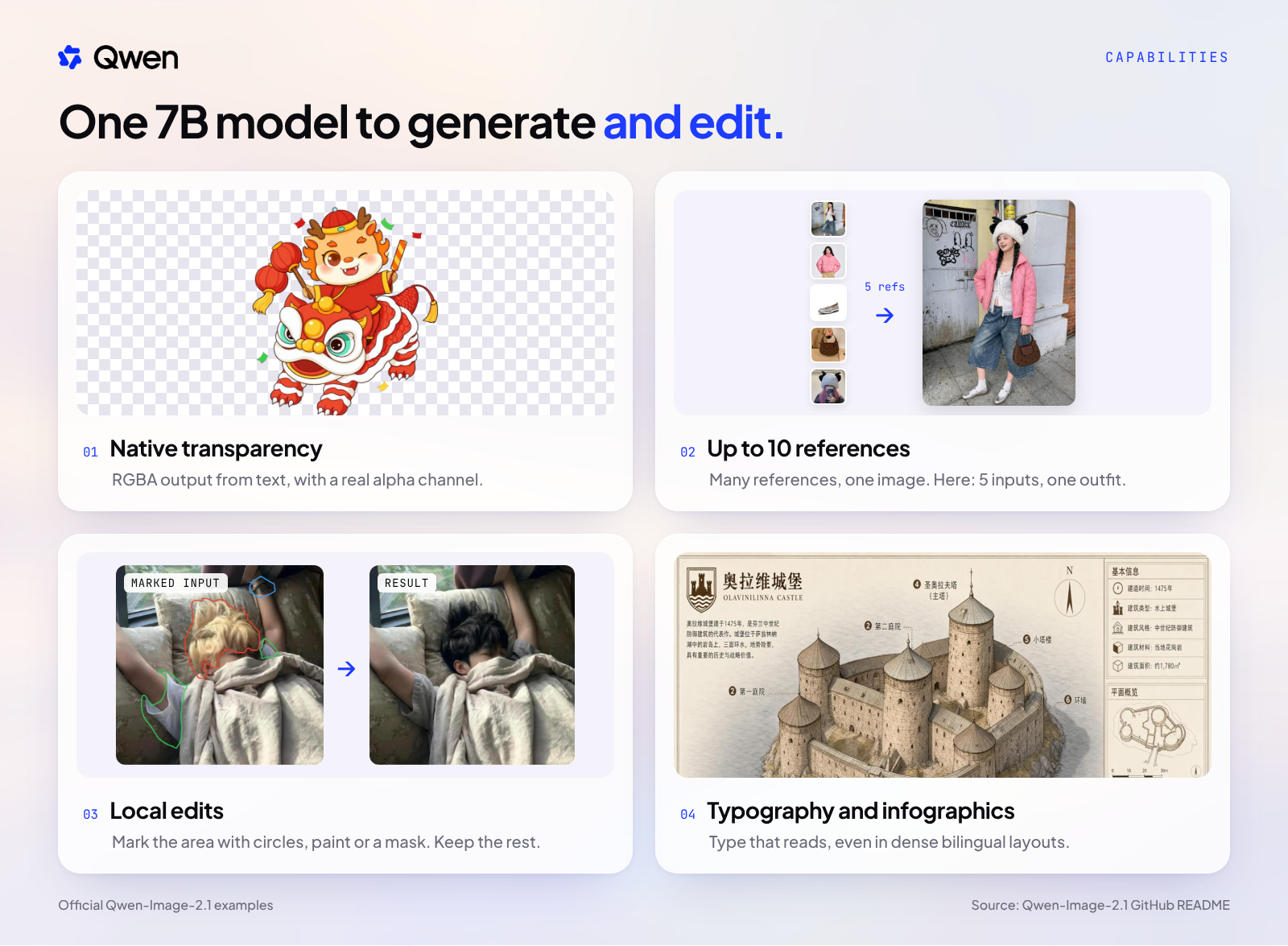
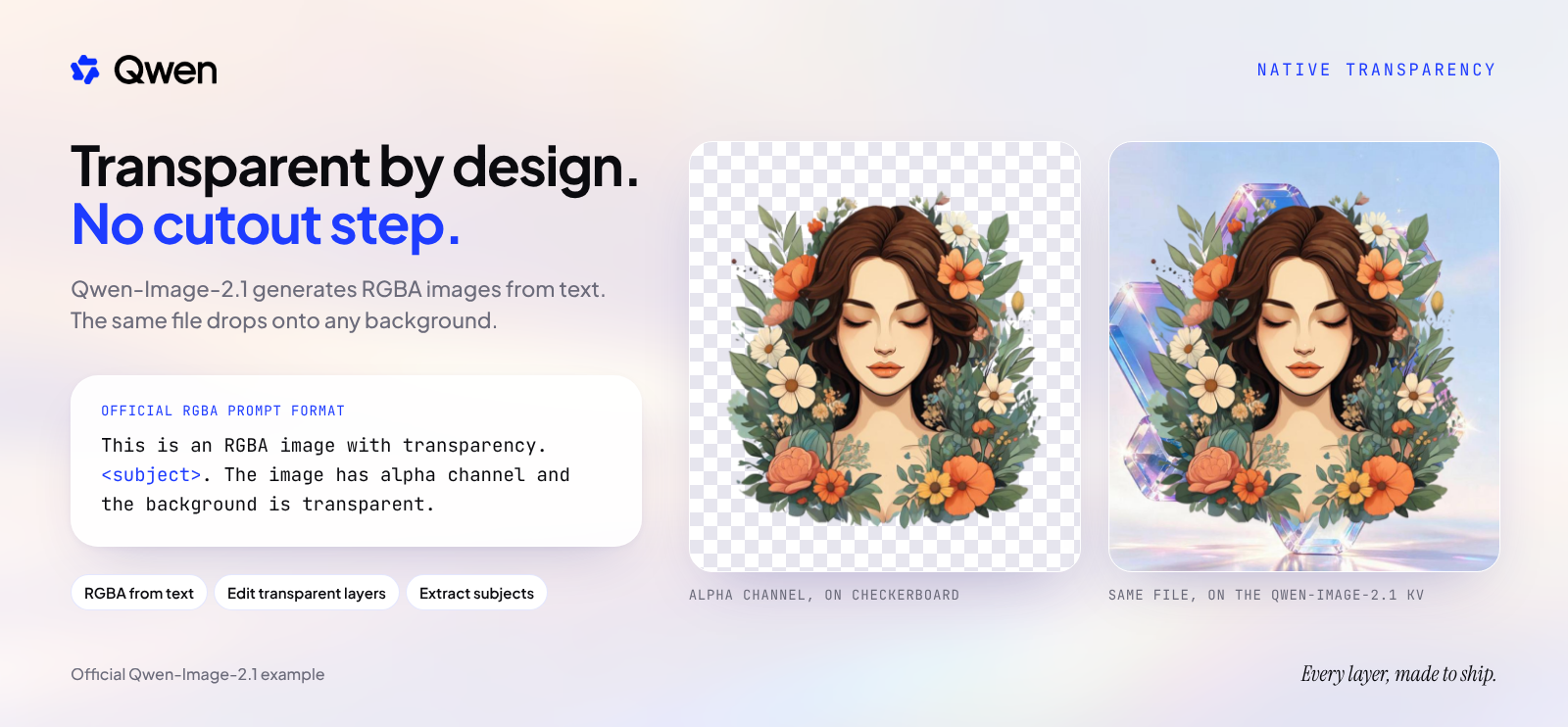
1. Native transparency. The model generates RGBA images with a real alpha channel straight from a text prompt. It also edits transparent layers and extracts subjects from existing photos. For e-commerce and design teams, that removes a separate background-removal step: the asset arrives ready to composite onto any page, ad or template. One prompt, one file, one layer you can drop anywhere.
2. Up to 10 references in one pass. Feed up to 10 reference images and the model composes them into one output. Separate garment shots become one styled outfit. A product and a scene become one campaign image. Identity is preserved for people and products, so the item on the page is still your item.
3. Local edits that leave the rest alone. Mark the region to change with a circle, a painted annotation or a mask, describe the change, and the model edits that part while keeping everything else. For a content team, this is the difference between regenerating a shot and correcting it.
4. Type that reads, at native 2K. Typography is improved, so headlines and labels render as legible text, and dense layouts such as infographics and annotated posters hold together. Output is native 2K: the default is 2048x2048, with presets from 9:16 to 16:9 for every placement. Qwen also highlights better portrait lighting, fine detail, panoramas and virtual try-on.
Rule of Thumb: count the tools a capability replaces, not the features it adds.
There are three ways in, and each serves a different job.
Open weights, for research and evaluation. Qwen-Image-2.1 and the Turbo checkpoint are on Hugging Face and ModelScope under the Qwen Research License Agreement. Use them to test quality on your own prompts, prototype workflows in ComfyUI or Diffusers, and run research. Commercial use needs a separate license.
Turbo API. The volume tier: $0.016 per image in Singapore with a rate limit of 120 requests per minute. This is the default for catalogs, cutouts and variants.
Pro API. $0.04 per image in Singapore with a rate limit of 20 requests per minute. Use it for lower-volume work such as hero and campaign images.
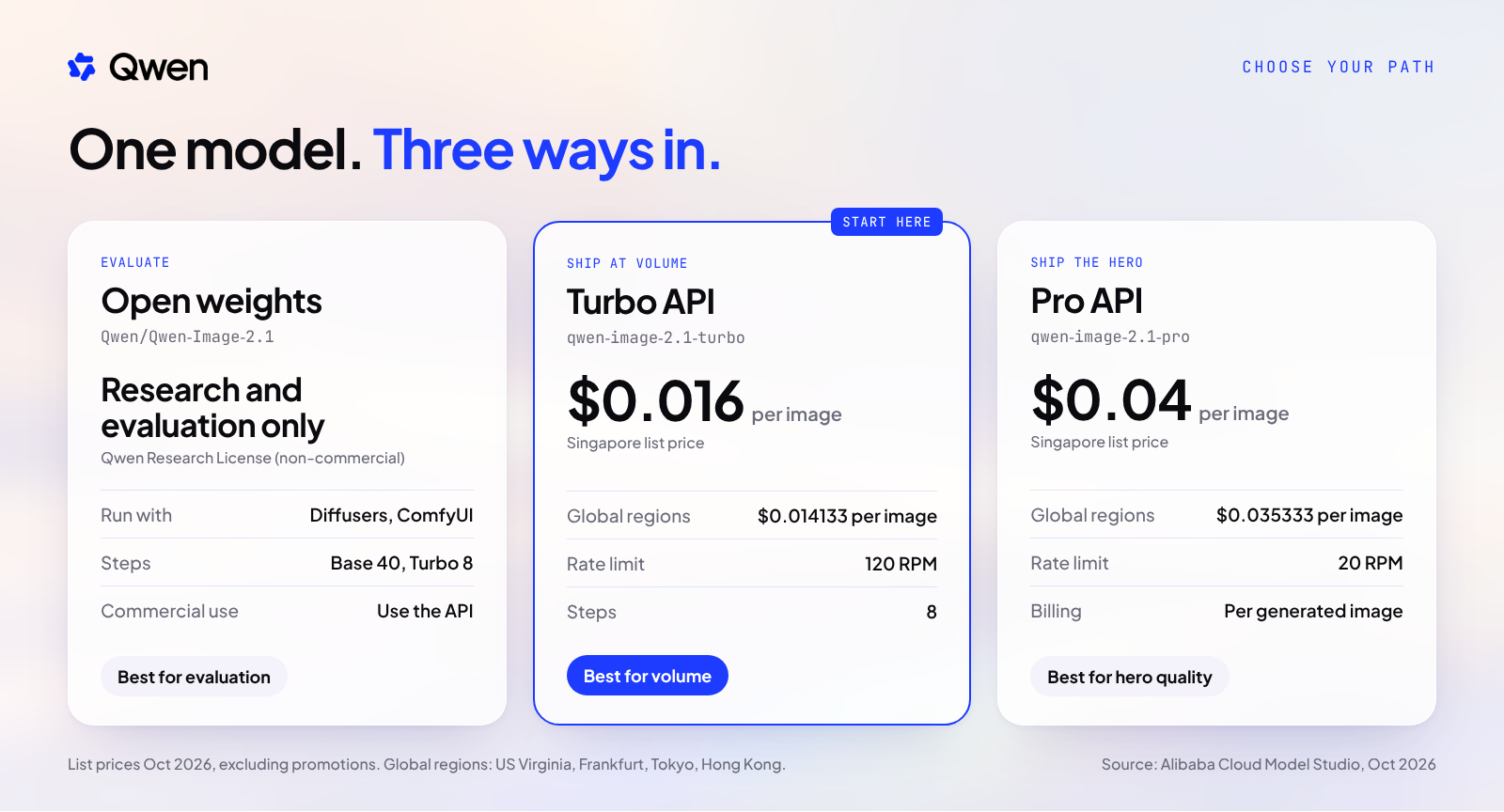
The card above is the full comparison at list price. The Global regions (US Virginia, Frankfurt, Tokyo, Hong Kong) price Turbo at $0.014133 per image and Pro at $0.035333, against $0.016 and $0.04 in Singapore.
Both APIs take text and image input and return an image. Both support fine-tuning. Both are billed per successfully generated image, and failed calls are not charged.
Rule of Thumb: pick the tier by volume and rate limit first, then confirm quality on your own prompts.
Two levers set the bill: the tier you call and the region you call it from. The same Turbo image is $0.016 in Singapore and $0.014133 in the Global regions. Volume does the rest, so model the job you actually run, not a single image.
Assumptions for both examples: illustrative, Model Studio list price, original prices excluding promotions, billed per successfully generated image.
Example A: a 10,000-image catalog refresh in Singapore. Turbo: 10,000 images x $0.016 = $160. Pro: 10,000 images x $0.04 = $400. That gap, $160 against $400 for the same 10,000 images, is the reason to default to Turbo and choose Pro deliberately.
Example B: 1,000 product images on Turbo in US Virginia. 1,000 images x $0.014133 = $14.13.
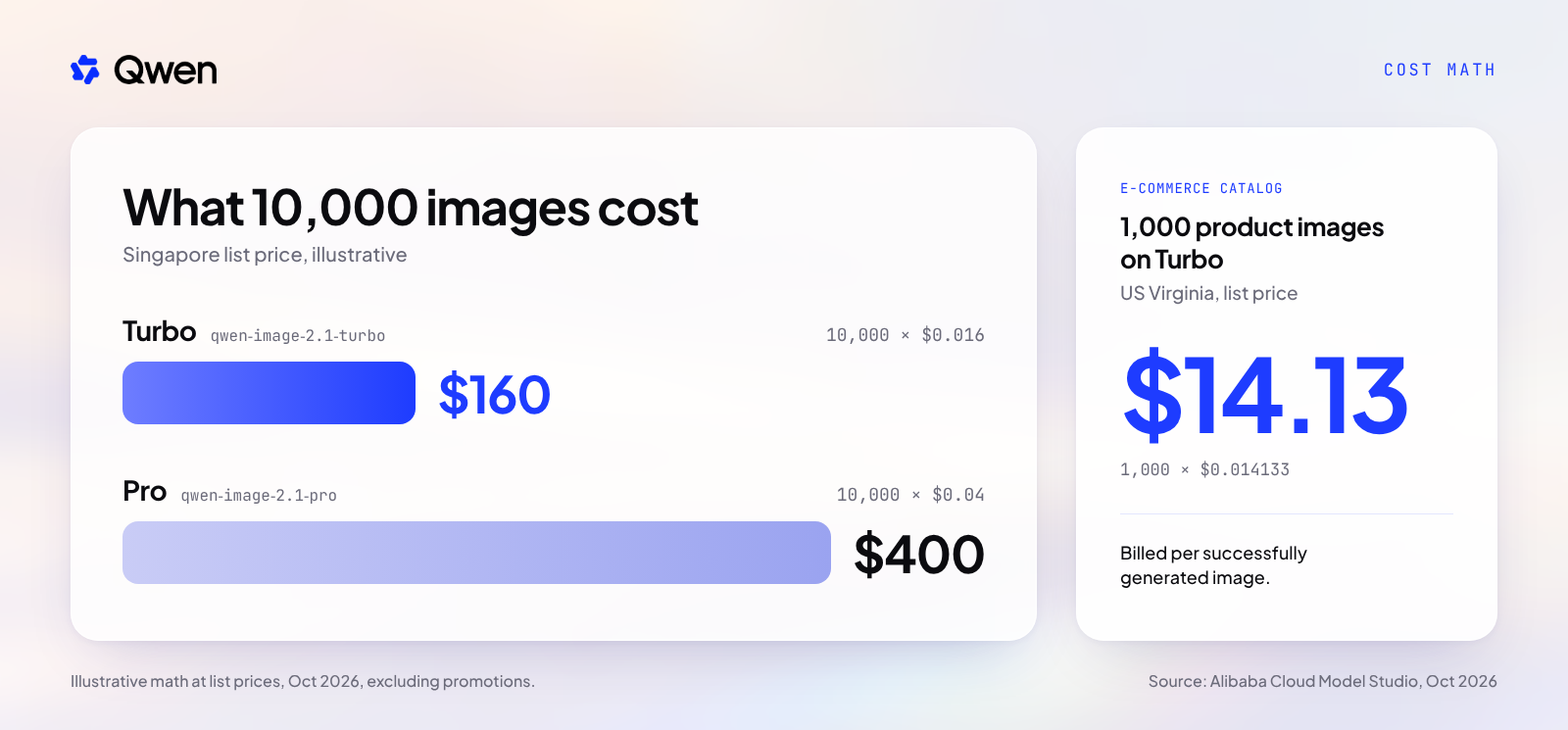
The point is not that images are cheap. It is that per-image pricing turns image production into a unit cost you can forecast, with no idle GPUs between campaigns. Run the same math with your own monthly volume and region before you commit.
Billing per successful image also keeps the forecast honest. A failed call is not charged, so the number you model is the number of images you actually receive. Budget your iteration rounds as images, and the cost of exploring a new campaign look stays visible.
Rule of Thumb: know your cost per 1,000 images before you pick your favorite prompt.
Start with the weights when you want to inspect behavior closely: how the model handles your product shapes, your brand colors and your copy. Diffusers and ComfyUI both supported Qwen-Image-2.1 from Day 0, so you can test inside the tooling you already run.
For evaluation on your own hardware, the Turbo checkpoint runs in Diffusers with 8 steps. This example uses the recommended RGBA prompt format to produce a transparent asset.
from diffusers import QwenImage21Pipeline

# Open weights: Qwen Research License, for research and evaluation only
pipe = QwenImage21Pipeline.from_pretrained("Qwen/Qwen-Image-2.1-Turbo")
pipe.to("cuda")

prompt = (
    "This is an RGBA image with transparency. "
    "A ceramic coffee mug with a matte blue glaze, soft studio light. "
    "The image has alpha channel and the background is transparent."
)

image = pipe(
    prompt=prompt,
    width=2048,
    height=2048,
    num_inference_steps=8,
    use_kv_cache=True,
).images[0]
image.save("mug_rgba.png")
Three notes. Turbo defaults to CFG 1 and 8 steps; the base checkpoint uses 40. The RGBA prompt wraps your subject between two fixed sentences, so keep them intact. If your prompts are short, the Qwen-Image-2.1-PE-T2I and PE-I2I prompt rewriters expand them before generation.
For production, call qwen-image-2.1-turbo or qwen-image-2.1-pro on Model Studio. Same model family, per-image billing, published rate limits, and no GPUs to provision. A practical pattern: run Turbo for the volume work, and route the smaller set of hero images to Pro. Open Qwen-Image-2.1 Turbo in the Model Studio console →
Rule of Thumb: prototype where it is cheapest to change your mind, and ship where it is cheapest to scale.
Qwen-Image-2.1 had Day-0 support across the open tooling teams already use:
Adoption followed. As of Oct 11, the model card shows 120K+ downloads in the last month on Hugging Face, along with 61 finetunes, 127 quantizations and 100+ Spaces.
On quality, Qwen-Image-2.1 is the highest-ranked open-weight model on LMArena's Text-to-Image and Image Edit boards (preliminary, Sep 22). Treat any leaderboard as a starting signal. Your own prompts, products and brand rules are the test that counts.
Rule of Thumb: let the community prove the model, and let your own evaluation prove the fit.
The model that fits in your stack is one 7B model: generate and edit, native transparency, ten references, 2K. Evaluate it on the open weights. Ship it on Model Studio.
Your first production images are one API call away. Start generating with Qwen-Image-2.1 Turbo on Model Studio → Planning catalog-scale volume or a custom image pipeline? Then start the conversation with the team: one minute, no login. See more of the enterprise AI portfolio at qwen.ai. Lasting returns come from treating AI like infrastructure: planned over years, delivered in stages, with Qwen alongside you so the early choices hold up and the value keeps growing.
About Qwen. Qwen gives enterprises an open route into production AI: one model family covering language, vision, audio, coding, embeddings, and agents, as open weights and managed APIs. Built on curated data and ongoing research, Qwen supports creating, testing, and running AI systems for decisions that matter, from self-serve developer access to dedicated inference.
Sources: GitHub QwenLM/Qwen-Image-2.1 (README, News, License); Hugging Face model cards Qwen/Qwen-Image-2.1 and Qwen/Qwen-Image-2.1-Turbo; Alibaba Cloud Model Studio documentation for qwen-image-2.1-turbo and qwen-image-2.1-pro; LMArena Text-to-Image and Image Edit boards (Sep 22 2026 snapshot, preliminary).
Johnny Mai - Director, Gen AI Product Strategy & GTM, Qwen.
Disclaimer: This post is provided for general information only. Worked examples are illustrative and use stated assumptions; your costs will vary. Prices are Alibaba Cloud Model Studio list prices as published in October 2026, exclude promotions, vary by region, and may change over time. Figures from third-party sources (LMArena, Sep 22 2026 snapshot) are quoted as published, are preliminary, and are not independently verified by Qwen or Alibaba Cloud. The Qwen-Image-2.1 open weights and the Turbo checkpoint are licensed under the Qwen Research License Agreement for research and evaluation only; commercial use requires a separate license. Product and service availability, features, and program terms vary by region and may change over time. Nothing in this post constitutes professional, legal, or investment advice. © 2026 Qwen. All rights reserved.
Budgeting AI Video by the Second: A Campaign Planning Template

15 posts | 2 followers
FollowAlibaba Cloud Community - September 21, 2026
Alibaba Cloud Community - November 22, 2024
Alibaba Cloud Community - November 22, 2024
Alibaba Clouder - October 2, 2018
Alibaba Container Service - July 24, 2024
Alibaba Cloud Community - April 17, 2026
15 posts | 2 followers
Follow Image Search
An intelligent image search service with product search and generic search features to help users resolve image search requests.
Learn More Quick BI
A new generation of business Intelligence services on the cloud
Learn More CT Image Analytics Solution
This technology can assist realizing quantitative analysis, speeding up CT image analytics, avoiding errors caused by fatigue and adjusting treatment plans in time.
Learn More API Gateway
API Gateway provides you with high-performance and high-availability API hosting services to deploy and release your APIs on Alibaba Cloud products.
Learn MoreMore Posts by Johnny Mai

