
By Wuzhe
In the daily use of databases, "viewing what the data looked like at a certain moment in the past" is a common but difficult-to-solve requirement. Traditional methods usually rely on Extract, Transform, Load (ETL) for periodic exports or logical backups. These methods involve long processes, incur high costs, and have poor timeliness. The emergence of columnar snapshots is to provide the ability to query historical data at an extremely low additional cost based on In-Memory Column Index (IMCI).
Columnar snapshots are mainly applicable to two types of scenarios:
Scenario 1: Historical data analysis. The business needs to periodically review data at a certain point in time in the past, such as analyzing the business conditions of the previous month at the beginning of each month. The traditional method requires you to separately extract the data at the end of the month and store the data in another location. With columnar snapshots, you only need to create a snapshot point at the end of the month. Subsequently, you can query the data at any time by using the SELECT ... AS OF Timestamp Oracle (TSO) syntax, without the need for additional data migration or storage.
Scenario 2: Data change protection and recovery. In the AI era, Agent-driven automated development is becoming increasingly common. However, when an agent operates a database, human review is lacking, and the agent can easily modify or destroy data by mistake. Columnar snapshots provide a lightweight "regret medicine": You can create a snapshot before each change. Once the data is corrupted, you can directly query the state before the change based on the snapshot for data recovery or troubleshooting, without having to rely on a full backup rollback.
Columnar snapshots are a historical data query capability based on IMCI provided by PolarDB-X. Columnar snapshots allow users to:
SELECT ... AS OF TSO syntax, you can query the historical data corresponding to any retained snapshot point.Columnar snapshots have the following features:
• No data migration required: Snapshot data is stored directly in columnar files on Object Storage Service (OSS), without the need for additional exports.
• Query is recovery: You can directly use SQL to query historical data. You can also restore data to the current table by using the INSERT ... SELECT ... AS OF TSO syntax.
• Low cost: Snapshots only retain version chain metadata and delay file cleanup, without the need to copy full data.
Next, we will first understand the overall architecture of PolarDB-X IMCI, and then deeply understand the usage methods and implementation principles of columnar snapshots.
To understand the principles of columnar snapshots, you must first understand the overall architecture of PolarDB-X IMCI. This chapter does not elaborate on all details, but only introduces the core concepts directly related to the snapshot mechanism.
PolarDB-X adopts a distributed architecture with separate storage and computing. The core components related to columnar storage include:
• Compute Node (CN): The SQL entry point. The CN is responsible for query parsing, optimization, and Massively Parallel Processing (MPP) execution. Columnar queries are coordinated by the CN to build snapshots and schedule distributed scan tasks.
• Data Node (DN): The row storage engine. The DN processes Online Transaction Processing (OLTP) transactions and generates Binlogs.
• Change Data Capture (CDC): The CDC collects Binlogs generated by DNs and merges the Binlogs into a globally ordered Global Binlog for consumption by columnar nodes.
• Columnar (columnar node): Consumes Global Binlog, converts row-oriented data into columnar storage files (Comma-Separated Values (CSV)/Optimized Row Columnar (ORC)/Delete Bitmap) in real time, and writes the files to Object Storage Service (OSS).
• Global Metadata Service (GMS) (metadata service): Stores global metadata, including columnar version chains and snapshot information. It also provides the Timestamp Oracle (TSO) (global timestamping) service.
• OSS (object storage): The persistent medium for columnar data, which stores CSV, ORC, and Delete Bitmap files.
Columnar data adopts a tiered organization method of CSV + ORC on OSS, which involves three types of files:
• CSV files: The on-disk format for incremental data. After the Columnar node consumes the Binlog, the Columnar node writes the newly written data to CSV files in an append-only manner. CSV is unordered row-oriented storage and has high write efficiency.
• ORC files: Columnar storage format, which is compressed and encoded, and has high scanning efficiency. ORC files are asynchronously converted by background Compaction tasks (CSV to ORC, or multiple ORC files merged into one). Data is distributed in an orderly manner by column, which provides good read performance.
• Delete Bitmap: Deletion markers based on RoaringBitmap. When data in CSV or ORC files is deleted, the data is marked as deleted in the Bitmap, and you do not need to directly modify the CSV or ORC files.
Relationship among the three: CSV is responsible for "fast writes", ORC is responsible for "fast reads", and Delete Bitmap is responsible for marking which rows have become invalid. When a query is performed, you must integrate all three to obtain the correct result.
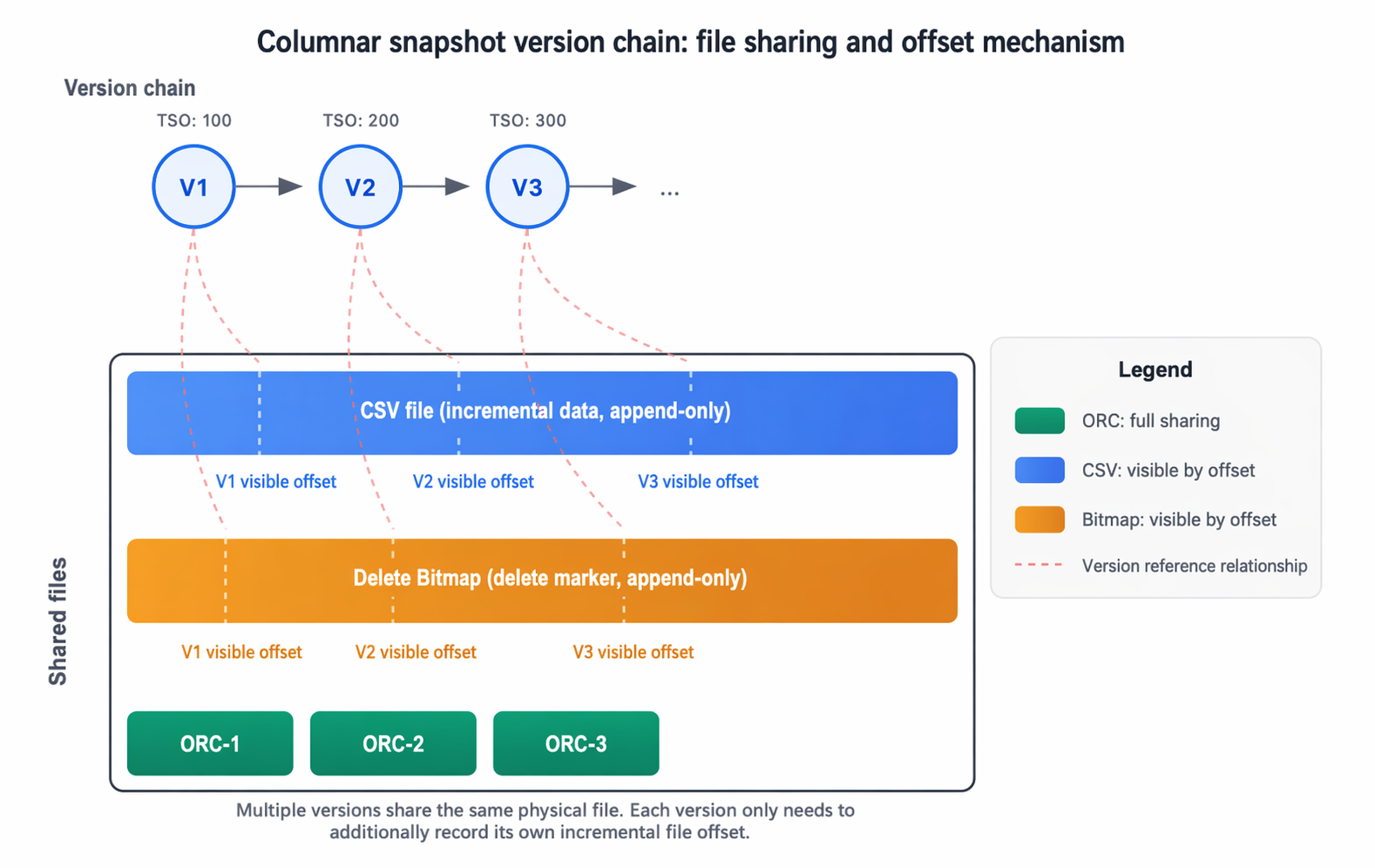
Every time the columnar engine commits data (group commit), a new version node is generated in GMS to form a version chain:
V1 → V2 → V3 → V4 → ...Each version is uniquely identified by a TSO. TSO is a globally monotonically increasing timestamp provided by GMS. Each transaction in the Binlog carries a TSO. The columnar engine is responsible for consuming the Binlog and advancing the version. In addition, Compaction also generates new versions.
The information recorded in each version includes:
• The newly added CSV files and Delete Bitmap in this version, and the write range (offset) of these files.
• File changes generated by Compaction (deleted old files + newly added ORC files).
This version chain is the foundation of columnar snapshots. Each snapshot point is essentially a node on the version chain. If you retain this node and its associated files, you can restore the complete data view at that moment.
To intuitively understand how columnar snapshots work, we track an INSERT statement to observe how the statement is written from row-oriented storage and eventually becomes visible in a columnar snapshot.
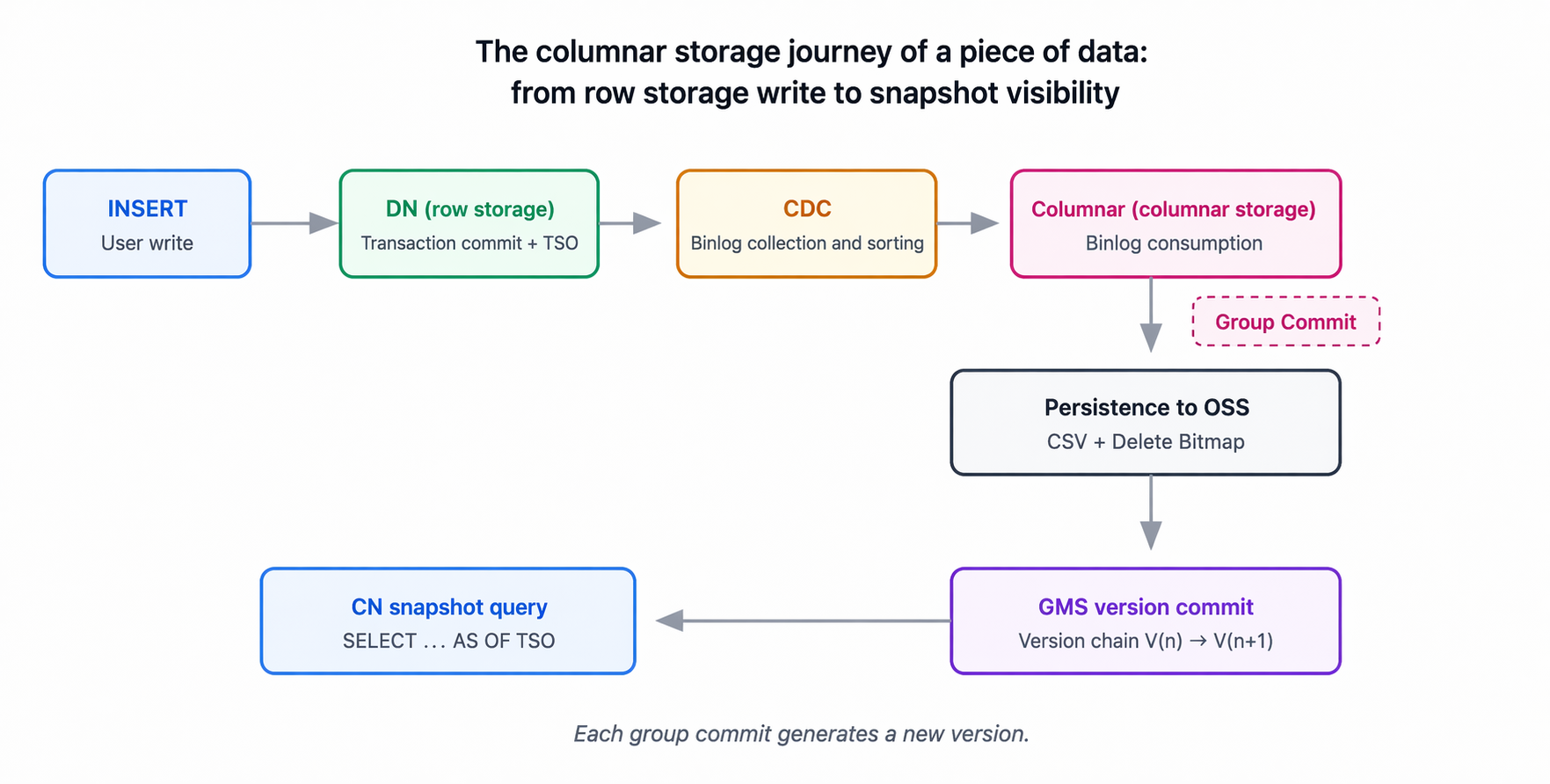
Step 1: Row-oriented write and transaction commit. The user executes INSERT INTO t_order VALUES (...). The Data Node (DN) completes the row-oriented write and commits the transaction. When the transaction is committed, GMS allocates a globally unique TSO as the commit timestamp of the transaction, and writes the timestamp to the Binlog.
Step 2: Binlog collection and transmission. The Change Data Capture (CDC) component collects Binlog from each DN, sorts the Binlog by TSO, merges the Binlog into a globally ordered Global Binlog, and sends the Global Binlog to the Columnar node.
Step 3: The columnar engine consumes data, and the data is flushed to the disk. The Columnar node consumes the Global Binlog and appends the data corresponding to this INSERT statement to a CSV file on Object Storage Service (OSS). If the same batch contains a DELETE or UPDATE statement (split into DELETE + INSERT), a Delete Bitmap is appended at the same time.
Step 4: A version is submitted, and a snapshot is created. When a group commit cycle ends, the Columnar node writes all transaction changes within a period to the CSV and Delete Bitmap files, persists them to OSS, and finally registers information such as file names, offsets, and Timestamp Oracles (TSOs) to the version chain of Global Meta Service (GMS).
At this time, the version chain advances from V(n) to V(n+1), and the TSO of the new version is greater than or equal to the TSO of this INSERT transaction.
Step 5: The snapshot is visible. When a user executes SELECT ... AS OF TSO and specifies the TSO of V(n+1), the compute node (CN) builds a columnar snapshot. The snapshot contains the file list and offset of the new version, so this data is visible to the query.
The latency from writing to columnar visibility is usually at the second level.
In section 3.1, we can see that the columnar engine continuously advances the version chain as the Binlog is consumed. However, these versions are gradually cleaned up by the background Purge mechanism by default, and only the latest version is retained. A columnar snapshot fundamentally marks a specific version as "to be retained" to prevent it from being cleaned up, so that it can be queried in the future.
You can execute CALL polardbx.columnar_flush() to manually generate a snapshot point. The operations triggered internally by this call are as follows:
-- Manually generate a snapshot point
CALL polardbx.columnar_flush();
-- Example of the return value: 7206138458723582016

-- You can also specify an index
CALL polardbx.columnar_flush('db_name', 'table_name', 'index_name');
In addition to manual calls, you can also configure automatic generation:
• At fixed intervals: You can set auto_gen_columnar_snapshot_interval (unit: minutes, minimum 5 minutes). The implementation mechanism is that the system checks once per second. If the time since the last snapshot point was generated exceeds this parameter value, a new snapshot is generated immediately.
-- Modify the configuration to generate a snapshot point every hour
CALL polardbx.columnar_set_config('db_name', 'table_name', 'index_name', 'auto_gen_columnar_snapshot_interval', 60);

-- Disable automatic generation of snapshot points
CALL polardbx.columnar_set_config('db_name', 'table_name', 'index_name', 'auto_gen_columnar_snapshot_interval', -1);
• By CRON expression (more commonly used): You can configure scheduled tasks through columnar_auto_snapshot_config, such as generating a snapshot on the hour every hour. The implementation mechanism is to periodically generate a global snapshot based on a CRON expression.
-- Generate a global snapshot on the hour every hour
CALL polardbx.columnar_auto_snapshot_config('ENABLE', '0 0 * * * ?', '+08:00');

-- View the regular snapshot configuration
CALL polardbx.columnar_auto_snapshot_config('SHOW');

-- Disable the regular snapshot feature
CALL polardbx.columnar_auto_snapshot_config('DISABLE');
Note that the essence of columnar_flush is a mandatory commit + metadata marking, and it does not copy data or create physical replicas. The storage cost of a snapshot comes from delayed cleanup, because the files referenced by the snapshot are retained for a longer time, and nothing more.
The columnar storage engine continuously generates new versions during operation. Each group commit and each compaction appends a node to the version chain. If all historical versions are permanently retained, the metadata and associated physical files of the version chain will grow indefinitely. Therefore, the system requires a purge mechanism to periodically clean up old versions that are no longer needed.
Basic logic of Purge
Purge periodically scans the version chain to determine a low watermark, and marks versions that are before the low watermark and are not referenced by any snapshot as recyclable. The specific rules are as follows:
How snapshots prevent Purge
In Section 3.2, we see that columnar_flush marks a version as a snapshot point in Global Meta Service (GMS). The actual effect of this mark is to inform Purge to skip the version. A snapshot retains not only a node on the version chain, but also all physical files pointed to by the version.
Snapshot expiration and cleanup
Snapshots are not retained permanently. You can control the lifecycle of snapshots in the following ways:
-- Set the snapshot retention duration (unit: seconds). The example shows retaining for 7 days
CALL polardbx.columnar_set_config('db_name', 'table_name', 'index_name', 'columnar_snapshot_retention_time', 604800);
When the creation time of a snapshot exceeds the retention duration, the system automatically marks it as expired. During the next Purge scan, the version will no longer be protected, and the related files can be cleaned up normally.
When you execute SELECT ... AS OF TSO, the Compute Node (CN) constructs a snapshot based on the specified TSO to determine which files and rows are visible to the query:
-- Query historical snapshot data
SELECT * FROM t_order AS OF TSO 7206138458723582016
WHERE order_date BETWEEN '2024-01-01' AND '2024-01-31';

-- Data recovery: Write snapshot data back to a temporary table
INSERT INTO t_order_backup
SELECT * FROM t_order AS OF TSO 7206138458723582016;
In terms of caching strategy, snapshot queries adopt a bypass cache strategy: when the CN detects that AS OF TSO points to a historical version, reading Object Storage Service (OSS) files does not go through the local cache. This is because the historical data accessed by snapshot queries is usually one-off. If written to the cache, it will squeeze out the hot data of regular queries, causing cache pollution. Trading the single latency of a snapshot query for overall cache efficiency is a reasonable trade-off for typical scenarios of low-frequency batch analysis.
In Section 2.2, we mentioned that CSV is the on-disk format for incremental data, which is fast to write but slow to scan. ORC is a columnar format, which is fast to scan but does not support append writing. One of the core tasks of compaction is to asynchronously convert CSV data into ORC to improve query performance.
Compaction runs continuously in the background and mainly includes two types of operations:
• CSV → ORC: This operation converts undeleted data in a batch of Comma-Separated Values (CSV) files into the Optimized Row Columnar (ORC) format, and stores the data in an orderly manner by column.
• ORC merge: This operation merges valid data from multiple ORC files into a single ORC file. This reduces the number of files and data holes, and lowers the input/output (IO) overhead during queries.
After each Compaction is completed, a new version is submitted on the version chain to record the file changes of the current operation: which ORC files are added, and which old CSV or ORC files are deleted.
Compaction replaces files, but it cannot compromise the data integrity of existing snapshots.
Here is a specific example:
csv_1, orc_1, and orc_2. A user creates a snapshot at V5.csv_1 into orc_3, and submits this change at version V8. Starting from V8, orc_3 replaces csv_1.csv_1 + orc_1 + orc_2, and is independent of the files after Compaction.Note that:
• The file change records generated by Compaction are stored in the new version (V8), and the metadata of historical versions is not modified.
• When the purge operation performs cleanup, it checks whether csv_1 is still referenced by a snapshot. If csv_1 is referenced, the Purge operation skips the deletion.
Therefore, Compaction and snapshots can run in parallel safely without interfering with each other. The cost is that the old files referenced by snapshots are delayed in cleanup, which occupies additional OSS storage space until the snapshots expire. Because columnar data itself has a high compression ratio, and multiple versions share the same batch of physical files (snapshots only retain additional metadata and delay file cleanup), the actual additional storage overhead is very low.
After a user executes Data Definition Language (DDL) operations (such as ALTER TABLE ADD COLUMN) on a table, the schema of the IMCI changes. The ORC or CSV files of the new version are written according to the new schema, but snapshots may point to files of the old schema.
PolarDB-X resolves this issue through the multi-version schema mechanism: Each version can find the schema version number corresponding to that version through the metadata of the Global Meta Service (GMS). When a snapshot is queried, the compute node (CN) builds a query plan based on the schema of the latest version, and parses old files according to the old schema when the old files are read, which ensures the correctness of the read operation.
This means that:
• Snapshot queries can correctly process changes such as ADD COLUMN and DROP COLUMN that occur after the snapshot is created.
• The returned data always conforms to the table structure at the time of the snapshot, and no errors occur because of subsequent DDL operations.
Columnar snapshots are not the only method to recover historical data. PolarDB-X also supports traditional backup and recovery and row-store snapshots. The three methods are applicable to different scenarios.
| Backup and recovery | Row-based snapshot | Columnar snapshot | |
|---|---|---|---|
| Principle | Full backup + incremental Binlog replay to restore data to a specified point in time | Undo logs are retained, and data is rolled back row by row to historical versions when queries are performed | Historical versions on the columnar store version chain are retained, and data is read by truncating based on file offsets |
| Recovery granularity | Entire instance | Table level | Table level |
| Resource overhead | A control task flow is required to create a new instance, which occupies additional computing and storage resources | No additional resources are required. The InnoDB engine of the current instance is reused. | No additional resources are required. The columnar store engine of the current instance is reused. |
| Storage cost | High (full data copy) | Relatively high (the storage cost of a row store is higher than that of a columnar store) | Low (multiple versions share physical files) |
| Query efficiency | Direct queries are not supported. Data can be accessed only after the recovery is completed. | Fast (data is in the local row store, and point queries do not need to read irrelevant data) | Suitable for batch analysis (columnar store files on Object Storage Service (OSS) need to be read remotely block by block) |
| Applicable scenarios | Disaster recovery and entire instance rollback | Scenarios dominated by row-level historical queries and point queries within a short period | Long-term historical analysis and batch data recovery |
In short: Backup and recovery means "rebuilding an instance", row-based snapshots mean "rolling back a single row in place", and columnar snapshots mean "directly querying historical files". The choice among the three methods depends on the recovery granularity, time span, and query pattern.
The essence of columnar snapshots is to "pin" a historical version on the columnar version chain so that the historical version is not cleaned up by the Purge operation. This supports querying historical data by point in time. The entire mechanism has the following characteristics:
• No data movement is required: Snapshot data is stored directly in columnar files on OSS, and no additional export is required.
• Querying is recovery: You can directly use Structured Query Language (SQL) to query historical data, or you can recover data to the current table through INSERT ... SELECT ... AS OF TSO.
• Low cost: Snapshots only retain version chain metadata and delay file cleanup, and no full data copying is required.
From a usage perspective, users only need to focus on two operations: columnar_flush generates a snapshot point, and SELECT ... AS OF TSO queries a snapshot. Complexities such as underlying version chain management, file retention, purge coordination, and schema compatibility are transparently handled by the system.
PolarDB-X Best Practice Series (12): Best Practices for Data and Traffic Skew Analysis (Part 3)
ApsaraDB - March 26, 2025
ApsaraDB - June 25, 2026
ApsaraDB - August 25, 2026
ApsaraDB - March 26, 2025
ApsaraDB - November 18, 2025
ApsaraDB - October 24, 2025
 PolarDB for Xscale
Alibaba Cloud PolarDB for Xscale (PolarDB-X) is a cloud-native high-performance distributed database service independently developed by Alibaba Cloud.
Learn More LedgerDB
A ledger database that provides powerful data audit capabilities.
Learn More Time Series Database (TSDB)
TSDB is a stable, reliable, and cost-effective online high-performance time series database service.
Learn More ApsaraDB for OceanBase
A financial-grade distributed relational database that features high stability, high scalability, and high performance.
Learn MoreMore Posts by ApsaraDB


