By Chenyu
Zero-modification access, automatic read/write splitting, and second-level switching for primary database faults: A comprehensive analysis of the high-performance database proxy in PolarDB-X Standard Edition
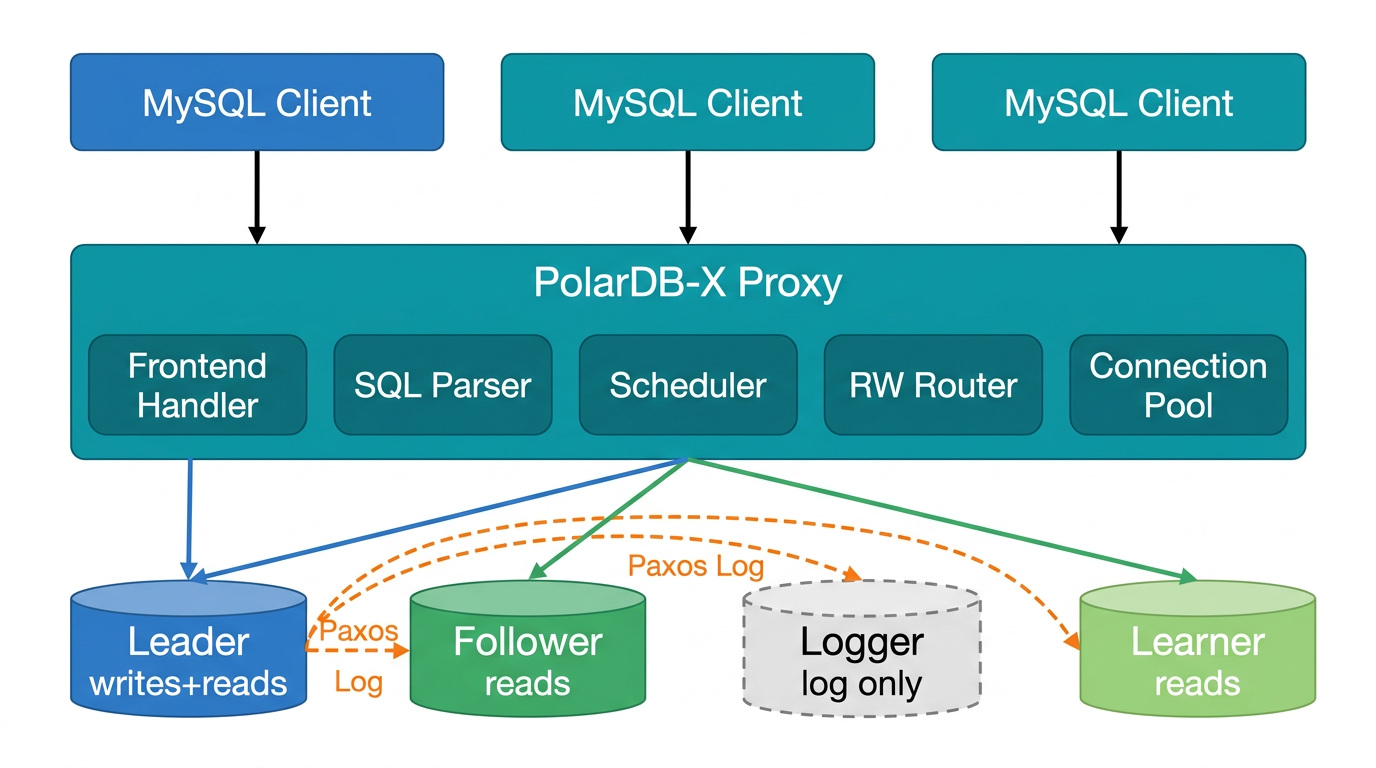
In the world of distributed databases, PolarDB-X Proxy acts as a highly skilled "middleman". It stands between the application and the database cluster. It can both understand the "dialect" of MySQL and cleverly route traffic to the most suitable node. Today, let us uncover the mystery of this high-performance proxy built on Java.
You do not need to rush to read the principles. You can run it first. PolarDB-X Proxy is completely transparent to the application side. It exposes a standard MySQL protocol port to the outside. The business only needs to change the connected IP address and port to the address of the Proxy. You do not need to change the driver, modify the connection string parameters, or change a single line of code.
Driver compatibility: The Proxy supports the MySQL protocol and is compatible with MySQL Connector/JDBC 5.1.x/8.0 and higher versions of the driver. Note: Because the Proxy only supports the mysql_native_password authentication plug-in, you need to use a user that supports mysql_native_password authentication to connect and log on.
Key point: For the connection string that the business originally used to directly connect to the database, you only need to change the IP address and port to the address of the proxy. Other parameters (such as the database name, character set, and connection pool configuration) remain unchanged. You can simply change the JDBC URL from jdbc:mysql://db-host:3306/mydb to jdbc:mysql://proxy-host:3307/mydb.
The fastest way to start is to complete three steps: pull the image, start it, and connect:
docker pull polardbx/polardbx-proxy:latest

bash ./quick_start.sh \
  -e backend_address=your_db_host:port \
  -e backend_username=your_user \
  -e backend_password=your_pass \
  -e memory=4294967296

# Connection test: It is exactly the same as directly connecting to MySQL, except that the port is changed
mysql -Ac -h127.0.0.1 -P3307 -u<user> -p<pass>If you need customized development or in-depth study of the source code, you can build from the source code:
# Clone the repository
git clone https://github.com/polardb/polardbx-proxy.git
cd polardbx-proxy

# Environment requirements: Java Development Kit (JDK) 11+, Maven 3.6.3+
# Package the code (skip tests and use the release environment)
mvn clean -DskipTests package -Denv=release

# Extract and deploy the code (the directory must contain the string "polardbx-proxy")
mkdir -p /home/admin/polardbx-proxy
tar -xzf target/polardbx-proxy-*.tar.gz -C /home/admin/polardbx-proxy
cd /home/admin/polardbx-proxyYou can edit conf/config.properties. Only 3 required items are needed:
# Backend leader node address
backend_address=10.10.10.10:3306

# Backend superuser account (The authentication method must be mysql_native_password, and remote logon is allowed)
backend_username=root
backend_password=123456

# Frontend listening port
frontend_port=3307cd bin
# Start with 4 GB memory
./startup.sh -m 4096
# View the startup log
tail -f ../logs/proxy.logAfter the startup is successful, you will see:
2026-02-05 16:50:50.390 [main] INFO com.alibaba.polardbx.proxy.ProxyServer - ==================== Proxy started.Then you can use any MySQL client to connect. This is exactly the same as connecting to an ordinary MySQL database:
mysql -Ac -h127.0.0.1 -P3307 -uroot -p123456After you connect to the proxy, you can use these system commands to view the cluster status:
SHOW CLUSTER;       -- View backend cluster information
SHOW FRONTEND;      -- View frontend connections
SHOW FULL FRONTEND; -- Contains prepared statement details
SHOW BACKEND;       -- View backend connections
SHOW RW;            -- View the read/write connection pool (Leader)
SHOW RO;            -- View the read-only connection pool (Follower+Learner)
SHOW PROPERTIES;    -- View the current configuration
SHOW REACTOR; -- View network layer statisticsAfter you run it quickly, let us talk about "why".
Imagine this scenario: your application connects directly to the primary node of the PolarDB-X Standard Edition cluster. Read and write requests are mixed, which puts immense pressure on the primary database. However, the Follower and Learner nodes are sitting idle. Worse still, when a failover occurs on the primary database, the application connection is instantly disconnected, and the business experiences a significant disruption.
PolarDB-X Proxy is specifically designed to resolve these pain points:
· Read/write splitting: Read requests automatically flow to the Follower and Learner nodes, allowing the Leader node to focus on processing write requests.
· Load balancing: Intelligent scheduling based on the number of active requests prevents uneven load distribution.
· High availability guarantee: Second-level fault detection and idempotent retries ensure that the switchover process is transparent to the application.
· Connection retention: Transaction-level connection pools reduce the number of connections while the pools ensure transaction consistency.
Before we dive into the Proxy, we need to first understand the typical deployment modes of the PolarDB-X Standard Edition (Data Node cluster).
PolarDB-X Standard Edition implements multiple replicas based on the Paxos protocol and includes four node roles:
| Role | Responsibility | Data storage | Whether read services can be provided |
|---|---|---|---|
| Leader | Process write requests and coordinate replica synchronization. | Full data | Yes |
| Follower | Store full data. Can run for Leader. | Full data | Yes |
| Logger | Store only Paxos Log and do not participate in replay. Used for voting. | Log only | No |
| Learner | Asynchronously replicate Paxos Log and provide read-only services. | Full data (replay log) | Yes (read-only) |
Key differences:
• Logs are synchronized among the Leader, Follower, and Logger nodes through the Paxos protocol.
• Follower and Learner nodes locally construct data by replaying Paxos logs. Direct data replication does not exist.
• The Logger node only stores logs for voting and does not replay data. Therefore, the Logger node cannot provide read services.
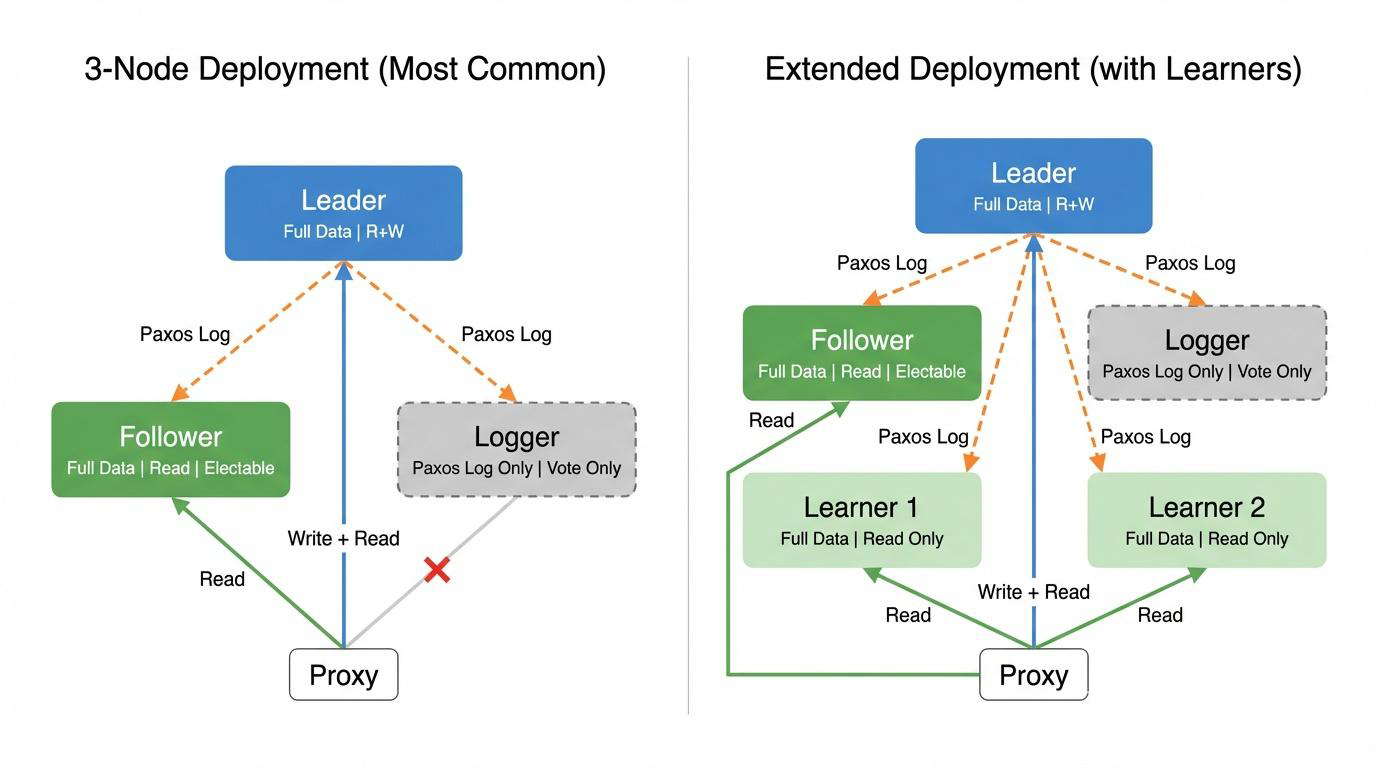
Three-node deployment (most commonly used):
· Leader: A fully functional node that processes write requests and can also process read requests.
· Follower: A full data replica that can participate in Leader election and processes read requests.
· Logger: Only stores Paxos logs and participates in voting. It does not store data or provide read services.
Data synchronization method: The Leader node synchronizes logs to the Follower and Logger nodes through the Paxos protocol. The Follower node locally replays the logs to construct data.
Extended deployment (adding Learner nodes):
· You can add multiple Learner nodes based on the three-node deployment.
· Learner nodes asynchronously receive and replay Paxos logs to provide read-only services.
· You can achieve horizontal scaling of read traffic by adding Learner nodes.
Key insight: Even in the simplest three-node deployment, the Proxy can utilize the resources of the Leader and Follower nodes to share read traffic and maximize resource utilization (the Logger node only records logs and does not replay data, so the Logger node cannot provide read services because it has no data).
Hardware configuration:
· DN (Data Node): 3 instances × 32 vCPUs and 128 GB (1 Leader + 1 Follower + 1 Logger)
· Proxy: 32 vCPUs and 64 GB
· Network: Internal network across Elastic Compute Service (ECS) instances
· Concurrency: 600 threads
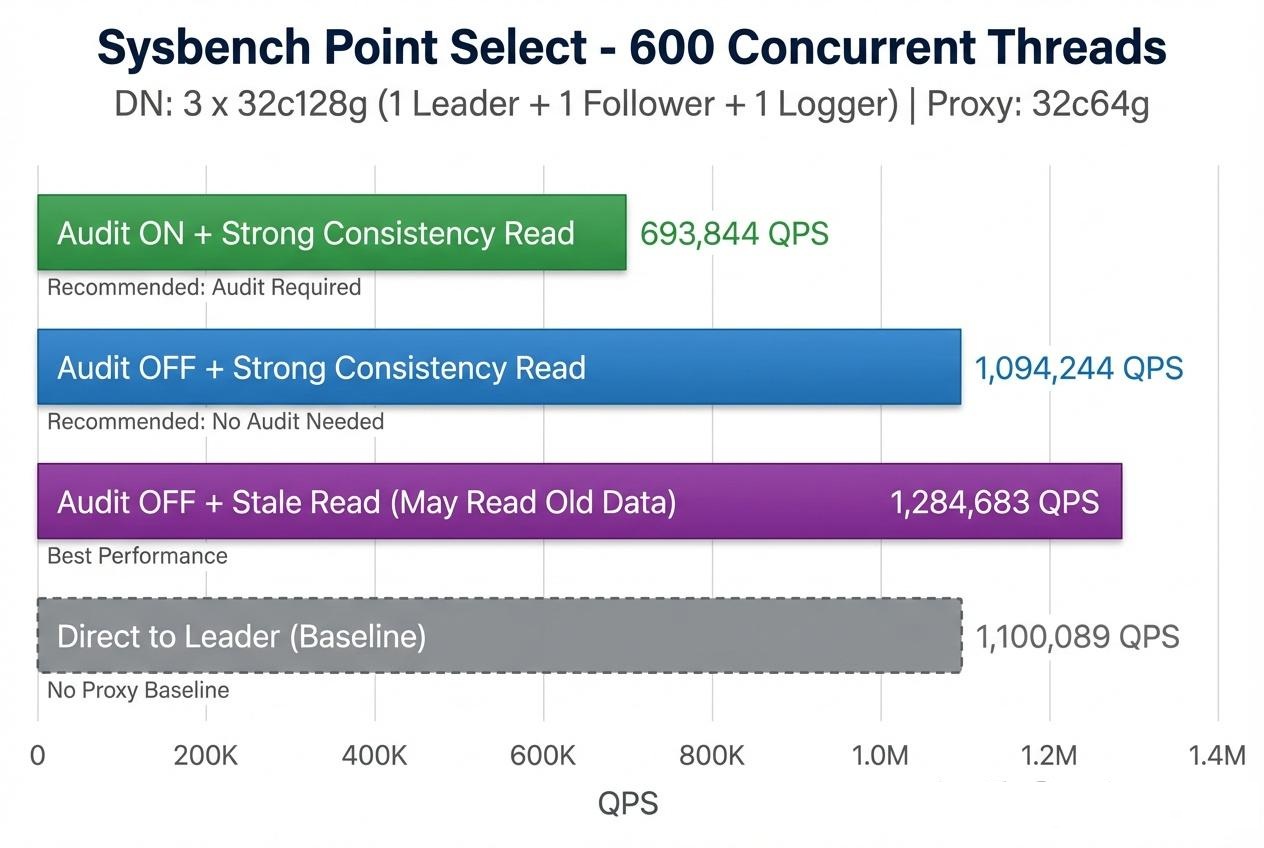
| Test scenario | QPS | Configuration description | Applicable scenario |
|---|---|---|---|
| Audit log enabled + standby database strong consistent read | 693,844 | enable_stale_read=false SQL log enabled |
Recommended configuration for scenarios that require audit logs. Strong consistency is guaranteed. Backtracking audits are supported. |
| Audit log disabled + standby database strong consistent read | 1,094,244 | enable_stale_read=false SQL log disabled |
Recommended configuration for scenarios that do not require audits. Strong consistency is guaranteed. Performance is relatively good. |
| Audit log disabled + Stale Read | 1,284,683 | enable_stale_read=true SQL log disabled | Scenarios that require extreme high performance. Historical data might be read. This configuration provides the best performance. |
| Direct connection to Leader (baseline) | 1,100,089 | Direct connection without Proxy | Performance comparison baseline |
enable_read_write_splitting=true
enable_stale_read=false
enable_sql_log=true
• You can enable SQL audit logs on the Proxy side to meet compliance requirements.
• Strong consistency read: FetchLsnTask retrieves the Leader position, and SetLsnTask waits for the Follower to catch up.
• The performance is approximately 690,000 QPS.
enable_read_write_splitting=true
enable_stale_read=false
enable_sql_log=false
• You can disable the Structured Query Language (SQL) logs on the Proxy side to reduce the input/output (IO) overhead.
• You can use strong consistency reads to ensure that the latest data is read.
• The performance is approximately 1.09 million QPS. This configuration is recommended for production environments.
enable_read_write_splitting=true
enable_stale_read=true
enable_sql_log=false
• You can enable Stale Read. FetchLsnTask is directly skipped, and the system does not wait for the Follower to replay the position.
• Historical data may be read (millisecond-level latency).
• The performance is approximately 1.28 million QPS, which even exceeds the performance of direct connections.
• This scenario is applicable to latency-sensitive scenarios where slight data latency is acceptable.
enable_stale_read=false, which requires FetchLsn and SetLsn) cause a performance loss of approximately 15% compared to Stale Read (enable_stale_read=true, which skips the log sequence number (LSN)) (1.09 million QPS versus 1.28 million QPS).After the kill -9 command is executed on the primary database:
· Fault detection time: < 1 s
· New Leader election completion: ~3 s
· Business fully recovered: within 5 s
Read-only traffic can be automatically recovered after the Follower catches up. Manual intervention is not required.
PolarDB-X Proxy adopts a classic layered architecture design, which can be divided into four major layers from bottom to top: network I/O layer, connection management layer, protocol processing layer, and business processing layer.
· Network I/O layer (proxy-net module): This layer is based on the non-blocking I/O (NIO) Reactor model. This layer is responsible for Socket read and write operations, memory pool management (FastBufferPool/Slice), and connection leak detection. Each NIOProcessor has an independent Selector and memory pool to achieve zero competition among threads.
· Connection management layer (connection of proxy-core and context packages): This layer manages frontend connections (FrontendConnection), backend connections (BackendConnection), backend connection pools (BackendPool), and context hierarchies (FrontendContext → TransactionContext → RequestContext).
· Protocol processing layer (scheduler of proxy-core and protocol packages): This layer is responsible for the decoding and encoding of the MySQL protocol (Decoder/Encoder), task pipeline scheduling (Scheduler/ScheduleTask), and the interception and processing of system commands.
· Business processing layer (serverless of proxy-core and callback packages): This layer implements business logic such as HA management (HaManager), read/write splitting routing (ReadWriteSplittingPool), and latency detection (LatencyChecker), as well as the specific processing workflows of various MySQL commands (such as COM_QUERY and COM_STMT_PREPARE).
polardbx-proxy/
├── proxy-common/      # Shared data, logging, config, utilities
│   └── utils/         # FastBufferPool, Slice, etc.
├── proxy-core/        # Core modules: task queue, Timer, ProxyServer
│   ├── callback/      # Request callback handlers
│   ├── connection/    # Frontend/backend connection management
│   ├── context/       # Connection context, transaction context
│   ├── scheduler/     # Task pipeline scheduler
│   ├── serverless/    # HA management, read/write splitting
│   └── protocol/      # MySQL protocol implementation
├── proxy-net/         # NIO network framework
├── proxy-parser/      # SQL parser (Cobar Parser variant)
├── proxy-rpc/         # gRPC-based inter-node communication
└── proxy-server/ # Server environment, startup scriptsThe network layer of PolarDB-X Proxy is implemented based on the classic Reactor pattern, and its underlying layer uses epoll multiplexing on Linux. Its design philosophy can be summarized in one sentence: "One Thread One Epoll, fully asynchronous, and zero blocking".
As can be seen from the implementations of NIOWorker and NIOProcessor:
Thread model:
• The default maximum number of threads is limited to 32. You can adjust this value through the cpu_cores environment variable.
• Each NIOProcessor is an independent Thread and has an independent Selector.
• The Accept thread runs independently and distributes new connections to each Processor through polling.
Memory management:
• The upper limit of off-heap memory is 10% of the heap memory (calculated by aligning to a power of 2).
• Each Processor has an independent FastBufferPool, and the default block size is 8 KB.
• The following log is printed during startup: NIOWorker start with {} processors and {} MB buf per processor.
FastBufferPool is the core component of the network layer. It implements a memory pool with a lock-free stack structure:
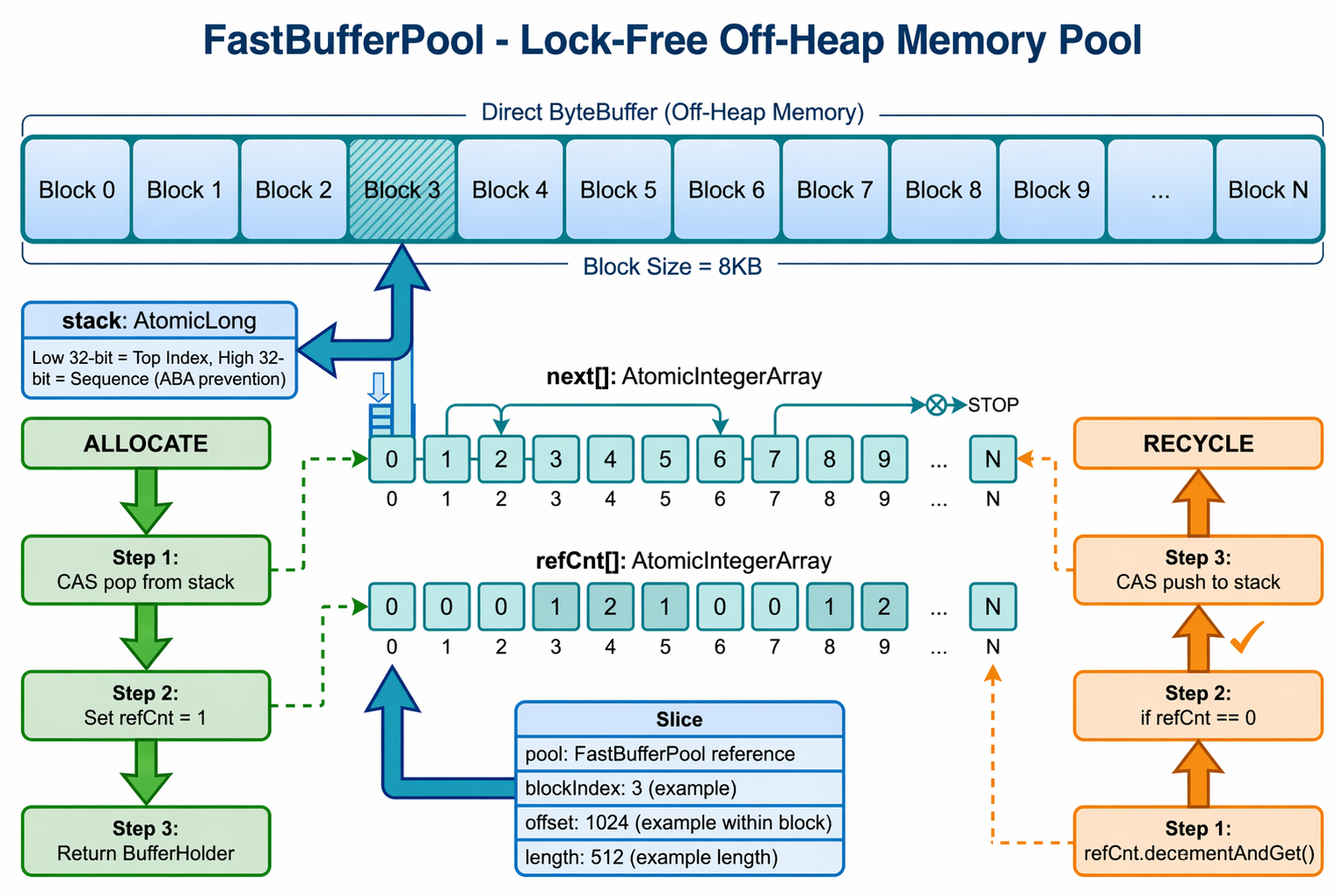
Key design:
• The lock-free compare-and-swap (CAS) operations of AtomicLong are used to implement the push and pop operations of the stack.
• The high 32 bits are used as the sequence number to avoid the ABA problem.
• Reference counting ensures that the same memory block can be shared by multiple Slices.
NIOConnection is the abstract base class for front-end and back-end connections. It implements zero-copy data flow:
Read process:
Write process:
Flow control mechanism:
• When the write buffer is full, the OP_WRITE event is enabled for waiting.
• It supports disableRead() and enableRead() for backpressure control.
• It provides registerWriteResumeListener() to register the write resumption callback.
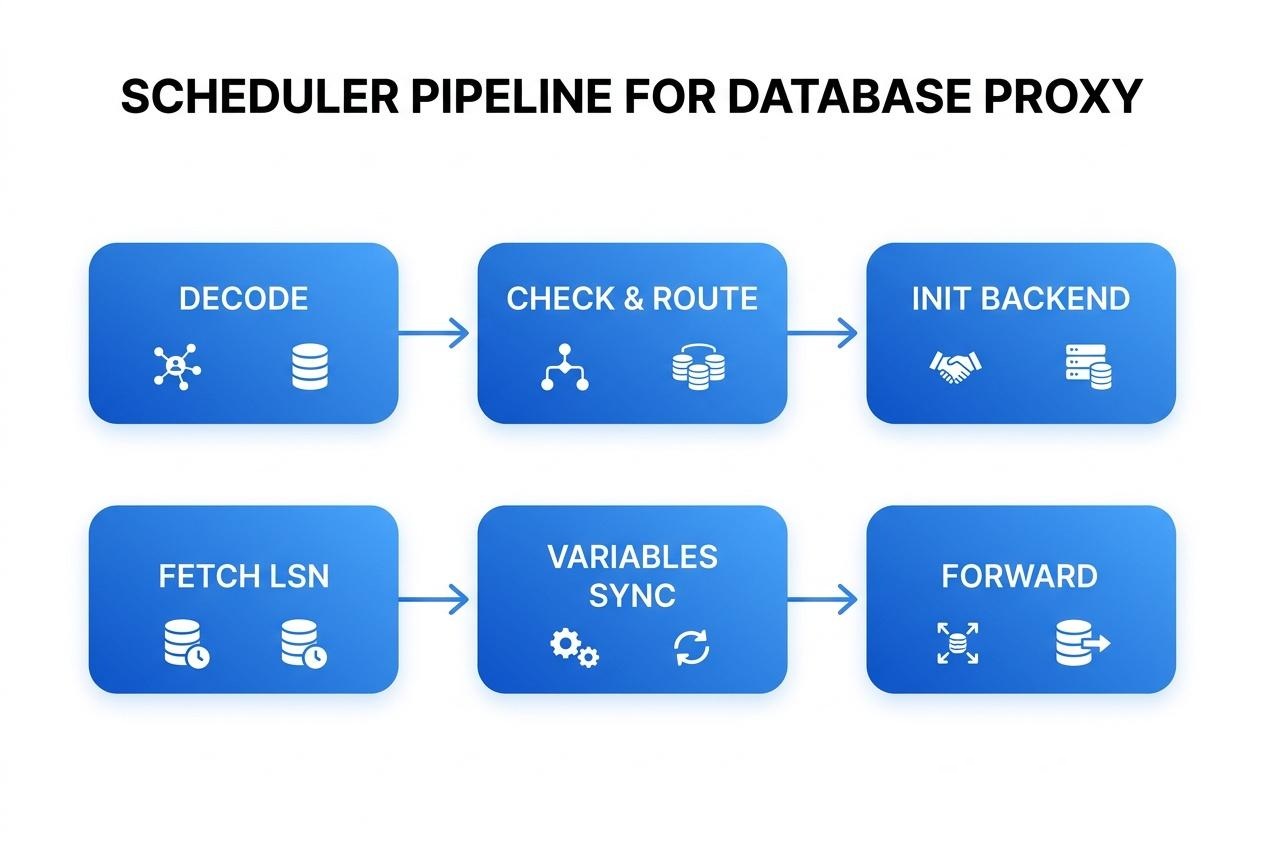
PolarDB-X Proxy abandons the traditional "large if-else" protocol processing mode and innovatively adopts the Task Pipeline architecture.
ScheduleTask is a functional interface. Each task receives the Scheduler context, and the return value controls the ownership of the packet (used for zero-copy forwarding):
• null: The current task does not process the packet, and the next task continues to be executed.
• true: The pipeline ends, and the task has taken ownership of the incoming packet (Typical scenario: ForwardTaskBase.post() forwards the packet to the backend with zero-copy. Returning true indicates that the packet has been taken and forwarded, and the caller must not release it.)
• false: The pipeline ends, and the task has not taken ownership of the packet (Typical scenario: SystemCommandTask replies to the client directly. The packet is not forwarded, and the caller is responsible for releasing it.)
Scheduler is the execution context of the pipeline, which contains the following items:
• Frontend connection, context, and raw data packet
• Dynamic states: decoder, encoder, backend connection, Log Sequence Number (LSN) position, and others
• Retransmission control: retransmitLimitNanos and rescheduleCount
• Performance statistics: The time consumed in each stage (such as fetchLsnNanos and waitLsnNanos)
Take COM_QUERY as an example. Its pipeline is defined in the Pipelines class:
| Task | Responsibility |
|---|---|
| DecodeComQueryTask | Parse SQL statements and extract key information. |
| SystemCommandTask | Check whether the commands are system commands such as SHOW or SET. |
| InitRetransmitTask | Initialize the retransmission context (time limit and number of retries). |
| CheckQuerySlaveReadTask | Determine whether Follower or Learner reads can be used (analyzed through SQL Parser. Only SELECT statements without transactions under autocommit are allowed). |
| CheckLeaderTransferringTask | Check whether the Leader is being switched. If the Leader is being switched and the request is a non-transactional and non-standby read, suspend the request and wait for the switch to complete. |
| InitBackendTask | Obtain a backend connection from the connection pool. When goSlave is executed, prioritize retrieving from the read-only (RO) pool. If the retrieval fails, fall back to the read/write (RW) pool. |
| FetchLsnTask | Execute only when a standby database read is performed and enable_stale_read=false. Asynchronously retrieve the Commit Index from the Leader. |
| VariablesRestoreTask | Restore session variables to the backend connection. |
| VariablesPostGatherTask | Collect variables that might change (such as the value of @a after SET @a=1). |
| SetLsnTask | Set READ_LSN on the Follower or Learner and wait for the point to catch up. |
| ForwardComQueryTask | Forward the request to the backend and process the response. |
Scheduler.errorHandle() implements intelligent retransmission. From the perspective of code implementation, the conditions for retransmission are very strict:
retransmitLimitNanos != null (retransmission is initialized), context.getTransactionContext() == null (no transaction), MysqlServerState.Authenticated (the connection is valid), and the timeout period has not elapsed.schedule() method of ProxyExecutor. The default delay is queryRetransmitFastRetryDelay milliseconds.new Scheduler(this, packet). The new scheduler inherits existing states such as LSN and slaveRead decisions, but resets the backend connection.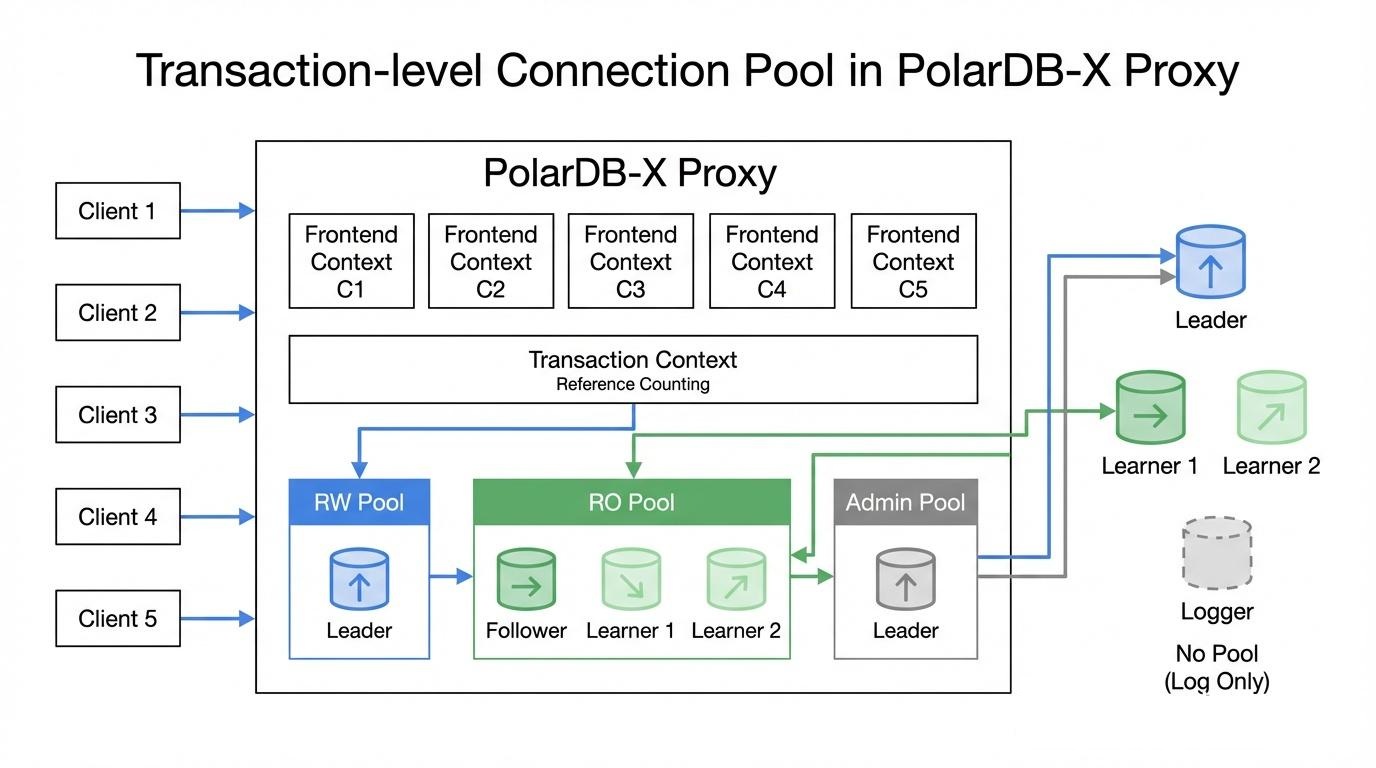
Traditional database proxies usually adopt a model in which one frontend connection corresponds to one backend connection. In high-concurrency scenarios, this model can cause an explosion in the number of backend connections. PolarDB-X Proxy adopts a smarter transaction-level connection pool design.
BackendPool is the connection pool for each backend node:
• connections: ConcurrentLinkedQueue stores idle connections.
• connectionCount: AtomicInteger records the current number of idle connections.
• connectionRunning: AtomicInteger records the number of running connections.
• maxPooled: The maximum number of pooled connections.
• slave: Indicates whether the connection pool is a read-only connection pool (Follower/Learner).
The process to obtain a connection:
isGood().BackendConnectionWrapper and returned.The process to release a connection:
FrontendContext manages the lifecycle of transactions through reference counting:
• referenceTransaction(): The reference count is incremented by 1, and a transaction context is created for the first time.
• dereferenceTransaction(): Decrements the reference count by 1. When the count is 0, the transaction context is closed.
• During a transaction, all requests share the same backend connection.
• Non-transactional requests obtain a connection from the pool each time and return it immediately after use.
BackendPool.refreshPool() implements connection keep-alive:
• Periodically checks idle connections (60 s by default).
• Executes SELECT 1 to probe connections that have timed out while idle.
• Connections that time out or fail are closed.
• Simultaneously refreshes the global variable cache.
The read/write splitting of PolarDB-X Proxy is not a simple "SELECT goes to the secondary database," but a precise consistent read system.
| Node type | Routing policy | Description |
|---|---|---|
| Leader | Write request + request within a transaction + read request | The only writable node. This node also participates in read load balancing. |
| Follower | Non-transactional read request | Full data. This node can run for Leader. |
| Learner | Non-transactional read request | Asynchronous replication. Read-only services. |
| Logger | Does not participate in routing | Stores only Paxos Log. No data. |
Important note: In the Proxy implementation, the Leader node also handles pure read traffic, which is selected based on the Weighted Least Connections (WLC) load balancing algorithm. This means that even read requests may be routed to the Leader for execution.
HaManager is responsible for detecting the cluster status and node latency:
-- 1. Obtain the Commit Index of the Leader
SELECT COMMIT_INDEX FROM information_schema.ALISql_CLUSTER_LOCAL;

-- 2. Obtain the Apply Index of the Follower
SELECT LAST_APPLY_INDEX FROM information_schema.ALISql_CLUSTER_LOCAL;

-- 3. Calculate latency
Delay = f(COMMIT_INDEX_leader, LAST_APPLY_INDEX_follower, RTT)
Latency calculation:
• Maintains the Commit Index history of the Leader for the last 100 seconds.
• Calculates the Apply Index of the Follower based on the RTT and the current time.
• Uses linear interpolation to calculate the latency time.
ReadWriteSplittingPool manages read/write and read-only connection pools:
• RW Pool: Points to the Leader node and processes write requests and in-transaction requests.
• RO Pool: Points to Follower and Learner nodes and processes non-transactional read requests.
• Important: The Leader node also participates in the load balancing of read requests.
WLC load balancing:
• Calculation formula: load = (runningConnections + (isSlave ? 0 : 1)) / weight
• Selects the node with the minimum load value.
• Because isSlave=false for the Leader node, it receives a penalty of plus 1. Under the same load, Follower or Learner nodes are preferred.
• You can configure custom weights through read_weights (format: ip:port@weight, ip:port@weight).
The enable_stale_read configuration item controls the read consistency level:
When enable_stale_read=false (default, strong consistent read):
COMMIT_INDEX from the Leader.SET READ_LSN = <commit_index> on Follower or Learner nodes.This design ensures that if a user first writes to the primary database and then immediately reads from the secondary database, the user can definitely read the newly written data.
When enable_stale_read=true (Stale Read mode):
• FetchLsnTask is skipped directly, and the Log Sequence Number (LSN) is not retrieved.
• SetLsnTask is also not executed because no LSN is available.
• The secondary database returns local data directly, and historical data with a millisecond-level delay may be read.
• The performance is optimal. This mode is suitable for scenarios where slight data delay is acceptable.
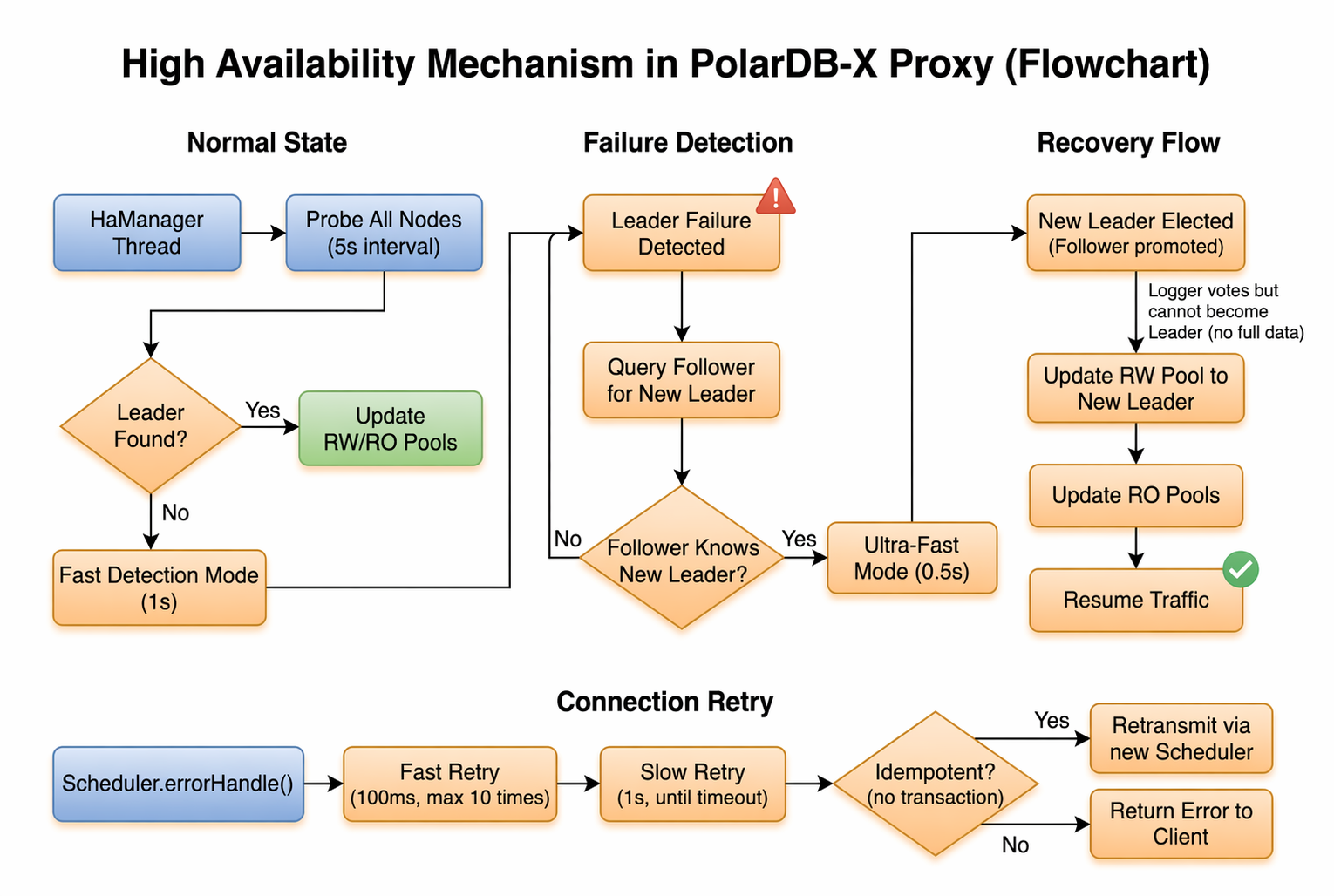
HaManager is an independent background thread. The detection frequency is dynamically adjusted based on the status:
| Scenario | Detection frequency | Trigger condition |
|---|---|---|
| Normal operation | 5 s | Default state |
| Leader lost | 1 s | Leader cannot be detected |
| Follower knows the new leader | 0.5 s | Follower returns the new leader information |
Detection process:
information_schema.ALISql_CLUSTER_LOCAL is queried to retrieve the role and Leader information.dynamic.json is updated to persist the cluster status.ReadWriteSplittingPool is triggered to refresh the connection pool.In a three-node (Leader+Follower+Logger) deployment:
Scenario 1: Leader Failure
• The Follower and Logger participate in the voting to elect a new Leader.
• The Follower can be promoted to the Leader.
• The Logger participates in the voting but cannot be promoted to the Leader (because it has no full data, only the Paxos Log).
Scenario 2: Follower Failure
• The Leader and Logger maintain services.
• All read traffic is concentrated on the Leader (until the Follower recovers or a Learner is added).
Scenario 3: Logger Failure
• The Leader and Follower maintain services.
• Read and write operations are not affected, but a voting node is lost.
CheckLeaderTransferringTask implements the smooth processing of planned switchovers. From the perspective of code implementation, its trigger conditions are very precise:
• The check is performed only when the backend connection has not been allocated (scheduler.getBackend() == null).
• Only requests that are not secondary database reads or in a transaction-opened state are intercepted.
• When HaManager.isLeaderTransferring() is detected as true, the request is added to the wait queue leaderTransferredTask.
• After the switchover is completed, HaManager uniformly triggers the rescheduling of all requests in the wait queue.
• To prevent race conditions, the Leader status is rechecked once after the request is added to the queue. If the switchover has been completed, the request is immediately submitted for execution.
When a backend failure occurs, Scheduler.errorHandle() provides connection retention:
Prepared Statement (PS) is a powerful tool for improving database performance, but it is prone to incompatibility issues in proxy scenarios—the PS context is lost after the backend connection is switched.
• Frontend Prepared Statement (PS) context (FrontendContext): It allocates statement IDs and manages PS metadata.
• Backend PS context (BackendConnection): It maintains server-side PS mappings and Least Recently Used (LRU) caches.
· Prepare phase: PolarDB-X Proxy executes Prepare on backend connections to validate request validity and record metadata.
· Execute phase: PolarDB-X Proxy selects a backend connection, and re-executes Prepare if the connection does not have this PS.
· LRU cache: Backend connections maintain the LRU cache of PSs to avoid frequent Prepare executions.
· Exclusive mode: Backend connections are exclusively occupied during Cursor Fetch and Send Long Data.
Although PolarDB-X Proxy is powerful, you must also note the following limitations when PolarDB-X Proxy is used:
• Compression protocols are not supported.
• Secure Sockets Layer (SSL) connections are not supported.
• Some deprecated commands such as COM_REFRESH and COM_PROCESS_INFO are not supported.
• Only mysql_native_password authentication is supported.
• Temporary tables are not supported.
• The use of LOCK TABLE is prohibited.
• Functions such as FOUND_ROWS() and ROW_COUNT() may return incorrect results because of the transaction-level connection pool design.
• The wait_timeout parameter does not take effect because of the transaction-level connection pool design.
• Statements that specify the next transaction attribute are not supported (set transaction statements without the session or global keyword).
As a cloud-native database proxy, PolarDB-X Proxy provides enterprise-level proxy capabilities for PolarDB-X Standard Edition through technologies such as event-driven fully asynchronous architecture, transaction-level connection pools, intelligent read/write splitting, and seamless High Availability (HA) switching.
Core advantages review:
• Even in the simplest three-node deployment (Leader + Follower + Logger), you can utilize the resources of the Leader and Follower nodes to share read traffic.
• Although the Logger node does not provide read services, the Logger node participates in voting to ensure high availability and saves storage costs.
• You can achieve limitless horizontal scaling of read traffic by adding Learner nodes.
• The Leader node also participates in the load balancing of pure read requests.
The design philosophy of PolarDB-X Proxy can be summarized as follows:
"Transparent to applications, ultimate in performance, and immune to faults."
In the future, along with the evolution of Serverless databases, PolarDB-X Proxy will continue to evolve and bring more surprises in directions such as connection management, intelligent routing, and multi-active architectures.
Say Goodbye to Goldfish Memory: PolarDB Mem0 Gives AI Agents long-term Memory
ApsaraDB - November 28, 2022
ApsaraDB - January 29, 2026
ApsaraDB - July 16, 2026
ApsaraDB - January 16, 2026
ApsaraDB - May 29, 2025
ApsaraDB - March 26, 2025
 PolarDB for Xscale
Alibaba Cloud PolarDB for Xscale (PolarDB-X) is a cloud-native high-performance distributed database service independently developed by Alibaba Cloud.
Learn More
PolarDB for MySQL
Alibaba Cloud PolarDB for MySQL is a cloud-native relational database service 100% compatible with MySQL.
Learn More Application High availability Service
Application High Available Service is a SaaS-based service that helps you improve the availability of your applications.
Learn More
PolarDB for PostgreSQL
Alibaba Cloud PolarDB for PostgreSQL is an in-house relational database service 100% compatible with PostgreSQL and highly compatible with the Oracle syntax.
Learn MoreMore Posts by ApsaraDB


