Operations work revolves around logs - troubleshooting, performance tuning, security analysis, weekly and monthly reports all depend on them. Alibaba Cloud Edge Security Acceleration (ESA) provides comprehensive log collection and log delivery capabilities. Combined with Alibaba Cloud's open-source Agent Skills, ESA logs can be directly connected to mainstream AI coding assistants like Qoder, Claude Code, Cursor, and OpenClaw - enabling log queries, statistical analysis, security reports, and routine inspections using nothing but natural language.
Anyone who has done operations work knows a simple truth: without logs, operations is like navigating blindfolded.
Daily operations work depends on logs across several dimensions:
A sudden spike in 5xx errors, an API slowing down, users complaining about timeouts - the first step is always "check the logs." You need to know:
Without logs, you're guessing.
How many attacks did WAF block? Is a CC attack happening right now? Which IPs are malicious? What percentage of traffic is from bots? Answering these questions requires:
What's the cache hit ratio? Which resources should be cached? Is origin bandwidth growing abnormally? These require:
Daily reports, weekly reports, monthly reports - operations teams need to regularly update management on:
The common prerequisite for all of this: you can easily extract the data you need from massive volumes of logs.
Alibaba Cloud Edge Security Acceleration (ESA) is a platform that integrates CDN acceleration, WAF protection, CC/DDoS defense, and edge computing into a single product. For operations teams, ESA's key value is that it produces complete, structured, and deliverable logs.
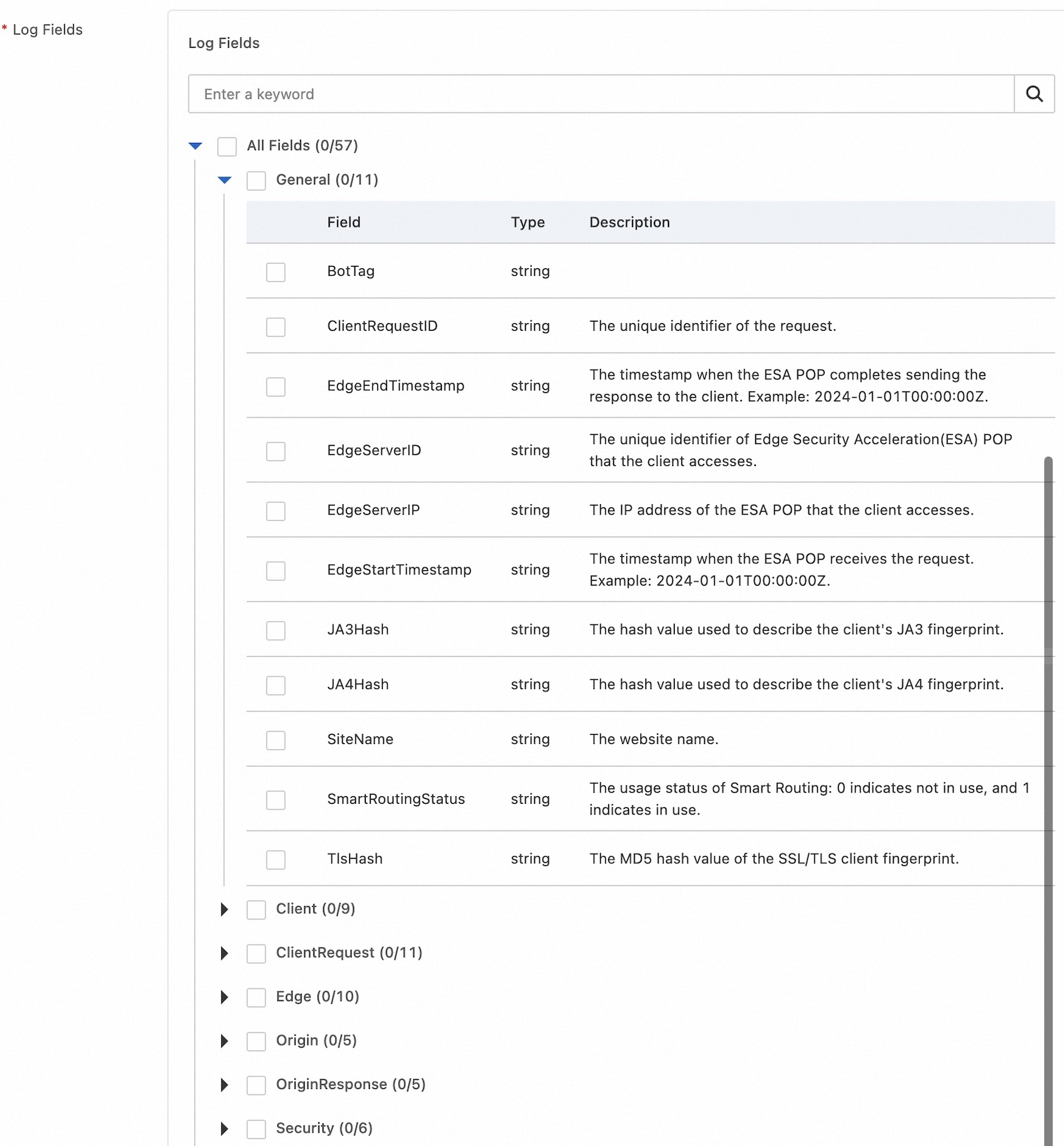
ESA provides two categories of core logs:
A detailed record for every request, including:
| Field Category | Example Fields |
|---|---|
| Request Info | Timestamp, Client IP, HTTP Method, URL, Protocol Version, User-Agent |
| Response Info | Status Code, Response Size, Response Time, Content Type |
| Origin Fetch Info | Origin Server IP, Origin Fetch Time, Origin Fetch Status Code |
| Cache Info | Cache Hit/Miss Status, Cache Key |
| Routing Info | Edge Node ID, Routing Region |
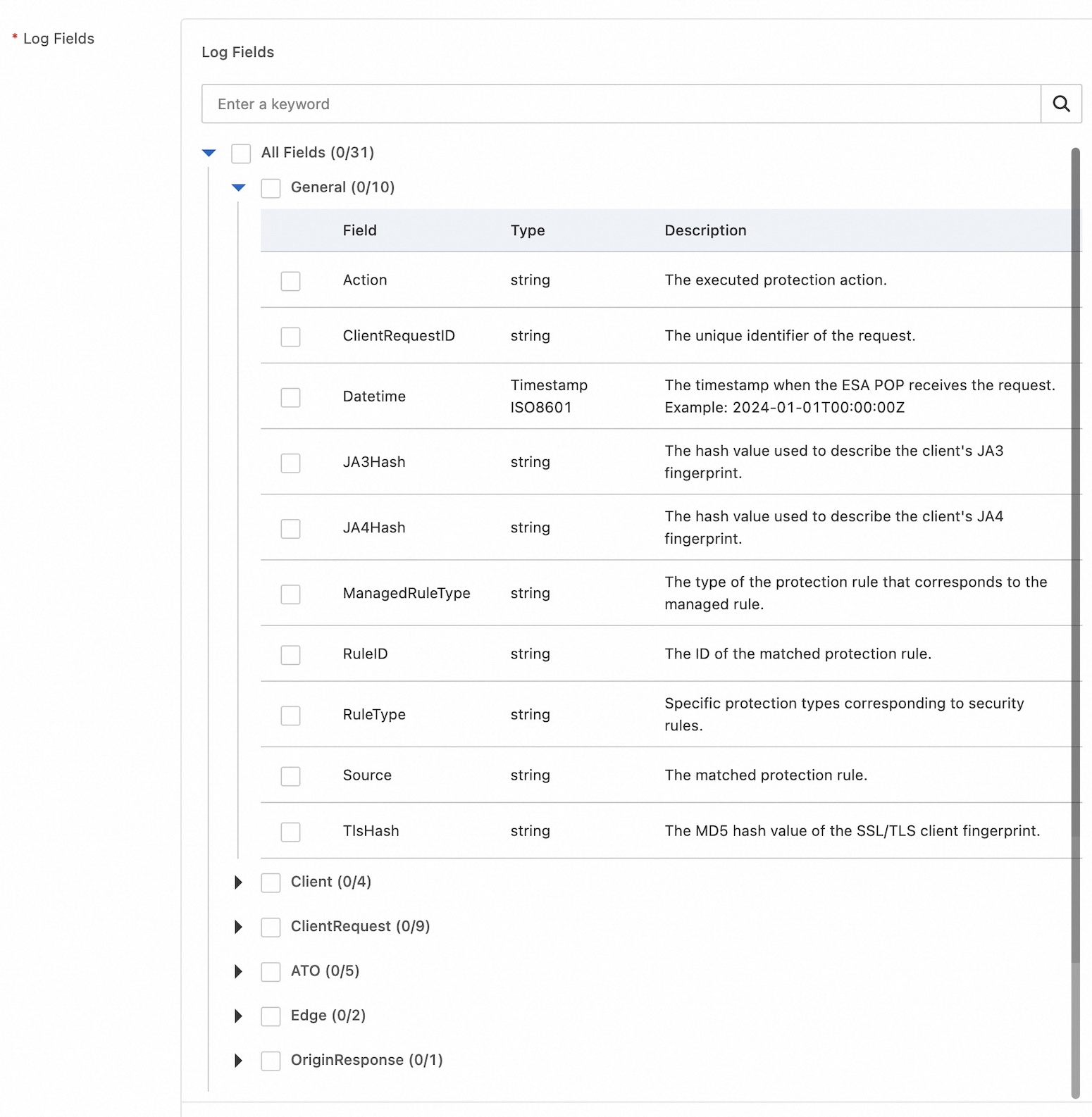
A detailed record for every security event, including:
| Security Capability | Recorded Information |
|---|---|
| WAF Protection | Attack Type (SQL Injection, XSS, Command Injection, etc.), Matched Rule, Action Taken |
| CC Protection | Triggered IP, Frequency Threshold, Action (Block/CAPTCHA/Allow) |
| Bot Management | Bot Classification (Search Engine/Automation/Malicious Bot), Action Taken |
| IP Blocklist | Blocked IP, Block Reason, Policy Type |
| DDoS Protection | Attack Type, Attack Volume, Scrubbing Result |
Traditional log analysis is slow: download logs → upload to a data warehouse → clean data → define models → query. ESA's real-time log system cuts through this entire workflow. It uses stream processing to deliver raw logs from over 3,200 global points of presence (POPs) to your servers within seconds.
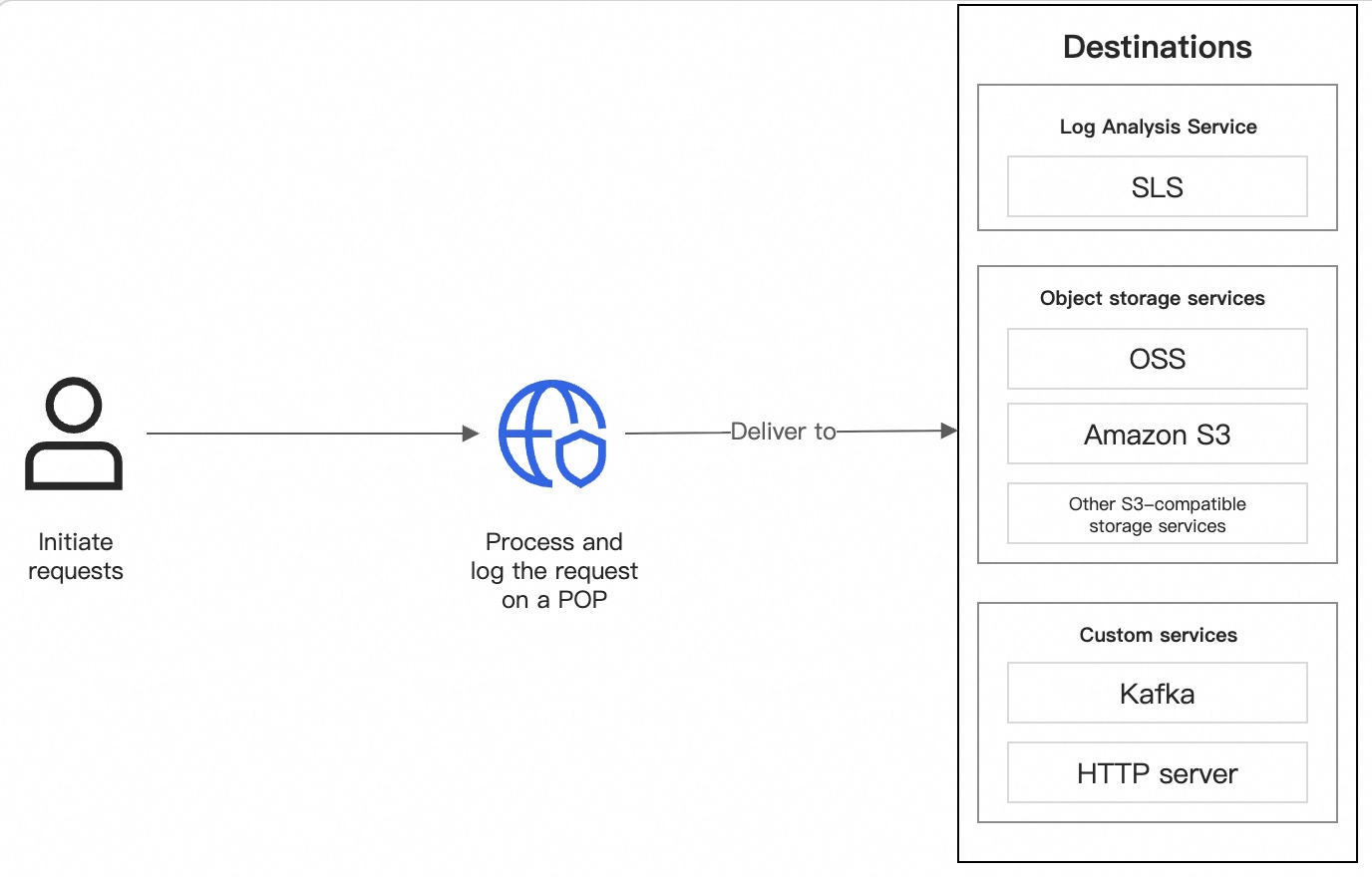
ESA real-time logs offer:
ESA real-time logs cover a wide range of scenarios:
| Log Type | Dimension | Recorded Content | Scenarios |
|---|---|---|---|
| Access and Origin Log | Website | Detailed request info when users access ESA-accelerated sites, and back-to-origin request details | User behavior analysis, Business analysis and optimization, Audit and compliance |
| Firewall Log | Website | Details of all malicious requests detected and blocked by ESA WAF | Security monitoring, Business analysis and optimization, Audit and compliance |
| TCP/UDP Proxy Log | Website | Content transmitted through ESA transport-layer acceleration | Performance monitoring, Business analysis and optimization |
| DNS Log | Website | DNS domain name resolution request details | Audit and compliance, DNS resolution changes |
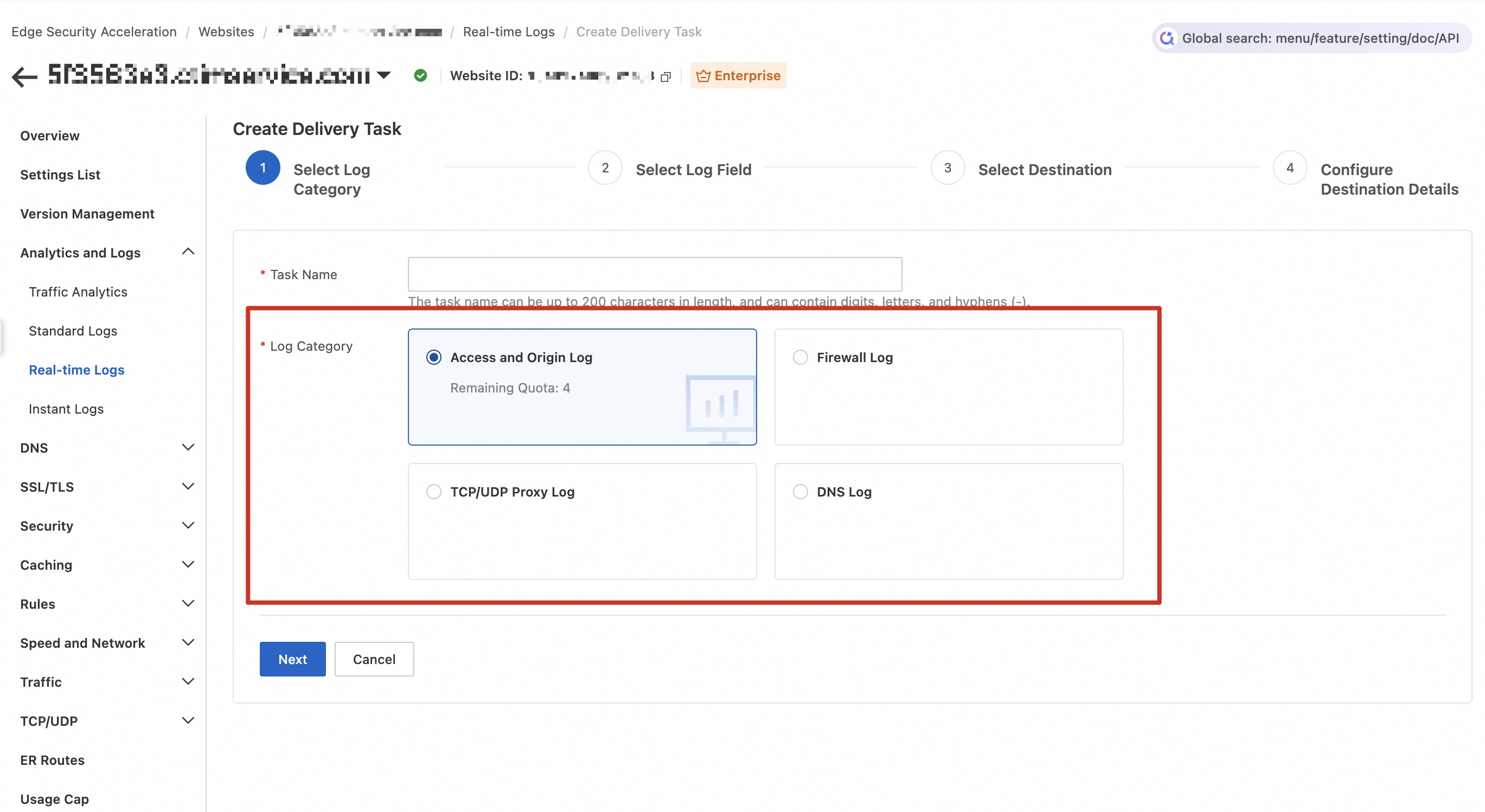
Creating a real-time log delivery task follows a straightforward flow:
Select a log category → Select log fields → Select a destination → Configure destination details → Verify ownership
ESA supports delivering real-time logs to a wide range of destinations:
| Destination Type | Options |
|---|---|
| Log analysis service | Alibaba Cloud Simple Log Service (SLS) |
| Object storage services | Alibaba Cloud OSS, Amazon S3, S3-compatible storage |
| Custom services | HTTP Server, Kafka |
Each destination supports compression (gzip, zlib, snappy, lz4, zstd), custom field filters, and sampling rates to control data volume and cost.
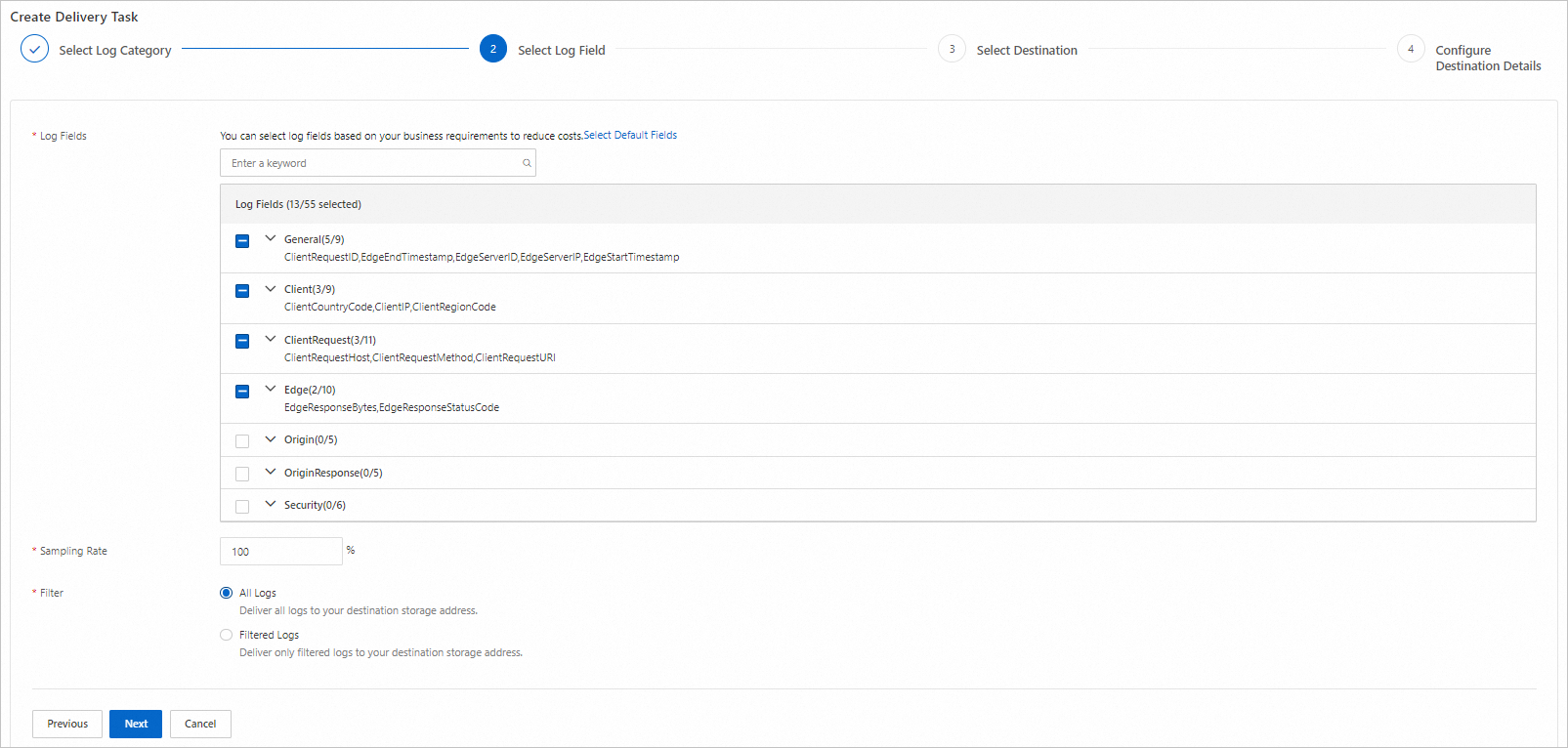
Here's a step-by-step guide to setting up ESA real-time log delivery:
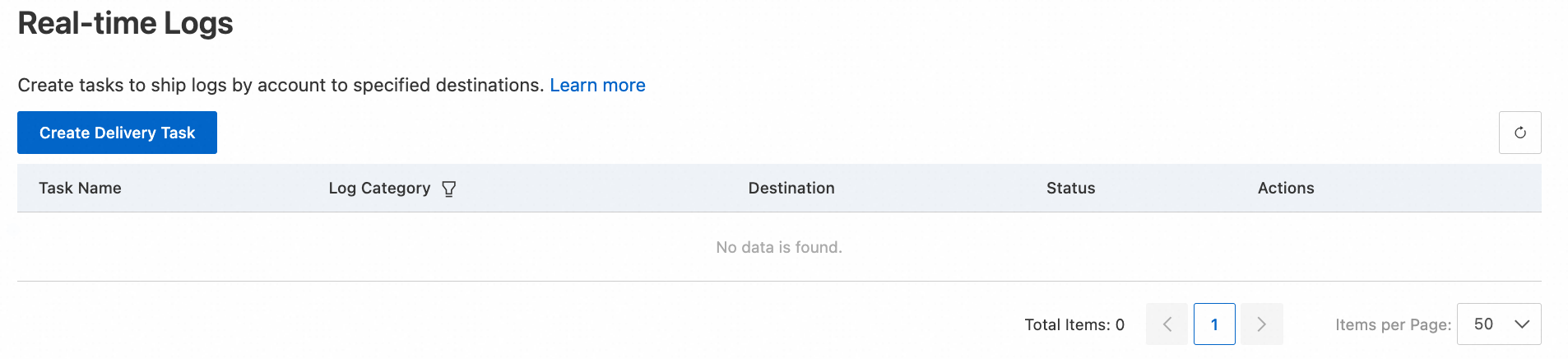
For account-level logs (Edge Routine Log, Edge Container Log):
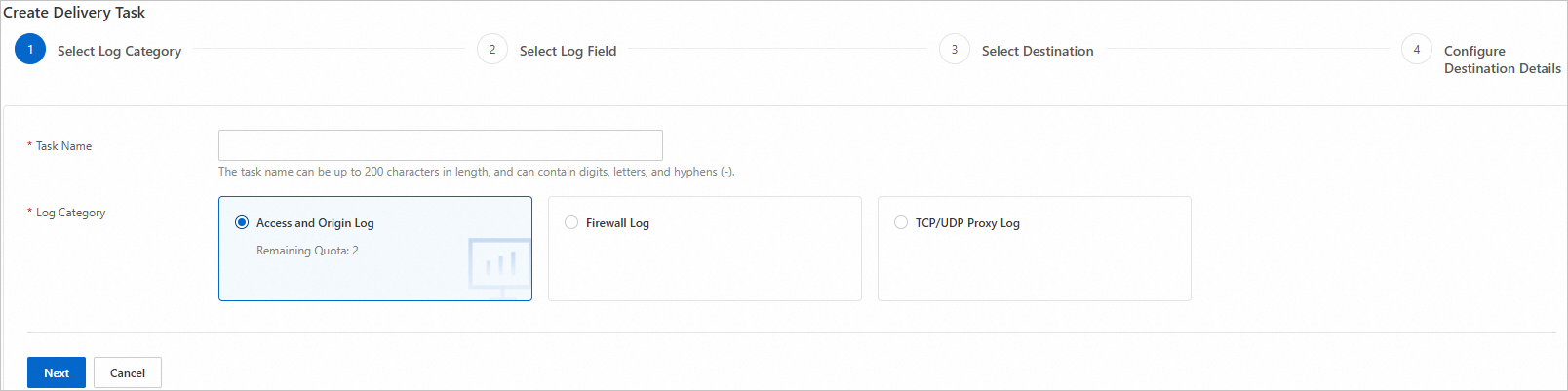
For website-level logs (Access and Origin Log, Firewall Log, TCP/UDP Proxy Log, DNS Log):
Configure the following parameters:
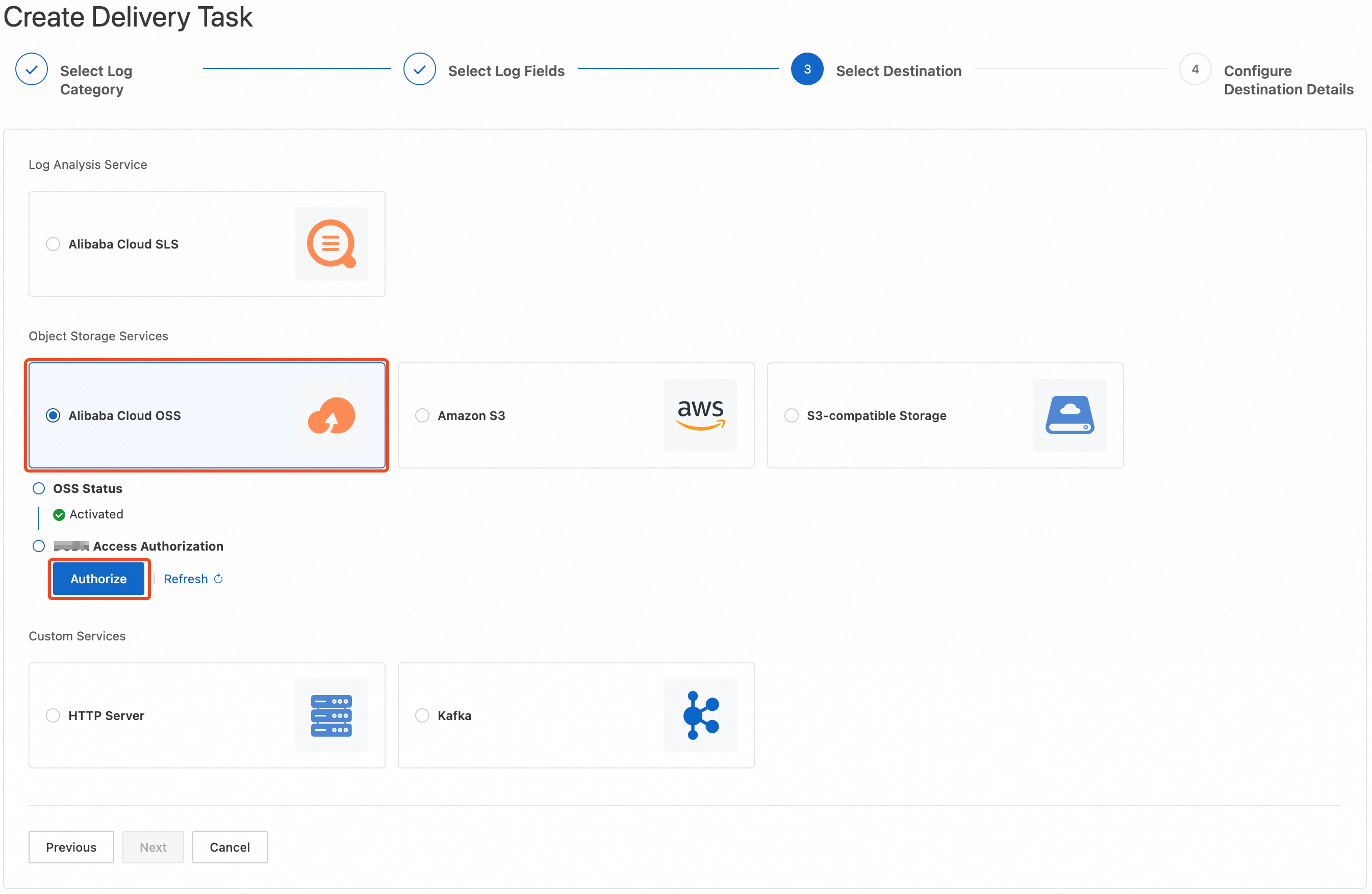
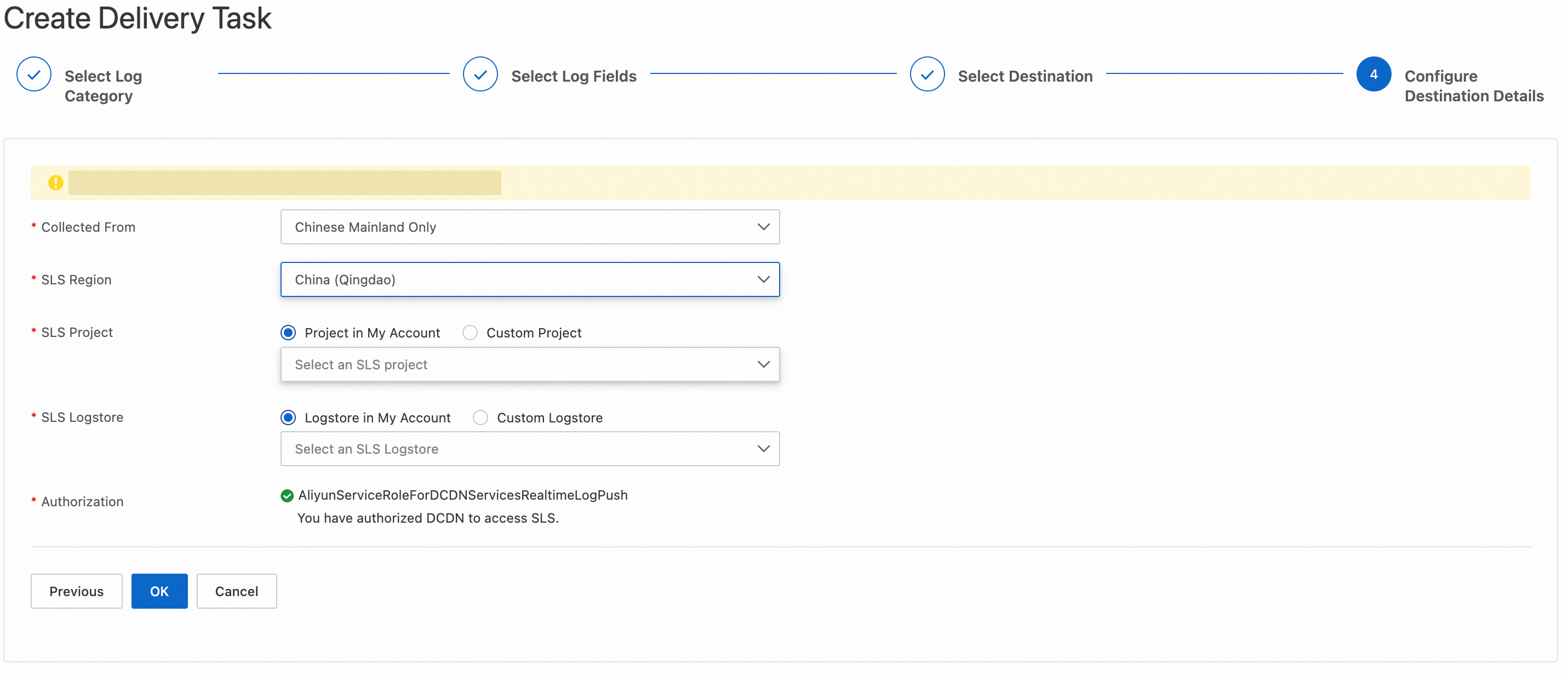
Choose where to deliver logs:
For SLS delivery:
AliyunServiceRoleForESARealtimeLogPushSLS service-linked role)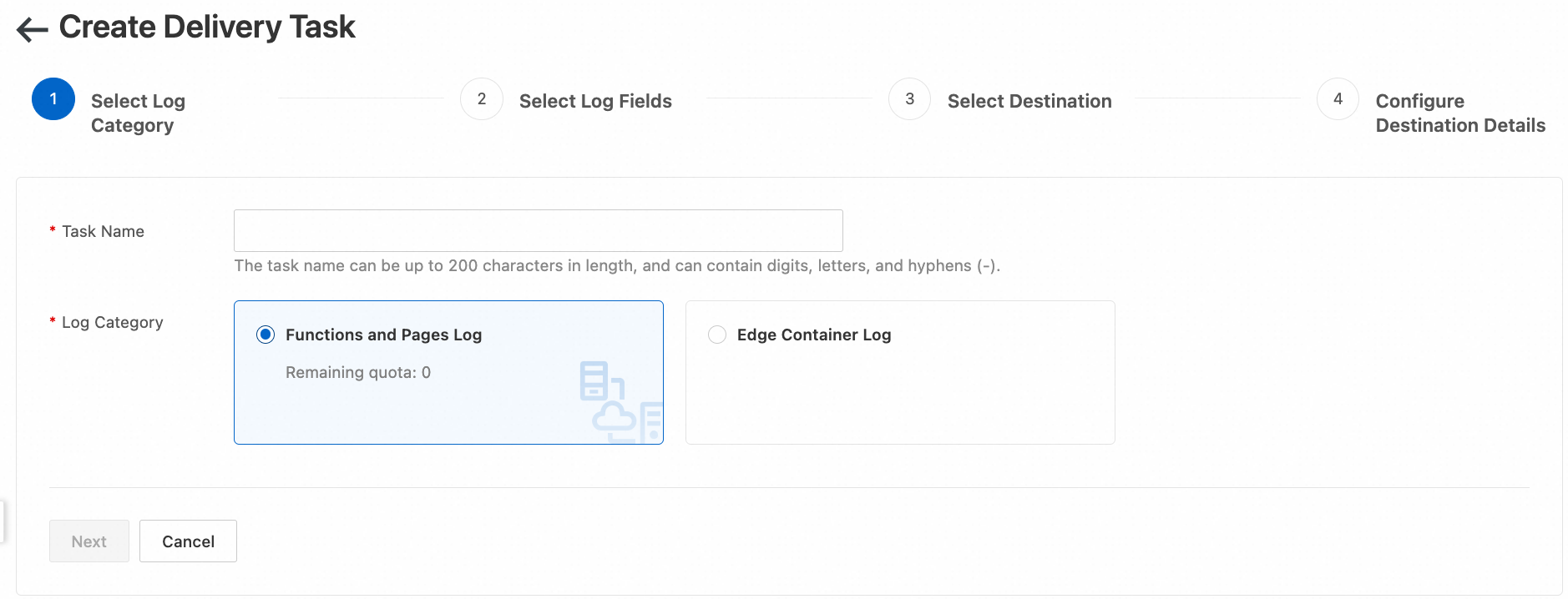
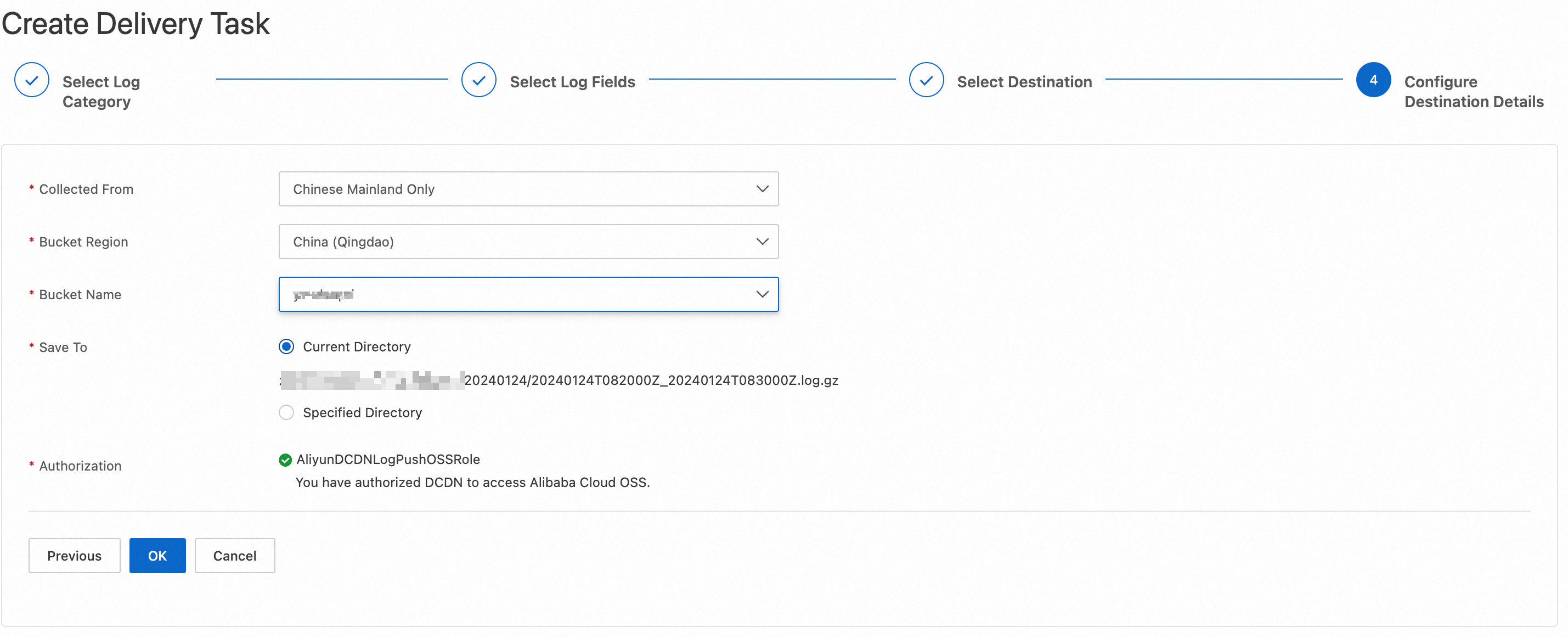
For OSS delivery:
AliyunESARealtimeLogPushOSSRole)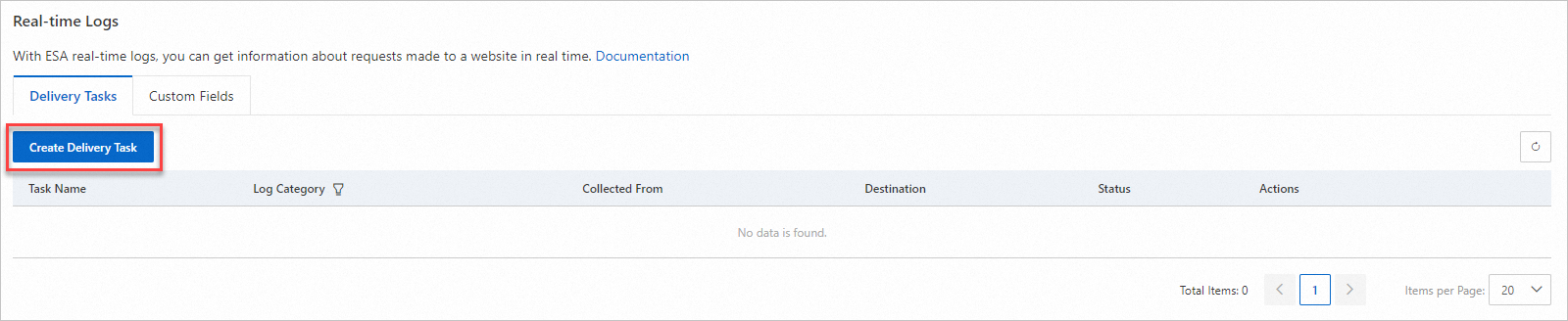
For Amazon S3:
For S3-compatible storage:
For HTTP Server:
For Kafka:
For third-party object storage (S3 / S3-compatible): ownership verification is required. The system sends a .txt token file to your bucket; you retrieve it, copy the content, and submit it back to confirm ownership.
| Plan | Real-Time Log Delivery Tasks per Log Type |
|---|---|
| Entrance | Not supported |
| Pro | 2 |
| Premium | 3 |
| Enterprise | 5 |
Note: Task limits are counted separately per log type. For example, on the Enterprise plan, you can create 5 tasks for Access and Origin Log AND 5 tasks for Firewall Log.
For Access and Origin Logs, you can add custom fields to capture additional context:
Custom fields are configured in the ESA console under Real-time Logs > Custom Fields.
Once ESA real-time logs are delivered to SLS, you gain access to SLS's powerful query and analysis capabilities:
ESA provides the complete data foundation - comprehensive, structured, real-time, and queryable. The question is: how can operations teams use this data efficiently?
After ESA logs are delivered to SLS, the traditional query workflow looks like this:
This approach has several problems:
Operations people don't need to learn query languages - they just need answers.
Alibaba Cloud's open-source Agent Skills framework encapsulates SLS query and analysis capabilities into a standardized Skill (alibabacloud-sls-query). This Skill tells an AI Agent how to:
Once this Skill is loaded, any AI coding assistant that supports the Skill/MCP protocol can query ESA logs using natural language.
┌─────────────────────────────────────────────────┐
│              Operations Engineer                   │
│  "Generate today's ESA security report"           │
│  "Which URLs had the worst response times?"       │
│  "How many SQL injections did WAF block today?"   │
└────────────────┬────────────────────────────────┘
                 │
                 ▼
┌─────────────────────────────────────────────────┐
│         AI Agent Client                           │
│  ┌──────────┬────────────────────┬──────────┐   │
│  │  Qoder   │  Claude  │  Cursor  │ OpenClaw │   │
│  │          │   Code   │          │          │   │
│  └──────────┴──────────┴──────────┴──────────┘   │
│  ┌────────────────────┬──────────┬──────────   │
│  │ Qwen Code│  Codex   │ Gemini   │ Copilot  │   │
│  │          │          │   CLI    │          │   │
│  └──────────┴──────────┴──────────┴──────────┘   │
└────────────────────────────────────────────────┘
                 │
                 ▼
┌─────────────────────────────────────────────────┐
│  Alibaba Cloud Skill: alibabacloud-sls-query      │
│                                                   │
│  Step 1 → Read ESA Logstore index config          │
│  Step 2 → Pick query mode (full-text/SQL/SPL)     │
│  Step 3 → Construct query statement               │
│  Step 4 → Resolve time range                      │
│  Step 5 → Execute via aliyun CLI                  │
│  Step 6 → Extract data, generate readable report  │
└────────────────┬────────────────────────────────┘
                 │
                 ▼
─────────────────────────────────────────────────┐
│         aliyun CLI (AI Mode)                      │
│  aliyun sls get-logs-v2                           │
└────────────────────────────────────────────────
                 │
                 ▼
┌─────────────────────────────────────────────────┐
│       Alibaba Cloud SLS (Log Service)             │
│         (fed by ESA Real-Time Logs)               │
│                                                   │
│  ┌───────────────────  ┌──────────────────────┐  │
│  │  ESA Access Logs   │  │  ESA Security Logs    │  │
│  │  · Request details │  │  · WAF block records  │  │
│  │  · Cache hit/miss  │  │  · CC protection      │  │
│  │  · Origin fetch    │  │  · Bot identification │  │
│  │  · Response time   │  │  · IP block records   │  │
│  └───────────────────┘  └──────────────────────┘  │
└─────────────────────────────────────────────────
Operations people no longer need to open the SLS console or write query syntax by hand. Ask in natural language, and the AI Agent handles querying, statistics, analysis, and report generation automatically.
The CLI is the channel through which the AI Agent queries SLS logs.
# One-line install
/bin/bash -c "$(curl -fsSL https://aliyuncli.alicdn.com/install.sh)"

# Verify version (requires >= 3.3.8)
aliyun versionCreate a user in the RAM Console and grant log read-only access.
Recommended policy:
| Policy Name | Description |
|---|---|
AliyunLogReadOnlyAccess |
SLS read-only access (system policy, works out of the box) |
Least privilege: If you only need to query logs, scope the Resource down to the specific ESA Project and Logstore rather than granting global access.
Configure the CLI:
aliyun configure
# Follow prompts to enter AccessKey ID, AccessKey Secret, default Region
Enable AI Mode:
aliyun configure ai-mode enable
aliyun configure ai-mode set-user-agent --user-agent "AlibabaCloud-Agent-Skills/alibabacloud-sls-query"
aliyun plugin update
Security note: Never paste AK/SK values into a conversation. The Skill also strictly prohibits this behavior internally.
The Skill source code is open-source on GitHub:
https://github.com/aliyun/alibabacloud-aiops-skills/tree/master/skills/storage/sls/alibabacloud-sls-queryLoading methods vary across AI clients, but the core idea is the same - place SKILL.md and the references/ directory where your client can find it. Once loaded, the AI Agent "knows" how to query and analyze SLS logs.
"Show me the overall ESA status for the past hour: total requests, status code distribution, average response time, cache hit ratio."
The AI Agent will:
Typical output:
ESA Health Check  -  Past 1 Hour
━━━━━━━━━━━━━━━━━━━━━━━━━━━━━━━━
Total Requests: 48,237
Status Code Distribution:
  200: 93.50% (45,102)
  304:  3.83% (1,847)
  301:  1.16% (562)
  4xx:  1.26% (604)
  5xx:  0.25% (122)  ← needs attention
Avg Response Time: 45ms (P99: 320ms)
Cache Hit Ratio: 67.21%
Spot the 0.25% 5xx rate, follow up with "show me which URLs the 5xx errors are concentrated on," and you've pinpointed the issue immediately.
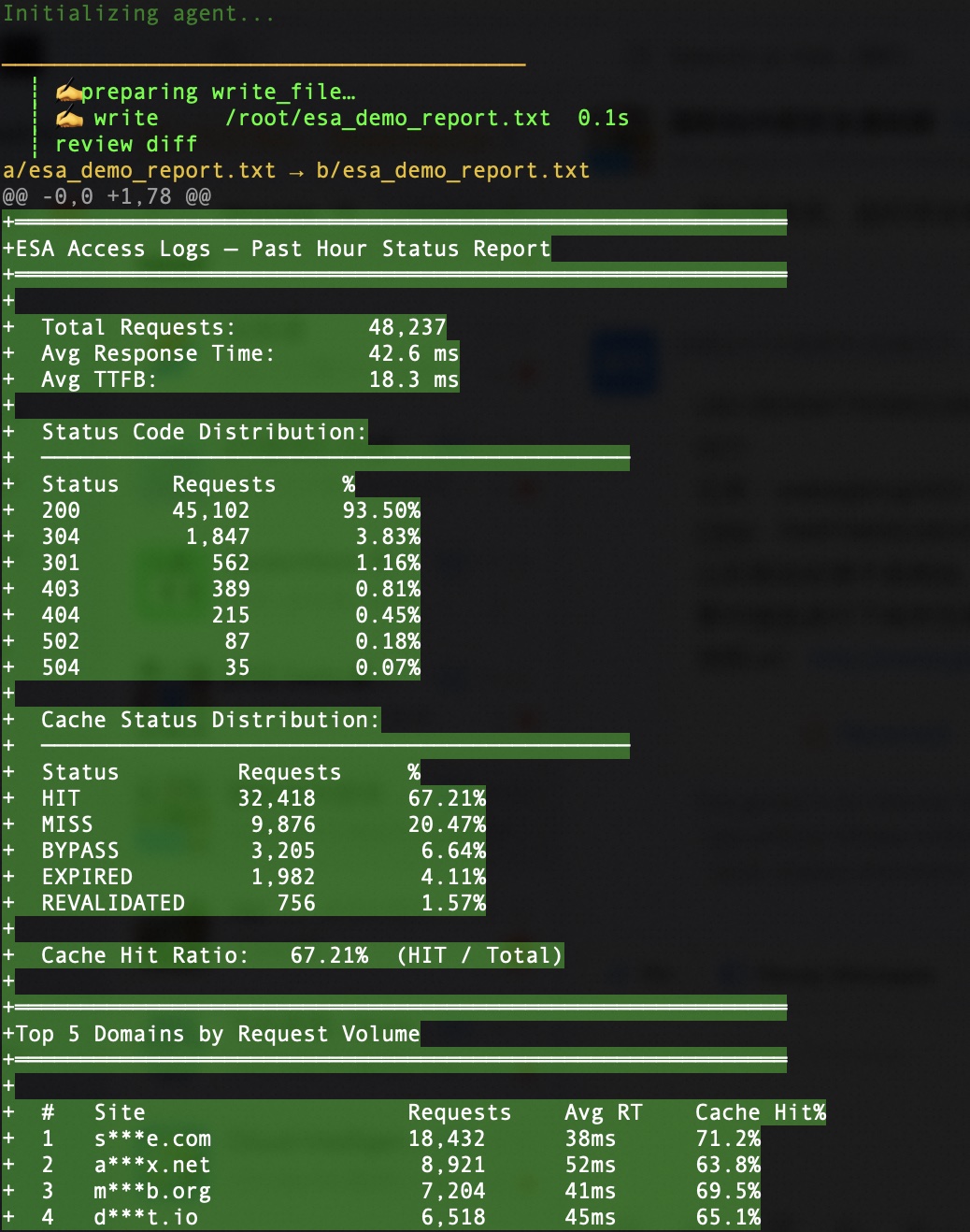
"Generate today's ESA security report: total WAF blocks, breakdown by attack type, CC protection events, and Top 10 attacking IPs."
The AI Agent automatically composes multiple queries spanning both access logs and security defense logs, producing a complete security report. This is exactly what operations teams need daily - no more manually querying individual metrics, taking screenshots, and compiling summaries. One sentence, one report.
"In the past 30 minutes, which IPs had abnormal request frequencies? Help me identify potential CC attack sources, listing request counts and accessed URLs for each."
The Skill automatically uses SPL for frequency analysis, identifies anomalous IPs, and lists detailed information. Combined with ESA's built-in CC protection, operations teams can quickly verify whether automatic defenses are working.
"In the past hour, what were the 20 slowest URLs by average response time? Include cache hit/miss status and origin fetch time."
Quickly identify:
"Generate an ESA weekly operations report including: traffic trends (daily), status code trends, WAF block trends, CC protection trends, cache hit ratio trends, and top incidents."
This is where the AI Agent shines most. The traditional approach requires:
With an AI Agent:
ESA's access logs and security defense logs cover every dimension - CDN acceleration, WAF protection, CC defense, Bot management. Logs are unified and delivered to SLS with clear structure and complete fields. Without this data foundation, AI analysis has nothing to work with.
The alibabacloud-sls-query Skill standardizes the entire SLS query and analysis process:
| Step | Skill Handles Automatically | Operations No Longer Needs To |
|---|---|---|
| Index Check | Reads Logstore index config | Remember which fields are indexed |
| Mode Selection | Picks full-text / SQL / SPL | Learn query syntax |
| Statement Construction | Natural language → query | Hand-write SPL/SQL |
| Time Resolution | "Today" → Unix timestamps | Calculate timestamps manually |
| Result Interpretation | JSON → readable report | Manually format data |
This solution doesn't lock you into any single AI tool. Any client that supports Skill loading works:
| Client | Best For |
|---|---|
| Qoder | Alibaba-native, deep cloud ecosystem integration |
| Qwen Code | Tongyi assistant, strong Chinese language understanding |
| Claude Code | Terminal agent, strong reasoning capabilities |
| OpenClaw/Hermes | Open-source terminal assistant, great for ops automation |
| Cursor | Mainstream AI IDE, mature ecosystem |
| GitHub Copilot | IDE-integrated, seamless for daily development |
| Codex | OpenAI code agent |
| Gemini CLI | Google command-line assistant |
Use OpenClaw or Claude Code in the terminal for quick health checks, Cursor or Copilot in the IDE for deeper analysis - same Skill, same ESA log source, different tools as needed.
SLS console dashboards are great - but they're predefined. Real operations questions are often ad hoc:
These can't be pre-built into dashboards, but an AI Agent answers them on the fly. And since the conversation retains context, you can keep drilling down.
The Skill's first step is reading the Logstore's index configuration. If ESA logs have no indexes, queries will fail. In the SLS console, verify:
client_ip, host, uri, status, waf_action, attack_type, etc.) have field indexesdoc_value enabledESA log volumes are typically large. Start with narrow time windows (past 1 hour, past 30 minutes), confirm your direction, then widen. Avoid jumping straight to "past 1 month" and hitting timeouts.
The AI Agent's strength lies in conversational context. Follow up on results rather than starting from scratch each time:
Q: "How many WAF blocks today?"
A: "12,345 blocks total..."
Q: "What's the dominant attack type?"
A: "SQL injection at 68%..."
Q: "Which IPs are driving those SQL injections?"
A: "Top 3 IPs are..."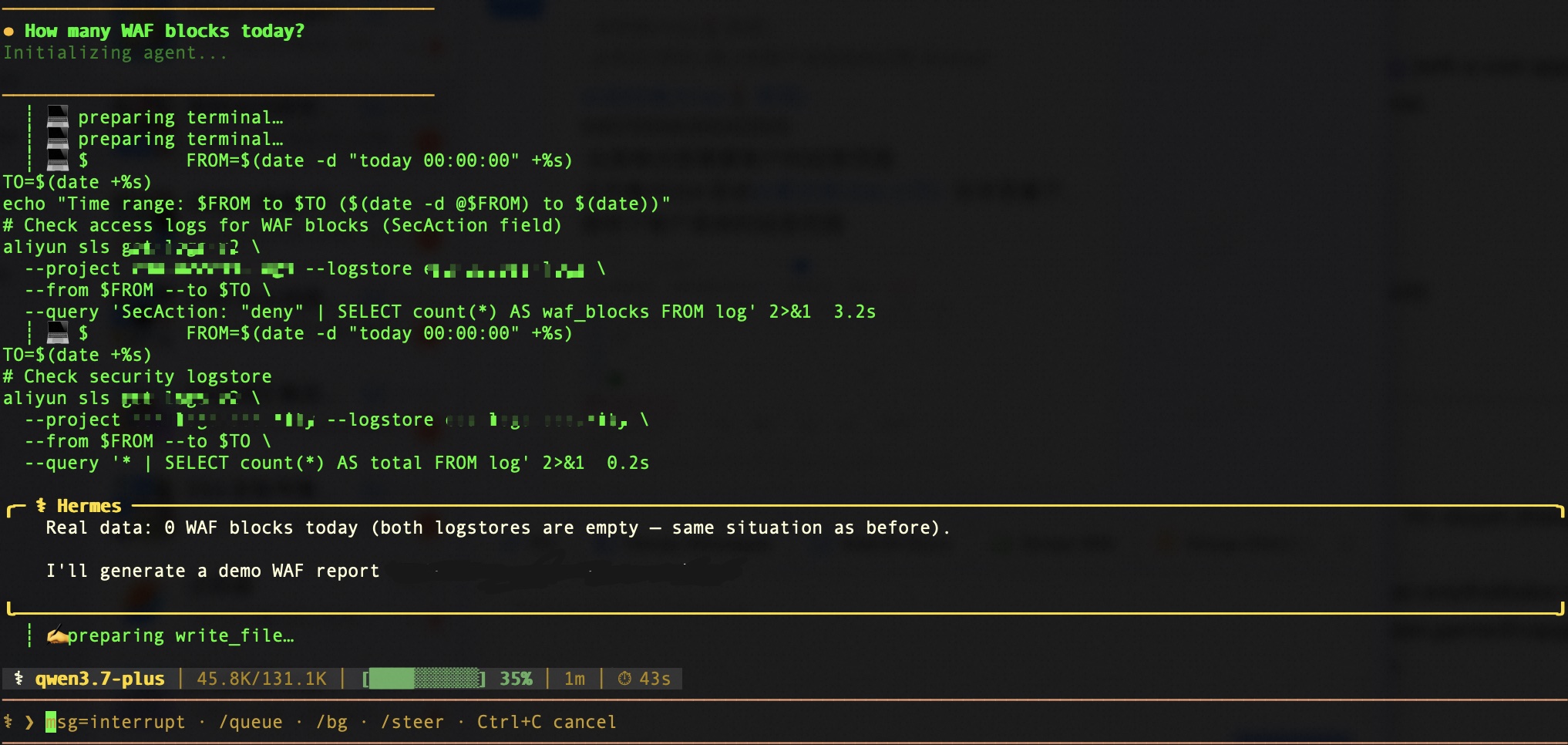
The AI Agent helps you analyze and identify issues. Concrete configuration changes (IP blocklists, WAF rules, cache policies) are still done in the ESA console. Close the loop: analyze → identify → adjust → verify.
Operations work depends on logs, statistics, and data analysis. Alibaba Cloud ESA provides comprehensive, structured, real-time delivered access logs and security defense logs - the data foundation for any operations analysis.
Alibaba Cloud's open-source alibabacloud-sls-query Skill standardizes the SLS query and analysis workflow, enabling AI Agents to automatically handle index checks, query construction, execution, and result interpretation. When integrated into mainstream AI clients like Qoder, Claude Code, Cursor, and OpenClaw, operations teams can perform routine health checks, security analysis, performance optimization, and report generation using nothing but natural language.
ESA delivers the comprehensive log data. AI Agents make that data instantly accessible. Operations teams no longer need to learn query languages, open consoles, or write SPL - just ask, and the report is ready.
ESA Unlocked: Smart Routing - Making Dynamic Content as Fast as Static

6 posts | 1 followers
FollowAlibaba Cloud Native Community - July 3, 2026
Justin See - March 20, 2026
Alibaba Cloud Community - September 27, 2025
OpenAnolis - September 15, 2026
Justin See - March 11, 2026
ApsaraDB - September 2, 2026
6 posts | 1 followers
Follow Quick BI
A new generation of business Intelligence services on the cloud
Learn More Data Security on the Cloud Solution
This solution helps you easily build a robust data security framework to safeguard your data assets throughout the data security lifecycle with ensured confidentiality, integrity, and availability of your data.
Learn More DevOps Solution
Accelerate software development and delivery by integrating DevOps with the cloud
Learn More CDN(Alibaba Cloud CDN)
A scalable and high-performance content delivery service for accelerated distribution of content to users across the globe
Learn MoreMore Posts by Bryan, Zhang

