Let me tell you about a conversation that kept me up at night.
A SaaS customer called me and said: "We have 800 resellers. Each reseller needs their own branded domain pointing to our platform. We also need HTTPS on every single one, plus WAF protection, plus CDN acceleration. Can you help?"
800 domains. Each one needing a certificate, security rules, and acceleration config.
If you've ever managed a fleet of domains, you know exactly what that feels like. Your stomach drops.
That's the problem I helped this customer solve using SaaS Manager. And honestly? It's not just for 800 domains — it's for anyone who's tired of treating each domain like a snowflake.
Here's the simple version: you have an ESA site already configured with your origin server, security policies, and acceleration rules. SaaS Manager lets you attach any number of customer domains to that single site. Every domain gets your security, your acceleration, your certificates - automatically.
No per-domain config. No certificate chaos. No "wait, did I enable WAF on that one?"
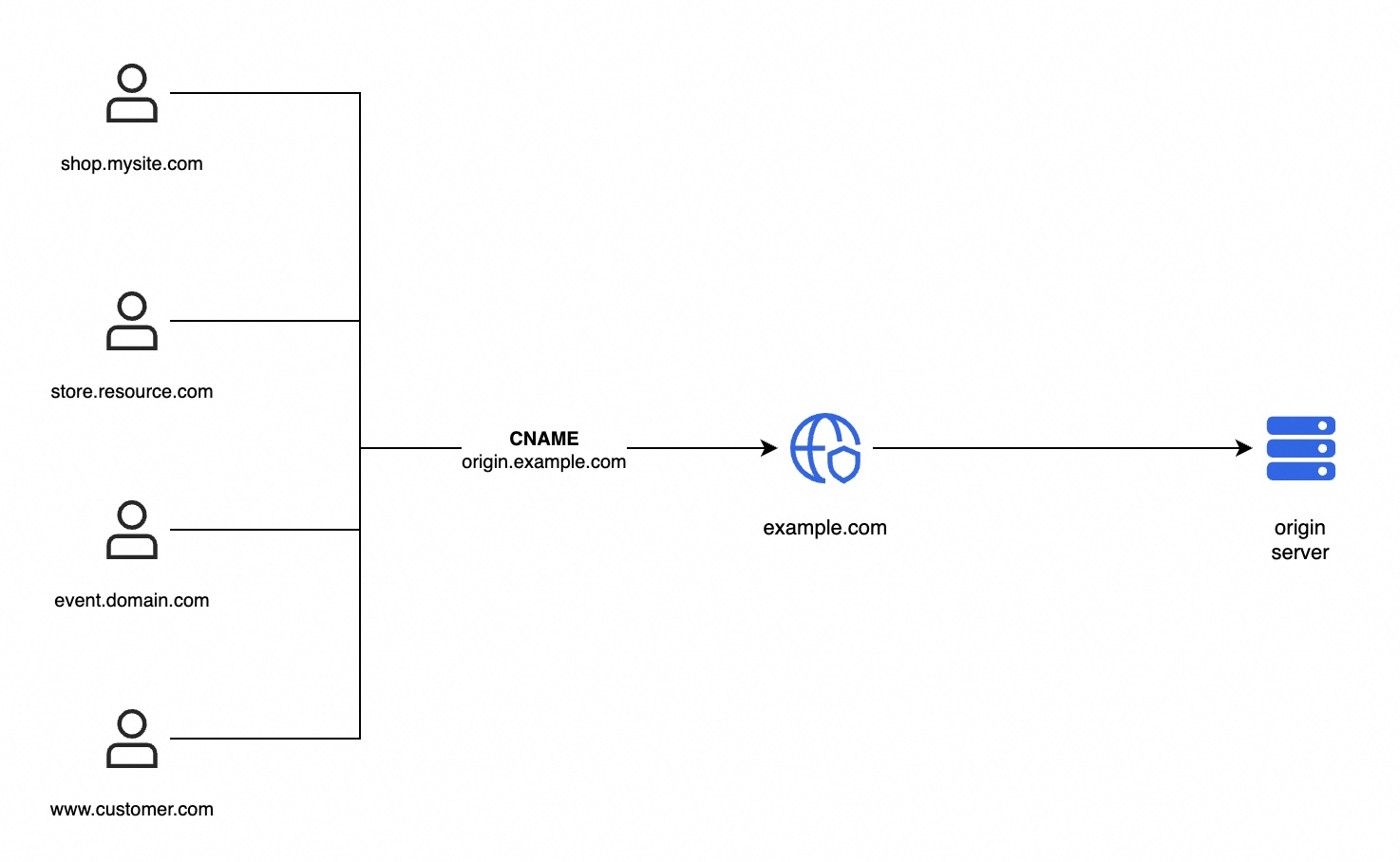
One site. Hundreds of domains. Zero duplication.
Before we dive into the "how," let's talk about the "why." Because if you're running a SaaS platform, you're probably already using multiple domains: you just might not realize how much complexity you're carrying.
In the SaaS and e-commerce world, different domains aren't just branding: they're business intelligence. Here's how top operators use them:
| Scenario | Why Separate Domains? | What You Gain |
|---|---|---|
| Reseller / Channel Tracking | Each reseller gets a unique domain (e.g., promo.reseller-a.com) |
Attribute traffic, conversions, and revenue to specific channels |
| Tiered Reseller Programs | Premium resellers get cleaner domains; basic resellers get subdomains | Differentiate partner tiers, justify commission structures |
| Regional Campaigns |
shop-us.yoursaas.com, shop-eu.yoursaas.com
|
Geo-targeted content, localized compliance, regional performance tuning |
| Marketing Campaigns |
blackfriday.yoursaas.com, spring-sale.yoursaas.com
|
Isolate campaign traffic, measure ROI, kill campaigns without touching main site |
| White-Label Client Portals | app.customer-brand.com |
Your platform runs behind the scenes; the customer sees their own brand |
| Product Line Separation |
api.product-a.com, dashboard.product-b.com
|
Different security profiles per product, independent scaling |
Let's be real about what managing 100+ domains looks like without SaaS Manager:
| Task | Without SaaS Manager | With SaaS Manager |
|---|---|---|
| Add a new domain | Create DNS record → Request cert → Configure WAF → Set up CDN → Test | Add domain in console → Wait for auto-cert → Done |
| SSL certificate management | Manual renewal for each domain, or complex automation scripts | Let's Encrypt auto-provisioning, zero-touch renewal |
| Security policy updates | Update WAF rules on every domain individually | Update once on the ESA site, all domains inherit |
| Troubleshooting | "Which domain has the wrong config?" - good luck | Single pane of glass, real-time status for all domains |
| Scaling to 1,000 domains | Not feasible without a dedicated team | Handled by the same console you use for 10 domains |
Enough theory. Let's walk through adding a customer domain from scratch.
In the ESA console: Website → DNS → SaaS Manager → Add.
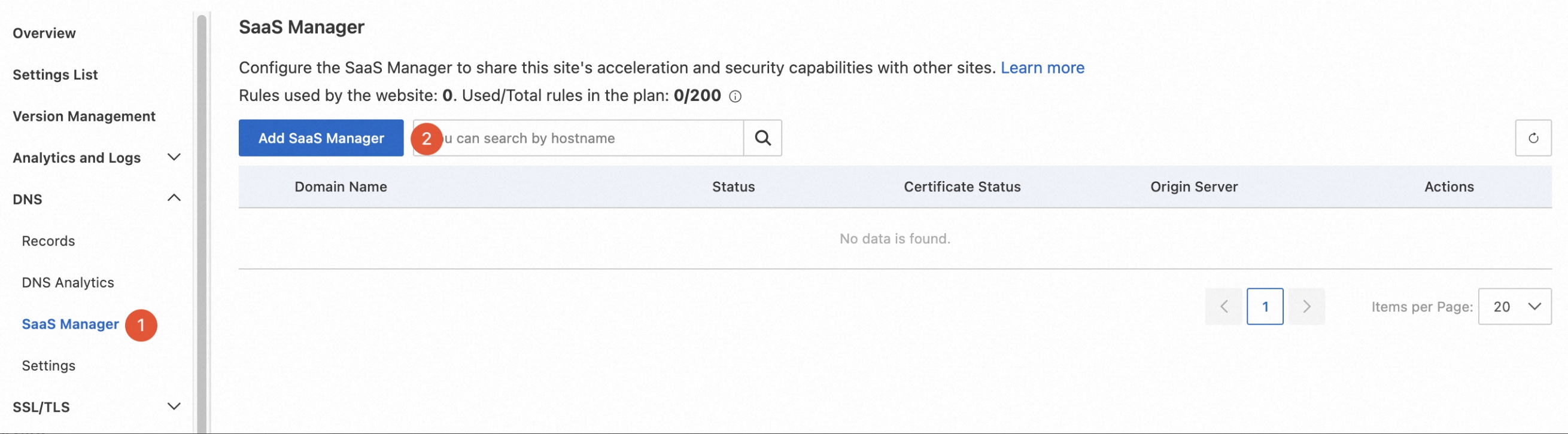
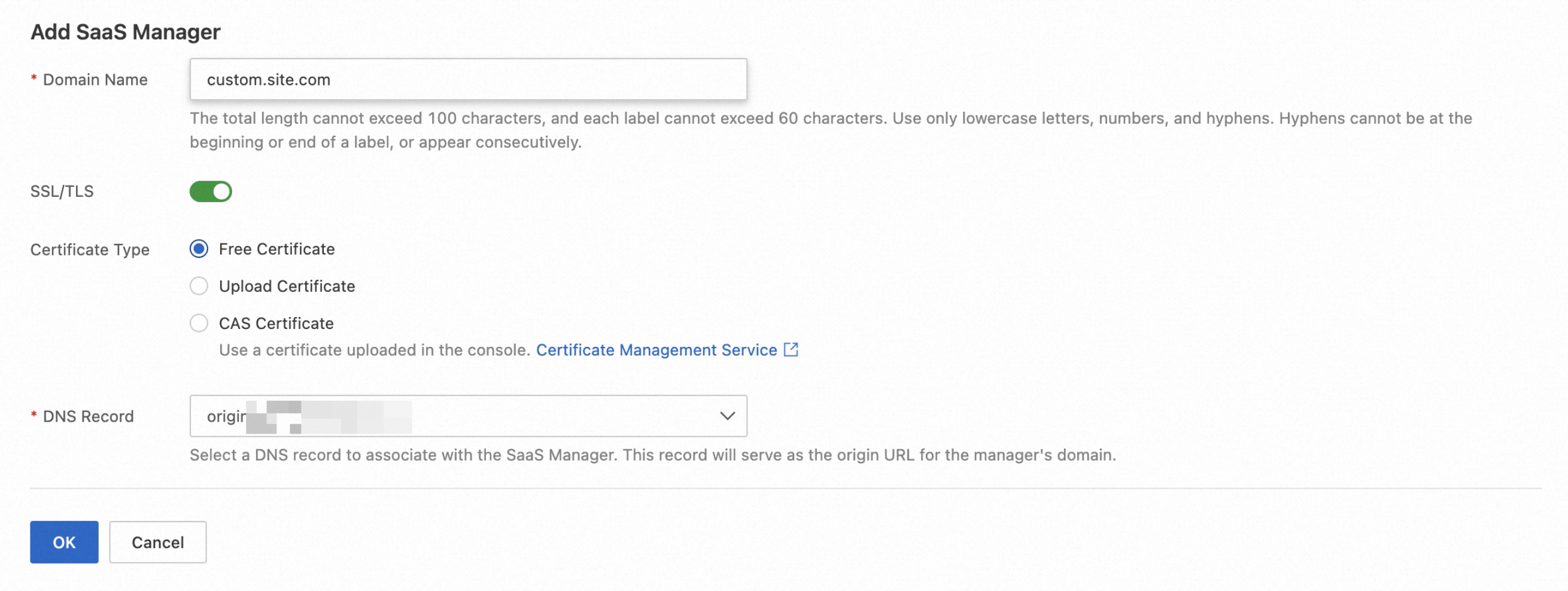
Enter the customer's domain, pick SSL/TLS (we recommend Free Certificate for automatic SSL provisioning), and bind it to your origin.
ESA gives you a TXT record to add at the customer's DNS provider. This proves the customer actually controls the domain. Add the record, click "Verify," and you're golden.

Pro tip: You can also use CNAME verification if your customer prefers that method.
ESA gives the customer a CNAME address. They add it to their DNS:
Type: CNAME
Host: custom (or @ for apex)
Value: <esa-provided-cname>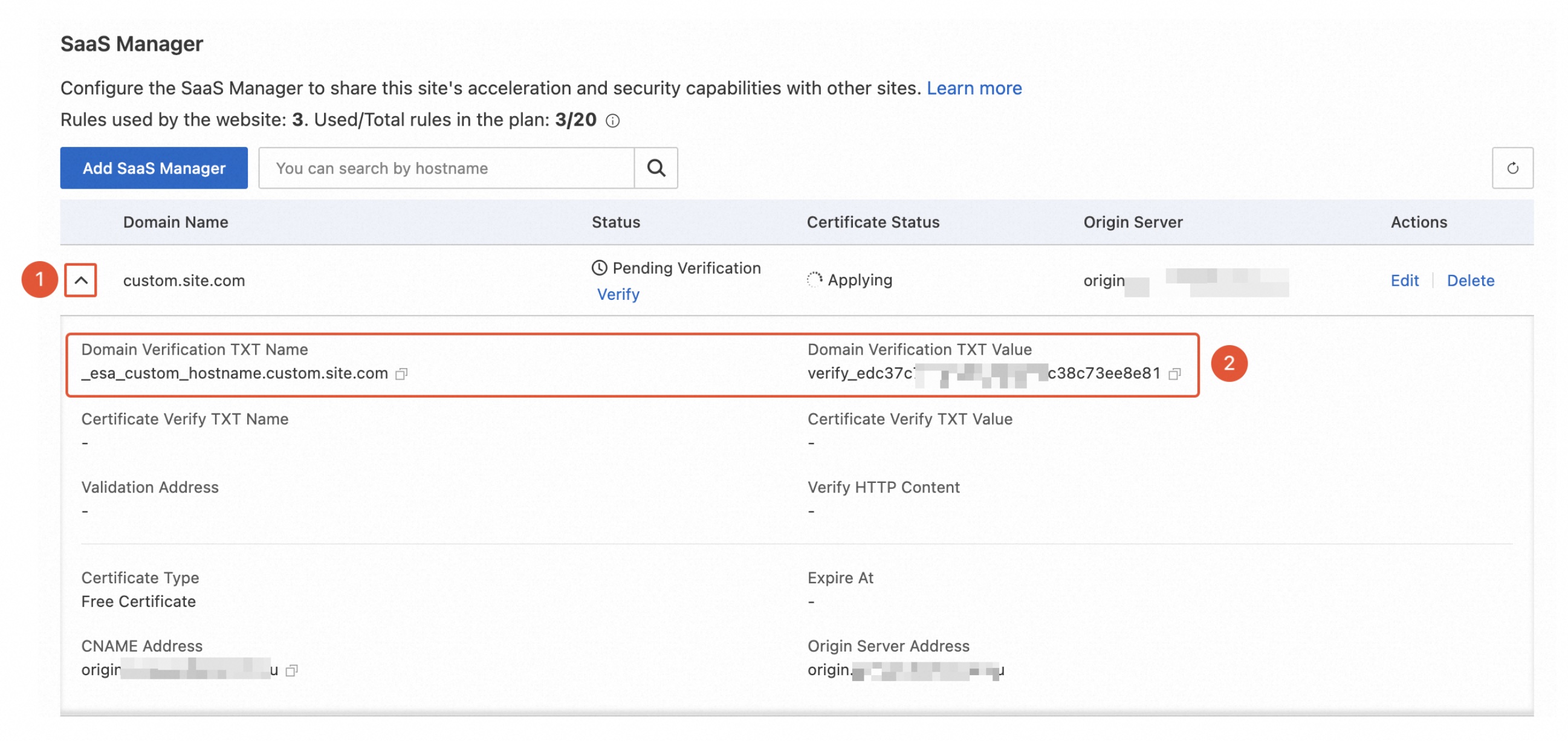
Traffic now flows through ESA's edge network.
Open https://custom.site.com in a browser. If it loads, you're done.
⚠️ One catch: HTTPS won't work until the certificate is issued (usually a few minutes). Test with HTTP first if you're impatient.
You'll see these statuses in the console. Here's what they actually mean in practice:
| Status | What's Happening | What to Do |
|---|---|---|
| Pending Verification | DNS TXT/CNAME record not yet detected | Add the record, wait for propagation, click Verify |
| Activated | ✅ All good, serving traffic | Nothing. Go drink coffee. |
| Deactivated | Violation detected OR ICP filing incomplete (China mainland) | Fix the issue, click Verify to re-enable |
| Conflicted | A default site record (A/AAAA/CNAME) is blocking this domain | Delete the conflicting record, re-verify |
Q: Does the customer need an Alibaba Cloud account?
No. They just need access to their DNS provider to add two records. That's it.
Q: Are SSL certificates free?
Yes, SSL certificates are automatically provisioned at no cost. You can also upload your own certs or reference Alibaba Cloud Certificate Service if you have compliance requirements.
Q: What about ICP filing for China?
If your acceleration region includes mainland China, ICP filing is required. Domains without it go into "Deactivated" state. No workaround, it's a regulatory requirement. However, we provide a cross-border solution as an alternative.
Q: How many domains can I manage?
Standard plans support up to 100 SaaS Manager entries. Enterprise customers can contact sales for custom limits (we've seen customers manage thousands).
Q: Can I do zero-downtime migration?
Yes. Verify the domain and let the certificate issue first. Once status shows "Activated" and certificate is "Normal," switch the customer's DNS to the CNAME. Seamless.
Q: What happens if a customer's domain gets attacked?
Your ESA site's WAF, DDoS protection, and Bot Management rules apply to all SaaS Manager domains. One attack doesn't take down the others — but they all benefit from your shared protection.
If you're managing more than a handful of customer domains, SaaS Manager isn't a nice-to-have — it's the difference between "I can handle this" and "I need to hire three people just for DNS ops."
After helping multiple customers implement this, I kept seeing the same pattern: SaaS platforms growing their customer base, and their domain management becoming the bottleneck that slowed everything down.
One site. Unlimited domains. Shared security. Shared acceleration.
That's the promise. And it actually works.
Ready to try it?
👉 Get started with ESA SaaS Manager
👉 Sign up for Alibaba Cloud ESA
Got questions? Drop them in the comments, or reach out to us directly. We read every one.
Product: Alibaba Cloud Edge Security Acceleration (ESA)
Docs: SaaS Manager Guide

8 posts | 1 followers
FollowBryan, Zhang - May 28, 2026
Bryan, Zhang - June 23, 2026
Bryan, Zhang - October 5, 2026
ESA Big Fan - July 7, 2026
Bryan, Zhang - September 7, 2026
ESA Big Fan - June 5, 2026
8 posts | 1 followers
Follow Edge Security Acceleration (Original DCDN)
Edge Security Acceleration (ESA) provides capabilities for edge acceleration, edge security, and edge computing. ESA adopts an easy-to-use interactive design and accelerates and protects websites, applications, and APIs to improve the performance and experience of access to web applications.
Learn More Edge Node Service
An all-in-one service that provides elastic, stable, and widely distributed computing, network, and storage resources to help you deploy businesses on the edge nodes of Internet Service Providers (ISPs).
Learn More Secure Access Service Edge
An office security management platform that integrates zero trust network access, office data protection, and terminal management.
Learn More Edge Network Acceleration
Establish high-speed dedicated networks for enterprises quickly
Learn MoreMore Posts by Bryan, Zhang

