E-commerce, SaaS, fintech, media - doesn't matter the industry, this is the #1 PoC I run with customers. Last month alone, I ran it six times. So instead of walking through it one-on-one for the hundredth time, I'm writing it up here once and for all.
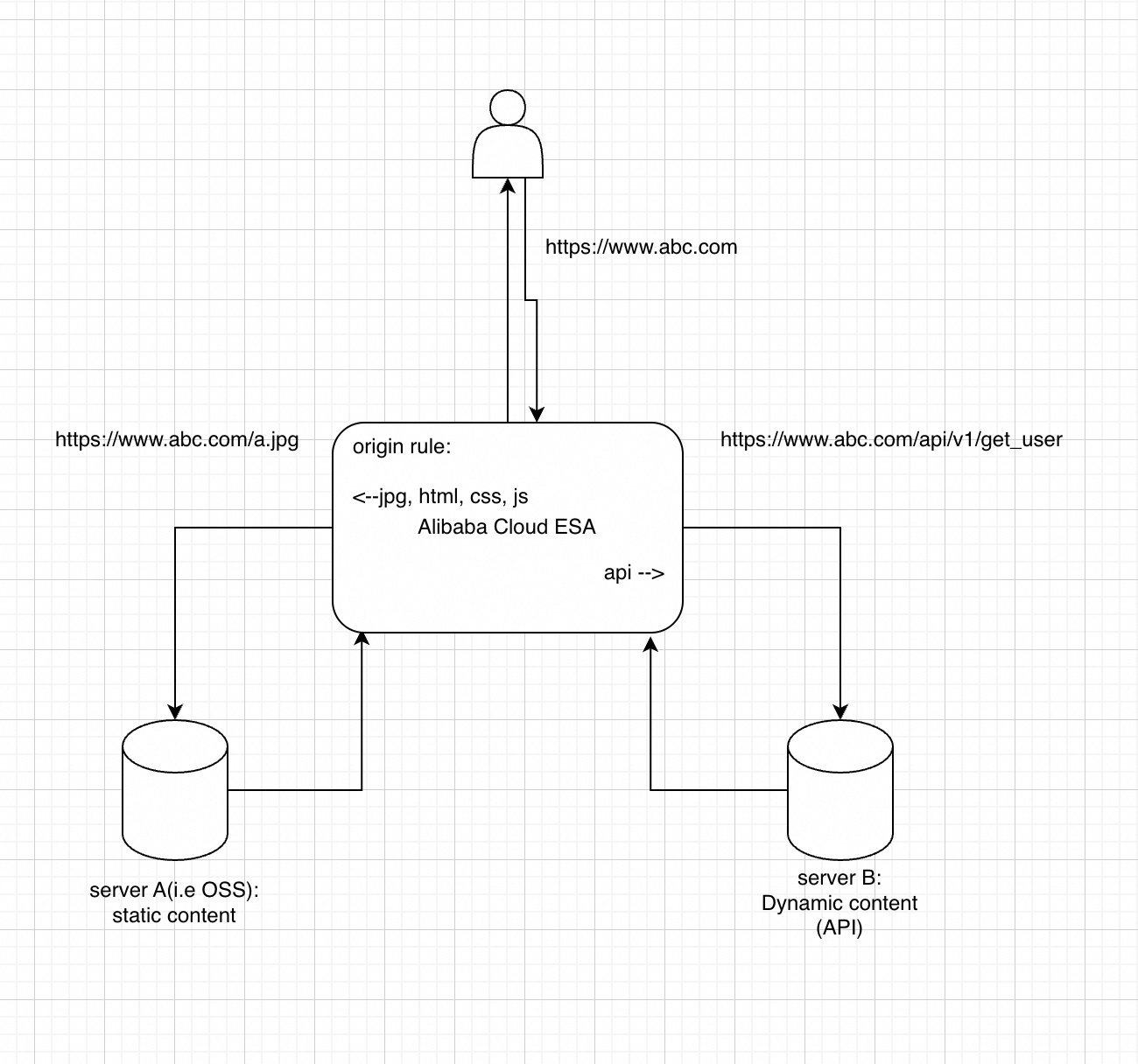
Here's a complete PoC I ran last week: routing different request paths to different backend origins, under a single domain, with proper static caching and dynamic acceleration.
Most modern web applications serve two fundamentally different types of traffic. And most teams I work with are still handling them the painful way:
| Traffic Type | Examples | What It Needs |
|---|---|---|
| Static | Images, CSS, JS, fonts | Cache at the edge, serve fast, offload origin |
| Dynamic | API calls, user data, real-time content | Skip cache, hit app server, accelerate back-to-origin |
The old playbook: create static.example.com for assets, api.example.com for the API. Two CDN configs, two SSL certs, two dashboards. I've watched ops teams burn hours every week keeping these in sync.
When I tell customers ESA can do this under one domain, they're skeptical. Then I show them Origin Rules, and the reaction is always the same: "Why didn't we do this sooner?"
Every PoC I run has two goals. I tell customers upfront: if these two things check out, you're done.
Goal 1 - Multi-Origin Routing:
Static requests go to Origin A. Dynamic requests go to Origin B. One domain, smart routing.
Goal 2 - Static-Dynamic Separation:
Static resources get cached at the edge (X-Cache: HIT). Dynamic requests bypass cache entirely.
That's it. If both work, the customer signs the contract. They always do.
I send this checklist to customers before every PoC session. Have these ready and we're done in 15 minutes.
Domain: A test domain with DNS admin access.
Two backend origins — this mirrors what 90% of my customers already have:
| Origin A (Static) | Origin B (Dynamic) | |
|---|---|---|
| Type | OSS / Nginx static server | ECS / K8s / App Server |
| Content | Static HTML + test image | API endpoint (JSON) |
| Example | static-source.example.com |
api-source.example.com |
One thing I always insist on: create a test endpoint at /api/status that returns:
{
  "source": "Dynamic Source B",
  "timestamp": "2026-05-28T10:00:00Z"
}
This way you can see which origin answered. Trust me — I learned this the hard way after a few early PoCs where we couldn't tell the backends apart.
Here's exactly what I do. Every step, no shortcuts.
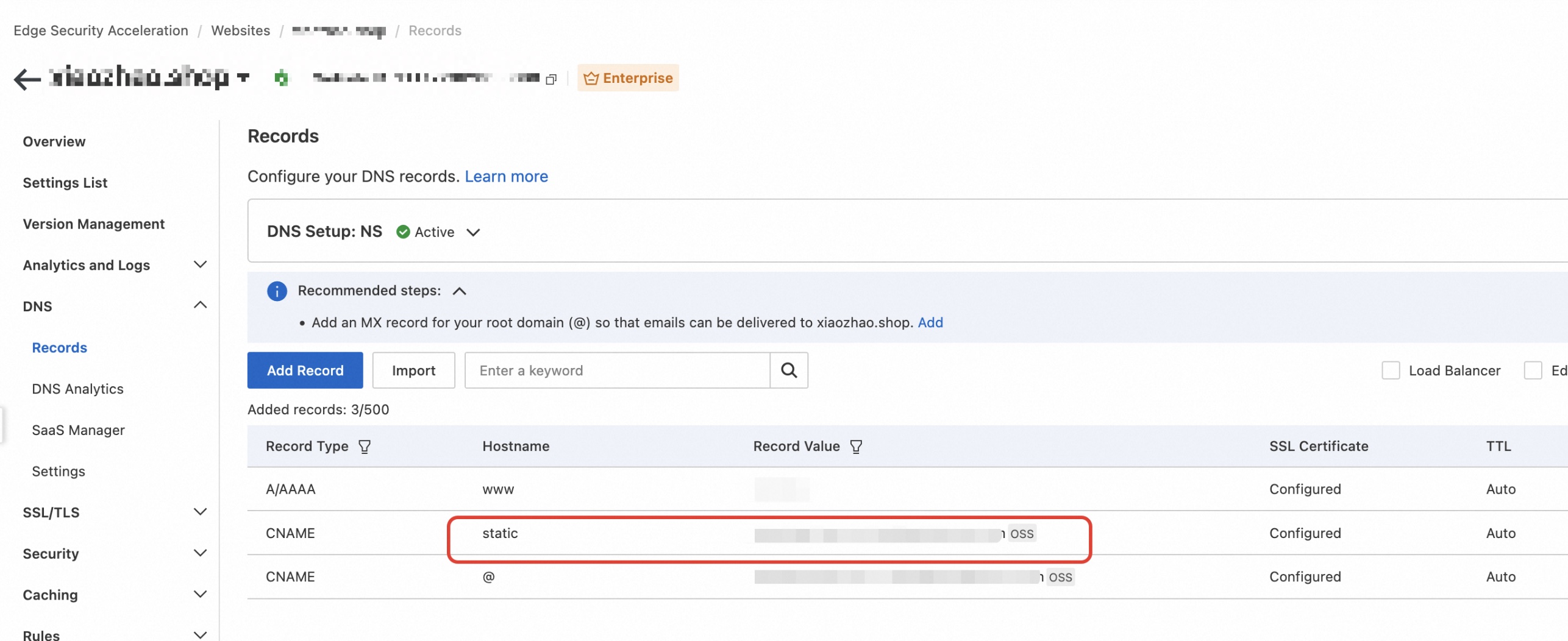
Don't worry about DNS yet — we'll come back to that.
This is where I spend 80% of every PoC. Navigate to DNS → Rules → Origin Rules.
Rule 1 — Static Resources → Origin A:
| Setting | Value |
|---|---|
| Match Condition | File extensions: .jpg, .png, .css, .js, .html
|
| Hostname Match | yourdomain.com |
| DNS Record (Rewrite) | static-source.example.com |
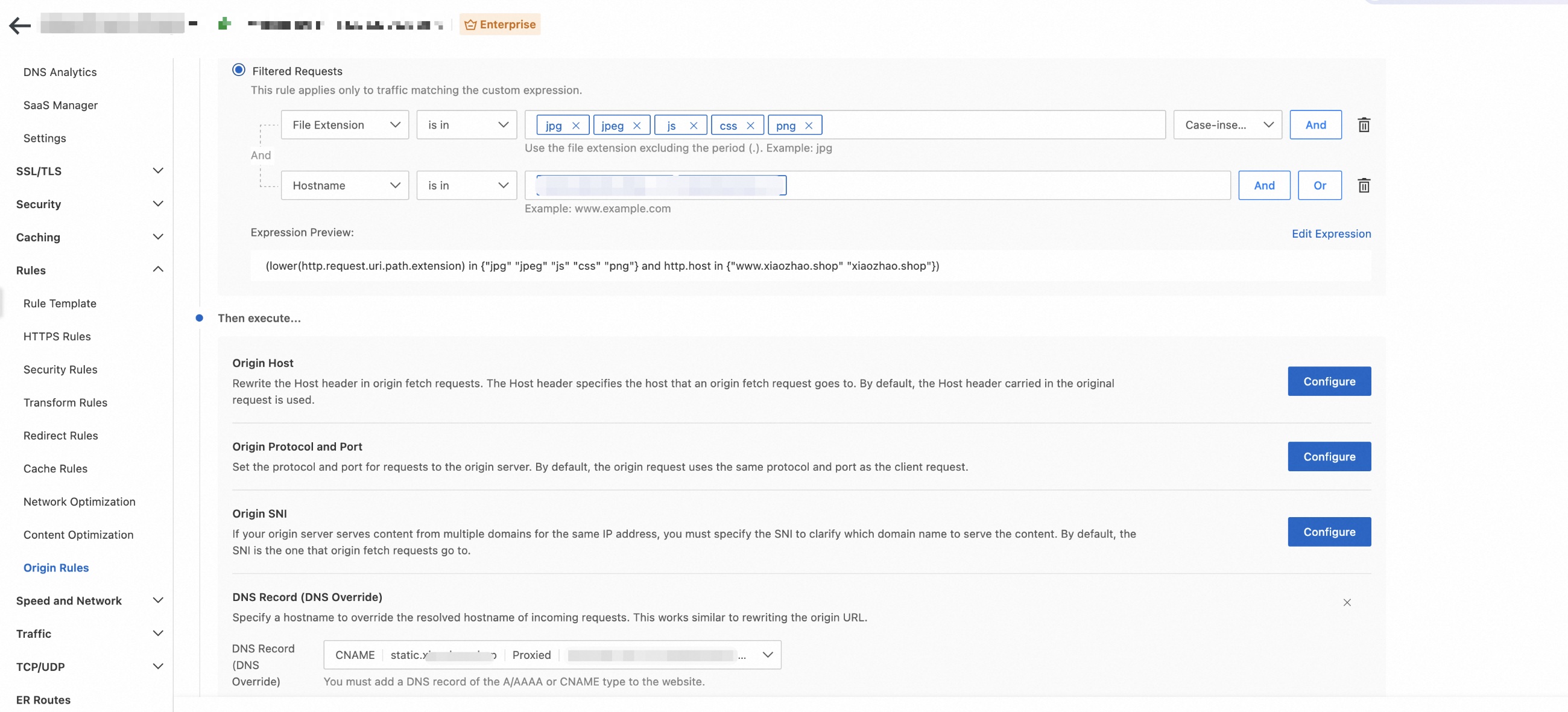
Any request for a static file gets silently routed to Origin A. The user sees nothing — just fast content.
Rule 2 — Dynamic API → Origin B:
| Setting | Value |
|---|---|
| Match Condition | URI Path starts with /api/ or /dynamic/
|
| Hostname Match | yourdomain.com |
| DNS Record (Rewrite) | api-source.example.com |
API calls go straight to your app server. Clean separation.
What about everything else? Anything that doesn't match falls through to your default origin. I always point this out — it's your safety net. Nothing breaks if a request slips through.
This is the mistake I see constantly. Customers nail the Origin Rules, then forget Cache Rules entirely. Let me be clear: Origin Rules handle routing. Cache Rules handle caching. You need both.
Navigate to Cache → Cache Rules.
For static resources:
| Setting | Value |
|---|---|
| Match | File extensions: .jpg, .png, .css, .js
|
| Cache TTL | 7 days |
| Browser Cache TTL | 1 day |
For dynamic paths:
| Setting | Value |
|---|---|
| Match | URI Path starts with /api/ or /dynamic/
|
| Cache | Bypass |
True story: a pretty big e-commerce customer went live last month without the bypass rule. Their API responses got cached. Users saw stale cart data. It was not a good afternoon. Always set explicit bypass rules for dynamic paths.
ESA gives you a CNAME address. Point your domain to it:
yourdomain.com → CNAME → <esa-provided-cname>Wait a few minutes for propagation. I usually grab a coffee here.
Chrome DevTools (F12) → Network tab. Let's see if it worked.
Visit: https://yourdomain.com/static/index.html
Content check: Does it show Origin A's content?
Header check:
| Header | What to Look For |
|---|---|
X-Cache |
HIT (refresh once — first visit will be MISS, that's normal) |
Via / Server
|
ESA identifier |
I always make customers refresh twice just to watch that MISS → HIT flip. It never gets old.
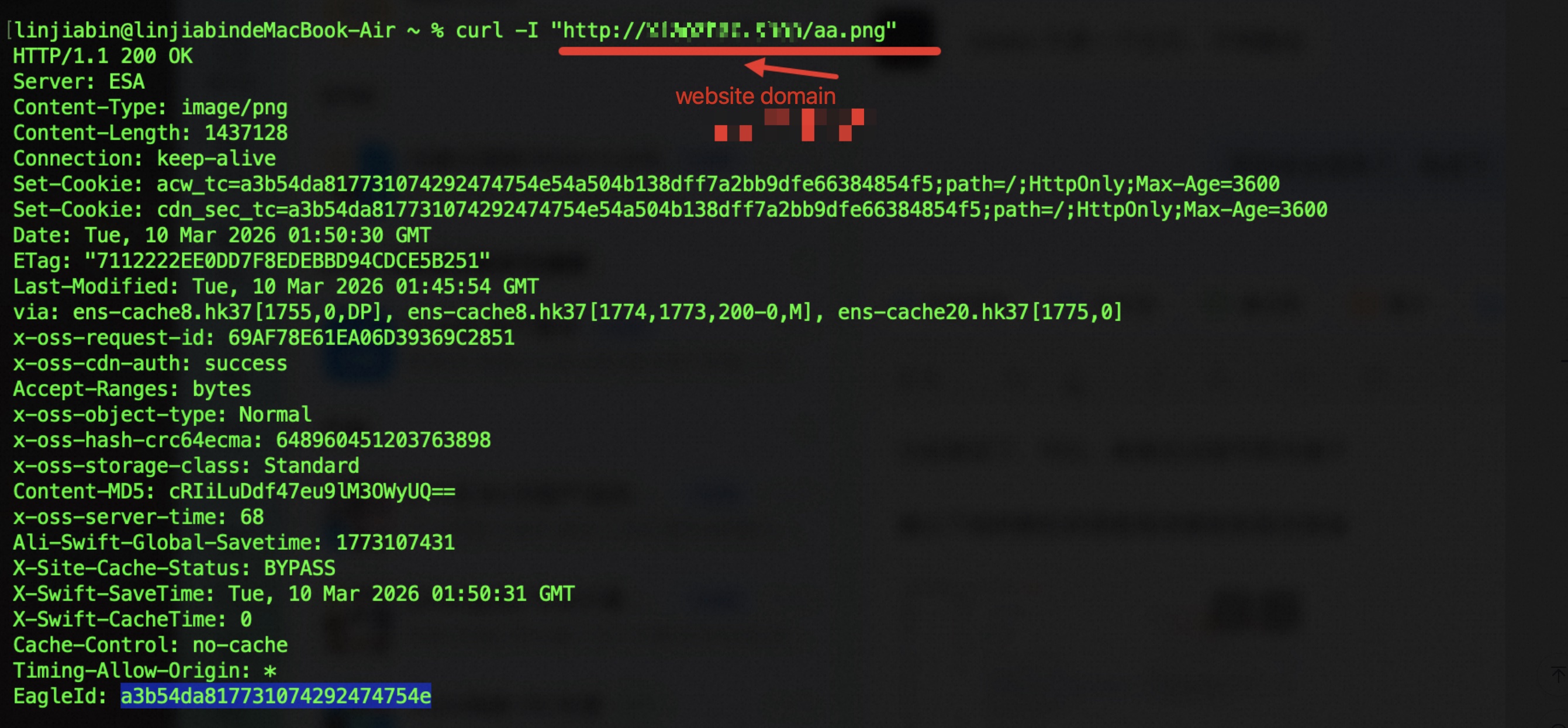
Visit: https://yourdomain.com/api/status
Content check: JSON shows "source": "Dynamic Source B"?
Header check:
| Header | What to Look For |
|---|---|
X-Cache |
MISS or BYPASS — not cached, hit your app server |
| Response Time | Slightly higher than static — totally normal |
Visit: https://yourdomain.com/something-random
Should hit the default origin. I always include this test — it catches rules that are too broad or too narrow. You'd be surprised how often this catches a misconfiguration.
Data from last week's PoC. Customer: mid-size SaaS company, evaluating ESA against their current dual-CDN setup.
| Test | Path | Origin | X-Cache | Latency |
|---|---|---|---|---|
| Static (1st visit) | /static/index.html |
Origin A (OSS) | MISS | ~180ms |
| Static (2nd visit) | /static/index.html |
Origin A (OSS) | HIT | ~12ms |
| Static asset | /assets/logo.png |
Origin A (OSS) | HIT | ~8ms |
| Dynamic API | /api/status |
Origin B (ECS) | BYPASS | ~95ms |
| Dynamic page | /dynamic/profile |
Origin B (ECS) | BYPASS | ~110ms |
| Fallback | /random-path |
Default | MISS | ~150ms |
Static went from ~180ms to ~12ms — a 15x improvement from edge caching alone. The customer signed the next day.
After running this PoC dozens of times, I can predict where things break. Here's my highlight reel:
1. "My static files aren't caching!"
You set Origin Rules but forgot Cache Rules. I see this at least once a month. Origin Rules = routing. Cache Rules = caching. Set both.
2. "My API is returning cached data!"
You forgot the bypass rule. This is the e-commerce customer I mentioned. Always — always — add a bypass rule for /api/* and /dynamic/*.
3. "The origin rule isn't matching!"
Rule order matters. They're evaluated top-to-bottom. A broader rule sitting above a specific one will swallow the request. I spent an hour debugging this with a fintech customer whose health check was hitting the wrong origin. Put specific rules first.
4. "HTTPS is broken on some paths"
Check your SSL certificate coverage. ESA's free cert covers everything automatically. Custom certs can sometimes be path-restricted. Rare, but I've seen it.
This PoC is simple, but I've deployed this exact pattern across every industry I work with:
| Scenario | Static (Origin A) | Dynamic (Origin B) | Customer Profile |
|---|---|---|---|
| E-commerce | Product images (OSS) | Cart/checkout API (K8s) | Major retailer, 50K+ RPM |
| SaaS | UI assets (CDN storage) | User data API (ECS) | B2B multi-tenant platform |
| Media | Thumbnails, CSS, JS | Content API, recommendations | News portal, 10M+ PV/day |
| Fintech | Static dashboards | Real-time trading API | Securities firm, low-latency |
The best part? Your front-end developers don't need to know any of this. They call /api/whatever, load /static/whatever, and it just works. I've had dev teams tell me this is the best infra change they've seen in years — because from their perspective, nothing changed.
Q: Can I have more than two origins?
Yes. I've configured customers with 5+ origins - routing by path, header, even query string. One gaming customer routes to different regional game servers based on URI. The platform doesn't limit you.
Q: Does this work with WebSocket?
Yes. ESA supports WebSocket upgrade. I set this up for a live-chat SaaS customer last quarter. Make sure your dynamic rule covers the WebSocket path and your origin supports it.
Q: What if static and dynamic content share a path prefix?
Use more granular matching - file extensions, exact URIs, request headers. I had a customer where /api/static-config got caught by the static rule. Added a URI exception, fixed in 2 minutes.
Q: Any performance penalty for rule evaluation?
No. Rule evaluation happens at the edge in microseconds. I've A/B tested with and without rules - you can't measure the difference.
Q: Can I A/B test or do blue-green deployments with this?
Absolutely. Percentage-based routing, header-based routing - I helped a customer shift 10% → 50% → 100% traffic to a new origin over three days using exactly this approach.
I've run this PoC more times than I can count, and the outcome is always the same: it works, it's fast, and customers wonder why they waited so long.
The pattern:
If you're still running separate CDN configs for static and dynamic traffic, you're doing more work than you need to. Consolidate. Your ops team will thank you, and so will your finance team when they see the bill.
Ready to try it?
👉 Get started with Alibaba Cloud ESA
👉 ESA Documentation: Origin Rules
Questions? Drop them in the comments — I read every one.
Product: Alibaba Cloud Edge Security Acceleration (ESA)
Author: Bryan, Zhang
Managing 1,000 Customer Domains in One Day: How Alibaba Cloud ESA SaaS Manager Changed the Game

6 posts | 1 followers
FollowAlibaba Clouder - September 24, 2020
Bryan, Zhang - June 23, 2026
Alibaba Clouder - June 24, 2020
Alibaba Clouder - February 26, 2021
Alibaba Clouder - March 2, 2021
Alibaba Clouder - November 9, 2020
6 posts | 1 followers
Follow Edge Security Acceleration (Original DCDN)
Edge Security Acceleration (ESA) provides capabilities for edge acceleration, edge security, and edge computing. ESA adopts an easy-to-use interactive design and accelerates and protects websites, applications, and APIs to improve the performance and experience of access to web applications.
Learn More Edge Node Service
An all-in-one service that provides elastic, stable, and widely distributed computing, network, and storage resources to help you deploy businesses on the edge nodes of Internet Service Providers (ISPs).
Learn More Secure Access Service Edge
An office security management platform that integrates zero trust network access, office data protection, and terminal management.
Learn More Edge Network Acceleration
Establish high-speed dedicated networks for enterprises quickly
Learn MoreMore Posts by Bryan, Zhang

