By Qianqian Wu
The IMCI technology of PolarDB for MySQL owned by Alibaba Cloud ApsaraDB is designed for complex queries of large data volumes in OLAP scenarios. With the IMCI feature, PolarDB for MySQL can offer a one-stop hybrid transactional/analytical processing (HTAP) solution, integrating real-time transaction processing and real-time data analysis.
In the previous usage, if you want to accelerate slow queries on tables, you must manually add column indexes to these tables. Execute the CREATE TABLE or ALTER TABLE statement with COLUMNAR=1 added to the COMMENT field for the tables. After IMCIs are added, the optimizer automatically chooses whether to use IMCIs for query acceleration based on query costs. However, if you have a large number of SQL templates and complex SQL logic, this manual approach is not user-friendly in practice.
To achieve this, PolarDB now introduces the AutoIndex feature. This feature automatically creates column indexes on destination tables based on slow queries, thereby accelerating queries. This article will introduce the technical background, implementation principles, and usage guidelines of this feature to help you understand how to improve database query performance through automation.
AutoIndex is a technical method to tune SQL performance by automatically adding indexes. For row store indexes, the industry has conducted extensive research and commercial cases, such as Oracle and SQL Server. These solutions typically analyze potential secondary indexes based on the predicate, order by, or join. They then simulate the cost of creating these indexes and selectively deploy those that significantly reduce query execution costs.
In recent years, with the advancement of the IMCI technology in analytical databases, AutoIndex has gradually been applied to systems such as Redshift, Snowflake, Databricks, and Heatwave. Typical automation means include:
1. Automatic loading/unloading: Automatically creates column indexes based on the query execution and accelerates slow queries. Column indexes that are infrequently used or occupy excessive resources are automatically deleted to reduce space consumption.
2. Automatic encoding: Automatically selects the optimal encoding algorithm based on the data distribution in each column to further compress the storage space.
3. Automatic selection of distribution keys: Enables a more balanced data distribution in MPP scenarios to minimize data skew and optimize data shuffle between distributed GroupBy and join.
4. Automatic selection of sort keys: Accelerates query filtering or sorting through common predicates, joins, and sorting columns.
This article describes the AutoIndex feature of IMCI in PolarDB for MySQL. It is worth noting that the automatic creation of column indexes in IMCI incurs lower overhead and offers higher fault tolerance than the creation of row indexes. This is mainly because:
1. Less impact on writes: While excessive row store indexes can significantly degrade the write performance of the primary node, IMCI does not materialize column store data on the primary node. After you add a column index, you only need to synchronize write operations to read-only column store nodes through redo logs. This does not affect the write performance.
2. Higher compression ratio: Column indexes generally achieve a compression ratio of 3 to 5 times. Therefore, the storage overhead of new indexes is relatively small.
3. Reduced impact on business: This includes the collection of SQL trace information using a lock-free and efficient data structure, as well as the use of nonblocking DDL to reduce interference with the business. These mechanisms will be detailed in the subsequent sections on the implementation principles.
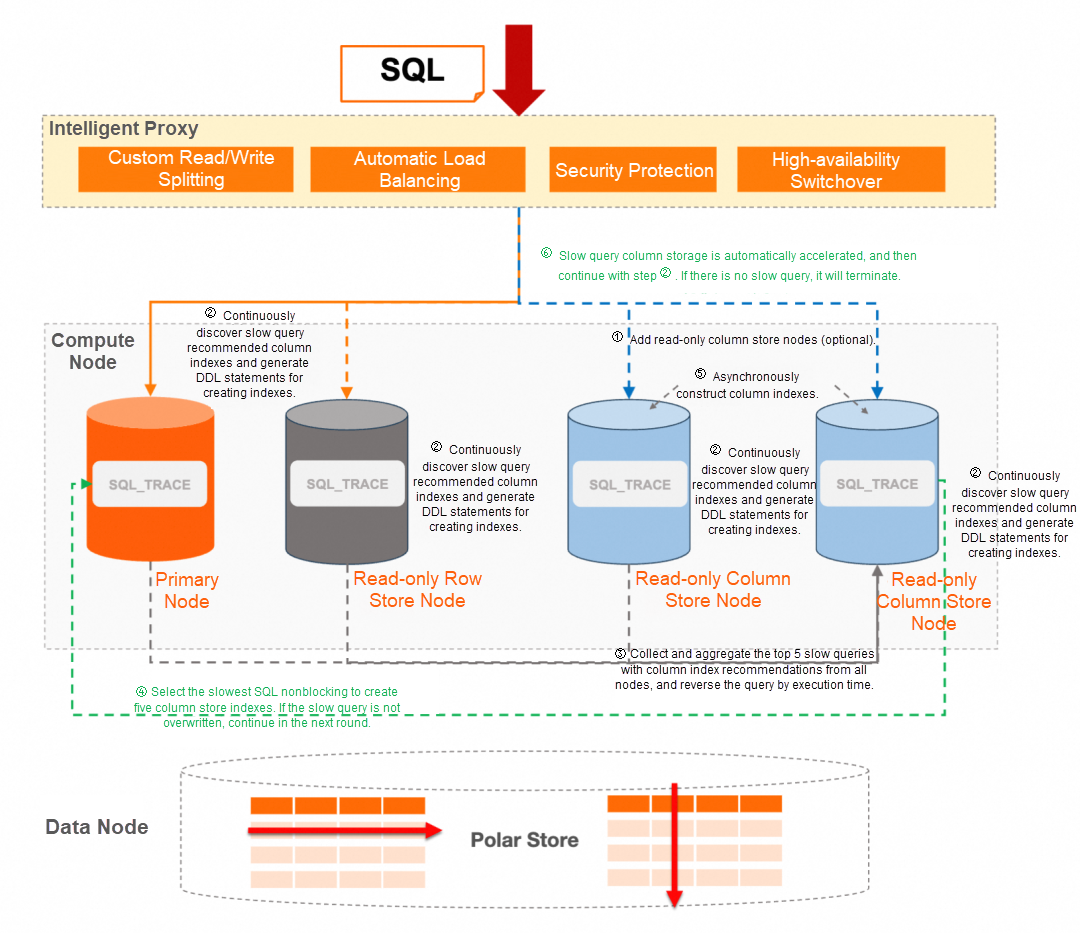
Each node in a PolarDB for MySQL cluster uses the SQL Trace feature to collect slow queries and automatically generates DDL statements to create column indexes for qualifying SQL statements. Procedure:
1. SQL Trace: Using an SQL template as the key, it leverages a lock-free hash table officially provided by MySQL to track and record SQL execution information. This is designed for high-concurrency scenarios with massive SQL templates. In the Sysbench test, the impact of SQL Trace on database performance does not exceed 3%.
2. Triggering condition: When the number of scanned rows in a slow query reaches the specified threshold, AutoIndex generates DDL statements to add column indexes to the corresponding table.
3. Low-cost design: To avoid repeatedly parsing SQL statements, opening tables, and obtaining MDL locks, AutoIndex directly uses the table list of the cached THD (Thread Handler). Therefore, the system is almost free of additional burdens.
4. Viewing generation records: You can directly connect to each node and query information_schema.imci_autoindex system tables to learn the slow query information of tracked and generated DDL statement sets. Example:
mysql> SELECT * FROM information_schema.imci_autoindex\GYou can also obtain more detailed SQL execution information based on information_schema.sql_sharing:
mysql> SELECT *
FROM information_schema.imci_autoindex autoindex, information_schema.sql_sharing share
WHERE autoindex.sql_id = share.sql_id
AND share.type = 'SQL'\GThe read-only column store nodes in the cluster (with one designated as the leader if multiple exist) collect and aggregate slow queries with column index recommendations from all nodes. These queries are then sorted in descending order by execution time, and the recommended DDL statements are executed sequentially until reaching the per-round DDL execution threshold. The main points of this process include:
• The operation of adding a column index is an instant DDL operation on the primary node. You only need to modify the data dictionary and do not change the data in the primary database.
• The corresponding redo log is copied to the read-only column store node, which builds the column index in the background.
• Normal DDL statements block new transactions while waiting to acquire the MDL-X lock. Nonblocking DDL statements allow new transactions to enter first when the lock fails to be acquired and then retry to obtain the lock.
• For AutoIndex scenarios, DDL operations are not "urgent". If the operation fails in the current round, you can continue to try it in the next round of automatic scheduling. Therefore, nonblocking DDL can be well combined with automatic indexing requirements.
• You can use the cluster endpoint to query information_schema.imci_autoindex_executed system tables to view the recently executed column index recommendation statements and associated slow queries. A maximum of 128 records can be retained.
• By default, the round interval is 1 minute, and a maximum of five DDL statements can be executed in each round.
• The column indexes that are not overwritten in this round can be retried only after slow queries hit them again.
• Read-only column store nodes are subject to resource control when creating column indexes. Although the resource metrics increase, the node resources are not fully exhausted.
• The next round of scheduling starts only after the column indexes of the current round are built on the column store nodes.
To make full use of the AutoIndex effect, it is recommended to attach the read-only column store nodes to the cluster endpoint and enable automatic request distribution among row store and column store nodes. In this way, during the playback of real business traffic, slow queries trigger AutoIndex to create column indexes. After the index is created for the column store node, automatic request distribution among row store and column store nodes can route related queries to the column store node based on the query cost. This accelerates the query performance. If the business traffic is directly connected to a regular read-only node, you can manually switch traffic to the read-only column store node after the column index is created to enjoy the improved performance brought by the column index. For more information about how to query the status of a column index and the request distribution policy, see the FAQ about the column store index in the related documentation.
To use IMCI AutoIndex, you only need to turn on the "Automatic column store index acceleration" switch in the console. If the current cluster does not have read-only column store nodes, the system will direct you to the column store read-only node purchase page.
The following is an example based on the tpch100g test set:
• Environment preparation: 22 TPC-H test queries are executed every 1 minute. The HTAP configuration is enabled for the cluster endpoint. Automatic request distribution among row store and column store nodes is enabled as well, and the row store parallelism is set to 8 to shorten the test time.
• Test results: As shown in the following table, the query speed in subsequent rounds is significantly improved. In the second half of the queries in the first round (starting from about the 12th query), AutoIndex has completed the creation of column indexes for most tables, and the optimizer automatically routes these queries to the column store node.
| Execution Round | Total Time (s) | Row-store Plan/Column-store Plan | Acceleration Effect |
|---|---|---|---|
| 1 | 8293 | 10/12 | - |
| 2 | 118 | 1/21 | About 70 times |
| 3 | 110 | 0/22 | About 75 times |
The test data shows that AutoIndex can intuitively improve query performance and significantly shorten the execution time in HTAP scenarios.
The IMCI feature of PolarDB for MySQL provides a series of advantages, which significantly improve compatibility, performance, and cost.
• Full compatibility with MySQL: It supports all MySQL data types and is fully compatible with the MySQL protocol.
• Excellent HTAP performance: The performance of analysis scenarios can be improved by 1 to 2 orders of magnitude.
• Hybrid row-column storage to reduce costs: Transaction consistency is guaranteed by row-column storage. Column indexes provide better performance and lower costs in some query scenarios.
The AutoIndex feature of column store indexes further enhances the user experience and cost-effectiveness:
• Easy automatic acceleration operation: Enable automatic performance improvement with one click, without complex configuration or adjustment.
• Reduced O&M workload: Automatically create column indexes for slow queries. This reduces manual slow query optimization.
• Decreased IT costs: Optimize for slow queries without creating column indexes for all databases and tables. This saves memory and storage resources.
In general, these features enable PolarDB to significantly reduce O&M and IT costs while enhancing availability and performance.
This article describes the technical background, implementation principles, usage methods, and core benefits of the IMCI AutoIndex feature of PolarDB for MySQL. By using the automatic column index creation and management mechanism, AutoIndex can effectively improve the execution efficiency of slow queries in HTAP scenarios, and has minimal impact on the normal transaction performance of databases. This is a practical solution to reduce costs and increase efficiency in scenarios where a large amount of business data needs to be analyzed.
It is hoped that this article can help you quickly understand and get started with AutoIndex to accelerate slow queries in PolarDB. If you have any questions about the specific implementation details or usage, please refer to the official documentation or communicate with us further.
[Infographic] Highlights | Database New Features in May 2025
ApsaraDB - May 30, 2023
ApsaraDB - September 19, 2022
ApsaraDB - November 18, 2025
ApsaraDB - September 21, 2022
ApsaraDB - June 3, 2021
ApsaraDB - March 26, 2024
 PolarDB for MySQL
Alibaba Cloud PolarDB for MySQL is a cloud-native relational database service 100% compatible with MySQL.
Learn More
PolarDB for PostgreSQL
Alibaba Cloud PolarDB for PostgreSQL is an in-house relational database service 100% compatible with PostgreSQL and highly compatible with the Oracle syntax.
Learn More
PolarDB for Xscale
Alibaba Cloud PolarDB for Xscale (PolarDB-X) is a cloud-native high-performance distributed database service independently developed by Alibaba Cloud.
Learn More AnalyticDB for MySQL
AnalyticDB for MySQL is a real-time data warehousing service that can process petabytes of data with high concurrency and low latency.
Learn MoreMore Posts by ApsaraDB


