As an Iceberg table takes continuous writes, small files quietly pile up, historical snapshots accumulate, query performance gradually degrades, and storage costs keep climbing.
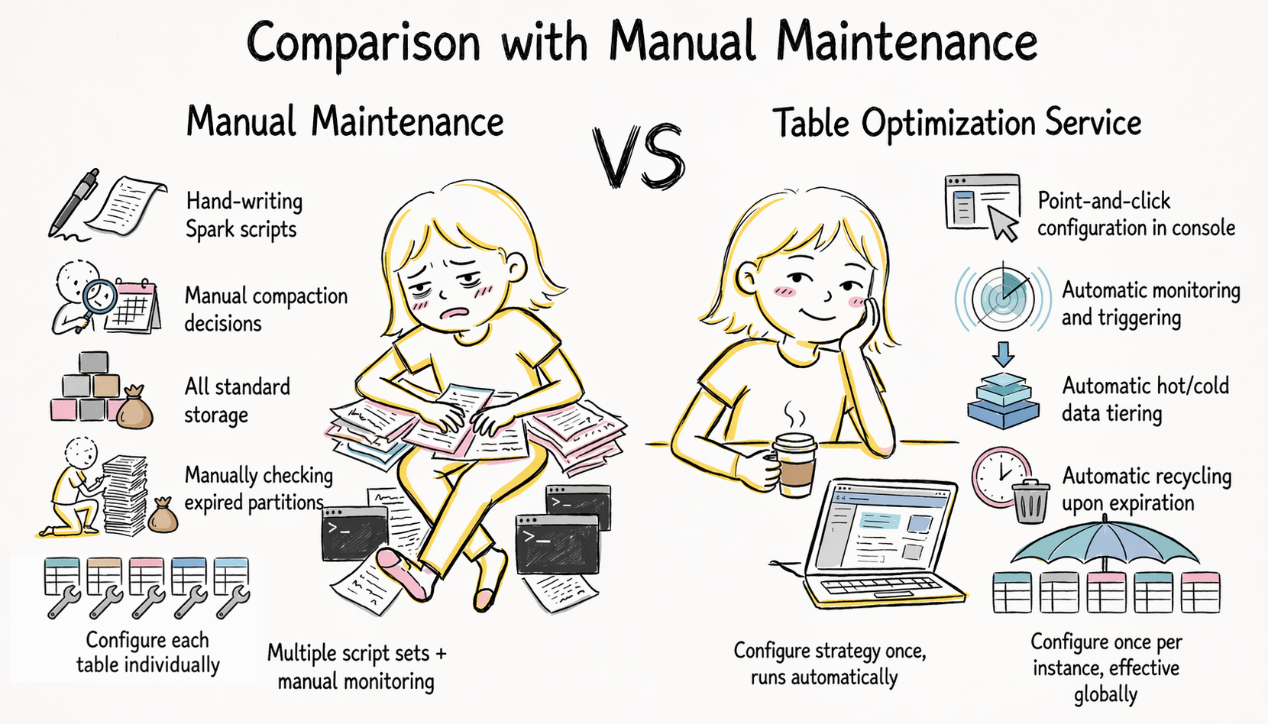
Anyone who has hand-written Spark scripts to compact small files, periodically clean up snapshots, and figure out what to do with cold data knows how tedious it all is. The Table Service for Iceberg tables — offered by AnalyticDB for MySQL, the cloud-native data warehouse under the ApsaraDB family — automates this work: configure a policy in the console, and let the system handle the rest.
Table Service improves the Iceberg table experience along two directions: faster queries and lower storage costs.
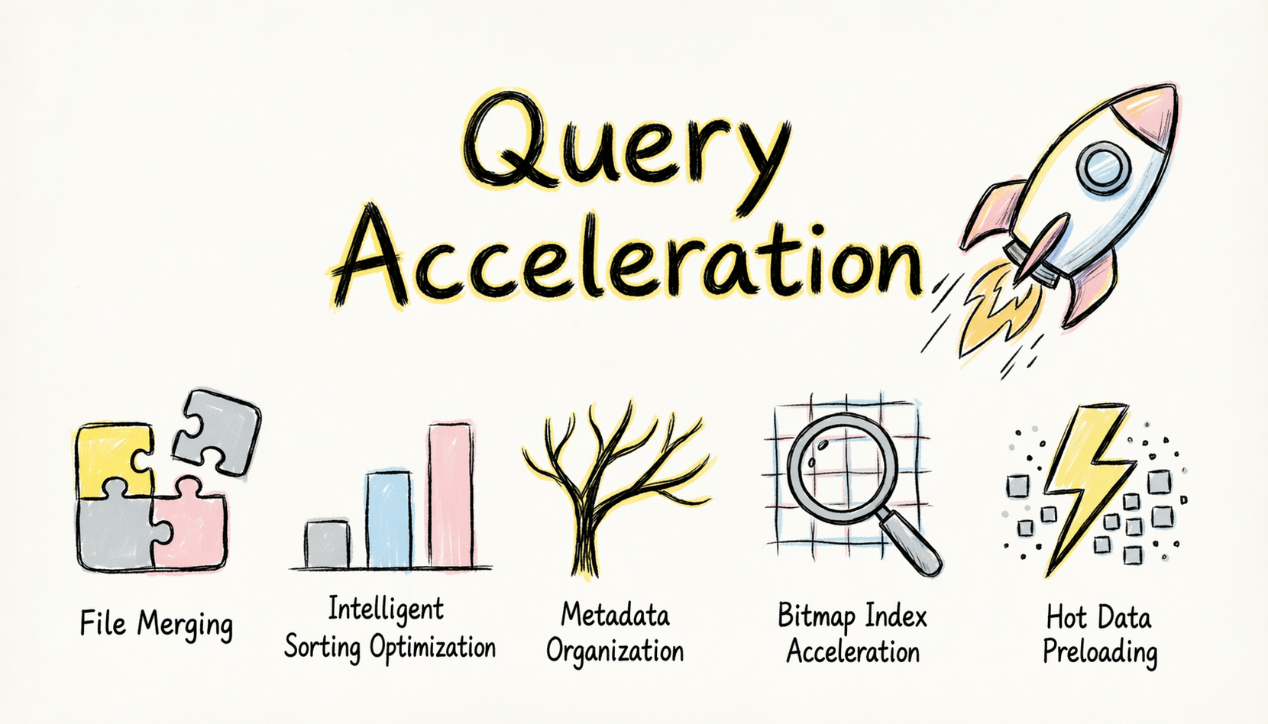
| Capability | What it does | Effect |
|---|---|---|
| Automatic small file compaction | Compacts fragmented small files into appropriately sized files | Queries no longer scan small files one by one. Query speed improves noticeably. |
| Intelligent sort optimization | Reorganizes data distribution by the most frequently queried columns | Higher range-query hit rate. Scanned data volume can drop several-fold. |
| Automatic metadata compaction | Reorganizes the internal manifest hierarchy of Iceberg | Query planning drops from tens of seconds to sub-second. |
| Bitmap index acceleration | Builds a bitmap index on specified columns to accelerate equality/IN queries | Over 60% speed up for queries in typical scenarios |
| Hot-data pre-caching | Preloads frequently accessed partitions into the cache | Queries hit the cache directly in peak hours. |
🔔 Tip: A Bitmap index suits high-cardinality columns (user ID, order number, and the like) and mainly accelerates equality and IN queries; you specify the columns in the console. If your queries are dominated by range scans or aggregation, small file compaction and sort optimization are the better fit.
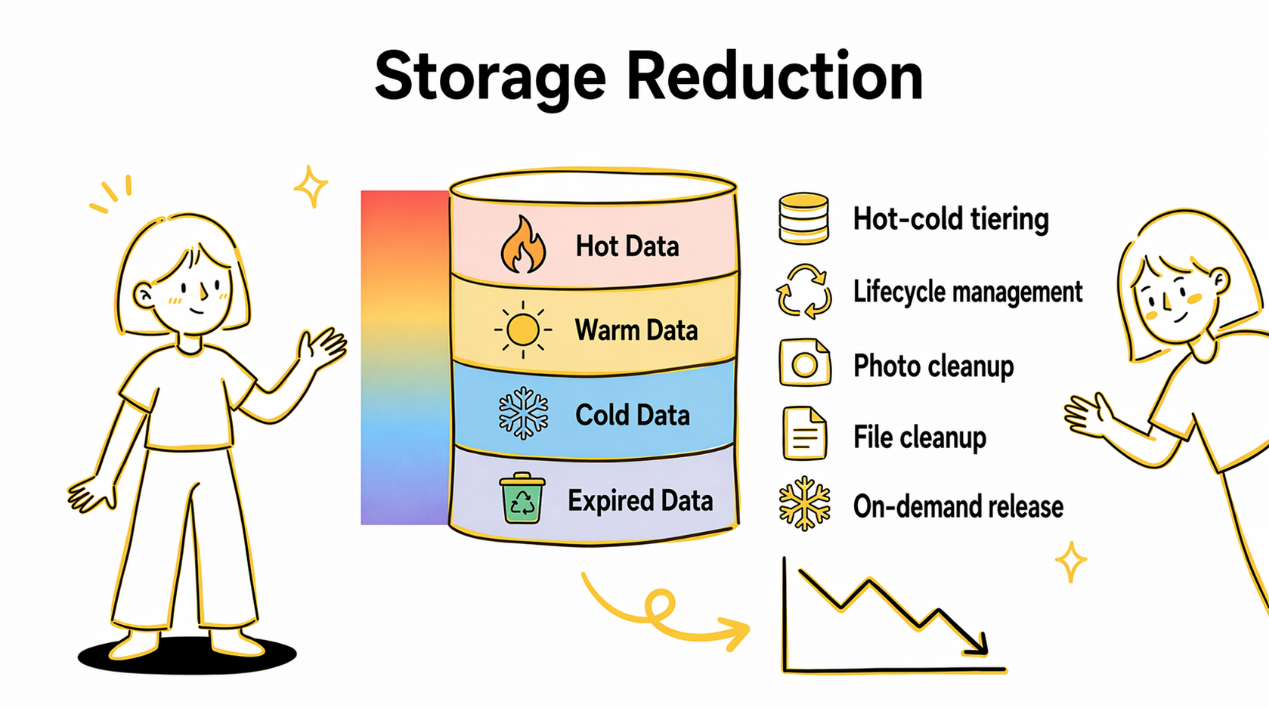
| Capability | Action | Effect |
|---|---|---|
| Automatic hot-cold data tiering | Historical data is automatically moved to IA/Archive/Cold Archive storage per policy | Storage costs cut to as low as 1/10 of the original |
| Automatic expired-partition reclamation | Partition data beyond the retention period is cleaned up automatically | Retains logs are for 30 days and details for 365 days. Reclaims them automatically at expiry |
| Automatic historical snapshot cleanup | Periodically cleans up residual data from obsolete historical versions | Frees the "invisible" storage occupied by old snapshots |
| Automatic orphan file cleanup | Cleans up residual files left by failed writes and other anomalies | Keeps storage clean |
| On-demand cold-data restore | When you need to query historical data, restore the specified partition with one click | For audit tracing, simply restore and query as usual |
Take an e-commerce order-detail table that grows by several million rows per day. Once Table Service is configured, the system automatically applies the following policies:
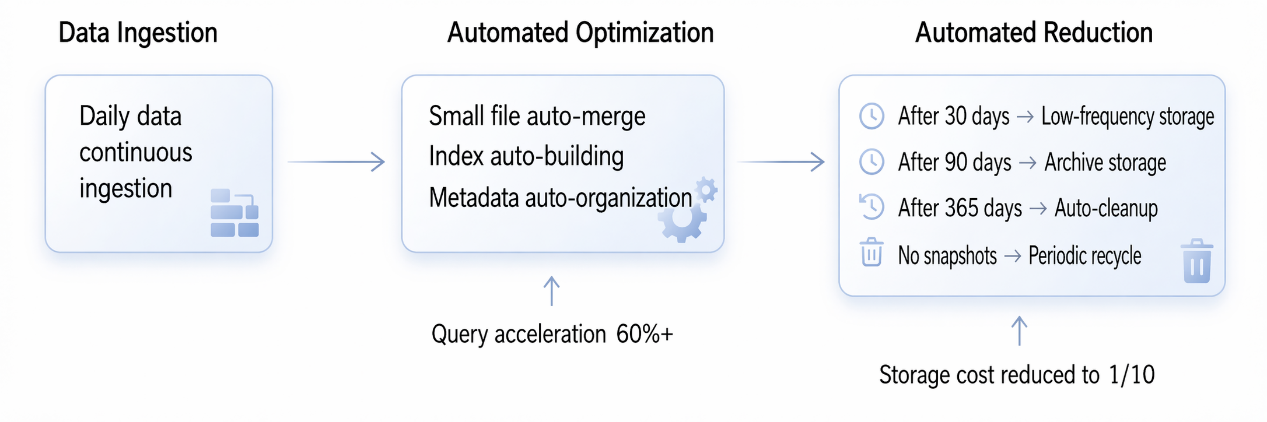
▶︎ Full lifecycle management of log data
A workload continuously writes about 500 GB of log-type data per day (application logs, access logs, behavioral tracking, and so on), retains it for one year, and stores it all in an AnalyticDB for MySQL Iceberg lakehouse.
Configure hot-cold tiering + automatic reclamation policies in the AnalyticDB for MySQL console:
0 to 30 Days    →  Standard (high-frequency read and write, supporting real-time Dashboards and alerting)
30 to 90 Days   →  Infrequent Access storage (occasional queries, retrieved on demand)
90 to 365 Days  →  Archive Storage (rarely accessed, retained only for compliance)
> 365 Days   →  Automatic deletion (expired partitions are automatically recycled)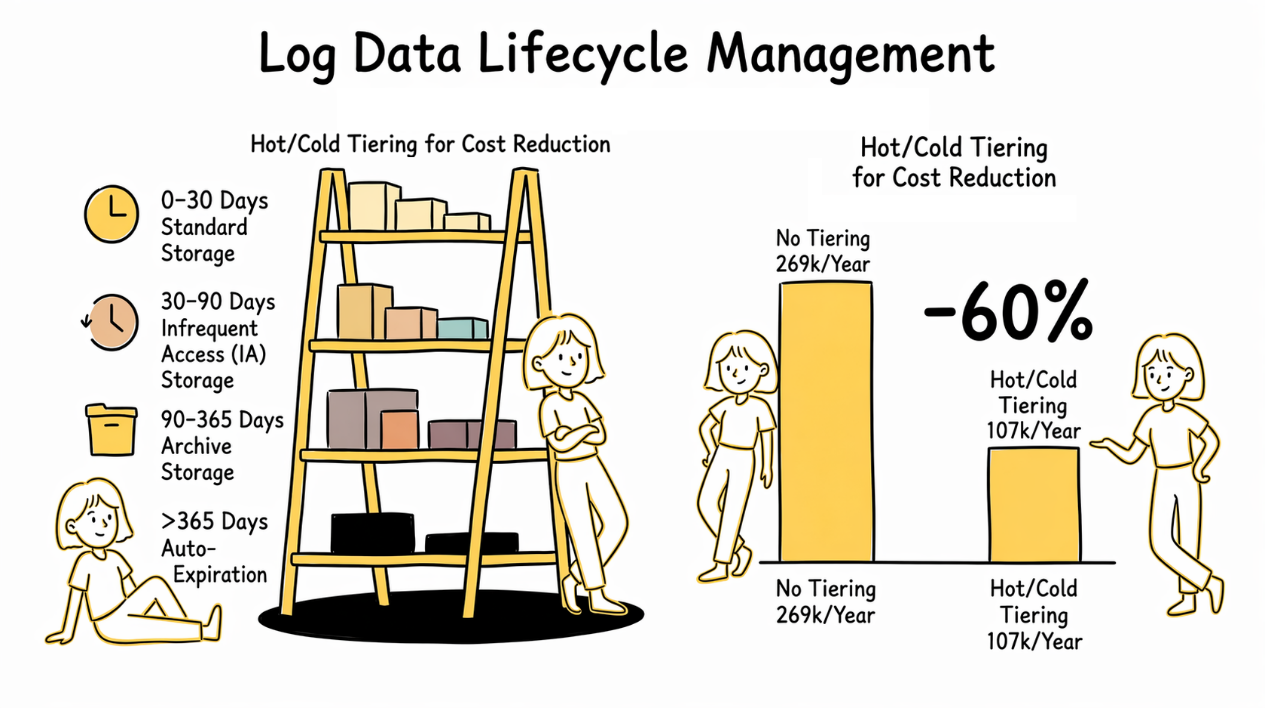
After a full year of operation, the data volume in each storage tier reaches steady state:
| Storage tier | Data age | Duration | Data volume | OSS unit price (CNY/GB/month) | Monthly cost |
|---|---|---|---|---|---|
| Standard | 0–30 days | 30 days | 15 TB | 0.12 | CNY 1,843 |
| Infrequent Access | 30–90 days | 60 days | 30 TB | 0.08 | CNY 2,458 |
| Archive | 90–365 days | 275 days | 137.5 TB | 0.033 | CNY 4,646 |
| Total | 182.5 TB | CNY 8,947/month |
Without tiering, keeping everything in Standard storage costs CNY 22,426 per month. With hot-cold tiering, the annual storage cost drops from CNY 269,000 to CNY 107,000 — a saving of CNY 162,000 (a 60% reduction).
The larger the data volume or the longer the retention, the more significant the savings:
| Daily writes | Retention | Total data | Annual cost without tiering | Annual cost with tiering | Annual saving |
|---|---|---|---|---|---|
| 500 GB | 1 year | 182.5 TB | CNY 269,000 | CNY 107,000 | CNY 162,000 |
| 1 TB | 1 year | 365 TB | CNY 538,000 | CNY 214,000 | CNY 324,000 |
| 1 TB | 2 years | 730 TB | CNY 1,075,000 | CNY 363,000 | CNY 712,000 |
The longer the retention period and the higher the proportion of cold data, the more pronounced the cost reduction.
Note: The data volumes above are theoretical values obtained by simply summing daily writes, and do not account for Parquet columnar compression (actual storage footprint is usually smaller, so the absolute savings shrink accordingly, but the cost-reduction ratio stays roughly the same). For actual pricing, refer to the OSS pricing page.
🔗 OSS pricing: https://www.alibabacloud.com/help/oss/billing-overview
Archived data is not "stored but unusable." When you need to query it back, a single SQL statement restores it on demand:
-- Restore the logs of Double 11 last year. They can be queried within 3 Days
CALL catalog.system.restore_files(
  table => 'log_db.app_logs',
  where => "dt = '2025-11-11'",
  days => 3
);
Take restoring one day of data (~500 GB) for an example: the archive retrieval fee is about CNY 15 — negligible compared with the extra tens of thousands per month that keeping everything in Standard storage would cost.
▶︎ Going further: adding speed on top of cost savings
Hot-cold tiering solves the storage-cost problem. If you also need fast queries on the hot data from the last few days, you can additionally enable LakeCache warmup to preload data into the local cache, so queries hit the cache instead of reading remotely from OSS. In testing, Spark query performance improved by roughly 3×.
🔗 LakeCache: https://www.alibabacloud.com/help/en/analyticdb/analyticdb-for-mysql/user-guide/use-lakecache
LakeCache is billed by the volume of cached data (CNY 0.002/GB/hour, about CNY 1.44/GB/month). Take caching the last 7 days of data (about 3.5 TB): the added cost is about CNY 5,040 per month, which on top of the CNY 8,947 for tiered storage brings the total to about CNY 13,987 per month — still about 38% less than the CNY 22,426 without tiering.
The two can be configured independently: if you only care about cost, enable tiering; if you are sensitive to hot-data latency, add LakeCache.
A workload continuously writes about 200 GB per day, and analysts run ad hoc queries over the past week's data through the XIHE engine.
Frequent writes caused the Iceberg table to accumulate a large number of manifest files. In testing, a single query needed to read about 120 manifest files (3–5 MB each), pulling nearly 600 MB of metadata in the query planning phase alone — and that became the bottleneck. The reason: each import generates a manifest that mixes entries from all partitions, so querying any single partition requires scanning almost every manifest.
Table Service's metadata compaction reclassifies manifest entries by partition — without moving any data files, it merely reorganizes the index. Afterward, querying a single partition reads only the few relevant manifests instead of scanning them all.
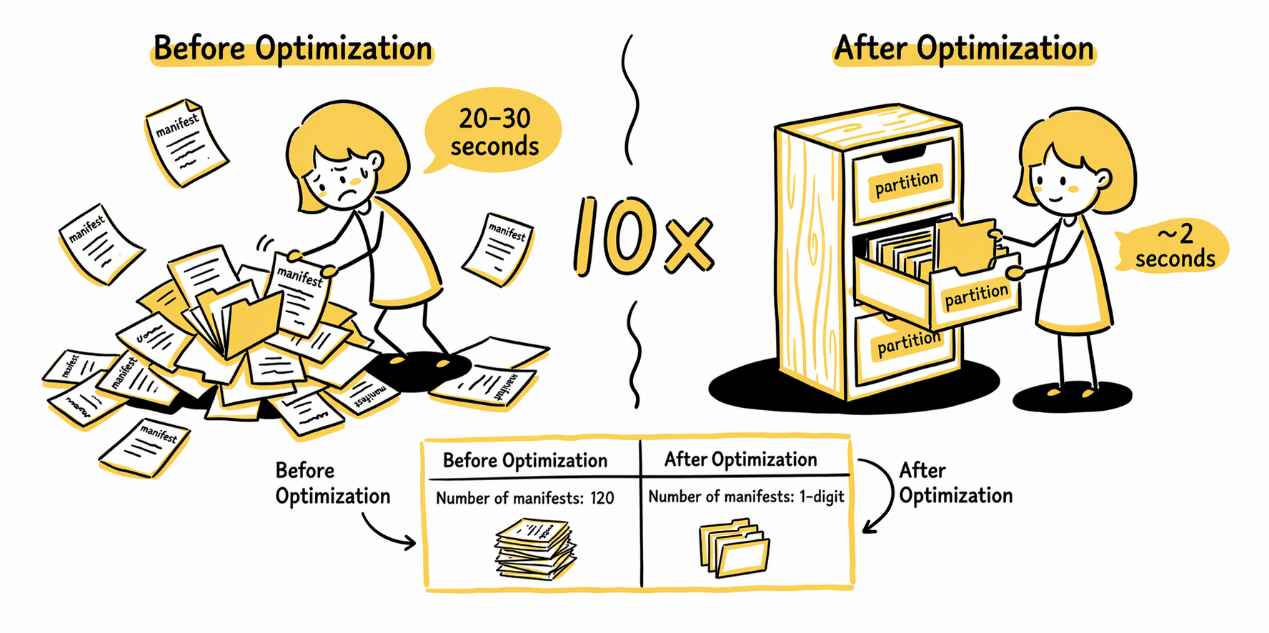
| Metric | Before | After | Change |
|---|---|---|---|
| Weekly data volume | ~1.4 TB | ~1.4 TB | |
| Manifest files to read | ~120 | Single digits | One to two orders of magnitude fewer |
| Metadata pulled in query planning | ~600 MB | MB-scale | Same as above |
| Typical XIHE query time | 20–30 s | ~2 s | 10–15× faster |
Once the policy is configured, it runs automatically, with no manual intervention.
Everything above works once you configure it in the console. This section digs into some technical details — why we built a file-level Bitmap index on Iceberg in-house.
Open-source Iceberg's built-in file filtering relies on column-level min-max statistics, which can only skip files whose value range does not match at all. For high-cardinality columns such as user_id and device_id, min-max is nearly useless: every file's value range covers the target value, so it still ends up scanning everything. The open-source community currently has no file-level index filtering solution either.
Our in-house approach in AnalyticDB for MySQL: build a file-level bitmap index on the specified columns, recording which data files each value appears in. At query time, the engine first checks the index, skips irrelevant files, and then scans only the small number of files that match.
In a typical test, a business table with 1,349 data files ran an equality query on user_id: the index narrowed the scan range from all files down to a single one, cutting query time from 4.2 minutes to 1.8 minutes. The effect also shows on a standard benchmark (100 million rows, 20 daily partitions):
| Query | Without index | With index | Improvement |
|---|---|---|---|
| WHERE user_id = 42 | 26s | 4s | 85% |
| WHERE user_id IN (1, 100, 10000, …) | 5s | 3s | 40% |
The more data files there are and the more scattered the value distribution, the better the index filters. The 1,349-file table above, filtered down to 1, is a fairly typical high-cardinality-column scenario.
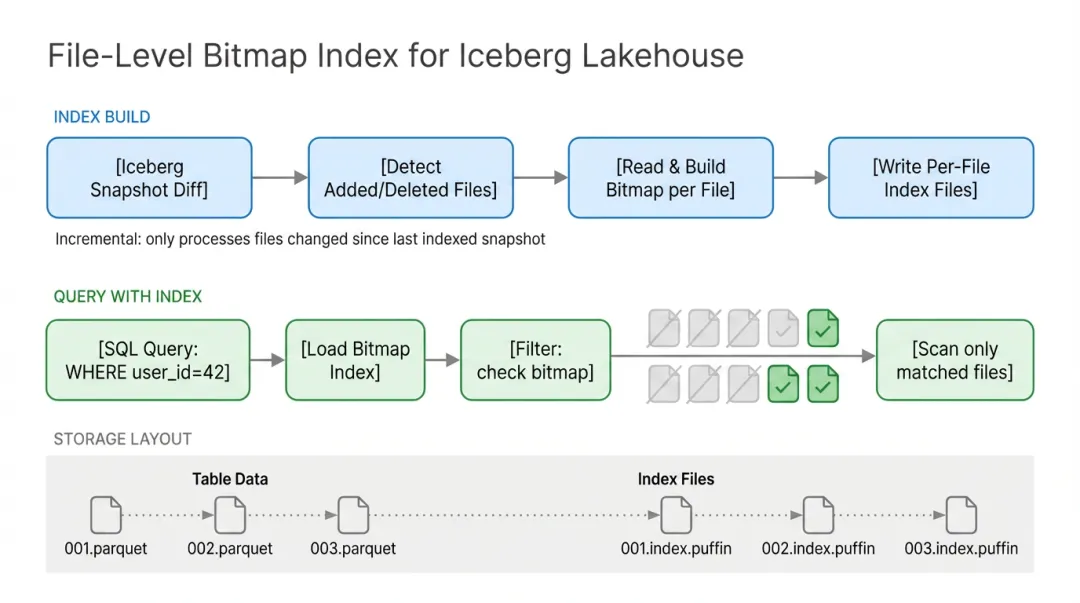
A few design decisions are worth mentioning. The index is built at data-file granularity — one data file maps to one index file — and is loaded in parallel by Spark executors at query time, a natural fit for distributed scenarios. The index metadata is placed under Iceberg's transaction management, so concurrent writes cause no consistency issues. The build process is incremental: it only builds indexes for newly added data files, with no need for a full rebuild each time. We also adopted a fail-open design: if something goes wrong with the index, queries automatically fall back to non-indexed execution, so the query itself never errors out.
-- Create an index on the user_id column
CALL catalog.system.create_index('db.table', 'user_id');

-- View existing indexes
CALL catalog.system.show_index('db.table');Table Service is already integrated into the AnalyticDB for MySQL console, fully visual, with no scripting required. (In gradual rollout — submit a ticket and apply for canary testing.)
It supports multi-level configuration inheritance, from instance to database to table, for flexible control of granularity:
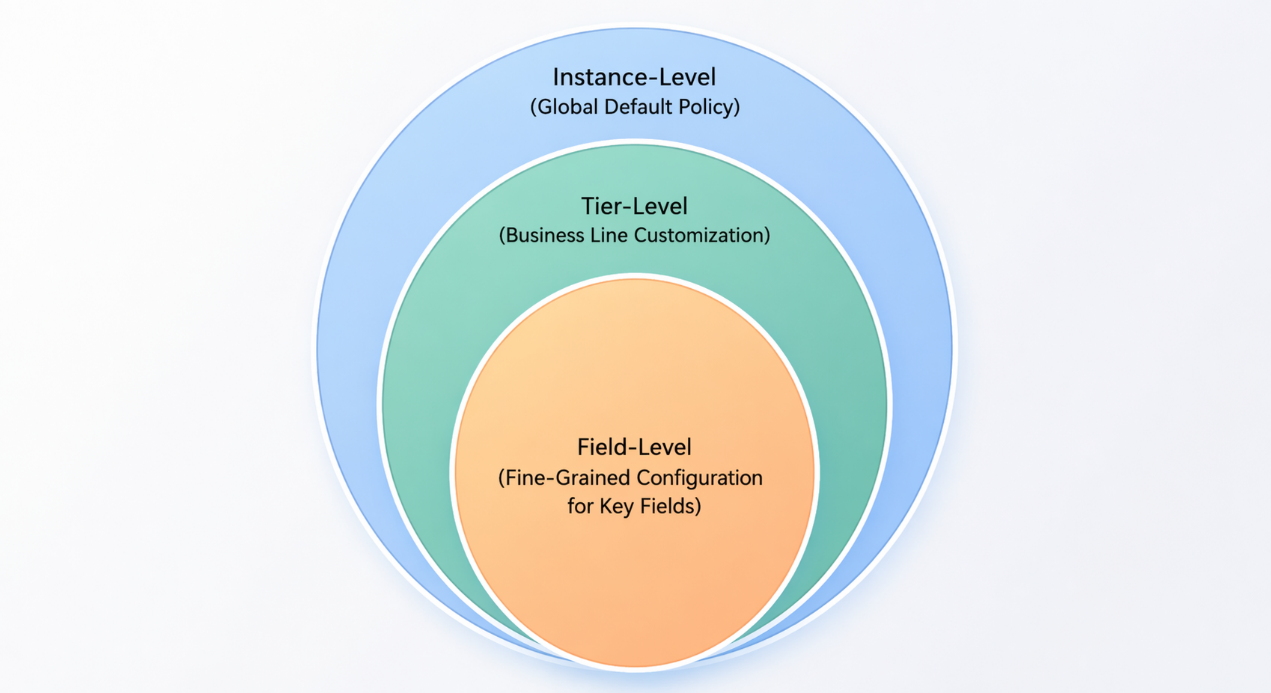
Select "Enable lake storage optimization," and lower-level objects inherit the configuration automatically; you can also override it level by level with custom settings.
| Goal | What to configure |
|---|---|
| Faster queries | Enable Table Service; the system automatically runs small file compaction, metadata compaction, and other optimizations |
| Lower storage cost | Set hot-cold tiering rules (how many days before moving to IA/Archive) and the data retention period |
| Index acceleration | Specify the high-cardinality columns to index, accelerating equality/IN queries |
| Dedicated resources | Choose the Spark resource group used to run tasks, avoiding impact on online workloads |
The console shows the optimization history for each table: how many files were compacted, how much space was freed, and whether each task succeeded. Once the policy is configured, you can leave it alone — the system schedules everything automatically according to the policy.
If your workload matches any of the following, AnalyticDB for MySQL's Iceberg Table Service can solve the problem directly:
Storage costs are rising, but you dare not downgrade lightly.
Keeping cold data in Standard storage is wasteful, but moving it to Infrequent Access risks slower queries — hot-cold tiering combined with query acceleration resolves this "save money or preserve performance" dilemma.
Your operations bandwidth is limited, and you would rather not keep maintaining optimization scripts.
Small file compaction, snapshot cleanup, sort optimization — anyone who has done these chores knows how tedious they are. Once the policy is set, the system schedules and runs everything automatically, with virtually no need to babysit it.
Your data has clear hot-cold characteristics.
Log analytics, historical orders, audit records, behavioral tracking — this kind of data is accessed frequently in the near term, queried occasionally as it ages, and barely used once expired. Tiered storage and automatic reclamation match this lifecycle exactly.
If you already have an AnalyticDB for MySQL Lakehouse Edition / Enterprise Edition / Basic Edition cluster, just create a Spark resource group and enable the automatic table optimization service in the console. There is no extra component to deploy, no operations scripts to write, and no need to understand Iceberg's internals — configure the policy, and let the system handle the rest.
Table Service is currently in gradual rollout on AnalyticDB for MySQL Lakehouse Edition and Enterprise Edition. If you are using AnalyticDB for MySQL + Iceberg, you can submit a ticket to apply for a console trial.
🔗 Submit a ticket: https://smartservice.console.aliyun.com/service/create-ticket
ApsaraDB - July 22, 2026
ApsaraDB - March 30, 2026
ApsaraDB - February 29, 2024
ApsaraDB - November 14, 2024
Alibaba Clouder - December 21, 2020
ApsaraDB - October 24, 2025
 Data Lake Formation
An end-to-end solution to efficiently build a secure data lake
Learn More Data Lake Storage Solution
Build a Data Lake with Alibaba Cloud Object Storage Service (OSS) with 99.9999999999% (12 9s) availability, 99.995% SLA, and high scalability
Learn More ApsaraDB for HBase
ApsaraDB for HBase is a NoSQL database engine that is highly optimized and 100% compatible with the community edition of HBase.
Learn More Tair (Redis® OSS-Compatible)
A key value database service that offers in-memory caching and high-speed access to applications hosted on the cloud
Learn MoreMore Posts by ApsaraDB


