DuckDB Internals - Part 6: DuckDB LocalStorage
By Zhang Xizhe and Chen Zongzhi
Introduction
In our previous article on the transaction lifecycle, we discussed two key members within a transaction object: LocalStorage and UndoBuffer. This article focuses on LocalStorage, a data structure that is tightly coupled with INSERT operations within a transaction. Since OLAP databases frequently need to import data in bulk, LocalStorage is specifically optimized for such scenarios. All analysis in this article is based on the DuckDB 1.4.0 source code. A TL;DR summary is provided at the end.
Overview
In DuckDB, inserting a row does not directly modify the source table, as is the case in MySQL. Instead, the data is first written to the transaction's LocalStorage. Only when the transaction is committed are the contents of LocalStorage merged into the source table. When we first encountered DuckDB's approach to handling INSERT operations, several questions naturally arose. We list them below, along with their explanations:
• Why is DuckDB able to accumulate inserted data and merge it into the source table only at commit time?
- This is because DuckDB source tables are not stored in primary-key order. As a result, the final merge step is simply an append operation to the source table. There is no need to locate a specific insertion position based on the primary key. By contrast, MySQL source tables are implemented as clustered indexes, which require locating the correct position based on the primary key before inserting. This makes insertion significantly more complex than simply appending a batch of rows.
• How does DuckDB enforce primary key uniqueness?
- In DuckDB, primary keys, unique indexes, and secondary indexes are all implemented using Adaptive Radix Tree (ART) indexes, which will be covered in detail in a future article. Essentially, an ART index is an optimized Trie-based structure. Since primary keys and unique indexes do not allow duplicate keys, DuckDB searches the ART index for conflicts during insertion. In practice, this check can introduce noticeable performance overhead.
• What are the benefits of this design? (The authors have identified the following advantages; additional insights are welcome.)
- When multiple sessions insert data concurrently, each session operates exclusively on its own
LocalStorage. No synchronization is required between sessions; each can proceed independently. - If a session rolls back, its
LocalStoragecan simply be discarded, without touching the source table. This greatly reduces interference between concurrent sessions. - An additional benefit is that other sessions scanning the table will never see these uncommitted rows. This both reduces scan overhead and naturally satisfies Multi-Version Concurrency Control (MVCC) requirements.
Differences in WAL Handling Between DuckDB and Row-oriented Storage Engines
DuckDB's primary write path is largely similar to that of most storage engines, such as InnoDB and RocksDB. Once a write has been recorded in the Write-Ahead Log (WAL) and the WAL has been flushed to disk, the write is considered complete. The actual persistence of most data from memory to disk then happens asynchronously during later dirty-page flushing or compaction.
The only scenario in which DuckDB differs in a noticeable way is bulk write workloads.
In fact, the WAL mechanisms used by all row-oriented storage engines all suffer from an inherent issue: write amplification. Data is first written to the WAL, and then written again to data pages when dirty pages are flushed. In other words, the same data is effectively written twice. This level of write amplification is generally acceptable in OLTP workloads, because OLTP operations typically involve very small data modifications.
However, in OLAP workloads, this becomes much harder to tolerate. In OLAP systems, throughput itself is often the primary bottleneck, and doubling the write volume is usually unacceptable. As a result, most OLAP systems adopt a different approach: data is written directly to data pages at write time, while the WAL only records the locations of the affected data pages. This design significantly reduces I/O bandwidth consumption during large-scale bulk imports.
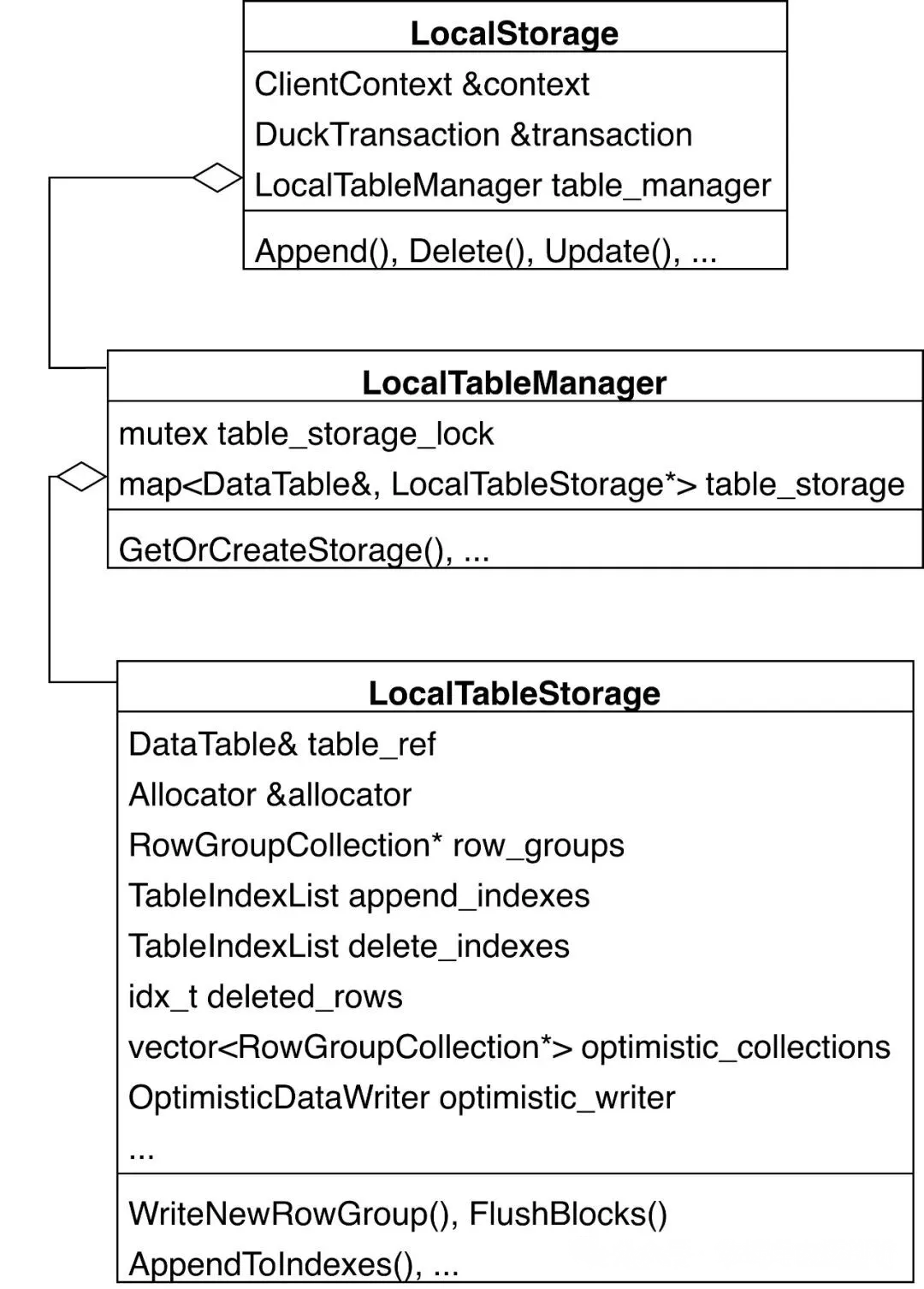
After introducing the overall concept, let's take a look at the UML overview of LocalStorage. It consists of two layers:
• LocalStorage and its internal LocalTableManager form the entry layer. LocalTableManager is essentially a map that associates DataTable objects with pointers to LocalTableStorage instances.
• LocalTableStorage is where the actual data is stored. For each table that a transaction inserts into, a LocalTableStorage object is created, which contains several key fields:
-
row_groups: As mentioned in the previous article about theRowGroupCollectionclass, DuckDB manages table data throughRowGroupCollectionobjects. Here, this effectively creates a shadow table that has the same schema as the source table. All insert operations are performed on this shadow table, and its contents are merged into the source table at the end of the transaction. -
append_indexesanddelete_indexes: As discussed earlier in the explanation of how DuckDB enforces uniqueness constraints, these two fields are ART indexes created for that purpose. Since indexing is not the focus of this article, it will be covered in a future article. -
optimistic_collections: This is an array of pointers toRowGroupCollectionobjects. DuckDB includes optimizations for parallel execution in large-scale insert scenarios, and this array is used when inserts are performed by multiple threads. Each thread is assigned its ownRowGroupCollection, which can be viewed as a "shadow table of the shadow table (row_groups)." During the insert (Sink) phase, each thread operates exclusively on its ownRowGroupCollection. Only during the finalCombinephase is all threads' data merged intorow_groups. -
optimistic_writer: TheOptimisticDataWriterclass is also designed to optimize large-scale data import. Transferring data fromrow_groupsinto the sourceDataTablerequires reading and writing the data again, incurring additional overhead. To avoid this cost, for data imports that meet certain conditions, DuckDB incrementally persists data to disk during insertion. In the final step, DuckDB only needs to attach data pointers and in-memory objects to the source table. This process avoids a substantial amount of I/O and will be explained in detail later.
Next, let's examine the overall execution flow of an INSERT statement. The following stack trace outlines the main steps involved:
- Construct a
PhysicalInsertobject and configure a set of options, including whether the operation runs in parallel, constraint checks, and ON CONFLICT handling. - Construct a shared
InsertGlobalStateobject that is used by all threads. This object contains alockthat synchronizes multiple threads during parallel insertion. - Each thread constructs its own
InsertLocalStateobject, so that during parallel insertion, each thread operates exclusively on its ownRowGroupCollection. - Insert data into
LocalStorage, which will be described in detail later. - (Parallel insertion only) Combine the data inserted by each thread. In fact, this step aggregates data of all threads into
row_groups, which will be explained in detail later. - At transaction commit time, merge the contents of
row_groupsinto the sourceDataTable. This step will also be covered in detail later.
ClientContext::Query
├── ClientContext::PendingQueryInternal
│   └── ClientContext::PendingStatementOrPreparedStatementInternal
│       └── ClientContext::PendingStatementOrPreparedStatement
│           └── ClientContext::PendingStatementInternal
│               ├── ClientContext::CreatePreparedStatement
│               │   └── ClientContext::CreatePreparedStatementInternal
│               │       └── PhysicalPlanGenerator::Plan
│               │           └── PhysicalPlanGenerator::ResolveAndPlan
│               │               └── PhysicalPlanGenerator::PlanInternal
│               │                   └── PhysicalPlanGenerator::CreatePlan
│               │                       └── PhysicalPlanGenerator::CreatePlan
│               │                           └── DuckCatalog::PlanInsert // 1. Construct a `PhysicalInsert` object and configure a set of options.
│               └── ClientContext::PendingPreparedStatementInternal
│                   └── Executor::Initialize
│                       └── Executor::InitializeInternal
│                           └── Executor::ScheduleEvents
│                               └── ... ExecutorTask::Execute
│                                   └── PipelineInitializeTask::ExecuteTask
│                                       └── Pipeline::ResetSink
│                                           └── PhysicalInsert::GetGlobalSinkState // 2. Construct a shared InsertGlobalState object that is used by all threads.
└── ClientContext::ExecutePendingQueryInternal
    └── PendingQueryResult::ExecuteInternal
        └── PendingQueryResult::ExecuteTaskInternal
            └── ClientContext::ExecuteTaskInternal
                └── Executor::ExecuteTask
                    └── ExecutorTask::Execute
                        └── PipelineTask::ExecuteTask
                            ├── PipelineExecutor::PipelineExecutor
                            │   └── PhysicalInsert::GetLocalSinkState // 3. Each thread constructs its own `InsertLocalState` object.
                            └── PipelineExecutor::Execute
                                ├── PipelineExecutor::ExecutePushInternal
                                │   └── PipelineExecutor::Sink
                                │       └── PhysicalInsert::Sink // 4. Insert data into `LocalStorage`.
                                └── PipelineExecutor::PushFinalize
                                    └── PhysicalInsert::Combine // 5. (Parallel insertion only) Combine the data inserted by each thread
...
DuckTransactionManager::CommitTransaction
└── DuckTransaction::WriteToWAL
    └── LocalStorage::Commit
        └── LocalStorage::Flush // 6. At transaction commit time, merge the contents of `row_groups` into the source `DataTable`
Inserting Data into LocalStorage
First, let's examine how data is inserted into LocalStorage. The entry point for this process is the PhysicalInsert::Sink function. Within this function, different logic paths are taken depending on whether the insertion is executed in parallel. Here, we first focus on the simpler single-threaded insertion path; the multi-threaded parallel insertion process will be introduced later based on this foundation. From the code snippet below, it is clear that single-threaded insertion essentially involves a call to the DataTable::LocalAppend function.
SinkResultType PhysicalInsert::Sink(ExecutionContext &context, DataChunk &insert_chunk,
                                    OperatorSinkInput &input) const {
    auto &gstate = input.global_state.Cast<InsertGlobalState>();
    auto &lstate = input.local_state.Cast<InsertLocalState>();
    auto &table = gstate.table;
    auto &storage = table.GetStorage();
    insert_chunk.Flatten();

    if (!parallel) { /* Single-threaded mode. */
        ... /* Uniqueness constraints and other checks; not covered in this article. */
        /* Call the `DataTable::LocalAppend` function. */
        storage.LocalAppend(table, context.client, insert_chunk, bound_constraints);
        ...
        return SinkResultType::NEED_MORE_INPUT;
    }
    ...
}
Next, let's focus on the call stack starting from the DataTable::LocalAppend function. Overall, the process can be divided into the following steps:
1. Construct a LocalAppendState object to handle the current insertion.
2. If this is the first insertion into a table, create a LocalTableStorage object for that table.
3. Initialize append states layer by layer. The hierarchy is as follows:
LocalAppendState (corresponding to LocalTableStorage) -> TableAppendState (corresponding to RowGroupCollection) -> RowGroupAppendState (corresponding to RowGroup) -> ColumnAppendState (corresponding to ColumnData)
4. Insert data by calling the Append method layer by layer. During this process, new ColumnSegments (default size limit: 256 KB) or RowGroups (default row limit: 122,880) may be created if the current segments or groups are full.
5. If a new RowGroup is created, the previous one has reached its capacity and is flushed to disk. This is an optimization for bulk data import.
6. Attach version information to the newly inserted rows, which is used to determine visibility under MVCC.
DataTable::LocalAppend(TableCatalogEntry &table, ...) // 1. Construct a `LocalAppendState` object to handle the current insertion
├── DataTable::InitializeLocalAppend
│   └── LocalStorage::InitializeAppend
│       ├── LocalTableManager::GetOrCreateStorage // 2. If this is the first insertion into a table, create a `LocalTableStorage` object for that table.
|       |   └── LocalTableStorage::LocalTableStorage
│       └── RowGroupCollection::InitializeAppend // 3. Initialize layer by layer
│           └── RowGroup::InitializeAppend
│               └── StandardColumnData::InitializeAppend
│                   └── ColumnData::InitializeAppend
│                       └── ColumnSegment::InitializeAppend
├── DataTable::LocalAppend(LocalAppendState &state, ...)
│   └── LocalStorage::Append
│       ├── RowGroupCollection::Append // 4. Insert data by calling the Append method layer by layer
│       │   └── RowGroup::Append
│       │       └── ColumnData::Append(ColumnAppendState &state, ...)
│       │           └── ColumnData::Append(BaseStatistics &append_stats, ...)
│       │               └── StandardColumnData::AppendData
│       │                   └── ColumnData::AppendData
│       │                       └── ColumnSegment::Append
│       └── LocalTableStorage::WriteNewRowGroup // 5. If a new RowGroup is created, the previous one has reached its capacity and is flushed to disk
└── DataTable::FinalizeLocalAppend
    └── LocalStorage::FinalizeAppend
        └── RowGroupCollection::FinalizeAppend
            └── RowGroup::AppendVersionInfo // 6. Attach version information to the newly inserted rows.
Initialization
Let's take a closer look at the layered initialization process from LocalTableStorage to ColumnSegment, in which each layer initializes its corresponding XXXAppendState.
LocalTableStorage
Within LocalStorage::InitializeAppend, a LocalAppendState object is initialized. This process involves obtaining or creating a LocalTableStorage object and then calling the InitializeAppend method for the next layer (the RowGroupCollection):
void LocalStorage::InitializeAppend(LocalAppendState &state, DataTable &table) {
    /* 1. Obtain or create a `LocalTableStorage` object. */
    state.storage = &table_manager.GetOrCreateStorage(context, table);
    /* 2. Call the `InitializeAppend` method for the `RowGroupCollection`. */
    state.storage->row_groups->InitializeAppend(TransactionData(transaction), state.append_state);}
When a transaction inserts data into a table for the first time, a LocalTableStorage object is created for that table and registered in LocalTableManager::table_storage. This allows subsequent inserts within the same transaction to retrieve the object directly. During the construction of a LocalTableStorage object, the following steps are performed, including the creation of an empty RowGroupCollection.
LocalTableStorage::LocalTableStorage(ClientContext &context, DataTable &table)
    : table_ref(table), allocator(Allocator::Get(table.db)), deleted_rows(0), optimistic_writer(context, table),
      merged_storage(false) {
    auto types = table.GetTypes();
    auto data_table_info = table.GetDataTableInfo();
    auto &io_manager = TableIOManager::Get(table);
    /* Set the start row of `row_groups` to MAX_ROW_ID and the count to 0. */
    row_groups = make_shared_ptr<RowGroupCollection>(data_table_info, io_manager, types, MAX_ROW_ID, 0);
    /* Initialize statistics. */
    row_groups->InitializeEmpty();
    ... /* Handle uniqueness and other constraints. */
}
RowGroupCollection
Within RowGroupCollection::InitializeAppend, a TableAppendState object is initialized, which involves the following steps:
- Obtain the start row ID for the current
DataChunk(typically 2,048 rows) being inserted and initialize both the current row ID and the append count. - If this is the first insertion, create an empty
RowGroupobject to accommodate subsequent inserted data. - Set the current
RowGroupand call theInitializeAppendmethod for it. - Initialize an empty set of statistics, which is thread-local. This avoids multi-threaded synchronization during insertion, and the statistics can be merged at the end.
void RowGroupCollection::InitializeAppend(TransactionData transaction, TableAppendState &state) {
    /* 1. Obtain the start row ID for the current `DataChunk` (typically 2,048 rows) being inserted and initialize both the current row ID and the append count. */
    state.row_start = UnsafeNumericCast<row_t>(total_rows.load());
    state.current_row = state.row_start;
    state.total_append_count = 0;

    auto l = row_groups->Lock();
    /* 2. If this is the first insertion, create an empty `RowGroup` object to accommodate subsequent inserted data. */
    if (IsEmpty(l) || requires_new_row_group) {
        AppendRowGroup(l, row_start + total_rows);
    }

    /* 3. Set the current `RowGroup` and call the `InitializeAppend` method for it. */
    state.start_row_group = row_groups->GetLastSegment(l);
    state.start_row_group->InitializeAppend(state.row_group_append_state);
    state.transaction = transaction;

    /* 4. Initialize an empty set of statistics. */
    state.stats = TableStatistics();
    state.stats.InitializeEmpty(types);}
RowGroup
Within RowGroup::InitializeAppend, a RowGroupAppendState object is initialized. The implementation is simple:
void RowGroup::InitializeAppend(RowGroupAppendState &append_state) {
    /* 1. Set the current `RowGroup` to itself and record the current offset within the group. */
    append_state.row_group = this;
    append_state.offset_in_row_group = this->count;
    /* 2. Create a `ColumnAppendState` object for each column and call the `InitializeAppend` method on each `ColumnData`. */
    append_state.states = make_unsafe_uniq_array<ColumnAppendState>(GetColumnCount());
    for (idx_t i = 0; i < GetColumnCount(); i++) {
        auto &col_data = GetColumn(i);
        col_data.InitializeAppend(append_state.states[i]);
    }
}
ColumnData
Within ColumnData::InitializeAppend, a ColumnAppendState object is initialized. The implementation is simple:
1. Set the current ColumnSegment, which can fall into one of three scenarios:
- If the column contains no existing
ColumnSegment, create an emptyColumnSegmentobject. This typically happens during the first insertion into an emptyRowGroup. - If the last
ColumnSegmenthas already been persisted to disk, create an emptyColumnSegmentobject in memory. This is necessary because DuckDB's data blocks cannot be modified in place. - If the last
ColumnSegmentis already in memory, simply use it.
2. Call the InitializeAppend method on the ColumnSegment object obtained in step 1.
void ColumnData::InitializeAppend(ColumnAppendState &state) {
    auto l = data.Lock();
    /* 1. Set the current `ColumnSegment`. */
    if (data.IsEmpty(l)) {
        /* 1.i. If the column contains no existing `ColumnSegment`, create an empty `ColumnSegment` object. */
        AppendTransientSegment(l, start);
    }
    auto segment = data.GetLastSegment(l);
    if (segment->segment_type == ColumnSegmentType::PERSISTENT || !segment->GetCompressionFunction().init_append) {
        /* 1.ii. If the last `ColumnSegment` has already been persisted to disk, create an empty `ColumnSegment` object in memory. */
        auto total_rows = segment->start + segment->count;
        AppendTransientSegment(l, total_rows);
        state.current = data.GetLastSegment(l);
    } else {
        /* 1.iii. If the last `ColumnSegment` is already in memory, simply use it. */
        state.current = segment;
    }

    /* 2. Call the `InitializeAppend` method on the `ColumnSegment` object obtained in step 1. */
    state.current->InitializeAppend(state);
}
ColumnSegment
Within ColumnSegment::InitializeAppend, the method essentially calls the init_append callback. In the current version of the implementation, the AppendTransientSegment function determines that this callback uses the Uncompressed algorithm (which involves no compression). The purpose of this callback is to pin the in-memory data block corresponding to the ColumnSegment in the buffer pool, ensuring that it is not evicted while new data is being appended.
void ColumnSegment::InitializeAppend(ColumnAppendState &state) {
    ...
    state.append_state = function.get().init_append(*this);
}
Insertion
Let's now take a closer look at the layered insertion process from RowGroupCollection down to ColumnSegment.
RowGroupCollection
Within RowGroupCollection::Append, besides updating some state information (such as total_append_count), the main logic consists of a loop with two key steps:
- Call the
Appendmethod of the currentRowGroupto insert data. Since the defaultrow_group_sizeis 122,880 rows, it is possible that the current row group reaches its limit before all data is inserted, in which case only part of the data is inserted. - If there is remaining data after step 1, create a new
RowGroupand continue inserting the remaining data.
bool RowGroupCollection::Append(DataChunk &chunk, TableAppendState &state){
    const idx_t row_group_size = GetRowGroupSize(); /* Default value: 122880. */
    bool new_row_group = false;
    idx_t total_append_count = chunk.size();
    idx_t remaining = chunk.size();
    state.total_append_count += total_append_count;
    while (true) {
        auto current_row_group = state.row_group_append_state.row_group;
        /* Calculate the number of rows to insert: min(remaining space in RowGroup, remaining rows to insert). */
        idx_t append_count =
            MinValue<idx_t>(remaining, row_group_size - state.row_group_append_state.offset_in_row_group);
        if (append_count > 0) {
            auto previous_allocation_size = current_row_group->GetAllocationSize();
            /* 1. Call the `Append` method of the current `RowGroup` to insert data. */
            current_row_group->Append(state.row_group_append_state, chunk, append_count);
            allocation_size += current_row_group->GetAllocationSize() - previous_allocation_size;
            current_row_group->MergeIntoStatistics(stats);
        }
        remaining -= append_count;
        if (remaining > 0) {
            /* Extract the remaining data to be inserted. */
            if (remaining < chunk.size()) {
                chunk.Slice(append_count, remaining);
            }

            new_row_group = true;
            auto next_start = current_row_group->start + state.row_group_append_state.offset_in_row_group;
            auto l = row_groups->Lock();
            /* 2. Create a new `RowGroup` and continue inserting the remaining data. */
            AppendRowGroup(l, next_start);
            auto last_row_group = row_groups->GetLastSegment(l);
            last_row_group->InitializeAppend(state.row_group_append_state);
            continue;
        } else {
            break;
        }
    }
    state.current_row += row_t(total_append_count);
    ... /* Statistics-related; not covered in this article. */
    return new_row_group;
}
RowGroup
Because the append_count has already been determined in RowGroupCollection::Append, inserting data within RowGroup::Append will never exceed the row group limit (122,880 rows). As a result, the function simply iterates over each column (ColumnData) and calls its Append method to insert the data.
void RowGroup::Append(RowGroupAppendState &state, DataChunk &chunk, idx_t append_count) {
    for (idx_t i = 0; i < GetColumnCount(); i++) {
        auto &col_data = GetColumn(i);
        auto prev_allocation_size = col_data.GetAllocationSize();
        col_data.Append(state.states[i], chunk.data[i], append_count);
        allocation_size += col_data.GetAllocationSize() - prev_allocation_size;
    }
    state.offset_in_row_group += append_count;
}
ColumnData
The ColumnData::Append function essentially forwards the operation to ColumnData::AppendData. The main logic of this function is a loop, which can be described in two steps:
- Call the
Appendmethod on the currentColumnSegment, which effectively calls theappendcallback of theUncompressedalgorithm. For example, for an INT column, each 4-byte integer is stored sequentially. If the data block reaches its capacity limit (typically 256 KB), only part of the data can be inserted at this time. - If there is remaining data after step 1, create a new
ColumnSegmentand continue inserting the remaining data.
void ColumnData::AppendData(BaseStatistics &append_stats, ColumnAppendState &state, UnifiedVectorFormat &vdata,
                            idx_t append_count) {
    idx_t offset = 0;
    this->count += append_count;
    while (true) {
        /* 1. Call the `Append` method on the current `ColumnSegment`. */
        idx_t copied_elements = state.current->Append(state, vdata, offset, append_count);
        append_stats.Merge(state.current->stats.statistics);
        if (copied_elements == append_count)
            break;

        {
            auto l = data.Lock();
            /* 2. If there is remaining data after step 1, create a new `ColumnSegment` and continue inserting the remaining data. */
            AppendTransientSegment(l, state.current->start + state.current->count);
            state.current = data.GetLastSegment(l);
            state.current->InitializeAppend(state);
        }
        offset += copied_elements;
        append_count -= copied_elements;
    }
}
Merging Data from LocalStorage into the Target Table
DuckTransactionManager::CommitTransaction
└── DuckTransaction::WriteToWAL
    └── LocalStorage::Commit // Iterate over each `LocalTableStorage` and `flush` its contents.
        └── LocalStorage::Flush // Merge data from `LocalTableStorage` into the target table.
During a transaction, all inserted data resides in LocalStorage, so other sessions cannot see it. Once the transaction is committed, these changes need to become visible to other sessions. This requires transferring data from LocalStorage to the target table. The entry point for this process is LocalStorage::Flush, which proceeds as follows:
- Construct a
TableAppendStateobject for inserting data into the target table. Add anappend_lockon the table to prevent concurrent merges by multiple sessions. TheAppendLockalso initializes theTableAppendStateobject, including the start row ID. - Add an
INSERT_TUPLEundo entry to the UndoBuffer. This entry will be used later for writing to the WAL. - Merge data optimistically or pessimistically, depending on the scenario:
- Optimistic case: The conditions are "the target table is empty, or the inserted batch exceeds 122,880 rows," and "none of the just-inserted rows have been deleted." In this case, all data in
LocalTableStorageis persisted and then linked directly to the target table. - Pessimistic case: Otherwise, any already-persisted data blocks in
LocalTableStorageare discarded. The data is rescanned and inserted into the target table in smaller chunks (2,048 rows).
void LocalStorage::Flush(DataTable &table, LocalTableStorage &storage, optional_ptr<StorageCommitState> commit_state){
    if (storage.is_dropped) {
        /* The table was dropped; no merge needed. */
        return;
    }
    if (storage.row_groups->GetTotalRows() <= storage.deleted_rows) {
        /* All inserted rows in this transaction were deleted; release data blocks without merging. */
        storage.Rollback();
        return;
    }

    auto append_count = storage.row_groups->GetTotalRows() - storage.deleted_rows;
    const auto row_group_size = storage.row_groups->GetRowGroupSize();

    /* 1. Construct a `TableAppendState` object for inserting data into the target table. Add an `append_lock` on the target table to prevent concurrent merges
          by multiple sessions. The `AppendLock` also initializes the `TableAppendState` object. */
    TableAppendState append_state;
    table.AppendLock(append_state);

    /* 2. Add an `INSERT_TUPLE` undo entry to the UndoBuffer. This entry will be used later for writing to the WAL. */
    transaction.PushAppend(table, NumericCast<idx_t>(append_state.row_start), append_count);

    if ((append_state.row_start == 0 || storage.row_groups->GetTotalRows() >= row_group_size) &&
        storage.deleted_rows == 0) {
        /* 3.i. Optimistic case: "The target table is empty, or the just-inserted batch exceeds 122,880 rows," and "none of the inserted rows have been deleted." */
        /* Persist all data in `LocalTableStorage`. */
        storage.FlushBlocks();
        ... /* Insert data into secondary indexes; not covered in this article. */
        /* Link data to the target table. */
        table.MergeStorage(*storage.row_groups, storage.append_indexes, commit_state);
    } else {
        /* 3.ii. Pessimistic case */
        /* Discard any already-persisted data blocks in `LocalTableStorage`. */
        storage.Rollback();
        /* Rescan the data and insert it into the target table in chunks of 2,048 rows. */
        storage.AppendToIndexes(transaction, append_state, true);
    }
}
Optimistic Merging
As discussed earlier, compared with pessimistic merging, optimistic merging eliminates the need for an additional "rescan + insert" phase. Since the logic of pessimistic merging is relatively straightforward, we will not cover it in detail here. Instead, we focus on how optimistic merging is implemented. DataTable::MergeStorage forwards the call to RowGroupCollection::MergeStorage. Before examining this function, it is useful to summarize the two optimizations enabled by optimistic merging:
• It avoids an extra "scan + insert" process and links the data directly into the target table.
• It reduces WAL write overhead. Because the data has already been persisted, the WAL only needs to record pointers to the data instead of rewriting the inserted data itself.
The RowGroupCollection::MergeStorage function implements the first optimization and prepares the groundwork for the second:
1. Compute the current highest row ID of the target table, which will be used as the start row ID for this merge operation.
2. Iterate over the inserted RowGroup objects to determine how many rows have already been persisted (in the optimistic case, this should include all rows). This step prepares the information required for WAL write optimization.
3. Iterate over the inserted RowGroup objects, and for each RowGroup object:
- Update the start row ID from top to bottom, from the
RowGrouplevel down to eachColumnSegment. - Collect pointers to the persisted data, which will later be used for WAL write optimization.
- Append the current
RowGroupobject to theRowGroupCollectionof the target table, thereby directly linking the data into the table.
4. Record the collected data pointers in commit_state. This step also prepares for WAL write optimization.
5. Merge statistics into the target table.
void RowGroupCollection::MergeStorage(RowGroupCollection &data, optional_ptr<DataTable> table,
                                      optional_ptr<StorageCommitState> commit_state){
    /* 1. Compute the current highest row ID of the target table, which will be used as the start row ID for this merge operation. */
    auto start_index = row_start + total_rows.load();
    auto index = start_index;
    auto segments = data.row_groups->MoveSegments();

    unique_ptr<PersistentCollectionData> row_group_data;
    idx_t optimistically_written_count = 0;
    if (commit_state) {
        /* 2. Iterate over the inserted RowGroup objects to determine how many rows have already been persisted. */
        for (auto &entry : segments) {
            auto &row_group = *entry.node;
            if (!row_group.IsPersistent())
                break;
            optimistically_written_count += row_group.count;
        }
        if (optimistically_written_count > 0) {
            row_group_data = make_uniq<PersistentCollectionData>();
        }
    }

    /* 3. Iterate over the inserted `RowGroup` objects. */
    for (auto &entry : segments) {
        auto &row_group = entry.node;
        /* 3.i. Update the start row ID from top to bottom, from the `RowGroup` level down to each `ColumnSegment`. */
        row_group->MoveToCollection(*this, index);

        if (commit_state && (index - start_index) < optimistically_written_count) {
            /* 3.ii. Collect pointers to the persisted data. */
            auto persistent_data = row_group->SerializeRowGroupInfo();
            persistent_data.types = types;
            row_group_data->row_group_data.push_back(std::move(persistent_data));
        }
        index += row_group->count;
        /* 3.iii. Append the current `RowGroup` object to the `RowGroupCollection` of the target table. */
        row_groups->AppendSegment(std::move(row_group));
    }
    if (commit_state && optimistically_written_count > 0) {
        /* 4. Record the collected data pointers in `commit_state`. */
        commit_state->AddRowGroupData(*table, start_index, optimistically_written_count, std::move(row_group_data));
    }
    /* 5. Merge statistics into the target table. */
    stats.MergeStats(data.stats);
    total_rows += data.total_rows.load();
}
Writing to WAL
DuckTransactionManager::CommitTransaction
├── DuckTransaction::WriteToWAL
│   ├── LocalStorage::Commit
│   │   └── LocalStorage::Flush // Merge data from `LocalTableStorage` into the target table.
│   ├── UndoBuffer::WriteToWAL
│   │   └── WALWriteState::CommitEntry
│   │       └── DataTable::WriteToLog // Write WAL records for INSERT_TUPLE undo entries.
│   └── SingleFileBlockManager::FileSync // In the optimistic merge case, ensure that data is actually flushed from the page cache to disk.
└── DuckTransaction::Commit
    └── SingleFileStorageCommitState::FlushCommit
        └── WriteAheadLog::Flush
            └── BufferedFileWriter::Sync // Flush WAL records from the page cache to disk. This ensures that the data will exist during crash recovery.
For cases where a WAL write is required, the preceding stack trace shows the execution order of an append operation during transaction commit. After the LocalStorage::Flush function merges the data into the target table, DuckDB proceeds to write the corresponding WAL records. Within DataTable::WriteToLog, DuckDB handles optimistic and pessimistic merge scenarios differently:
• Optimistic merge: Write only the data pointers recorded in commit_state to the WAL.
• Pessimistic merge: Scan all rows inserted by the current transaction and write them to the WAL in batches of 2,048 rows.
void DataTable::WriteToLog(DuckTransaction &transaction, WriteAheadLog &log, idx_t row_start, idx_t count,
                           optional_ptr<StorageCommitState> commit_state) {
    log.WriteSetTable(info->schema, info->table);
    if (commit_state) {
        idx_t optimistic_count = 0;
        auto entry = commit_state->GetRowGroupData(*this, row_start, optimistic_count);
        if (entry) {
            /* Optimistic merge: Write only the data pointers recorded in commit_state to the WAL. */
            log.WriteRowGroupData(*entry);
            ...
            row_start += optimistic_count;
            count -= optimistic_count;
            if (count == 0) { /* In the normal case, count should be 0 here. */
                return;
            }
        }
    }

    /* Pessimistic merge: Scan all rows inserted by the current transaction and write them to the WAL in batches of 2,048 rows. */
    ScanTableSegment(transaction, row_start, count, [&](DataChunk &chunk) { log.WriteInsert(chunk); });
}
Parallel Inserts
In the previous sections, for the sake of clarity, we intentionally skipped the discussion of parallel inserts. We now return to this topic to examine how DuckDB performs multi-threaded inserts—specifically, how individual threads independently process data during the Sink phase and how their results are eventually aggregated during the Combine phase.
Thread-local Inserts
The core logic of parallel inserts resides in PhysicalInsert::Sink, as shown below:
- If the current thread has not yet been assigned a dedicated
RowGroupCollection, create an emptyRowGroupCollectionobject. Under the protection ofgstate.lock, register and manage this object inLocalTableStorage::optimistic_collections. - The thread inserts data into its own
RowGroupCollection. The insertion logic itself is essentially identical to the single-threaded case; the only difference is that each thread operates on a differentRowGroupCollection.
SinkResultType PhysicalInsert::Sink(ExecutionContext &context, DataChunk &insert_chunk,
                                    OperatorSinkInput &input) const {
    auto &gstate = input.global_state.Cast<InsertGlobalState>();
    auto &lstate = input.local_state.Cast<InsertLocalState>();
    auto &table = gstate.table;
    auto &storage = table.GetStorage();
    insert_chunk.Flatten();
    ... /* Single-threaded insert. */

    auto &data_table = gstate.table.GetStorage();
    if (!lstate.collection_index.IsValid()) {
        /* 1. If the current thread has not yet been assigned a dedicated `RowGroupCollection`, create one. */
        auto table_info = storage.GetDataTableInfo();
        auto &io_manager = TableIOManager::Get(table.GetStorage());

        /* Create an empty `RowGroupCollection` object. */
        auto max_row_id = NumericCast<idx_t>(MAX_ROW_ID);
        auto collection = make_uniq<RowGroupCollection>(std::move(table_info), io_manager, insert_types, max_row_id);
        collection->InitializeEmpty();
        collection->InitializeAppend(lstate.local_append_state);

        /* Under the protection of `gstate.lock`, register and manage the `RowGroupCollection` object
           in `LocalTableStorage::optimistic_collections`. */
        lock_guard<mutex> l(gstate.lock);
        lstate.optimistic_writer = make_uniq<OptimisticDataWriter>(context.client, data_table);
        lstate.collection_index = data_table.CreateOptimisticCollection(context.client, std::move(collection));
    }
    /* Constraint checks; not covered in this article. */
    OnConflictHandling(table, context, gstate, lstate, insert_chunk);

    /* 2. The thread inserts data into its own `RowGroupCollection`. */
    auto &collection = data_table.GetOptimisticCollection(context.client, lstate.collection_index);
    auto new_row_group = collection.Append(insert_chunk, lstate.local_append_state);
    if (new_row_group) {
        lstate.optimistic_writer->WriteNewRowGroup(collection);
    }
    return SinkResultType::NEED_MORE_INPUT;
}
Combining Data
The Combine phase is responsible for merging data from each thread's dedicated RowGroupCollection into LocalTableStorage::row_groups. In implementation, this process closely mirrors the earlier workflow of merging data from LocalStorage into the target table.
- Call the
FinalizeAppendmethod on the thread-localRowGroupCollection, which attaches version information to the appended data. - Acquire
gstate.lockto prevent contention among multiple threads. - Merge the thread-local
RowGroupCollectionintoLocalTableStorage::row_groups, with different strategies applied depending on the volume of inserted data:
- If the number of inserted rows is less than 122,880, the merge follows a pessimistic path similar to the one described earlier, relying on a "scan + insert" approach.
- If the number of inserted rows is greater than or equal to 122,880, the merge follows an optimistic path, directly linking the already-persisted data.
SinkCombineResultType PhysicalInsert::Combine(ExecutionContext &context, OperatorSinkCombineInput &input) const{
    auto &gstate = input.global_state.Cast<InsertGlobalState>();
    auto &lstate = input.local_state.Cast<InsertLocalState>();

    /* Single-threaded insert mode: nothing to combine. */
    if (!parallel || !lstate.collection_index.IsValid())
        return SinkCombineResultType::FINISHED;

    auto &table = gstate.table;
    auto &storage = table.GetStorage();
    const idx_t row_group_size = storage.GetRowGroupSize();

    /* 1. Call the `FinalizeAppend` method on the thread-local `RowGroupCollection`, which attaches version information to the appended data. */
    TransactionData tdata(0, 0);
    auto &data_table = gstate.table.GetStorage();
    auto &collection = data_table.GetOptimisticCollection(context.client, lstate.collection_index);
    collection.FinalizeAppend(tdata, lstate.local_append_state);
    auto append_count = collection.GetTotalRows();

    /* 2. Acquire `gstate.lock` to prevent contention among multiple threads. */
    lock_guard<mutex> lock(gstate.lock);
    gstate.insert_count += append_count;

    /* 3. Merge the thread-local `RowGroupCollection` into `LocalTableStorage::row_groups`. */
    if (append_count < row_group_size) {
        /* Small data volume: merge via scan + insert. */
        LocalAppendState append_state;
        storage.InitializeLocalAppend(append_state, table, context.client, bound_constraints);
        auto &transaction = DuckTransaction::Get(context.client, table.catalog);
        collection.Scan(transaction, [&](DataChunk &insert_chunk) {
            storage.LocalAppend(append_state, context.client, insert_chunk, false);
            return true;
        });
        storage.FinalizeLocalAppend(append_state);
    } else {
        /* At least one RowGroup has already been persisted: use optimistic linking. */
        lstate.optimistic_writer->WriteLastRowGroup(collection);
        lstate.optimistic_writer->FinalFlush();
        gstate.table.GetStorage().LocalMerge(context.client, collection);
        auto &optimistic_writer = gstate.table.GetStorage().GetOptimisticWriter(context.client);
        optimistic_writer.Merge(*lstate.optimistic_writer);
    }

    return SinkCombineResultType::FINISHED;
}
TL;DR
• During transaction execution, DuckDB inserts data into a transaction-private LocalStorage, which effectively serves as a shadow table of the source table. The data is merged into the source table only when the transaction is committed.
• DuckDB applies dedicated optimizations for bulk import workloads. While inserting data into LocalStorage, fully-filled RowGroup objects (122,880 rows) are flushed to disk. During the final merge into the source table, these persisted RowGroup objects can be linked directly. At the same time, in this optimistic insert path, writing to the WAL only requires recording pointers to the persisted data, rather than rewriting the raw data.
• For non-optimistic insert paths, both merging into the source table and writing to the WAL require a full "scan + write" process, which can lead to a substantial degradation in insert performance.
• DuckDB supports multi-threaded parallel execution for bulk INSERT statements. Each thread performs its insertion (Sink) into a private RowGroupCollection, and once all threads complete, their data is merged (Combine) into a shared RowGroupCollection.
Read previous post:
Read next post:

Comments
Related Products
-
 Database for FinTech Solution
Leverage cloud-native database solutions dedicated for FinTech.
Learn More -
 Oracle Database Migration Solution
Migrate your legacy Oracle databases to Alibaba Cloud to save on long-term costs and take advantage of improved scalability, reliability, robust security, high performance, and cloud-native features.
Learn More -
 Database Migration Solution
Migrating to fully managed cloud databases brings a host of benefits including scalability, reliability, and cost efficiency.
Learn More -
 DBStack
 is an all-in-one database management platform provided by Alibaba Cloud.
Learn More
More Posts by ApsaraDB
- Saying Goodbye to Write Stall: How Tair Serverless KV Keeps Latency Stable Under Extreme Write Pressure
- Enterprises Have AI Assistants Now. Why Are Office Workers Still So Drained?
- From Cloud Native to Agentic Native: PolarDB for PostgreSQL Rebuilds the Data Foundation for AI Agents
- Advanced Data Analytics in the AI Era: How Alibaba Cloud AIDBS Brings Specialized Models to Life
- Git for Your Database: PolarDB Lets Agents Experiment Safely
- AI Coding Context Keeps Getting More Expensive — Tair Built a Capability for That, and We Want You to Test It
- With PostgreSQL Firmly in Place as the Data Foundation, What Else Do Agents Need to Truly Run?
- The 6 Components of RAG, Actually Just Need 1 Database
- PolarDB-X Zero: Get an AI-Friendly Database in 30 Seconds with a Single Command
- HiCache Across Multi‑Parallelism and Distributed Serving