The 6 Components of RAG, Actually Just Need 1 Database
By Yan Hua
Vector Index + AI Functions: Run semantic search and RAG entirely in the database without writing a single line of Python
The Operational Cost Behind the "Full Stack"
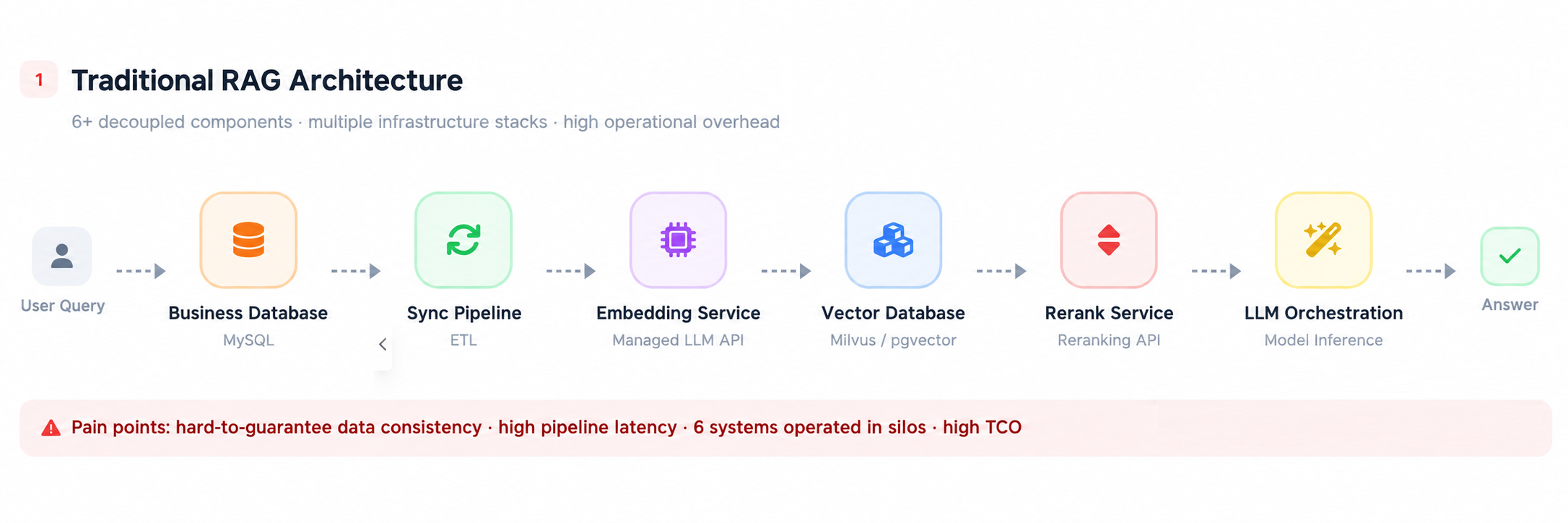
Anyone who has built RAG is familiar with this "full stack": embedding services, a vector database, synchronization tasks, rerank services, and LLM orchestration, plus the original business database. A single Q&A pipeline requires 6 components and 3 data replicas.
A few dozen lines of Python can get a prototype running. But once in production, the real costs surface: data consistency relies on synchronization tasks, troubleshooting spans 6 systems, and moving data between the vector database and the business database becomes a continuous operational burden. The more components, the larger the surface area for things to go wrong.
If your business runs on MySQL, the pain is even deeper: native MySQL has neither a vector index nor AI functions, meaning you must externalize the entire AI pipeline to build RAG.
Vectors, text, and business fields are all inherently in the database anyway, so why can't we just handle everything with a single SQL query right inside the database?
This diagram illustrates the difference:
Traditional RAG architecture: data is moved multiple times, with 6 components chained together:
PolarDB-X all-in-one architecture: vectors, full-text, scalars, and LLMs are all handled in-database:
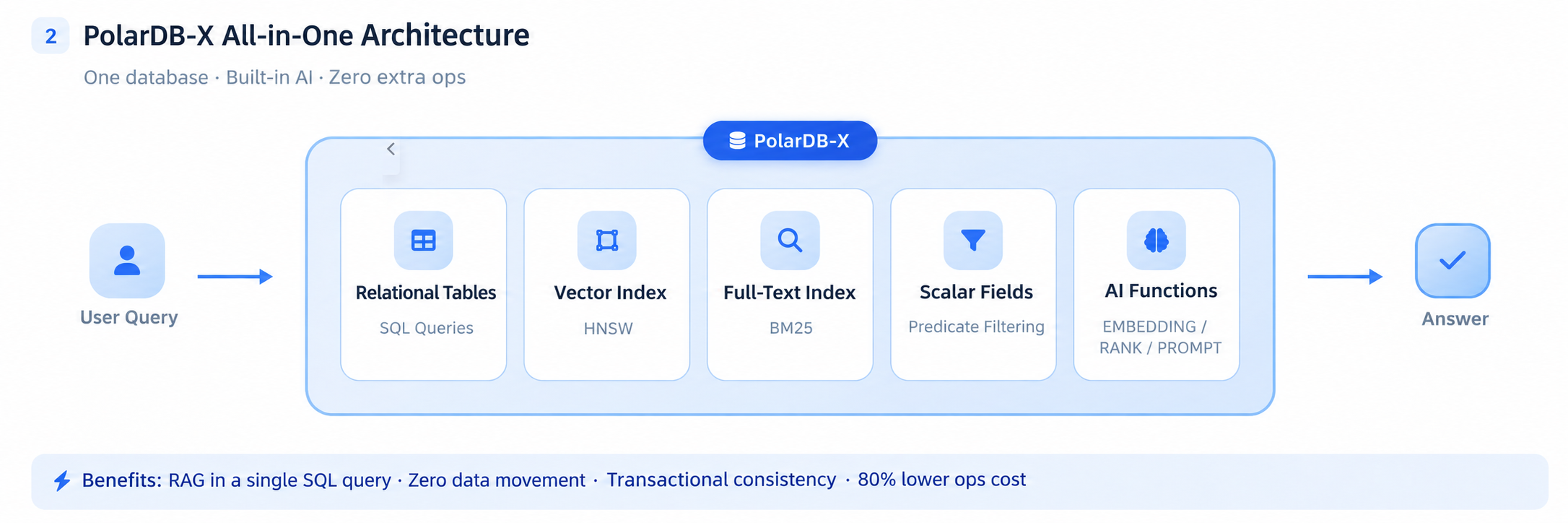
User question → PolarDB-X (relational tables · HNSW vector index · full-text index · scalar fields · AI functions) → answer. A single SQL query completes the entire pipeline of embedding, recall, reranking, and generation within the database.
PolarDB-X turns this idea into reality—combining a vector index with a set of SQL-native AI functions to run the entire RAG pipeline directly in the database:
• AI_EMBEDDING(): Text to vector
• AI_RANK(): Relevance reranking
• AI_PROMPT(): Calls an LLM to generate answers
• AI_CLASSIFY() / AI_EXTRACT(): Classification and structured extraction
• VECTOR data type + HNSW index: Native storage and nearest neighbor search for high-dimensional vectors
These capabilities are built natively into both the PolarDB-X Standard Edition and Enterprise Edition — not as paid plugins. Let’s get straight to the practical parts. All the SQL below can be copy-pasted and run directly.
5-Minute Quick Start: Table Creation and Embedding
PolarDB-X is compatible with the MySQL protocol, so you can connect using any MySQL client. The core design uses a generated column to automatically maintain vectors:
CREATE TABLE docs (
  id        INT AUTO_INCREMENT PRIMARY KEY,
  content   TEXT NOT NULL,
  emb_text  TEXT,
-- Vector column is automatically derived from emb_text, no triggers needed
  emb_vec   VECTOR(1024) GENERATED ALWAYS AS (VEC_FROMTEXT(emb_text)) STORED
) ENGINE=InnoDB;

-- HNSW vector index
ALTER TABLE docs ADD VECTOR INDEX vi_emb(emb_vec) m=16 distance=cosine;
Embedding uses a batched incremental mode, naturally supporting appending new data:
-- Write raw text first
INSERT INTO docs (content) VALUES
('PolarDB-X is a cloud-native distributed database'),
('HNSW is an efficient approximate nearest neighbor vector index algorithm'),
('RAG enhances LLM answers by retrieving external knowledge');

-- Batched embedding, repeated execution only processes new rows
UPDATE docs SET emb_text = AI_EMBEDDING(content)
WHERE emb_text IS NULL LIMIT 500;
Now the docs table has semantic search capabilities. During queries, user input is also embedded in real time within SQL, eliminating the need for the application layer to call an embedding API first:
SELECT id, content,
VEC_DISTANCE(emb_vec, VEC_FROMTEXT(AI_EMBEDDING('distributed database system'))) AS dist
FROM docs
ORDER BY dist
LIMIT 3;
Scenario 1: Two-Stage Retrieval + Generation (Complete RAG)
This is the core scenario. Use HNSW for recall to get the top 20, use AI_RANK for reranking to narrow it down to the top 5, and finally use AI_PROMPT to generate the answer.
Two-stage retrieval:
PREPARE two_stage FROM
  'SELECT id, content, AI_RANK(?, content) AS relevance
     FROM (
       SELECT id, content
       FROM docs
       ORDER BY VEC_DISTANCE(emb_vec, VEC_FROMTEXT(AI_EMBEDDING(?)))
       LIMIT 20
     ) AS candidates
   ORDER BY relevance DESC
   LIMIT 5';

SET @q = 'What is a distributed database?';
EXECUTE two_stage USING @q, @q;
Generate answers:
SELECT AI_PROMPT(CONCAT(
'Answer the question based on the following materials: What is a distributed database?

',
  (SELECT GROUP_CONCAT(content SEPARATOR '\n')
   FROM (
     SELECT content
     FROM docs
ORDER BY VEC_DISTANCE(emb_vec, VEC_FROMTEXT(AI_EMBEDDING('What is a distributed database?')))
     LIMIT 3
   ) AS top_k)
)) AS answer;
Pitfall warning: GROUP_CONCAT must be placed in a subquery to aggregate into a scalar string before concatenating it into the prompt. If the recall is empty, GROUP_CONCAT returns NULL, which causes the entire CONCAT result to be NULL, and AI_PROMPT(NULL) will throw an error. In production, it is recommended to add IFNULL as a fallback.
Scenario 2: Vector + Full-Text + Scalar Hybrid Search
Pure vector search understands intent but might miss precise terminology, while pure keyword search catches terms but lacks semantic understanding. Real-world search scenarios often require combining all three approaches.
Since business fields, the full-text index, and the vector index all reside in the same table, hybrid search is just a matter of a single SQL query:
CREATE TABLE articles (
  id        INT AUTO_INCREMENT PRIMARY KEY,
  content   TEXT NOT NULL,
  emb_text  TEXT,
  emb_vec   VECTOR(1024) GENERATED ALWAYS AS (VEC_FROMTEXT(emb_text)) STORED,
  category  VARCHAR(50),
  price     DECIMAL(10,2),
  FULLTEXT INDEX ft_content(content) WITH PARSER ngram
) ENGINE=InnoDB;

ALTER TABLE articles ADD VECTOR INDEX vi_art(emb_vec) m=16 distance=cosine;

-- Write product data and perform batch embedding
INSERT INTO articles (content, category, price) VALUES
('Thin and light office laptop, suitable for daily documents and online classes, long battery life', 'Laptop', 4299.00),
('High-performance gaming laptop, dedicated GPU, runs mainstream games smoothly', 'Laptop', 5899.00),
('Entry-level laptop, sufficient for documents and media, affordable price',     'Laptop', 3199.00);

UPDATE articles SET emb_text = AI_EMBEDDING(content) WHERE emb_text IS NULL;
Query example—a user searches for "cheap laptop that can also play games":
SELECT id, content, price,
MATCH(content) AGAINST('gaming laptop' IN BOOLEAN MODE) AS ft_score,
VEC_DISTANCE(emb_vec, VEC_FROMTEXT(AI_EMBEDDING('cheap laptop that can also play games'))) AS sem_dist
FROM articles
WHERE MATCH(content) AGAINST('gaming laptop' IN BOOLEAN MODE)
AND category = 'Laptop'
  AND price <= 6000
ORDER BY sem_dist
LIMIT 10;
Semantics handle intent understanding, full-text handles terminology hits, and scalars handle hard filtering. You cannot achieve this combination in a standalone vector database—you would have to sync business fields over or perform cross-database JOINs.
Scenario 3: Cross-Table Semantic Association—JOINs Without a Foreign Key
The first two scenarios involve single-table retrieval. However, actual business operations often present another requirement: two tables lacking a foreign key but sharing a semantic association—such as Resumes ↔ Job Descriptions, Requirement Docs ↔ Code Modules, or Product Descriptions ↔ User Reviews. Traditional approaches either involve manually creating mapping tables or writing complex fuzzy matching logic.
After embedding the text of both tables independently, a single SQL query can automatically match them based on semantic distance:
CREATE TABLE job_positions (
  id           INT AUTO_INCREMENT PRIMARY KEY,
  title        VARCHAR(200),
  requirements TEXT,
  emb_text     TEXT,
  emb_vec      VECTOR(1024) GENERATED ALWAYS AS (VEC_FROMTEXT(emb_text)) STORED
) ENGINE=InnoDB;

CREATE TABLE candidates (
  id       INT AUTO_INCREMENT PRIMARY KEY,
  name     VARCHAR(100),
  skills   TEXT,
  emb_text TEXT,
  emb_vec  VECTOR(1024) GENERATED ALWAYS AS (VEC_FROMTEXT(emb_text)) STORED
) ENGINE=InnoDB;

-- Write data and embed independently
INSERT INTO job_positions (title, requirements) VALUES
('Database kernel development', 'Proficient in C++, familiar with MySQL/PostgreSQL kernels, understands storage engines and query optimizers'),
('Frontend development',       'Familiar with React/Vue, TypeScript, has experience with large SPA projects'),
('AI algorithm engineer',   'Deep learning framework PyTorch, NLP or CV direction, has model training and deployment experience');

INSERT INTO candidates (name, skills) VALUES
('Wang Wu', '5 years of C++ development experience, participated in InnoDB storage engine optimization, familiar with B+ trees and MVCC'),
('Li Si',   '3 years of frontend experience, Vue ecosystem, has worked on e-commerce backend management systems'),
('Zhao Liu', 'Master in machine learning, proficient in PyTorch, has done text classification and Named Entity Recognition');

UPDATE job_positions SET emb_text = AI_EMBEDDING(requirements) WHERE emb_text IS NULL;
UPDATE candidates SET emb_text = AI_EMBEDDING(skills) WHERE emb_text IS NULL;
Cross-table semantic matching:
SELECT c.name AS candidate, j.title AS position,
       VEC_DISTANCE_COSINE(c.emb_vec, j.emb_vec) AS semantic_dist
FROM candidates c
CROSS JOIN job_positions j
ORDER BY semantic_dist
LIMIT 5;| candidate | position | semantic_dist |
|---|---|---|
| Wang Wu | Database kernel development | 0.214 |
| Zhao Liu | AI algorithm engineer | 0.309 |
| Li Si | Frontend development | 0.327 |
The smaller the distance, the better the match: Wang Wu automatically matches the database kernel role, Zhao Liu matches the AI algorithm role, and Li Si matches the frontend role. Without foreign keys or manual mapping tables, the association is built purely on semantic distance.
Scenario 4: One SQL Query Replaces Three Microservices
The final scenario demonstrates the combined power of AI functions. When a customer complaint comes in, traditional methods require an NLU service for extraction, an intent routing service for classification, and another LLM call to generate a reply—three microservices called sequentially. In PolarDB-X, AI_EXTRACT, AI_CLASSIFY, and AI_PROMPT are written side-by-side in the same SELECT statement, completing everything in a single query:
SELECT
  AI_EXTRACT(
    content,
'{"order_id":"Order ID","product":"Product","issue":"Issue description"}'
  ) AS extracted_fields,
  AI_CLASSIFY(
    content,
'["Refund","Exchange","Repair","Consultation"]'
  ) AS action_type,
  AI_PROMPT(CONCAT(
'You are a customer service assistant. Please generate a brief standard reply (within 30 words) for the following customer complaint:\n', content
  )) AS auto_reply
FROM tickets
WHERE status = 'pending'
LIMIT 10;
Let's test it with a real customer complaint—Input: I received the phone case I bought yesterday, but the color is wrong, order number PX20260610, I want to exchange it
| extracted_fields | action_type | auto_reply |
|---|---|---|
{"order_id":"PX20260610","product":"phone case","issue":"wrong color"} |
Exchange | Hello, we have received your exchange request and will process it as soon as possible. |
A single SQL query simultaneously completes structured extraction, intent classification, and reply generation. More importantly, the entire pipeline is executed within a database transaction. The customer complaint record, processing action, and reply content can be committed to the database in the same transaction, eliminating cross-service data consistency issues.
Practical Tips
• Use AI_RANK only for reranking: It calls the LLM and has higher latency, so restrict its use to the top 20–50 results after vector recall.
• Perform embedding in batches: WHERE emb_text IS NULL LIMIT N naturally supports incremental processing.
• Automatic maintenance via a generated column: emb_vec is automatically recalculated when emb_text is updated.
• It is normal for small datasets to bypass the index: The optimizer will choose a full table scan when the table only has a few rows. The HNSW index will only be utilized once the data volume scales up.
• Dimension alignment: AI_EMBEDDING outputs 1024 dimensions by default, which matches VECTOR(1024) during table creation.
• Enable vector functions: If creating an index throws an error, execute SET GLOBAL vidx_disabled=OFF.
Which Scenarios Yield the Highest Returns?
The core value of this solution is architecture simplification—consolidating 6 components into 1 to eliminate data movement and consistency issues. The following scenarios benefit the most:
- Business data is already in the MySQL ecosystem: There is no need to migrate data or introduce a new storage system just to build RAG. The original transaction guarantees, permission systems, and backup/recovery capabilities are all fully retained.
- Scenarios requiring hybrid queries: Vector search + full-text search + scalar filtering are completed in a single SQL query, with no need for cross-system JOINs or result merging at the application layer.
- Teams sensitive to operational complexity: Managing monitoring, scaling, and failover recovery pipelines for a single database is significantly lighter than maintaining separate pipelines for 6 different components.
- AI applications requiring transaction consistency: AI processing results and business data are committed to the database in the same transaction, eliminating any window for intermediate state inconsistencies.
Performance optimization recommendations: For high-frequency retrieval scenarios, we recommend pre-computing vectors during writes (leveraging the generated column’s automatic maintenance mechanism) and only performing nearest neighbor search during queries to avoid calling the embedding API on the online path. This way, the latency of pure vector search is determined by the HNSW index, which is in the same order of magnitude as dedicated vector engines. Batch embedding is best done with async tasks during off-peak hours.
Conclusion
PolarDB-X has turned vector search and LLM calls into built-in SQL capabilities. For businesses running on the MySQL ecosystem, this means you can implement AI features like RAG, semantic search, and intelligent classification directly within your existing database, without introducing an additional vector database or orchestration services.
The architectural benefits are tangible: components are consolidated from 6 down to 1, data movement disappears, and consistency is guaranteed by transactions rather than reconciliation via synchronization tasks. Developers write the SQL they are familiar with, and operations teams manage a unified database platform.
In-database AI is already an industry consensus direction. PolarDB-X’s differentiator lies in its native support for the MySQL ecosystem — without changing protocols, clients, or ORMs, existing applications can gain AI capabilities just by adding a few SQL queries. Both Standard Edition and Enterprise Edition include these capabilities out of the box.
Want to try it hands-on? You can refer to the PolarDB-X official documentation to explore the complete capabilities of the vector index and AI functions. If you have any real-world RAG scenarios you’d like to discuss, feel free to share them in the comments section.
Read previous post:
PolarDB-X Zero: Get an AI-Friendly Database in 30 Seconds with a Single Command
Read next post:
With PostgreSQL Firmly in Place as the Data Foundation, What Else Do Agents Need to Truly Run?

Comments
Related Products
-
 PolarDB for Xscale
Alibaba Cloud PolarDB for Xscale (PolarDB-X) is a cloud-native high-performance distributed database service independently developed by Alibaba Cloud.
Learn More -
PolarDB for MySQL
Alibaba Cloud PolarDB for MySQL is a cloud-native relational database service 100% compatible with MySQL.
Learn More -
 Vector Retrieval Service for Milvus
A cloud-native vector search engine that is 100% compatible with open-source Milvus, extensively optimized in performance, stability, availability, and management capabilities.
Learn More -
PolarDB for PostgreSQL
Alibaba Cloud PolarDB for PostgreSQL is an in-house relational database service 100% compatible with PostgreSQL and highly compatible with the Oracle syntax.
Learn More
More Posts by ApsaraDB
- With PostgreSQL Firmly in Place as the Data Foundation, What Else Do Agents Need to Truly Run?
- PolarDB-X Zero: Get an AI-Friendly Database in 30 Seconds with a Single Command
- HiCache Across Multi‑Parallelism and Distributed Serving
- How CXL 2.0 Drives the Evolution of PolarDB's Software-Hardware Co-Designed Architecture
- CloudJump III: Optimizing Cloud Databases for Tiered Storage (SIGMOD 2026)
- Highlights | Alibaba Cloud Database New Features in September 2026
- [Infographic] Highlights | Database New Features in August 2026
- The First Data Foundation of the Agent Era: What Exactly Is the PolarDB Full-Stack Data Foundation for Agents?
- MemOS × PolarDB All-in-One Memory Management Solution: Giving AI Unbroken Memory