Os objetos do OSS são privados por padrão e apenas o proprietário do arquivo pode acessá-los. No entanto, os proprietários podem gerar links compartilhados (URLs pré-assinadas) para autorizar terceiros a baixar ou visualizar arquivos específicos on-line dentro de um período de validade.

Público-alvo: usuários que precisam compartilhar um objeto (arquivo) do OSS com terceiros rapidamente e os terceiros que recebem essas URLs. Isso inclui tanto usuários iniciantes no OSS quanto usuários técnicos, como desenvolvedores e engenheiros de O&M.
Objetivo: ajudar usuários de todos os níveis a gerar URLs pré-assinadas que atendam aos seus requisitos e possam ser acessadas conforme esperado, além de auxiliar terceiros a usar essas URLs para acessar recursos.
Como funciona
A geração de URLs pré-assinadas baseia-se em criptografia de chave secreta e concatenação de parâmetros. O processo é o seguinte:
Verificação de permissão: ao gerar uma URL pré-assinada, você precisa ter a permissão
oss:GetObjectpara que terceiros consigam baixar ou visualizar arquivos com sucesso por meio dessa URL.Criptografia local: com base no AK/SK, criptografe e calcule o caminho do arquivo, o tempo de expiração e outras informações para obter uma assinatura (
x-oss-signature).Anexar assinatura: adicione parâmetros de assinatura (
x-oss-date,x-oss-expires,x-oss-credential, etc.) como strings de consulta à URL do arquivo.-
Formar o link: componha a URL pré-assinada completa.
Formato da URL pré-assinada
https://BucketName.Endpoint/Object?signature parametersExemplo completo
https://examplebucket.oss-cn-hangzhou.aliyuncs.com/exampleobject.txt?x-oss-process=image%2Fresize%2Cp_10&x-oss-date=20241115T095058Z&x-oss-expires=3600&x-oss-signature-version=OSS4-HMAC-SHA256&x-oss-credential=LTAI****************%2F20241115%2Fcn-hangzhou%2Foss%2Faliyun_v4_request&x-oss-signature=6e7a*********************************
Para obter detalhes sobre o processo de geração, consulte Signature Version 4 (Recommended).
Obter links de download de arquivos
Use o OSS default endpoint para gerar um link de download de arquivo com data de expiração (URL pré-assinada).
Usando o OSS console
Faça login no OSS Management Console, acesse a lista Files do bucket de destino, clique no arquivo desejado e, em seguida, clique em Copy File URL no painel de detalhes à direita para obter um link de download temporário com um período de validade padrão de 300 segundos (5 minutos).
Usando o Alibaba Cloud SDK
A seguir, são apresentados exemplos de código para gerar links de download de arquivos (URLs pré-assinadas) nas linguagens mais comuns.
Java
Para mais informações, consulte Download files using presigned URLs in Java.
import com.aliyun.oss.*;
import com.aliyun.oss.common.auth.*;
import com.aliyun.oss.common.comm.SignVersion;

import java.net.URL;
import java.util.Date;

public class Demo {
    public static void main(String[] args) throws Throwable {
        // This example uses the public endpoint of the China (Hangzhou) region. Specify the actual endpoint.
        String endpoint = "https://oss-cn-hangzhou.aliyuncs.com";
        // Obtain access credentials from environment variables. Before you run this code, make sure that the OSS_ACCESS_KEY_ID and OSS_ACCESS_KEY_SECRET environment variables are set.
        EnvironmentVariableCredentialsProvider credentialsProvider = CredentialsProviderFactory.newEnvironmentVariableCredentialsProvider();
        // Enter the bucket name. For example, examplebucket.
        String bucketName = "examplebucket";
        // Enter the full path of the object. For example, exampleobject.txt. The full path cannot contain the bucket name.
        String objectName = "exampleobject.txt";
        // Enter the region where the bucket is located. For example, if the bucket is in the China (Hangzhou) region, set Region to cn-hangzhou.
        String region = "cn-hangzhou";

        // Create an OSSClient instance.
        // When the OSSClient instance is no longer used, call the shutdown method to release resources.
        ClientBuilderConfiguration clientBuilderConfiguration = new ClientBuilderConfiguration();
        clientBuilderConfiguration.setSignatureVersion(SignVersion.V4);
        OSS ossClient = OSSClientBuilder.create()
                .endpoint(endpoint)
                .credentialsProvider(credentialsProvider)
                .clientConfiguration(clientBuilderConfiguration)
                .region(region)
                .build();

        try {
            // Set the expiration time of the presigned URL in milliseconds. This example sets the expiration time to one hour.
            Date expiration = new Date(new Date().getTime() + 3600 * 1000L);
            // Generate a presigned URL for a GET request. This example does not include additional request headers. Other users can directly access the content through a browser.
            URL url = ossClient.generatePresignedUrl(bucketName, objectName, expiration);
            System.out.println(url);
        } catch (OSSException oe) {
            System.out.println("Caught an OSSException, which means your request made it to OSS, "
                    + "but was rejected with an error response for some reason.");
            System.out.println("Error Message:" + oe.getErrorMessage());
            System.out.println("Error Code:" + oe.getErrorCode());
            System.out.println("Request ID:" + oe.getRequestId());
            System.out.println("Host ID:" + oe.getHostId());
        } catch (ClientException ce) {
            System.out.println("Caught an ClientException, which means the client encountered "
                    + "a serious internal problem while trying to communicate with OSS, "
                    + "such as not being able to access the network.");
            System.out.println("Error Message:" + ce.getMessage());
        } finally {
            if (ossClient != null) {
                ossClient.shutdown();
            }
        }
    }
}
Python
Para mais informações, consulte Download files using presigned URLs in Python.
import argparse
import alibabacloud_oss_v2 as oss

# Create a command-line parameter parser and describe the purpose of the script.
parser = argparse.ArgumentParser(description="presign get object sample")

# Specify the --region parameter to indicate the region in which the bucket is located. This parameter is required.
parser.add_argument('--region', help='The region in which the bucket is located.', required=True)
# Specify the --bucket parameter to indicate the name of the bucket in which the object is stored. This parameter is required.
parser.add_argument('--bucket', help='The name of the bucket.', required=True)
# Specify the --endpoint parameter to indicate the endpoint of the region in which the bucket is located. This parameter is optional.
parser.add_argument('--endpoint', help='The domain names that other services can use to access OSS')
# Specify the --key parameter to indicate the name of the object. This parameter is required.
parser.add_argument('--key', help='The name of the object.', required=True)

def main():
    # Parse the command-line parameters to obtain the specified values.
    args = parser.parse_args()

    # From the environment variables, load the authentication information required to access OSS.
    credentials_provider = oss.credentials.EnvironmentVariableCredentialsProvider()

    # Use the default configuration to create a cfg object and specify the credential provider.
    cfg = oss.config.load_default()
    cfg.credentials_provider = credentials_provider

    # Set the region attribute of the cfg object to the region provided in the command line.
    cfg.region = args.region

    # If a custom endpoint is provided, update the endpoint attribute of the cfg object with the provided endpoint.
    if args.endpoint is not None:
        cfg.endpoint = args.endpoint

    # Use the preceding settings to initialize the OSSClient instance.
    client = oss.Client(cfg)

    # Initiate a request to generate a presigned URL.
    pre_result = client.presign(
        oss.GetObjectRequest(
            bucket=args.bucket,  # Specify the bucket name.
            key=args.key,        # Specify the object key.
        )
    )

    # Display the HTTP method, expiration time, and presigned URL.
    print(f'method: {pre_result.method},'
          f' expiration: {pre_result.expiration.strftime("%Y-%m-%dT%H:%M:%S.000Z")},'
          f' url: {pre_result.url}'
    )

    # Display the signed headers.
    for key, value in pre_result.signed_headers.items():
        print(f'signed headers key: {key}, signed headers value: {value}')

# Call the main function to start the processing logic when the script is directly run.
if __name__ == "__main__":
    main()  # Specify the entry point of the script. The control flow starts here.
Go
Para mais informações, consulte Download files using presigned URLs in Go.
package main
import (
"context"
"flag"
"log"
"time"
"github.com/aliyun/alibabacloud-oss-go-sdk-v2/oss"
"github.com/aliyun/alibabacloud-oss-go-sdk-v2/oss/credentials"
)
// Define global variables.
var (
region string // The region in which the bucket is located.
bucketName string // The name of the bucket.
objectName string // The name of the object.
)
// The init function is used to initialize command-line parameters.
func init() {
flag.StringVar(®ion, "region", "", "The region in which the bucket is located.")
flag.StringVar(&bucketName, "bucket", "", "The name of the bucket.")
flag.StringVar(&objectName, "object", "", "The name of the object.")
}
func main() {
// Parse command-line parameters.
flag.Parse()
// Check whether the bucket name is empty.
if len(bucketName) == 0 {
flag.PrintDefaults()
log.Fatalf("invalid parameters, bucket name required")
}
// Check whether the region is empty.
if len(region) == 0 {
flag.PrintDefaults()
log.Fatalf("invalid parameters, region required")
}
// Check whether the object name is empty.
if len(objectName) == 0 {
flag.PrintDefaults()
log.Fatalf("invalid parameters, object name required")
}
// Load the default configurations and specify the credential provider and region.
cfg := oss.LoadDefaultConfig().
WithCredentialsProvider(credentials.NewEnvironmentVariableCredentialsProvider()).
WithRegion(region)
// Create an OSS client.
client := oss.NewClient(cfg)
// Generate a presigned URL for the GetObject request.
result, err := client.Presign(context.TODO(), &oss.GetObjectRequest{
Bucket: oss.Ptr(bucketName),
Key: oss.Ptr(objectName),
},
oss.PresignExpires(10*time.Minute),
)
if err != nil {
log.Fatalf("failed to get object presign %v", err)
}
log.Printf("request method:%v\n", result.Method)
log.Printf("request expiration:%v\n", result.Expiration)
log.Printf("request url:%v\n", result.URL)
if len(result.SignedHeaders) > 0 {
// If the returned result contains signed headers, you must include the corresponding request headers when you send a GET request using the presigned URL. Otherwise, the request may fail or a signature error may occur.
log.Printf("signed headers:\n")
for k, v := range result.SignedHeaders {
log.Printf("%v: %v\n", k, v)
}
}
}
Node.js
Para mais informações, consulte Download files using presigned URLs in Node.js.
const OSS = require("ali-oss");

// Define a function to generate a presigned URL.
async function generateSignatureUrl(fileName) {
  // Obtain the presigned URL.
  const client = await new OSS({
      // Obtain access credentials from environment variables. Before you run this code, make sure that the OSS_ACCESS_KEY_ID and OSS_ACCESS_KEY_SECRET environment variables are set.
      accessKeyId: process.env.OSS_ACCESS_KEY_ID,
      accessKeySecret: process.env.OSS_ACCESS_KEY_SECRET,
      bucket: 'examplebucket',
      // Replace yourregion with the region where the bucket is located. For example, if the bucket is in the China (Hangzhou) region, set Region to oss-cn-hangzhou.
      region: 'oss-cn-hangzhou',
      // Set secure to true to use HTTPS. This prevents the browser from blocking the generated download link.
      secure: true,
      authorizationV4: true
  });

  return await client.signatureUrlV4('GET', 3600, {
      headers: {} // Set the request headers based on the actual request headers.
  }, fileName);
}
// Call the function and pass the file name.
generateSignatureUrl('yourFileName').then(url => {
  console.log('Generated Signature URL:', url);
}).catch(err => {
  console.error('Error generating signature URL:', err);
});
PHP
Para mais informações, consulte Download files using presigned URLs in PHP.
<?php

// Import the autoloader file to ensure that dependency libraries are loaded correctly.
require_once __DIR__ . '/../../vendor/autoload.php';

use AlibabaCloud\Oss\V2 as Oss;

// Define the description for command-line arguments.
$optsdesc = [
    "region" => ['help' => 'The region in which the bucket is located.', 'required' => True], // The region where the bucket is located. (Required)
    "endpoint" => ['help' => 'The domain names that other services can use to access OSS.', 'required' => False], // The endpoint to access OSS. (Optional)
    "bucket" => ['help' => 'The name of the bucket', 'required' => True], // The bucket name. (Required)
    "key" => ['help' => 'The name of the object', 'required' => True], // The object name. (Required)
    "expire" => ['help' => 'The expiration time in seconds (default: 900)', 'required' => False], // The expiration time in seconds. (Optional, default: 900)
];

// Convert the argument descriptions to the long options format required by getopt.
// A colon ":" after each argument indicates that it requires a value.
$longopts = \array_map(function ($key) {
    return "$key:";
}, array_keys($optsdesc));

// Parse the command-line arguments.
$options = getopt("", $longopts);

// Check if all required arguments are provided.
foreach ($optsdesc as $key => $value) {
    if ($value['required'] === True && empty($options[$key])) {
        $help = $value['help']; // Get the help information for the argument.
        echo "Error: the following arguments are required: --$key, $help" . PHP_EOL;
        exit(1); // If a required argument is missing, exit the program.
    }
}

// Extract values from the parsed arguments.
$region = $options["region"]; // The region where the bucket is located.
$bucket = $options["bucket"]; // The bucket name.
$key = $options["key"];       // The object name.
$expire = isset($options["expire"]) ? (int)$options["expire"] : 900; // The expiration time. Default: 900 seconds.

// Load the credentials from environment variables.
// Use EnvironmentVariableCredentialsProvider to read the Access Key ID and Access Key Secret from environment variables.
$credentialsProvider = new Oss\Credentials\EnvironmentVariableCredentialsProvider();

// Use the default configurations of the SDK.
$cfg = Oss\Config::loadDefault();
$cfg->setCredentialsProvider($credentialsProvider); // Set the credential provider.
$cfg->setRegion($region); // Set the region where the bucket is located.
if (isset($options["endpoint"])) {
    $cfg->setEndpoint($options["endpoint"]); // If an endpoint is provided, set it.
}

try {
    // Create an OSS client instance.
    $client = new Oss\Client($cfg);

    // Create a GetObjectRequest object to download the object.
    $request = new Oss\Models\GetObjectRequest(bucket:$bucket, key:$key);

    // Call the presign method to generate a signed URL and set the expiration time.
    $result = $client->presign($request, [
        'expires' => new \DateInterval("PT{$expire}S") // PT stands for Period Time, and S stands for seconds.
    ]);

    // Output the signed URL.
    echo "Signed URL: " . $result->url . PHP_EOL;
} catch (Exception $e) {
    echo "Error: " . $e->getMessage() . PHP_EOL;
    exit(1);
}
.NET
Para mais informações, consulte Download files using presigned URLs in .NET.
using Aliyun.OSS;
using Aliyun.OSS.Common;
// Specify the endpoint of the region in which the bucket is located. For example, if the bucket is located in the China (Hangzhou) region, set the endpoint to https://oss-cn-hangzhou.aliyuncs.com.
var endpoint = "https://oss-cn-hangzhou.aliyuncs.com";
// Obtain a credential from the environment variables. Before you run the sample code, make sure that the OSS_ACCESS_KEY_ID and OSS_ACCESS_KEY_SECRET environment variables are configured.
var accessKeyId = Environment.GetEnvironmentVariable("OSS_ACCESS_KEY_ID");
var accessKeySecret = Environment.GetEnvironmentVariable("OSS_ACCESS_KEY_SECRET");
// Specify the name of the bucket. Example: examplebucket.
var bucketName = "examplebucket";
// Specify the full path of the object. The full path cannot contain the bucket name. Example: exampledir/exampleobject.txt.
var objectName = "exampledir/exampleobject.txt";
// Specify the region in which the bucket is located. For example, if the bucket is located in the China (Hangzhou) region, set the region to cn-hangzhou.
const string region = "cn-hangzhou";

// Create a ClientConfiguration instance and modify the default parameters based on your requirements.
var conf = new ClientConfiguration();

// Specify the V4 signature.
conf.SignatureVersion = SignatureVersion.V4;

// Create an OSSClient instance.
var client = new OssClient(endpoint, accessKeyId, accessKeySecret, conf);
client.SetRegion(region);
try
{
    var metadata = client.GetObjectMetadata(bucketName, objectName);
    var etag = metadata.ETag;
    // Generate a presigned URL.
    var req = new GeneratePresignedUriRequest(bucketName, objectName, SignHttpMethod.Get)
      {
        // Set the validity period of the presigned URL. Default value: 3600. Unit: seconds.
        Expiration = DateTime.UtcNow.AddHours(1),
    };
    var uri = client.GeneratePresignedUri(req);
    // Print the generated presigned URL
    Console.WriteLine("Generated Signed URL: " + uri);
}
catch (OssException ex)
{
    Console.WriteLine("Failed with error code: {0}; Error info: {1}. \nRequestID:{2}\tHostID:{3}",
        ex.ErrorCode, ex.Message, ex.RequestId, ex.HostId);
}
catch (Exception ex)
{
    Console.WriteLine("Failed with error info: {0}", ex.Message);
}
Android
Para mais informações sobre o SDK, consulte Download files using presigned URLs in Android.
// Specify the bucket name, for example, examplebucket.
String bucketName = "examplebucket";
// Specify the full path of the source object, without the bucket name, for example, exampleobject.txt.
String objectKey = "exampleobject.txt";
String url = null;
try {
    // Generate a presigned URL for downloading the file.
    GeneratePresignedUrlRequest request = new GeneratePresignedUrlRequest(bucketName, objectKey);
    // Set the expiration time of the presigned URL to 30 minutes.
    request.setExpiration(30*60);
    request.setMethod(HttpMethod.GET);
    url = oss.presignConstrainedObjectURL(request);
    Log.d("url", url);
} catch (ClientException e) {
    e.printStackTrace();
}
iOS
Para mais informações sobre o SDK, consulte Download files using presigned URLs in iOS.
// Specify the name of the bucket.
NSString *bucketName = @"examplebucket";
// Specify the name of the object.
NSString *objectKey = @"exampleobject.txt";
__block NSString *urlString;
// Generate a presigned URL with a validity period for downloading the object. In this example, the validity period of the URL is 30 minutes.
OSSTask *task = [client presignConstrainURLWithBucketName:bucketName
                                            withObjectKey:objectKey
                                               httpMethod:@"GET"
                                   withExpirationInterval:30 * 60
                                           withParameters:@{}];
[task continueWithBlock:^id _Nullable(OSSTask * _Nonnull task) {
    if (task.error) {
        NSLog(@"presign error: %@", task.error);
    } else {
        urlString = task.result;
        NSLog(@"url: %@", urlString);
    }
    return nil;
}];
C++
Para mais informações sobre o SDK, consulte Download files using presigned URLs in C++.
#include <alibabacloud/oss/OssClient.h>
using namespace AlibabaCloud::OSS;

int main(void)
{
    /* Initialize information about the account that is used to access OSS. */

    /* Specify the endpoint of the region in which the bucket is located. For example, if the bucket is located in the China (Hangzhou) region, set the endpoint to https://oss-cn-hangzhou.aliyuncs.com. */
    std::string Endpoint = "yourEndpoint";
    /* Specify the region in which the bucket is located. For example, if the bucket is located in the China (Hangzhou) region, set the region to cn-hangzhou.   * /
    std::string Region = "yourRegion";
    /* Specify the name of the bucket. Example: examplebucket. */
    std::string BucketName = "examplebucket";
    /* Specify the full path of the object. Do not include the bucket name in the full path. Example: exampledir/exampleobject.txt. */
    std::string GetobjectUrlName = "exampledir/exampleobject.txt";

    /* Initialize resources, such as network resources. */
    InitializeSdk();

    ClientConfiguration conf;
    conf.signatureVersion = SignatureVersionType::V4;
    /* Obtain access credentials from environment variables. Before you run the sample code, make sure that the OSS_ACCESS_KEY_ID and OSS_ACCESS_KEY_SECRET environment variables are configured. */
    auto credentialsProvider = std::make_shared<EnvironmentVariableCredentialsProvider>();
    OssClient client(Endpoint, credentialsProvider, conf);
    client.SetRegion(Region);

    /* Specify the validity period of the pre-signed URL. The maximum validity period is 32,400. Unit: seconds. */
    std::time_t t = std::time(nullptr) + 1200;
    /* Generate a pre-signed URL. */
    auto genOutcome = client.GeneratePresignedUrl(BucketName, GetobjectUrlName, t, Http::Get);
    if (genOutcome.isSuccess()) {
        std::cout << "GeneratePresignedUrl success, Gen url:" << genOutcome.result().c_str() << std::endl;
    }
    else {
        /* Handle exceptions. */
        std::cout << "GeneratePresignedUrl fail" <<
        ",code:" << genOutcome.error().Code() <<
        ",message:" << genOutcome.error().Message() <<
        ",requestId:" << genOutcome.error().RequestId() << std::endl;
        return -1;
    }

    /* Release resources, such as network resources. */
    ShutdownSdk();
    return 0;
}
Ruby
Para mais informações sobre o SDK, consulte Download files using presigned URLs in Ruby.
require 'aliyun/oss'

client = Aliyun::OSS::Client.new(
  # The China (Hangzhou) endpoint is used as an example. Specify the endpoint based on your actual region.
  endpoint: 'https://oss-cn-hangzhou.aliyuncs.com',
  # Obtain access credentials from environment variables. Before you run this sample code, make sure that the OSS_ACCESS_KEY_ID and OSS_ACCESS_KEY_SECRET environment variables are set.
  access_key_id: ENV['OSS_ACCESS_KEY_ID'],
  access_key_secret: ENV['OSS_ACCESS_KEY_SECRET']
)
# Specify the bucket name. For example, examplebucket.
bucket = client.get_bucket('examplebucket')

# Generate a presigned URL and set its validity period to 1 hour (3600 seconds).
puts bucket.object_url('my-object', true, 3600)
C
Para mais informações sobre o SDK, consulte Download files using presigned URLs in C.
#include "oss_api.h"
#include "aos_http_io.h"
/* Set yourEndpoint to the endpoint of the region where the bucket is located. For example, if the bucket is in the China (Hangzhou) region, set the endpoint to https://oss-cn-hangzhou.aliyuncs.com. */
const char *endpoint = "yourEndpoint";
/* Specify the bucket name. For example, examplebucket. */
const char *bucket_name = "examplebucket";
/* Specify the full path of the object. The full path cannot contain the bucket name. For example, exampledir/exampleobject.txt. */
const char *object_name = "exampledir/exampleobject.txt";
/* Specify the full path of the local file. */
const char *local_filename = "yourLocalFilename";

void init_options(oss_request_options_t *options)
{
    options->config = oss_config_create(options->pool);
    /* Initialize the aos_string_t type with a char* string. */
    aos_str_set(&options->config->endpoint, endpoint);
    /* Obtain access credentials from environment variables. Before you run this sample code, make sure that the OSS_ACCESS_KEY_ID and OSS_ACCESS_KEY_SECRET environment variables are set. */
    aos_str_set(&options->config->access_key_id, getenv("OSS_ACCESS_KEY_ID"));
    aos_str_set(&options->config->access_key_secret, getenv("OSS_ACCESS_KEY_SECRET"));
    /* Specify whether to use a CNAME to access OSS. A value of 0 indicates that a CNAME is not used. */
    options->config->is_cname = 0;
    /* Set network parameters, such as the timeout period. */
    options->ctl = aos_http_controller_create(options->pool, 0);
}
int main(int argc, char *argv[])
{
    /* Call the aos_http_io_initialize method at the program entry to initialize global resources, such as the network and memory. */
    if (aos_http_io_initialize(NULL, 0) != AOSE_OK) {
        exit(1);
    }
    /* The memory pool (pool) for memory management, which is equivalent to apr_pool_t. Its implementation code is in the APR library. */
    aos_pool_t *pool;
    /* Create a new memory pool. The second parameter is NULL, which indicates that the pool does not inherit from other memory pools. */
    aos_pool_create(&pool, NULL);
    /* Create and initialize options. This parameter includes global configuration information, such as endpoint, access_key_id, access_key_secret, is_cname, and curl. */
    oss_request_options_t *oss_client_options;
    /* Allocate memory for options in the memory pool. */
    oss_client_options = oss_request_options_create(pool);
    /* Initialize the client option oss_client_options. */
    init_options(oss_client_options);
    /* Initialize parameters. */
    aos_string_t bucket;
    aos_string_t object;
    aos_string_t file;
    aos_http_request_t *req;
    apr_time_t now;
    char *url_str;
    aos_string_t url;
    int64_t expire_time;
    int one_hour = 3600;
    aos_str_set(&bucket, bucket_name);
    aos_str_set(&object, object_name);
    aos_str_set(&file, local_filename);
    expire_time = now / 1000000 + one_hour;
    req = aos_http_request_create(pool);
    req->method = HTTP_GET;
    now = apr_time_now();
    /* Unit: microseconds. */
    expire_time = now / 1000000 + one_hour;
    /* Generate a presigned URL. */
    url_str = oss_gen_signed_url(oss_client_options, &bucket, &object, expire_time, req);
    aos_str_set(&url, url_str);
    printf("Temporary download URL: %s\n", url_str);
    /* Release the memory pool. This is equivalent to releasing the memory allocated for various resources during the request. */
    aos_pool_destroy(pool);
    /* Release the previously allocated global resources. */
    aos_http_io_deinitialize();
    return 0;
}
O exemplo da URL pré-assinada gerada é o seguinte:
https://examplebucket.oss-cn-hangzhou.aliyuncs.com/exampleobject.txt?x-oss-process=image%2Fresize%2Cp_10&x-oss-date=20241115T095058Z&x-oss-expires=3600&x-oss-signature-version=OSS4-HMAC-SHA256&x-oss-credential=LTAI****************%2F20241115%2Fcn-hangzhou%2Foss%2Faliyun_v4_request&x-oss-signature=6e7a*********************************************Usando a ferramenta de linha de comando ossutil
Para o objeto example.txt no bucket examplebucket, gere um link de download de arquivo (URL pré-assinada) com um período de validade padrão de 15 minutos usando o seguinte comando.
ossutil presign oss://examplebucket/example.txtPara mais exemplos de uso do ossutil na geração de URLs pré-assinadas, consulte presign (Generate presigned URLs).
Usando a ferramenta de gerenciamento gráfico ossbrowser
O ossbrowser suporta operações no nível de objeto semelhantes às suportadas pelo console. Siga a interface do ossbrowser para concluir a operação de obtenção de uma URL pré-assinada. Para obter informações sobre como usar o ossbrowser, consulte 常用操作.
Obter links de visualização on-line para arquivos
Para gerar links que suportem visualização on-line (URLs pré-assinadas), você deve primeiro attach a custom domain name. Após anexar o nome de domínio personalizado, use-o para gerar URLs pré-assinadas.
Usar o OSS console
Faça login no OSS console.
No painel de navegação à esquerda, clique em Buckets. Na página Buckets, clique no nome do bucket.
Na árvore de navegação à esquerda, escolha .
Na página Objects, clique no nome do objeto.
-
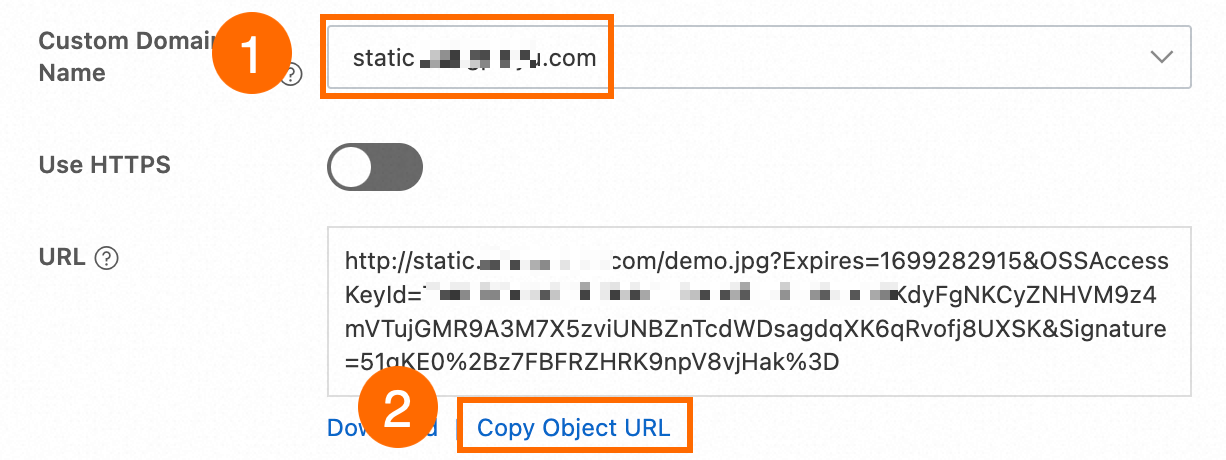
No painel View Details, selecione o nome de domínio personalizado mapeado para o bucket no campo Custom Domain Name, mantenha as configurações padrão para os outros parâmetros e clique em Copy Object URL.
Usar o ossbrowser
Você pode usar o ossbrowser para realizar as mesmas operações no nível de objeto disponíveis no OSS console. Siga as instruções na tela do ossbrowser para obter uma URL pré-assinada. Para obter informações sobre como baixar o ossbrowser, consulte ossbrowser 1.0.
-
Use o nome de domínio personalizado para fazer login no ossbrowser.
-
Obtenha a URL do objeto.
Usar OSS SDKs
Use o nome de domínio personalizado para criar uma instância OssClient e gerar uma URL pré-assinada.
Java
import com.aliyun.oss.*;
import com.aliyun.oss.common.auth.*;
import com.aliyun.oss.common.comm.SignVersion;
import com.aliyun.oss.model.GeneratePresignedUrlRequest;

import java.net.URL;
import java.util.Date;

public class Demo {
    public static void main(String[] args) throws Throwable {
        // Set yourCustomEndpoint to your custom domain name. For example, http://static.example.com.
        String endpoint = "yourCustomEndpoint";
        // Enter the region information of your bucket, for example, cn-hangzhou.
        String region = "cn-hangzhou";
        // Enter the bucket name. For example, examplebucket.
        String bucketName = "examplebucket";
        // Enter the full path of the object. For example, exampleobject.txt. The full path cannot contain the bucket name.
        String objectName = "exampleobject.txt";

        // Obtain access credentials from environment variables. Before you run this code, configure the environment variables.
        EnvironmentVariableCredentialsProvider credentialsProvider = CredentialsProviderFactory.newEnvironmentVariableCredentialsProvider();

        // Create an OSSClient instance.
        // When the OSSClient instance is no longer used, call the shutdown method to release resources.
        ClientBuilderConfiguration clientBuilderConfiguration = new ClientBuilderConfiguration();
        // Note: Set this to true to enable the CNAME option.
        clientBuilderConfiguration.setSupportCname(true);
        // Explicitly declare the use of the V4 signature algorithm.
        clientBuilderConfiguration.setSignatureVersion(SignVersion.V4);
        OSS ossClient = OSSClientBuilder.create()
                .endpoint(endpoint)
                .credentialsProvider(credentialsProvider)
                .clientConfiguration(clientBuilderConfiguration)
                .region(region)
                .build();

        try {
            // Set the expiration time of the generated presigned URL in milliseconds. This example sets the expiration time to one hour.
            Date expiration = new Date(new Date().getTime() + 3600 * 1000L);

            // Generate a presigned URL.
            GeneratePresignedUrlRequest request = new GeneratePresignedUrlRequest(bucketName, objectName, HttpMethod.GET);

            // Set the expiration time.
            request.setExpiration(expiration);

            // Generate a presigned URL for an HTTP GET request.
            URL signedUrl = ossClient.generatePresignedUrl(request);
            // Print the presigned URL.
            System.out.println("signed url for getObject: " + signedUrl);
        } catch (OSSException oe) {
            System.out.println("Caught an OSSException, which means your request made it to OSS, "
                    + "but was rejected with an error response for some reason.");
            System.out.println("Error Message:" + oe.getErrorMessage());
            System.out.println("Error Code:" + oe.getErrorCode());
            System.out.println("Request ID:" + oe.getRequestId());
            System.out.println("Host ID:" + oe.getHostId());
        } catch (ClientException ce) {
            System.out.println("Caught an ClientException, which means the client encountered "
                    + "a serious internal problem while trying to communicate with OSS, "
                    + "such as not being able to access the network.");
            System.out.println("Error Message:" + ce.getMessage());
        } finally {
            if (ossClient != null) {
                ossClient.shutdown();
            }
        }
    }
}
PHP
<?php

// Import the autoloader file to ensure that dependency libraries are loaded correctly.
require_once __DIR__ . '/../vendor/autoload.php';

use AlibabaCloud\Oss\V2 as Oss;

// Define the description for command-line arguments.
$optsdesc = [
    "region" => ['help' => 'The region in which the bucket is located.', 'required' => True], // The region where the bucket is located. (Required)
    "endpoint" => ['help' => 'The domain names that other services can use to access OSS.', 'required' => False], // The endpoint to access OSS. (Optional)
    "bucket" => ['help' => 'The name of the bucket', 'required' => True], // The bucket name. (Required)
    "key" => ['help' => 'The name of the object', 'required' => True], // The object name. (Required)
];

// Convert the argument descriptions to the long options format required by getopt.
// A colon ":" after each argument indicates that it requires a value.
$longopts = \array_map(function ($key) {
    return "$key:";
}, array_keys($optsdesc));

// Parse the command-line arguments.
$options = getopt("", $longopts);

// Check if all required arguments are provided.
foreach ($optsdesc as $key => $value) {
    if ($value['required'] === True && empty($options[$key])) {
        $help = $value['help']; // Get the help information for the argument.
        echo "Error: the following arguments are required: --$key, $help" . PHP_EOL;
        exit(1); // If a required argument is missing, exit the program.
    }
}

// Extract values from the parsed arguments.
$region = $options["region"]; // The region where the bucket is located.
$bucket = $options["bucket"]; // The bucket name.
$key = $options["key"];       // The object name.

// Load the credentials from environment variables.
// Use EnvironmentVariableCredentialsProvider to read the Access Key ID and Access Key Secret from environment variables.
$credentialsProvider = new Oss\Credentials\EnvironmentVariableCredentialsProvider();

// Use the default configurations of the SDK.
$cfg = Oss\Config::loadDefault();
$cfg->setCredentialsProvider($credentialsProvider); // Set the credential provider.
$cfg->setRegion($region); // Set the region where the bucket is located.
$cfg->setEndpoint(endpoint: "http://static.example.com"); // Set this to your custom endpoint.
$cfg->setUseCname(true); // Set to use a CNAME.

// Create an OSS client instance.
$client = new Oss\Client($cfg);

// Create a GetObjectRequest object to download the object.
$request = new Oss\Models\GetObjectRequest(bucket:$bucket, key:$key);

// Call the presign method to generate a signed URL.
$result = $client->presign($request);

// Print the presign result.
// Output the signed URL, which users can use directly to download the object.
print(
    'get object presign result:' . var_export($result, true) . PHP_EOL . // Detailed information about the presign result.
    'get object url:' . $result->url . PHP_EOL                           // The signed URL for directly downloading the object.
);
Node.js
const OSS = require("ali-oss");

// Define a function to generate a presigned URL.
async function generateSignatureUrl(fileName) {
  // Obtain the presigned URL.
  const client = await new OSS({
      // Use a custom domain name as the endpoint.
      endpoint: 'http://static.example.com',
      // Obtain access credentials from environment variables. Before you run this code, make sure that the OSS_ACCESS_KEY_ID and OSS_ACCESS_KEY_SECRET environment variables are set.
      accessKeyId: process.env.OSS_ACCESS_KEY_ID,
      accessKeySecret: process.env.OSS_ACCESS_KEY_SECRET,
      bucket: 'examplebucket',
      // Replace yourregion with the region where the bucket is located. For example, if the bucket is in the China (Hangzhou) region, set Region to oss-cn-hangzhou.
      region: 'oss-cn-hangzhou',
      authorizationV4: true,
      cname: true
  });

  return await client.signatureUrlV4('GET', 3600, {
      headers: {} // Set the request headers based on the actual request headers.
  }, fileName);
}
// Call the function and pass the file name.
generateSignatureUrl('yourFileName').then(url => {
  console.log('Generated Signature URL:', url);
}).catch(err => {
  console.error('Error generating signature URL:', err);
});
Python
import argparse
import alibabacloud_oss_v2 as oss

# Create a command-line parameter parser and describe the purpose of the script.
parser = argparse.ArgumentParser(description="presign get object sample")

# Specify the --region parameter to indicate the region in which the bucket is located. This parameter is required.
parser.add_argument('--region', help='The region in which the bucket is located.', required=True)
# Specify the --bucket parameter to indicate the name of the bucket in which the object is stored. This parameter is required.
parser.add_argument('--bucket', help='The name of the bucket.', required=True)
# Specify the --endpoint parameter to indicate the endpoint of the region in which the bucket is located. This parameter is optional.
parser.add_argument('--endpoint', help='The domain names that other services can use to access OSS')
# Specify the --key parameter to indicate the name of the object. This parameter is required.
parser.add_argument('--key', help='The name of the object.', required=True)

def main():
    # Parse the command-line parameters to obtain the specified values.
    args = parser.parse_args()

    # From the environment variables, load the authentication information required to access OSS.
    credentials_provider = oss.credentials.EnvironmentVariableCredentialsProvider()

    # Use the default configuration to create a cfg object and specify the credential provider.
    cfg = oss.config.load_default()
    cfg.credentials_provider = credentials_provider

    # Specify the region attribute of the configuration object based on the command line parameters specified by the user.
    cfg.region = args.region

    # Specify the custom endpoint. Example: http://static.example.com
    cfg.endpoint = "http://static.example.com"

    # Enable CNAME record resolution.
    cfg.use_cname = True

    # Use the preceding settings to initialize the OSSClient instance.
    client = oss.Client(cfg)

    # Initiate a request to generate a presigned URL.
    pre_result = client.presign(
        oss.GetObjectRequest(
            bucket=args.bucket,  # Specify the bucket name.
            key=args.key,        # Specify the object key.
        )
    )

    # Display the HTTP method, expiration time, and presigned URL.
    print(f'method: {pre_result.method},'
          f' expiration: {pre_result.expiration.strftime("%Y-%m-%dT%H:%M:%S.000Z")},'
          f' url: {pre_result.url}'
    )

    # Display the signed headers.
    for key, value in pre_result.signed_headers.items():
        print(f'signed headers key: {key}, signed headers value: {value}')

# Call the main function to start the processing logic when the script is directly run.
if __name__ == "__main__":
    main()  # Specify the entry point of the script. The control flow starts here.
Go
package main
import (
"context"
"flag"
"log"
"time"
"github.com/aliyun/alibabacloud-oss-go-sdk-v2/oss"
"github.com/aliyun/alibabacloud-oss-go-sdk-v2/oss/credentials"
)
// Define global variables.
var (
region string // The region in which the bucket is located.
bucketName string // The name of the bucket.
objectName string // The name of the object.
)
// The init function is used to initialize command-line parameters.
func init() {
flag.StringVar(®ion, "region", "", "The region in which the bucket is located.")
flag.StringVar(&bucketName, "bucket", "", "The name of the bucket.")
flag.StringVar(&objectName, "object", "", "The name of the object.")
}
func main() {
// Parse command-line parameters.
flag.Parse()
// Check whether the bucket name is empty.
if len(bucketName) == 0 {
flag.PrintDefaults()
log.Fatalf("invalid parameters, bucket name required")
}
// Check whether the region is empty.
if len(region) == 0 {
flag.PrintDefaults()
log.Fatalf("invalid parameters, region required")
}
// Check whether the object name is empty.
if len(objectName) == 0 {
flag.PrintDefaults()
log.Fatalf("invalid parameters, object name required")
}
// Load the default configurations and specify the credential provider and region.
cfg := oss.LoadDefaultConfig().
WithCredentialsProvider(credentials.NewEnvironmentVariableCredentialsProvider()).
WithRegion(region).
WithEndpoint("http://static.example.com").
WithUseCName(true)
// Create an OSS client.
client := oss.NewClient(cfg)
// Generate a presigned URL for the GetObject request.
result, err := client.Presign(context.TODO(), &oss.GetObjectRequest{
Bucket: oss.Ptr(bucketName),
Key: oss.Ptr(objectName),
//RequestPayer: oss.Ptr("requester"), // Specify the identity of the requester.
},
oss.PresignExpires(10*time.Minute),
)
if err != nil {
log.Fatalf("failed to get object presign %v", err)
}
log.Printf("request method:%v\n", result.Method)
log.Printf("request expiration:%v\n", result.Expiration)
log.Printf("request url:%v\n", result.URL)
if len(result.SignedHeaders) > 0 {
// If you specify request headers when you generate a presigned URL that allows HTTP GET requests, make sure that the request headers are included in the GET request initiated using the presigned URL. This prevents request failures and signature errors.
log.Printf("signed headers:\n")
for k, v := range result.SignedHeaders {
log.Printf("%v: %v\n", k, v)
}
}
}Usar o ossutil
Use o nome de domínio personalizado para gerar uma URL pré-assinada para um objeto executando o comando presign (generate signed URL).
ossutil presign oss://examplebucket/exampleobject.txt --endpoint "http://static.example.com” --addressing-style "cname"Para permitir que o comando ossutil use automaticamente um nome de domínio personalizado, em vez de especificá-lo manualmente a cada vez, adicione o nome de domínio personalizado ao configuration file.
Se o link ainda não puder ser visualizado, verifique as seguintes configurações.
-
O
Content-Typeestá definido adequadamente?Se o
Content-Typedo arquivo não corresponder ao seu tipo real, o navegador poderá não identificar e renderizar o conteúdo corretamente, fazendo com que o arquivo seja baixado como anexo. Verifique How to set Content-Type (MIME)? para confirmar se a extensão do nome do arquivo corresponde aoContent-Type. Se não houver correspondência, consulte Manage object metadata para métodos de modificação doContent-Typedo arquivo. -
O
Content-Dispositionestá definido comoinline?Se o Content-Disposition do arquivo estiver definido como
attachment, o navegador forçará o download do arquivo. Consulte Manage object metadata para métodos de modificação parainlinepara suportar visualização. -
O cache do CDN foi atualizado?
Se você não estiver usando aceleração de CDN, ignore este item.
Se você usar o CDN para acessar recursos do OSS, precisará atualizar o cache do CDN após modificar os metadados do arquivo. Caso contrário, a configuração antiga ainda poderá ser lida, impedindo que a visualização tenha efeito.
Obter um link de download forçado para um arquivo
Se o link atual (URL pré-assinada) abrir diretamente para visualização no navegador, mas você desejar que ele seja baixado, use os seguintes métodos. O Método 1 tem prioridade maior que o Método 2.
Método 1: Download forçado único
Isso se aplica apenas ao link gerado atualmente. Implemente isso definindo o parâmetro response-content-disposition como attachment ao gerar a URL.
Java
Importe a classe GeneratePresignedUrlRequest.
import com.aliyun.oss.model.GeneratePresignedUrlRequest;Use o método GeneratePresignedUrlRequest e defina o cabeçalho de resposta response-content-disposition como attachment.
// Build a presigned URL for GET request
GeneratePresignedUrlRequest request = new GeneratePresignedUrlRequest(
    bucketName, objectName, HttpMethod.GET);

// Set forced download
request.getResponseHeaders().setContentDisposition("attachment");
Python
Adicione o parâmetro response_content_disposition em GetObjectRequest e defina seu valor como attachment.
    # Generate a presigned GET request
    pre_result = client.presign(
        oss.GetObjectRequest(
            bucket=args.bucket,  # Specify the bucket name
            key=args.key,        # Specify the object key
            response_content_disposition="attachment",# Set to forced download
        )
    )
Go
Adicione o parâmetro ResponseContentDisposition em GetObjectRequest e defina seu valor como attachment.
// Generate a presigned GET request with forced download behavior
result, err := client.Presign(context.TODO(), &oss.GetObjectRequest{
    Bucket:                     oss.Ptr(bucketName),
    Key:                        oss.Ptr(objectName),
    ResponseContentDisposition: oss.Ptr("attachment"), // Set to forced download
})Método 2: Configuração universal de download forçado (via metadados)
Após definir isso uma vez, todo acesso ao arquivo será forçado a baixar. Isso é implementado modificando o campo Content-Disposition nos metadados do arquivo.
Usando o OSS console
No OSS Management Console, localize o arquivo de destino, clique em Set File Metadata no painel de detalhes do arquivo, defina Content-Disposition como attachment e clique em OK para salvar.
Além das operações no console, você também pode consultar Manage file metadata para definir esse campo usando o SDK ou a interface de linha de comando ossutil.
Se você também quiser personalizar o nome do arquivo exibido durante o download, consulte Customize the file name during download.
Obter links para versões específicas de arquivos
Gere links (URLs pré-assinadas) para versões específicas de arquivos, aplicável a buckets com versioning ativado.
Usando o OSS console
-
Faça login no OSS Management Console, acesse a aba Files do bucket de destino e alterne Historical Version para Show no canto superior direito da página.

-
Localize o arquivo de destino, clique no nome do arquivo da versão histórica desejada e Copy a URL deste arquivo de versão na página de detalhes.

Usando o Alibaba Cloud SDK
Java
Adicione o seguinte código-chave:
// 1. Define the version ID variable
String versionId = "CAEQARiBgID8rumR2hYiIGUyOTAyZGY2MzU5MjQ5ZjlhYzQzZjNlYTAyZDE3****";

// 2. Create a query parameter Map
Map<String, String> queryParam = new HashMap<String, String>();
queryParam.put("versionId", versionId);

// 3. Add the version ID parameter to the request
request.setQueryParameter(queryParam);
Python
Adicione o parâmetro version_id a GetObjectRequest.
pre_result = client.presign(
    oss.GetObjectRequest(
        bucket=bucket_name,
        key=object_name,
        version_id='CAEQARiBgID8rumR2hYiIGUyOTAyZGY2MzU5MjQ5ZjlhYzQzZjNlYTAyZDE3****'  # Set the VersionId parameter
    )
)
Go
Adicione o campo VersionId a GetObjectRequest.
result, err := client.Presign(context.TODO(), &oss.GetObjectRequest{
    Bucket:    oss.Ptr(bucketName),
    Key:       oss.Ptr(objectName),
    VersionId: oss.Ptr("CAEQARiBgID8rumR2hYiIGUyOTAyZGY2MzU5MjQ5ZjlhYzQzZjNlYTAyZDE7****"), // Set VersionId
}, oss.PresignExpires(10*time.Minute))
Node.js
Adicione o parâmetro queries a signatureUrlV4.
const signedUrl = await client.signatureUrlV4('GET', 3600, {
  queries: {
    "versionId": 'CAEQARiBgID8rumR2hYiIGUyOTAyZGY2MzU5MjQ5ZjlhYzQzZjNlYTAyZDE7****'  // Add versionId parameter
  }
}, objectName);
PHP
Em GetObjectRequest, adicione o parâmetro versionId.
// Add specific version parameter
$versionId = "yourVersionId"; // Replace with actual version number
$request = new Oss\Models\GetObjectRequest(bucket:$bucket, key:$key, versionId:$versionId);Usando o ossutil
Gere uma URL pré-assinada para o objeto example.txt com ID de versão 123 no bucket examplebucket.
ossutil presign oss://examplebucket/example.txt --version-id 123Gerar links de arquivos em lote
Recomenda-se usar a interface de linha de comando ossutil, que pode gerar links em lote para arquivos em uma pasta inteira.
Usar a interface de linha de comando ossutil
-
Gere URLs pré-assinadas com um período de validade padrão de 15 minutos para todos os arquivos no diretório folder do bucket examplebucke.
ossutil presign oss://examplebucket/folder/ -r -
Gere URLs pré-assinadas com um período de validade padrão de 15 minutos para arquivos com a extensão .txt no diretório folder do bucket examplebucket.
ossutil presign oss://examplebucket/folder/ -r --include "*.txt" -
Gere URLs pré-assinadas com um período de validade padrão de 15 minutos para todos os arquivos no bucket examplebucket.
ossutil presign oss://examplebucket/ -r
Para mais informações sobre como gerar URLs pré-assinadas usando o ossutil, consulte presign (Generate presigned URLs).
Usar o OSS console
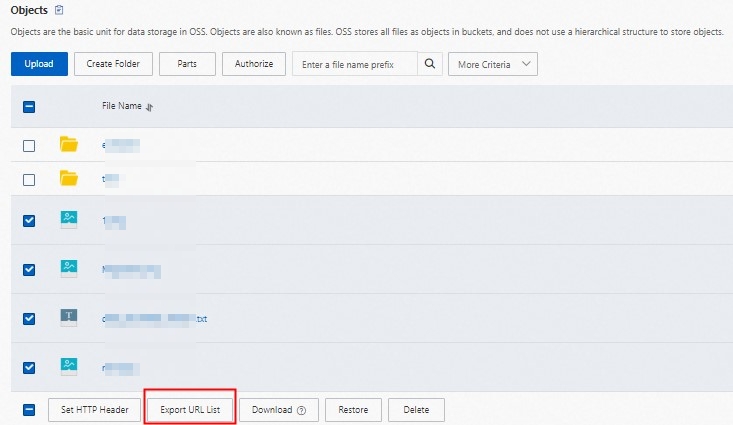
Você só pode exportar URLs pré-assinadas para arquivos no diretório atual. Não é possível exportar URLs pré-assinadas para arquivos em subdiretórios.
Selecione o arquivo de objeto e clique em Export URL List abaixo.
-
No painel de configuração exibido, os parâmetros padrão são adequados para a maioria dos cenários e podem ser usados sem modificação.
Clique em OK para baixar e salvar o arquivo de lista de URLs gerado.
Usar o Alibaba Cloud SDK
Use a operação GetBucket (ListObjects) para obter todos os nomes de objetos e, em seguida, gere URLs pré-assinadas para cada objeto.
Personalizar o nome do arquivo de download
Com base nos downloads forçados, você pode especificar ainda mais o nome do arquivo que os usuários veem ao salvar arquivos. O Método 1 tem prioridade maior que o Método 2.
Método 1: Definir o nome do arquivo de download para uma única solicitação
Especifique um nome de arquivo de download para uma única URL pré-assinada. Basta adicionar o parâmetro response-content-disposition definido como attachment e incluir o parâmetro filename.
Java
Defina o parâmetro response-content-disposition.
// Set the file name displayed when the client downloads, using "test.txt" as an example
String filename = "test.txt";
request.getResponseHeaders().setContentDisposition("attachment;filename=" + URLEncoder.encode(filename,"UTF-8"));
Python
Use o parâmetro response_content_disposition para personalizar o nome do arquivo de download como test.txt.
    # Generate a presigned GET request
    pre_result = client.presign(
        oss.GetObjectRequest(
            bucket=args.bucket,  # Specify the bucket name
            key=args.key,        # Specify the object key
            response_content_disposition="attachment;filename=test.txt",# Set the file name displayed when the client downloads, in this case "test.txt"
        )
    )
Go
Use o parâmetro ResponseContentDisposition para personalizar o nome do arquivo de download como test.txt.
// Generate a presigned GET request with forced download behavior
result, err := client.Presign(context.TODO(), &oss.GetObjectRequest{
    Bucket:                     oss.Ptr(bucketName),
    Key:                        oss.Ptr(objectName),
    ResponseContentDisposition: oss.Ptr("attachment;filename=test.txt"),//Set the file name displayed when the client downloads, in this case "test.txt"
})
Método 2: Configuração universal (através de metadados)
Modifique os metadados para definir um nome de download padrão unificado para todos os acessos. Isso é implementado modificando o campo Content-Disposition nos metadados do arquivo para attachment; filename="yourFileName", onde yourFileName é o seu nome de arquivo personalizado, como example.jpg.
Definir o período de validade de um link
O período de validade de um link (URL pré-assinada) é definido quando ele é gerado e não pode ser modificado posteriormente. O link pode ser acessado várias vezes durante seu período de validade e torna-se inválido após a expiração.
Diferentes métodos de geração suportam diferentes períodos máximos de validade. Exceder o limite causará falha na geração ou exceções de acesso.
Usando o OSS console
Faça login no OSS Management Console, acesse a lista Files do bucket de destino, clique no arquivo alvo e defina o período de validade do link em Expiration Time no painel de detalhes à direita.
Usando o Alibaba Cloud SDK
Você precisa ter a permissão oss:GetObject para que terceiros baixem arquivos com sucesso através da URL pré-assinada. Para operações de autorização específicas, consulte Grant custom permissions to RAM users. Após a geração, você pode enviar o link para terceiros que precisam acessar o arquivo.
Você pode definir o tempo de expiração da URL pré-assinada modificando a expiração no código.
Java
Para mais informações sobre o SDK, consulte Download objects using presigned URLs in Java.
import com.aliyun.oss.*;
import com.aliyun.oss.common.auth.*;
import com.aliyun.oss.common.comm.SignVersion;

import java.net.URL;
import java.util.Date;

public class Demo {
    public static void main(String[] args) throws Throwable {
        // This example uses the public endpoint of the China (Hangzhou) region. Specify the actual endpoint.
        String endpoint = "https://oss-cn-hangzhou.aliyuncs.com";
        // Obtain access credentials from environment variables. Before you run this code, make sure that the OSS_ACCESS_KEY_ID and OSS_ACCESS_KEY_SECRET environment variables are set.
        EnvironmentVariableCredentialsProvider credentialsProvider = CredentialsProviderFactory.newEnvironmentVariableCredentialsProvider();
        // Enter the bucket name. For example, examplebucket.
        String bucketName = "examplebucket";
        // Enter the full path of the object. For example, exampleobject.txt. The full path cannot contain the bucket name.
        String objectName = "exampleobject.txt";
        // Enter the region where the bucket is located. For example, if the bucket is in the China (Hangzhou) region, set Region to cn-hangzhou.
        String region = "cn-hangzhou";

        // Create an OSSClient instance.
        // When the OSSClient instance is no longer used, call the shutdown method to release resources.
        ClientBuilderConfiguration clientBuilderConfiguration = new ClientBuilderConfiguration();
        clientBuilderConfiguration.setSignatureVersion(SignVersion.V4);
        OSS ossClient = OSSClientBuilder.create()
                .endpoint(endpoint)
                .credentialsProvider(credentialsProvider)
                .clientConfiguration(clientBuilderConfiguration)
                .region(region)
                .build();

        try {
            // Set the expiration time of the presigned URL in milliseconds. This example sets the expiration time to one hour.
            Date expiration = new Date(new Date().getTime() + 3600 * 1000L);
            // Generate a presigned URL for a GET request. This example does not include additional request headers. Other users can directly access the content through a browser.
            URL url = ossClient.generatePresignedUrl(bucketName, objectName, expiration);
            System.out.println(url);
        } catch (OSSException oe) {
            System.out.println("Caught an OSSException, which means your request made it to OSS, "
                    + "but was rejected with an error response for some reason.");
            System.out.println("Error Message:" + oe.getErrorMessage());
            System.out.println("Error Code:" + oe.getErrorCode());
            System.out.println("Request ID:" + oe.getRequestId());
            System.out.println("Host ID:" + oe.getHostId());
        } catch (ClientException ce) {
            System.out.println("Caught an ClientException, which means the client encountered "
                    + "a serious internal problem while trying to communicate with OSS, "
                    + "such as not being able to access the network.");
            System.out.println("Error Message:" + ce.getMessage());
        } finally {
            if (ossClient != null) {
                ossClient.shutdown();
            }
        }
    }
}
Python
Para mais informações sobre o SDK, consulte Download objects using presigned URLs in Python.
import argparse
import alibabacloud_oss_v2 as oss

# Create a command-line parameter parser and describe the purpose of the script.
parser = argparse.ArgumentParser(description="presign get object sample")

# Specify the --region parameter to indicate the region in which the bucket is located. This parameter is required.
parser.add_argument('--region', help='The region in which the bucket is located.', required=True)
# Specify the --bucket parameter to indicate the name of the bucket in which the object is stored. This parameter is required.
parser.add_argument('--bucket', help='The name of the bucket.', required=True)
# Specify the --endpoint parameter to indicate the endpoint of the region in which the bucket is located. This parameter is optional.
parser.add_argument('--endpoint', help='The domain names that other services can use to access OSS')
# Specify the --key parameter to indicate the name of the object. This parameter is required.
parser.add_argument('--key', help='The name of the object.', required=True)

def main():
    # Parse the command-line parameters to obtain the specified values.
    args = parser.parse_args()

    # From the environment variables, load the authentication information required to access OSS.
    credentials_provider = oss.credentials.EnvironmentVariableCredentialsProvider()

    # Use the default configuration to create a cfg object and specify the credential provider.
    cfg = oss.config.load_default()
    cfg.credentials_provider = credentials_provider

    # Set the region attribute of the cfg object to the region provided in the command line.
    cfg.region = args.region

    # If a custom endpoint is provided, update the endpoint attribute of the cfg object with the provided endpoint.
    if args.endpoint is not None:
        cfg.endpoint = args.endpoint

    # Use the preceding settings to initialize the OSSClient instance.
    client = oss.Client(cfg)

    # Initiate a request to generate a presigned URL.
    pre_result = client.presign(
        oss.GetObjectRequest(
            bucket=args.bucket,  # Specify the bucket name.
            key=args.key,        # Specify the object key.
        )
    )

    # Display the HTTP method, expiration time, and presigned URL.
    print(f'method: {pre_result.method},'
          f' expiration: {pre_result.expiration.strftime("%Y-%m-%dT%H:%M:%S.000Z")},'
          f' url: {pre_result.url}'
    )

    # Display the signed headers.
    for key, value in pre_result.signed_headers.items():
        print(f'signed headers key: {key}, signed headers value: {value}')

# Call the main function to start the processing logic when the script is directly run.
if __name__ == "__main__":
    main()  # Specify the entry point of the script. The control flow starts here.
Go
Para mais informações sobre o SDK, consulte Download objects using presigned URLs in Go.
package main
import (
"context"
"flag"
"log"
"time"
"github.com/aliyun/alibabacloud-oss-go-sdk-v2/oss"
"github.com/aliyun/alibabacloud-oss-go-sdk-v2/oss/credentials"
)
// Define global variables.
var (
region string // The region in which the bucket is located.
bucketName string // The name of the bucket.
objectName string // The name of the object.
)
// The init function is used to initialize command-line parameters.
func init() {
flag.StringVar(®ion, "region", "", "The region in which the bucket is located.")
flag.StringVar(&bucketName, "bucket", "", "The name of the bucket.")
flag.StringVar(&objectName, "object", "", "The name of the object.")
}
func main() {
// Parse command-line parameters.
flag.Parse()
// Check whether the bucket name is empty.
if len(bucketName) == 0 {
flag.PrintDefaults()
log.Fatalf("invalid parameters, bucket name required")
}
// Check whether the region is empty.
if len(region) == 0 {
flag.PrintDefaults()
log.Fatalf("invalid parameters, region required")
}
// Check whether the object name is empty.
if len(objectName) == 0 {
flag.PrintDefaults()
log.Fatalf("invalid parameters, object name required")
}
// Load the default configurations and specify the credential provider and region.
cfg := oss.LoadDefaultConfig().
WithCredentialsProvider(credentials.NewEnvironmentVariableCredentialsProvider()).
WithRegion(region)
// Create an OSS client.
client := oss.NewClient(cfg)
// Generate a presigned URL for the GetObject request.
result, err := client.Presign(context.TODO(), &oss.GetObjectRequest{
Bucket: oss.Ptr(bucketName),
Key: oss.Ptr(objectName),
},
oss.PresignExpires(10*time.Minute),
)
if err != nil {
log.Fatalf("failed to get object presign %v", err)
}
log.Printf("request method:%v\n", result.Method)
log.Printf("request expiration:%v\n", result.Expiration)
log.Printf("request url:%v\n", result.URL)
if len(result.SignedHeaders) > 0 {
// If the returned result contains signed headers, you must include the corresponding request headers when you send a GET request using the presigned URL. Otherwise, the request may fail or a signature error may occur.
log.Printf("signed headers:\n")
for k, v := range result.SignedHeaders {
log.Printf("%v: %v\n", k, v)
}
}
}
Node.js
Para mais informações sobre o SDK, consulte Download objects using presigned URLs in Node.js.
const OSS = require("ali-oss");

// Define a function to generate a presigned URL.
async function generateSignatureUrl(fileName) {
  // Obtain the presigned URL.
  const client = await new OSS({
      // Obtain access credentials from environment variables. Before you run this code, make sure that the OSS_ACCESS_KEY_ID and OSS_ACCESS_KEY_SECRET environment variables are set.
      accessKeyId: process.env.OSS_ACCESS_KEY_ID,
      accessKeySecret: process.env.OSS_ACCESS_KEY_SECRET,
      bucket: 'examplebucket',
      // Replace yourregion with the region where the bucket is located. For example, if the bucket is in the China (Hangzhou) region, set Region to oss-cn-hangzhou.
      region: 'oss-cn-hangzhou',
      // Set secure to true to use HTTPS. This prevents the browser from blocking the generated download link.
      secure: true,
      authorizationV4: true
  });

  return await client.signatureUrlV4('GET', 3600, {
      headers: {} // Set the request headers based on the actual request headers.
  }, fileName);
}
// Call the function and pass the file name.
generateSignatureUrl('yourFileName').then(url => {
  console.log('Generated Signature URL:', url);
}).catch(err => {
  console.error('Error generating signature URL:', err);
});
PHP
Para mais informações sobre o SDK, consulte Download objects using presigned URLs in PHP.
<?php

// Import the autoloader file to ensure that dependency libraries are loaded correctly.
require_once __DIR__ . '/../../vendor/autoload.php';

use AlibabaCloud\Oss\V2 as Oss;

// Define the description for command-line arguments.
$optsdesc = [
    "region" => ['help' => 'The region in which the bucket is located.', 'required' => True], // The region where the bucket is located. (Required)
    "endpoint" => ['help' => 'The domain names that other services can use to access OSS.', 'required' => False], // The endpoint to access OSS. (Optional)
    "bucket" => ['help' => 'The name of the bucket', 'required' => True], // The bucket name. (Required)
    "key" => ['help' => 'The name of the object', 'required' => True], // The object name. (Required)
    "expire" => ['help' => 'The expiration time in seconds (default: 900)', 'required' => False], // The expiration time in seconds. (Optional, default: 900)
];

// Convert the argument descriptions to the long options format required by getopt.
// A colon ":" after each argument indicates that it requires a value.
$longopts = \array_map(function ($key) {
    return "$key:";
}, array_keys($optsdesc));

// Parse the command-line arguments.
$options = getopt("", $longopts);

// Check if all required arguments are provided.
foreach ($optsdesc as $key => $value) {
    if ($value['required'] === True && empty($options[$key])) {
        $help = $value['help']; // Get the help information for the argument.
        echo "Error: the following arguments are required: --$key, $help" . PHP_EOL;
        exit(1); // If a required argument is missing, exit the program.
    }
}

// Extract values from the parsed arguments.
$region = $options["region"]; // The region where the bucket is located.
$bucket = $options["bucket"]; // The bucket name.
$key = $options["key"];       // The object name.
$expire = isset($options["expire"]) ? (int)$options["expire"] : 900; // The expiration time. Default: 900 seconds.

// Load the credentials from environment variables.
// Use EnvironmentVariableCredentialsProvider to read the Access Key ID and Access Key Secret from environment variables.
$credentialsProvider = new Oss\Credentials\EnvironmentVariableCredentialsProvider();

// Use the default configurations of the SDK.
$cfg = Oss\Config::loadDefault();
$cfg->setCredentialsProvider($credentialsProvider); // Set the credential provider.
$cfg->setRegion($region); // Set the region where the bucket is located.
if (isset($options["endpoint"])) {
    $cfg->setEndpoint($options["endpoint"]); // If an endpoint is provided, set it.
}

try {
    // Create an OSS client instance.
    $client = new Oss\Client($cfg);

    // Create a GetObjectRequest object to download the object.
    $request = new Oss\Models\GetObjectRequest(bucket:$bucket, key:$key);

    // Call the presign method to generate a signed URL and set the expiration time.
    $result = $client->presign($request, [
        'expires' => new \DateInterval("PT{$expire}S") // PT stands for Period Time, and S stands for seconds.
    ]);

    // Output the signed URL.
    echo "Signed URL: " . $result->url . PHP_EOL;
} catch (Exception $e) {
    echo "Error: " . $e->getMessage() . PHP_EOL;
    exit(1);
}
.NET
Para mais informações sobre o SDK, consulte Download objects using presigned URLs in .NET.
using Aliyun.OSS;
using Aliyun.OSS.Common;
// Specify the endpoint of the region in which the bucket is located. For example, if the bucket is located in the China (Hangzhou) region, set the endpoint to https://oss-cn-hangzhou.aliyuncs.com.
var endpoint = "https://oss-cn-hangzhou.aliyuncs.com";
// Obtain a credential from the environment variables. Before you run the sample code, make sure that the OSS_ACCESS_KEY_ID and OSS_ACCESS_KEY_SECRET environment variables are configured.
var accessKeyId = Environment.GetEnvironmentVariable("OSS_ACCESS_KEY_ID");
var accessKeySecret = Environment.GetEnvironmentVariable("OSS_ACCESS_KEY_SECRET");
// Specify the name of the bucket. Example: examplebucket.
var bucketName = "examplebucket";
// Specify the full path of the object. The full path cannot contain the bucket name. Example: exampledir/exampleobject.txt.
var objectName = "exampledir/exampleobject.txt";
// Specify the region in which the bucket is located. For example, if the bucket is located in the China (Hangzhou) region, set the region to cn-hangzhou.
const string region = "cn-hangzhou";

// Create a ClientConfiguration instance and modify the default parameters based on your requirements.
var conf = new ClientConfiguration();

// Specify the V4 signature.
conf.SignatureVersion = SignatureVersion.V4;

// Create an OSSClient instance.
var client = new OssClient(endpoint, accessKeyId, accessKeySecret, conf);
client.SetRegion(region);
try
{
    var metadata = client.GetObjectMetadata(bucketName, objectName);
    var etag = metadata.ETag;
    // Generate a presigned URL.
    var req = new GeneratePresignedUriRequest(bucketName, objectName, SignHttpMethod.Get)
      {
        // Set the validity period of the presigned URL. Default value: 3600. Unit: seconds.
        Expiration = DateTime.UtcNow.AddHours(1),
    };
    var uri = client.GeneratePresignedUri(req);
    // Print the generated presigned URL
    Console.WriteLine("Generated Signed URL: " + uri);
}
catch (OssException ex)
{
    Console.WriteLine("Failed with error code: {0}; Error info: {1}. \nRequestID:{2}\tHostID:{3}",
        ex.ErrorCode, ex.Message, ex.RequestId, ex.HostId);
}
catch (Exception ex)
{
    Console.WriteLine("Failed with error info: {0}", ex.Message);
}
Android
Para mais informações sobre o SDK, consulte Download objects using presigned URLs in Android.
// Specify the bucket name, for example, examplebucket.
String bucketName = "examplebucket";
// Specify the full path of the source object, without the bucket name, for example, exampleobject.txt.
String objectKey = "exampleobject.txt";
String url = null;
try {
    // Generate a presigned URL for downloading the file.
    GeneratePresignedUrlRequest request = new GeneratePresignedUrlRequest(bucketName, objectKey);
    // Set the expiration time of the presigned URL to 30 minutes.
    request.setExpiration(30*60);
    request.setMethod(HttpMethod.GET);
    url = oss.presignConstrainedObjectURL(request);
    Log.d("url", url);
} catch (ClientException e) {
    e.printStackTrace();
}
iOS
Para mais informações sobre o SDK, consulte Download objects using presigned URLs in iOS.
// Specify the name of the bucket.
NSString *bucketName = @"examplebucket";
// Specify the name of the object.
NSString *objectKey = @"exampleobject.txt";
__block NSString *urlString;
// Generate a presigned URL with a validity period for downloading the object. In this example, the validity period of the URL is 30 minutes.
OSSTask *task = [client presignConstrainURLWithBucketName:bucketName
                                            withObjectKey:objectKey
                                               httpMethod:@"GET"
                                   withExpirationInterval:30 * 60
                                           withParameters:@{}];
[task continueWithBlock:^id _Nullable(OSSTask * _Nonnull task) {
    if (task.error) {
        NSLog(@"presign error: %@", task.error);
    } else {
        urlString = task.result;
        NSLog(@"url: %@", urlString);
    }
    return nil;
}];
C++
Para mais informações sobre o SDK, consulte Download objects using presigned URLs in C++.
#include <alibabacloud/oss/OssClient.h>
using namespace AlibabaCloud::OSS;

int main(void)
{
    /* Initialize information about the account that is used to access OSS. */

    /* Specify the endpoint of the region in which the bucket is located. For example, if the bucket is located in the China (Hangzhou) region, set the endpoint to https://oss-cn-hangzhou.aliyuncs.com. */
    std::string Endpoint = "yourEndpoint";
    /* Specify the region in which the bucket is located. For example, if the bucket is located in the China (Hangzhou) region, set the region to cn-hangzhou.   * /
    std::string Region = "yourRegion";
    /* Specify the name of the bucket. Example: examplebucket. */
    std::string BucketName = "examplebucket";
    /* Specify the full path of the object. Do not include the bucket name in the full path. Example: exampledir/exampleobject.txt. */
    std::string GetobjectUrlName = "exampledir/exampleobject.txt";

    /* Initialize resources, such as network resources. */
    InitializeSdk();

    ClientConfiguration conf;
    conf.signatureVersion = SignatureVersionType::V4;
    /* Obtain access credentials from environment variables. Before you run the sample code, make sure that the OSS_ACCESS_KEY_ID and OSS_ACCESS_KEY_SECRET environment variables are configured. */
    auto credentialsProvider = std::make_shared<EnvironmentVariableCredentialsProvider>();
    OssClient client(Endpoint, credentialsProvider, conf);
    client.SetRegion(Region);

    /* Specify the validity period of the pre-signed URL. The maximum validity period is 32,400. Unit: seconds. */
    std::time_t t = std::time(nullptr) + 1200;
    /* Generate a pre-signed URL. */
    auto genOutcome = client.GeneratePresignedUrl(BucketName, GetobjectUrlName, t, Http::Get);
    if (genOutcome.isSuccess()) {
        std::cout << "GeneratePresignedUrl success, Gen url:" << genOutcome.result().c_str() << std::endl;
    }
    else {
        /* Handle exceptions. */
        std::cout << "GeneratePresignedUrl fail" <<
        ",code:" << genOutcome.error().Code() <<
        ",message:" << genOutcome.error().Message() <<
        ",requestId:" << genOutcome.error().RequestId() << std::endl;
        return -1;
    }

    /* Release resources, such as network resources. */
    ShutdownSdk();
    return 0;
}
Ruby
Para mais informações sobre o SDK, consulte Download objects using presigned URLs in Ruby.
require 'aliyun/oss'

client = Aliyun::OSS::Client.new(
  # The China (Hangzhou) endpoint is used as an example. Specify the endpoint based on your actual region.
  endpoint: 'https://oss-cn-hangzhou.aliyuncs.com',
  # Obtain access credentials from environment variables. Before you run this sample code, make sure that the OSS_ACCESS_KEY_ID and OSS_ACCESS_KEY_SECRET environment variables are set.
  access_key_id: ENV['OSS_ACCESS_KEY_ID'],
  access_key_secret: ENV['OSS_ACCESS_KEY_SECRET']
)
# Specify the bucket name. For example, examplebucket.
bucket = client.get_bucket('examplebucket')

# Generate a presigned URL and set its validity period to 1 hour (3600 seconds).
puts bucket.object_url('my-object', true, 3600)
C
Para mais informações sobre o SDK, consulte Download objects using presigned URLs in C.
#include "oss_api.h"
#include "aos_http_io.h"
/* Set yourEndpoint to the endpoint of the region where the bucket is located. For example, if the bucket is in the China (Hangzhou) region, set the endpoint to https://oss-cn-hangzhou.aliyuncs.com. */
const char *endpoint = "yourEndpoint";
/* Specify the bucket name. For example, examplebucket. */
const char *bucket_name = "examplebucket";
/* Specify the full path of the object. The full path cannot contain the bucket name. For example, exampledir/exampleobject.txt. */
const char *object_name = "exampledir/exampleobject.txt";
/* Specify the full path of the local file. */
const char *local_filename = "yourLocalFilename";

void init_options(oss_request_options_t *options)
{
    options->config = oss_config_create(options->pool);
    /* Initialize the aos_string_t type with a char* string. */
    aos_str_set(&options->config->endpoint, endpoint);
    /* Obtain access credentials from environment variables. Before you run this sample code, make sure that the OSS_ACCESS_KEY_ID and OSS_ACCESS_KEY_SECRET environment variables are set. */
    aos_str_set(&options->config->access_key_id, getenv("OSS_ACCESS_KEY_ID"));
    aos_str_set(&options->config->access_key_secret, getenv("OSS_ACCESS_KEY_SECRET"));
    /* Specify whether to use a CNAME to access OSS. A value of 0 indicates that a CNAME is not used. */
    options->config->is_cname = 0;
    /* Set network parameters, such as the timeout period. */
    options->ctl = aos_http_controller_create(options->pool, 0);
}
int main(int argc, char *argv[])
{
    /* Call the aos_http_io_initialize method at the program entry to initialize global resources, such as the network and memory. */
    if (aos_http_io_initialize(NULL, 0) != AOSE_OK) {
        exit(1);
    }
    /* The memory pool (pool) for memory management, which is equivalent to apr_pool_t. Its implementation code is in the APR library. */
    aos_pool_t *pool;
    /* Create a new memory pool. The second parameter is NULL, which indicates that the pool does not inherit from other memory pools. */
    aos_pool_create(&pool, NULL);
    /* Create and initialize options. This parameter includes global configuration information, such as endpoint, access_key_id, access_key_secret, is_cname, and curl. */
    oss_request_options_t *oss_client_options;
    /* Allocate memory for options in the memory pool. */
    oss_client_options = oss_request_options_create(pool);
    /* Initialize the client option oss_client_options. */
    init_options(oss_client_options);
    /* Initialize parameters. */
    aos_string_t bucket;
    aos_string_t object;
    aos_string_t file;
    aos_http_request_t *req;
    apr_time_t now;
    char *url_str;
    aos_string_t url;
    int64_t expire_time;
    int one_hour = 3600;
    aos_str_set(&bucket, bucket_name);
    aos_str_set(&object, object_name);
    aos_str_set(&file, local_filename);
    expire_time = now / 1000000 + one_hour;
    req = aos_http_request_create(pool);
    req->method = HTTP_GET;
    now = apr_time_now();
    /* Unit: microseconds. */
    expire_time = now / 1000000 + one_hour;
    /* Generate a presigned URL. */
    url_str = oss_gen_signed_url(oss_client_options, &bucket, &object, expire_time, req);
    aos_str_set(&url, url_str);
    printf("Temporary download URL: %s\n", url_str);
    /* Release the memory pool. This is equivalent to releasing the memory allocated for various resources during the request. */
    aos_pool_destroy(pool);
    /* Release the previously allocated global resources. */
    aos_http_io_deinitialize();
    return 0;
}
Usando a ferramenta de linha de comando ossutil
Gere uma URL pré-assinada com um período de validade de 1 hora para o objeto example.txt no bucket examplebucket.
ossutil presign oss://examplebucket/example.txt --expires-duration 1hPara mais exemplos de geração de URLs pré-assinadas usando o ossutil, consulte presign (Generate a presigned URL).
Usando a ferramenta de gerenciamento gráfico ossbrowser
O ossbrowser suporta operações no nível de objeto semelhantes às suportadas pelo console. Siga o guia da interface do ossbrowser para concluir a operação de obtenção de uma URL pré-assinada. Para mais informações sobre como usar o ossbrowser, consulte 常用操作.
Obter links válidos de longo prazo
Você pode obter URLs de arquivos (links) sem assinaturas e limites de tempo de expiração através dos dois métodos a seguir.
-
Método 1: Set the file to public-read (não recomendado)
Defina a ACL do arquivo como "public-read" para obter uma URL de arquivo permanentemente válida. Esta configuração é simples e não requer ferramentas adicionais. No entanto, o endereço do arquivo é totalmente público, acessível por qualquer pessoa e vulnerável a rastreadores maliciosos ou abuso de tráfego. Recomendamos usar este método com hotlink protection do OSS (lista de permissões de Referer), mas ainda há risco de expor a origem.
-
Método 2: Fornecer acesso de leitura pública através do CDN (recomendado)
Mantenha o arquivo privado e implemente o acesso público através do CDN. Após ativar o recurso private OSS bucket back-to-origin para o CDN, você pode acessar todos os recursos no bucket privado através do nome de domínio acelerado pelo CDN. O método de autenticação privada da URL original tornar-se-á inválido. Em comparação com o Método 1, o OSS não é exposto diretamente, proporcionando maior segurança e suportando recursos de aceleração e controle de acesso. Recomendamos ativar Referer hotlink protection e URL signing do CDN para evitar abuso de links.
Como construir URLs de arquivos válidas de longo prazo
Você pode construir endereços de acesso a arquivos com base no tipo de nome de domínio.
|
Tipo de nome de domínio |
Formato da URL |
Exemplo |
|
Nome de domínio padrão do OSS |
|
Por exemplo, em um bucket chamado examplebucket na região China (Hangzhou), há uma pasta chamada example contendo um arquivo chamado example.jpg.
|
|
Nome de domínio personalizado |
|
Por exemplo, se você anexou um nome de domínio personalizado |
|
Nome de domínio acelerado pelo CDN |
|
Por exemplo, quando o nome de domínio acelerado pelo CDN é |
<BucketName>: O nome do bucket.<ObjectName>: O caminho completo do arquivo (comofolder/example.jpg).<Endpoint>: O endpoint da região.<YourDomainName>: Seu nome de domínio personalizado. Para mais informações, consulte Attach custom domain names to bucket default domain names.<CDN accelerated domain name>: Seu nome de domínio acelerado pelo CDN.
Configurar protocolo HTTPS
O protocolo do link é determinado pelo endpoint. O endpoint padrão não requer configuração e suporta HTTPS diretamente. Ao usar um nome de domínio personalizado, você deve primeiro concluir certificate hosting antes de poder ativar o protocolo HTTPS.
OSS console: Ao gerar um link, você pode selecionar o protocolo no painel de detalhes. HTTPS é o protocolo padrão.
ossutil/SDK: Isso depende do endpoint que você definiu. Se começar com
https://, HTTPS será usado.
Texto chinês ilegível ao visualizar arquivos .txt
Ao visualizar arquivos .txt em um navegador ou no OSS console, se caracteres chineses aparecerem como texto ilegível, geralmente é porque o arquivo não declara o formato de codificação correto. Você pode definir o campo Content-Type nos metadados do arquivo como text/plain;charset=utf-8, o que força o navegador a exibir o conteúdo usando a codificação UTF-8 correta.
Faça login no OSS Management Console.
Clique em Bucket List e, em seguida, clique no nome do bucket de destino.
No painel de navegação à esquerda, escolha .
À direita do objeto alvo, escolha .
Na área HTTP Standard Properties, defina Content-Type como text/plain;charset=utf-8.
Clique em OK para salvar as configurações.
Restringir origens de acesso
Através de configuring Referer hotlink protection, você pode permitir que apenas sites especificados acessem recursos do OSS e rejeitar solicitações de outras origens.
Por exemplo, você pode permitir apenas solicitações de acesso do seu site oficial https://example.com, e solicitações de outras origens serão negadas.
Autorizar terceiros para mais operações
Além de URLs pré-assinadas, a Alibaba Cloud fornece um método de autorização temporária mais flexível — credenciais de acesso temporário STS. Se você quiser que terceiros realizem operações no OSS além de download, como listagem e cópia, recomendamos que aprenda sobre e use credenciais de acesso temporário STS. Para mais informações, consulte Access OSS with STS temporary access credentials.
Processar imagens
Você pode gerar uma URL pré-assinada com parâmetros de processamento de imagem para process images, como redimensionar imagens e adicionar marcas d'água.