O Security Token Service (STS) gera credenciais temporárias que concedem aos usuários acesso limitado por tempo a recursos específicos do OSS, conforme definido por uma política. Essas credenciais expiram automaticamente, garantindo um controle de acesso flexível e com duração determinada.
Casos de uso
Uma empresa de e-commerce, Empresa A, armazena uma grande quantidade de dados de products no Alibaba Cloud OSS. Um fornecedor, Empresa B, precisa enviar dados regularmente para o OSS da Empresa A e integrar seu próprio sistema aos resources do Alibaba Cloud da Empresa A.
A Empresa A possui os seguintes requisitos de segurança:
Segurança de dados: A Empresa A não deseja expor seu par de AccessKey de longo prazo à Empresa B para evitar acesso não autorizado ou uso indevido de seus dados principais.
Controle de permissões: A Empresa A quer conceder inicialmente apenas permissões de upload à Empresa B e ajustá-las posteriormente conforme necessário. Isso proporciona controle preciso sobre os direitos de acesso.
Gerenciamento de permissões: Para a Empresa B e futuros parceiros, a Empresa A deseja gerar credenciais para cada parceiro ou necessidade temporária, eliminando o gerenciamento constante de pares de AccessKey de longo prazo.
Controle de acesso limitado por tempo: A Empresa A pretende limitar a duração do acesso da Empresa B aos dados. Quando as credenciais expiram, a Empresa B perde o acesso automaticamente, assegurando controle rigoroso sobre a duração do acesso.
Como funciona
A Empresa A utiliza credenciais temporárias para autorizar a Empresa B a enviar arquivos com segurança para o OSS.

Primeiramente, a Empresa A cria um usuário RAM e uma função RAM com as permissões necessárias. Quando a Empresa B solicita acesso, a Empresa A chama a operação AssumeRole para obter credenciais temporárias do STS e as repassa à Empresa B. Com essas credenciais, a Empresa B pode enviar dados para o OSS da Empresa A.
Pré-requisitos
A Empresa A criou um bucket. Para mais informações, consulte Create buckets.
Etapa 1: A Empresa A emite credenciais temporárias
1. Crie um usuário RAM
Use uma conta Alibaba Cloud ou um usuário RAM com permissões administrativas do RAM para criar um usuário RAM.
Faça login no console RAM.
No painel de navegação à esquerda, escolha Identities > Users.
Clique em Create User.
Insira um Logon Name e um Display Name.
Na seção Access Mode, selecione OpenAPI Access e clique em OK.
Conclua a verificação de segurança conforme solicitado.
-
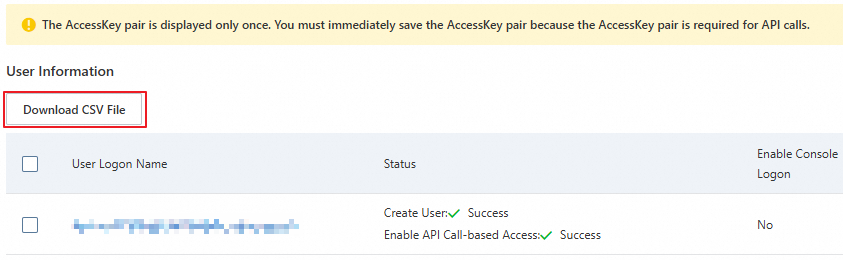
Copie o AccessKey ID e o AccessKey secret.
ImportanteO AccessKey secret de um usuário RAM é exibido apenas durante a criação e não pode ser recuperado posteriormente. Baixe o arquivo CSV que contém o par de AccessKey e armazene-o com segurança.
2. Conceda permissões AssumeRole ao usuário RAM
Após criar o usuário RAM, use uma conta Alibaba Cloud ou um usuário RAM com permissões administrativas do RAM para conceder ao usuário RAM as permissões necessárias para chamar o service STS assumindo uma função.
Faça login no console RAM.
No painel de navegação à esquerda, escolha Identities > Users. Na lista de usuários, localize o usuário RAM e clique em Add Permissions na coluna Actions.
-
Na página Grant Permission, selecione a política de sistema AliyunSTSAssumeRoleAccess.
NotaA política AliyunSTSAssumeRoleAccess concede ao usuário RAM permissão para chamar a operação
AssumeRoledo STS. Isso difere das permissões concedidas pela própria função, que as credenciais temporárias herdarão.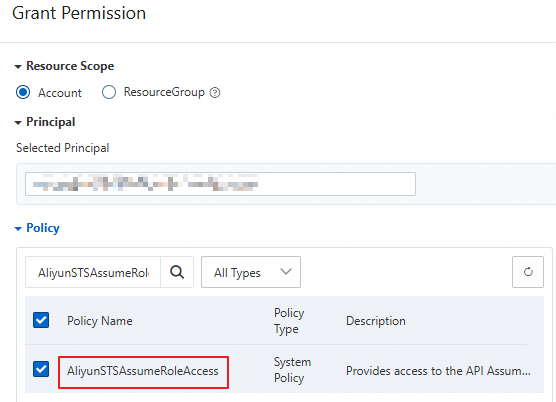
Clique em OK.
3. Crie uma função RAM
Utilize uma conta Alibaba Cloud ou um usuário RAM com permissões administrativas do RAM para criar uma função RAM. Essa função define as permissões de acesso ao OSS concedidas quando ela é assumida.
Faça login no console RAM.
No painel de navegação à esquerda, escolha Identities > Roles.
Na página Roles, clique em Create Role.
-
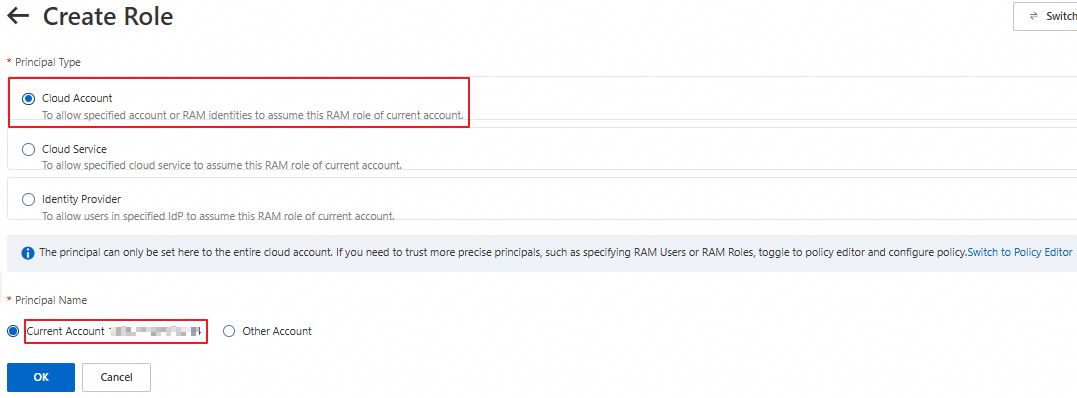
Na página Create Role, defina Principal Type como Alibaba Cloud Account e Principal Name como Current Alibaba Cloud Account. Em seguida, clique em OK.
Na caixa de diálogo Create Role, insira um nome para a função e clique em OK.
-
Clique em Copy ao lado do ARN e salve o ARN da função.

4. Conceda permissões de upload de arquivos à função RAM
Após criar a função RAM, use uma conta Alibaba Cloud ou um usuário RAM com permissões administrativas do RAM para anexar políticas a ela. Essas políticas definem as permissões de acesso ao OSS concedidas pela função.
-
Crie uma política personalizada para uploads de arquivos.
Faça login no console RAM.
No painel de navegação à esquerda, escolha Permissions > Policies.
Na página Policies, clique em Create Policy.
-
Na página Create Policy, clique na aba JSON Editor. No editor de políticas, conceda à função a permissão para enviar arquivos para examplebucket. O código a seguir fornece um exemplo:
AvisoO exemplo abaixo serve apenas como referência. Para segurança ideal, recomendamos configurar políticas de autorização mais granulares para evitar riscos associados a permissões excessivas. Para mais informações sobre como configurar políticas de autorização granulares, consulte Grant permissions to other users by using RAM or STS.
{ "Version": "1", "Statement": [ { "Effect": "Allow", "Action": [ "oss:PutObject" ], "Resource": [ "acs:oss:*:*:examplebucket/*" ] } ] }NotaAs permissões do OSS de uma função RAM são determinadas pela configuração
Action. Por exemplo, se você conceder a permissãooss:PutObject, um usuário RAM que assumir a função RAM poderá executar operações de upload simples, upload de formulário, upload de anexação, upload multipart e upload retomável no bucket especificado. Para mais informações, consulte OSS actions. Após configurar a política, clique em OK. Na página Edit Basic Information, insira um nome para a política, como RamTestPolicy, e clique em OK.
-
Conceda a política personalizada à função RAM RamOssTest.
Faça login no console RAM.
No painel de navegação à esquerda, escolha Identities > Roles.
Na página Roles, localize a função RAM de destino RamOssTest.
Clique em Add Permissions na coluna Actions para a função RAM RamOssTest.
Na página Grant Permission, selecione Custom Policy na seção Select Policy. Em seguida, clique na política personalizada criada RamTestPolicy na lista de políticas.
Clique em OK.
5. Assuma uma função RAM e obtenha credenciais temporárias
Não utilize o par de AccessKey de uma conta Alibaba Cloud para chamar operações da API STS para credenciais temporárias; isso causará um erro. Os exemplos a seguir usam o par de AccessKey de um usuário RAM.
Depois de conceder a permissão de upload de arquivos à função, o usuário RAM precisa assumir a função para obter credenciais temporárias. As credenciais temporárias consistem em um token de segurança, um par de AccessKey temporário (AccessKey ID e AccessKey secret) e um tempo de expiração. Use um sdk STS para obter credenciais temporárias que possuem a permissão de upload simples (
oss:PutObject). Para mais exemplos de sdk STS em outras linguagens de programação, consulte STS SDK overview.O endpoint no código de exemplo é o endereço do endpoint STS. Para respostas mais rápidas do STS, selecione um endpoint STS na mesma região do seu servidor ou em uma região próxima. Para mais informações sobre endpoints STS, consulte Endpoints.
Java
import com.aliyuncs.DefaultAcsClient;
import com.aliyuncs.exceptions.ClientException;
import com.aliyuncs.http.MethodType;
import com.aliyuncs.profile.DefaultProfile;
import com.aliyuncs.profile.IClientProfile;
import com.aliyuncs.auth.sts.AssumeRoleRequest;
import com.aliyuncs.auth.sts.AssumeRoleResponse;
public class StsServiceSample {
    public static void main(String[] args) {
        // The endpoint of the STS service. Example: sts.cn-hangzhou.aliyuncs.com. You can access the STS service over the internet or through a VPC.
        String endpoint = "sts.cn-hangzhou.aliyuncs.com";
        // Obtain the AccessKey ID and AccessKey secret of the RAM user that you created in Substep 1 from environment variables.
        String accessKeyId = System.getenv("ACCESS_KEY_ID");
        String accessKeySecret = System.getenv("ACCESS_KEY_SECRET");
        // Obtain the ARN of the RAM role that you created in Substep 3 from environment variables.
        String roleArn = System.getenv("RAM_ROLE_ARN");
        // Specify a custom role session name to distinguish different tokens. Example: SessionTest.
        String roleSessionName = "yourRoleSessionName";
        // By default, the temporary credentials have all the permissions of the assumed role.
        String policy = null;
        // The validity period of the temporary credentials in seconds. Minimum value: 900. Maximum value: the value of the Maximum Session Duration parameter of the role. The value of this parameter can be 3,600 to 43,200 seconds. Default value: 3,600 seconds.
        // When you upload large files or perform other time-consuming operations, we recommend that you specify a sufficient validity period to avoid having to repeatedly call the STS service to obtain new temporary credentials.
        Long durationSeconds = 3600L;
        try {
            // The region where the STS request is initiated. We recommend that you retain the default value, which is an empty string ("").
            String regionId = "";
            // Add an endpoint. This is applicable to STS SDK for Java 3.12.0 and later.
            DefaultProfile.addEndpoint(regionId, "Sts", endpoint);
            // Add an endpoint. This is applicable to STS SDK for Java versions earlier than 3.12.0.
            // DefaultProfile.addEndpoint("",regionId, "Sts", endpoint);
            // Construct a default profile.
            IClientProfile profile = DefaultProfile.getProfile(regionId, accessKeyId, accessKeySecret);
            // Construct a client.
            DefaultAcsClient client = new DefaultAcsClient(profile);
            final AssumeRoleRequest request = new AssumeRoleRequest();
            // This is applicable to STS SDK for Java 3.12.0 and later.
            request.setSysMethod(MethodType.POST);
            // This is applicable to STS SDK for Java versions earlier than 3.12.0.
            // request.setMethod(MethodType.POST);
            request.setRoleArn(roleArn);
            request.setRoleSessionName(roleSessionName);
            request.setPolicy(policy);
            request.setDurationSeconds(durationSeconds);
            final AssumeRoleResponse response = client.getAcsResponse(request);
            System.out.println("Expiration: " + response.getCredentials().getExpiration());
            System.out.println("Access Key Id: " + response.getCredentials().getAccessKeyId());
            System.out.println("Access Key Secret: " + response.getCredentials().getAccessKeySecret());
            System.out.println("Security Token: " + response.getCredentials().getSecurityToken());
            System.out.println("RequestId: " + response.getRequestId());
        } catch (ClientException e) {
            System.out.println("Failed:");
            System.out.println("Error code: " + e.getErrCode());
            System.out.println("Error message: " + e.getErrMsg());
            System.out.println("RequestId: " + e.getRequestId());
        }
    }
}
Python
# -*- coding: utf-8 -*-

from aliyunsdkcore import client
from aliyunsdkcore.request import CommonRequest
import json
import oss2
import os

# Obtain the AccessKey ID and AccessKey secret of the RAM user that you created in Substep 1 from environment variables.
access_key_id = os.getenv("ACCESS_KEY_ID")
access_key_secret = os.getenv("ACCESS_KEY_SECRET")
# Obtain the ARN of the RAM role that you created in Substep 3 from environment variables.
role_arn = os.getenv("RAM_ROLE_ARN")

# Create a policy.
clt = client.AcsClient(access_key_id, access_key_secret, 'cn-hangzhou')
request = CommonRequest(product="Sts", version='2015-04-01', action_name='AssumeRole')
request.set_method('POST')
request.set_protocol_type('https')
request.add_query_param('RoleArn', role_arn)
# Specify a custom role session name to distinguish different tokens. Example: sessiontest.
request.add_query_param('RoleSessionName', 'sessiontest')
# Specify that the STS temporary credentials expire in 3,600 seconds.
request.add_query_param('DurationSeconds', '3600')
request.set_accept_format('JSON')

body = clt.do_action_with_exception(request)

# Use the AccessKey ID and AccessKey secret of the RAM user to request temporary credentials from STS.
token = json.loads(oss2.to_unicode(body))
# Print the temporary AccessKey pair (AccessKey ID and AccessKey secret), security token, and expiration time returned by STS.
print('AccessKeyId: ' + token['Credentials']['AccessKeyId'])
print('AccessKeySecret: ' + token['Credentials']['AccessKeySecret'])
print('SecurityToken: ' + token['Credentials']['SecurityToken'])
print('Expiration: ' + token['Credentials']['Expiration'])
Node.js
const { STS } = require('ali-oss');
const express = require("express");
const app = express();

app.get('/sts', (req, res) => {
 let sts = new STS({
  // Obtain the AccessKey ID and AccessKey secret of the RAM user that you created in Substep 1 from environment variables.
   accessKeyId : process.env.ACCESS_KEY_ID,
   accessKeySecret : process.env.ACCESS_KEY_SECRET
});
  // process.env.RAM_ROLE_ARN is used to obtain the ARN of the RAM role that you created in Substep 3 from environment variables.
  // Specify a custom policy to further limit the permissions of the STS temporary credentials. If you do not specify a policy, the returned STS temporary credentials have all permissions of the specified role.
  // The final permissions of the temporary credentials are the intersection of the role permissions that you set in Step 4 and the permissions that you set in this policy.
  // The expiration parameter specifies the validity period of the temporary credentials in seconds. Minimum value: 900. Maximum value: the value of the Maximum Session Duration parameter of the role. In this example, the validity period is set to 3,600 seconds.
  // The sessionName parameter specifies a custom role session name to distinguish different tokens. Example: sessiontest.
  sts.assumeRole('process.env.RAM_ROLE_ARN', ``, '3600', 'sessiontest').then((result) => {
    console.log(result);
    res.set('Access-Control-Allow-Origin', '*');
    res.set('Access-Control-Allow-METHOD', 'GET');
    res.json({
      AccessKeyId: result.credentials.AccessKeyId,
      AccessKeySecret: result.credentials.AccessKeySecret,
      SecurityToken: result.credentials.SecurityToken,
      Expiration: result.credentials.Expiration
    });
  }).catch((err) => {
    console.log(err);
    res.status(400).json(err.message);
  });
});
app.listen(8000,()=>{
   console.log("server listen on:8000")
})
Go
package main

import (
    "fmt"
    "os"

    openapi "github.com/alibabacloud-go/darabonba-openapi/v2/client"
    sts20150401 "github.com/alibabacloud-go/sts-20150401/v2/client"
    util "github.com/alibabacloud-go/tea-utils/v2/service"
    "github.com/alibabacloud-go/tea/tea"
)

func main() {
    // Obtain the AccessKey ID and AccessKey secret of the RAM user that you created in Substep 1 from environment variables.
    accessKeyId := os.Getenv("ACCESS_KEY_ID")
    accessKeySecret := os.Getenv("ACCESS_KEY_SECRET")
    // Obtain the ARN of the RAM role that you created in Substep 3 from environment variables.
    roleArn := os.Getenv("RAM_ROLE_ARN")

    // Create a policy client.
    config := &openapi.Config{
        // Required. The AccessKey ID that you obtained in Substep 1.
        AccessKeyId: tea.String(accessKeyId),
        // Required. The AccessKey secret that you obtained in Substep 1.
        AccessKeySecret: tea.String(accessKeySecret),
    }
    // For more information about endpoints, see https://api.alibabacloud.com/product/Sts
    config.Endpoint = tea.String("sts.cn-hangzhou.aliyuncs.com")
    client, err := sts20150401.NewClient(config)
    if err != nil {
        fmt.Printf("Failed to create client: %v\n", err)
        return
    }

    // Use the AccessKey ID and AccessKey secret of the RAM user to request temporary credentials from STS.
    request := &sts20150401.AssumeRoleRequest{
        // Specify that the STS temporary credentials expire in 3,600 seconds.
        DurationSeconds: tea.Int64(3600),
        // Obtain the ARN of the RAM role that you created in Substep 3 from environment variables.
        RoleArn: tea.String(roleArn),
        // Specify a custom role session name. In this example, use examplename.
        RoleSessionName: tea.String("examplename"),
    }
    response, err := client.AssumeRoleWithOptions(request, &util.RuntimeOptions{})
    if err != nil {
        fmt.Printf("Failed to assume role: %v\n", err)
        return
    }

    // Print the temporary AccessKey pair (AccessKey ID and AccessKey secret), security token, and expiration time returned by STS.
    credentials := response.Body.Credentials
    fmt.Println("AccessKeyId: " + tea.StringValue(credentials.AccessKeyId))
    fmt.Println("AccessKeySecret: " + tea.StringValue(credentials.AccessKeySecret))
    fmt.Println("SecurityToken: " + tea.StringValue(credentials.SecurityToken))
    fmt.Println("Expiration: " + tea.StringValue(credentials.Expiration))
}
PHP
<?php
require __DIR__ . '/vendor/autoload.php';

use AlibabaCloud\Client\AlibabaCloud;
use AlibabaCloud\Client\Exception\ClientException;
use AlibabaCloud\Client\Exception\ServerException;
use AlibabaCloud\Sts\Sts;

// Obtain the AccessKey ID and AccessKey secret of the RAM user that you created in Substep 1 from environment variables.
$accessKeyId = getenv("ACCESS_KEY_ID");
$accessKeySecret = getenv("ACCESS_KEY_SECRET");
// Obtain the ARN of the RAM role that you created in Substep 3 from environment variables.
$roleArn = getenv("RAM_ROLE_ARN");

// Initialize an Alibaba Cloud client.
AlibabaCloud::accessKeyClient($accessKeyId, $accessKeySecret)
    ->regionId('cn-hangzhou')
    ->asDefaultClient();

try {
    // Create an STS request.
    $result = Sts::v20150401()
        ->assumeRole()
        // Set the role ARN.
        ->withRoleArn($roleArn)
        // Specify a custom role session name to distinguish different tokens.
        ->withRoleSessionName('sessiontest')
        // Specify that the STS temporary credentials expire in 3,600 seconds.
        ->withDurationSeconds(3600)
        ->request();

    // Obtain the credential information from the response.
    $credentials = $result['Credentials'];

    // Print the temporary AccessKey pair (AccessKey ID and AccessKey secret), security token, and expiration time returned by STS.
    echo 'AccessKeyId: ' . $credentials['AccessKeyId'] . PHP_EOL;
    echo 'AccessKeySecret: ' . $credentials['AccessKeySecret'] . PHP_EOL;
    echo 'SecurityToken: ' . $credentials['SecurityToken'] . PHP_EOL;
    echo 'Expiration: ' . $credentials['Expiration'] . PHP_EOL;
} catch (ClientException $e) {
    // Handle client exceptions.
    echo $e->getErrorMessage() . PHP_EOL;
} catch (ServerException $e) {
    // Handle server exceptions.
    echo $e->getErrorMessage() . PHP_EOL;
}
Ruby
require 'sinatra'
require 'base64'
require 'open-uri'
require 'cgi'
require 'openssl'
require 'json'
require 'sinatra/reloader'
require 'sinatra/content_for'
require 'aliyunsdkcore'

# Set the path of the public folder to the templates subfolder in the current folder.
set :public_folder, File.dirname(__FILE__) + '/templates'

def get_sts_token_for_oss_upload()
  client = RPCClient.new(
    # Obtain the AccessKey ID and AccessKey secret of the RAM user that you created in Substep 1 from environment variables.
    access_key_id: ENV['ACCESS_KEY_ID'],
    access_key_secret: ENV['ACCESS_KEY_SECRET'],
    endpoint: 'https://sts.cn-hangzhou.aliyuncs.com',
    api_version: '2015-04-01'
  )
  response = client.request(
    action: 'AssumeRole',
    params: {
      # Obtain the ARN of the RAM role that you created in Substep 3 from environment variables.
      "RoleArn": ENV['RAM_ROLE_ARN'],
      # Specify that the STS temporary credentials expire in 3,600 seconds.
      "DurationSeconds": 3600,
      # The sessionName parameter specifies a custom role session name to distinguish different tokens. Example: sessiontest.
      "RoleSessionName": "sessiontest"
    },
    opts: {
      method: 'POST',
      format_params: true
    }
  )
end

if ARGV.length == 1
  $server_port = ARGV[0]
elsif ARGV.length == 2
  $server_ip = ARGV[0]
  $server_port = ARGV[1]
end

$server_ip = "127.0.0.1"  # To listen on other addresses such as 0.0.0.0, you must add an authentication mechanism on the server.
$server_port = 8000

puts "App server is running on: http://#{$server_ip}:#{$server_port}"

set :bind, $server_ip
set :port, $server_port

get '/get_sts_token_for_oss_upload' do
  token = get_sts_token_for_oss_upload()
  response = {
    "AccessKeyId" => token["Credentials"]["AccessKeyId"],
    "AccessKeySecret" => token["Credentials"]["AccessKeySecret"],
    "SecurityToken" => token["Credentials"]["SecurityToken"],
    "Expiration" => token["Credentials"]["Expiration"]
  }
  response.to_json
end

get '/*' do
  puts "********************* GET "
  send_file File.join(settings.public_folder, 'index.html')
end-
As credenciais temporárias do STS são as seguintes:
NotaUma conta Alibaba Cloud e os usuários RAM e funções RAM sob esta conta podem chamar o service STS para obter credenciais temporárias até 100 vezes por segundo. Em cenários de alta concorrência, recomendamos reutilizar as credenciais temporárias dentro de seu período de validade.
O horário de expiração das credenciais temporárias do STS está em UTC. O UTC está 8 horas atrás do Horário Padrão da China (CST). Por exemplo, se o horário de expiração das credenciais temporárias for 2024-04-18T11:33:40Z, as credenciais temporárias expirarão às 19:33:40 de 18 de abril de 2024 (UTC+8).
{
  "AccessKeyId": "STS.****************",
  "AccessKeySecret": "3dZn*******************************************",
  "SecurityToken": "CAIS*****************************************************************************************************************************************",
  "Expiration": "2024-**-*****:**:50Z"
}
-
Para configurar permissões de acesso temporário com maior granularidade, veja o conteúdo a seguir.
Para restringir ainda mais as permissões herdadas da função, especifique uma política adicional ao solicitar as credenciais temporárias. Por exemplo, se a função tiver permissão para enviar arquivos para examplebucket, restrinja as credenciais temporárias para permitir o upload de arquivos apenas para um diretório específico neste bucket.
// The following policy restricts the temporary credentials to allow uploading files only to the src directory in examplebucket.
// The final permissions of the temporary credentials are the intersection of the role permissions set in Step 4 and the permissions set in this policy, which means that files can be uploaded only to the src directory in examplebucket.
String policy = "{\n" +
                "    \"Version\": \"1\", \n" +
                "    \"Statement\": [\n" +
                "        {\n" +
                "            \"Action\": [\n" +
                "                \"oss:PutObject\"\n" +
                "            ], \n" +
                "            \"Resource\": [\n" +
                "                \"acs:oss:*:*:examplebucket/src/*\" \n" +
                "            ], \n" +
                "            \"Effect\": \"Allow\"\n" +
                "        }\n" +
                "    ]\n" +
                "}";
Etapa 2: Envie um arquivo com credenciais temporárias
Devido a uma alteração de política para melhorar a conformidade e a segurança, a partir de 20 de março de 2025, novos usuários do OSS devem use a custom domain name (CNAME) para executar operações de API de dados em buckets do OSS localizados em regiões da China continental. Os endpoints públicos padrão estão restritos para essas operações. Consulte o anúncio oficial para obter uma lista completa das operações afetadas. Se você acessar seus dados via HTTPS, deverá bind a valid SSL Certificate ao seu domínio personalizado. Isso é obrigatório para acesso ao Console OSS, pois o console impõe HTTPS.
Os exemplos a seguir mostram como usar credenciais temporárias para enviar um arquivo para o OSS. Para instalação do sdk e mais exemplos de código para várias operações, como uploads e downloads de arquivos, usando credenciais temporárias, consulte SDK reference.
Java
import com.aliyun.oss.*;
import com.aliyun.oss.common.auth.CredentialsProvider;
import com.aliyun.oss.common.auth.DefaultCredentialProvider;
import com.aliyun.oss.common.comm.SignVersion;
import com.aliyun.oss.model.PutObjectRequest;
import com.aliyun.oss.model.PutObjectResult;

import java.io.File;

public class Demo {

    public static void main(String[] args) throws Exception {
        // Specify the temporary AccessKey ID, AccessKey secret, and security token that you obtained in Substep 5 of Step 1. Do not use the identity credentials of the RAM user.
        // Note that the AccessKey ID obtained from the STS service starts with "STS".
        String accessKeyId = "yourSTSAccessKeyID";
        String accessKeySecret = "yourSTSAccessKeySecret";
        // Specify the security token that you obtained from STS.
        String stsToken= "yourSecurityToken";

        // Use the DefaultCredentialProvider method to directly set the AccessKey ID and AccessKey secret.
        CredentialsProvider credentialsProvider = new DefaultCredentialProvider(accessKeyId, accessKeySecret, stsToken);
        // Initialize the client by using credentialsProvider.
        ClientBuilderConfiguration clientBuilderConfiguration = new ClientBuilderConfiguration();
        // Explicitly declare that the V4 signature algorithm is used.
        clientBuilderConfiguration.setSignatureVersion(SignVersion.V4);
        // Create an OSSClient instance.
        // When the OSSClient instance is no longer used, call the shutdown method to release resources.
        OSS ossClient = OSSClientBuilder.create()
                 // Set the OSS access domain name. Example for the China (Hangzhou) region: https://oss-cn-hangzhou.aliyuncs.com
                .endpoint("endpoint")
                .credentialsProvider(credentialsProvider)
                .clientConfiguration(clientBuilderConfiguration)
                // Set the region of the destination bucket. Example for the China (Hangzhou) region: cn-hangzhou
                .region("region")
                .build();

        try {

            // Create a PutObjectRequest object to upload the local file exampletest.txt to examplebucket.
            PutObjectRequest putObjectRequest = new PutObjectRequest("examplebucket", "exampletest.txt", new File("D:\\localpath\\exampletest.txt"));

            // If you need to set the storage class and access permissions during the upload, see the following sample code.
            // ObjectMetadata metadata = new ObjectMetadata();
            // metadata.setHeader(OSSHeaders.OSS_STORAGE_CLASS, StorageClass.Standard.toString());
            // metadata.setObjectAcl(CannedAccessControlList.Private);
            // putObjectRequest.setMetadata(metadata);

            // Upload the file.
            PutObjectResult result = ossClient.putObject(putObjectRequest);
        } catch (OSSException oe) {
            System.out.println("Caught an OSSException, which means your request made it to OSS, "
                    + "but was rejected with an error response for some reason.");
            System.out.println("Error Message:" + oe.getErrorMessage());
            System.out.println("Error Code:" + oe.getErrorCode());
            System.out.println("Request ID:" + oe.getRequestId());
            System.out.println("Host ID:" + oe.getHostId());
        } catch (ClientException ce) {
            System.out.println("Caught a ClientException, which means the client encountered "
                    + "a serious internal problem while trying to communicate with OSS, "
                    + "such as not being able to access the network.");
            System.out.println("Error Message:" + ce.getMessage());
        } finally {
            if (ossClient != null) {
                ossClient.shutdown();
            }
        }
    }
}
Python
O OSS sdk for Python está disponível nas versões V2 e V1. A V2 é uma reformulação abrangente da V1 que simplifica operações subjacentes, como verificação de identidade, novas tentativas de solicitação e tratamento de erros. Ela também oferece configurações de parâmetros mais flexíveis e novas interfaces avançadas. Veja os exemplos a seguir conforme suas necessidades.
Exemplo V2
import alibabacloud_oss_v2 as oss

def main():
    # Specify the temporary AccessKey ID, AccessKey secret, and security token that you obtained in Substep 5 of Step 1. Do not use the identity credentials of the RAM user.
    # Note that the AccessKey ID obtained from the STS service starts with "STS".
    sts_access_key_id = 'yourSTSAccessKeyID'
    sts_access_key_secret = 'yourSTSAccessKeySecret'
    # Specify the security token that you obtained from STS.
    sts_security_token = 'yourSecurityToken'

    # Create a static credential provider and explicitly set the temporary AccessKey ID, AccessKey secret, and security token.
    credentials_provider = oss.credentials.StaticCredentialsProvider(
        access_key_id=sts_access_key_id,
        access_key_secret=sts_access_key_secret,
        security_token=sts_security_token,
    )

    # Load the default configuration of the SDK and set the credential provider.
    cfg = oss.config.load_default()
    cfg.credentials_provider = credentials_provider

    # Specify the region of the bucket. Example for China (Hangzhou): cn-hangzhou.
    cfg.region = 'cn-hangzhou'

    # Create an OSS client by using the configured information.
    client = oss.Client(cfg)

    # The path of the local file to upload. Example: D:\\localpath\\exampletest.txt.
    local_file_path = 'D:\\localpath\\exampletest.txt'
    with open(local_file_path, 'rb') as file:
        data = file.read()

    # Execute the object upload request to upload the local file exampletest.txt to examplebucket. Specify the bucket name, object name, and file to upload.
    result = client.put_object(oss.PutObjectRequest(
        # Bucket name
        bucket='examplebucket',
        # Name of the object to upload to the bucket
        key='exampletest.txt',
        body=data,
    ))

     # Output the request status code, request ID, content MD5, ETag, CRC-64 checksum, and version ID to check whether the request was successful.
    print(f'status code: {result.status_code},'
          f' request id: {result.request_id},'
          f' content md5: {result.content_md5},'
          f' etag: {result.etag},'
          f' hash crc64: {result.hash_crc64},'
          f' version id: {result.version_id},'
    )

# When this script is run directly, call the main function.
if __name__ == "__main__":
    main()  # The entry point of the script. When the file is run directly, the main function is called.
Exemplo V1
# -*- coding: utf-8 -*-
import oss2

# yourEndpoint specifies the endpoint of the bucket's region. Example for China (Hangzhou): https://oss-cn-hangzhou.aliyuncs.com.
endpoint = 'https://oss-cn-hangzhou.aliyuncs.com'
# Specify the temporary AccessKey ID and AccessKey secret that you obtained in Substep 5 of Step 1. Do not use the AccessKey ID and AccessKey secret of an Alibaba Cloud account.
sts_access_key_id = 'yourAccessKeyId'
sts_access_key_secret = 'yourAccessKeySecret'
# Specify the bucket name.
bucket_name = 'examplebucket'
# Specify the full path of the object. The full path of the object cannot contain the bucket name.
object_name = 'examplebt.txt'
# Specify the security token that you obtained in Substep 5 of Step 1.
security_token = 'yourSecurityToken'
# Initialize the StsAuth instance by using the authentication information from the temporary credentials.
auth = oss2.StsAuth(sts_access_key_id,
                    sts_access_key_secret,
                    security_token)
# Initialize the bucket by using the StsAuth instance.
bucket = oss2.Bucket(auth, endpoint, bucket_name)
# Upload the object.
result = bucket.put_object(object_name, "hello world")
print(result.status)
Go
O OSS sdk for Go está disponível nas versões V2 e V1. A V2 é uma reformulação abrangente da V1 que simplifica operações subjacentes, como verificação de identidade, novas tentativas de solicitação e tratamento de erros. Ela também oferece configurações de parâmetros mais flexíveis e novas interfaces avançadas. Veja os exemplos a seguir conforme suas necessidades.
Exemplo V2
package main

import (
	"context"
	"log"

	"github.com/aliyun/alibabacloud-oss-go-sdk-v2/oss"
	"github.com/aliyun/alibabacloud-oss-go-sdk-v2/oss/credentials"
)

func main() {
	// Specify the region of the bucket. Example for China (Hangzhou): cn-hangzhou.
	region := "cn-hangzhou"

	// Specify the temporary AccessKey ID, AccessKey secret, and security token that you obtained in Substep 5 of Step 1. Do not use the identity credentials of the RAM user.
    // Note that the AccessKey ID obtained from the STS service starts with "STS".
	accessKeyID := "yourSTSAccessKeyID"
	accessKeySecret := "yourSTSAccessKeySecret"
	// Specify the security token that you obtained from STS.
	stsToken := "yourSecurityToken"

	// Use the NewStaticCredentialsProvider method to directly set the AccessKey ID, AccessKey secret, and STS token.
	provider := credentials.NewStaticCredentialsProvider(accessKeyID, accessKeySecret, stsToken)

	// Load the default configuration and set the credential provider and region.
	cfg := oss.LoadDefaultConfig().
		WithCredentialsProvider(provider).
		WithRegion(region)

	// Create an OSS client.
	client := oss.NewClient(cfg)

	// Specify the path and name of the local file to upload. Example: D:\\localpath\\exampletest.txt.
	localFile := "D:\\localpath\\exampletest.txt"

	// Create a request to upload an object.
	putRequest := &oss.PutObjectRequest{
		Bucket:       oss.Ptr("examplebucket"),      // Bucket name
		Key:          oss.Ptr("exampletest.txt"),    // Name of the object to upload to the bucket
		StorageClass: oss.StorageClassStandard, // Set the storage class of the object to Standard.
		Acl:          oss.ObjectACLPrivate,     // Set the access control list (ACL) of the object to private.
		Metadata: map[string]string{
			"yourMetadataKey1": "yourMetadataValue1", // Set the metadata of the object.
		},
	}

	// Execute the object upload request to upload the local file exampletest.txt to examplebucket.
	result, err := client.PutObjectFromFile(context.TODO(), putRequest, localFile)
	if err != nil {
		log.Fatalf("failed to put object from file %v", err)
	}

	// Print the result of the object upload.
	log.Printf("put object from file result:%#v\n", result)

}
Exemplo V1
package main

import (
    "fmt"
    "github.com/aliyun/aliyun-oss-go-sdk/oss"
    "os"
)

func main() {
    // Obtain the temporary credentials from environment variables that you obtained in Substep 5 of Step 1. Before you run this sample code, make sure that the OSS_ACCESS_KEY_ID, OSS_ACCESS_KEY_SECRET, and OSS_SESSION_TOKEN environment variables are set.
    provider, err := oss.NewEnvironmentVariableCredentialsProvider()
    if err != nil {
        fmt.Println("Error:", err)
        os.Exit(-1)
    }
    // Create an OSSClient instance.
    // yourEndpoint specifies the endpoint of the bucket. Example for China (Hangzhou): https://oss-cn-hangzhou.aliyuncs.com. Specify the endpoint based on your region.
    client, err := oss.New("yourEndpoint", "", "", oss.SetCredentialsProvider(&provider))
    if err != nil {
        fmt.Println("Error:", err)
        os.Exit(-1)
    }
    // Specify the bucket name. Example: examplebucket.
    bucketName := "examplebucket"
    // Specify the full path of the object. The full path cannot contain the bucket name. Example: exampledir/exampleobject.txt.
    objectName := "exampledir/exampleobject.txt"
    // Specify the full path of the local file. Example: D:\\localpath\\examplefile.txt.
    filepath := "D:\\localpath\\examplefile.txt"
    bucket, err := client.Bucket(bucketName)
    if err != nil {
        fmt.Println("Error:", err)
        os.Exit(-1)
    }
    // Authorize a third party to upload a file by using STS.
    err = bucket.PutObjectFromFile(objectName, filepath)
    if err != nil {
        fmt.Println("Error:", err)
        os.Exit(-1)
    }
    fmt.Println("upload success")
}
Node.js
O exemplo nesta etapa depende do axios. Instale-o antes de executar o código.
const axios = require("axios");
const OSS = require("ali-oss");

// Use the temporary credentials to initialize the OSS client on the client side for temporary authorized access to OSS resources.
const getToken = async () => {
  // Set the address for the client to request access credentials.
  await axios.get("http://localhost:8000/sts").then((token) => {
    const client = new OSS({
       // yourRegion specifies the region of the bucket. Example for China (Hangzhou): oss-cn-hangzhou.
      region: 'oss-cn-hangzhou',
      // Specify the temporary AccessKey ID and AccessKey secret that you obtained in Substep 5 of Step 1. Do not use the AccessKey ID and AccessKey secret of an Alibaba Cloud account.
      accessKeyId: token.data.AccessKeyId,
      accessKeySecret: token.data.AccessKeySecret,
      // Specify the security token that you obtained in Substep 5 of Step 1.
      stsToken: token.data.SecurityToken,
      authorizationV4: true,
      // Specify the bucket name.
      bucket: "examplebucket",
      // Refresh the temporary credentials.
      refreshSTSToken: async () => {
        const refreshToken = await axios.get("http://localhost:8000/sts");
        return {
          accessKeyId: refreshToken.data.AccessKeyId,
          accessKeySecret: refreshToken.data.AccessKeySecret,
          stsToken: refreshToken.data.SecurityToken,
        };
      },
    });
    // Use the temporary credentials to upload a file.
    // Specify the full path of the object, excluding the bucket name. Example: exampleobject.jpg.
    // Specify the full path of the local file. Example: D:\\example.jpg.
    client.put('exampleobject.jpg', 'D:\\example.jpg').then((res)=>{console.log(res)}).catch(e=>console.log(e))
  });
};
getToken()
PHP
<?php
if (is_file(__DIR__ . 'autoload.php')) {
    require_once __DIR__ . 'autoload.php';
}
if (is_file(__DIR__ . '/vendor/autoload.php')) {
    require_once __DIR__ . '/vendor/autoload.php';
}

use OSS\Credentials\StaticCredentialsProvider;
use OSS\OssClient;
use OSS\Core\OssException;

try {
    // Specify the temporary AccessKey ID, AccessKey secret, and security token that you obtained in Substep 5 of Step 1. Do not use the identity credentials of the RAM user.
    // Note that the AccessKey ID obtained from the STS service starts with "STS".
    $accessKeyId = 'yourSTSAccessKeyID';
    $accessKeySecret = 'yourSTSAccessKeySecret';
    // Specify the security token that you obtained from STS.
    $securityToken = 'yourSecurityToken';

    // Create a credential provider by using the StaticCredentialsProvider class.
    $provider = new StaticCredentialsProvider($accessKeyId, $accessKeySecret, $securityToken);

    // Specify the endpoint of the bucket's region. Example for China (Hangzhou): https://oss-cn-hangzhou.aliyuncs.com.
    $endpoint = "https://oss-cn-hangzhou.aliyuncs.com";

    // Specify the bucket name. Example: examplebucket.
    $bucket= "examplebucket";
    // Specify the name of the object to upload to the bucket.
    $object = "exampletest.txt";
    // Specify the path of the local file to upload. Example: D:\\localpath\\exampletest.txt.
    $localFilePath = "D:\\localpath\\exampletest.txt";

    // You can set relevant headers during the upload, such as setting the access permission to private and specifying custom metadata.
    $options = array(
        OssClient::OSS_HEADERS => array(
            'x-oss-object-acl' => 'private',
            'x-oss-meta-info' => 'yourinfo'
        ),
    );

    $config = array(
        "provider" => $provider,
        "endpoint" => $endpoint,
        "signatureVersion" => OssClient::OSS_SIGNATURE_VERSION_V4,
        // Specify the region of the bucket. Example for China (Hangzhou): cn-hangzhou.
        "region" => "cn-hangzhou"
    );

    // Create an OSS client by using the configured information.
    $ossClient = new OssClient($config);

     // Send the request to upload the local file exampletest.txt to examplebucket.
    $ossClient->putObject($bucket, $object, $localFilePath, $options);
} catch (OssException $e) {
    printf($e->getMessage() . "\n");
    return;
}
Ruby
require 'aliyun/sts'
require 'aliyun/oss'

client = Aliyun::OSS::Client.new(
  # The endpoint of the China (Hangzhou) region is used in this example. Specify the endpoint based on your region.
  endpoint: 'https://oss-cn-hangzhou.aliyuncs.com',
  # Specify the temporary AccessKey ID and AccessKey secret that you obtained in Substep 5 of Step 1. Do not use the AccessKey ID and AccessKey secret of an Alibaba Cloud account.
  access_key_id: 'token.access_key_id',
  access_key_secret: 'token.access_key_secret',
  # Specify the security token that you obtained in Substep 5 of Step 1.
  sts_token: 'token.security_token'
  )
# Specify the bucket name. Example: examplebucket.
bucket = client.get_bucket('examplebucket')
# Upload the file.
bucket.put_object('exampleobject.txt', :file => 'D:\test.txt')
Perguntas frequentes
Erro de autorização
Valor DurationSeconds inválido
Token de segurança inválido
AccessKeyId inexistente
Acesso anônimo proibido
Erro NoSuchBucket
Erro de ACL do bucket
Erro de política do autorizador
Este erro geralmente ocorre porque você não tem as permissões para executar as operações relacionadas. Antes de solicitar credenciais temporárias, crie uma função RAM e conceda permissões à função (Substep 4 of Step 1). Ao enviar uma solicitação ao servidor STS para assumir essa função e obter credenciais temporárias, use o parâmetro policy para restringir ainda mais as permissões das credenciais temporárias (Substep 5 of Step 1).
-
Se você fornecer este parâmetro policy, as permissões finais das credenciais temporárias serão a interseção entre a política da função RAM e a política do parâmetro.
-
Exemplo 1
Na figura a seguir, A representa as permissões da função RAM, B representa as permissões definidas pelo parâmetro policy e C representa as permissões finais das credenciais temporárias.

-
Exemplo 2
Na figura a seguir, A representa as permissões da função RAM e B representa as permissões definidas pelo parâmetro policy. As permissões definidas pelo parâmetro policy são um subconjunto das permissões da função RAM. Portanto, B representa as permissões finais das credenciais temporárias.

-
Se você omitir o parâmetro policy, as credenciais temporárias herdarão todas as permissões da função RAM.
Erro de endpoint incorreto
Obtenção de múltiplas credenciais
Erro de formato de hora incorreto
Tratando o código de erro 0003-0000301
Referências
Para aprender a limitar o tamanho do arquivo, o tipo de arquivo ou o caminho de upload ao usar credenciais STS emitidas pelo servidor para uploads no lado do cliente, consulte Overview.
Após autorizar uploads de arquivos para o OSS com credenciais temporárias do STS, utilize URLs pré-assinadas para compartilhar arquivos com terceiros para visualização ou download. Para mais informações, consulte Use a presigned URL to download or preview a file.