All Products
Search
Document Center

PolarDB:billable items

Last Updated:May 27, 2026

The billable items for a cloud-native database PolarDB cluster include compute nodes, storage space, backup storage that exceeds the free quota, SQL Explorer (optional), and cold data archiving (optional).

Cost distribution

Approximate cost distribution of billable items for a PolarDB cluster:
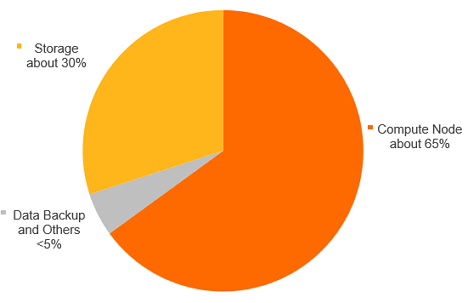
Cost distribution

Overview

Billable item

Billable item code

Description

Supported billing methods

Compute nodes

master_spec

  • Compute nodes include primary and read-only nodes.

  • Compute node fees depend on the region, node specifications, and usage duration.

  • The billing units for Serverless dynamic resources and fixed-specification resources are different. Serverless resources are billed per PCU per second, and bills are generated hourly.

    Note

    PCU is the abbreviation for PolarDB Capacity Unit. One PCU provides the standard service capability of approximately 1 CPU core and 2 GB of memory. PCU is the unit used to manage the resource elasticity of a PolarDB Serverless cluster. The minimum unit for a single scaling event is 0.5 PCU.

  • Subscription

  • Pay-as-you-go

  • Serverless

Note

Billing rules: Compute nodes.

Storage space

  • Enterprise SSD: SEStorage

  • PSL4/PSL5:

    • Subscription: storage_space

    • Pay-as-you-go: master_disk_size

  • You are charged for space occupied by data files, index files, log files (online and archived), and temporary files.

  • Storage fees depend on data volume and duration.

  • Subscription

  • Pay-as-you-go

  • Serverless

Note
  • You can configure the billing method for the storage space of an Enterprise Edition cluster separately. The Pay-as-you-go method is based on actual usage and billed hourly. The Subscription method requires you to specify an upper limit for the storage space and pay upfront.

  • The billing method for the storage space of a Standard Edition cluster follows the billing method of the compute nodes and cannot be set separately.

  • Billing rules: Storage space.

Backup storage (beyond the free quota)

  • Data backup: data_backup

  • Level-1 backup: level1_backup

  • Level-2 backup: level2_backup

  • Log backup: log_backup

  • PolarDB provides a free backup storage quota. You are charged for usage beyond this quota.

  • Backup fees depend on capacity and retention period.

  • Pay-as-you-go

Note
  • Backup storage is billed separately. If you select Subscription as the Billing Method when you purchase a cluster, this billing method applies only to compute nodes. Therefore, when your backup storage exceeds the free quota, fees are still incurred for the subscription cluster.

  • When you unsubscribe from or release a cluster, if your Backup Policy is set to When the cluster is released, the cluster data is automatically backed up, and the latest backup set is retained for a long period of time., backup fees apply. Delete these backup sets from the cluster recycle bin to stop these fees. Permanently delete a released cluster.

  • Billing rules: Backup storage (beyond the free quota).

SQL Explorer (optional)

sql_explorer

  • SQL Explorer, a Database Autonomy Service (DAS) feature, provides security audit and performance diagnostics. After you enable SQL Explorer, you are charged for the audit function and for storage that exceeds the free quota.

  • SQL Explorer fees depend on audit log storage capacity and retention period.

  • Pay-as-you-go

Note
  • SQL Explorer is billed separately. If you select Subscription as the Billing Method when you purchase a cluster, this billing method applies only to compute nodes. Therefore, when you use SQL Explorer, fees are still incurred for the subscription cluster.

  • Billing rules: SQL Explorer (optional).

Cold data archiving (optional)

colddata

  • PolarDB cold data archiving separates cold data from source tables and archives it to OSS, reducing storage costs.

  • Cold data archiving fees depend on capacity and retention period.

  • Pay-as-you-go

Note
  • Cold data archiving is billed separately. If you select Subscription as the Billing Method when you purchase a cluster, this billing method applies only to compute nodes. Therefore, when you enable and use cold data archiving, fees are still incurred for the subscription cluster.

  • Billing rules: Cold data archiving (optional).

Global database network (GDN) (optional)

-

Cross-region data transmission is free. You are charged only for each PolarDB cluster in the GDN.

Not applicable.

Multi-zone (optional)

-

This feature is currently free of charge.

Not applicable.

Note

After you enable the No-activity Suspension feature for a Serverless cluster, you are not charged for compute nodes when the cluster is suspended. However, you are still charged for storage space, backup storage that exceeds the free quota, and SQL Explorer (optional).

FAQ

Why am I still charged for backup storage after I release my cluster?

If you retain backup sets when releasing a cluster, backup storage fees apply. Delete these backup sets from the cluster recycle bin to stop these fees. Permanently delete a released cluster.image