PolarDB backup and recovery features are free, but backup files consume storage space. PolarDB provides a free quota for backup storage, and storage exceeding this quota is billed pay-as-you-go. To quickly understand the billing rules, refer to the pricing for your billing type in the navigation pane on the right.
Free quota
PolarDB provides a free quota for backup storage. When your backup storage usage exceeds the free quota, billing rules vary by product edition and storage class.
Enterprise edition
When your backup storage usage exceeds the free quota, PolarDB charges for same-region backups based on the size and retention period of your backup files (data and logs). For cross-region backups, PolarDB also charges for the network traffic generated.
Backup type | Free quota |
level-1 backup | The formula for the free quota varies by the Storage Payment Method. The formulas are as follows:
|
level-2 backup | None |
log backup | 100 GB |
To view your database storage usage, go to the PolarDB console. On the Basic Information page of your cluster, find the Database Storage Usage in the Distributed Storage section.
Standard edition
Standard Edition offers multiple storage classes. The supported backup types vary by storage class.
When your backup storage usage exceeds the free quota, PolarDB charges for same-region backups based on the size and retention period of your backup files (data and logs). For cross-region backups, PolarDB also charges for the network traffic generated.
Storage class | Backup type | Free quota |
ESSD (PL0, PL1, PL2, PL3, and AutoPL) | level-1 backup | Storage capacity × 50% |
log backup | 100 GB | |
PSL4/PSL5 | level-1 backup | The formula for the free quota varies by the Storage Payment Method. The formulas are as follows:
|
level-2 backup | None | |
log backup | 100 GB |
To view your database storage usage, go to the PolarDB console. On the Basic Information page of your cluster, find the Database Storage Usage in the Distributed Storage section.
Pricing
Enterprise Edition
Level-1 backup
Storage type | Chinese mainland | Other regions | Hourly cost formula | |
PSL5 | Dual-availability zone (storage hot-standby cluster enabled) | 0.000464 USD/GB/hour | 0.000650 USD/GB/hour | Hourly cost = (Total size of Level-1 backup - free quota) × Hourly price |
Dual-availability zone (storage and compute hot-standby clusters enabled) | ||||
Triple-availability zone (storage hot-standby cluster and Logger node enabled) | ||||
Single-availability zone (storage hot-standby cluster disabled) | ||||
PSL4 | Dual-availability zone (storage hot-standby cluster enabled) | 0.0003 USD/GB/hour | 0.000433 USD/GB/hour | |
Dual-availability zone (storage and compute hot-standby clusters enabled) | ||||
Triple-availability zone (storage hot-standby cluster and Logger node enabled) | ||||
Single-availability zone (storage hot-standby cluster disabled) | ||||
Example: For a PSL5 storage type in the Chinese mainland, if the total size of Level-1 backups (snapshots) is 700 GB and the database storage usage is 1,000 GB, the hourly cost is calculated as follows: [700 GB - (1,000 GB × 50%)] × 0.000464 USD/GB/hour = 0.0928 USD/hour.
Level-2 backup and log backup
Secondary backups and log backups support same-region backup and cross-region backup. For same-region backups, PolarDB charges a fee based on the storage size and retention period of backup files (data and logs). For cross-region backups, PolarDB charges a fee based on the storage size and retention period of backup files (data and logs), and the network traffic generated by cross-region backups.
Intra-region backup
Backup type
Chinese mainland
Other regions
Hourly cost formula
Level-2 backup
0.0000325 USD/GB/hour
0.0000455 USD/GB/hour
Hourly cost = Total size of Level-2 backup × Hourly price
log backup
Hourly cost = (Total size of log backup - 100 GB) × Hourly price
Example 1: In the Chinese mainland, if the total size of Level-2 backups is 1,000 GB, the hourly cost is calculated as follows: 1,000 GB × 0.0000325 USD/GB/hour = 0.0325 USD/hour.
Example 2: In the Chinese mainland, if the total size of log backups is 1,000 GB, the hourly cost is calculated as follows: (1,000 GB - 100 GB) × 0.0000325 USD/GB/hour = 0.02925 USD/hour.
Cross-region backup
Backup type
Billable item
Chinese mainland
Other regions
Hourly cost formula
Level-2 backup
backup storage
0.0000325 USD/GB/hour
0.0000455 USD/GB/hour
Hourly cost = Total size of Level-2 backup × Hourly price + Cross-region network traffic price
network traffic
For information about network traffic fees for cross-region backups, see Network Fees.
log backup
backup storage
0.0000325 USD/GB/hour
0.0000455 USD/GB/hour
Hourly cost = (Total size of log backup - 100 GB) × Hourly price + Cross-region network traffic price
network traffic
For information about network traffic fees for cross-region backups, see Network Fees.
Example 1: For a cross-region backup between regions in the Chinese mainland, if the total size of Level-2 backups is 1,000 GB and the network traffic consumed by the backup transfer is 500 MB, the hourly cost is calculated as follows: 1,000 GB × 0.0000325 USD/GB/hour + (500 MB/1,024) × 0.075 USD/GB = 0.0691 USD/hour.
Example 2: For a cross-region backup between regions in the Chinese mainland, if the total size of log backups is 1,000 GB and the network traffic consumed by the backup transfer is 500 MB, the hourly cost is calculated as follows: (1,000 GB - 100 GB) × 0.0000325 USD/GB/hour + (500 MB/1,024) × 0.075 USD/GB = 0.0659 USD/hour.
NoteCross-region backups are billed daily. The prices in this document are converted to hourly rates for your reference.
Charges for cross-region backups are itemized under data disaster recovery on your bill.
Standard Edition
Standard Edition supports multiple storage types. The available backup types vary by storage type.
ESSD (PL0, PL1, PL2, PL3, and AutoPL)
Backup type | Chinese mainland | Other regions | Hourly cost formula |
Level-1 backup | 0.00003231 USD/GB/hour | 0.00004523 USD/GB/hour | Hourly cost = (Total size of Level-1 backup - free quota) × Hourly price |
log backup | 0.0000325 USD/GB/hour | 0.0000455 USD/GB/hour | Hourly cost = (Total size of Log Backup - 100 GB) × Hourly price |
Example 1: In the Chinese mainland, if the total size of Level-1 backup is 700 GB and the database storage usage is 1,000 GB, the hourly cost is calculated as follows: [700 GB - (1,000 GB × 50%)] × 0.00003231 USD/GB/hour = 0.006462 USD/hour.
Example 2: In the Chinese mainland, if the total size of log backups is 1,000 GB, the hourly cost is calculated as follows: (1,000 GB - 100 GB) × 0.0000455 USD/GB/hour = 0.04095 USD/hour.
PSL4/PSL5
Level-1 backup
Storage type | Chinese mainland | Other regions | Hourly cost formula | |
PSL5 | Dual-availability zone (storage hot-standby cluster enabled) | 0.000464 USD/GB/hour | 0.000650 USD/GB/hour | Hourly cost = (Total size of Level-1 backup - free quota) × Hourly price |
Dual-availability zone (storage and compute hot-standby clusters enabled) | ||||
Triple-availability zone (storage hot-standby cluster and Logger node enabled) | ||||
Single-availability zone (storage hot-standby cluster disabled) | ||||
PSL4 | Dual-availability zone (storage hot-standby cluster enabled) | 0.0003 USD/GB/hour | 0.000433 USD/GB/hour | |
Dual-availability zone (storage and compute hot-standby clusters enabled) | ||||
Triple-availability zone (storage hot-standby cluster and Logger node enabled) | ||||
Single-availability zone (storage hot-standby cluster disabled) | ||||
Example: For a PSL5 storage type in the Chinese mainland, if the total size of Level-1 backups (snapshots) is 700 GB and the database storage usage is 1,000 GB, the hourly cost is calculated as follows: [700 GB - (1,000 GB × 50%)] × 0.000464 USD/GB/hour = 0.0928 USD/hour.
Level-2 backup and log backup
Secondary backups and log backups support same-region backup and cross-region backup. For same-region backups, PolarDB charges a fee based on the storage size and retention period of backup files (data and logs). For cross-region backups, PolarDB charges a fee based on the storage size and retention period of backup files (data and logs), and the network traffic generated by cross-region backups.
Intra-region backup
Backup type
Chinese mainland
Other regions
Hourly cost formula
Level-2 backup
0.0000325 USD/GB/hour
0.0000455 USD/GB/hour
Hourly cost = Total size of Level-2 backup × Hourly price
log backup
Hourly cost = (Total size of log backup - 100 GB) × Hourly price
Example 1: In the Chinese mainland, if the total size of Level-2 backups is 1,000 GB, the hourly cost is calculated as follows: 1,000 GB × 0.0000325 USD/GB/hour = 0.0325 USD/hour.
Example 2: In the Chinese mainland, if the total size of log backups is 1,000 GB, the hourly cost is calculated as follows: (1,000 GB - 100 GB) × 0.0000325 USD/GB/hour = 0.02925 USD/hour.
Cross-region backup
Backup type
Billable item
Chinese mainland
Other regions
Hourly cost formula
Level-2 backup
backup storage
0.0000325 USD/GB/hour
0.0000455 USD/GB/hour
Hourly cost = Total size of Level-2 backup × Hourly price + Cross-region network traffic price
network traffic
For information about network traffic fees for cross-region backups, see Network Fees.
log backup
backup storage
0.0000325 USD/GB/hour
0.0000455 USD/GB/hour
Hourly cost = (Total size of log backup - 100 GB) × Hourly price + Cross-region network traffic price
network traffic
For information about network traffic fees for cross-region backups, see Network Fees.
Example 1: For a cross-region backup between regions in the Chinese mainland, if the total size of Level-2 backups is 1,000 GB and the network traffic consumed by the backup transfer is 500 MB, the hourly cost is calculated as follows: 1,000 GB × 0.0000325 USD/GB/hour + (500 MB/1,024) × 0.075 USD/GB = 0.0691 USD/hour.
Example 2: For a cross-region backup between regions in the Chinese mainland, if the total size of log backups is 1,000 GB and the network traffic consumed by the backup transfer is 500 MB, the hourly cost is calculated as follows: (1,000 GB - 100 GB) × 0.0000325 USD/GB/hour + (500 MB/1,024) × 0.075 USD/GB = 0.0659 USD/hour.
NoteCross-region backups are billed daily. The prices in this document are converted to hourly rates for your reference.
Charges for cross-region backups are itemized under data disaster recovery on your bill.
Backup storage usage
Level-1 and data backup
PSL4/PSL5
-
Log on to the PolarDB console.
-
Choose your cluster.
-
Navigate to .

-
The Physical Size of Level-1 Backups value of the PolarDB cluster is the sum of the dedicated physical storage space occupied by all level-1 backup sets, as shown in part ①. The actual storage space occupied by level-1 backup files is based on this value.
-
The Logical Size of Backups value of the PolarDB cluster indicates the logical size of a backup set, as shown in part ②. This size is not billed.
-
The data of the PolarDB cluster and multiple level-1 backup files (snapshots) can be stored in the same physical data block that is billed only once.
For more information about data backup, see FAQ.
ESSD (PL0, PL1, PL2, PL3, and AutoPL)
-
Log on to the PolarDB console
-
Choose your cluster.
-
Navigate to .
-
The Physical Size of Level-1 Backups value of the PolarDB cluster is the sum of the dedicated physical storage occupied by all level-1 backup sets, as shown in part ①. The actual storage space occupied by level-1 backup files is based on this value.
-
The Logical Size of Backups value of the PolarDB cluster indicates the logical size of a backup set, as shown in part ②. This size is not billed.
-
The data of the PolarDB cluster and multiple level-1 backup sets (snapshots) can be stored in the same physical data block that is billed only once.
For more information about data backup, see FAQ.
Level-2 backup
-
Log on to the PolarDB console.
-
Choose your cluster.
-
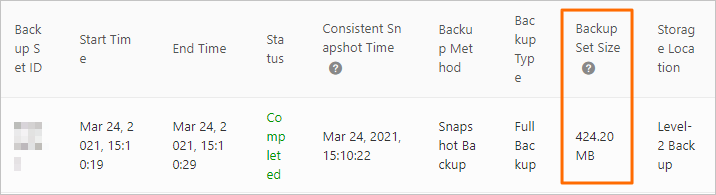
Navigate to . The total size of level-2 backup files is the sum of the size of each level-2 backup file.
Log backup
The following figure shows that the total size of log backup files is the sum of the size of each log backup file.
