リソースグループを活用することで、Smart Access Gateway (SAG)リソースの一元管理が可能になり、RAM (Resource Access Management) ポリシーを用いたグループ単位でのきめ細かなアクセス制御を実現できます。これにより、Alibaba Cloud アカウントで最小権限の原則 (PoLP) を徹底できます。
リソースグループレベルの権限設定は、サポート対象リソースタイプとアクションに限られます。サポート対象外アクションの場合、リソースグループに対するポリシーを指定しても無視されます。アクセス制御のため、アカウントに対するポリシーを設定する必要があります。
仕組み
リソースグループは、プロジェクトや環境ごとにリソースを整理します。リソースをグループ化したら、そのグループにのみ権限を限定する RAM ポリシーをアイデンティティ (RAM ユーザー、ユーザーグループ、ロールなど) にアタッチできます。詳細については、「リソースのグループ化と権限付与」をご参照ください。
このアプローチには、主に 2 つのメリットがあります。
-
きめ細かなアクセス制御:アカウント全体の権限を付与する代わりに、アイデンティティのアクセスを特定のグループ内のリソースのみに制限できます。これにより、プロジェクト固有のワークロードを分離し、意図しないアクセスのリスクを軽減できます。
-
管理の簡素化:新しいリソースがリソースグループに追加されると、そのグループに限定された権限を持つ RAM アイデンティティは自動的にアクセスできます。新しいリソースが作成されるたびに RAM ポリシーを更新する必要はありません。
RAM ユーザーへのリソースグループレベルの権限付与
このセクションでは、特定のリソースグループ内のSmart Access Gateway (SAG)リソースにのみアクセス権限を RAM ユーザーに付与する方法について説明します。
1. 前提条件
-
RAM ユーザーが作成されていること。
-
リソースグループを作成し、対象リソースがそのグループ内にあること。詳細については、「リソースグループの作成」、「リソースをリソースグループに自動追加」、および「リソースをリソースグループに手動で追加」をご参照ください。
2. 権限付与
リソースグループレベルの権限は、Resource Management コンソールまたは RAM コンソールのいずれかから付与できます。
Resource Management コンソール
-
Resource Management コンソールにログインします。
-
[Resource Group] ページで、対象のリソースグループを見つけ、[Actions] 列の [Manage Permission] をクリックします。
-
[Permissions] タブで、[Grant Permission] をクリックします。
-
[Grant Permission] パネルで、プリンシパルとアクセスポリシーを設定します。
-
Principal:RAM ユーザーを選択します。
-
Policy:[System Policy] または [Custom Policy] を選択します。詳細については、「カスタム権限ポリシーの作成」をご参照ください。
-
-
[Grant Permissions] をクリックします。
詳細については、「リソースグループに対する RAM アイデンティティへの権限付与」をご参照ください。
RAM コンソール
-
Alibaba Cloud アカウント (root ユーザー)または RAM 管理者アカウントを使用して、RAM コンソールにログインします。
-
左側のメニューで、を選択します。[Users] ページで、対象の RAM ユーザーを見つけ、[Actions] 列の [Add Permissions] をクリックします。
-
[Grant Permission] パネルで、RAM ユーザーに権限を追加します。
-
Resource Scope:[Resource Group] を選択します。
-
Principal:既存の RAM ユーザーまたは前のステップで作成した RAM ユーザーを選択します。
-
Access Policy:[System Policy] または [Custom Policy] を選択します。詳細については、「カスタム権限ポリシーの作成」をご参照ください。
-
-
[OK] をクリックします。
詳細については、「RAM ユーザーへの権限付与」をご参照ください。
サポート対象リソース
以下のSmart Access Gateway (SAG)リソースは、リソースグループレベルの権限付与をサポートしています。
|
Alibaba Cloud サービス |
サービスコード |
リソースタイプ |
|
Smart Access Gateway (SAG) |
smartag |
acl : ACL |
|
Smart Access Gateway (SAG) |
smartag |
ccn : Cloud Connect Network (CCN) インスタンス |
|
Smart Access Gateway (SAG) |
smartag |
flowlog : フローログ |
|
Smart Access Gateway (SAG) |
smartag |
intelligentrouting : インテリジェントルーティング |
|
Smart Access Gateway (SAG) |
smartag |
qos : Quality of Service (QoS) ポリシー |
|
Smart Access Gateway (SAG) |
smartag |
smartag : SAG インスタンス |
|
Smart Access Gateway (SAG) |
smartag |
smartag_s : SAG アプリインスタンス |
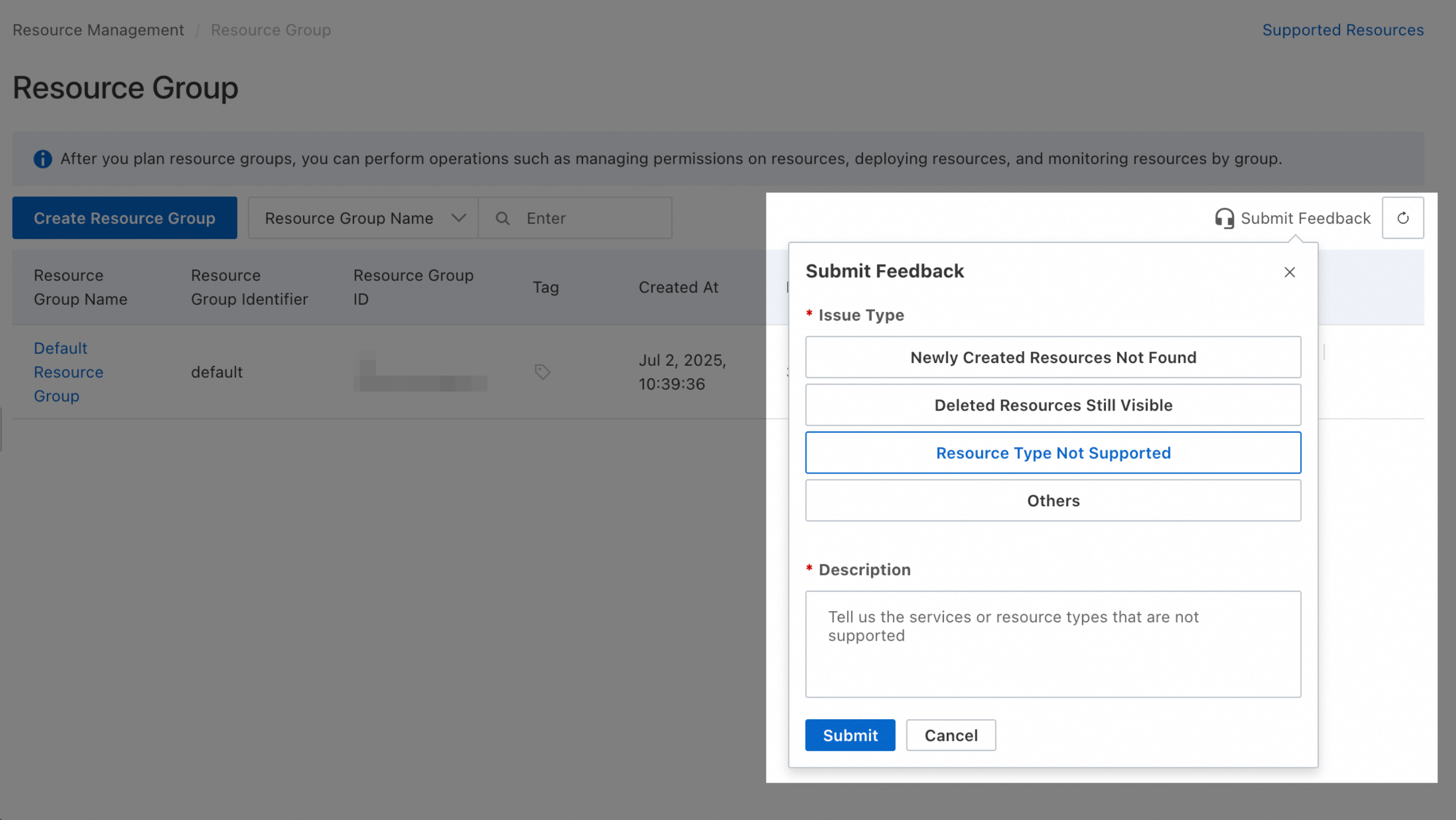
上表に記載されていないリソースタイプのサポートをリクエストするには、Resource Management コンソールでフィードバックを送信してください。
サポート対象外アクション
以下のSmart Access Gateway (SAG)アクションは、リソースグループレベルの権限付与をサポートしていません。
|
アクション |
説明 |
|
smartag:ClearSagCipher |
- |
|
smartag:CreateApplicationBandwidthPackage |
- |
|
smartag:CreateEnterpriseCode |
- |
|
smartag:CreateIntelligentRouting |
- |
|
smartag:CreateResellerInstance |
- |
|
smartag:CreateSagSoftwareAuditSubscription |
- |
|
smartag:CreateSmartAGForResellerInstance |
- |
|
smartag:DeleteEnterpriseCode |
- |
|
smartag:DeleteProbeTask |
- |
|
smartag:DeleteResellerInstance |
- |
|
smartag:DescribeGatewayIntelligentRoutings |
- |
|
smartag:DescribeGatewayQoses |
- |
|
smartag:DescribeGatewayValidIROutboundPorts |
- |
|
smartag:DescribeSAGDeviceARPInfo |
- |
|
smartag:DescribeSagDropTopN |
- |
|
smartag:DescribeSagOnlineClientStatistics |
- |
|
smartag:DescribeSagRouteableAddress |
- |
|
smartag:DescribeSagTrafficTopN |
- |
|
smartag:DescribeSmartAccessGatewayRoutes |
- |
|
smartag:DownloadSagAuditRecord |
- |
|
smartag:ExportSagAuditRecord |
- |
|
smartag:GetApPortalAttribute |
- |
|
smartag:GetApRadioAttribute |
- |
|
smartag:GetApplicationBandwidthPackageAttribute |
- |
|
smartag:GetBranchAttribute |
- |
|
smartag:GetBranchBasicNetworkAttribute |
- |
|
smartag:GetBranchDeviceCount |
- |
|
smartag:GetCloudConnectNetworkUseLimit |
- |
|
smartag:GetDeviceAttribute |
- |
|
smartag:GetQosAttribute |
- |
|
smartag:GetSagAuditRecordDownLoadUrl |
- |
|
smartag:GetSmartAccessGatewayUseLimit |
- |
|
smartag:GetTopology |
- |
|
smartag:ListAlarmRecordCounts |
- |
|
smartag:ListApMonitorDataTopN |
- |
|
smartag:ListApSsids |
- |
|
smartag:ListApplicationAccelerateRules |
- |
|
smartag:ListAuthenticationTemplate |
- |
|
smartag:ListAuthorizedBranch |
- |
|
smartag:ListBranchAlarmDataTopN |
- |
|
smartag:ListBranches |
- |
|
smartag:ListDevices |
- |
|
smartag:ListEnterpriseCode |
- |
|
smartag:ListEventAlarmRecords |
- |
|
smartag:ListGatewayACLs |
- |
|
smartag:ListGatewayMonitorDataTopN |
- |
|
smartag:ListGatewayPorts |
- |
|
smartag:ListGatewayRouters |
- |
|
smartag:ListGatewayWifiRadio |
- |
|
smartag:ListGatewayWifiSsids |
- |
|
smartag:ListMonitorAlarmRecords |
- |
|
smartag:ListMonitorDataTopN |
- |
|
smartag:ListPPPOEProvidersAlarmData |
- |
|
smartag:ListProbeAlarmRecords |
- |
|
smartag:ListProbeTask |
- |
|
smartag:ListResellerInstances |
- |
|
smartag:ListSagAuditRecord |
- |
|
smartag:ListSagAuditRecordParam |
- |
|
smartag:ListSagAuditSubscription |
- |
|
smartag:ListSagSoftwareAuditRecord |
- |
|
smartag:ListSagSoftwareAuditRecordParam |
- |
|
smartag:ListSagSoftwareAuditSubscription |
- |
|
smartag:ListSmartAGByAccessPoint |
- |
|
smartag:ListStationMonitorDataTopN |
- |
|
smartag:ListTerminalProbeAlarmRecords |
- |
|
smartag:ListUnsupportedFeatures |
- |
|
smartag:ModifyFlowLogAttribute |
- |
|
smartag:ModifyQosCar |
- |
|
smartag:ModifyQosPolicy |
- |
|
smartag:ModifySagGlobalRouteProtocol |
- |
|
smartag:ModifySagPortRouteProtocol |
- |
|
smartag:RemoveApSsid |
- |
|
smartag:ReserveSmartAG |
- |
|
smartag:UpdateEnterpriseCode |
- |
|
smartag:UpdateResellerInstanceAttribute |
- |
|
smartag:ViewSmartAccessGatewayDeviceAttributes |
- |
上記のアクションについては、 [Resource Scope] を [Account] に設定し、カスタムポリシーを作成する必要があります。
 以下のポリシー例は、必要に応じてカスタマイズ可能です。
-
読み取り専用アクセスの許可
{ "Version": "1", "Statement": [ { "Effect": "Allow", "Action": [ "smartag:DescribeGatewayIntelligentRoutings", "smartag:DescribeGatewayQoses", "smartag:DescribeGatewayValidIROutboundPorts", "smartag:DescribeSAGDeviceARPInfo", "smartag:DescribeSagDropTopN", "smartag:DescribeSagOnlineClientStatistics", "smartag:DescribeSagRouteableAddress", "smartag:DescribeSagTrafficTopN", "smartag:DescribeSmartAccessGatewayRoutes", "smartag:GetApPortalAttribute", "smartag:GetApRadioAttribute", "smartag:GetApplicationBandwidthPackageAttribute", "smartag:GetBranchAttribute", "smartag:GetBranchBasicNetworkAttribute", "smartag:GetBranchDeviceCount", "smartag:GetCloudConnectNetworkUseLimit", "smartag:GetDeviceAttribute", "smartag:GetQosAttribute", "smartag:GetSagAuditRecordDownLoadUrl", "smartag:GetSmartAccessGatewayUseLimit", "smartag:GetTopology", "smartag:ListAlarmRecordCounts", "smartag:ListApMonitorDataTopN", "smartag:ListApSsids", "smartag:ListApplicationAccelerateRules", "smartag:ListAuthenticationTemplate", "smartag:ListAuthorizedBranch", "smartag:ListBranchAlarmDataTopN", "smartag:ListBranches", "smartag:ListDevices", "smartag:ListEnterpriseCode", "smartag:ListEventAlarmRecords", "smartag:ListGatewayACLs", "smartag:ListGatewayMonitorDataTopN", "smartag:ListGatewayPorts", "smartag:ListGatewayRouters", "smartag:ListGatewayWifiRadio", "smartag:ListGatewayWifiSsids", "smartag:ListMonitorAlarmRecords", "smartag:ListMonitorDataTopN", "smartag:ListPPPOEProvidersAlarmData", "smartag:ListProbeAlarmRecords", "smartag:ListProbeTask", "smartag:ListResellerInstances", "smartag:ListSagAuditRecord", "smartag:ListSagAuditRecordParam", "smartag:ListSagAuditSubscription", "smartag:ListSagSoftwareAuditRecord", "smartag:ListSagSoftwareAuditRecordParam", "smartag:ListSagSoftwareAuditSubscription", "smartag:ListSmartAGByAccessPoint", "smartag:ListStationMonitorDataTopN", "smartag:ListTerminalProbeAlarmRecords", "smartag:ListUnsupportedFeatures" ], "Resource": "*" } ] } -
フルアクセスの許可
{
  "Version": "1",
  "Statement": [
    {
      "Effect": "Allow",
      "Action": [
        "smartag:ClearSagCipher",
        "smartag:CreateApplicationBandwidthPackage",
        "smartag:CreateEnterpriseCode",
        "smartag:CreateIntelligentRouting",
        "smartag:CreateResellerInstance",
        "smartag:CreateSagSoftwareAuditSubscription",
        "smartag:CreateSmartAGForResellerInstance",
        "smartag:DeleteEnterpriseCode",
        "smartag:DeleteProbeTask",
        "smartag:DeleteResellerInstance",
        "smartag:DescribeGatewayIntelligentRoutings",
        "smartag:DescribeGatewayQoses",
        "smartag:DescribeGatewayValidIROutboundPorts",
        "smartag:DescribeSAGDeviceARPInfo",
        "smartag:DescribeSagDropTopN",
        "smartag:DescribeSagOnlineClientStatistics",
        "smartag:DescribeSagRouteableAddress",
        "smartag:DescribeSagTrafficTopN",
        "smartag:DescribeSmartAccessGatewayRoutes",
        "smartag:DownloadSagAuditRecord",
        "smartag:ExportSagAuditRecord",
        "smartag:GetApPortalAttribute",
        "smartag:GetApRadioAttribute",
        "smartag:GetApplicationBandwidthPackageAttribute",
        "smartag:GetBranchAttribute",
        "smartag:GetBranchBasicNetworkAttribute",
        "smartag:GetBranchDeviceCount",
        "smartag:GetCloudConnectNetworkUseLimit",
        "smartag:GetDeviceAttribute",
        "smartag:GetQosAttribute",
        "smartag:GetSagAuditRecordDownLoadUrl",
        "smartag:GetSmartAccessGatewayUseLimit",
        "smartag:GetTopology",
        "smartag:ListAlarmRecordCounts",
        "smartag:ListApMonitorDataTopN",
        "smartag:ListApSsids",
        "smartag:ListApplicationAccelerateRules",
        "smartag:ListAuthenticationTemplate",
        "smartag:ListAuthorizedBranch",
        "smartag:ListBranchAlarmDataTopN",
        "smartag:ListBranches",
        "smartag:ListDevices",
        "smartag:ListEnterpriseCode",
        "smartag:ListEventAlarmRecords",
        "smartag:ListGatewayACLs",
        "smartag:ListGatewayMonitorDataTopN",
        "smartag:ListGatewayPorts",
        "smartag:ListGatewayRouters",
        "smartag:ListGatewayWifiRadio",
        "smartag:ListGatewayWifiSsids",
        "smartag:ListMonitorAlarmRecords",
        "smartag:ListMonitorDataTopN",
        "smartag:ListPPPOEProvidersAlarmData",
        "smartag:ListProbeAlarmRecords",
        "smartag:ListProbeTask",
        "smartag:ListResellerInstances",
        "smartag:ListSagAuditRecord",
        "smartag:ListSagAuditRecordParam",
        "smartag:ListSagAuditSubscription",
        "smartag:ListSagSoftwareAuditRecord",
        "smartag:ListSagSoftwareAuditRecordParam",
        "smartag:ListSagSoftwareAuditSubscription",
        "smartag:ListSmartAGByAccessPoint",
        "smartag:ListStationMonitorDataTopN",
        "smartag:ListTerminalProbeAlarmRecords",
        "smartag:ListUnsupportedFeatures",
        "smartag:ModifyFlowLogAttribute",
        "smartag:ModifyQosCar",
        "smartag:ModifyQosPolicy",
        "smartag:ModifySagGlobalRouteProtocol",
        "smartag:ModifySagPortRouteProtocol",
        "smartag:RemoveApSsid",
        "smartag:ReserveSmartAG",
        "smartag:UpdateEnterpriseCode",
        "smartag:UpdateResellerInstanceAttribute",
        "smartag:ViewSmartAccessGatewayDeviceAttributes"
      ],
      "Resource": "*"
    }
  ]
}
アカウントレベルの権限を付与すると、アカウント内のすべての関連リソースへのアクセスが許可されます。常に最小権限の原則に従ってください。
よくある質問
リソースがどのリソースグループに属しているかを確認するにはどうすればよいですか。
-
方法 1:所属サービスのコンソールで確認
-
リソースが所属する Alibaba Cloud サービスのコンソールに移動します。通常、リソースの詳細ページの基本情報セクションにリソースグループが記載されています。
-
-
方法 2:Resource Management コンソールで確認
-
Resource Management コンソールにログインします。
-
を選択します。
-
左側のメニューで、対象リソースを所有するアカウントを選択します (デフォルトは [Current Account]) を選択します。
-
フィルター条件を使用してリソースを検索します。
-
[Resource Group Name] 列に、リソースが属するグループが表示されます。
-
特定のリソースグループ内のすべてのリソースを表示するにはどうすればよいですか。
-
方法 1:
-
Resource Management コンソールにログインします。
-
を選択します。
-
左側のメニューで、リソースを所有するアカウント (デフォルトは [Current Account]) の下にある、対象のリソースグループ名をクリックします。
-
右側の画面で、[Select resource types] ドロップダウンリストからクラウドサービスを選択します。
-
そのグループ内のすべてのリソースが表示されます。
-
-
方法 2:
-
Resource Management コンソールにログインします。
-
を選択します。
-
対象のリソースグループを見つけ、[Actions] 列の [Manage Resource] をクリックします。
-
リソース管理ページで、[Service] ドロップダウンリストからクラウドサービスを選択します。
-
そのグループ内のすべてのリソースが表示されます。
-
複数のリソースを別のリソースグループに一括で移動するにはどうすればよいですか。
-
Resource Management コンソールにログインします。
-
左側のメニューで、 を選択します。
-
対象のリソースグループを見つけ、[Actions] 列の [Manage Resource] をクリックします。
-
リソース管理ページで、フィルター条件を使用して移動したいリソースを検索します。
-
移動したいリソースのチェックボックスを選択します。
-
ページ下部にある [Transfer] をクリックします。
-
ダイアログボックスで、移動先のリソースグループを選択し、 [Confirm] をクリックします。