What is a relational model?
Introduction to the relational model
The Quick BI relational model is a data modeling system for connecting and analyzing multiple tables. It is designed to solve common challenges in traditional physical modeling, such as low efficiency, data inaccuracies, and limited analytical flexibility. This model is ideal for multidimensional data analysis in complex business scenarios.
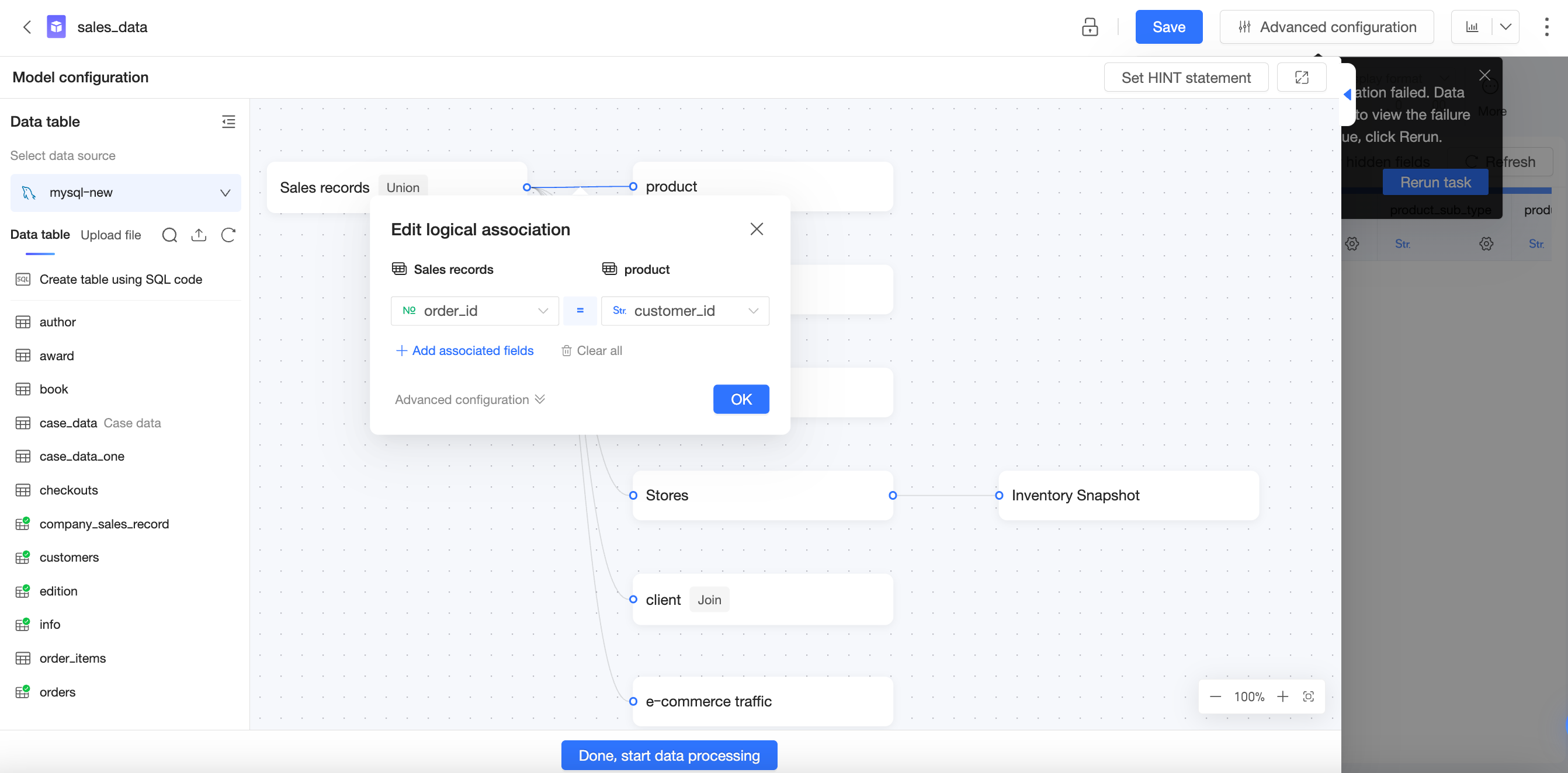
In a relational model, you do not need to specify exact join types or manage low-level data details. Simply place related tables on the canvas and define their join keys to complete the model.
While improving modeling efficiency, the relational model also ensures data accuracy. Quick BI dynamically adjusts the query SQL based on the fields in a query and the configured relationships to guarantee accurate results. For details on how this works, see How does the relational model work?
Core value of the relational model
Background and challenges
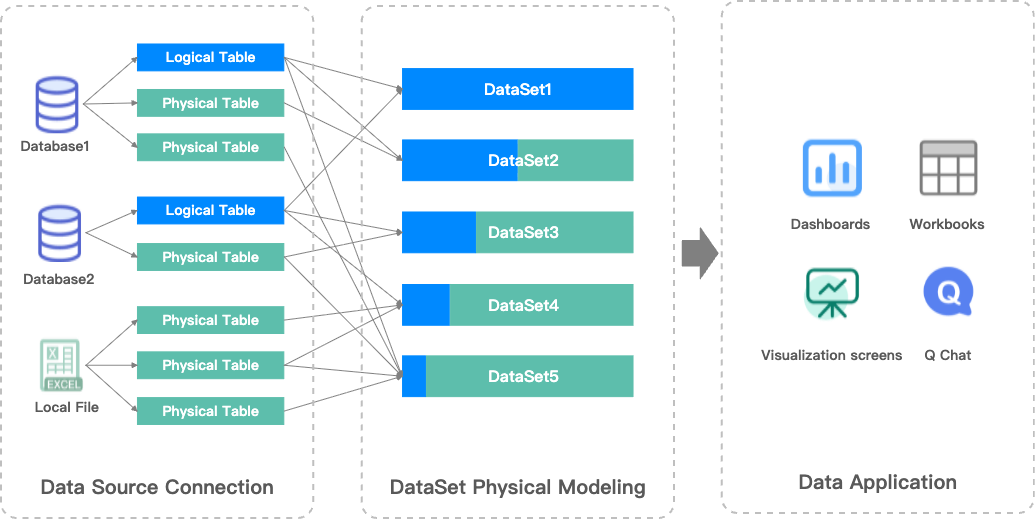
Previously, dataset modeling in Quick BI involved connecting tables with standard physical joins like Left Join and Full Join, which created a single, large wide table. Because physical joins can cause data explosion, ensuring accuracy required a clear understanding of your data's characteristics, such as its completeness and uniqueness. Sometimes, you even had to preprocess source tables—for example, by pre-aggregating data—to prevent this issue. Consequently, physical modeling often had a high barrier to entry, was costly to implement, and was prone to errors caused by data explosion.
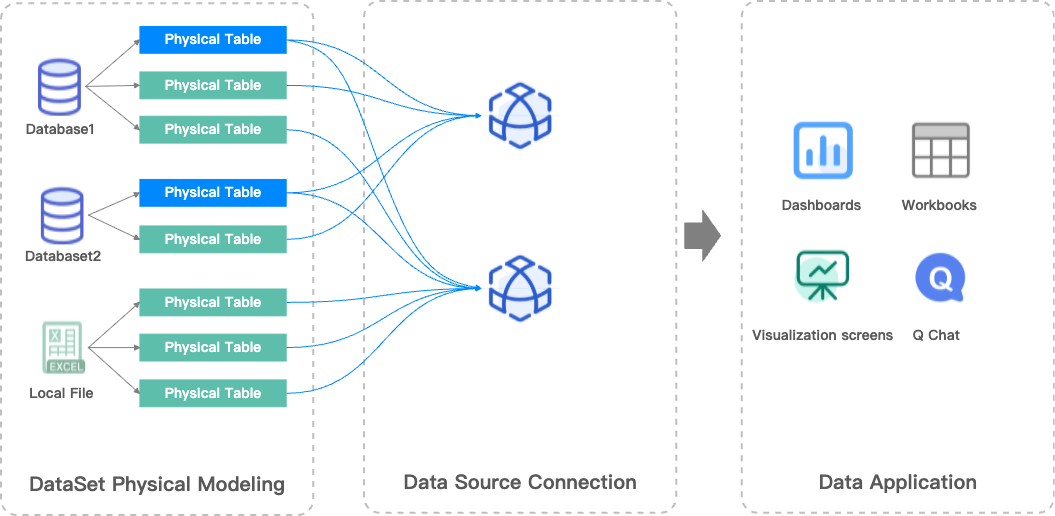
To address these issues, Quick BI introduces the relational model, which adds relationship modeling capabilities to complement existing physical modeling. The relational model significantly improves your efficiency and flexibility when working with complex data models.
Value of the relational model
Simpler data modeling: You no longer need to select specific join types. Just define the join keys, and the relational model automatically handles the connections to ensure data integrity.
Prevents data explosion: When tables have mismatched granularities, you do not need to preprocess the data during modeling. The relational model automatically resolves data explosion issues to ensure accurate calculations.
Supports more use cases with fewer models: A relational model is highly reusable. Instead of building separate models for different analytical scenarios, you can create a single comprehensive model. This reduces the number of models you need to build and simplifies long-term maintenance.
For more information, see Advantages of the relational model.
Physical model vs. relational model
Physical model | Relational model |
|
|
Challenges:
| Solutions:
|
Key concepts
Fact and dimension tables
A fact table and a dimension table are two common types of tables in data modeling.
fact table: Stores quantifiable business metrics, such as data related to business events or facts. For example, in an online education platform, this could include the number of students who completed a course, average test scores, or total study time.
dimension table: Stores descriptive attributes, which provide business context or dimensions. For example, this could include course type, student grade level, teacher name, or study date.
Fact tables and dimension tables are connected through common fields, allowing you to associate dimensions and measures during queries to enable multidimensional analysis.
Example
Fact tables
Orders table
Order ID | Date | Product ID | Quantity | Amount |
1 | 2025-12-01 | A | 1 | 50 |
2 | 2025-12-01 | A | 2 | 100 |
3 | 2025-12-01 | B | 3 | 60 |
4 | 2025-12-02 | C | 1 | 10 |
Inventory records
Date | Product ID | Inventory quantity |
2025-12-01 | A | 10 |
2025-12-01 | B | 20 |
2025-12-01 | C | 5 |
2025-12-02 | C | 4 |
Dimension table
Product ID | Product name | Category | Brand |
A | Qingfeng Facial Tissues (Box) | Household goods | Qingfeng |
B | M&G File Folders (Set) | Stationery | M&G |
C | Oishi Prawn Crackers (Large Bag) | Food | Oishi |
Layers in data modeling
Every dataset you create in Quick BI has a data model. You can think of a data model as a diagram of table relationships that tells Quick BI how to query data from your database tables.
Logical and physical layers
The Quick BI data model has two layers:
Logical layer:
When you enter the data modeling canvas for a dataset, you first see the logical layer. In most cases, you only need to model in the logical layer.
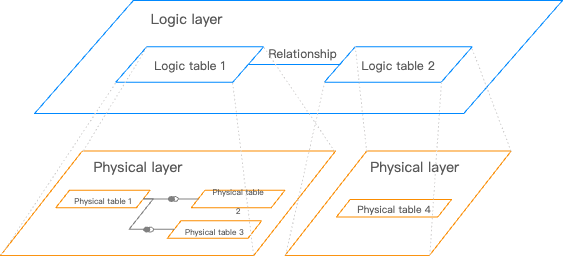
You use relationships (the connecting lines) to define how nodes are connected in the logical layer. Each node is a logical table. A logical table can be a single table, a custom SQL query, or a wide table created from physical joins or unions of multiple tables and custom SQL queries.
Modeling in the logical layer builds the complete data model.
Physical layer:
From any logical table in the logical layer, you can enter its physical canvas, which is the physical layer.
The physical layer uses traditional physical joins and unions to define relationships between multiple physical tables. Each node here represents a database table or a custom SQL query.
Modeling in the physical layer creates a fixed wide table, which in turn becomes a single logical node in the logical layer.
Logical layer | Physical layer |
Relationship lines | Venn diagram |
|
|
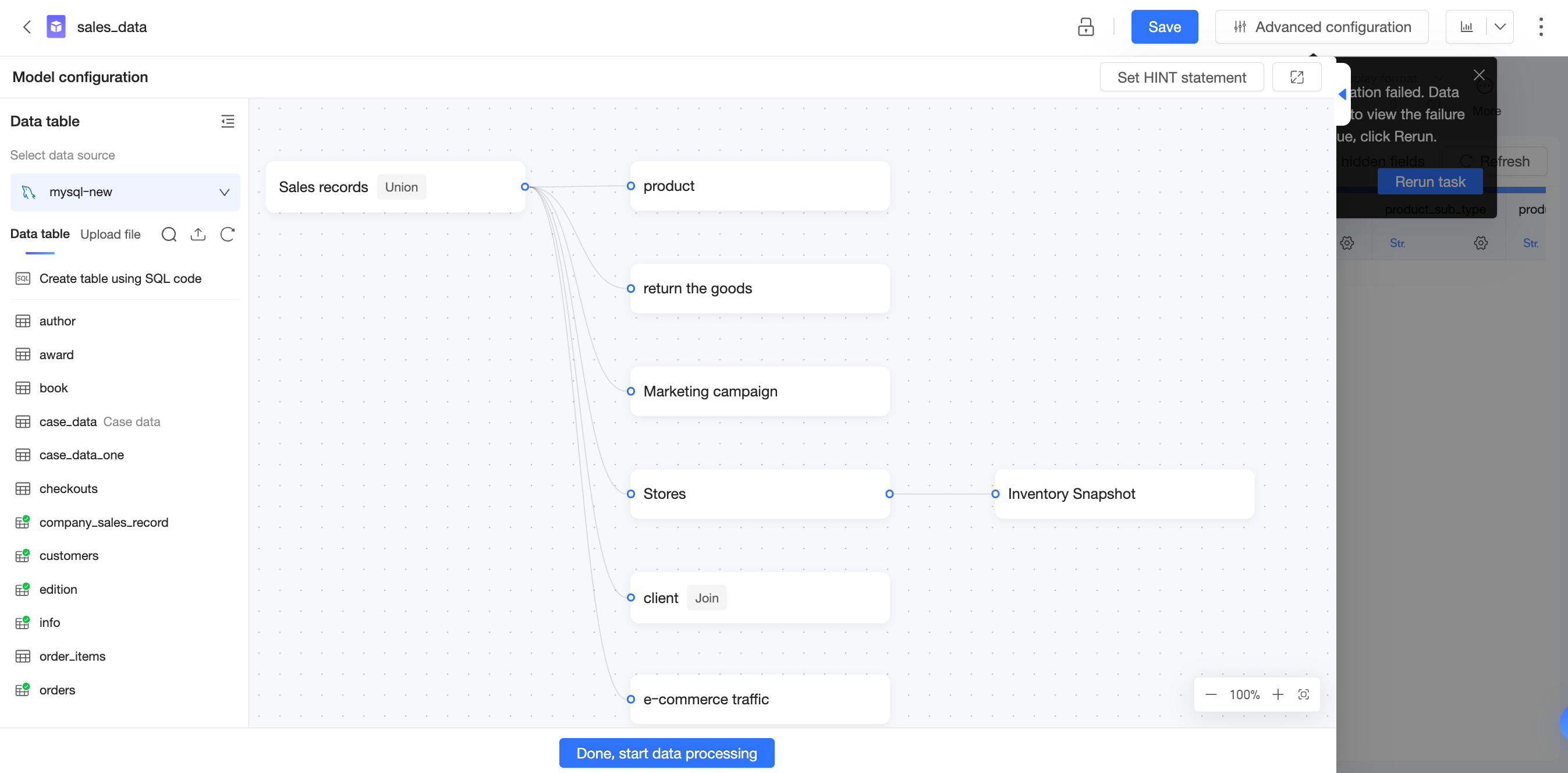
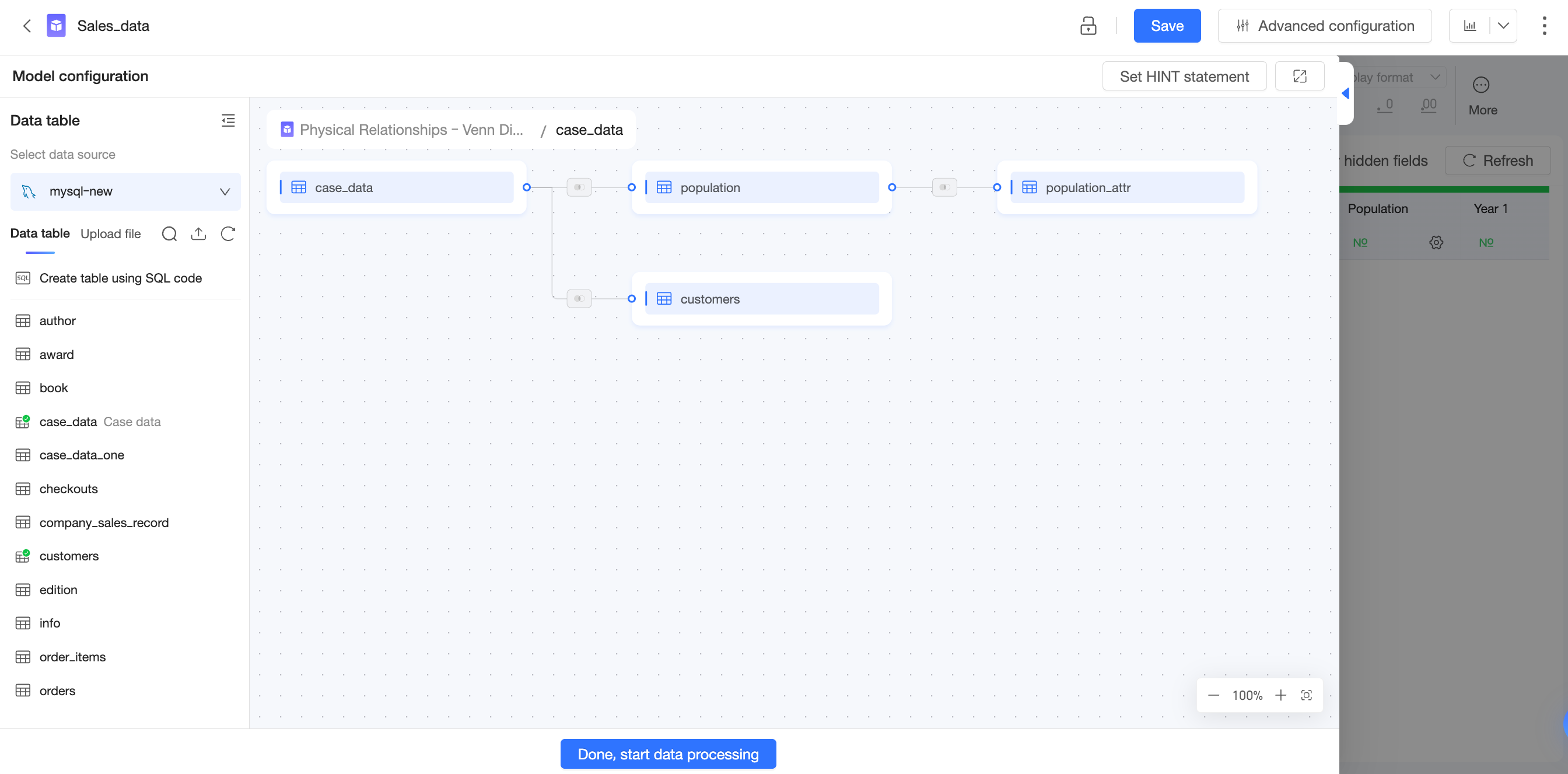
Logical and physical layer relationship
In the logical layer, you connect logical tables using relationships to build a relational model. You do not need to specify join types for relationships, and this approach does not create a fixed wide table.
Each logical table corresponds to a separate physical model. You can access the physical layer by double-clicking a logical table or by selecting Enter Physical Canvas from the More options ( ) menu. In the physical layer, you connect physical tables using joins or unions. You must specify the exact join type, and the result is a complete wide table.
Each logical table in the logical layer has a corresponding physical model (either a single-table or a multi-table physical model) in the physical layer.
In previous versions of Quick BI, the data model had only a physical layer. In v6.1 and later, the data model has both a logical and a physical layer, which introduces the relational model capability.
Cardinality and referential integrity
When you configure a relationship, click More Options to set the Cardinality and Referential Integrity. Quick BI uses these settings to select the most appropriate join type for queries. If you provide accurate settings, Quick BI can improve query performance.
If you are unsure about your data's distribution or unfamiliar with the concepts of cardinality and referential integrity, do not change the default settings. Incorrect settings can lead to data explosion, data loss, or other errors.
Only adjust these settings if you have a clear understanding of your data distribution and are certain it will not change in the future. This can help optimize the query performance of the relational model.
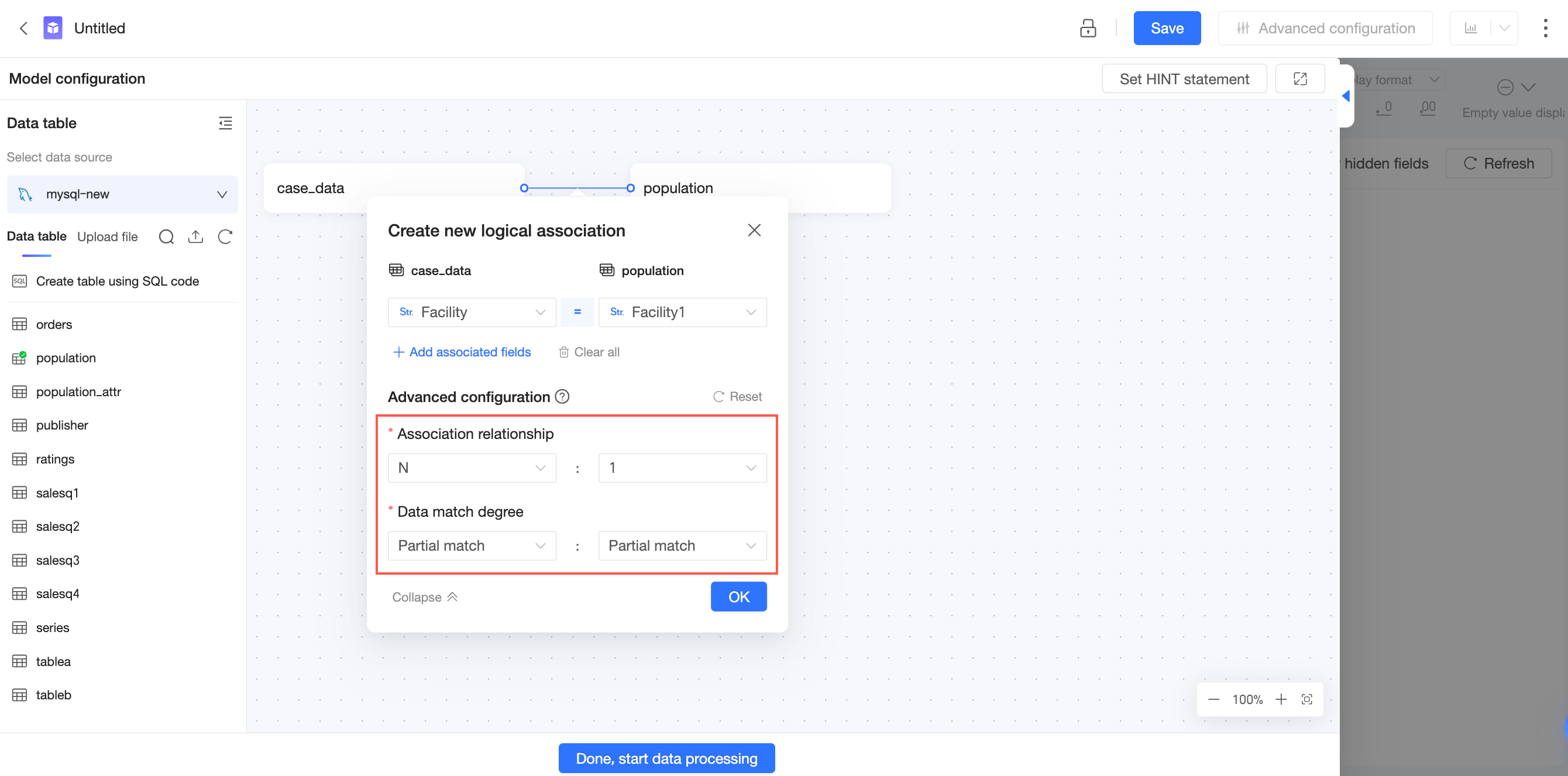
Cardinality
Cardinality describes whether the join key values in a table are unique and how they correspond to the join key values in the other table.
1: The field values are unique.
N: The field values are not unique.
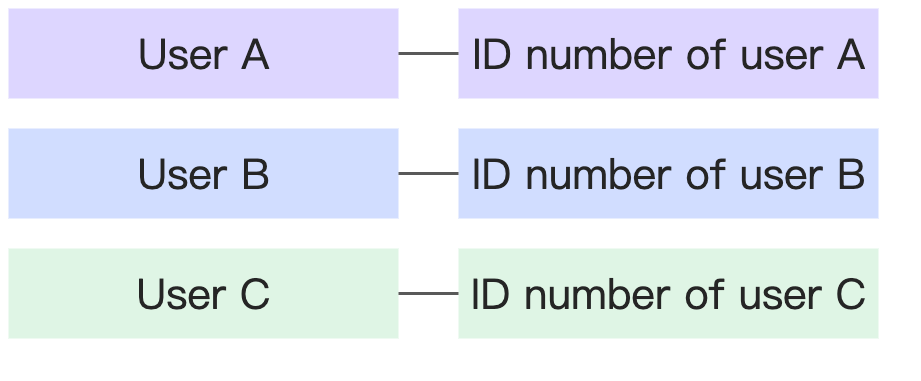
Cardinality | Example | Diagram |
1-to-1 | Each person has only one ID number, and each ID number corresponds to only one person. |
|
1-to-many | Each province corresponds to many cities, but each city corresponds to only one province. |
|
Many-to-1 |
| |
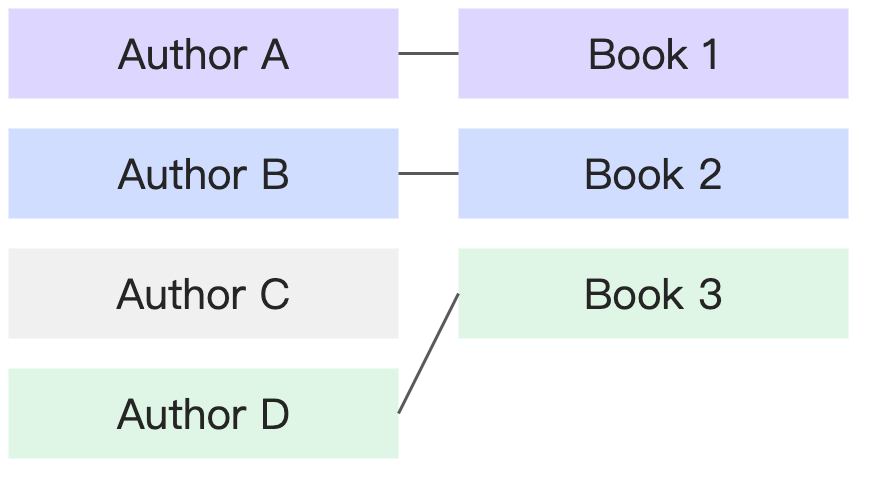
Many-to-many | A book can have multiple authors, and an author can have multiple books. |
|
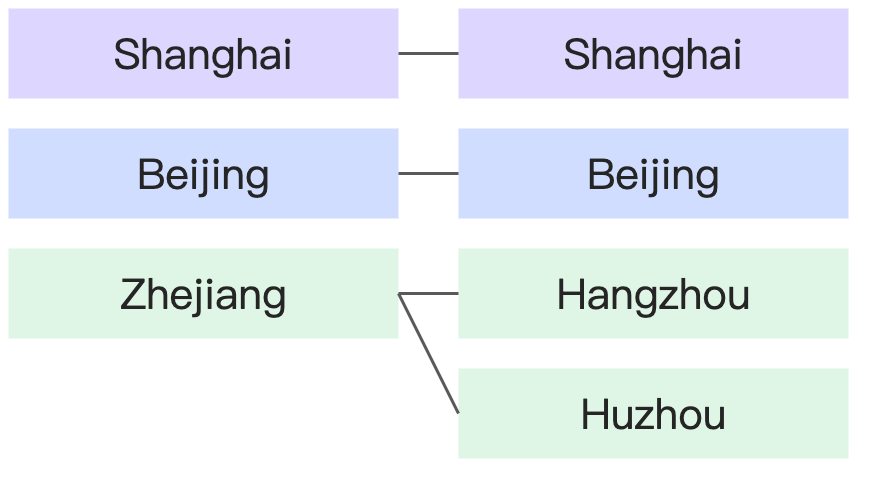
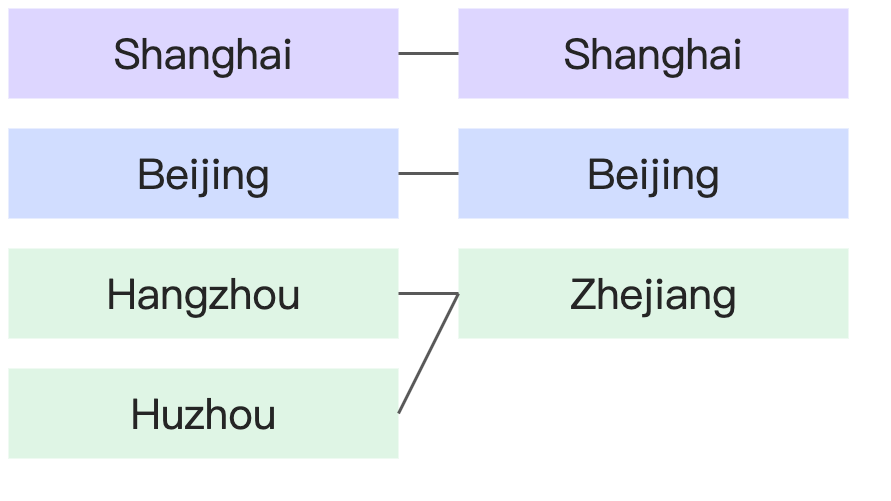
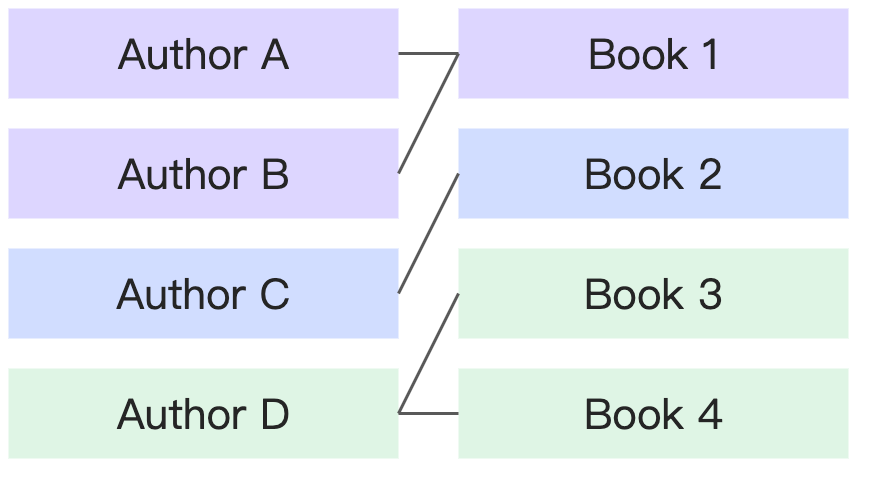
Referential integrity
Referential integrity describes whether each join key value in one table has a corresponding match in the other. In other words, it describes data completeness.
Some records match: Some field values in one table do not have a matching value in the other table.
All records match: All field values in one table have a matching value in the other table.
Referential integrity | Example | Diagram |
All records in each table have a matching record in the other. | Every country has corresponding provinces, and every province has a corresponding country. |
|
Some records in the left table do not have a match in the right, while all records in the right table do. | Every book has a corresponding author, but some authors may not have a corresponding book (if they have not yet published). |
|
All records in the left table have a match in the right, while some records in the right table do not. | ||
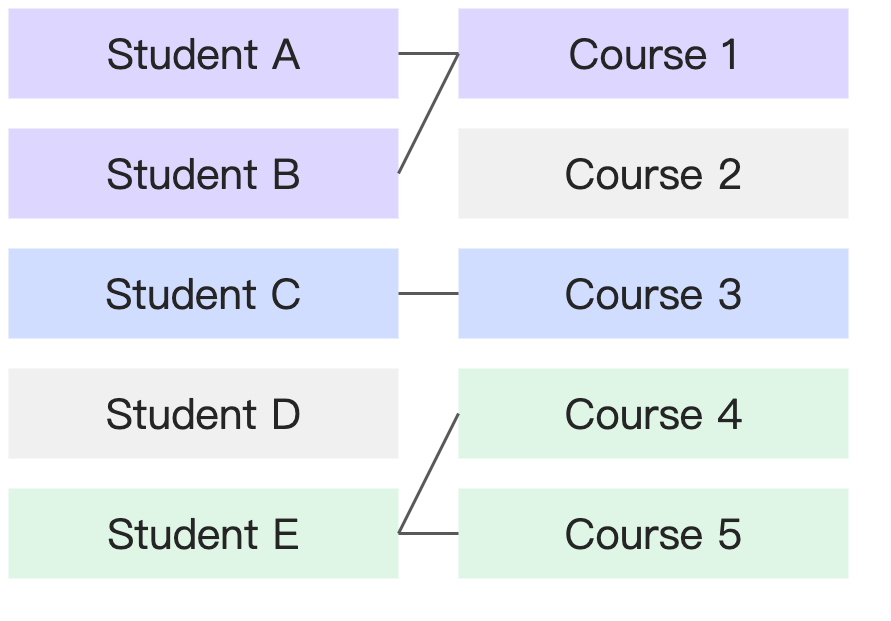
Some records in each table do not have a match in the other. | Some students do not have a corresponding course (if they have not enrolled), and some courses do not have corresponding students (if no one has enrolled). |
|
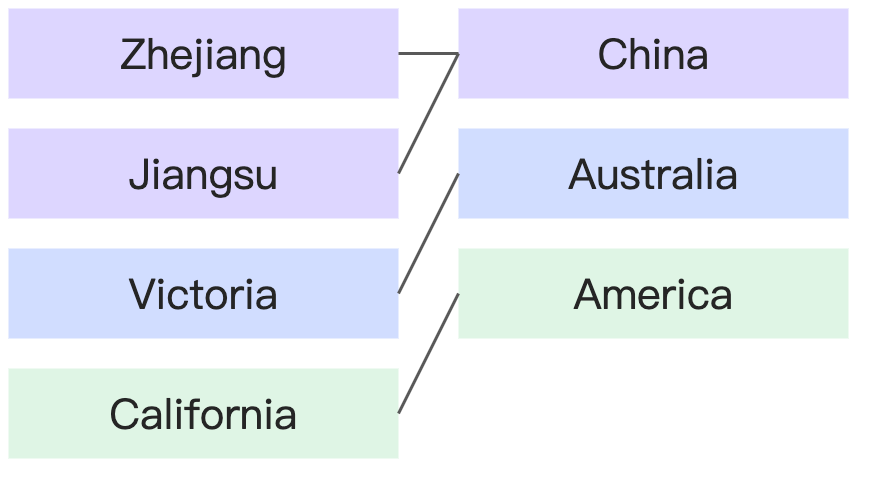
Use cases for the relational model
Use cases for the relational model
Scenario 1: Simple data modeling for business users
If users have limited knowledge of SQL and databases, we recommend using the relational model for modeling.
Configuring a relational model is simpler than physical modeling. You only need to specify the join key between two tables and can use the default advanced settings. The relational model also effectively prevents data explosion, so business users do not need to worry about data integrity or uniqueness. This lowers the barrier to entry for modeling and improves accuracy.
Example
An HR department creates a points system to encourage employees to participate in training and other activities. Employees earn points by participating in activities and can redeem them for gifts. The database contains two tables:
Points Earned table: Date, Employee ID, Department, Activity Name, Points Earned
Points Redeemed table: Date, Employee ID, Department, Gift Name, Points Spent
The Points Earned table and Points Redeemed table have the following data relationship:
Points earned table - Points redeemed table | ||
Cardinality | Many-to-many | An employee can participate in multiple activities to earn points and can also redeem gifts multiple times. Therefore, 'Employee ID' is not unique in either table. |
Referential integrity | Some records match : All records match | An employee may have earned points but never redeemed a gift. In this case, the employee exists in the Points Earned table but not in the Points Redeemed table. If an employee has never earned points, they cannot redeem gifts. Therefore, an employee cannot exist in the Points Redeemed table without also being in the Points Earned table. |
Now, the HR user needs to perform a self-service analysis to check the remaining points for each employee. A user might naturally perform a physical join on the two tables using the 'Employee ID' field. However, because 'Employee ID' is not unique in either table, a direct join will cause data explosion. The correct approach in physical modeling would be to aggregate both tables by 'Employee ID' before joining them, which requires data preprocessing skills.
If the HR user models with a relational model instead, they can simply relate the tables by 'Employee ID'. During calculations, Quick BI automatically handles the data aggregation to ensure accuracy.
For more details on calculations, see How does the relational model work?
Scenario 2: Improve dataset reusability
When there is a large number of underlying data tables, an IT user can drag all related tables onto the logical canvas to build a single, comprehensive relational model. Business users can then select only the fields they need for their analysis. This approach prevents the IT team from having to create different wide tables for various analysis scenarios, which can lead to a proliferation of datasets that are difficult to maintain and manage.
In this scenario, we recommend that IT users accurately adjust the cardinality and referential integrity settings based on the data's characteristics. This can improve query performance and reduce the performance impact of complex models.
Example
Let's use the same HR points scenario:
Points Earned table: Date, Employee ID, Department, Activity Name, Points Earned
Points Redeemed table: Date, Employee ID, Department, Gift Name, Points Spent
Unlike the previous example, this company requires a centralized IT team to prepare datasets for all analysts. An HR user submits data requests for the following three scenarios. If the IT team uses physical modeling, they must prepare three separate datasets.
Scenario | Analysis description | Physical modeling approach |
Scenario 1 | Analyze the number of participants and points earned for each activity. | Points Earned table (single-table modeling) |
Scenario 2 | Analyze the number of people who redeemed each gift and the number of redemptions. | Points Redeemed table (single-table modeling) |
Scenario 3 | Analyze the remaining points for each employee and create a leaderboard. | Join the Points Earned and Points Redeemed tables after aggregating each by 'Employee ID'. |
Because the Points Earned and Points Redeemed tables have different granularities, a direct physical join would cause data explosion and yield incorrect results. However, aggregating by 'Employee ID' first would lose information like 'Activity Name' and 'Gift Name', making it impossible to perform the analyses for Scenario 1 and Scenario 2. Therefore, when using physical modeling, the IT team must prepare three separate datasets to support these three scenarios.
However, if the IT team uses a relational model, they only need to prepare one dataset. Quick BI will automatically select the appropriate calculation method based on the fields used in the analysis to ensure data accuracy.
Scenario | Analysis description | Relationship modeling approach | Fields used | Relational model handling |
Scenario 1 | Analyze the number of participants and points earned for each activity. | Join key: Employee ID Many-to-many Some records match : All records match | Dimension: Activity Name Measures: Employee ID (distinct count), Points Earned (sum) | Single-table query |
Scenario 2 | Analyze the number of people who redeemed each gift and the number of redemptions. | Dimension: Gift Name Measures: Employee ID (distinct count), Points Spent (sum) | Single-table query | |
Scenario 3 | Analyze the remaining points for each employee and create a leaderboard. | Dimension: Employee ID Measure: SUM(Points Earned) - SUM(Points Spent) | Join after aggregation |
For more details on calculations, see How does the relational model work?
Limitations of the relational model
Performance limitations
To prevent data explosion, the relational model applies special processing to query SQL, which makes the SQL more complex. Compared to traditional physical joins, queries generated by a relational model have more subqueries and deeper nesting, which can reduce query performance. Performance is also highly dependent on data volume and model complexity. As data volume grows and model complexity increases, the performance gap between a relational model and a physical model widens.
If you have a thorough understanding of your data distribution, you can optimize query performance by adjusting the cardinality and referential integrity settings. In general, the performance of these settings ranks as follows:
Cardinality: 1-to-1 > 1-to-many = many-to-1 > many-to-many
Referential Integrity: All : All > All : Some = Some : All > Some : Some
If you are unsure about your data's distribution or unfamiliar with the concepts of cardinality and referential integrity, do not change the default settings. Incorrect settings can lead to data explosion, data loss, or other errors.
Only adjust these settings if you have a clear understanding of your data distribution and are certain it will not change in the future. This can help optimize the query performance of the relational model.
Nonetheless, if you have strong data processing skills and require very high query performance, we still recommend using the traditional physical modeling approach to avoid the computational overhead from the relational model's complex logic.
Data volume limitations
When measures come from multiple logical tables, Quick BI queries each logical table separately and then joins the results. To ensure query efficiency and service stability, each underlying query is limited to 10,000 rows. For more details, see How does the relational model work?
This 10,000-row limit applies to the data after aggregation. For example, if the join key is "region" and the query dimension is "product type", Quick BI aggregates the logical table by the "region" and "product type" fields and returns the first 10,000 rows of the result.
Due to the computational complexity of relational models, you cannot use pagination to retrieve data beyond the 10,000-row limit. If you need to perform queries on more granular data or if your query dimensions have a large number of unique values, the relational model may return incomplete data. In these scenarios, we recommend using traditional physical joins for modeling.
Feature limitations
With the introduction of the relational model, the underlying processing and calculation of datasets have undergone significant changes. The following capabilities are not backward-compatible:
A resource package does not support importing a dataset from a higher version into a lower-version environment. Doing so will result in an error. We recommend that you first upgrade the target environment to v6.1 or later before importing the resource package.
The legacy
QueryDatasetDetailInfoAPI operation is no longer compatible with datasets that use a relational model. We recommend you switch to the newQueryDatasetInfoAPI operation.Legacy API (no longer maintained): https://next.api.aliyun.com/document/quickbi-public/2022-01-01/QueryDatasetDetailInfo
New API: https://next.api.aliyun.com/document/quickbi-public/2022-01-01/QueryDatasetInfo
Quick BI v6.1 introduces the initial version of the relational model. The following features are only supported for datasets with a single logical table. Support for datasets with multiple logical tables will be added in future releases:
extraction acceleration
LOD function
data preparation
Complex filter conditions do not allow selecting fields from multiple logical tables. The following features are affected by this limitation:
row-level security: Includes conditional combination authorization and user tag-based authorization.
dashboard - composite query control
monitoring and alerting - alerting rule