What is a relational model?
Relational model overview
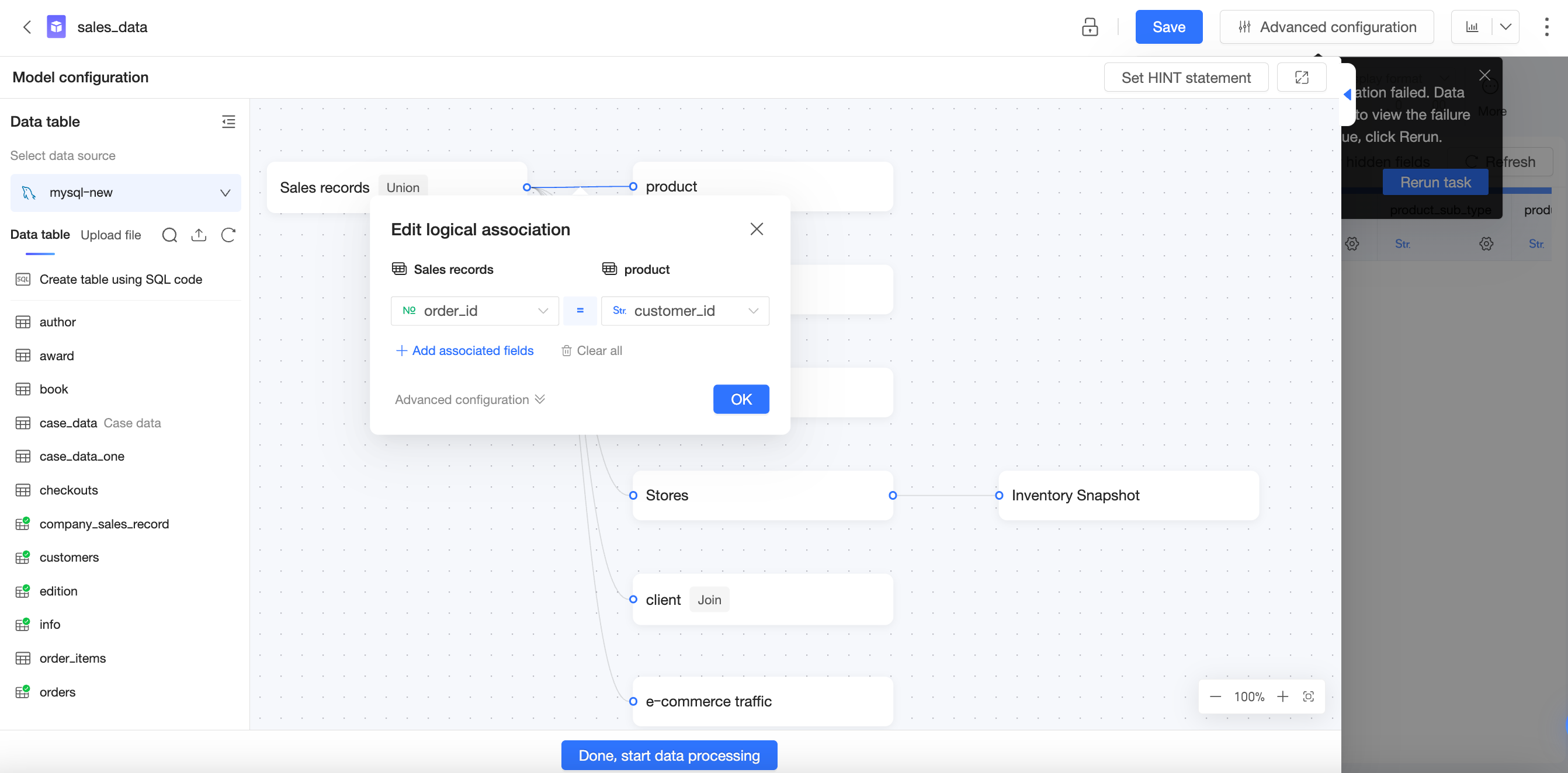
The Quick BI relational model is a data modeling framework for multi-table joins and analysis. It solves key problems of traditional physical modeling—inefficiency, inaccuracy, and limited analytical flexibility—making it ideal for multidimensional analysis in complex business scenarios.
With a relational model, you place related tables on the canvas and configure join keys. No low-level data management or explicit join type specification is required.
The relational model improves modeling efficiency while ensuring data accuracy. Quick BI dynamically adjusts query SQL based on the fields and relationship configurations at query time, guaranteeing precise results. How the relational model works.
Core value of the relational model
Background and challenges
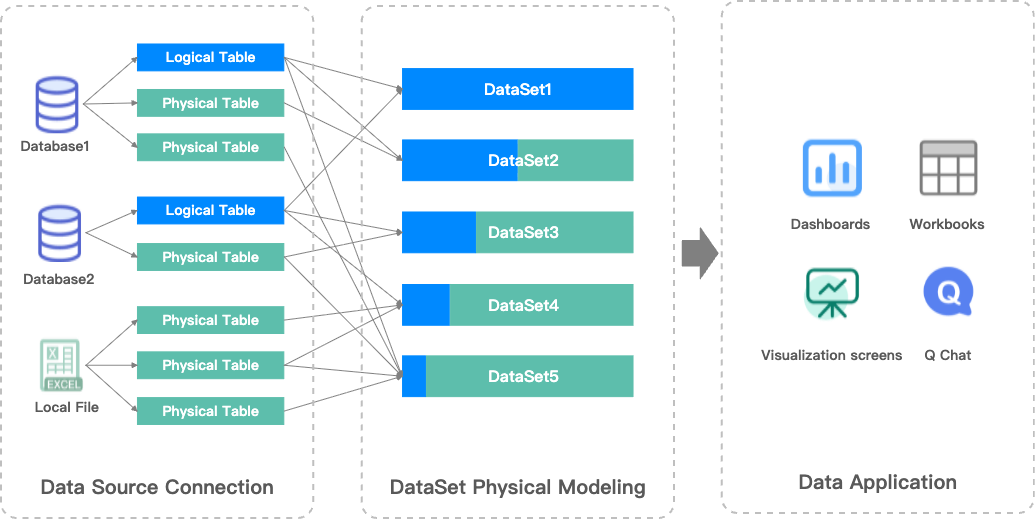
In previous versions of Quick BI, tables were connected using physical joins (left join, full join, etc.) to produce a single wide table. Because physical joins can duplicate data, users needed to understand their data's completeness and uniqueness in advance. Source tables sometimes required preprocessing such as pre-aggregation. This made physical modeling complex, costly, and error-prone.
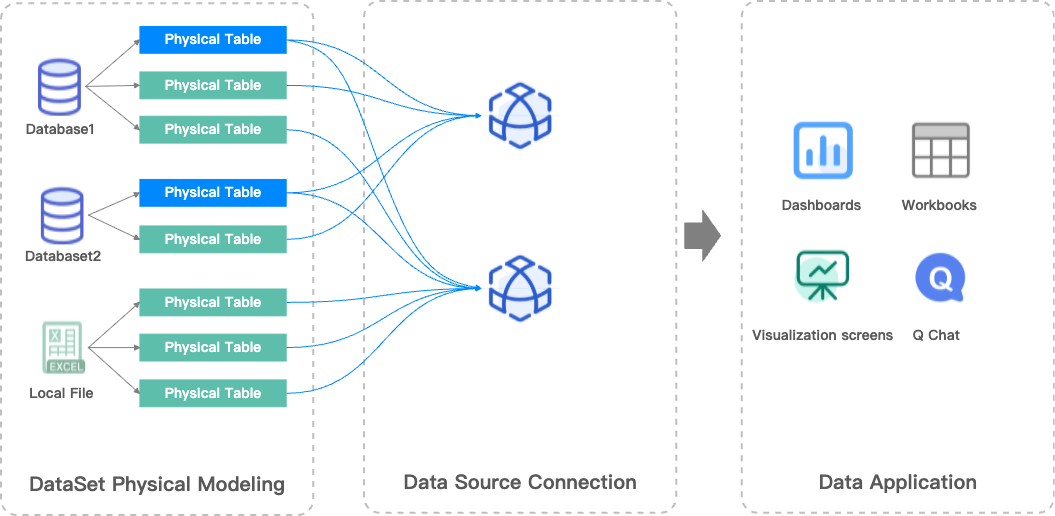
To address these challenges, Quick BI introduces the relational model, adding relationship modeling capabilities on top of existing physical modeling. This enhances efficiency and flexibility for complex data models.
Advantages
-
Simplified data modeling: Define join keys without specifying join types. The relational model automatically handles connections and ensures data integrity.
-
Prevents data duplication: No data preprocessing is needed when granularities differ. The relational model automatically resolves duplication to ensure correct calculations.
-
Supports more analytical use cases with fewer models: One comprehensive relational model can replace multiple scenario-specific models, reducing dataset count and simplifying maintenance.
For more information, see Advantages of the relational model.
Comparison of physical and relational models
|
Physical model |
Relational model |
|
|
|
|
Problems:
|
Solutions:
|
Key concepts
Fact tables and dimension tables
Fact tables and dimension tables are two common types of tables in data modeling.
-
Fact table: Stores quantifiable business measures and contains data related to business events (facts). For example, in an online education platform, a fact table might include the number of students who completed a course, average test scores, and total study time.
-
Dimension table: Stores descriptive attributes and contains data related to business context (dimensions). For example, a dimension table might include course type, student grade level, instructor name, and study date.
Fact tables and dimension tables are linked through common fields. This allows you to connect dimensions and measures during queries to perform multidimensional analysis.
Example
Fact tables
Orders
|
Order ID |
Date |
Product ID |
Quantity |
Amount |
|
1 |
2025-12-01 |
A |
1 |
50 |
|
2 |
2025-12-01 |
A |
2 |
100 |
|
3 |
2025-12-01 |
B |
3 |
60 |
|
4 |
2025-12-02 |
C |
1 |
10 |
Inventory records
|
Date |
Product ID |
Inventory |
|
2025-12-01 |
A |
10 |
|
2025-12-01 |
B |
20 |
|
2025-12-01 |
C |
5 |
|
2025-12-02 |
C |
4 |
Dimension table
|
Product ID |
Product Name |
Category |
Brand |
|
A |
Breeze Facial Tissues (Case) |
Household Supplies |
Breeze |
|
B |
M&G File Folders (Set) |
Stationery |
M&G |
|
C |
Oishi Prawn Crackers (Large Bag) |
Food |
Oishi |
Layers in data modeling
A data model defines table relationships that tell Quick BI how to query your database tables.
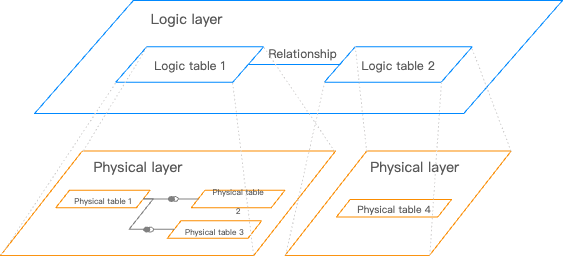
Logical layer and physical layer
The Quick BI data model has two layers:
-
Logical layer:
-
When you open the data modeling canvas, you first see the logical layer. In most cases, you only need to work here.
-
Relationships (lines connecting tables) define how nodes are related. Each node is a logical table—either a single table, a custom SQL query, or a wide table created by physical joins or unions on multiple tables or custom SQL queries.
-
Modeling in the logical layer builds the complete data model.
-
-
Physical layer:
-
From any logical table, you can enter its physical canvas (the physical layer).
-
The physical layer uses traditional physical joins and unions to define relationships between multiple physical tables. Each node is a database table or a custom SQL query.
-
Modeling in the physical layer creates a fixed, wide table, which then becomes a single logical node in the logical layer.
-
|
Logical layer |
Physical layer |
|
Relationship lines |
Venn diagrams |
|
|
|
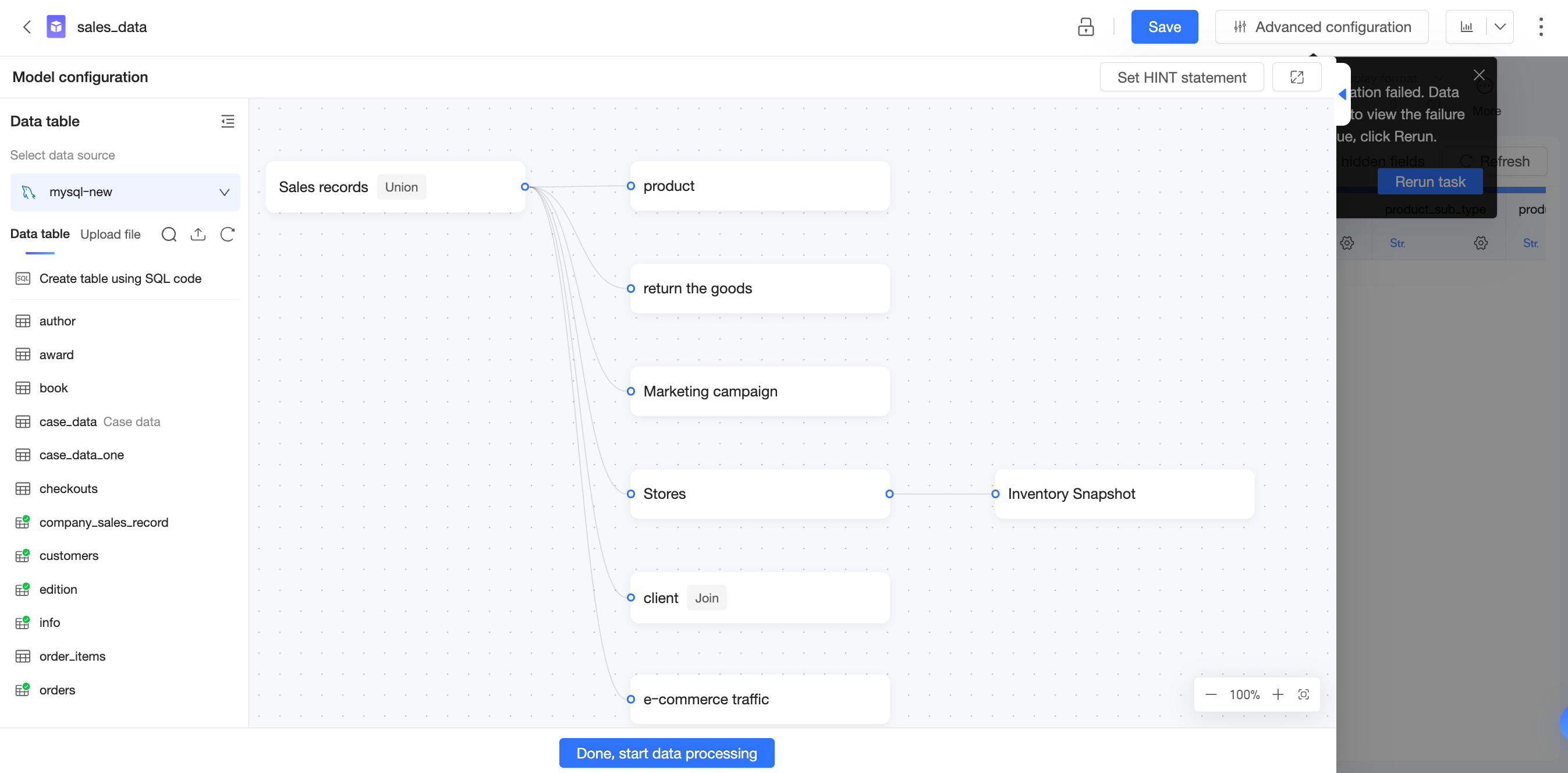
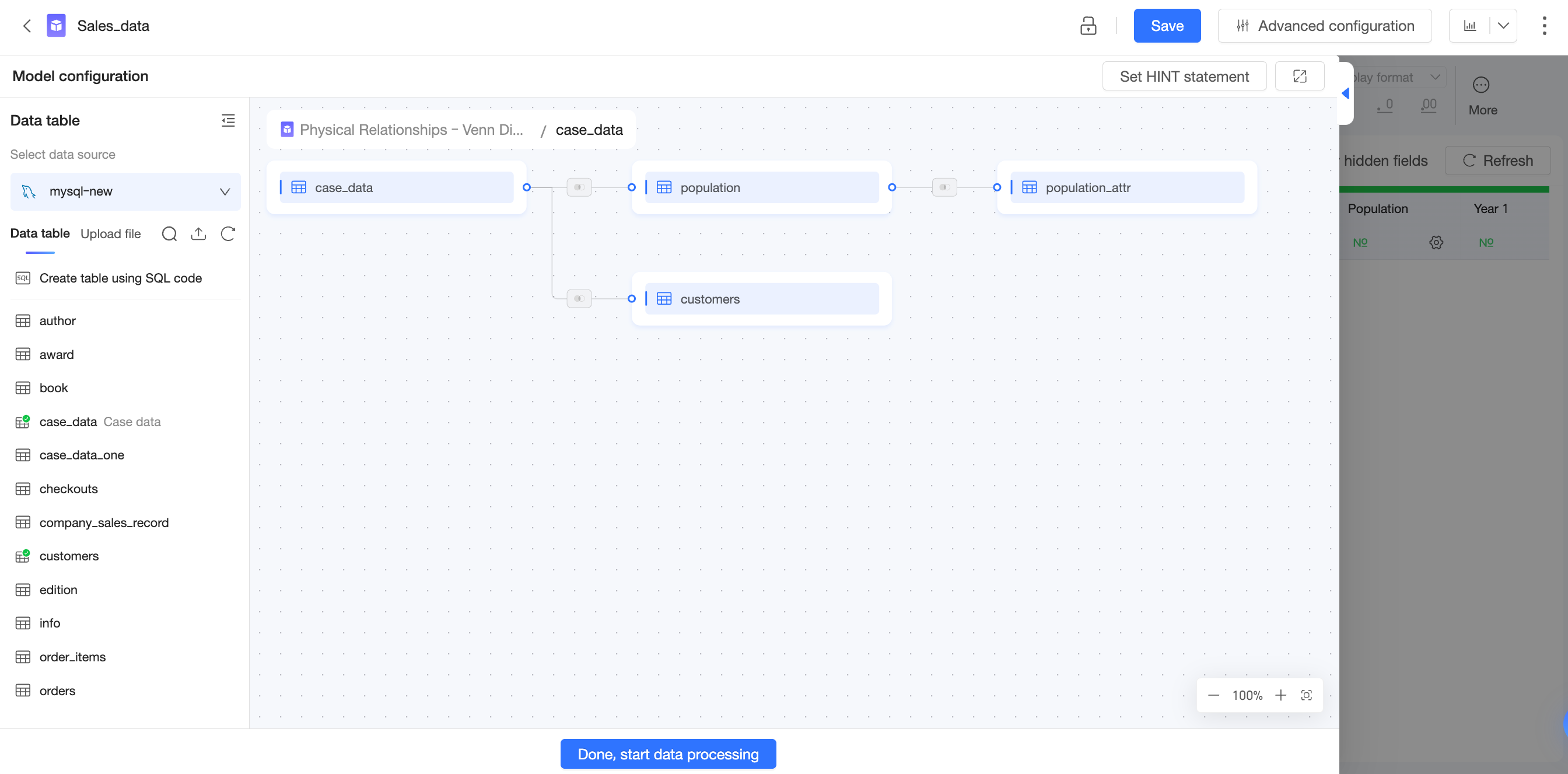
Relationship between the logical and physical layers
In the logical layer, logical tables are connected by relationships that form the relational model. You do not specify join types, and the result is not a fixed wide table.
Each logical table has its own physical model. Enter the physical layer by double-clicking a logical table or clicking the  icon and selecting Go to Physical Canvas. In the physical layer, tables are connected using joins or unions with explicit join types, producing a complete wide table.
Each logical table in the logical layer has a corresponding physical model (either a single-table or multi-table model) in the physical layer.
In previous versions of Quick BI, the data model had only a physical layer. Version 6.1 and later adds a logical layer, enabling the relational model.
Cardinality and referential integrity
When you configure a relationship, click More Options to set the cardinality and referential integrity. Quick BI uses these settings to select the most appropriate join type. Accurate configuration improves query performance.
-
If you are unfamiliar with your data's distribution or the concepts of cardinality and referential integrity, do not change the default settings. Incorrect configurations can lead to errors such as data duplication or data loss.
-
Only adjust the cardinality and referential integrity settings to optimize query performance if you have a clear understanding of your data distribution and are certain it will not change in the future.
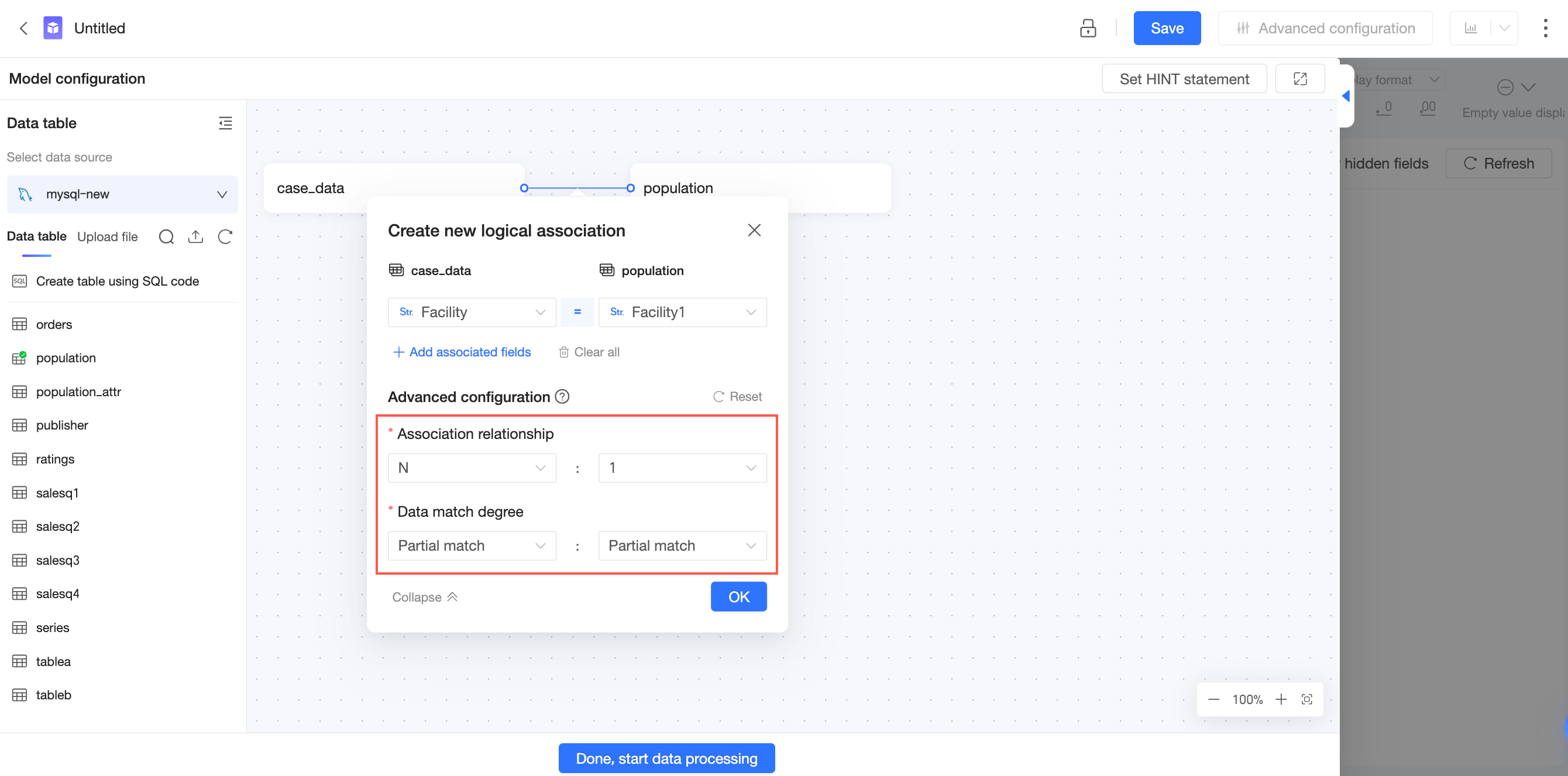
Cardinality
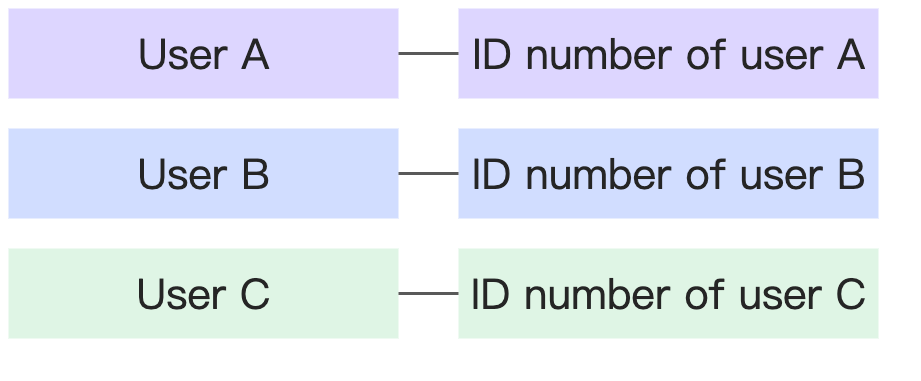
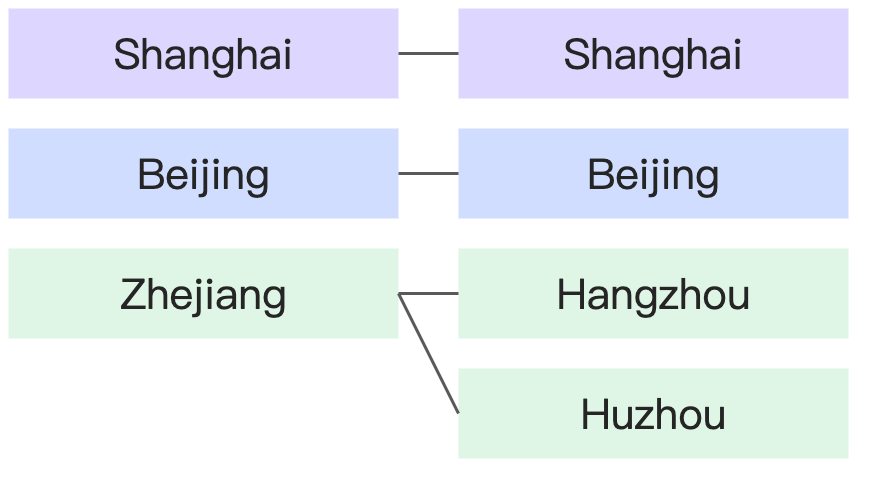
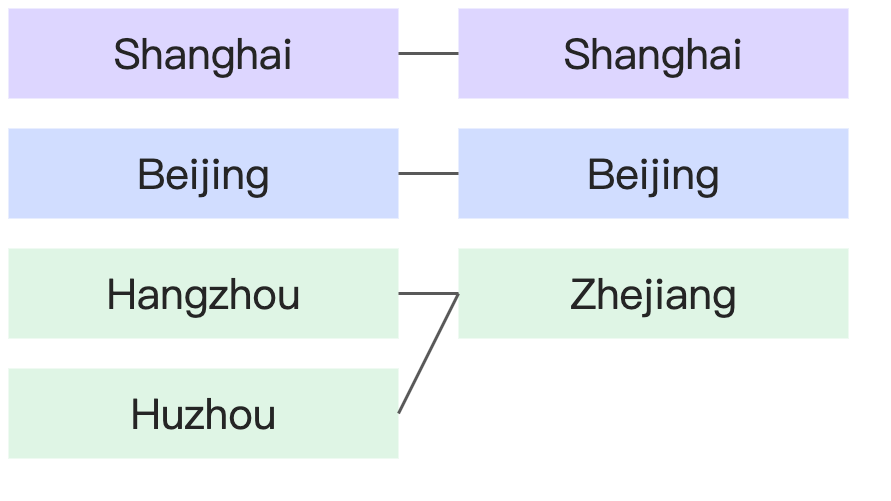
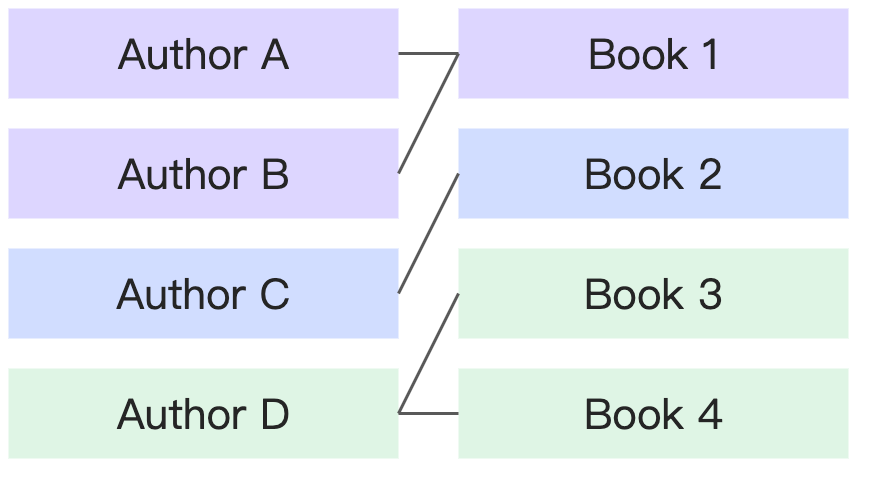
Cardinality describes whether the join key values in a table are unique and how the join key values in two tables correspond to each other.
-
1: The field contains unique values.
-
N: The field contains non-unique (many) values.
|
Cardinality |
Example |
Diagram |
|
1:1 |
Each person has one unique national ID number, and each national ID number corresponds to only one person. |
|
|
1:N |
Each state corresponds to many cities, but each city corresponds to only one state. |
|
|
N:1 |
|
|
|
N:N |
One book can have many authors, and one author can have many books. |
|
Referential integrity
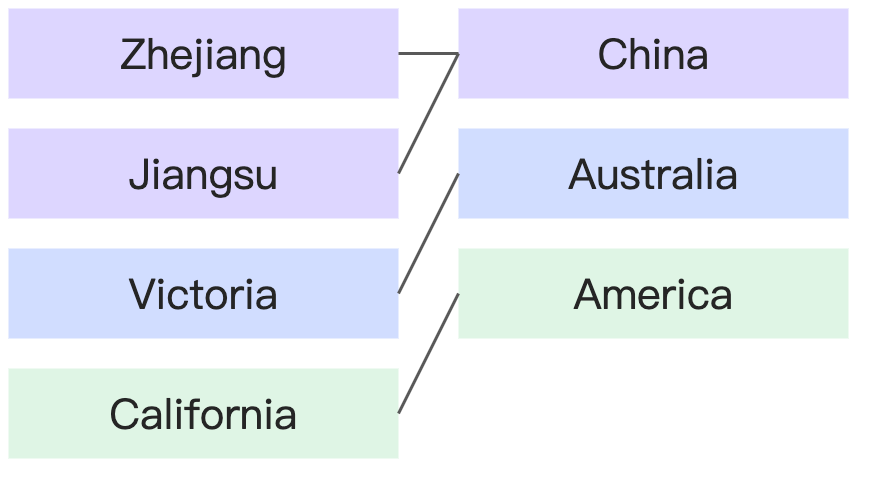
Referential integrity describes whether the join key values in one table can be completely matched to the values in another table. In other words, it describes the completeness of the data.
-
Some records match: Some field values in one table do not have a match in the other table.
-
All records match: All field values in one table have a corresponding match in the other table.
|
Referential integrity |
Example |
Diagram |
|
All records match : All records match |
Every country has corresponding states, and every state has a corresponding country. |
|
|
Some records match : All records match |
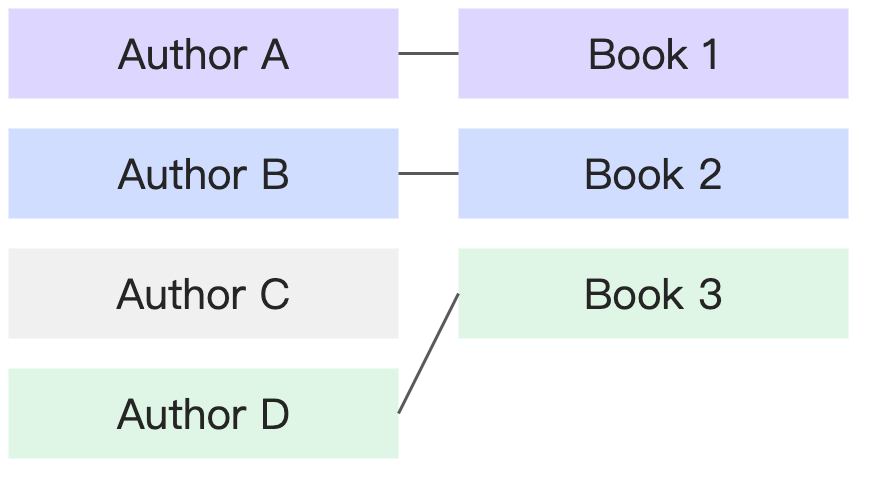
Every book has a corresponding author, but some authors may not have a corresponding book (for example, they have not published yet). |
|
|
All records match : Some records match |
||
|
Some records match : Some records match |
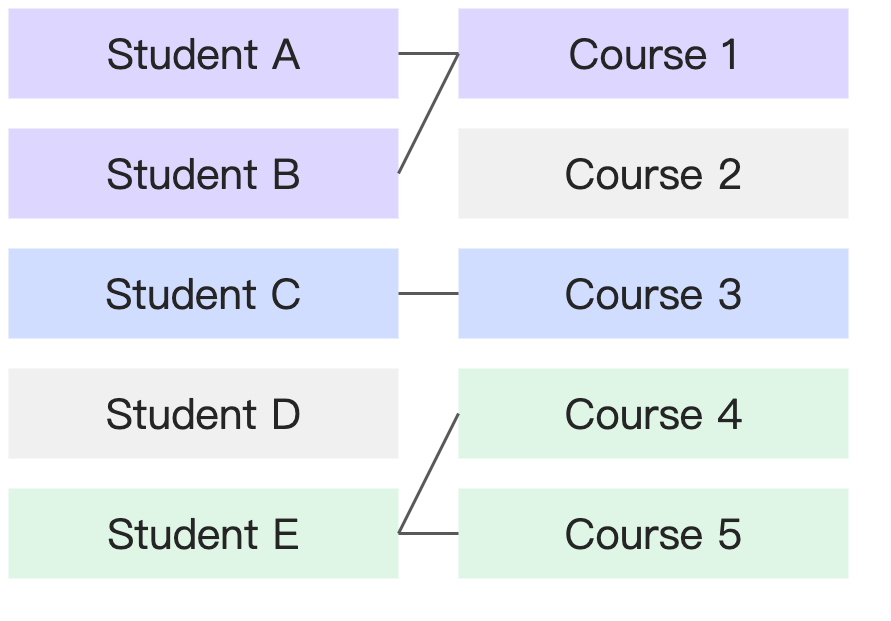
Some students do not have a corresponding course (they have not enrolled yet), and some courses do not have corresponding students (no one enrolled). |
|
Use cases for the relational model
Relational model use cases
Use case 1: Simple modeling for business users
If you have limited SQL or database knowledge, use the relational model for data modeling.
Configuring a relational model is simpler than physical modeling—specify the join key between two tables and keep default values for advanced settings. The relational model prevents data duplication without requiring you to understand data completeness or uniqueness, lowering the modeling barrier and improving accuracy.
Example
An HR department creates a points system to encourage employees to participate in training activities. Employees earn points by attending events and can redeem them for gifts. The database has two tables:
-
Points earned table: Date, Employee ID, Department, Activity Name, Points Earned
-
Points redeemed table: Date, Employee ID, Department, Gift Name, Points Spent
The relationship between the points earned table and the points redeemed table is as follows:
|
Points earned table - Points redeemed table |
||
|
Cardinality |
N:N |
An employee can participate in multiple activities to earn points and can also redeem points multiple times. Therefore, the "Employee ID" field is not unique in either table. |
|
Referential integrity |
Some records match : All records match |
An employee might earn points but never redeem them. In this case, the employee's record exists in the "Points earned table" but not in the "Points redeemed table." If an employee has never earned points, they cannot redeem them. Therefore, a record cannot exist in the "Points redeemed table" if it does not also exist in the "Points earned table." |
The HR analyst needs to check remaining points per employee. A physical join on "Employee ID" would duplicate data because the field is not unique in either table. The correct physical modeling approach—aggregating both tables by "Employee ID" before joining—requires data preprocessing skills.
With the relational model, the analyst creates a relationship on "Employee ID" and Quick BI automatically aggregates data during calculation to ensure accuracy.
The calculation logic is described in How the relational model works.
Use case 2: Improve dataset reusability
An IT user can drag all related tables into the logical canvas to build a single comprehensive relational model. Business users then select the fields they need. This eliminates the need to create numerous wide tables for different analytical scenarios, preventing dataset proliferation.
In this use case, IT users should configure the cardinality and referential integrity settings based on data characteristics to optimize query performance.
Example
Let's return to the HR department's points system example:
-
Points earned table: Date, Employee ID, Department, Activity Name, Points Earned
-
Points redeemed table: Date, Employee ID, Department, Gift Name, Points Spent
Unlike the previous example, this company has a centralized IT team that prepares datasets for all analysts. The HR department submits data requests for three scenarios. With physical modeling, the IT team must create three separate datasets.
|
Scenario |
Description |
Modeling approach |
|
Scenario 1 |
Analyze participant count and points earned for each activity. |
Points earned table (single-table model) |
|
Scenario 2 |
Analyze the number of people and redemptions for each gift. |
Points redeemed table (single-table model) |
|
Scenario 3 |
Analyze the remaining points for each employee and create a leaderboard. |
Join the points earned and points redeemed tables after aggregating each by "Employee ID." |
Because the two tables have different granularities, a direct physical join duplicates data. Pre-aggregating by "Employee ID" loses detail fields like "Activity Name" and "Gift Name," making Scenario 1 and 2 analyses impossible. Physical modeling therefore requires three separate datasets.
With a relational model, one dataset suffices. Quick BI automatically selects the appropriate calculation method based on the fields used in each analysis.
|
Scenario |
Description |
Modeling approach |
Fields used |
Model handling |
|
Scenario 1 |
Analyze participant count and points earned for each activity. |
Join key: Employee ID N:N Some : All |
Dimension: Activity Name Measures: Employee ID (distinct count), Points Earned (sum) |
Single-table query |
|
Scenario 2 |
Analyze the number of people and redemptions for each gift. |
Dimension: Gift Name Measures: Employee ID (distinct count), Points Spent (sum) |
Single-table query |
|
|
Scenario 3 |
Analyze the remaining points for each employee and create a leaderboard. |
Dimension: Employee ID Measure: SUM(Points Earned) - SUM(Points Spent) |
Join after aggregation |
The calculation logic is described in How the relational model works.
Limitations
Performance limitations
To prevent data duplication, the relational model generates more complex SQL with additional subqueries and deeper nesting, which can degrade query performance. The impact grows with data volume and model complexity.
If you understand your data distribution well, adjust the cardinality and referential integrity settings to optimize performance. Performance ranking:
-
Cardinality: 1:1 > 1:N = N:1 > N:N
-
Referential Integrity: All records match : All records match > All records match : Some records match = Some records match : All records match > Some records match : Some records match
-
If you are unfamiliar with your data's distribution or the concepts of "cardinality" and "referential integrity," do not change the default settings. Incorrect configurations can lead to errors such as data duplication or data loss.
-
Only adjust the "cardinality" and "referential integrity" settings to optimize query performance if you have a clear understanding of your data distribution and are certain it will not change in the future.
If you require maximum query performance and have strong data processing skills, use traditional physical modeling to avoid the computational overhead of the relational model.
Data volume limitations
When measures come from multiple logical tables, Quick BI queries each table separately and joins the results. To ensure query efficiency and service stability, each query has a data volume limit of 10,000 rows. How the relational model works.
This 10,000-row limit applies to aggregated data. For example, if the join key is "Region" and the query dimension is "Product Type," the logical table query aggregates by both fields and returns the first 10,000 rows.
Pagination cannot retrieve data beyond the 10,000-row limit. If your query requires finer granularity or your dimension has too many unique values, the relational model may return incomplete data. In these cases, use traditional physical joins instead.
Feature limitations
The relational model introduced significant changes to underlying data processing. The following features are not compatible with older versions:
-
Importing a dataset from a newer version into an older environment causes an error. Upgrade the target environment to version 6.1 or later before importing.
-
The
QueryDatasetDetailInfoAPI is no longer compatible with relational model datasets. UseQueryDatasetInfoinstead.
Quick BI v6.1 introduced the initial version of the relational model. The following features currently support only single logical table datasets (multi-table support planned for future versions):
-
Data preparation
Complex filter conditions cannot reference fields from multiple logical tables. Affected features:
-
Row-level security: including conditional combination authorization and user tag-based authorization
-
dashboard - Composite Query Control
-
Monitoring and alarm - alarm rule
Extraction acceleration limitation: If a query involves more than three logical tables, the system bypasses the acceleration engine and uses a direct connection.