This topic describes how to unsubscribe from purchased Subscription products, such as yearly/monthly instances and Resource Plans. For Pay-as-you-go products, no unsubscription is required. To stop billing, simply back up your data and release the associated resources.
Understand unsubscription rules
Before you unsubscribe, review the Unsubscription rules to understand the detailed policies and confirm if your resource is eligible for a refund.
After you unsubscribe, the resource is released. Back up your data in advance. The unsubscription cannot be undone. Carefully verify your order details to prevent mistakes.
Initiate unsubscription
An Alibaba Cloud account has unsubscription permissions by default. Before a RAM user can unsubscribe, the parent Alibaba Cloud account must grant them permissions, such as
AliyunBSSFullAccess.Unsubscribe using a PC. Unsubscribing from a mobile device, including the Alibaba Cloud app and mobile browsers, is not currently supported.
Log on to the Expenses and Costs console and go to the Resource Unsubscription page. The page lists your account's resources that are eligible for unsubscription, categorized by resource type, refund type, and activation status.
Active orders: Displayed on the Unsubscribe Resource tab (new console) or the Unsubscribe from In-use Resources tab (legacy console). If you unsubscribe from an active order, both the current order and any pending renewal orders for that resource are canceled.
Pending renewal orders: Displayed on the Unsubscribe Renewal That Does Not Take Effect tab. If you unsubscribe from a pending renewal, the renewal order is canceled, but your currently active service is not affected.
Unsubscribe from an active order
Active orders are categorized into Cloud Resource and Resource Plan. If there are pending renewal orders for the resource, they will be unsubscribed at the same time.
Cloud Resource
Cloud Resource unsubscriptions are categorized as Partial Refund or Non-refundable.
Only resources eligible for a Partial Refund support batch unsubscription, with a maximum of 50 instances at a time. The official website rules determine the refund amount.
On the Regular Cloud Resource tab, find the Instance ID to unsubscribe by filtering by product name, Instance ID, or order date. Then, click Unsubscribe Resource or Batch Unsubscribe Resources.
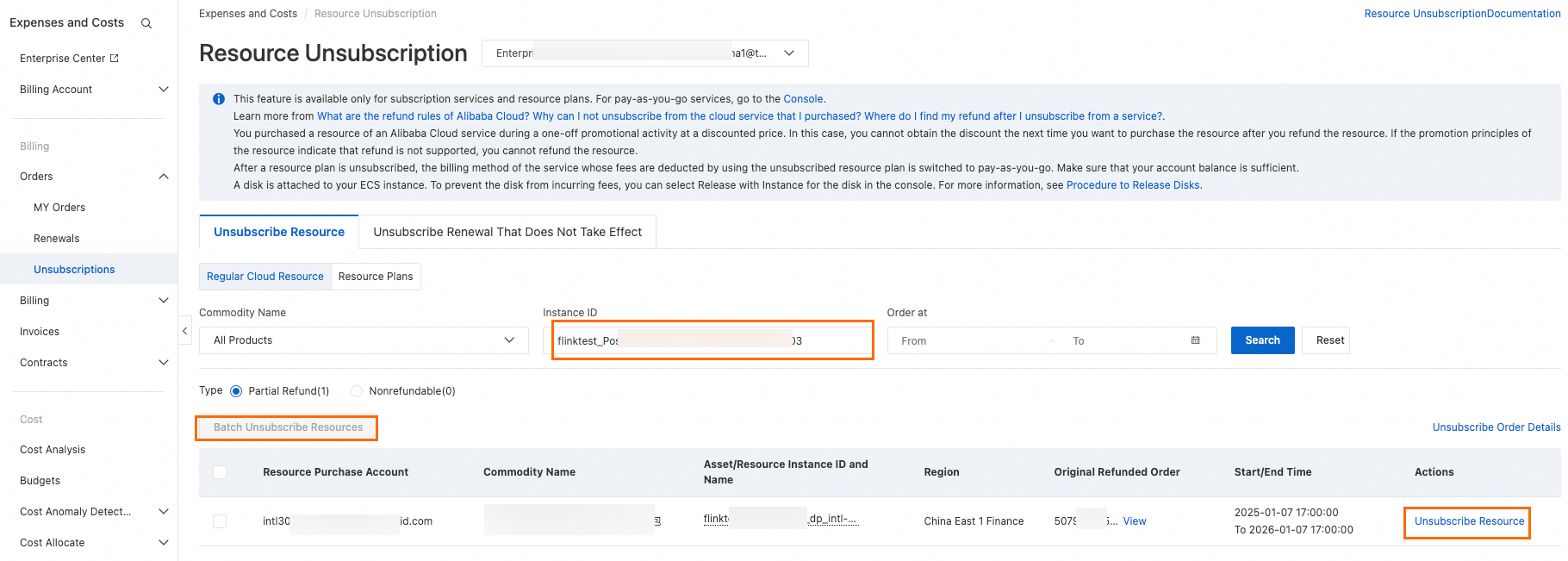
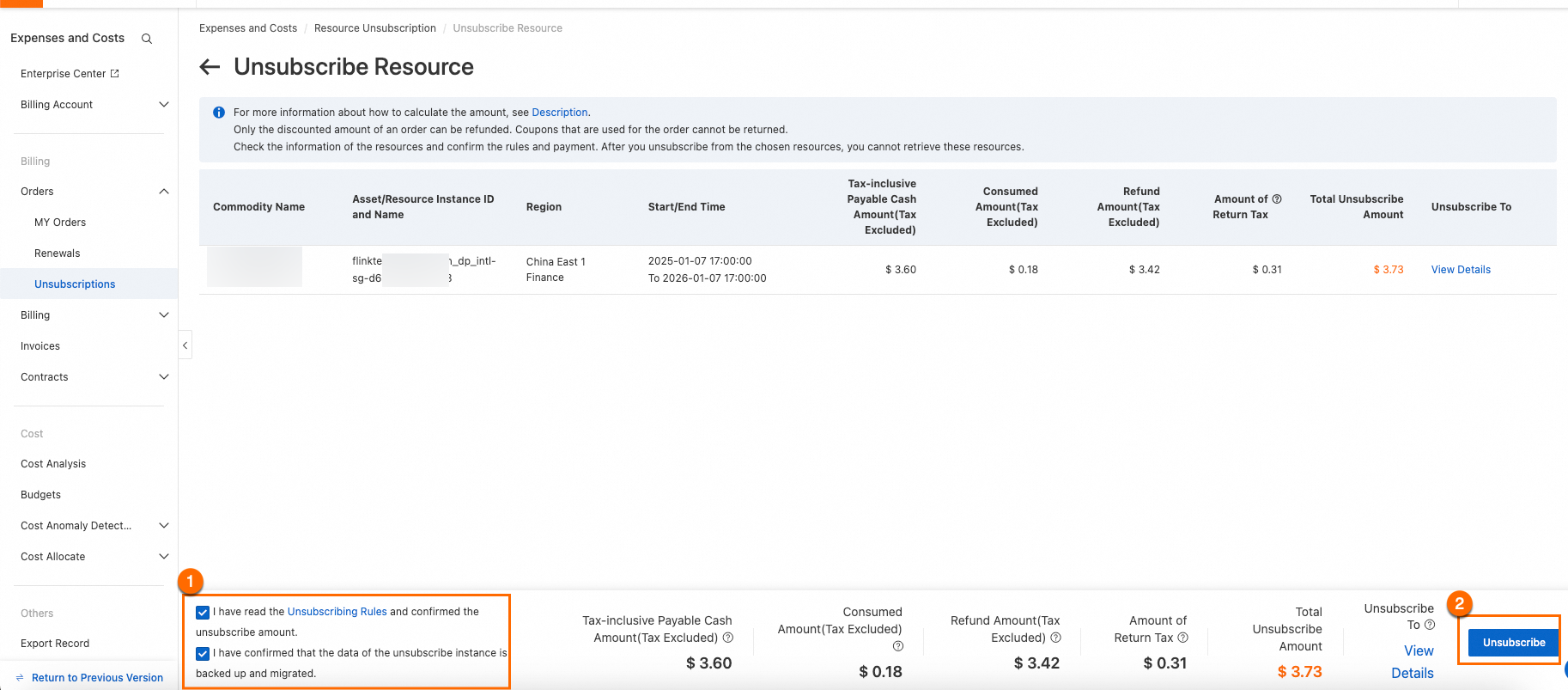
On the Unsubscribe Resource page, carefully review the resource information, confirm the unsubscription terms and refund amount, and then follow the console prompts to complete the unsubscription.
Resource Plan
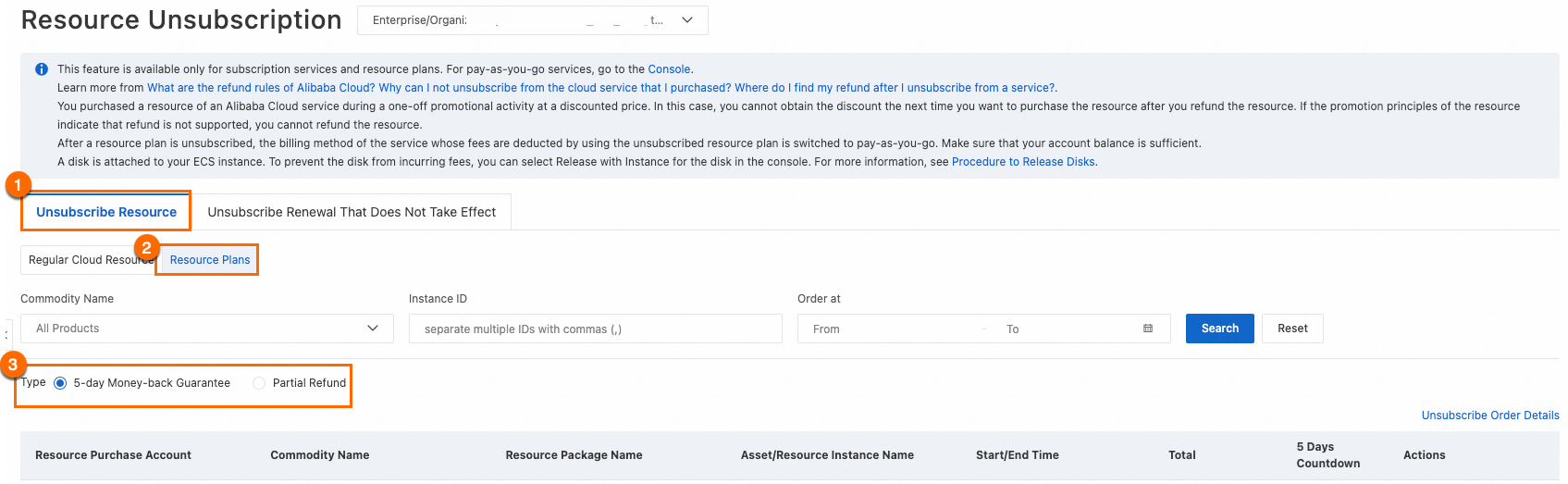
Resource Plan unsubscriptions are categorized as 5-day Unused Money-back Guarantee or Partial Refund.
Only resources eligible for a Partial Refund support batch unsubscription, with a maximum of 50 instances at a time. The official website rules determine the refund amount.
On the Resource Plans tab, find the Instance ID to unsubscribe by filtering by product name, Instance ID, or order date. Click Unsubscribe Resource or Batch Unsubscribe Resources, and then follow the console prompts to complete the unsubscription.
Unsubscribe from a pending renewal
Unsubscribe from pending renewals
Log on to the Resource Unsubscription page.
Click the Unsubscribe Renewal That Does Not Take Effect tab. Find the instance or instances to unsubscribe by filtering by product name and Instance ID. Then, click Unsubscribe From Renewal or Batch Unsubscribe From Renewals. Follow the on-screen prompts to complete the unsubscription.
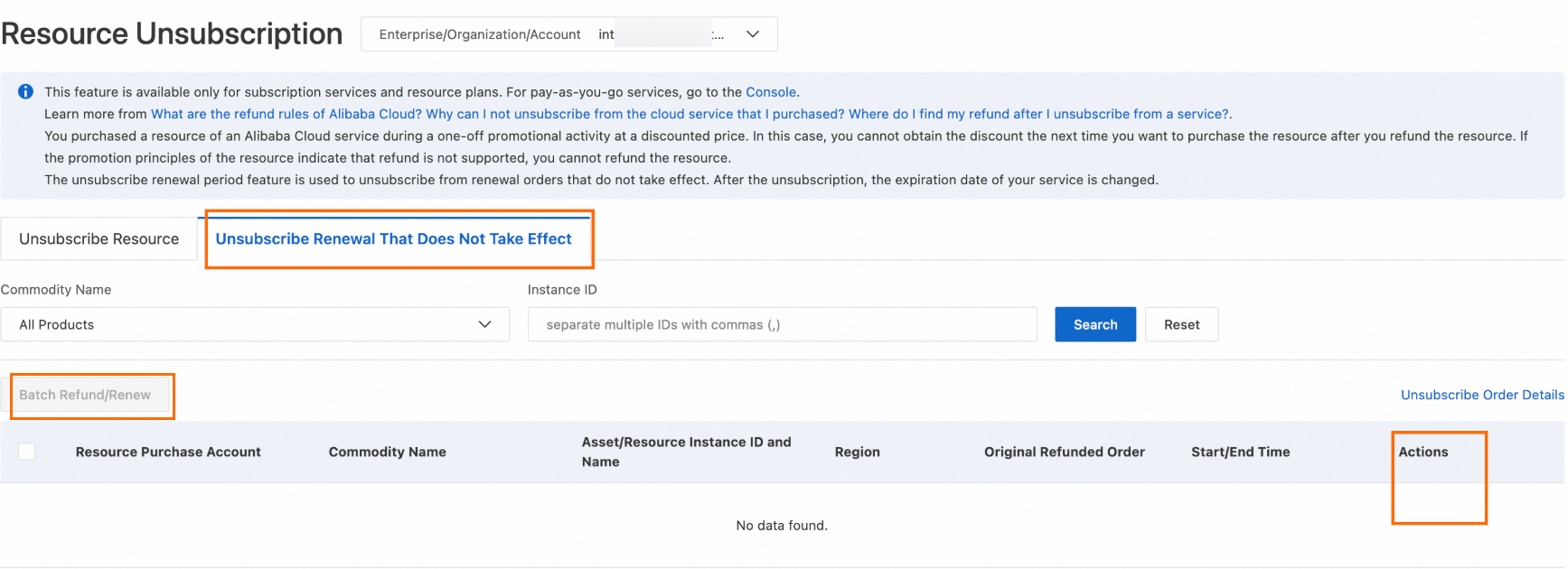
If you have renewed a single instance multiple times, you can select a specific order to unsubscribe by choosing an Expiration Time After Change. This lets you unsubscribe from one or more specific orders.
Check refund status
Refunds are typically returned to the original payment source. After a successful unsubscription, the time it takes for the refund to arrive varies depending on the processing speed of the payment channel. It may take up to 30 business days.
Payment method | Refund destination |
Credit or debit card payment | For unsubscriptions within 5 months (150 days) of payment, the refund is credited to the original bank account. For unsubscriptions after 5 months of payment, the refund is credited to your Alibaba Cloud account balance. |
PayPal payment | For unsubscriptions within 6 months (180 days) of payment, the refund is credited to the original PayPal account. For unsubscriptions after 6 months of payment, the refund is credited to your Alibaba Cloud account balance. |
Alibaba Cloud account balance | Alibaba Cloud account balance. |
You can check your unsubscription records in the following ways:
Log on to the Resource Unsubscription page and click Unsubscribe Order Details to view the account's unsubscription history.
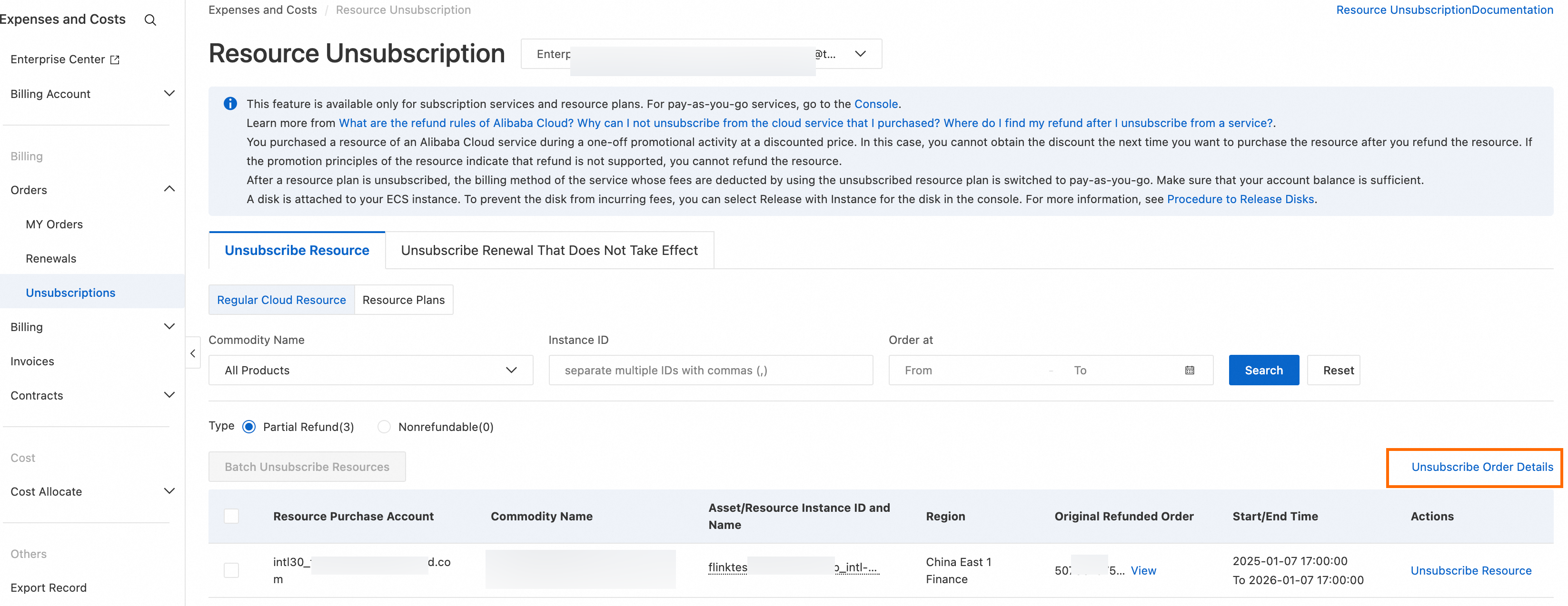
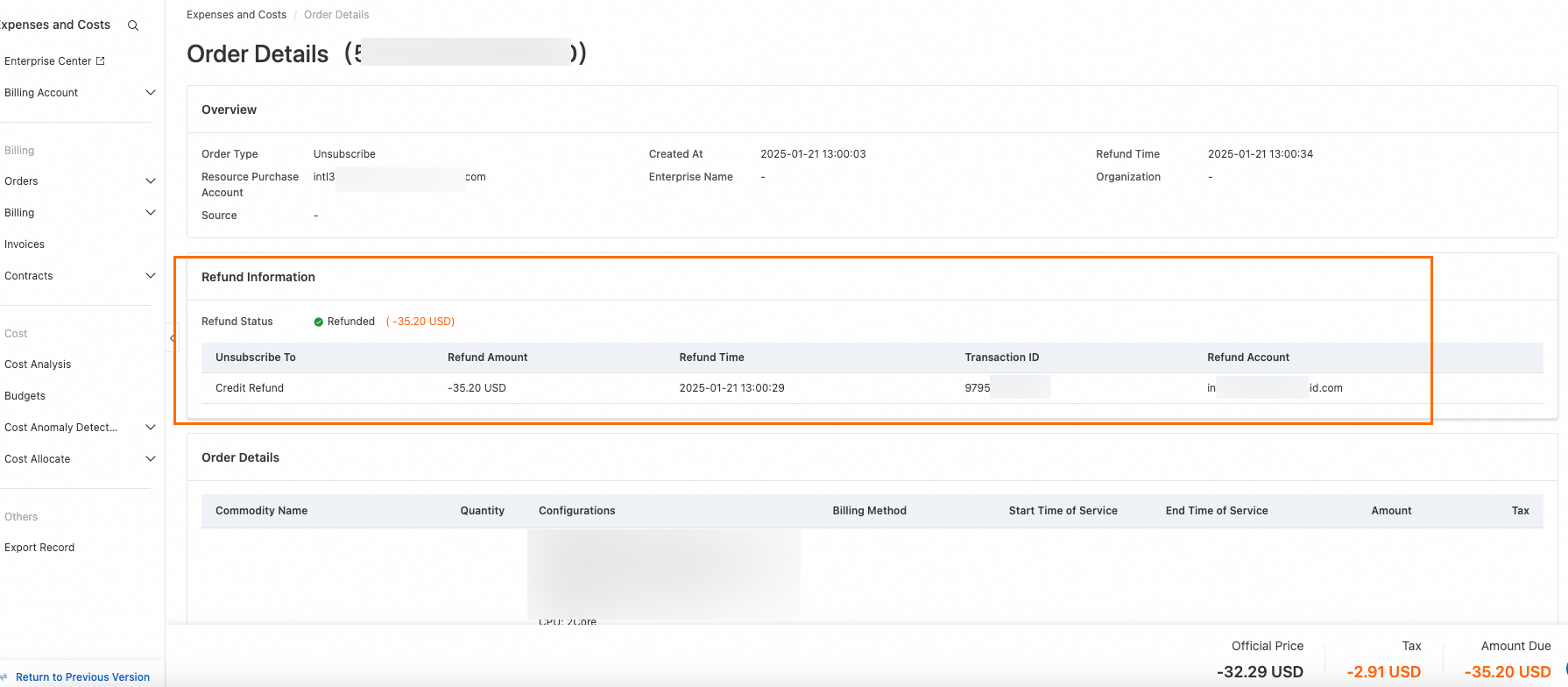
In the unsubscription list, find the unsubscribed order and click Details in the Actions column. On the Order Details page, you can view details such as Refund Status, Refund Amount, Refund Time, and Refund Account. The refund arrival time and method depend on your original Payment method. For more information, see Refund destinations.