MaxCompute external tables let you run SQL analytics directly on Tablestore data without data migration. This guide walks you through creating an external table in MaxCompute that maps to a Tablestore data table under the same Alibaba Cloud account.
Background
MaxCompute is a fully managed big data computing service that provides petabyte-scale data warehousing and analytics. With a single DDL statement, create an external table in MaxCompute to connect to an external data source for data ingestion and export. Unlike native MaxCompute tables that store only structured data, external tables support both structured and unstructured data.
Tablestore and MaxCompute use different type systems. The following table lists the data type mappings between the two services.
|
Tablestore |
MaxCompute |
|
STRING |
STRING |
|
INTEGER |
BIGINT |
|
DOUBLE |
DOUBLE |
|
BOOLEAN |
BOOLEAN |
|
BINARY |
BINARY |
Prerequisites
Before you begin, ensure that you have:
-
A MaxCompute workspace. For more information, see Create a workspace.
-
An AccessKey pair for authentication.
-
MaxCompute authorized to access Tablestore in the RAM console. For more information, see Cross-account authorization.
-
A Tablestore instance and data table created in the Tablestore console. For more information, see create an instance and create a data table.
This guide uses the following example resources:
-
Instance name: cap1
-
Data table name: vehicle_track
-
Primary keys: vid (INTEGER), gt (INTEGER)
-
Endpoint:
https://cap1.cn-hangzhou.ots-internal.aliyuncs.comNoteUse the private endpoint of the Tablestore instance when accessing it from MaxCompute.
-
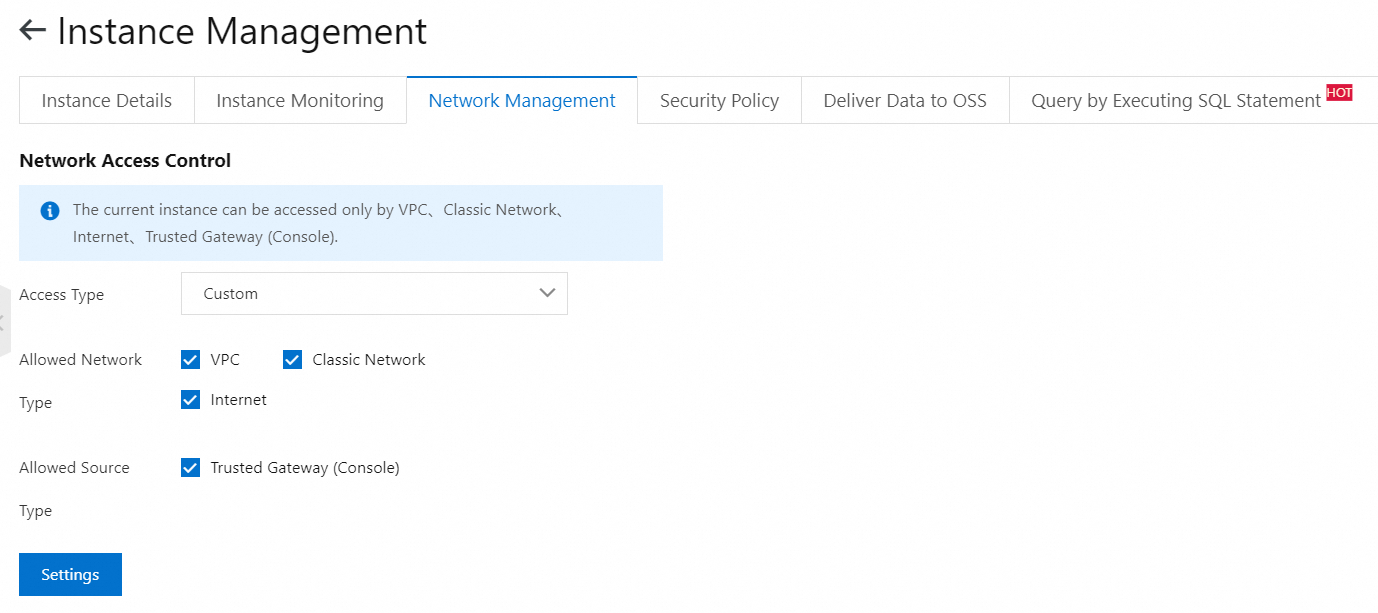
Configure network access control for the instance. By default, Tablestore allows access from any network. Keep the default configuration as follows:
-
Step 1: Install and configure the MaxCompute client
-
Download and decompress the MaxCompute client.
NoteVerify that Java Runtime Environment (JRE) 1.7 or later is installed on your machine.
-
Edit the
conf/odps_config.inifile with the following configuration:# The AccessKey pair of your Alibaba Cloud account, which consists of an AccessKey ID and an AccessKey secret. To view the AccessKey pair, log on to the Alibaba Cloud Management Console, hover over your profile picture in the top-right corner, and click AccessKey Management. access_id=******************* access_key=********************* # The project you want to access. project_name=my_project # The endpoint for the MaxCompute service. end_point=https://service.odps.aliyun.com/api # The endpoint for the MaxCompute Tunnel service. tunnel_endpoint=https://dt.odps.aliyun.com # The Logview URL that the client returns after a job is run. Open this URL to view detailed job execution information. log_view_host=http://logview.odps.aliyun.com # Specifies whether to enable access over HTTPS. https_check=trueNoteIn the
odps_config.inifile, the number sign (#) indicates a comment, while in the MaxCompute client, double hyphens (--) indicate a comment. -
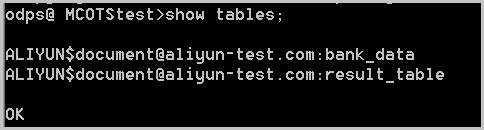
Run
bin/odpscmd.batand entershow tables;.If the tables in the current MaxCompute project are displayed, the configuration is correct.
Step 2: Create an external table
Create a MaxCompute external table named ots_vehicle_track that maps to the Tablestore vehicle_track data table.
The target data table has the following properties:
-
Instance name: cap1
-
Data table name: vehicle_track
-
Primary keys: vid (INTEGER), gt (INTEGER)
-
Endpoint:
https://cap1.cn-hangzhou.ots-internal.aliyuncs.com
CREATE EXTERNAL TABLE IF NOT EXISTS ots_vehicle_track
(
vid bigint,
gt bigint,
longitude double,
latitude double,
distance double ,
speed double,
oil_consumption double
)
STORED BY 'com.aliyun.odps.TableStoreStorageHandler' -- (1)
WITH SERDEPROPERTIES ( -- (2)
'tablestore.columns.mapping'=':vid, :gt, longitude, latitude, distance, speed, oil_consumption', -- (3)
'tablestore.table.name'='vehicle_track' -- (4)
)
LOCATION 'tablestore://cap1.cn-hangzhou.ots-internal.aliyuncs.com'; -- (5)
The following table describes the parameters in the DDL statement.
|
Number |
Parameter |
Description |
|
(1) |
com.aliyun.odps.TableStoreStorageHandler |
The built-in MaxCompute storage handler for Tablestore. It defines how MaxCompute reads from and writes to Tablestore. |
|
(2) |
SERDEPROPERITES |
The serialization and deserialization properties interface. Two properties are required when using TableStoreStorageHandler: |
|
(3) |
tablestore.columns.mapping |
Required. Specifies which Tablestore columns MaxCompute accesses, including primary key columns and attribute columns. A column name prefixed with a colon ( |
|
(4) |
tablestore.table.name |
The name of the Tablestore table to access. If the specified table does not exist, MaxCompute returns an error. MaxCompute does not create Tablestore tables automatically. |
|
(5) |
LOCATION |
The Tablestore instance information, including the instance name and endpoint. |
Step 3: Query Tablestore data through the external table
High concurrency increases the load on the Tablestore instance and may cause higher latency or request failures for online workloads. To control parallelism, run set odps.sql.mapper.split.size=256;. A larger value reduces concurrency; a smaller value increases it. For more information, see SQL Tuning.
After creating the external table, Tablestore data becomes available in the MaxCompute ecosystem. Use MaxCompute SQL to query the data.
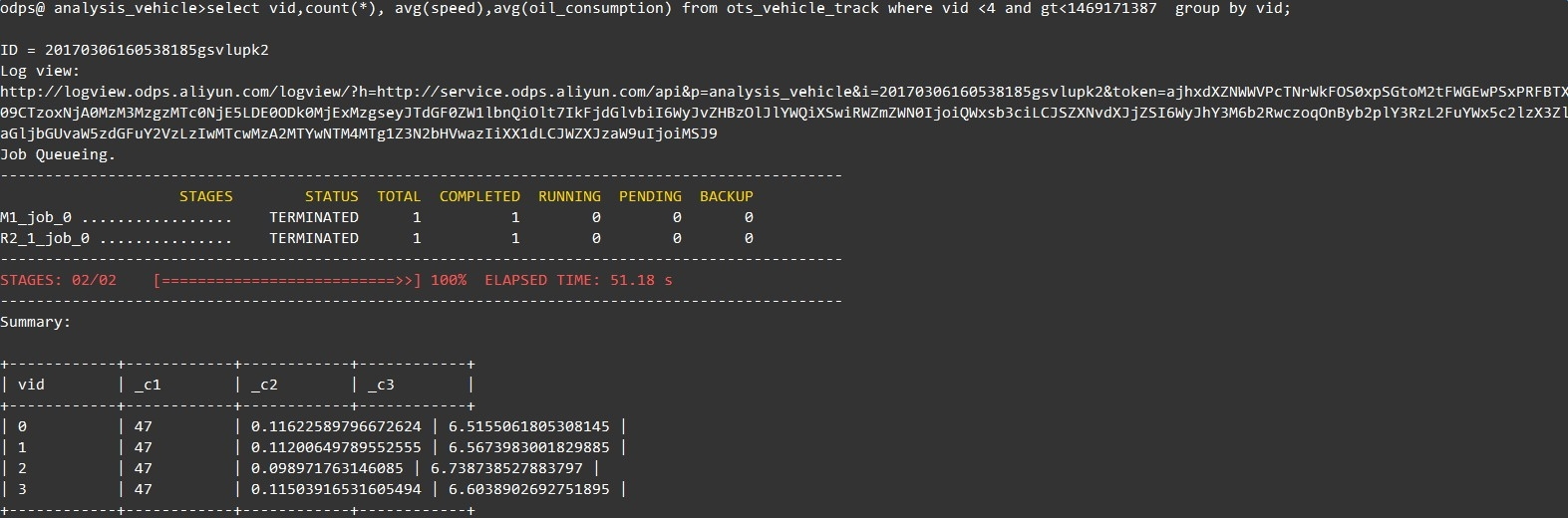
-- Calculate the average speed and fuel consumption of vehicles with a VID less than 4 before timestamp 1469171387.
select vid,count(*),avg(speed),avg(oil_consumption) from ots_vehicle_track where vid <4 and gt<1469171387  group by vid;
Sample result: