If your SSL certificate has a Pending Application status, you must submit an application to the certificate authority (CA) to initiate validation. This topic details the specific requirements for Domain Validated (DV), Organization Validated (OV), or Extended Validation (EV) certificates to complete the issuance process.
Usage scope
This topic applies to certificates with a Pending Application status.
Application process

Scenario 1: Apply for a single certificate
Apply for a commercial certificate
Commercial certificates include DV, OV, and EV types. The information you must provide to the CA for review varies based on the certificate type. This information includes the domain name or IP address to be bound, the domain verification method, contact details, and the company.
-
Log on to the Certificate Management Service console.
-
In the left navigation pane, choose .
-
On the Commercial Certificate tab, click Apply for Certificate in the Actions column of the target certificate, or hover over the
 icon in the Status column and click Apply for Certificate.
-
In the certificate application panel, complete the following configurations and click Submit.
NoteAlibaba Cloud Certificate Management Service sends your application information (such as the bound domains and contact information) to the CA for review.
DV certificate
-
Domains to Bind
Domain name requirements
Type matching: The domain type that you enter (single, multi-domain, or wildcard) must match your purchased certificate.
Length limits: The total length must not exceed 253 characters. Each label (a segment separated by the
.character) must not exceed 63 characters.
Special format requirements
Wildcard: Must start with
*, such as*.example.com.Chinese domain name: If you use a Chinese domain name, you must convert it to Punycode as prompted in the console. You can also use a conversion tool. For more information, see Chinese Domain Name Conversion.
IP addresses: Supported only by some OV single-domain certificates (Brands: GlobalSign and GeoTrust).
Suffix restrictions: DigiCert-branded certificates cannot be issued for domain names with special suffixes, such as
.edu,.gov,.org,.jp,.pay,.bank,.live,.nuclear, or.ru. This restriction does not apply to GlobalSign.Complimentary domain names: When you purchase a commercial certificate from Certificate Management Service and bind it to your domain name, Alibaba Cloud provides a corresponding complimentary domain name if your domain name is eligible for a commercial certificate.
-
Domain Verification Method
NoteCertificate purchase account: The Alibaba Cloud account used to purchase the target SSL certificate in the Certificate Management Service console.
DNS resolution account: The Alibaba Cloud account used to configure DNS resolution for the target domain name in Alibaba Cloud DNS.
The purchase and DNS accounts are different
Manual DNS Verification (recommended): Log on to your DNS service platform and add a TXT DNS record.
File Verification: Log on to your web server, and create and upload the required validation file to the specified directory.
ImportantWildcard domain names do not support file validation.
The purchase and DNS account are the same
The system uses the Automatic DNS Verification method. Alibaba Cloud automatically adds a DNS record for the domain name in Alibaba Cloud DNS to verify domain ownership. No manual operation is required.
-
Contact
Select the contact for this certificate application. The contact information includes an email address and a mobile phone number. To create or modify a contact, click Create Contact or Edit, or go to Contact Management.
ImportantAfter the CA receives the certificate application, it sends a validation email to the contact's email address or communicates with the contact using their mobile phone number for the review. Make sure that the contact information is accurate and valid.
-
Location
Select the city or region where the applicant is located.
-
Encryption Algorithm
Option
Security
Compatibility
Performance
Recommendation
RSA_2048
Medium
Widest
Middle
Recommended for general use and suitable for most web applications.
RSA_3072
High
Good
Lower
Suitable for scenarios with high security requirements, such as finance and payments.
RSA_4096
Very High
Fair
Low
Recommended only for top-secret or extremely high-security scenarios.
ECC_256
High
Good
Very High
Suitable for mobile applications, high-concurrency systems, and IoT devices.
RSA: An asymmetric key encryption algorithm based on the difficulty of factoring large integers. It is the most widely used and has excellent compatibility. Longer keys provide higher security but increase performance overhead.
ECC: An asymmetric key encryption algorithm based on the difficulty of the elliptic curve discrete logarithm problem. It achieves the same level of security as RSA with shorter keys, offers higher computational efficiency, and is suitable for resource-constrained environments such as mobile devices and IoT.
NoteCurrently, only some brands and types of certificates support the ECC. For more information, see SSL certificate selection guide.
-
CSR Generation
A Certificate Signing Request (CSR) is an application file submitted to a CA when you apply for an SSL certificate. It contains your domain name, organization information, and public key. You must securely store the corresponding private key.
Automatic (recommended)
Alibaba Cloud automatically creates a CSR and a private key for you. After the certificate is issued, you can directly download the complete file that contains the private key.
Manual Entry
You can use tools such as OpenSSL or Keytool to manually generate a CSR and a private key file, which you must store securely. Then, copy the CSR content into the CSR File configuration item. For more information about how to create a CSR and a private key file, see How to create a CSR file.
ImportantSecurely store your private key. If you lose the private key, the certificate becomes unusable because the key is unrecoverable. You would need to generate a new key pair and request a certificate reissuance.
The encryption algorithm of the CSR must match the Key Algorithm selected above.
Select an Existing CSR
From the CSRs created or uploaded in the Certificate Management Service console, select the CSR that matches the Domains to Bind. For more information about how to create and upload a CSR, see Create a CSR.
-
CSR File
This parameter is required only when CSR Generation is set to Manual or Select Existing CSR. Enter the content of your CSR file.
OV certificate
NoteAfter you submit an application for an OV certificate, the CA sends domain ownership verification instructions to the contact by email or phone. The contact must complete the verification as required to confirm domain ownership.
-
Domains to Bind
Domain name requirements
Type matching: The domain type that you enter (single, multi-domain, or wildcard) must match your purchased certificate.
Length limits: The total length must not exceed 253 characters. Each label (a segment separated by the
.character) must not exceed 63 characters.
Special format requirements
Wildcard: Must start with
*, such as*.example.com.Chinese domain name: If you use a Chinese domain name, you must convert it to Punycode as prompted in the console. You can also use a conversion tool. For more information, see Chinese Domain Name Conversion.
IP addresses: Supported only by some OV single-domain certificates (Brands: GlobalSign and GeoTrust).
Suffix restrictions: DigiCert-branded certificates cannot be issued for domain names with special suffixes, such as
.edu,.gov,.org,.jp,.pay,.bank,.live,.nuclear, or.ru. This restriction does not apply to GlobalSign.Complimentary domain names: When you purchase a commercial certificate from Certificate Management Service and bind it to your domain name, Alibaba Cloud provides a corresponding complimentary domain name if your domain name is eligible for a commercial certificate.
-
Contact
Select the contact for this certificate application. The contact information includes an email address and a mobile phone number. To create or modify a contact, click Create Contact or Edit, or go to Contact Management.
ImportantAfter the CA receives the certificate application, it sends a validation email to the contact's email address or communicates with the contact using their mobile phone number for the review. Make sure that the contact information is accurate and valid.
-
Company
Select the company information for this certificate application, including the name, phone number, and address. To create or modify company information, click Create Company Profile or Edit, or go to Company Information Management.
ImportantWhen you apply for an OV certificate for a .gov domain name, the organization name in the domain's WHOIS information must exactly match the company name.
-
Business License
After you select a Company, the system automatically identifies the business license picture uploaded for the company. If you did not upload a business license picture when you created the company, the business license picture is empty. To ensure a quick review by the CA, we recommend that you upload the company's business license picture.
-
Encryption Algorithm
Option
Security
Compatibility
Performance
Recommendation
RSA_2048
Medium
Widest
Middle
Recommended for general use and suitable for most web applications.
RSA_3072
High
Good
Lower
Suitable for scenarios with high security requirements, such as finance and payments.
RSA_4096
Very High
Fair
Low
Recommended only for top-secret or extremely high-security scenarios.
ECC_256
High
Good
Very High
Suitable for mobile applications, high-concurrency systems, and IoT devices.
RSA: An asymmetric key encryption algorithm based on the difficulty of factoring large integers. It is the most widely used and has excellent compatibility. Longer keys provide higher security but increase performance overhead.
ECC: An asymmetric key encryption algorithm based on the difficulty of the elliptic curve discrete logarithm problem. It achieves the same level of security as RSA with shorter keys, offers higher computational efficiency, and is suitable for resource-constrained environments such as mobile devices and IoT.
NoteCurrently, only some brands and types of certificates support the ECC. For more information, see SSL certificate selection guide.
-
CSR Generation
A Certificate Signing Request (CSR) is an application file submitted to a CA when you apply for an SSL certificate. It contains your domain name, organization information, and public key. You must securely store the corresponding private key.
Automatic (recommended)
Alibaba Cloud automatically creates a CSR and a private key for you. After the certificate is issued, you can directly download the complete file that contains the private key.
Manual Entry
You can use tools such as OpenSSL or Keytool to manually generate a CSR and a private key file, which you must store securely. Then, copy the CSR content into the CSR File configuration item. For more information about how to create a CSR and a private key file, see How to create a CSR file.
ImportantSecurely store your private key. If you lose the private key, the certificate becomes unusable because the key is unrecoverable. You would need to generate a new key pair and request a certificate reissuance.
The encryption algorithm of the CSR must match the Key Algorithm selected above.
Select an Existing CSR
From the CSRs created or uploaded in the Certificate Management Service console, select the CSR that matches the Domains to Bind. For more information about how to create and upload a CSR, see Create a CSR.
-
CSR File
This parameter is required only when CSR Generation is set to Manual or Select Existing CSR. Enter the content of your CSR file.
EV certificate
NoteAfter you submit an application for an EV certificate, the CA sends domain ownership verification instructions to the contact by email or phone. The contact must complete the verification as required to confirm domain ownership.
-
Domains to Bind
Domain name requirements
Type matching: The domain type that you enter (single, multi-domain, or wildcard) must match your purchased certificate.
Length limits: The total length must not exceed 253 characters. Each label (a segment separated by the
.character) must not exceed 63 characters.
Special format requirements
Wildcard: Must start with
*, such as*.example.com.Chinese domain name: If you use a Chinese domain name, you must convert it to Punycode as prompted in the console. You can also use a conversion tool. For more information, see Chinese Domain Name Conversion.
IP addresses: Supported only by some OV single-domain certificates (Brands: GlobalSign and GeoTrust).
Suffix restrictions: DigiCert-branded certificates cannot be issued for domain names with special suffixes, such as
.edu,.gov,.org,.jp,.pay,.bank,.live,.nuclear, or.ru. This restriction does not apply to GlobalSign.Complimentary domain names: When you purchase a commercial certificate from Certificate Management Service and bind it to your domain name, Alibaba Cloud provides a corresponding complimentary domain name if your domain name is eligible for a commercial certificate.
-
Contact
Select the contact for this certificate application. The contact information includes an email address and a mobile phone number. To create or modify a contact, click Create Contact or Edit, or go to Contact Management.
ImportantAfter the CA receives the certificate application, it sends a validation email to the contact's email address or communicates with the contact using their mobile phone number for the review. Make sure that the contact information is accurate and valid.
-
Company
Select the company information for this certificate application, including the name, phone number, and address. To create or modify company information, click Create Company Profile or Edit, or go to Company Information Management.
ImportantWhen you apply for an OV certificate for a .gov domain name, the organization name in the domain's WHOIS information must exactly match the company name.
-
Business License
After you select a Company, the system automatically identifies the business license picture uploaded for the company. If you did not upload a business license picture when you created the company, the business license picture is empty. To ensure a quick review by the CA, we recommend that you upload the company's business license picture.
-
Encryption Algorithm
Option
Security
Compatibility
Performance
Recommendation
RSA_2048
Medium
Widest
Middle
Recommended for general use and suitable for most web applications.
RSA_3072
High
Good
Lower
Suitable for scenarios with high security requirements, such as finance and payments.
RSA_4096
Very High
Fair
Low
Recommended only for top-secret or extremely high-security scenarios.
ECC_256
High
Good
Very High
Suitable for mobile applications, high-concurrency systems, and IoT devices.
RSA: An asymmetric key encryption algorithm based on the difficulty of factoring large integers. It is the most widely used and has excellent compatibility. Longer keys provide higher security but increase performance overhead.
ECC: An asymmetric key encryption algorithm based on the difficulty of the elliptic curve discrete logarithm problem. It achieves the same level of security as RSA with shorter keys, offers higher computational efficiency, and is suitable for resource-constrained environments such as mobile devices and IoT.
NoteCurrently, only some brands and types of certificates support the ECC. For more information, see SSL certificate selection guide.
-
CSR Generation
A Certificate Signing Request (CSR) is an application file submitted to a CA when you apply for an SSL certificate. It contains your domain name, organization information, and public key. You must securely store the corresponding private key.
Automatic (recommended)
Alibaba Cloud automatically creates a CSR and a private key for you. After the certificate is issued, you can directly download the complete file that contains the private key.
Manual Entry
You can use tools such as OpenSSL or Keytool to manually generate a CSR and a private key file, which you must store securely. Then, copy the CSR content into the CSR File configuration item. For more information about how to create a CSR and a private key file, see How to create a CSR file.
ImportantSecurely store your private key. If you lose the private key, the certificate becomes unusable because the key is unrecoverable. You would need to generate a new key pair and request a certificate reissuance.
The encryption algorithm of the CSR must match the Key Algorithm selected above.
Select an Existing CSR
From the CSRs created or uploaded in the Certificate Management Service console, select the CSR that matches the Domains to Bind. For more information about how to create and upload a CSR, see Create a CSR.
-
CSR File
This parameter is required only when CSR Generation is set to Manual or Select Existing CSR. Enter the content of your CSR file.
-
-
After confirming the certificate application information, complete the domain ownership verification.
Scenario 2: Combine and apply for multiple certificates
Certificate combination restrictions
To combine certificates, all the following conditions must be met:
-
Basic requirements:
-
The certificates must be of the same brand and type.
-
The certificate status must be Pending Application.
-
The certificates must not be managed. If a certificate is managed, you must first cancel certificate management.
-
-
Additional rules for specific brands: In addition to the basic requirements, the following restrictions apply to some brands.
-
GlobalSign:
-
DV: The primary domain names must be the same. Wildcard domain names and IP addresses are not supported.
-
EV: There are no restrictions on primary domain names, but wildcard domain names and IP addresses are not supported.
-
OV: There are no restrictions on primary domain names, and wildcard domain names and IP addresses are supported.
-
-
Procedure
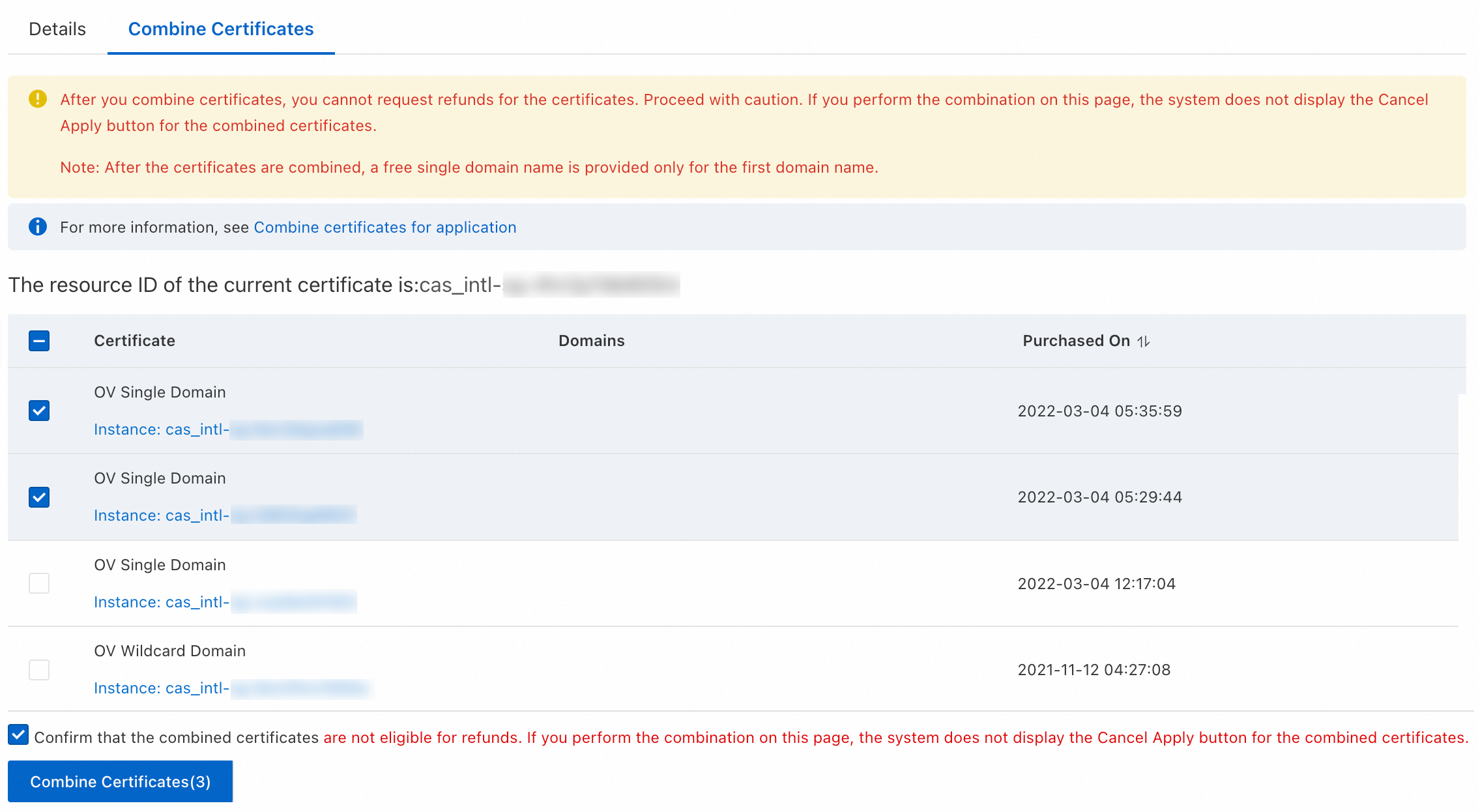
After certificates are combined, you cannot request a refund. If the combination is generated from a resource plan, you cannot cancel the application. Proceed with caution.
Log in to the Certificate Management Service console.
-
On the Commercial Certificates tab, click the certificate status drop-down list above the certificate list and select Pending Application. Find the target certificate. In the Actions column, click Combine Certificates.
-
In the Combine Certificates dialog box, select the certificates to combine and the confirmation checkbox, and then click Combine Certificates.
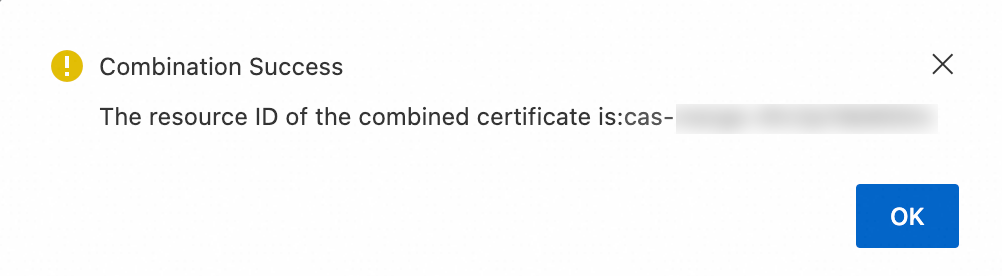
In the success dialog box, click OK.
-
Find the combined certificate. In the Actions column, click Apply for Certificate.
You can find the combined certificate by its name, which starts with cas-merge.
-
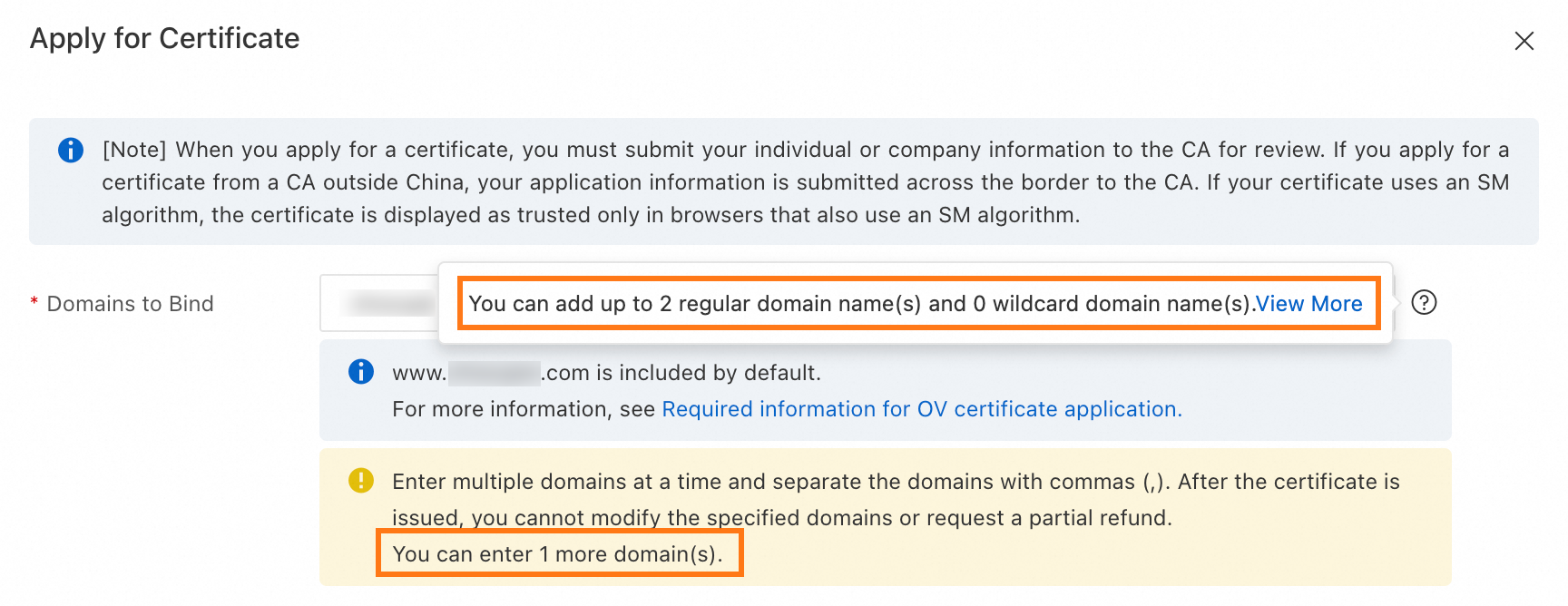
In the certificate application panel, follow the prompts to set the Domains to Bind and fill in other application information. Then, click Submit.
-
The number of domain names that a combined certificate can be bound to is the sum of the domain names that each individual certificate could be bound to before the combination.
-
For more information about other parameters for a certificate application, see Application information.
-
-
After confirming the certificate application information, you must complete the domain ownership verification.
Withdraw an application
If you selected the wrong encryption algorithm or contact and need to change the application information, your options depend on the certificate's status:
-
If the certificate status is Validating Application and the certificate has not been issued, you can Withdraw the application. After you withdraw the application, you can enter the correct information and submit the application again.
-
If the certificate status is Issued, you can only revoke the certificate. If the certificate was issued less than 28 calendar days ago and you have not changed the domain name (such as by appending or replacing a domain name), the certificate quota is returned to you after the certificate is revoked. You can use the quota to create a new certificate, enter the correct information, and submit the application. For more information, see Revoke and delete SSL certificates.
FAQ
How do I choose the correct domain ownership verification method for an SSL certificate in Alibaba Cloud?
The Alibaba Cloud console automatically recommends the best verification method based on your certificate and domain type. In most cases, you should use this default selection. If you need to choose manually or understand the options, see How do I select a domain ownership verification method?
How do I apply for an SSL certificate for a Chinese domain name?
Chinese domain names are supported, but they must be converted to Punycode
before you submit the application.The console will prompt you to perform this conversion. For
example, the domain 阿里云.公司 must be entered as xn--fhq546a.xn--55qx5d. For manual conversion, see Convert a Chinese domain name.
How can I update the contact email or phone number for an SSL certificate application?
You can manage contact information in three ways:
-
Create a new contact: In the application form, select Create Contact from the contact dropdown menu.
-
Edit an existing contact: During the application, find the contact in the dropdown list and click Edit next to it.
-
Manage globally: Go to the page in the Certificate Management Service console. See Manage contacts for details.
What is the expected issuance time for an SSL certificate after application submission?
The issuance time begins after you successfully complete domain ownership verification. and depends on the certificate type:
-
DV certificates: Typically issued within 1 to 15 minutes.
-
OV & EV certificates: Typically issued within 5 business days, though this can be longer depending on the CA's verification process.
The CA may need to contact you by phone or email. To avoid delays, ensure your contact information is accurate and monitor your messages.
For OV/EV certificates, must the company information in my application match my domain's registrant information?
Yes, this is a strict CA requirement. To pass validation, the company information you provide must exactly match your organization's official registration records. You can manage your saved company profiles in the Certificate Management Service console under . For more information, see Manage company information.
References
If your certificate's status is Validating Application and you no longer need it, you can apply for a refund within 7 calendar days of payment. For details about the refund process, see Certificate refund guide.
If you encounter problems during the application, see FAQ about SSL certificate applications for solutions.