You can use resource groups with Resource Access Management (RAM) for resource isolation and fine-grained permission management within a single Alibaba Cloud account. This topic explains how Log Service supports resource groups and shows you how to grant permissions at the resource group level.
-
Resource group-level authorization applies only to resource types that support resource groups and to operations that support resource group-level authorization.
-
For resource types that do not support resource groups, permissions granted at the resource group scope have no effect. When selecting the resource scope, choose Account-level to grant permissions at the account level. For more information, see Operations that do not support resource group-level authorization.
Resource group authorization
Use resource groups to group and manage resources within your Alibaba Cloud account. For example, you can create a resource group for each of your projects and move resources into their corresponding group. This centralizes resource management for each project. For more information, see What is a resource group?.
After you group your resources, you can grant permissions on a specific resource group to different RAM principals, such as RAM users, RAM user groups, or RAM roles. This confines a principal's management to the resources within that group. For more information, see Resource grouping and authorization.
This authorization method has the following benefits:
-
Fine-grained permissions: You can grant each identity the precise permissions needed for specific resources. This prevents the commingled management of resources from different projects within a single account.
-
Scalability: When you add new resources, you only need to add them to the resource group. The RAM identity automatically inherits the permissions for the new resources.
Grant resource group-level permissions to a RAM user
This topic uses a RAM user as an example to describe how to grant permissions on Log Service resources within a specific resource group.
1. Prerequisites
-
Create a RAM user. For more information, see Create a RAM user.
-
Create a resource group and move existing resources to it. For more information, see Create a resource group, Automatically move resources to a resource group, and Manually move resources to a resource group.
2. Grant resource group-level permissions
You can grant resource group-level permissions using either of the following methods.
Resource management console
Use a resource group's permission management feature to grant permissions to a RAM user. For detailed instructions, see Grant resource group-scoped permissions to a RAM identity.
-
Sign in to the Resource Management console.
-
On the Resource Groups page, find the target resource group and click Manage Permissions in the Actions column.
-
On the Manage Permissions tab, click Grant Permission.
-
In the Grant Permission panel, configure the principal and policy.
-
Principal: Select an existing RAM user.
-
Policy: Select a system policy or an existing custom policy. For more information, see Create a custom policy.
-
-
Click OK.
RAM console
You can grant resource group-level permissions to a RAM user in the RAM console. For detailed instructions, see Manage permissions for a RAM user.
-
Sign in to the RAM console with your Alibaba Cloud account (root account) or as a RAM administrator.
-
In the left-side navigation pane, choose . On the Users page, find the target RAM user and click Add Permissions in the Actions column.
-
In the Add Permissions panel, configure the following parameters.
-
Resource Scope: Select Resource Group.
-
Principal: The principal is automatically set to the current RAM user.
-
Policy: Select a system policy or an existing custom policy. For more information, see Create a custom policy.
-
-
Click OK.
Resource types that support resource groups
The following table lists the Log Service resource types that support resource groups.
|
Cloud service |
Cloud service code |
Resource type |
|
Log Service |
log |
project |
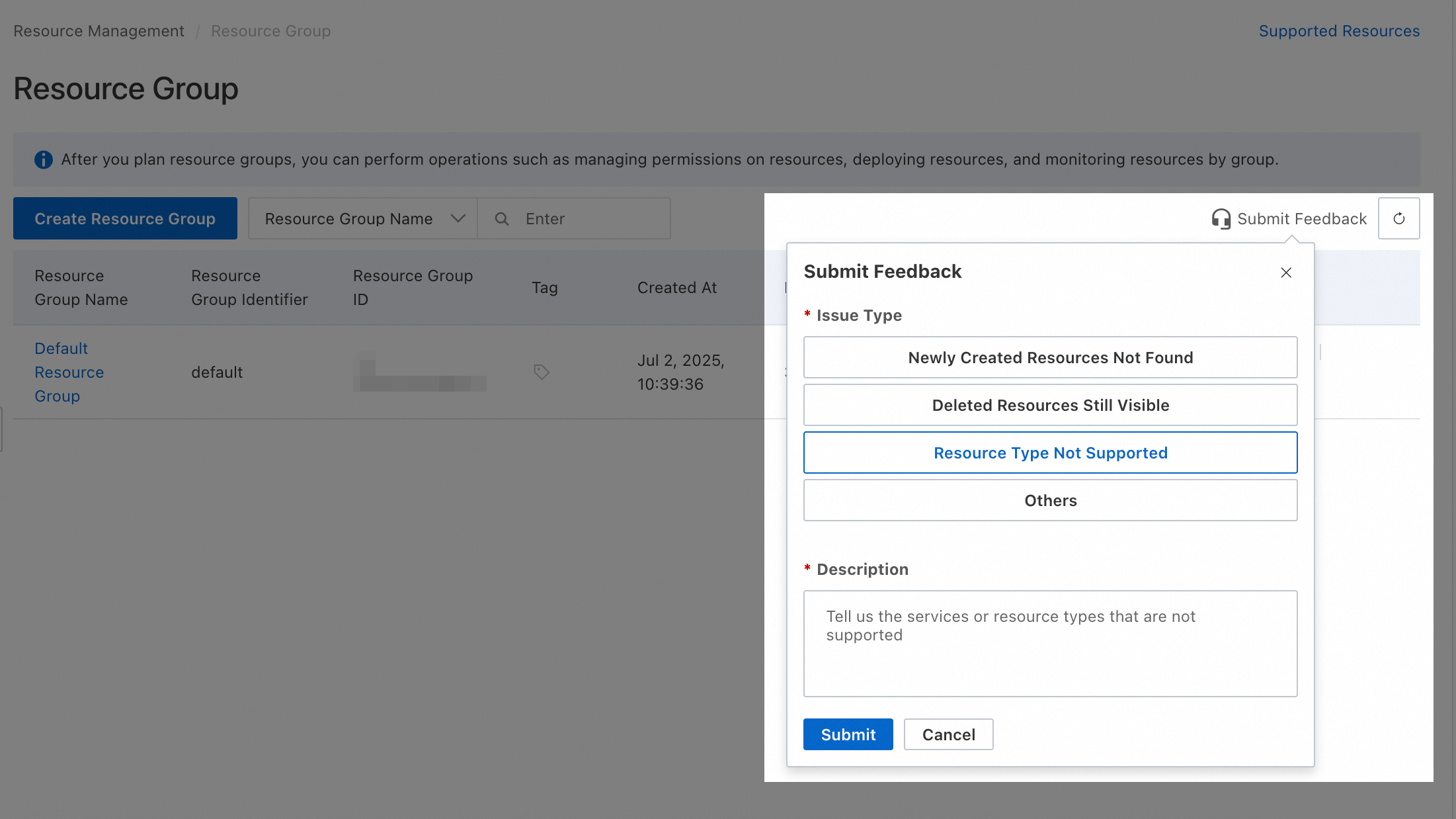
For unsupported resource types, you can submit feedback in the Resource Group Console.
Actions without resource group-level authorization
The following Log Service actions do not support resource group-level authorization:
|
Actions |
Description |
|
log:AccessDashboardSharing |
- |
|
log:AnalyzeProductLog |
- |
|
log:BalancePartitions |
- |
|
log:BatchGetGlobalProject |
- |
|
log:BatchGetIndex |
- |
|
log:BatchGetStore |
- |
|
log:CallAiTools |
Calls observability AI tools. You can use the tool list API to retrieve the list of currently supported capabilities, which are continuously updated. |
|
log:CheckArmsAuthorization |
- |
|
log:CheckUserPermission |
- |
|
log:CreateAccount |
- |
|
log:CreateAgentInstanceConfig |
- |
|
log:CreateAnnotationDataSet |
Creates a dataset. |
|
log:CreateAnnotationLabel |
Creates a label table. |
|
log:CreateApp |
- |
|
log:CreateCMSInnerExternalStore |
- |
|
log:CreateCluster |
- |
|
log:CreateDashboardSharing |
- |
|
log:CreateDataExpression |
- |
|
log:CreateEntityStore |
- |
|
log:CreateRecordingRule |
- |
|
log:CreateResourceRecord |
- |
|
log:CreateTicket |
Creates a ticket to generate a password-free access link for sharing the Log Service Query and Analysis page or a dashboard, or embedding them in a third-party system. |
|
log:DeleteAccount |
- |
|
log:DeleteAgentInstanceConfig |
- |
|
log:DeleteCollectionPolicy |
Deletes a collection policy for cloud product logs. |
|
log:DeleteDashboardSharing |
- |
|
log:DeleteEntityStore |
- |
|
log:DeleteRecordingRule |
- |
|
log:DeleteResource |
- |
|
log:DeleteResourceRecord |
- |
|
log:DescribeService |
Calls GetSlsService to retrieve the activation status of Log Service. The service endpoint must be China (Shanghai) or Asia Pacific SE 1 (Singapore). |
|
log:DisableWorker |
- |
|
log:EnableService |
Activates Log Service. The service endpoint must be China (Shanghai) or Asia Pacific SE 1 (Singapore). |
|
log:EnableWorker |
- |
|
log:GetAccount |
- |
|
log:GetAgentInstanceConfig |
- |
|
log:GetAnnotationLabel |
Retrieves a specific label table by its labelId. |
|
log:GetApp |
- |
|
log:GetAsyncSQL |
- |
|
log:GetCMSInnerExternalStore |
- |
|
log:GetCluster |
- |
|
log:GetCollectionPolicy |
Retrieves a specific collection policy. |
|
log:GetCursor |
- |
|
log:GetDataExpression |
- |
|
log:GetDiagnosis |
- |
|
log:GetEcsAliUid |
- |
|
log:GetEntityStore |
- |
|
log:GetGlobalProject |
- |
|
log:GetLogs |
- |
|
log:GetMLServiceResults |
Retrieves analysis results from intelligent models in Log Service. These models analyze log, metric, and trace data to perform tasks such as Named Entity Recognition (NER), time-series anomaly detection, and root cause analysis for high-latency spans. |
|
log:GetPartitions |
- |
|
log:GetProductDataCollection |
- |
|
log:GetProjectInfo |
- |
|
log:GetRecordingRule |
- |
|
log:GetResource |
- |
|
log:GetResourceRecord |
- |
|
log:GetRoleFlags |
- |
|
log:GetShards |
- |
|
log:GetShardsInPartition |
- |
|
log:GetSlsService |
- |
|
log:GetWorkerFlags |
- |
|
log:GetWorkers |
- |
|
log:ListAccounts |
- |
|
log:ListAgentInstanceConfigs |
- |
|
log:ListAiTools |
Retrieves a list of intelligent tools from the observability platform, including Copilot capabilities for various observability workloads. |
|
log:ListAnnotationData |
Lists all data in a dataset. |
|
log:ListAnnotationDataSets |
Retrieves a list of datasets. |
|
log:ListAnnotationLabels |
Retrieves a list of label tables. |
|
log:ListClusters |
- |
|
log:ListCollectionPolicies |
Lists the collection policies for cloud product logs. |
|
log:ListDashboardSharing |
- |
|
log:ListGlobalProjects |
- |
|
log:ListNextResourceRecords |
- |
|
log:ListProjects |
- |
|
log:ListResourceRecords |
- |
|
log:ListResources |
- |
|
log:ListTagResource |
- |
|
log:LockWorker |
- |
|
log:MovePartition |
- |
|
log:MoveShard |
- |
|
log:OpenSlsService |
- |
|
log:PutAccount |
- |
|
log:PutAnnotationData |
Adds data to a dataset. |
|
log:PutLogs |
- |
|
log:PutOpenEvent |
- |
|
log:QueryPartition |
- |
|
log:QueryProject |
- |
|
log:QueryPrometheusMetrics |
- |
|
log:RefreshToken |
Refreshes an access token using a ticket to access console APIs. |
|
log:RemoteWritePrometheus |
- |
|
log:SetGeneralDataAccessConfig |
- |
|
log:SetWorkerFlags |
- |
|
log:SubmitAsyncSQL |
- |
|
log:UnlockWorker |
- |
|
log:UpdateAccount |
- |
|
log:UpdateAgentInstanceConfig |
- |
|
log:UpdateApp |
- |
|
log:UpdateCluster |
- |
|
log:UpdateDashboardSharing |
- |
|
log:UpdateDataExpression |
- |
|
log:UpdateLogStoreInternalConfig |
- |
|
log:UpdateProjectOwner |
- |
|
log:UpdateProjectQuota |
- |
|
log:UpdateProjectV2 |
- |
|
log:UpdateResource |
- |
|
log:UpdateResourceRecord |
- |
|
log:UpsertCollectionPolicy |
|
|
log:UpsertResourceRecord |
- |
|
log:VerifySignature |
- |
If an action does not support resource group-level authorization, setting the resource scope to resource group level has no effect. To grant a RAM user these permissions, create a custom policy and set the resource scope to account level.
 Here are two example custom policies. You can modify them to meet your requirements.
-
Allows all read-only operations that do not support resource group-level authorization: All read-only operations that do not support resource group-level authorization are listed in
Action.{ "Version": "1", "Statement": [ { "Effect": "Allow", "Action": [ "log:CallAiTools", "log:DescribeService", "log:GetAccount", "log:GetAgentInstanceConfig", "log:GetAnnotationLabel", "log:GetApp", "log:GetAsyncSQL", "log:GetCMSInnerExternalStore", "log:GetCluster", "log:GetCollectionPolicy", "log:GetCursor", "log:GetDataExpression", "log:GetDiagnosis", "log:GetEcsAliUid", "log:GetEntityStore", "log:GetGlobalProject", "log:GetLogs", "log:GetMLServiceResults", "log:GetPartitions", "log:GetProductDataCollection", "log:GetProjectInfo", "log:GetRecordingRule", "log:GetResource", "log:GetResourceRecord", "log:GetRoleFlags", "log:GetShards", "log:GetShardsInPartition", "log:GetSlsService", "log:GetWorkerFlags", "log:GetWorkers", "log:ListAccounts", "log:ListAgentInstanceConfigs", "log:ListAiTools", "log:ListAnnotationData", "log:ListAnnotationDataSets", "log:ListAnnotationLabels", "log:ListClusters", "log:ListCollectionPolicies", "log:ListDashboardSharing", "log:ListGlobalProjects", "log:ListNextResourceRecords", "log:ListProjects", "log:ListResourceRecords", "log:ListResources", "log:ListTagResource", "log:QueryPartition", "log:QueryProject", "log:QueryPrometheusMetrics" ], "Resource": "*" } ] } -
Allows all operations that do not support resource group-level authorization: The
Actionelement lists all operations that do not support resource group-level authorization.{ "Version": "1", "Statement": [ { "Effect": "Allow", "Action": [ "log:AccessDashboardSharing", "log:AnalyzeProductLog", "log:BalancePartitions", "log:BatchGetGlobalProject", "log:BatchGetIndex", "log:BatchGetStore", "log:CallAiTools", "log:CheckArmsAuthorization", "log:CheckUserPermission", "log:CreateAccount", "log:CreateAgentInstanceConfig", "log:CreateAnnotationDataSet", "log:CreateAnnotationLabel", "log:CreateApp", "log:CreateCMSInnerExternalStore", "log:CreateCluster", "log:CreateDashboardSharing", "log:CreateDataExpression", "log:CreateEntityStore", "log:CreateRecordingRule", "log:CreateResourceRecord", "log:CreateTicket", "log:DeleteAccount", "log:DeleteAgentInstanceConfig", "log:DeleteCollectionPolicy", "log:DeleteDashboardSharing", "log:DeleteEntityStore", "log:DeleteRecordingRule", "log:DeleteResource", "log:DeleteResourceRecord", "log:DescribeService", "log:DisableWorker", "log:EnableService", "log:EnableWorker", "log:GetAccount", "log:GetAgentInstanceConfig", "log:GetAnnotationLabel", "log:GetApp", "log:GetAsyncSQL", "log:GetCMSInnerExternalStore", "log:GetCluster", "log:GetCollectionPolicy", "log:GetCursor", "log:GetDataExpression", "log:GetDiagnosis", "log:GetEcsAliUid", "log:GetEntityStore", "log:GetGlobalProject", "log:GetLogs", "log:GetMLServiceResults", "log:GetPartitions", "log:GetProductDataCollection", "log:GetProjectInfo", "log:GetRecordingRule", "log:GetResource", "log:GetResourceRecord", "log:GetRoleFlags", "log:GetShards", "log:GetShardsInPartition", "log:GetSlsService", "log:GetWorkerFlags", "log:GetWorkers", "log:ListAccounts", "log:ListAgentInstanceConfigs", "log:ListAiTools", "log:ListAnnotationData", "log:ListAnnotationDataSets", "log:ListAnnotationLabels", "log:ListClusters", "log:ListCollectionPolicies", "log:ListDashboardSharing", "log:ListGlobalProjects", "log:ListNextResourceRecords", "log:ListProjects", "log:ListResourceRecords", "log:ListResources", "log:ListTagResource", "log:LockWorker", "log:MovePartition", "log:MoveShard", "log:OpenSlsService", "log:PutAccount", "log:PutAnnotationData", "log:PutLogs", "log:PutOpenEvent", "log:QueryPartition", "log:QueryProject", "log:QueryPrometheusMetrics", "log:RefreshToken", "log:RemoteWritePrometheus", "log:SetGeneralDataAccessConfig", "log:SetWorkerFlags", "log:SubmitAsyncSQL", "log:UnlockWorker", "log:UpdateAccount", "log:UpdateAgentInstanceConfig", "log:UpdateApp", "log:UpdateCluster", "log:UpdateDashboardSharing", "log:UpdateDataExpression", "log:UpdateLogStoreInternalConfig", "log:UpdateProjectOwner", "log:UpdateProjectQuota", "log:UpdateProjectV2", "log:UpdateResource", "log:UpdateResourceRecord", "log:UpsertCollectionPolicy", "log:UpsertResourceRecord", "log:VerifySignature" ], "Resource": "*" } ] }
A RAM user or RAM role with account-level permissions can manage all resources within the account. Always follow the principle of least privilege by granting only intended permissions.
FAQ
Find the resource group for a resource
-
Method 1: Click a resource's name to open its details page, which displays the resource group.
-
Method 2: Log on to the Resource Management console and go to . On the left, select the account that owns the resource (the default is current account). Use the filters to locate the target resource, and view its resource group.
View product resources in a resource group
-
Method 1: Log on to the Resource Management console and go to . On the left, in the section for the account that owns the resources (the default is current account), click the name of the target resource group. Then, on the right, select the desired product from the Select resource type list to view all of its resources in the resource group.
-
Method 2: Log on to the Resource Management console and go to . Find the target resource group and click Manage Resources in the Actions column. On the Manage Resources page, select the product from the Product dropdown list at the top to view all of its resources in that resource group.
Change the resource group for multiple resources
Log on to the Resource Management console and go to . For the target resource group, click Manage Resources in the Actions column. Use the filters to find the resources, select their checkboxes, click Transfer Resource Group at the bottom, and follow the on-screen instructions.