This topic provides answers to some frequently asked questions about Kubernetes alerts.
How do I distinguish Kubernetes alerts that are triggered by alert monitoring rules from different sources?
On the Alert Center page of Simple Log Service, you can view the following types of built-in alert monitoring rules that can trigger Kubernetes alerts.
Built-in alert monitoring rules in Container Service for Kubernetes (ACK)
After the alert management feature is enabled in ACK, the built-in alert monitoring rules in ACK are synchronized to the Alert Center page of Simple Log Service. For more information about how to enable the alert management feature, see Alert management.

Built-in alert monitoring rules for Kubernetes events in Simple Log Service
After Kubernetes events are collected and sent to Simple Log Service, built-in alert monitoring rules are generated in the project to which the events belong. For more information about how to collect Kubernetes events, see Collect Kubernetes events or Create and use an event center.

Comparison item | Built-in alert monitoring rule in ACK | Built-in alert monitoring rule for Kubernetes events in Simple Log Service |
Method to enable an alert monitoring rule | You can enable an alert monitoring rule in the ACK console. | On the Alert Center page of the project to which a Kubernetes event belongs, you can find the built-in alert monitoring rule that you want to manage and enable the built-in alert monitoring rule. |
Method to disable an alert monitoring rule | You can disable an alert monitoring rule in the ACK console. | On the Alert Center page of the project to which a Kubernetes event belongs, you can find the built-in alert monitoring rule that you want to manage and disable or delete the built-in alert monitoring rule. |
Operation | After a built-in alert monitoring rule is synchronized to Simple Log Service, you can view and follow the alert monitoring rule. |
|
Notification recipient | You can configure notification recipients in the ACK console. | You can configure notification recipients in the Simple Log Service console. |
Notification method | Text messages and emails are supported. | All notification methods are supported, such as text messages, voice calls, emails, and DingTalk messages. |
Configuration of monitoring parameters | Not supported. | You can modify parameters such as the monitoring frequency. |
How do I manage alert monitoring rules that trigger Kubernetes alerts in the ACK console?
You can enable and disable an alert monitoring rule in the ACK console. You can also configure notification recipients and notification methods. For more information, see Alert management.
How do I manage alert monitoring rules that trigger Kubernetes alerts in the Simple Log Service console?
Log on to the Log Service console.
In the Projects section, click the project that you want to manage.
Click the project to which a Kubernetes event belongs.
In the left-side navigation pane, click Alerts.
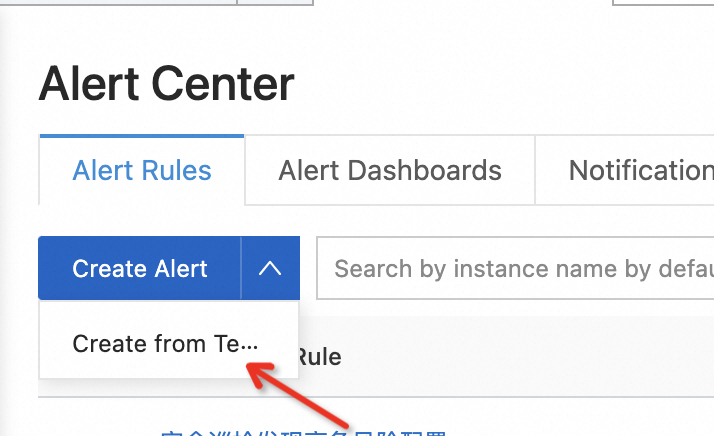
On the Alert Rules tab, click Create from Template.
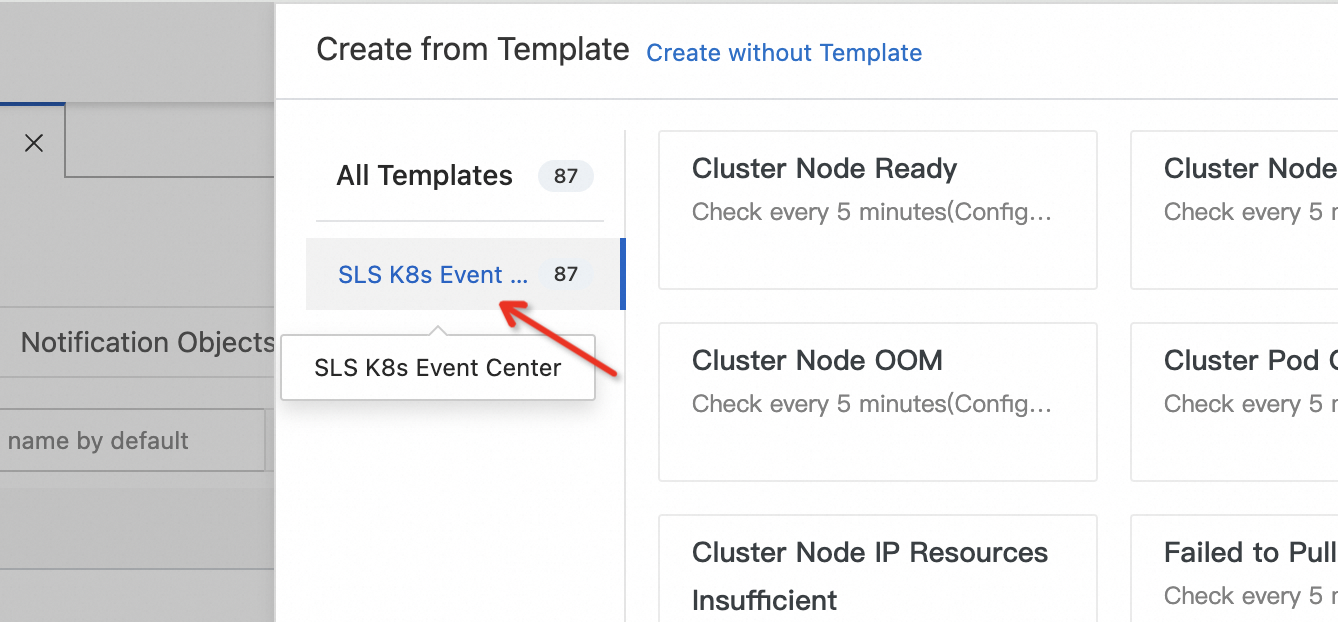
In the panel that appears, click SLS K8s Event Center and create alert rules. For more informaiton, see Configure alerts.