Application Load Balancer (ALB) lets you configure SM2 certificates and custom TLS security policies that include SM cipher suites. This allows SM-compatible browsers to securely access your services over the Transport Layer Cryptography Protocol (TLCP). You can achieve HTTPS encrypted communication that complies with China's national cryptographic standards and meets the Multi-Level Protection Scheme (MLPS) Level 3 compliance requirements for industries such as finance and government.
Scope
The SM certificate feature is not enabled by default. Go to Quota Center to apply for the privilege quota.
You have registered a custom domain name. This topic uses an ALB instance deployed in the China (Shanghai) region. Therefore, you must complete the ICP filing for the domain name.
You have purchased or uploaded an SM2 certificate in Certificate Management Service. The certificate must match the custom domain name that has an ICP filing.
You have created a virtual private cloud (VPC) named
VPC1in the China (Shanghai) region. You have also created a vSwitch namedVSW1in Zone E and a vSwitch namedVSW2in Zone F.
Procedure
1. Create an ECS instance and deploy a service
Create an ECS instance with the following configurations.
Instance Name: ECS01
Region: China (Shanghai)
VPC:
VPC1vSwitch:
VSW1Image: Alibaba Cloud Linux 3.2104 LTS 64-bit
Connect to the ECS01 instance. Run the following commands to deploy an Nginx service.
sudo yum install -y nginx
sudo systemctl start nginx
echo "Hello from ECS backend" | sudo tee /usr/share/nginx/html/index.html
Add an inbound rule to the security group of the ECS instance to allow incoming traffic. Make sure the rule has a high priority.
Authorization Policy: Allow
Protocol: Custom TCP
Source: Select
IPv4, and then selectThis VPC CIDR block.Destination (This Instance): Select
Port, and then selectHTTP (80).
For more information, see Create an instance on the Custom Launch tab, Connect to an ECS instance, and Add security group rules.
2. Create an ALB instance
Log on to the ALB console, select the China (Shanghai) region, and then click Create ALB.
On the purchase page, complete the following configurations and click Buy Now.
Instance Network Type: Select Internet.
VPC: Select
VPC1.Zone: Select Shanghai Zone E and Shanghai Zone F. Then, select
VSW1andVSW2respectively, and select Assign EIP.IP Version: Select IPv4.
Edition (Instance Fee): Select Standard.
On the Confirm Order page, confirm the instance configuration details and click Activate Now.
3. Create a server group and add backend servers
In the Server Group console, confirm that China (Shanghai) is selected as the region, and then click Create Server Group.
Configure the server group based on the following information and click Create.
For Server Group Type, select Server Type.
Server Group Name: Enter
sg-nginx.VPC: Select
VPC1.Backend Server Protocol: Keep the default value
HTTP.
In the The server group is created dialog box, click Add Backend Server. Select
ECS01and click Next. In the Ports/Weights step, set the Port of the server to80and click OK.
4. Create a TLS security policy that includes SM cipher suites
When you use an SM certificate, you must use a custom TLS security policy that includes SM cipher suites. Default system policies do not include SM cipher suites.
In the navigation pane on the left of the ALB console, click TLS Security Policy. On the Custom Policy tab, click Create Custom Policy.
In the panel that appears, set the policy Name to
gm-tls-policy. Set Minimum Version to TLS 1.0 and Later. In the Cipher Suite section, moveECC-SM2-WITH-SM4-SM3to the selected box on the right, and then click Create.
ECC-SM2-WITH-SM4-SM3is an alias forECC-SM2-SM4-CBC-SM3andECC-SM2-SM4-GCM-SM3.
5. Create an HTTPS listener and configure an SM certificate
In the ALB console, click the ID of the target instance to go to the Instance Details page. On the Listener tab, click Create Listener.
In the Configure Listener step, set Listener Protocol to HTTPS and set Listener Port to
443. Then, click Next.In the Configure SSL Certificate step, select the prepared SM certificate. The certificate list displays the algorithm type.
SM2indicates an SM certificate. Set TLS Security Policy togm-tls-policy, and then click Next.In the Select Server Group step, select the
sg-nginxserver group, and then click Next.In the Configuration Review step, confirm the configurations and click Submit.
After you configure an SM certificate, you must select a custom TLS security policy that includes SM cipher suites. Otherwise, clients cannot access the service.
6. Configure domain name resolution
Point your custom domain name to the DNS name of the ALB instance by adding a CNAME record. This allows clients to access the ALB instance through your custom domain name.
This topic uses Alibaba Cloud DNS as an example. If your domain name is not registered with Alibaba Cloud, you must first add the domain name to the Alibaba Cloud DNS console.
In the ALB console, copy the Domain Name of the target instance.
Log on to the Alibaba Cloud DNS console. In the Actions column of the target domain name, click Settings. On the Settings page, click Add Record.
Add a CNAME record with the following information and click OK.
Record Type: Select CNAME.
Hostname: Enter a domain name prefix, such as
sm2. If your custom domain name isexample.com, the domain name to access the ALB instance issm2.example.com.Query Source and TTL: Keep the default values.
Record Value: Enter the DNS name of the ALB instance.
In the Change Resource Record Confirmation dialog box that appears, confirm the DNS record information and click OK.
7. Test and verify
sm2.example.comis an example domain name. When you perform the test, replace it with the actual domain name configured in Step 6. Make sure the DNS record has taken effect.To access a website that uses an SM certificate, you need a browser that supports SM algorithms. This topic uses the ZOS browser as an example.
Verify SM HTTPS
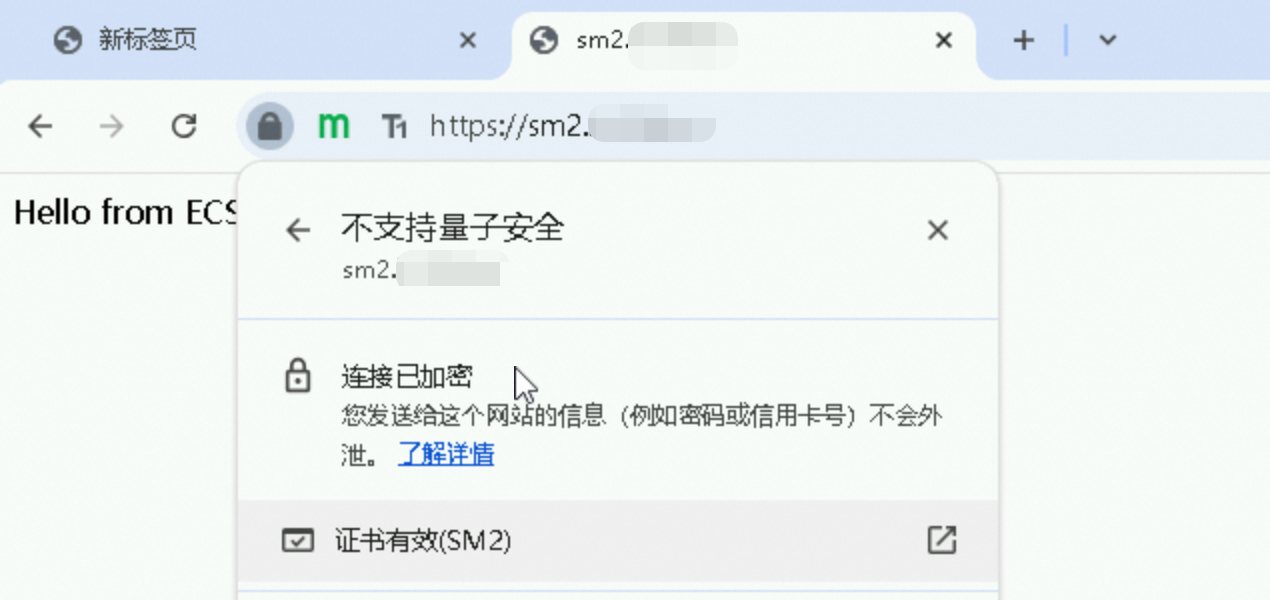
In the address bar of the ZOS browser, enter https://sm2.example.com and press Enter. After the page loads, click the lock icon to the left of the address bar to view the certificate information. If the certificate type is displayed as SM2, the SM HTTPS configuration is working correctly.
More information
Limits
Only upgraded ALB instances support SM certificates. This feature is not supported on ALB instances created before the upgrade. You can use ALB instance cloning to manually migrate services from an existing ALB instance to an upgraded ALB instance.
Only Standard and WAF-enabled ALB instances support SM certificates. The Basic and Advanced editions do not support SM certificates.
SM certificates do not support mutual authentication. CA certificates do not support the SM2 type.
Billing
ALB instance: ALB supports pay-as-you-go and subscription billing methods. For more information, see Billing overview of ALB.
ECS instance: For more information, see Billing overview of ECS. If you create an ECS instance for testing purposes, create a low-specification pay-as-you-go instance and release it after the test to avoid unnecessary charges.
Domain name and DNS resolution fees: In addition to the domain name fee charged by your domain name provider, you must pay for public authoritative DNS resolution when you configure DNS resolution on Alibaba Cloud.
FAQ
Why does the SM-compatible browser fail to access the service and report an SSL handshake error?
Ensure that the SM cipher suite
ECC-SM2-WITH-SM4-SM3is selected in the custom TLS security policy.Ensure that the listener is associated with the custom TLS security policy that includes the SM cipher suite.