When CloudFlow runs a flow, it assumes an execution role to access other Alibaba Cloud services on your behalf, such as invoking Function Compute (FC) functions, sending messages to Message Service (MNS) queues, or starting nested flows. This guide walks you through creating a custom permission policy and an execution role in Resource Access Management (RAM).
The CloudFlow console can auto-generate an execution role with system permissions. Create a custom policy only when you need fine-grained access control, such as restricting a flow to specific FC functions or MNS queues.
Prerequisites
Before you begin, make sure that you have:
An Alibaba Cloud account
A RAM user with administrative rights
Access to the RAM console
How policies and roles work together
A policy defines what services a role can access. After you attach the policy to a role, any entity that assumes the role inherits those permissions. CloudFlow assumes the execution role at runtime instead of using long-term access keys, which limits credential exposure.
Step 1: Create a custom policy
Log on to the RAM console.
In the left-side navigation pane, choose Permissions > Policies.
On the Policies page, click Create Policy.
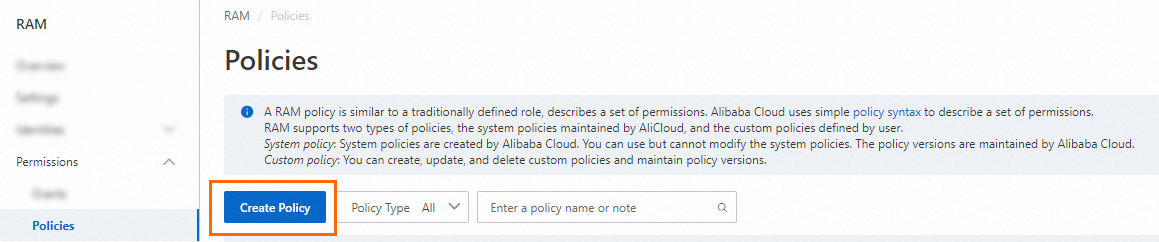
On the Create Policy page, click the JSON tab.
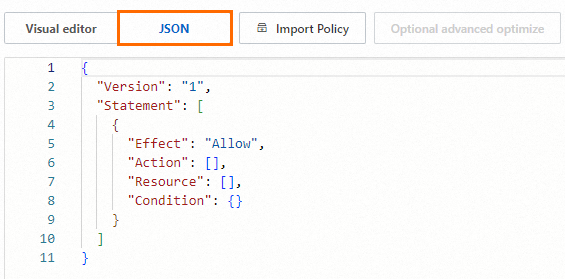
Enter the policy document in the editor. For full syntax details, see Policy structure and syntax. The following table shows common permission patterns for CloudFlow execution roles.
Permission Effect Action Resource ARN Invoke a specific FC function Allow fc:InvokeFunctionacs:fc:::services/Test1/functions/Func1Invoke all functions in an FC service Allow fc:InvokeFunctionacs:fc:::services/Test2/functions/*Invoke all functions in FC services prefixed with PublicAllow fc:InvokeFunctionacs:fc:::services/Public*/functions/*Send messages to an MNS queue Allow mns:SendMessageacs:mns:*:*:/queues/Test1/messagesStart an execution of a flow Allow fnf:StartExecutionacs:fnf:::flows/Test1/executions/*Check the policy optimization results. The system runs a basic optimization automatically, which removes unnecessary conditions and arrays. (Optional) For further refinement, hover over Optional: advanced optimize and click Perform. Advanced optimization splits incompatible resources or conditions, narrows resource scopes, and deduplicates or merges policy statements.
Specify the Name and Note parameters, and then click OK.
Step 2: Create the execution role
Log on to the RAM console.
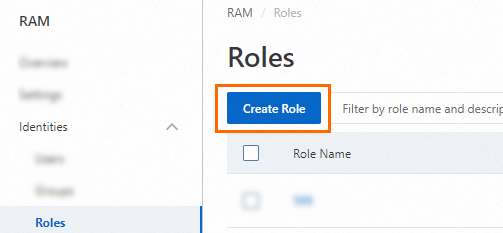
In the left-side navigation pane, choose Identities > Roles.
On the Roles page, click Create Role.
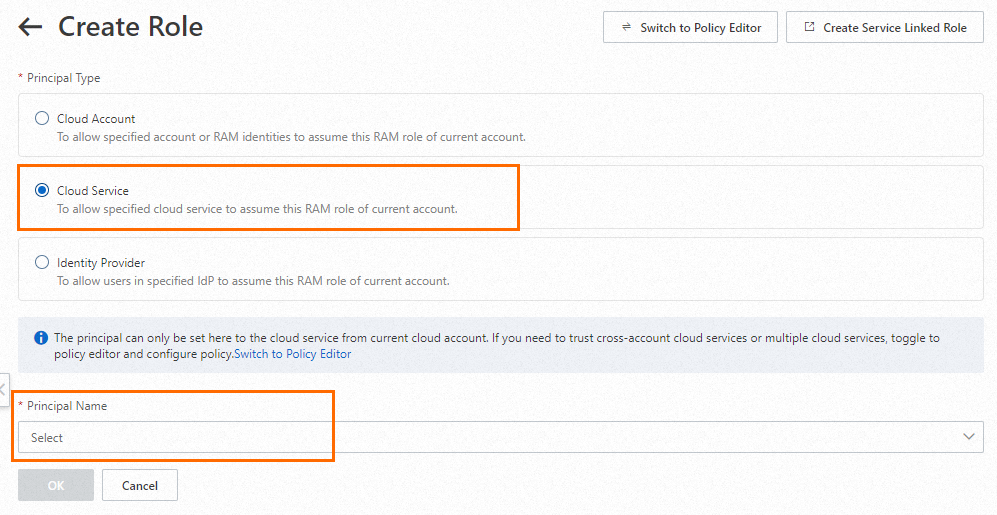
Set Principal Type to Cloud Service, select an Alibaba Cloud service for Principal Name, and then click OK.
The available services for Principal Name are determined by the RAM console and may vary.
In the Create Role dialog box, enter a Role Name (for example,
FnFExecutionRole) and click OK.
Step 3: Attach the policy to the role
Attach the custom policy you created in Step 1 to the execution role. For detailed instructions, see Grant permissions to a RAM role.
Step 4: Get the role ARN
On the Roles page, click the execution role you created.
In the Basic Information section, copy the Alibaba Cloud Resource Name (ARN).
Use this ARN when you create or update a flow in CloudFlow.